
Share Baddad's profile


Baddad
Baddad's stats
- Review count41
- Helpfulness votes48
- First reviewAugust 3, 2018
- Last reviewJune 23, 2023
- Featured reviews0
- Average rating4.8
Reviews comments
- Review comment count0
- Helpfulness votes0
- First review commentNone
- Last review commentNone
- Featured review comments0
Questions
- Question count0
- Helpfulness votes0
- First questionNone
- Last questionNone
- Featured questions0
- Answer count3
- Helpfulness votes51
- First answerJanuary 23, 2019
- Last answerMay 1, 2022
- Featured answers0
- Best answers2
![Shrek 3D [2 Discs] [3D] [Blu-ray/DVD] [Blu-ray/Blu-ray 3D/DVD] [2001]](https://pisces.bbystatic.com/prescaled/500/500/image2/BestBuy_US/images/products/304b2327-370a-41e7-956a-951dd4939472.png)
Customer Rating

5
Shrek Blu-Ray 3D Movie
on August 3, 2018
Posted by: Baddad
from Fairview Heights, IL
Verified Purchase:Yes
08/03/2018 - I'm very new to 3D movies, and this is my 1st review. First, Shrek is a fantastic movie on it's own (2D). My family and grandkids love it. The 3D version was on sale last week for $9.99, so I couldn't resist it. There wasn't allot of 3D that jumped out of the tv at you. But the 3D depth was great. It looked like from the front of the tv to about 4 foot depth into the tv was all in 3D. The details of the picture was fabulous. This movie was a great selection to start my collection. My equipment, Samsung TV 60" Model UN60JU7090FXZA, LG-UP875 4K Ultra HD 3D Blu-Ray Player ($79.99 on sale right now), and Samsung-Compatible 3ACTIVE 3D Glasses Rechargeable Twin Pack ( I paid $110 for these, and I love them.)
Mobile Submission: False
I would recommend this to a friend!
Share this review:


+1point
1of 1voted this as helpful.
Baddad's Review Comments
Baddad has not submitted comments on any reviews.
Baddad's Questions
Baddad has not submitted any questions.
Baddad's Answers
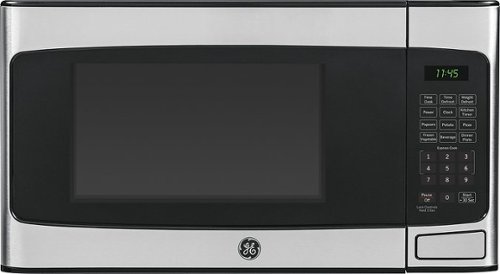
Using this 1.1 cu. ft. GE JES1145SHSS mid-size microwave's convenience cooking controls and instant-on controls, you can quickly prepare popcorn, dinner plates, vegetables and more. The weight defrost option simplifies thawing frozen items.
Is control panel easy to read @ night?
1 customer said it's not.
The numbers and start button are very dark gray on black. I keep a flashlight next to it to read the panal even in daylight. It also glares from reflections. So if you have any windows in your kitchen, it's a real problems too. One lady said she marked the panal with a silver sharpy. I thought that sounded stupid. But me looking for a flashlight for 5 min. to warm up some thing for 30 sec, doesn't sound any better. Oh, the nubers are NOT bold, as suggested. If #1 was Black, and #10 was readable Gray, I'd say the the panal was about a #3. I actually do like the microway. I just need a lit miners hat to use it.. :)
4 years, 1 month ago
by
Baddad

Connect this Mediasonic digital converter box to receive and record digital channels on your analog TV. It attaches to your existing antenna to let you record your favorite shows and store them on flash drives up to 64GB or hard drives up to 2TB. This Mediasonic digital converter box includes parental controls and an electronic program guide.
All I want to do is watch local programming, get good reception and possibly of few extra channels. I live in the twin cities. Do I have to have a HDMI? My TV is HD 1080, it's about 10 years old and it's not a Smart TV. I have no cable.
Mediasonic - Digital Converter Box with DVR - Black Model:HW150PVR - You would use the coaxial cable from you rabbit ears or outside antenna to connect IN to you Mediasonic. You can come out of the Mediasonic with coaxial or a HDIM cable to your TV. So if your tv has HDMI IN, you could use either Coaxial or HDMI cable. So either way, you will need an extra Coaxial or HDMI cable since the Mediasonic does not come with cables. Extra Channels - You will only get the channels in your area that you antenna can pick up. The Mediasonic does not give you any extra channels outside of your area. Recption - Your reception depends on how close you are to your local tv stations, and how good your antenna is. So, what you see on your tv locally now, is what you will see with the Mediasonic. Your advantage is, you can record programs and watch them later. If you have a very old tv, it says it will convert digital to old analog tv's. I have a $150 outside antenna, which works great with this unit. I do have on channel that pops in and out. When I tried to record a program on that channel, it didn't record. I assume since the channel may have not been receiving at my end, the Mediasonic didn't see it and didn't record. If you have a good antenna, and want to record local programs, then this is a great unit to get. I got it for $29.99 on sale at Best Buy. It's far cheaper than a $350 Tivo. I hope this helps..
7 years, 4 months ago
by
Baddad
Connect this Mediasonic digital converter box to receive and record digital channels on your analog TV. It attaches to your existing antenna to let you record your favorite shows and store them on flash drives up to 64GB or hard drives up to 2TB. This Mediasonic digital converter box includes parental controls and an electronic program guide.
Can you record two channels at the same time?
No... You can only record one channel at a time. I set up one recording for Ch 11 - 10:00 pm to 10:30 pm, then I set up a second recording for channel Ch 2 - 10:00 pm to 10:30 pm (for the same time), and I received an error message telling me I could not set up the 2nd recording due to a conflict in recordings. I hope that helps... I received the Mediasonic Over the Air Digital Video Recorder for Christmas. My wife got it on sale for $29.99, and I love it...!!! I already had a signal splitter and coax cable, but I had to buy an HDMI cable for $6.xx on Best Buys Website. I also had an extra 64gb thumbdrive, so I was ready to go. I recorded The Big Bang Theory in HD 1080p, and it looks fantastic on my 60" tv. I'm guessing that a 2 hour movie takes about 4 gb of space, so I may buy a 1 to 2 tb external hard drive in the near future. One of the downfalls is, the tv guide is provided by the tv stations, not the Mediasonic. So the tv guide in my area is only for a day. I can see everything scheduled for that day, but not the next. But I'm old school and had a VCR in which you had to program recording yourself. PRESS TIMER on remote, Select Channel, DATE, Time ON, Time OFF, and SAVE. I made a list of the day and times for my favorite programs, and I just set it up ahead. I could talk forever about this thing, so I better end it here...
7 years, 4 months ago
by
Baddad