Samsung
Samsung's Stats
Reviews
- Review Count0
- Helpfulness Votes0
- First ReviewNone
- Last ReviewNone
- Featured Reviews0
- Average Rating0
Reviews Comments
- Review Comment Count0
- Helpfulness Votes0
- First Review CommentNone
- Last Review CommentNone
- Featured Review Comments0
Questions
- Question Count0
- Helpfulness Votes0
- First QuestionNone
- Last QuestionNone
- Featured Questions0
- Answer Count74095
- Helpfulness Votes37,973
- First AnswerApril 24, 2013
- Last AnswerSeptember 4, 2026
- Featured Answers0
- Best Answers3950
Samsung's Reviews
Samsung has not submitted any reviews.
Samsung's Questions
Samsung has not submitted any questions.
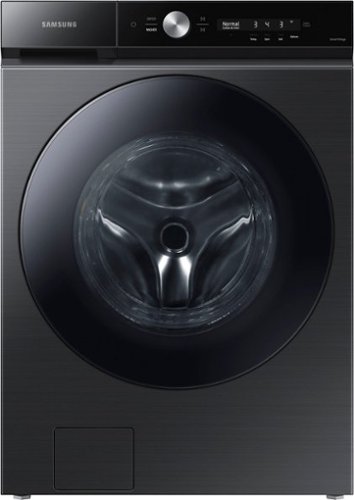
Samsung~s Bespoke 5.3 cu. ft. Ultra Capacity Front Load Washer has a sleek, flat-panel design, comes in new premium colors, and is equipped with smart features that simplify your laundry experience. It has our Super Speed Wash, which powerfully cleans a full load of laundry in just 28 minutes, and our AI Smart Dial, which learns and recommends your favorite cycles and makes controlling your washer a breeze.
Do you have to keep the door open when not in use so the unit does not smell

Greetings,
No, the washer gasket is treated with antimicrobial technology to help the unit smell fresh even when the door is closed.
If you have further questions or inquiries, these are the platforms on which you can reach us:
1. Facebook Messenger: http://m.me/samsungsupport
2. Twitter: https://twitter.com/messages/compose?recipient_id=18768513
3. Samsung Community: https://us.commuity.samsung.com/t5/Samsung-Community/ct-p/us
4. Samsung Customer Care: 1-800-7267864 (1800-SAMSUNG)
Please provide us with this reference number (1148595256) to help our team pull up your information when you message us.
Thank you.
-Kimberly
No, the washer gasket is treated with antimicrobial technology to help the unit smell fresh even when the door is closed.
If you have further questions or inquiries, these are the platforms on which you can reach us:
1. Facebook Messenger: http://m.me/samsungsupport
2. Twitter: https://twitter.com/messages/compose?recipient_id=18768513
3. Samsung Community: https://us.commuity.samsung.com/t5/Samsung-Community/ct-p/us
4. Samsung Customer Care: 1-800-7267864 (1800-SAMSUNG)
Please provide us with this reference number (1148595256) to help our team pull up your information when you message us.
Thank you.
-Kimberly
1 year, 5 months ago
by
Posted by:
Samsung
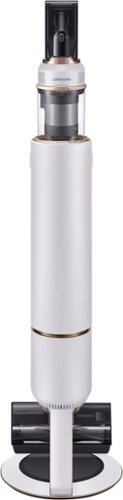
Samsung - BESPOKE Jet Cordless Stick Vacuum with All-in-One Clean Station - Misty White
Design meets function with the Bespoke Jet Cordless Stick Vacuum. Innovative design combines a Clean Station, charging stand and powerful Jet Stick into one show-stopping vacuum. Available in contemporary colors and premium finishes to beautifully fit your d~cor and lifestyle. Built-in Clean Station lets you empty the dustbin at the press of a button while also charging your vacuum. The Bespoke Jet is a powerful Jet Stick, so you can tackle any mess across multiple floor types such as carpets, hardwood floors and tile. The Bespoke Jet is engineered around a lightweight, maneuverable design, plus a multistage filtration system that maintains cleaner air in your home.
Can this be used without the brush?
Hi EricF,
Thank you for reaching out to us. We're glad to assist.
Yes, aside from the jet dual brush, it includes a combination and extended crevice tool that you could use.
If you have further questions or inquiries, these are the platforms on which you can reach us:
1. Facebook Messenger: http://m.me/samsungsupport
2. Twitter: https://twitter.com/messages/compose?recipient_id=18768513
3. Samsung Community: https://us.commuity.samsung.com/t5/Samsung-Community/ct-p/us
4. Samsung Customer Care: 1-800-7267864 (1800-SAMSUNG)
Please provide us with this reference number (1148595279) to help our team pull up your information when you message us.
Thank you.
-Kimberly
Thank you for reaching out to us. We're glad to assist.
Yes, aside from the jet dual brush, it includes a combination and extended crevice tool that you could use.
If you have further questions or inquiries, these are the platforms on which you can reach us:
1. Facebook Messenger: http://m.me/samsungsupport
2. Twitter: https://twitter.com/messages/compose?recipient_id=18768513
3. Samsung Community: https://us.commuity.samsung.com/t5/Samsung-Community/ct-p/us
4. Samsung Customer Care: 1-800-7267864 (1800-SAMSUNG)
Please provide us with this reference number (1148595279) to help our team pull up your information when you message us.
Thank you.
-Kimberly
1 year, 5 months ago
by
Posted by:
Samsung
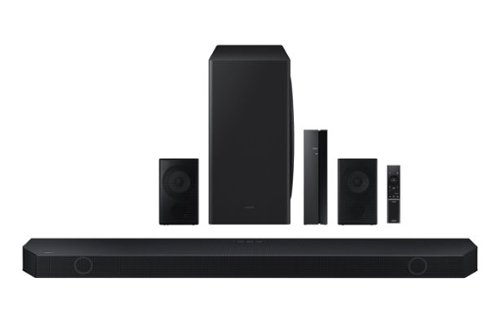
Samsung - HW-Q850D/ZA 7.1.2 Channel Wireless Dolby ATMOS Soundbar + Rear Speakers w/ Q Symphony - Black
This soundbar adapts rich, wireless audio to your space while staying in sync with your TV~s speakers* to amplify your experience.
Aside from the rear speakers, is the soundbar identical to the Q800D?
Hi there, No, they are not the same. The HW-Q850D offers a more comprehensive sound experience due to its additional channels, while the HW-Q800D is a more compact and slightly less expensive version with fewer channels. The Q850D would be the better choice if you want superior surround sound and are willing to spend a bit more. ~ Samsung Solutions
1 year, 5 months ago
by
Posted by:
Samsung
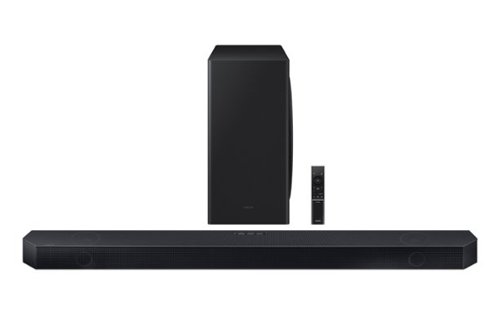
Samsung - Q series 3 .1.2 ch. Wireless Dolby ATMOS Soundbar w / Q Symphony - Titan Black
A smart Soundbar with realistic, multi dimensional spatial audio optimized specifically for your space and strong up firing speakers built in.
How many total speakers are in this system?
Hello KenS, The HW-QS730D Soundbar has a total of 8 speakers. ~ Samsung Solutions
1 year, 5 months ago
by
Posted by:
Samsung

Samsung - 65 Class DU7200 Series Crystal UHD 4K Smart Tizen TV (2024)
This essential TV features a range of contrast and color and smart capabilities. Enjoy your content with richer details, brighter images and clearer resolution with 4K Upscaling.
Is there a charge for installation and setup?
Hi flint,
For more information on delivery services, please contact your local Best Buy or visit https://www.bestbuy.com/site/help-topics/home-and-business-delivery/pcmcat204400050032.c?id=pcmcat204400050032
~Samsung Advisor
For more information on delivery services, please contact your local Best Buy or visit https://www.bestbuy.com/site/help-topics/home-and-business-delivery/pcmcat204400050032.c?id=pcmcat204400050032
~Samsung Advisor
1 year, 5 months ago
by
Posted by:
Samsung
Samsung - 55 Class DU7200 Series Crystal UHD 4K Smart Tizen TV (2024)
This essential TV features a range of contrast and color and smart capabilities. Enjoy your content with richer details, brighter images and clearer resolution with 4K Upscaling.
Can you download cbs or directv apps to this TV?
Hi NolaBaby,
Yes, you can download the CBS and Directv app onto the DU7200 TV.
~Samsung Advisor
Yes, you can download the CBS and Directv app onto the DU7200 TV.
~Samsung Advisor
1 year, 5 months ago
by
Posted by:
Samsung
Samsung - 55 Class DU7200 Series Crystal UHD 4K Smart Tizen TV (2024)
This essential TV features a range of contrast and color and smart capabilities. Enjoy your content with richer details, brighter images and clearer resolution with 4K Upscaling.
Can I connect my DirectV to this?
Hi Mindi,
Yes, you can connect your cable box or Dish network to the DU7200 TV via HDMI or Coax cable.
~Samsung Advisor
Yes, you can connect your cable box or Dish network to the DU7200 TV via HDMI or Coax cable.
~Samsung Advisor
1 year, 5 months ago
by
Posted by:
Samsung

Samsung - 50 Class DU8000 Series Crystal UHD Smart Tizen TV (2024)
This essential TV features a thin design that practically blends into your wall with thousands of on demand shows and movies for free. All that extra content comes in crisp 4K and prismatic color AirSlim.
how do I get a manual on using this tv. There was none in the box
Hi IowaLady,
To download the manual and quick start guide, please follow this link: https://www.samsung.com/us/support/downloads/?model=N0060577&modelCode=UN50DU8000FXZA or by going to our website and clicking Support.
~Samsung Advisor
To download the manual and quick start guide, please follow this link: https://www.samsung.com/us/support/downloads/?model=N0060577&modelCode=UN50DU8000FXZA or by going to our website and clicking Support.
~Samsung Advisor
1 year, 5 months ago
by
Posted by:
Samsung

Samsung - 43 Class Q60D Series QLED 4K Smart Tizen TV (2024)
This advanced TV features a bright new world of color and contrast, with 4K upscaling and seamless motion for crisp, smooth content.
The TV Tuner Type is listed as ATSC, Clear QAM. Does the tuner support both ATSC 1.0 and 3.0 broadcasts? Can the 3.0 tuner display DRM ATSC 3.0 broadcasts?
The Q60D has a built-in ATSC 1.0/ClearQAM tuner; when stepping up to our Neo QLED 8K Series, you’ll gain a built-in ATSC 3.0 tuner for receiving digital broadcasts.
~ Samsung Specialist
~ Samsung Specialist
1 year, 5 months ago
by
Posted by:
Samsung
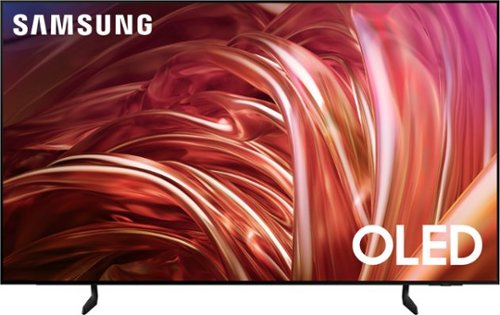
Samsung - 65 Class S85D Series OLED 4K Smart Tizen TV (2024)
This premium Samsung AI TV features details and contrast, expert validated colors, and a slim bezel. An AI-powered processor that upgrades your content scene by scene. Its contour design brings you a modern look, while clear motion and depth enhance the picture.
Is it easy to set up directv streaming? If so can you control it with voice control.
Hi rick - We recommend reaching out to DirecTV for setup assistance. If you need further help, please contact Samsung Support at 1-800-SAMSUNG, 8AM - 12AM EST, 7 days a week. Our LiveChat agents are also available by clicking on the ‘Support’ link on our website.
~ Samsung Specialist
~ Samsung Specialist
1 year, 5 months ago
by
Posted by:
Samsung