Samsung
Samsung's Stats
Reviews
- Review Count0
- Helpfulness Votes0
- First ReviewNone
- Last ReviewNone
- Featured Reviews0
- Average Rating0
Reviews Comments
- Review Comment Count0
- Helpfulness Votes0
- First Review CommentNone
- Last Review CommentNone
- Featured Review Comments0
Questions
- Question Count0
- Helpfulness Votes0
- First QuestionNone
- Last QuestionNone
- Featured Questions0
- Answer Count74127
- Helpfulness Votes37,976
- First AnswerApril 24, 2013
- Last AnswerSeptember 8, 2026
- Featured Answers0
- Best Answers3951
Samsung's Reviews
Samsung has not submitted any reviews.
Samsung's Questions
Samsung has not submitted any questions.
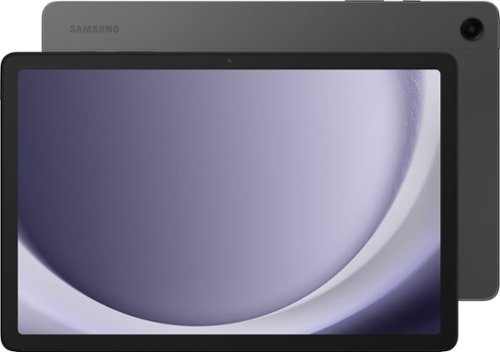
Samsung - Galaxy Tab A9+ 11" 128GB - Wi-Fi - Graphite
Meet your go to device for on-the-go family fun Galaxy Tab A9+. A bright, engaging 11" screen is perfect for every family member to do what they love. Whether they~re enjoying a show, unwinding with a game, or catching up on schoolwork or day to day tasks, an upgraded chipset makes every experience feel smooth and easy. You can even open multiple apps at the same time and get all your everyday tasks done quickly. Use it for hours without worrying about power and keep everything you love together with plenty of storage space. Plus, the preloaded Samsung Kids app provides a safe digital environment for your little ones to happily learn and play. Give your family a great all in one Tab that perfectly meets all their everyday needs without taking a bite out of your wallet Galaxy Tab A9+.
CAN I PUT A MICRO SIM ON MY A9 TAB?

Hello Arquin, thank you for finding the time out of your lively day to ask us your question about the Samsung Galaxy Tab A9+. Yes, you can absolutely add a microSD card, up to 1TB, to the Tab A9+ if you would like to take advantage of the expandable storage capability. If you think of any other questions for us, feel free to reach out to Support. Thank you for being a treasured Samsung customer. - Debra
1 year, 7 months ago
by
Posted by:
Samsung

Samsung - 65 Class DU7200 Series Crystal UHD 4K Smart Tizen TV (2024)
This essential TV features a range of contrast and color and smart capabilities. Enjoy your content with richer details, brighter images and clearer resolution with 4K Upscaling.
I just bought a samsung tv model DU7200. Where is the serial number on the outside of the tv?
Hi Barb,
You can find the Serial Number on the back of the TV on the silver plate next to the inputs.
~Samsung Advisor
You can find the Serial Number on the back of the TV on the silver plate next to the inputs.
~Samsung Advisor
1 year, 7 months ago
by
Posted by:
Samsung
Samsung - 85 Class DU7200 Series Crystal UHD 4K Smart Tizen TV (2024)
This essential TV features a range of contrast and color and smart capabilities. Enjoy your content with richer details, brighter images and clearer resolution with 4K Upscaling.
Does the 85 inch Samsung tv come with a remote that has a microphone to tell it where to go
Hi Christian,
No, a Voice-Enabled Remote begins with our DU8000 TV Series and above.
~Samsung Advisor
No, a Voice-Enabled Remote begins with our DU8000 TV Series and above.
~Samsung Advisor
1 year, 7 months ago
by
Posted by:
Samsung
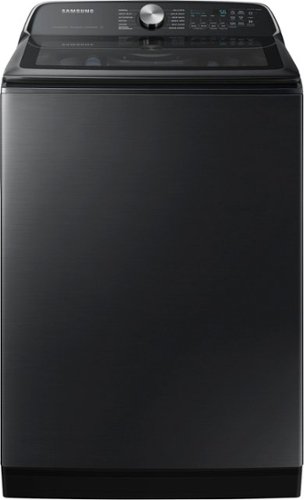
Samsung's 5.5 cu. ft. Extra-Large Capacity Top Load Washing Machine is equipped with Super Speed Wash, which powerfully cleans a full load of laundry in just 28 minutes without sacrificing cleaning performance. With Wi-Fi connectivity, you can remotely start, stop, or delay your smart washer from our simple-to use SmartThings App. Active Waterjet, a built-in water faucet, lets you easily pretreat heavily soiled and stained clothes.
I have one similar to this from 2019. We keep having issues with the load being unbalanced. Has this issue been resolved with this model?
Greetings!
Let us extend our help by providing the details on Samsung washing machine models.
New washing machine models (like those from 2023 or 2024) have significantly improved handling load imbalances. Technological advances, like improved sensors and algorithms, often help these machines redistribute the load more effectively, even correcting unbalanced loads in some cases.
While newer washing machine models with advanced sensors and algorithms are much better at handling load imbalances, they are not always "foolproof." These improvements certainly reduce the frequency and severity of unbalanced load issues, but there are still some situations where an imbalance might occur. For example:
1. Severe Imbalances: If the load is extremely unbalanced (e.g., a single heavy item like a large towel or blanket), the sensors may still struggle to redistribute the load effectively.
2. Underloading or Overloading: Even with smart features, washing machines still work best when loaded within their recommended capacity. Too little laundry can also cause issues, and overloading can trigger imbalance, particularly with heavier items.
3. Mechanical Issues: Sensors or components like shock absorbers and suspension springs can wear out or malfunction over time, even in newer models. If these parts are compromised, load imbalance can occur more frequently
4. External Factors: If the washing machine is not level or placed on an uneven surface, the sensors may not be able to accurately detect or correct the imbalance. Ensuring that the machine is properly leveled is still important.
While newer models are more adept at handling imbalances and can prevent many problems, no system is perfect. Proper loading, leveling, and maintenance remain essential to minimize unbalanced load.
Leo
Let us extend our help by providing the details on Samsung washing machine models.
New washing machine models (like those from 2023 or 2024) have significantly improved handling load imbalances. Technological advances, like improved sensors and algorithms, often help these machines redistribute the load more effectively, even correcting unbalanced loads in some cases.
While newer washing machine models with advanced sensors and algorithms are much better at handling load imbalances, they are not always "foolproof." These improvements certainly reduce the frequency and severity of unbalanced load issues, but there are still some situations where an imbalance might occur. For example:
1. Severe Imbalances: If the load is extremely unbalanced (e.g., a single heavy item like a large towel or blanket), the sensors may still struggle to redistribute the load effectively.
2. Underloading or Overloading: Even with smart features, washing machines still work best when loaded within their recommended capacity. Too little laundry can also cause issues, and overloading can trigger imbalance, particularly with heavier items.
3. Mechanical Issues: Sensors or components like shock absorbers and suspension springs can wear out or malfunction over time, even in newer models. If these parts are compromised, load imbalance can occur more frequently
4. External Factors: If the washing machine is not level or placed on an uneven surface, the sensors may not be able to accurately detect or correct the imbalance. Ensuring that the machine is properly leveled is still important.
While newer models are more adept at handling imbalances and can prevent many problems, no system is perfect. Proper loading, leveling, and maintenance remain essential to minimize unbalanced load.
Leo
1 year, 7 months ago
by
Posted by:
Samsung
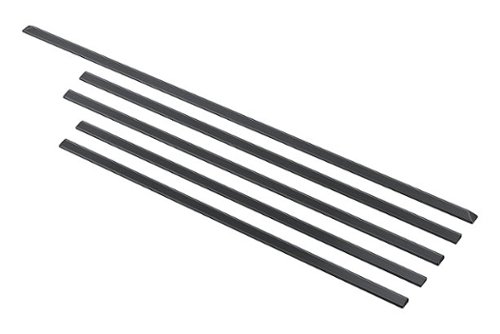
Get a built-in finished look with our easy-to-install trim kit. It~s so easy no tools are required! After determining position and placement, simply peel, stick and press firmly against the countertop for a seamless look, resulting in no gaps between your range and cabinetry.
Will this trim kit support Samsung model NZ30R5330 cooktop? My existing cut out has a height that would not give it much support (too deep) - will this kit help support it?
Hi Albert,
Let us provide the details you need on this Samsung accessory.
This accessories back piece has a length of 31 3/32 inches while the left and right have two lengths the shorter piece is 23 13/16 inches while the longer piece is 25 inches. The cooktop has a dimension of 30 inches wide and 21 1/4 inches deep.
Should you have additional questions, please feel free to get back to us via the following options:
1. Facebook Messenger: http://m.me/samsungsupport
2. Twitter: https://twitter.com/messages/compose?recipient_id=18768513
3. Samsung Community: https://us.community.samsung.com/t5/Samsung-Community/ct-p/us
When you message us, please provide us with this reference number 1148155314 to help our team pull up your information.
Leo
Let us provide the details you need on this Samsung accessory.
This accessories back piece has a length of 31 3/32 inches while the left and right have two lengths the shorter piece is 23 13/16 inches while the longer piece is 25 inches. The cooktop has a dimension of 30 inches wide and 21 1/4 inches deep.
Should you have additional questions, please feel free to get back to us via the following options:
1. Facebook Messenger: http://m.me/samsungsupport
2. Twitter: https://twitter.com/messages/compose?recipient_id=18768513
3. Samsung Community: https://us.community.samsung.com/t5/Samsung-Community/ct-p/us
When you message us, please provide us with this reference number 1148155314 to help our team pull up your information.
Leo
1 year, 7 months ago
by
Posted by:
Samsung
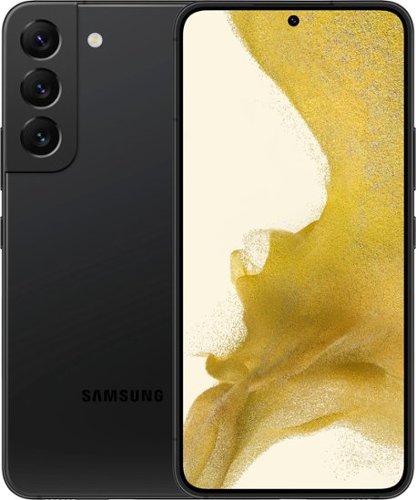
Samsung - Galaxy S22 5G 256GB (Unlocked) - Phantom Black
The only glare you'll get now is from jealous strangers. Enjoy high outdoor visibility and a crystal-clear view in bright daylight or at night with adaptive 120Hz Infinity-O Displays equipped with Vision Booster tech. Make nighttime pics and videos come out clear as day with the epic upgrades to our Pro-grade Camera: a big pixel sensor that pulls in tons of light and Super Clear Glass to dial down lens flare. Get epic low-light portraits and selfies thanks to all-new upgrades to the Rear Camera and Selfie Camera, each capturing more light for incredible color and detail. Live Sharing with Google Duo lets you co-watch YouTube videos and content with the whole gang from anywhere. You can even cast it onto your TV to see everyone all at once. Give your night videos the big TV break they deserve. Use Smart View to cast to your TV and either mirror your phone, or keep using other apps without interrupting the show. Seamlessly connect your phone and computer and use your favorite mobile apps right on your Windows PC. Accomplish more and keep the collaboration going wherever your business takes you with the next-level integration of both Microsoft and Google cloud productivity tools. Switch up the view with an even bigger screen, or use both devices at once for even more space to create. Your Samsung Account makes it seamless to continue edits from one Galaxy to another, so you can start something on your phone and finish on Galaxy Tab S8+. Whether you're vlogging your day, gaming all night or simply scrolling your feed, the 4nm processor makes for an incredibly smooth experience. Worry less with Corning Gorilla Glass Victus+ on the screen and back panels and a polished, protective Armor Aluminum frame. Plus, with its IP68 water resistance rating, it can take a splash, too. Secure your private data from the second you turn your phone on with Samsung Knox. Knox Vault helps keep your biometric information safe, while Secure Folder locks down your private data. And the new Permission Usage dashboard lets you see which apps are sharing your data or tracking you, and allows you to grant or deny access on your terms.
Will this phone be able to be used with net 10?
Salutations Peg, thanks for taking the time out of your busy schedule to ask us your question about the Samsung Galaxy S22. The advertised unlocked Galaxy S22 is compatible with AT&T, Boost Mobile, Consumer Cellular, Cricket, Verizon, Sprint, T-Mobile, Ting Mobile, Mint Mobile, Ultra Mobile, Metro by T-Mobile, and H2O Wireless. Feel free to reach back out if you think of any other questions for us. Thank you for being a faithful Samsung customer. - Debra
1 year, 7 months ago
by
Posted by:
Samsung
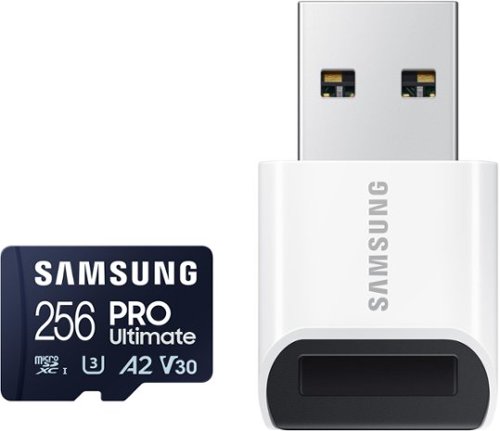
Samsung - Pro Ultimate and Reader 256GB microSDXC Memory Card
Step into a new stage of storage with the Samsung PRO Ultimate MicroSD. It supports every ambition from creative pursuits, to professional projects and personal memories with high speed and the compatibility to keep you on top of your game.
will this piece work in an xbox
chase,
Exact compatibility will vary based on which Xbox you have. If your Xbox supports microSD cards or USB devices as expandable memory, the PRO Ultimate with USB reader is compatible.
~Samsung Pro
Exact compatibility will vary based on which Xbox you have. If your Xbox supports microSD cards or USB devices as expandable memory, the PRO Ultimate with USB reader is compatible.
~Samsung Pro
1 year, 7 months ago
by
Posted by:
Samsung

Samsung's smart electric range features a stylish and contemporary Bespoke design with a recessed handle that seamlessly blends into your kitchen for an elegant and minimalist look. Air Fry built into the oven lets you cook healthier fried food and the Precision Knobs will prevent accidental cooktop turn-on with its pinch, press and turn mechanism.
How do you keep the glass inside the oven from looking dirty all the time? Is there a special cleaner?"
Hi Judas,
We are glad to answer your question about this Samsung range model.
We recommend using the self-clean or steam-clean feature of this range to clean the inside of the oven (this includes the inner part of the door). I have shared this model's user manual link below. Please visit the link and turn to page 50 to maintain the oven door. Turn to pages 51 - 52 for steps to remove the oven door and pages 46 - 49 for guidelines and steps in performing either a self-clean or steam-clean.
https://downloadcenter.samsung.com/content/UM/202405/20240503155839653/01._IB_FULL_NE9100D_NSE6DG8300_EN.pdf
Should you have additional questions, please feel free to get back to us via the following options:
1. Facebook Messenger: http://m.me/samsungsupport
2. Twitter: https://twitter.com/messages/compose?recipient_id=18768513
3. Samsung Community: https://us.community.samsung.com/t5/Samsung-Community/ct-p/us
When you message us, please provide us with this reference number 1148155006 to help our team pull up your information.
Leo
We are glad to answer your question about this Samsung range model.
We recommend using the self-clean or steam-clean feature of this range to clean the inside of the oven (this includes the inner part of the door). I have shared this model's user manual link below. Please visit the link and turn to page 50 to maintain the oven door. Turn to pages 51 - 52 for steps to remove the oven door and pages 46 - 49 for guidelines and steps in performing either a self-clean or steam-clean.
https://downloadcenter.samsung.com/content/UM/202405/20240503155839653/01._IB_FULL_NE9100D_NSE6DG8300_EN.pdf
Should you have additional questions, please feel free to get back to us via the following options:
1. Facebook Messenger: http://m.me/samsungsupport
2. Twitter: https://twitter.com/messages/compose?recipient_id=18768513
3. Samsung Community: https://us.community.samsung.com/t5/Samsung-Community/ct-p/us
When you message us, please provide us with this reference number 1148155006 to help our team pull up your information.
Leo
1 year, 7 months ago
by
Posted by:
Samsung

Samsung - Galaxy Z Fold5 Standing Case with Strap - Graphite
The Galaxy Z Fold5 Standing Case with Strap features a sleek kickstand that you can easily swap for a convenient strap at any time. Enjoy the freedom to seamlessly transition between two distinctive functions, adding practicality to your everyday use.
Will this fit a z fold three
Hey there Vee, thank you for finding the free time out of your busy day to ask us your question about the Samsung Galaxy Z Fold5 Standing Case with Strap. The advertised Z Fold5 Standing Case was designed to fit the dimensions of the Z Fold5. We recommend choosing accessories, like cases, that were designed specifically for your device to ensure a proper fit. Feel free to contact Support if you have any other questions for us. Thank you for being a valued Samsung customer. - Debra
1 year, 7 months ago
by
Posted by:
Samsung
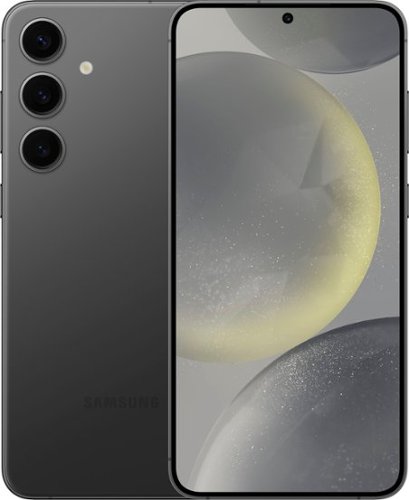
Samsung - Galaxy S24+ 256GB (Unlocked) - Onyx Black
Plus up your day with Galaxy AI on Galaxy S24+. Wonder where your favorite influencer got their shoes? Simply Circle to Search with Google to see where you can buy your own pair. Then, snap a photo to show off your new kicks and elevate your pic from good to great on the Galaxy S24+. Before you head out in style, call up that new authentic Japanese restaurant to make a reservation and impress the staff as you use Live Translate to speak their language in real time. And, with our powerful processor, you can smoothly switch between texting friends, taking photos of your food and searching for your next culinary adventure. Life just got a whole lot easier and a lot more fun. Epic, just like that.
Can I buy this and use It in ARGENTINA? There will be no carrier issue right?
Hello there EDUmax, thank you for finding the available time out of your lively day to ask us your questions about the Samsung Galaxy S24+. The advertised unlocked Galaxy S24+ (U.S. version) is compatible with the following U.S. wireless carriers: AT&T, Boost Mobile, Cricket, H2O Wireless, Metro by T-Mobile, Mint Mobile, Simple Mobile, Sprint, T-Mobile, Ultra Mobile, US Cellular, Verizon, and Google Fi. We recommend reaching out to the carrier of your choosing from the list of compatible providers to inquire if this device would be fully functional in Argentina. Feel free to reach back out if you think of any other questions for us. Thank you for being a steadfast Samsung customer. - Debra
1 year, 7 months ago
by
Posted by:
Samsung