Samsung
Samsung's Stats
Reviews
- Review Count0
- Helpfulness Votes0
- First ReviewNone
- Last ReviewNone
- Featured Reviews0
- Average Rating0
Reviews Comments
- Review Comment Count0
- Helpfulness Votes0
- First Review CommentNone
- Last Review CommentNone
- Featured Review Comments0
Questions
- Question Count0
- Helpfulness Votes0
- First QuestionNone
- Last QuestionNone
- Featured Questions0
- Answer Count74141
- Helpfulness Votes37,976
- First AnswerApril 24, 2013
- Last AnswerSeptember 8, 2026
- Featured Answers0
- Best Answers3951
Samsung's Reviews
Samsung has not submitted any reviews.
Samsung's Questions
Samsung has not submitted any questions.

Samsung - 65 Class DU7200 Series Crystal UHD 4K Smart Tizen TV (2024)
This essential TV features a range of contrast and color and smart capabilities. Enjoy your content with richer details, brighter images and clearer resolution with 4K Upscaling.
How do you get direct stream tv to work.we downloaded the app. entered user name and password, it looks like it's going to connect and then tv goes black. Called support and they couldn't figure it out either.

Hi Lois,
To help resolve the issue with the DIRECTV app, I recommend running a cold reboot on your TV. There are two ways to do this:
1) Using the Remote: For most people, the easiest way is to hold down the Power button on the Samsung TV remote until the TV turns off and then on again. This should take about 5 seconds.
2) Using the Plug: If you do not have the remote, unplug your TV from the wall outlet or surge protector, leave it unplugged for 30 seconds, and then plug it back in.
Next, I recommend ensuring the DIRECTV app is up to date by going to “Apps” on your Smart TV and selecting “Settings” from the top right corner. Next, select the DIRECTV app and select "Update," if available. If the issue persists or if there is no Update available, we will try deleting and reinstalling the DIRECTV app. To do so, navigate to “Apps” on your Smart TV and select “Settings” from the top right corner. Next, select the app. Finally, select Delete, and select Delete again to confirm.
Then we will reinstall the app by returning to “Apps” on your Smart TV and selecting “Settings” from the top right corner. Click on “DIRECTV” and then select “Reinstall.”
Also, please ensure you are running the latest Firmware update. Go to Settings> Support> Software Update.
~Samsung Advisor
To help resolve the issue with the DIRECTV app, I recommend running a cold reboot on your TV. There are two ways to do this:
1) Using the Remote: For most people, the easiest way is to hold down the Power button on the Samsung TV remote until the TV turns off and then on again. This should take about 5 seconds.
2) Using the Plug: If you do not have the remote, unplug your TV from the wall outlet or surge protector, leave it unplugged for 30 seconds, and then plug it back in.
Next, I recommend ensuring the DIRECTV app is up to date by going to “Apps” on your Smart TV and selecting “Settings” from the top right corner. Next, select the DIRECTV app and select "Update," if available. If the issue persists or if there is no Update available, we will try deleting and reinstalling the DIRECTV app. To do so, navigate to “Apps” on your Smart TV and select “Settings” from the top right corner. Next, select the app. Finally, select Delete, and select Delete again to confirm.
Then we will reinstall the app by returning to “Apps” on your Smart TV and selecting “Settings” from the top right corner. Click on “DIRECTV” and then select “Reinstall.”
Also, please ensure you are running the latest Firmware update. Go to Settings> Support> Software Update.
~Samsung Advisor
1 year, 8 months ago
by
Posted by:
Samsung
Samsung - 70 Class DU7200 Series Crystal UHD 4K Smart Tizen TV (2024)
This essential TV features a range of contrast and color and smart capabilities. Enjoy your content with richer details, brighter images and clearer resolution with 4K Upscaling.
Hello, what mounting screws are needed for the 70" DU7200??
Hi Paulie,
For your DU7200, you will need 4 x M8 screws, 20-22mm length, and 1.25mm pitch.
~Samsung Advisor
For your DU7200, you will need 4 x M8 screws, 20-22mm length, and 1.25mm pitch.
~Samsung Advisor
1 year, 8 months ago
by
Posted by:
Samsung
Samsung - 55 Class DU7200 Series Crystal UHD 4K Smart Tizen TV (2024)
This essential TV features a range of contrast and color and smart capabilities. Enjoy your content with richer details, brighter images and clearer resolution with 4K Upscaling.
What about Power consumption
Hi,
The Typical Power Consumption is 89 Watts, and the Maximum Power Consumption is 125 Watts.
~Samsung Advisor
The Typical Power Consumption is 89 Watts, and the Maximum Power Consumption is 125 Watts.
~Samsung Advisor
1 year, 8 months ago
by
Posted by:
Samsung
Samsung - 65 Class DU7200 Series Crystal UHD 4K Smart Tizen TV (2024)
This essential TV features a range of contrast and color and smart capabilities. Enjoy your content with richer details, brighter images and clearer resolution with 4K Upscaling.
will the du 7200 support direct tv streaming app
Hi Dave,
Yes, the DU7200 TV supports DIRECTV streaming.
~Samsung Advisor
Yes, the DU7200 TV supports DIRECTV streaming.
~Samsung Advisor
1 year, 8 months ago
by
Posted by:
Samsung
Samsung - 60 Class DU7200 Series Crystal UHD 4K Smart Tizen TV (2024)
This essential TV features a range of contrast and color and smart capabilities. Enjoy your content with richer details, brighter images and clearer resolution with 4K Upscaling.
What is the manufacturers warranty on this tv?
Hi Trish,
Samsung stands behind the quality and performance of our TVs with a limited 1-year manufacturer’s warranty when purchased brand-new from an authorized dealer.
~Samsung Advisor
Samsung stands behind the quality and performance of our TVs with a limited 1-year manufacturer’s warranty when purchased brand-new from an authorized dealer.
~Samsung Advisor
1 year, 8 months ago
by
Posted by:
Samsung
Samsung - 43 Class DU7200 Series Crystal UHD 4K Smart Tizen TV (2024)
This essential TV features a range of contrast and color and smart capabilities. Enjoy your content with richer details, brighter images and clearer resolution with 4K Upscaling.
How far apart are the wall mount holes on the back of this tv?
Hi Rover,
The 43" DU7200 TV requires a VESA Map of 200x200mm.
~Samsung Advisor
The 43" DU7200 TV requires a VESA Map of 200x200mm.
~Samsung Advisor
1 year, 8 months ago
by
Posted by:
Samsung

Samsung - 50 Class DU8000 Series Crystal UHD Smart Tizen TV (2024)
This essential TV features a thin design that practically blends into your wall with thousands of on demand shows and movies for free. All that extra content comes in crisp 4K and prismatic color AirSlim.
How do you set up this TV for Antenna TV channels ?? (no cable). The setup menu asks for service providers only with no Antenna TV choice. Menu only shows HDMI ports to test channels & Ant TV is not connected via HDMI, it uses the router coaxial and LAN.
Hi,
To set up your local channels, please follow these steps:
1) Make sure your Antenna or Cable box is set up, and then connect it to the TV vis the ANT IN.
2) Go to Source> TV
3) Press Setting> All Settings> Broadcasting> Auto Program
4) Start to begin Auto-Programming, and then select either Air, Cable, or Both
5) Your TV will begin to scan for channels. After it's done, select Close to finish
I hope this helps! If you need more help, please call us at 1-800-SAMSUNG, 8 AM - 12 AM EST, seven days a week. Our LiveChat agents are also available by clicking on the ‘Support’ link on our website.
~ Samsung Advisor
To set up your local channels, please follow these steps:
1) Make sure your Antenna or Cable box is set up, and then connect it to the TV vis the ANT IN.
2) Go to Source> TV
3) Press Setting> All Settings> Broadcasting> Auto Program
4) Start to begin Auto-Programming, and then select either Air, Cable, or Both
5) Your TV will begin to scan for channels. After it's done, select Close to finish
I hope this helps! If you need more help, please call us at 1-800-SAMSUNG, 8 AM - 12 AM EST, seven days a week. Our LiveChat agents are also available by clicking on the ‘Support’ link on our website.
~ Samsung Advisor
1 year, 8 months ago
by
Posted by:
Samsung
Samsung - 50 Class DU8000 Series Crystal UHD Smart Tizen TV (2024)
This essential TV features a thin design that practically blends into your wall with thousands of on demand shows and movies for free. All that extra content comes in crisp 4K and prismatic color AirSlim.
We have trouble with the 5 month old TV we bought. It has a stuck raster line approximately 1/3 down from the top of the screen. How do we file a warranty claim? We have a receipt.
Hi JohnB2024,
Please call us at 1-800-SAMSUNG, 8 AM - 12 AM EST, seven days a week. Our LiveChat agents are also available by clicking on the ‘Support’ link on our website.
~ Samsung Advisor
Please call us at 1-800-SAMSUNG, 8 AM - 12 AM EST, seven days a week. Our LiveChat agents are also available by clicking on the ‘Support’ link on our website.
~ Samsung Advisor
1 year, 8 months ago
by
Posted by:
Samsung
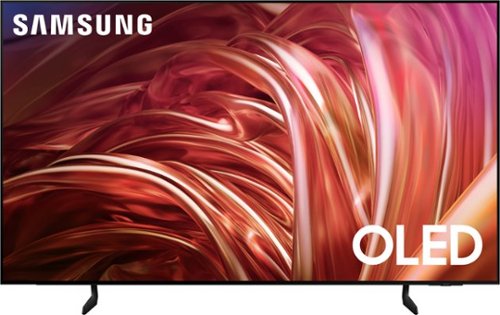
Samsung - 55 Class S85D Series OLED 4K Smart Tizen TV (2024)
This premium Samsung AI TV features details and contrast, expert validated colors, and a slim bezel. An AI-powered processor that upgrades your content scene by scene. Its contour design brings you a modern look, while clear motion and depth enhance the picture.
I have Spectrum cable and wifi at another house I have in NY State. Can I use the Spectrum app to watch tv on my new tv that will be in New Jersey? The NJ house does not have Spectrum wifi.
SaratogaCurls - Please give us the opportunity to better assist with this by reaching Samsung Support at: 1-800-SAMSUNG, 8AM - 12AM EST, 7 days a week, or Chat with us on Samsung.com: https://www.samsung.com/us/support/contact/
~ Samsung Specialist
~ Samsung Specialist
1 year, 8 months ago
by
Posted by:
Samsung

Samsung - 77" Class S90D Series OLED 4K UHD Smart Tizen TV (2024)
This premium TV features a detailed image, strong contrast and clear motion. Increased depth and AI-powered 4K upscaling all work to bring clarity to your content.
can you record with the Samsung + app?
You will not be able to record to directly to this TV. You will need to use an OTA (over air) DVR like one of these: https://www.bestbuy.com/site/searchpage.jsp?id=pcat17071&st=over+the+air+dvr .
~ Samsung Specialist
~ Samsung Specialist
1 year, 8 months ago
by
Posted by:
Samsung