Samsung
Samsung's Stats
Reviews
- Review Count0
- Helpfulness Votes0
- First ReviewNone
- Last ReviewNone
- Featured Reviews0
- Average Rating0
Reviews Comments
- Review Comment Count0
- Helpfulness Votes0
- First Review CommentNone
- Last Review CommentNone
- Featured Review Comments0
Questions
- Question Count0
- Helpfulness Votes0
- First QuestionNone
- Last QuestionNone
- Featured Questions0
- Answer Count73778
- Helpfulness Votes37,946
- First AnswerApril 24, 2013
- Last AnswerAugust 21, 2026
- Featured Answers0
- Best Answers3946
Samsung's Reviews
Samsung has not submitted any reviews.
Samsung's Questions
Samsung has not submitted any questions.
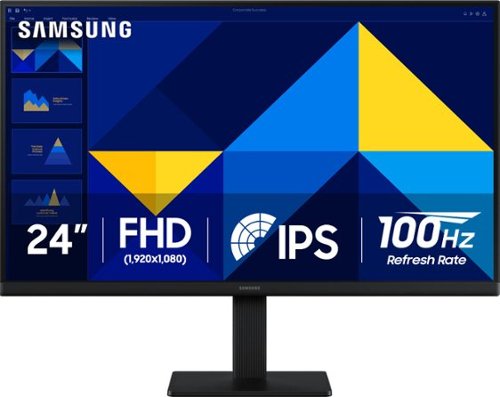
Samsung~s 24" S3 Monitor enables smooth performance, heightened productivity, and greater comfort. The IPS Panel delivers a stunning color experience across the entire display with less color washing, offering clarity from any viewpoint so tones stay consistent and accurate. The 100Hz refresh rate reduces lag and motion blur while playing games, watching videos, or working. Game Picture Mode with optimizable game settings enables instant adjustment of color and image contrast. Eye Saver Mode protects vision, reduces blue light and screen flicker, and extends comfort even during long sessions. The ergonomic super-slim design is a stylish addition to any environment, while ultra-thin border bezels make the most of screen space. Multiple connectivity enables devices to be plugged straight into the monitor for increased flexibility.
can the height of the monitor be adjusted

AmandaS:
Unfortunately, no. The Samsung S30GD monitor does not have height adjustment on its included stand.
- Samsung Monitors
Unfortunately, no. The Samsung S30GD monitor does not have height adjustment on its included stand.
- Samsung Monitors
5 months ago
by
Posted by:
Samsung
Samsung~s 24" S3 Monitor enables smooth performance, heightened productivity, and greater comfort. The IPS Panel delivers a stunning color experience across the entire display with less color washing, offering clarity from any viewpoint so tones stay consistent and accurate. The 100Hz refresh rate reduces lag and motion blur while playing games, watching videos, or working. Game Picture Mode with optimizable game settings enables instant adjustment of color and image contrast. Eye Saver Mode protects vision, reduces blue light and screen flicker, and extends comfort even during long sessions. The ergonomic super-slim design is a stylish addition to any environment, while ultra-thin border bezels make the most of screen space. Multiple connectivity enables devices to be plugged straight into the monitor for increased flexibility.
Does this monitor allow it to be tilted?
Mere:
Yes, the mount tilts. The tilt range for this monitor is -2.0˚(±2.0˚)~21.0˚(±2.0˚).
- Samsung Monitors
Yes, the mount tilts. The tilt range for this monitor is -2.0˚(±2.0˚)~21.0˚(±2.0˚).
- Samsung Monitors
5 months ago
by
Posted by:
Samsung
Samsung~s 24" S3 Monitor enables smooth performance, heightened productivity, and greater comfort. The IPS Panel delivers a stunning color experience across the entire display with less color washing, offering clarity from any viewpoint so tones stay consistent and accurate. The 100Hz refresh rate reduces lag and motion blur while playing games, watching videos, or working. Game Picture Mode with optimizable game settings enables instant adjustment of color and image contrast. Eye Saver Mode protects vision, reduces blue light and screen flicker, and extends comfort even during long sessions. The ergonomic super-slim design is a stylish addition to any environment, while ultra-thin border bezels make the most of screen space. Multiple connectivity enables devices to be plugged straight into the monitor for increased flexibility.
dowa this come with hdmi cable?
Yes, the S30GD monitor includes an HDMI cable.
- Samsung Monitors
- Samsung Monitors
5 months ago
by
Posted by:
Samsung
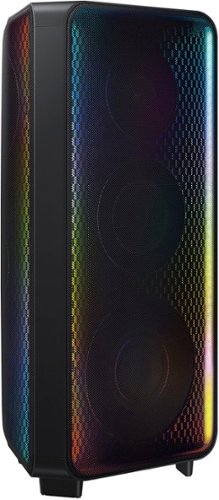
Get the party started with the Samsung MX-ST90B Sound Tower and fill the room with rich sound and LED party lighting.
Can this speaker be paired to a Samsung T70 sound tower?
Hi there gvilla75! Yes, you can connect the MX-ST90B with the MX-T70 using Wireless Group Play. ~ Samsung Solutions
5 months ago
by
Posted by:
Samsung
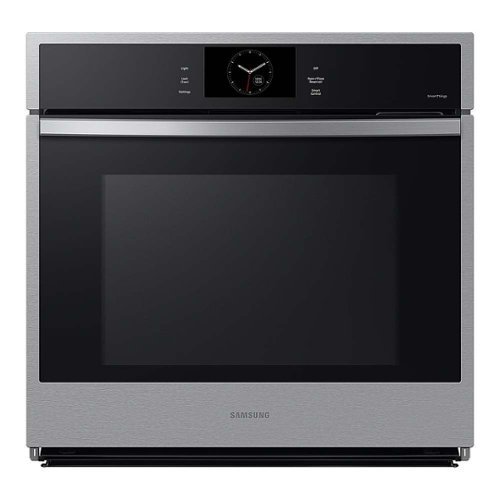
Samsung 30" Single Wall Ovens feature stunning stainless steel finishes that blend seamlessly with the d~cor of your kitchen. Rich with features like Steam Cook, Air Sous Vide, and Air Fry you'll enjoy cooking just like a professional in your own kitchen.
Is it possible to turn off the convection, or is this feature always on?
Hi JVD, thank you for reaching out about your question about convection settings.
You can turn off convection by selecting a standard cooking mode such as **Bake**, which uses traditional top‑and‑bottom heating without the convection fan. Convection is active only when you choose a convection mode (Convection Bake or Convection Roast), so switching to a non‑convection mode allows you to cook without the fan running.
Here’s a helpful Samsung guide that explains how convection modes work and when they are active:
How to use your Samsung convection oven
https://www.samsung.com/us/support/answer/ANS10006917/
Please keep this reference number for your records: 1152255261.
We value the time you took to raise your question.
Khristine
Samsung Care
You can turn off convection by selecting a standard cooking mode such as **Bake**, which uses traditional top‑and‑bottom heating without the convection fan. Convection is active only when you choose a convection mode (Convection Bake or Convection Roast), so switching to a non‑convection mode allows you to cook without the fan running.
Here’s a helpful Samsung guide that explains how convection modes work and when they are active:
How to use your Samsung convection oven
https://www.samsung.com/us/support/answer/ANS10006917/
Please keep this reference number for your records: 1152255261.
We value the time you took to raise your question.
Khristine
Samsung Care
5 months ago
by
Posted by:
Samsung
Samsung~s 24" S3 Monitor enables smooth performance, heightened productivity, and greater comfort. The IPS Panel delivers a stunning color experience across the entire display with less color washing, offering clarity from any viewpoint so tones stay consistent and accurate. The 100Hz refresh rate reduces lag and motion blur while playing games, watching videos, or working. Game Picture Mode with optimizable game settings enables instant adjustment of color and image contrast. Eye Saver Mode protects vision, reduces blue light and screen flicker, and extends comfort even during long sessions. The ergonomic super-slim design is a stylish addition to any environment, while ultra-thin border bezels make the most of screen space. Multiple connectivity enables devices to be plugged straight into the monitor for increased flexibility.
Is this power cord 2 or 3 prong?
Matt:
The Samsung S30GD monitor uses a 2‑prong power cord.
- Samsung Monitors
The Samsung S30GD monitor uses a 2‑prong power cord.
- Samsung Monitors
5 months ago
by
Posted by:
Samsung
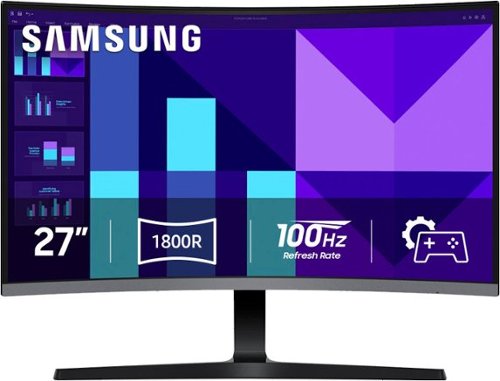
Samsung's 27" S3 FHD 100Hz Curved Monitor with Speakers provides an immersive viewing experience. The 1800R Curved Screen enhances depth perception and minimizes peripheral distractions, enabling greater focus. The 100Hz Refresh Rate reduces lag and motion blur when playing games, watching videos, or working on creative projects. Game Mode with optimizable settings allows color and image contrast to be instantly adjusted, filling the screen with every detail in view. Built-in Speakers free up desk space, minimize connections, and create a more efficient working environment for listening with ease. Eye Saver Mode with T~V-certified eye comfort technology reduces irritating screen flicker and minimizes excessive blue light, even during long sessions. Multiple Connectivity enables devices to be plugged straight into the monitor for a more convenient computing environment.
Would this be a decent gaming monitor
Angel:
Yes, the S39GD is a great option as a gaming monitor. The 100Hz Refresh Rate reduces lag and motion blur when playing games, watching videos, or working on creative projects. Game Mode with optimizable settings allows color and image contrast to be instantly adjusted, filling the screen with every detail in view.
- Samsung Monitors
Yes, the S39GD is a great option as a gaming monitor. The 100Hz Refresh Rate reduces lag and motion blur when playing games, watching videos, or working on creative projects. Game Mode with optimizable settings allows color and image contrast to be instantly adjusted, filling the screen with every detail in view.
- Samsung Monitors
5 months ago
by
Posted by:
Samsung
Samsung's 27" S3 FHD 100Hz Curved Monitor with Speakers provides an immersive viewing experience. The 1800R Curved Screen enhances depth perception and minimizes peripheral distractions, enabling greater focus. The 100Hz Refresh Rate reduces lag and motion blur when playing games, watching videos, or working on creative projects. Game Mode with optimizable settings allows color and image contrast to be instantly adjusted, filling the screen with every detail in view. Built-in Speakers free up desk space, minimize connections, and create a more efficient working environment for listening with ease. Eye Saver Mode with T~V-certified eye comfort technology reduces irritating screen flicker and minimizes excessive blue light, even during long sessions. Multiple Connectivity enables devices to be plugged straight into the monitor for a more convenient computing environment.
Can the monitor be turned vertical?
EDTechGuy:
Unfortunately, no. The Samsung S39GD cannot be turned vertical using its included stand.
- Samsung Monitors
Unfortunately, no. The Samsung S39GD cannot be turned vertical using its included stand.
- Samsung Monitors
5 months ago
by
Posted by:
Samsung
Samsung's 27" S3 FHD 100Hz Curved Monitor with Speakers provides an immersive viewing experience. The 1800R Curved Screen enhances depth perception and minimizes peripheral distractions, enabling greater focus. The 100Hz Refresh Rate reduces lag and motion blur when playing games, watching videos, or working on creative projects. Game Mode with optimizable settings allows color and image contrast to be instantly adjusted, filling the screen with every detail in view. Built-in Speakers free up desk space, minimize connections, and create a more efficient working environment for listening with ease. Eye Saver Mode with T~V-certified eye comfort technology reduces irritating screen flicker and minimizes excessive blue light, even during long sessions. Multiple Connectivity enables devices to be plugged straight into the monitor for a more convenient computing environment.
Does monitor come with hdmi cable
Yes, a HDMI cable is included.
- Samsung Monitors
- Samsung Monitors
5 months ago
by
Posted by:
Samsung
Samsung's 27" S3 FHD 100Hz Curved Monitor with Speakers provides an immersive viewing experience. The 1800R Curved Screen enhances depth perception and minimizes peripheral distractions, enabling greater focus. The 100Hz Refresh Rate reduces lag and motion blur when playing games, watching videos, or working on creative projects. Game Mode with optimizable settings allows color and image contrast to be instantly adjusted, filling the screen with every detail in view. Built-in Speakers free up desk space, minimize connections, and create a more efficient working environment for listening with ease. Eye Saver Mode with T~V-certified eye comfort technology reduces irritating screen flicker and minimizes excessive blue light, even during long sessions. Multiple Connectivity enables devices to be plugged straight into the monitor for a more convenient computing environment.
can this monitor be used as dual monitor?
lisa:
Yes, the Samsung S39GD monitor can be used as part of a dual‑monitor setup. Because it has standard video inputs, it can be paired with any second monitor as long as your computer has two video outputs.
- Samsung Monitors
Yes, the Samsung S39GD monitor can be used as part of a dual‑monitor setup. Because it has standard video inputs, it can be paired with any second monitor as long as your computer has two video outputs.
- Samsung Monitors
5 months ago
by
Posted by:
Samsung