Samsung
Samsung's Stats
Reviews
- Review Count0
- Helpfulness Votes0
- First ReviewNone
- Last ReviewNone
- Featured Reviews0
- Average Rating0
Reviews Comments
- Review Comment Count0
- Helpfulness Votes0
- First Review CommentNone
- Last Review CommentNone
- Featured Review Comments0
Questions
- Question Count0
- Helpfulness Votes0
- First QuestionNone
- Last QuestionNone
- Featured Questions0
- Answer Count74870
- Helpfulness Votes37,958
- First AnswerApril 24, 2013
- Last AnswerOctober 16, 2026
- Featured Answers0
- Best Answers3944
Samsung's Reviews
Samsung has not submitted any reviews.
Samsung's Questions
Samsung has not submitted any questions.

MX T40 2ch Sound Tower with High Power Audio
Give your sound a boost
Is the mxt40 water proof?

Hi Jim! The MX-T40 is not completely waterproof; however, with a spill resistant top-panel, you don’t have to worry about accidental drips and splashes. This speaker should not be submerged in water or left outside in the rain.
^Tim
^Tim
4 years, 8 months ago
by
Posted by:
Samsung
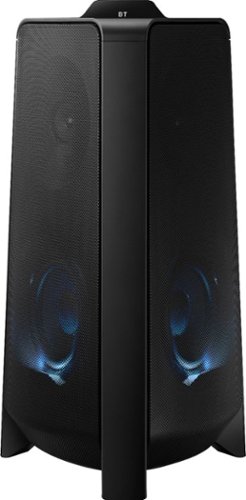
Samsung - MX-T50 Sound Tower 500W Wireless Speaker - Black
Enjoy balanced music and booming bass with this Samsung Giga party audio system. The two-dimensional sound and 500W of power broaden the music range to room-filling audio, while the built-in LED and DJ effects are adjustable from a smartphone so you're in control. This Samsung Giga party audio system has Bluetooth for wireless music streaming.
Would I be able to purchase the original remote by itself from you guys?
Hi Grooms1! For replacement part assistance, please reach out to Samsung Support at: 1-800-SAMSUNG, available 8AM - 12AM EST, 7 days a week, or Chat with us on Samsung.com: https://www.samsung.com/us/support/contact/ ^Tim
4 years, 8 months ago
by
Posted by:
Samsung
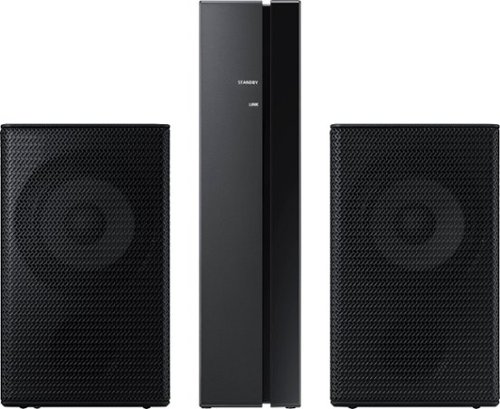
Samsung - 2.0-Channel Wireless Rear Speaker Kit with Surround Sound - Black
Connect easily and wirelessly to optional Samsung speakers for room-filling sound.
Does the Samsung A40R sound bar have surround sound without the rear speaker kit?
Hi! The HW-A40R includes a set of wireless rear speakers enabling surround sound on the soundbar. Without the rear speakers connected the soundbar is a 2.0ch system without surround sound.
^Tim
^Tim
4 years, 8 months ago
by
Posted by:
Samsung
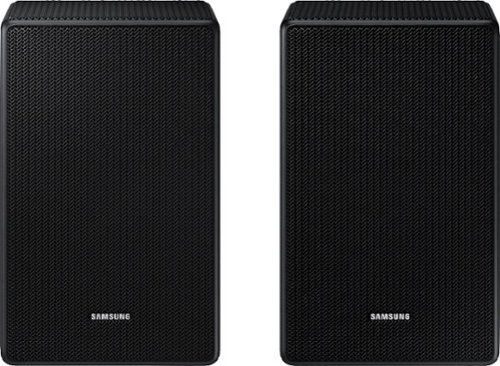
Are these speakers compatible with the HW-A550/ZA soundbar
Hi Edward! The SWA-9500S is only compatible with the HW-Q700A, HW-Q800A, and HW-Q900A. These speakers will not connect to the HW-A550 soundbar. The correct rear speaker kit designed to pair with the HW-A550 is model SWA-9100S found at the following link from Best Buy: https://www.bestbuy.com/site/samsung-2-0-channel-wireless-rear-speaker-kit-with-surround-sound-black/6456117.p?skuId=6456117 ^Tim
4 years, 8 months ago
by
Posted by:
Samsung
Are these speakers compatible with the Q65t soundbar? I have the small rear speaker kit but looking for upgraded rear speakers.
Hi Zach! The SWA-9500S is only compatible with the HW-Q700A, HW-Q800A, and HW-Q900A. These speakers will not connect to the HW-Q65T soundbar.
^Tim
^Tim
4 years, 8 months ago
by
Posted by:
Samsung
Samsung - 2.0-Channel Wireless Rear Speaker Kit with Surround Sound - Black
Connect easily and wirelessly to optional Samsung speakers for room-filling sound.
Why is this system called "wireless" if the speakers need wires to connect them to the amp? It doesn't make sense. "WIRELESS" means without wires.
Hi Einstein! Occasionally, customers have trouble hiding and running speaker wires from the front of the room (where their soundbar is) to the back of their room (where they have their rear speakers). The Rear Speaker Kit eliminates that hassle. Connect the rear speakers to its wireless module and place these three in the back of your room. One wire is required to connect each rear speaker to the wireless module. Then plug in the power cable to the module. The “wireless” convenience is in connecting your soundbar and any other speakers at the front of the room to the rear speakers – this can now be done via Wi-Fi through the wireless module, eliminating any clutter of long wires running the length of your room.
^Tim
^Tim
4 years, 8 months ago
by
Posted by:
Samsung
Samsung - 2.0-Channel Wireless Rear Speaker Kit with Surround Sound - Black
Connect easily and wirelessly to optional Samsung speakers for room-filling sound.
Are these compatability with the Hw-M450 soundbar
Images for this Question
(click to see full-size image)

Hi! The SWA-9100S rear speaker kit is not compatible with the HW-M450 Samsung soundbar.
^Tim
^Tim
4 years, 8 months ago
by
Posted by:
Samsung
Samsung - 2.0-Channel Wireless Rear Speaker Kit with Surround Sound - Black
Connect easily and wirelessly to optional Samsung speakers for room-filling sound.
I bought a HW-A40R sound bar with the wireless rear speaker kit, but I cannot get any sound from the rear speakers. Everything is connected correctly, The wireless base shows that it is connected, but nothing. Do you have any suggestions?
Hi KP68! Different sound modes will have different effects on the surround sound performance depending on the format of the source content. If you set the sound mode to SURROUND, you will get surround sound effect from the rear speakers. If you continue to experience issues, please contact Samsung Customer Support at 1-800-SAMSUNG.
^Tim
^Tim
4 years, 8 months ago
by
Posted by:
Samsung
Samsung - 2.0-Channel Wireless Rear Speaker Kit with Surround Sound - Black
Connect easily and wirelessly to optional Samsung speakers for room-filling sound.
Are these only compatible with soundbars or will they work with regular surround receivers?
Hi Nickgamertago1! Samsung wireless rear speaker kits, like the SWA-9100S, are only designed to connect wirelessly with a Samsung soundbar and do not feature the ability to connect to a receiver.
^Tim
^Tim
4 years, 8 months ago
by
Posted by:
Samsung

Samsung - HW-S50A 3.0ch Sound bar with Dolby Digital 5.1 - Deep Gray
Experience virtual 3D sound with the S Series, S50A all-in-one premium soundbar, a versatile soundbar that delivers sharp and realistic audio. Dialogue sounds crisp and super clean thanks to a built-in center speaker, so you won~t miss a word. Whether you~re playing games, watching sports, or kicking back with your favorite show, Adaptive Sound Lite enhances and optimizes your entertainment to a new level of audio. Plus, you can seamlessly pair mobile devices with Bluetooth~ TV Connection~. ~Please check whether your TV is Bluetooth~ compatible.
I have a 40" Sony Brava TV in my bedroom and want to get a sound bar for it. Is this a good one for a 40" or would you recommend something better?
Hi Tony! The HW-S50A is a great compact soundbar solution to improve the audio of your TV speakers. Samsung features a wide range of soundbar options each with their own set of specs and features. Some include wireless surround speakers to improve the surround sound performance, while others will include a wireless subwoofer to increase the bass. Should you wish to improve the audio experience of the S50A, you can purchase the wireless rear speaker kit or subwoofer separate.
^Tim
^Tim
4 years, 8 months ago
by
Posted by:
Samsung