Lenovo Product Expert
Lenovo Product Expert's Stats
Reviews
- Review Count0
- Helpfulness Votes0
- First ReviewNone
- Last ReviewNone
- Featured Reviews0
- Average Rating0
Reviews Comments
- Review Comment Count0
- Helpfulness Votes0
- First Review CommentNone
- Last Review CommentNone
- Featured Review Comments0
Questions
- Question Count0
- Helpfulness Votes0
- First QuestionNone
- Last QuestionNone
- Featured Questions0
- Answer Count37862
- Helpfulness Votes24,846
- First AnswerApril 21, 2014
- Last AnswerOctober 15, 2026
- Featured Answers0
- Best Answers2830
Lenovo Product Expert's Reviews
Lenovo Product Expert has not submitted any reviews.
Lenovo Product Expert's Questions
Lenovo Product Expert has not submitted any questions.
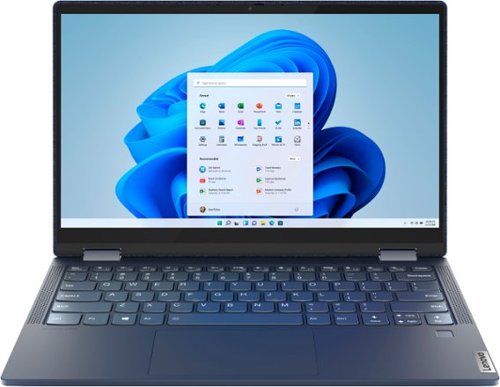
Lenovo - Yoga 6 13 2-in-1 13.3" Touch Screen Laptop - AMD Ryzen 7 - 16GB Memory - 512GB SSD - Abyss Blue with Fabric Cover
The Lenovo~ Yoga~ 6 is an ultra-portable 2-in-1 that combines unique style with the powerful responsiveness of an AMD Ryzen~ 5000 Series Mobile Processor, abundant memory and SSD storage. Enjoy a rich multimedia experience with the clarity of a 13.3" FHD touchscreen display, and enveloping sound with Dolby Atmos~-optimized stereo speakers.
Can you use this laptop for gaming?

That will depend on the requirements and compatibility of the games you want to play. We recommend you check with the specific game's software publisher's web sites, of the games you want to play, for their compatibility with Windows 10 Home 64-bit operating system and the minimum/recommended hardware requirements (Is a Graphics card required, the processor speed and the minimum required system RAM and the minimum available hard drive space) to run their program, then compare those requirements to this system's configuration.
4 years, 11 months ago
by
Posted by:
Lenovo Product Expert
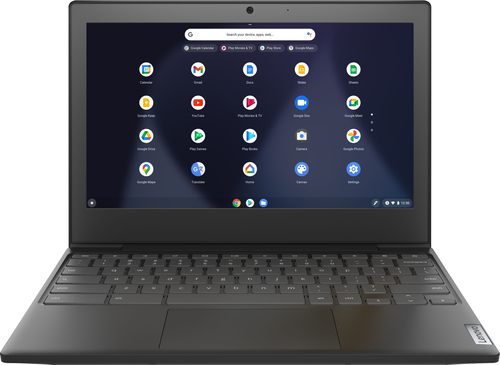
Lenovo - Chromebook 3 11" Chromebook - AMD A6 - 4GB Memory - 32GB eMMC Flash Memory
Fast, flexible, and fun, the Chromebook 3-11" brings everyone~s favorite Chromebook features, housed in a slim chassis, running on the lightning-fast Chrome OS that boots up in seconds, updates automatically, and is protected by built-in virus protection. Powered by an AMD A6 processor with up to 10 hours of battery life, the IdeaPad 3 Chromebook can seamlessly run all of your favorite apps at the same time
Can I upload photos and send by email?
That will depend on the compatibility of your email server and the photo file format you will be using. This Lenovo Chromebook 3 11 ships with the Chrome Operating System and is compatible with Google Play Store APPs. We recommend you check with both the photo file format and your email server's web sites for their compatibility with the Chrome operating system and the minimum/recommended hardware requirements (Is a Graphics card required, the processor speed and the minimum required system RAM and the minimum available hard drive space) to run their program, then compare those requirements to this system's configuration.
4 years, 11 months ago
by
Posted by:
Lenovo Product Expert
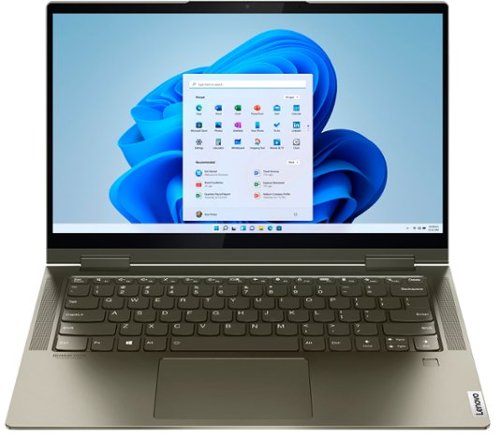
Lenovo - Yoga 7i 2-in-1 14" Touch Screen Laptop - Intel Evo Platform Core i5 - 12GB Memory - 512GB Solid State Drive - Dark Moss
The Lenovo Yoga 7i 14" combines versatile portability and enhanced productivity, thanks to the boundary-breaking performance and responsiveness of 11th generation Intel Core i5 processors and vibrant FHD clarity with Intel Iris X graphics. Go anywhere with a sleek 2-in-1 metal chassis featuring thoughtful details including a webcam privacy shutter.
I own this and the touch screen stopped working for some reason.. doesn't even show up in the device manager. Any ideas?
Yes. Here is a link to information about turning the touch screen feature on/off within the Windows 10 Operating System. The touch screen is listed within Device Manager, under Human Interface. Here is a link to more information: https://support.microsoft.com/en-us/windows/enable-and-disable-your-touchscreen-in-windows-b774e29d-be94-990f-c20f-e02892e572fc. If you continue to have an issue, we recommend you contact Lenovo Premium Care at: 888-278-9707.
4 years, 11 months ago
by
Posted by:
Lenovo Product Expert

Lenovo - IdeaPad 3 15ITL05 15.6" Laptop - Intel Core i3 - 8 GB Memory - 256 GB SSD - Almond
The Lenovo IdeaPad tailored to work and learn from home solutions that address eye strain, posture problems and at-home distractions, while deploying intelligent thermals for a cool and whisper-quiet system. The new privacy shutter on the camera also lets you reserve complete control over your privacy in the home and beyond.
Can I play games on this.
That really will depend on the requirements and compatibility of the specific games you want to play. This Lenovo IdeaPad 3 15 laptop, model number 81X800ECUS, ships with Windows 10 S-Mode 64-bit Operating System. Windows 10 S-Mode provides added security by only allowing APPs available ( and therefore certified by Microsoft) at the Microsoft Store. If you don't need the added security or you need to install APPs not available at the Microsoft Store, you can switch to standard Windows 10 Home 64-bit Operating System, at no additional cost. We recommend you check with the specific game's software publisher's web sites, of the games you want to play, for their compatibility with Windows 10 S-Mode 64-bit operating system and the minimum/recommended hardware requirements (Is a Graphics card required, the processor speed and the minimum required system RAM and the minimum available hard drive space) to run their program, then compare those requirements to this system's configuration. If you choose to switch out of S-Mode for Windows 10 Home: Here is a link to instructions for switching from Windows 10 S-Mode to Windows 10 Home: https://support.microsoft.com/en-us/help/4456067/windows-10-switch-out-of-s-mode
4 years, 11 months ago
by
Posted by:
Lenovo Product Expert
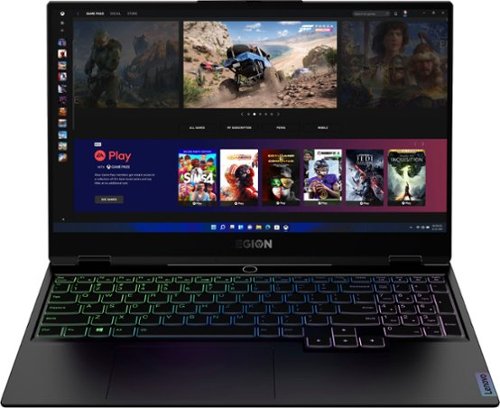
Lenovo - Legion Slim 7 15" Gaming Laptop - AMD Ryzen 7 5800H - 16GB Memory - NVIDIA GeForce RTX 3060 - 512GB SSD - Shadow Black
The Lenovo~ Legion Slim 7 was engineered for gamers who demand mobility and performance for day and night. Sporting a finely crafted chassis machined from 100% aluminum that is shockingly thin and impressively light, the Legion Slim 7 was expertly crafted for gamers who demand more.
Does it come with a RTX 3060 or 3060 Max-Q? or are both options available?
The Lenovo Legion Slim 7 15 Gaming Laptop, model number 82K80083US, ships with the
NVIDIA GeForce RTX 3060 GPU with 6GB GDDR6 RAM on the card, has a Boost Clock 1282 / 1425MHz and a TGP of 100W.
NVIDIA GeForce RTX 3060 GPU with 6GB GDDR6 RAM on the card, has a Boost Clock 1282 / 1425MHz and a TGP of 100W.
4 years, 11 months ago
by
Posted by:
Lenovo Product Expert
Lenovo - IdeaPad 3 15ITL05 15.6" Laptop - Intel Core i3 - 8 GB Memory - 256 GB SSD - Almond
The Lenovo IdeaPad tailored to work and learn from home solutions that address eye strain, posture problems and at-home distractions, while deploying intelligent thermals for a cool and whisper-quiet system. The new privacy shutter on the camera also lets you reserve complete control over your privacy in the home and beyond.
So, this laptop does not have a cd/dvd slot for recording or playing music or video's?
That is correct and although there is no built in CD/DVD drive within this Lenovo IdeaPad 3 15 Laptop, you can use an external, USB-based, Windows compatible, CD/DVD drive with this laptop like this one: https://www.bestbuy.com/site/lg-8x-external-usb-double-layer-dvdrw-cd-rw-drive-black/5852919.p?skuId=5852919
4 years, 11 months ago
by
Posted by:
Lenovo Product Expert

Lenovo - IdeaCentre AIO A340 22" Touch-Screen All-In-One - Intel Pentium - 8GB Memory - 1TB Hard Drive - Black
With its sleek, modern stand and thin bezel display, the Lenovo IdeaCentre A340 is sure to catch your eye. Fire it up and marvel at the super fast, smooth performance, where 8th Generation Intel~ Core~ processing is backed by the latest graphics and memory technology. And with the vast storage space, you~ll see why this space-saving all-in-one makes the perfect family PC.
Is this good for gaming?
That will depend on the requirements and compatibility of the games you want to play. We recommend you check with the specific game's software publisher's web sites, of the games you will be playing, for their compatibility with Windows 10 Home 64-bit operating system and the minimum/recommended hardware requirements (Is a Graphics card required, the processor speed and the minimum required system RAM and the minimum available hard drive space) to run their program, then compare those requirements to this system's configuration.
4 years, 11 months ago
by
Posted by:
Lenovo Product Expert
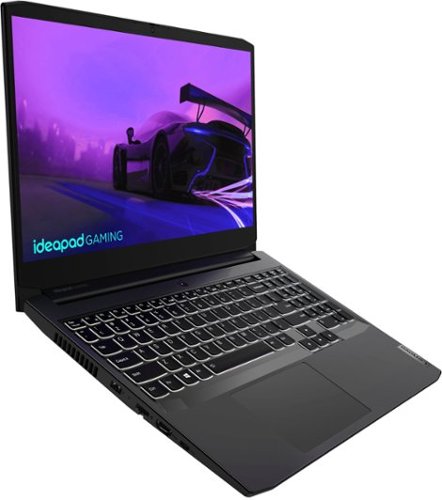
Lenovo - IdeaPad Gaming 3i 15" Laptop - Intel Core i5-11300H - NVIDIA GeForce GTX 1650 - 8GB Memory - 512GB SSD - Shadow Black
Time to elevate your game and esports experience beyond the realm of the ~just acceptable~ with a PC that stands tall amongst your gaming circle. Engineered with Intel i5 H-series processor, NVIDIA~ GeForce~ GTX 1650 graphics, DDR4 memory and M.2 NVMe SSD storage options, the Lenovo~ IdeaPad~ Gaming 3 projects a quiet and serene confidence with smooth, crystal-clear visuals and seamless gameplay that stays cool through improved thermals. The IdeaPad Gaming 3 is also stunning visually turned on or off with an FHD display and an advanced gaming keyboard.
The specs for this computer state that it has a displayport output, but I do not see one anywhere in the photos. Does it actually have a displayport output?
No. The Lenovo IdeaPad 3i 15 Gaming Laptop, model number 82K100LUUS, ships with 1x HDMI 2.0 port and supports up to 2 independent displays via native display and 1 external monitor; supports external monitor via HDMI (up to 3840x2162@60Hz).
4 years, 11 months ago
by
Posted by:
Lenovo Product Expert
Lenovo - Yoga 6 13 2-in-1 13.3" Touch Screen Laptop - AMD Ryzen 7 - 16GB Memory - 512GB SSD - Abyss Blue with Fabric Cover
The Lenovo~ Yoga~ 6 is an ultra-portable 2-in-1 that combines unique style with the powerful responsiveness of an AMD Ryzen~ 5000 Series Mobile Processor, abundant memory and SSD storage. Enjoy a rich multimedia experience with the clarity of a 13.3" FHD touchscreen display, and enveloping sound with Dolby Atmos~-optimized stereo speakers.
What is the name or specks of the processor, hard drive, and graphics card?
The Lenovo Yoga 6 13 2 in 1 Laptop, model number 82ND006QUS, ships with the 8-Core/16-Thread AMD Ryzen 7 5700U processor, with a base speed of 1.8GHz and a boost speed of up to 4.3GHz. This model ships with a Western Digital, 512GB M.2 2242 PCIe 3.0x4 NVMe solid state hard drive (WD SN530 512G PCIe 2242 SSD SOLID STATE DRIVE, Lenovo Part Number - 5SS0X54153). This model of the Yoga 6 13 uses integrated Radeon RX Vega 8 graphics, integrated within the AMD Ryzen 7 5700U processor.
4 years, 11 months ago
by
Posted by:
Lenovo Product Expert
Lenovo - IdeaPad 3 15ITL05 15.6" Laptop - Intel Core i3 - 8 GB Memory - 256 GB SSD - Almond
The Lenovo IdeaPad tailored to work and learn from home solutions that address eye strain, posture problems and at-home distractions, while deploying intelligent thermals for a cool and whisper-quiet system. The new privacy shutter on the camera also lets you reserve complete control over your privacy in the home and beyond.
Is this computer good for doing school work on?
That really will depend on the specific software you will need to use and the requirements and compatibility of that software. This Lenovo IdeaPad 3 15 Laptop, model number 81X800ECUS, ships with Windows 10 S-Mode 64-bit Operating System. Windows 10 S-Mode provides added security by only allowing APPs available ( and therefore certified by Microsoft) at the Microsoft Store. If you don't need the added security or you need to install APPs not available at the Microsoft Store, you can switch to standard Windows 10 Home 64-bit Operating System, at no additional cost. We recommend you check with the specific APPs software publisher's web sites, of the APPs you will need to use, for their compatibility with Windows 10 S-Mode 64-bit operating system and the minimum/recommended hardware requirements (Is a Graphics card required, the processor speed and the minimum required system RAM and the minimum available hard drive space) to run their program, then compare those requirements to this system's configuration. If you choose to switch from S-Mode to Windows 10 Home: Here is a link to instructions for switching from Windows 10 S-Mode to Windows 10 Home: https://support.microsoft.com/en-us/help/4456067/windows-10-switch-out-of-s-mode
4 years, 11 months ago
by
Posted by:
Lenovo Product Expert