Lenovo Product Expert
Lenovo Product Expert's Stats
Reviews
- Review Count0
- Helpfulness Votes0
- First ReviewNone
- Last ReviewNone
- Featured Reviews0
- Average Rating0
Reviews Comments
- Review Comment Count0
- Helpfulness Votes0
- First Review CommentNone
- Last Review CommentNone
- Featured Review Comments0
Questions
- Question Count0
- Helpfulness Votes0
- First QuestionNone
- Last QuestionNone
- Featured Questions0
- Answer Count37959
- Helpfulness Votes24,861
- First AnswerApril 21, 2014
- Last AnswerOctober 26, 2026
- Featured Answers0
- Best Answers2831
Lenovo Product Expert's Reviews
Lenovo Product Expert has not submitted any reviews.
Lenovo Product Expert's Questions
Lenovo Product Expert has not submitted any questions.

Lenovo - IdeaCentre A540 24" Touch-Screen All-In-One - AMD Ryzen 3-Series - 8GB Memory - 256GB Solid State Drive
Get the job done with this Lenovo IdeaCentre all-in-one computer. The 23.8-inch Full HD capacitive display offers high-quality visuals and smooth touch operation while typing, and 8GB of RAM lets you run several windows simultaneously. This Lenovo IdeaCentre all-in-one computer features a 256GB SSD for fast data access and an AMD Ryzen 3 3200 processor for seamless performance while streaming.
How can you Load Excel or other software from the original disk received when the software was purchased? Windows

There is a 30-day trial of Microsoft Office 365 included as part of the Windows 10 operating system. In order to keep the program active after the trial period, you will need to purchase a product key. You will not need to download any additional software. If you already have a Microsoft Office Account, first try logging into your existing account with your user name and password within the installed Microsoft Office 365 software. You may need the 25-digit Product Code number that is printed on the package the original software shipped in. There is no built in CD/DVD drive within this system. For installing purchased legacy software that is compatible with Windows 10, check with the software website to see if you can download the software from the website directly to your new computer. If not, you can use an external USB-based Windows 10 compatible CD/DVD drive with this computer.
5 years, 10 months ago
by
Posted by:
Lenovo Product Expert
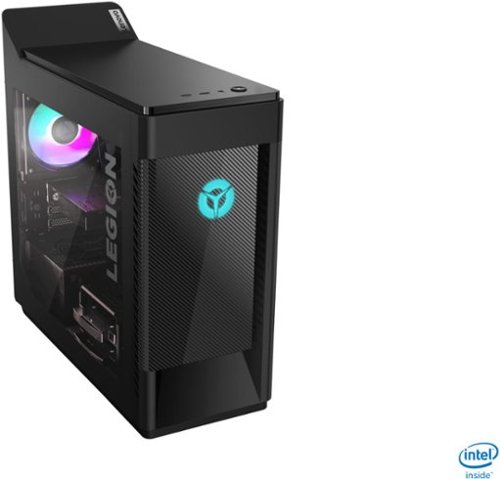
Lenovo - Legion Tower 5i Gaming Desktop - Intel Core i5-10400 - 8GB Memory - NVIDIA GeForce GTX 1660 Super - 256GB SSD + 1TB HDD - Phantom Black
Engineered out of a passion for savage power and unmatched speed, the Lenovo~ Legion Tower 5i delivers mind-blowing performance that combines 10th Generation Intel~ Core~ processors and top-of-the-line NVIDIA~ GeForce~ graphics cards for blazing-fast frame rates at up to 4K resolution. Pushing far beyond the upper bounds of smaller rig configurations while keeping things cool and whisper quiet, the Legion Tower 5i is a marvel of build and design, accentuated by its illuminated blue LED logo and lighting, as well a transparent side panel that can properly showcase your internals.
What brand is the power supply and what is the wattage?
The Lenovo Legion Tower 5i Gaming Desktop, model number 90NC00JAUS, ships with a 400W internal power supply. Here is a link to more parts information for this model: https://pcsupport.lenovo.com/us/en/products/desktops-and-all-in-ones/legion-series/legion-t5-28imb05/90nc/90nc00jaus/parts/display/model
5 years, 10 months ago
by
Posted by:
Lenovo Product Expert
Lenovo - IdeaCentre A540 24" Touch-Screen All-In-One - AMD Ryzen 3-Series - 8GB Memory - 256GB Solid State Drive
Get the job done with this Lenovo IdeaCentre all-in-one computer. The 23.8-inch Full HD capacitive display offers high-quality visuals and smooth touch operation while typing, and 8GB of RAM lets you run several windows simultaneously. This Lenovo IdeaCentre all-in-one computer features a 256GB SSD for fast data access and an AMD Ryzen 3 3200 processor for seamless performance while streaming.
Will this computer run recording software such as ableton live or protools
That will depend on the requirements and compatibility of the specific software you want to run. We recommend you check with the specific software publisher's web sites for their compatibility with Windows 10 Home 64-bit operating system and the minimum/recommended hardware requirements (Is a Graphics card required, the processor speed and the minimum required system RAM and the minimum available hard drive space) to run their program, then compare those requirements to this system's configuration.
5 years, 10 months ago
by
Posted by:
Lenovo Product Expert
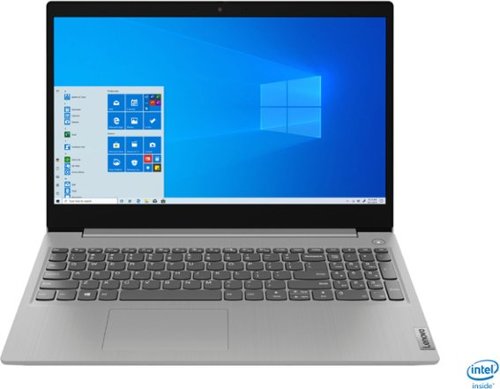
Lenovo - IdeaPad 3 15" Laptop - Intel Core i3-1005G1 - 8GB Memory - 256GB SSD
Engineered for long-lasting performance, the Lenovo~ IdeaPad~ 3 delivers powerful performance in a laptop that's perfect for your everyday tasks, with features that you can depend on.
Does this computer already have MS office on it, or will we need to purchase and have it installed?
There is a 30-day trial of Microsoft Office 365 included as part of the Windows 10 operating system. In order to keep the program active after the trial period, you will need to purchase a product key. You will not need to download any additional software.
5 years, 10 months ago
by
Posted by:
Lenovo Product Expert
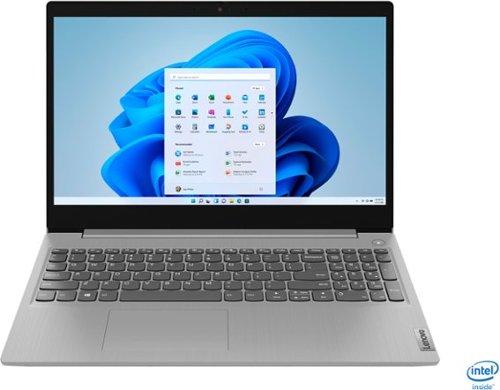
Lenovo - IdeaPad 3 15" Touch Screen Laptop - Intel Core i5-1035G1 - 12GB Memory - 256GB SSD - Platinum Grey
Engineered for long-lasting performance, the Lenovo~ IdeaPad~ 3 delivers powerful performance in a laptop that's perfect for your everyday tasks, with features that you can depend on.
Does this have a DVD port?
While there is no built in CD/DVD drive within the Lenovo IdeaPad 3 15 Laptop, model number 81WE00NKUS, you can use an external USB-based Windows 10 compatible CD/DVD drive with this laptop.
5 years, 10 months ago
by
Posted by:
Lenovo Product Expert
Lenovo - IdeaCentre A540 24" Touch-Screen All-In-One - AMD Ryzen 3-Series - 8GB Memory - 256GB Solid State Drive
Get the job done with this Lenovo IdeaCentre all-in-one computer. The 23.8-inch Full HD capacitive display offers high-quality visuals and smooth touch operation while typing, and 8GB of RAM lets you run several windows simultaneously. This Lenovo IdeaCentre all-in-one computer features a 256GB SSD for fast data access and an AMD Ryzen 3 3200 processor for seamless performance while streaming.
Can you insert a cd in it?
There is no built in CD/DVD drive within the Lenovo IdeaCentre A540-24 All-In-One system, model number F0EM006YUS, but you can use an external USB-based, Windows 10 compatible CD/DVD drive with this computer.
5 years, 10 months ago
by
Posted by:
Lenovo Product Expert
Lenovo - IdeaPad 3 15" Touch Screen Laptop - Intel Core i5-1035G1 - 12GB Memory - 256GB SSD - Platinum Grey
Engineered for long-lasting performance, the Lenovo~ IdeaPad~ 3 delivers powerful performance in a laptop that's perfect for your everyday tasks, with features that you can depend on.
Can the battery be changed , when it cannot be charged anymore or cannot hold the charge?
The internal battery is not user replaceable. A certified technician will need to replace the battery. If your laptop is currently not charging, it is possible that restoring the computer back to original factory settings will also reset the internal battery. Here is a link to instructions for resetting your laptop within Windows 10: https://support.microsoft.com/en-us/windows/recovery-options-in-windows-10-31ce2444-7de3-818c-d626-e3b5a3024da5
5 years, 10 months ago
by
Posted by:
Lenovo Product Expert
Lenovo - IdeaPad 3 15" Laptop - Intel Core i3-1005G1 - 8GB Memory - 256GB SSD
Engineered for long-lasting performance, the Lenovo~ IdeaPad~ 3 delivers powerful performance in a laptop that's perfect for your everyday tasks, with features that you can depend on.
Lenovo - IdeaPad 3 15" Laptop - Intel Core i3-1005G1 - 8GB Memory - 256GB SSD - Platinum Grey Model:81WE011UUSSKU:6426707 Is this computer 64 Bit? How many Giga Hertz does it have?
Images for this Question
(click to see full-size image)

Yes. The Lenovo IdeaPad 3 15 Laptop, model number 81WE011UUS, ships with the Windows 10 S-Mode 64-bit Operating System. Windows 10 S-Mode provides added security by only allowing APPs available ( and therefore certified by Microsoft) at the Microsoft Store. If you don't need the added security or you need to install APPs not available at the Microsoft Store, you can switch to standard Windows 10 Home 64-bit Operating System, at no additional cost. This configuration ships with the 10th Generation Intel Core i3-1005G1 processor, with a base speed of 1.2GHz and a boost speed of up to 3.4GHz.
5 years, 10 months ago
by
Posted by:
Lenovo Product Expert
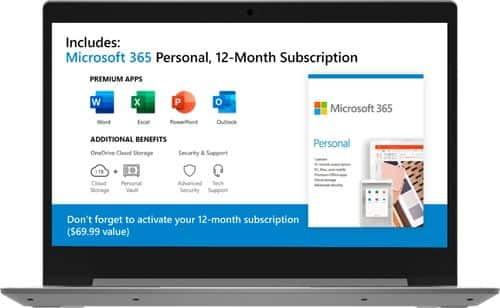
Lenovo - IdeaPad 1 14" Laptop - AMD A6-Series - 4GB Memory - AMD Radeon R4 - 64GB eMMC Flash Memory
Lenovo IdeaPad 1 14" Laptop: Complete daily computing tasks quickly with this Lenovo IdeaPad laptop. The 7th Gen AMD A6-9220E processor and 4GB of RAM offer ample power to run multiple applications seamlessly for efficient multitasking, while the AMD Radeon R4 integrated graphics deliver quality visuals on the 14-inch HD display. This Lenovo IdeaPad laptop has a lithium-polymer battery that provides up to 8 hours of uptime on a single charge.
does this computer have a camera on the monitor
There is a 300p webcam and microphone built in to the entry level Lenovo IdeaPad 1 14 Laptop, model number 81VS009GUS.
5 years, 10 months ago
by
Posted by:
Lenovo Product Expert
Lenovo - IdeaPad 3 15" Touch Screen Laptop - Intel Core i5-1035G1 - 12GB Memory - 256GB SSD - Platinum Grey
Engineered for long-lasting performance, the Lenovo~ IdeaPad~ 3 delivers powerful performance in a laptop that's perfect for your everyday tasks, with features that you can depend on.
How to make a recovery disk ? In case of a software crash how to recover? What are the recovery options beyond warranty?
You should always create "Off-Device Recovery Media". Here is a link to information about creating Recovery Media within Windows 10: https://support.microsoft.com/en-us/windows/create-a-recovery-drive-abb4691b-5324-6d4a-8766-73fab304c246. Additionally, the Lenovo IdeaPad 3 15 Laptop, model number 81WE00NKUS, is equipped with OneKey Recovery System. There is a very small pin hole on the right side of the device, right in between the headphone jack and the SD card slot on the device. You will need a pin to push this reset button. Plug the device in. Let the battery charge for about 15 minutes. Push the reset button. The system should boot to a choice screen where you can choose "Restore To Factory Default". Select this. It will delete everything from the hard drive except the original factory install of the operating system. You will need to reinstall all programs and files after the reset. If you don't have copies of the files, try to make one before you restore by selecting "Boot to desktop" and trying to back up your files. If the problem persists after the factory reset, we recommend you contact Lenovo Tech Support at: 877-453-6686.
5 years, 10 months ago
by
Posted by:
Lenovo Product Expert