Lenovo Product Expert
Lenovo Product Expert's Stats
Reviews
- Review Count0
- Helpfulness Votes0
- First ReviewNone
- Last ReviewNone
- Featured Reviews0
- Average Rating0
Reviews Comments
- Review Comment Count0
- Helpfulness Votes0
- First Review CommentNone
- Last Review CommentNone
- Featured Review Comments0
Questions
- Question Count0
- Helpfulness Votes0
- First QuestionNone
- Last QuestionNone
- Featured Questions0
- Answer Count37786
- Helpfulness Votes24,796
- First AnswerApril 21, 2014
- Last AnswerOctober 6, 2026
- Featured Answers0
- Best Answers2823
Lenovo Product Expert's Reviews
Lenovo Product Expert has not submitted any reviews.
Lenovo Product Expert's Questions
Lenovo Product Expert has not submitted any questions.
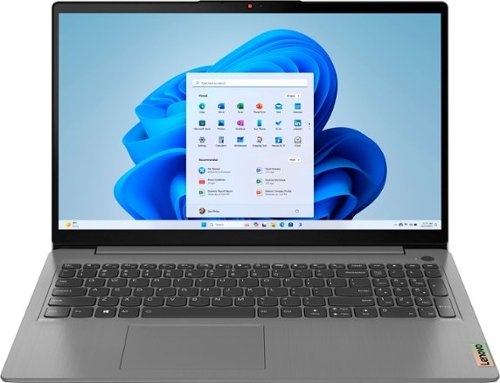
Lenovo - Ideapad 3i 15.6" FHD Touchscreen Laptop - Core i3-1115G4 with 8GB Memory - 256GB SSD - Arctic Grey
The ultimate Smart Learning notebook, the Lenovo IdeaPad 3i pairs up to 11th Generation Intel Core i3 processors with tailored work and learn from home solutions that address eye strain, posture problems and at-home distractions, while deploying intelligent thermals for a cool and whisper-quiet system. The new privacy shutter on the camera also lets you reserve complete control over your privacy in the home and beyond.
Is the RAM upgradable? I've seen conflicting info online. Some say the RAM is soldered but there is one open slot. Others say it is not upgradable at all.

Hello, abonnema. Thank you for your question. Yes, it is, with this IdeaPad 3i having up to 16GB (8GB soldered + 8GB SO-DIMM) DDR4-3200 offerings.
2 years, 8 months ago
by
Posted by:
Lenovo Product Expert
Lenovo - Ideapad 3i 15.6" FHD Touchscreen Laptop - Core i3-1115G4 with 8GB Memory - 256GB SSD - Arctic Grey
The ultimate Smart Learning notebook, the Lenovo IdeaPad 3i pairs up to 11th Generation Intel Core i3 processors with tailored work and learn from home solutions that address eye strain, posture problems and at-home distractions, while deploying intelligent thermals for a cool and whisper-quiet system. The new privacy shutter on the camera also lets you reserve complete control over your privacy in the home and beyond.
Does this laptop work well with Canva (or programs like it)?
Hello, AC12. Thank you for your question. Although we cannot speak to the functionality, by referencing this Canva Support webpage ( https://www.canva.com/help/technical-requirements/ ), and comparing it to the specifications of this IdeaPad 3i, you should be able to run the Canva online and desktop experiences.
2 years, 8 months ago
by
Posted by:
Lenovo Product Expert
Lenovo - Ideapad 3i 15.6" FHD Touchscreen Laptop - Core i3-1115G4 with 8GB Memory - 256GB SSD - Arctic Grey
The ultimate Smart Learning notebook, the Lenovo IdeaPad 3i pairs up to 11th Generation Intel Core i3 processors with tailored work and learn from home solutions that address eye strain, posture problems and at-home distractions, while deploying intelligent thermals for a cool and whisper-quiet system. The new privacy shutter on the camera also lets you reserve complete control over your privacy in the home and beyond.
What is the speed possible for the USB-C 3.2 port? What is the possible speed for the USB-A 3.2 port?
Hello, prof2000. Thank you for your question. According to the USB organization, USB 3.2 supports speeds of up to 20Gbps. For more information on the technology, here is a link to their site: https://www.usb.org/usb-32-0
2 years, 8 months ago
by
Posted by:
Lenovo Product Expert
Lenovo - Ideapad 3i 15.6" FHD Touchscreen Laptop - Core i3-1115G4 with 8GB Memory - 256GB SSD - Arctic Grey
The ultimate Smart Learning notebook, the Lenovo IdeaPad 3i pairs up to 11th Generation Intel Core i3 processors with tailored work and learn from home solutions that address eye strain, posture problems and at-home distractions, while deploying intelligent thermals for a cool and whisper-quiet system. The new privacy shutter on the camera also lets you reserve complete control over your privacy in the home and beyond.
Is there any option on this computer to takes notes? Like a note pad?
Hello, and thank you for your question. This IdeaPad 3i does come with Notepad preinstalled. However, there are Microsoft Office options to use Word instead.
2 years, 8 months ago
by
Posted by:
Lenovo Product Expert
Lenovo - Ideapad 3i 15.6" FHD Touchscreen Laptop - Core i3-1115G4 with 8GB Memory - 256GB SSD - Arctic Grey
The ultimate Smart Learning notebook, the Lenovo IdeaPad 3i pairs up to 11th Generation Intel Core i3 processors with tailored work and learn from home solutions that address eye strain, posture problems and at-home distractions, while deploying intelligent thermals for a cool and whisper-quiet system. The new privacy shutter on the camera also lets you reserve complete control over your privacy in the home and beyond.
Is the ram upgradeable
Hello, JD. Thank you for your question. Yes, it is, with this IdeaPad 3i having up to 16GB (8GB soldered + 8GB SO-DIMM) DDR4-3200 offerings.
2 years, 8 months ago
by
Posted by:
Lenovo Product Expert
Lenovo - Ideapad 3i 15.6" FHD Touchscreen Laptop - Core i3-1115G4 with 8GB Memory - 256GB SSD - Arctic Grey
The ultimate Smart Learning notebook, the Lenovo IdeaPad 3i pairs up to 11th Generation Intel Core i3 processors with tailored work and learn from home solutions that address eye strain, posture problems and at-home distractions, while deploying intelligent thermals for a cool and whisper-quiet system. The new privacy shutter on the camera also lets you reserve complete control over your privacy in the home and beyond.
How much does this laptop weigh?
Hello, and thank you for your question. This IdeaPad 3i weighs around 3 and a half pounds. 3.6lbs more precisely.
2 years, 8 months ago
by
Posted by:
Lenovo Product Expert
Lenovo - Ideapad 3i 15.6" FHD Touchscreen Laptop - Core i3-1115G4 with 8GB Memory - 256GB SSD - Arctic Grey
The ultimate Smart Learning notebook, the Lenovo IdeaPad 3i pairs up to 11th Generation Intel Core i3 processors with tailored work and learn from home solutions that address eye strain, posture problems and at-home distractions, while deploying intelligent thermals for a cool and whisper-quiet system. The new privacy shutter on the camera also lets you reserve complete control over your privacy in the home and beyond.
will it work with windows ink? I mean can I buy a stylus for it?
Hello, and thank you for your question. While this IdeaPad 3i does have a touchscreen, it is not compatible with an active pen.
2 years, 8 months ago
by
Posted by:
Lenovo Product Expert
Lenovo - Ideapad 3i 15.6" FHD Touchscreen Laptop - Core i3-1115G4 with 8GB Memory - 256GB SSD - Arctic Grey
The ultimate Smart Learning notebook, the Lenovo IdeaPad 3i pairs up to 11th Generation Intel Core i3 processors with tailored work and learn from home solutions that address eye strain, posture problems and at-home distractions, while deploying intelligent thermals for a cool and whisper-quiet system. The new privacy shutter on the camera also lets you reserve complete control over your privacy in the home and beyond.
Does this product support upgrading RAM later on?
Hello, savvyuser. Thank you for your question. Yes, with this IdeaPad 3i having up to 16GB (8GB soldered + 8GB SO-DIMM) DDR4-3200 offerings.
2 years, 8 months ago
by
Posted by:
Lenovo Product Expert
Lenovo - Ideapad 3i 15.6" FHD Touchscreen Laptop - Core i3-1115G4 with 8GB Memory - 256GB SSD - Arctic Grey
The ultimate Smart Learning notebook, the Lenovo IdeaPad 3i pairs up to 11th Generation Intel Core i3 processors with tailored work and learn from home solutions that address eye strain, posture problems and at-home distractions, while deploying intelligent thermals for a cool and whisper-quiet system. The new privacy shutter on the camera also lets you reserve complete control over your privacy in the home and beyond.
When this laptop auto update expire?
Hello, Puk. Thank you for your question. The parameters to which devices receive automatic updates through Windows is not clearly defined unfortunately, as the set of parameters to what devices meet these standards are determined not by the computer manufacturer.
2 years, 8 months ago
by
Posted by:
Lenovo Product Expert
Lenovo - Ideapad 3i 15.6" FHD Touchscreen Laptop - Core i3-1115G4 with 8GB Memory - 256GB SSD - Arctic Grey
The ultimate Smart Learning notebook, the Lenovo IdeaPad 3i pairs up to 11th Generation Intel Core i3 processors with tailored work and learn from home solutions that address eye strain, posture problems and at-home distractions, while deploying intelligent thermals for a cool and whisper-quiet system. The new privacy shutter on the camera also lets you reserve complete control over your privacy in the home and beyond.
For this chromebook which stylus pen works for I tried 2 different ones and none works with it
Hello, Vic. For clarification, this device the question is tied to is an IdeaPad 3i that is running Windows 11 Home in S-Mode and not ChromeOS. While it does have a touchscreen, it is not compatible with an active pen.
2 years, 8 months ago
by
Posted by:
Lenovo Product Expert