Lenovo Product Expert
Lenovo Product Expert's Stats
Reviews
- Review Count0
- Helpfulness Votes0
- First ReviewNone
- Last ReviewNone
- Featured Reviews0
- Average Rating0
Reviews Comments
- Review Comment Count0
- Helpfulness Votes0
- First Review CommentNone
- Last Review CommentNone
- Featured Review Comments0
Questions
- Question Count0
- Helpfulness Votes0
- First QuestionNone
- Last QuestionNone
- Featured Questions0
- Answer Count37785
- Helpfulness Votes24,805
- First AnswerApril 21, 2014
- Last AnswerOctober 6, 2026
- Featured Answers0
- Best Answers2824
Lenovo Product Expert's Reviews
Lenovo Product Expert has not submitted any reviews.
Lenovo Product Expert's Questions
Lenovo Product Expert has not submitted any questions.
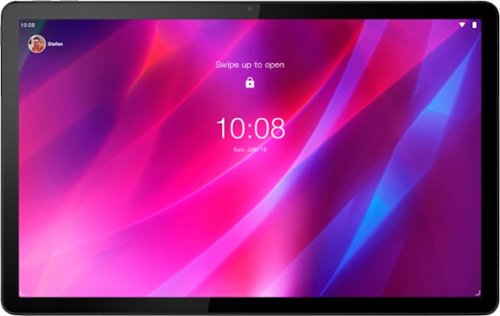
Lenovo - Tab P11 Plus - 11" - Tablet - 128GB - Slate Grey
Get bumped up to first-class experiences through the Lenovo Tab P11 Plus's eye-catching 2K visuals on its 11" display, quad speakers with persistent user-facing stereo tuned by Dolby Atmos~ and 15 hours of battery life*, all housed in a slim aluminum-alloy casing with contemporary dual-tone finish. . And it also comes with the latest new kids mode with Google Kids Space, featuring content that helps kids discover, create and grow.
TheBest Buy specs show a finger print reader. Answers here say it does not have finger print reader. Which should I believe?

This Lenovo Tab P11 Plus Tablet, model number ZA940188US, does not have a fingerprint reader. The Tab P11 Tablet has Face Unlock capability with its Front-Facing 8 MP Fixed-Focus camera.
3 years, 9 months ago
by
Posted by:
Lenovo Product Expert

Lenovo - IdeaPad Duet 3 Chromebook 2-in-1 Laptop - 11" 2K Touchscreen - Snapdragon 7cG2 - 4G RAM - 128G eMMC - Keyboard - Misty Blue
Fast, flexible, and fun, the Lenovo Duet 3 Chromebook 11" laptop brings everyone~s favorite Chromebook features, housed in a slim chassis, running on the lightning-fast Chrome OS that boots up in seconds, updates automatically, and is protected by built-in virus protection. Powered by Snapdragon SC7180 processor offers up to 10 hours of battery life, to seamlessly run all of your favorite apps at the same time.
does this have a back lit keyboard
No. This Lenovo IdeaPad Duet 3 Chromebook, model number 82T6000EUS, has a Non-backlit, English Version detachable keyboard.
3 years, 9 months ago
by
Posted by:
Lenovo Product Expert

Lenovo - Tab M8 HD (2nd Gen) - 8" - Tablet - 32GB - Iron Grey
Lenovo Tab M8 is the 2nd generation mainstream tablet that comes with standout metal design, and is tailored to make your entertainment experience richer. The stunning 8" HD display brings you a crispier and brighter visual world. More than that, no matter you are watching a thrilling online movie or playing an exciting game, the fast speed and stable connection can also make your enjoyment perfect. Non-stop entertainment is just ON. Lenovo Tab M8, your best companion device with stunning performance and stylish design. The device that everyone wants to have.
Does it have Sim card Slot?
No. This Lenovo Tab M8 2nd Gen Tablet, model number ZA5G0060US, uses 802.11ac frequency WiFi only for internet connectivity. The Tab M8 Tablet has no cellular/broadband data capability built in.
3 years, 9 months ago
by
Posted by:
Lenovo Product Expert
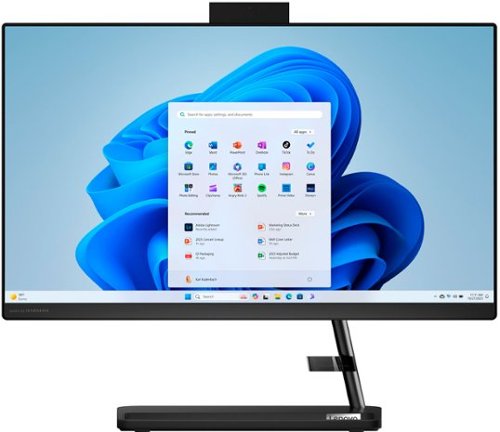
Lenovo - IdeaCentre AIO 3i 22" All-In-One - Intel Pentium - 8GB Memory - 256GB Solid State Drive - Black
A family PC for all generations, the Lenovo IdeaCentre AIO 3i seamlessly handles heavy multitasking sessions from demanding households with Intel Pentium processors, in a compact space-saving design that looks good anywhere you put it. Watch shows with the family on a vivid IPS FHD display with room-filling audio by Harman Kardon
what programs are installed with this computer.
This Lenovo IdeaCentre 3i 22 All-In-One System, model number F0GG000PUS, ships with the Windows 11 Home, 64-bit Operating System, Lenovo Vantage Utility, 30-day Trail of Microsoft 365 and a 30-day Trial of McAfee LiveSafe. Lenovo computers ship with one of the cleanest factory software installs within the consumer computer industry.
3 years, 9 months ago
by
Posted by:
Lenovo Product Expert
Lenovo - IdeaCentre AIO 3i 22" All-In-One - Intel Pentium - 8GB Memory - 256GB Solid State Drive - Black
A family PC for all generations, the Lenovo IdeaCentre AIO 3i seamlessly handles heavy multitasking sessions from demanding households with Intel Pentium processors, in a compact space-saving design that looks good anywhere you put it. Watch shows with the family on a vivid IPS FHD display with room-filling audio by Harman Kardon
can play roblox? or other games?
That will depend on the requirements and compatibility of the specific games you want to play. This Lenovo IdeaCentre 3i 22 All-In-One System, model number F0GG000PUS, ships with Windows 11 Home, 64-bit Operating System installed. We recommend you check with the specific game's software publisher's web sites, of the specific versions of the games you want to play, for their compatibility with Windows 11 Home 64-bit operating system and the minimum/recommended hardware requirements (Is a Graphics card required, the processor speed and the minimum required system RAM and the minimum available hard drive space) to run their program, then compare those requirements to this system's configuration.
3 years, 9 months ago
by
Posted by:
Lenovo Product Expert
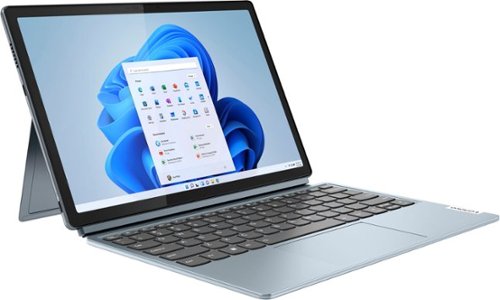
Lenovo - Ideapad Windows Duet 5i - 12.3" (2560x1600) Touch 2-in-1 Tablet - Core i3-1215U - 8GB RAM - 128GB SSD - with Keyboard - Stone Blue
The Lenovo Ideapad Duet 5 12" carries on its legacy as the ultimate expression of ultra-portability and versality with its detachable folio keyboard, stylus support, and ultra-light and slim chassis. Simply detach the screen and enjoy your favorite movies in tablet mode, or transform it into a productivity powerhouse by snapping on its thin, detachable laptop-grade keyboard to help you get work done from the classroom or to the couch. Stay on the move all day and never worry about disruption to your tasks or entertainment on a single charge with up to 11-hours on the 50Wh battery.
Does this come with a digital pen?
No. This Lenovo IdeaPad Windows Duet 5i, model number 82TQ0007US, does not ship with the Lenovo Active Pen 3, it is sold separately.
3 years, 9 months ago
by
Posted by:
Lenovo Product Expert
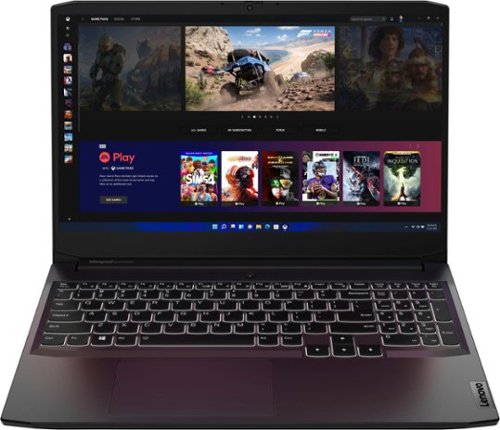
Lenovo - Ideapad Gaming 3 15.6" FHD Laptop - Ryzen 5 5600H - 8GB Memory - NVIDIA GeForce RTX 3050 Ti - 256GB SSD - Shadow Black
Time to elevate your game and esports experience beyond the realm of the ~just acceptable." Engineered with the latest generation AMD Ryzen processor and NVIDIA GeForce graphics, DDR4 memory and SSD storage options, the Lenovo IdeaPad Gaming 3 stays cool with a reengineered high-performance thermal system.
how many memory slots does it have?
This Lenovo IdeaPad 3 15 Gaming Laptop, model number 82K201XCUS, ships with 8GB DDR4-3200MHz RAM installed (1x 8GB SO-DIMM DDR4-3200MHz RAM). There are Two DDR4 SO-DIMM slots, dual-channel capable. The maximum RAM that this model configuration can support is: Up to 16GB DDR4-3200MHz RAM. There is also a 256GB M.2 2242 PCIe 3.0x4 NVMe solid state hard drive installed. The maximum storage capacity that this model configuration can support is: up to two drives, 1x 2.5 inch HDD + 1x M.2 2242 SSD or 1x M.2 2242/2280 SSD + 1x M.2 2242 SSD: • 2.5 inch HDD up to 1TB plus • M.2 2242 SSD up to 512GB or • M.2 2280 SSD up to 1TB. The Storage Slot configuration is: One 2.5 inch SATA HDD slot plus • One M.2 2242 PCIe 3.0 x4 slot. We recommend you consult with your certified technician about your upgrade options.
3 years, 9 months ago
by
Posted by:
Lenovo Product Expert
Lenovo - Ideapad Gaming 3 15.6" FHD Laptop - Ryzen 5 5600H - 8GB Memory - NVIDIA GeForce RTX 3050 Ti - 256GB SSD - Shadow Black
Time to elevate your game and esports experience beyond the realm of the ~just acceptable." Engineered with the latest generation AMD Ryzen processor and NVIDIA GeForce graphics, DDR4 memory and SSD storage options, the Lenovo IdeaPad Gaming 3 stays cool with a reengineered high-performance thermal system.
Can I play valorant on this laptop
That will depend on the requirements and compatibility of the specific version of the game you want to play. This Lenovo IdeaPad 3 15 Gaming Laptop, model number 82K201XCUS, ships with Windows 11 Home, 64-bit Operating System installed. We recommend you check with the specific game's software publisher's web site, of the specific version of the game you want to play, for their compatibility with Windows 11 Home 64-bit operating system and the minimum/recommended hardware requirements (Is a Graphics card required, the processor speed and the minimum required system RAM and the minimum available hard drive space) to run their program, then compare those requirements to this system's configuration.
3 years, 9 months ago
by
Posted by:
Lenovo Product Expert
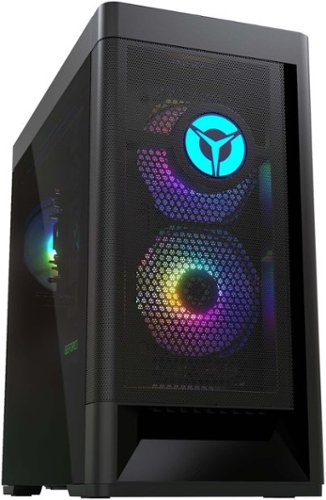
Lenovo - Legion Tower 5 AMD Gaming Desktop - AMD Ryzen 5-5600G - 8GB Memory - AMD Radeon RX 6500XT - 512GB SSD - Raven Black
Engineered out of a passion for savage power and unmatched speed, the Lenovo Legion Tower 5 AMD delivers mind-blowing performance that combines AMD Ryzen processors and AMD Radeon graphics cards for blazing-fast frame rates at up to 4K resolution. Pushing far beyond the upper bounds of smaller rig configurations while keeping things cool and whisper quiet, the Legion Tower 5 is a marvel of build and design, accentuated by its illuminated blue LED logo and lighting, as well a transparent side panel that can properly showcase your internals.
How many SSD cards can this pc have??
This Lenovo Legion Tower 5 AMD Gaming Desktop Computer, model number 90RB0027US, ships with a 512GB M.2 2280 PCIe 4.0x4 NVMe solid state hard drive installed. the maximum storage capacity that this model configuration can support is: Up to five drives, 2x 3.5 inch HDD + 1x 2.5 inch HDD + 2x M.2 SSD: • 3.5 inch HDD up to 2TB plus • 2.5 inch HDD up to 1TB plus • M.2 SSD up to 1TB. We recommend you consult with your certified technician about your storage upgrade options.
3 years, 9 months ago
by
Posted by:
Lenovo Product Expert
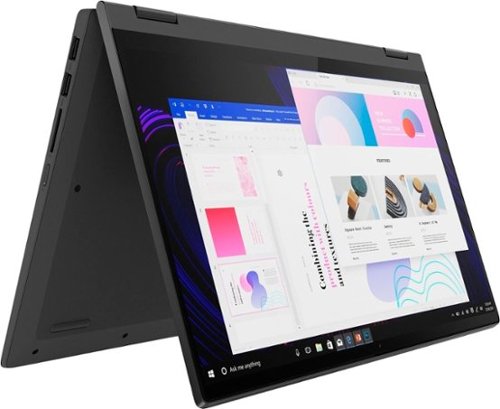
Lenovo - IdeaPad Flex 5 15ITL05 2-in-1 15.6" Laptop - Intel Core i5 - with 8GB Memory - 256 GB SSD - Graphite Gray
The IdeaPad Flex 5 2-in-1 Laptop. Featuring fast processors, an IPS touchscreen, and a 360-degree hinge to get things done efficiently for work, home, or school. Boasting a long battery life and security assets that include a webcam privacy shutter and fingerprint reader, the IdeaPad Flex 5 2-in-1 Laptop allows you to be creative and stay on point with your tasks.
does this laptop come with lighted keyboard
Yes. This Lenovo Flex 5i 15, model number 82HT00CQUS, ships with a Backlit, English (US) Version, standard QWERTY keyboard with 10 Key Numeric Pad included.
3 years, 9 months ago
by
Posted by:
Lenovo Product Expert