


BobinVA's stats
- Review count163
- Helpfulness votes454
- First reviewDecember 19, 2014
- Last reviewSeptember 1, 2026
- Featured reviews0
- Average rating4.1
Reviews comments
- Review comment count0
- Helpfulness votes0
- First review commentNone
- Last review commentNone
- Featured review comments0
Questions
- Question count0
- Helpfulness votes0
- First questionNone
- Last questionNone
- Featured questions0
- Answer count28
- Helpfulness votes23
- First answerAugust 12, 2016
- Last answerJanuary 22, 2022
- Featured answers0
- Best answers2
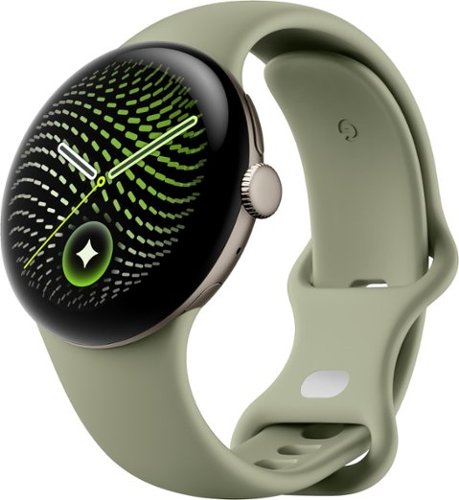
The Google Pixel Watch 5 offers a smarter way to a healthier you. Get proactive help with Gemini Intelligence, and personalized insights from Google Health.~,~,~
Customer Rating

5
Pixel Watch just keeps getting better
on September 1, 2026
Posted by: BobinVA
After 4 years with the original Google Pixel watch, it was time for an upgrade.
Unboxing has remained much the same through the years. In the box, there’s the watch (of course), a disc-shaped charger, and an extra half of a band, a thoughtful touch that Google has been doing since the start. The charger has changed since the first iteration. Previous versions required the watch to be lying on its back with the watch face pointed upward. This new version cradles the side of the watch (like the Pixel Watch 4), allowing it to “stand” on edge and function like a clock on your nightstand. There’s even the ability to use night-friendly colors and fonts so that you don’t have light blaring through your eyelids. Those who had version 4 were already used to these, but I appreciate these changes.
Setup was easy, but I dove right into setup and failed to look for an easy watch transfer, which is included. Manual setup really wasn’t bad, but I could have saved myself some time by using the auto transfer. I had to update or add a few apps, which is to be expected after 4 years. It was simple and easy to migrate from the old health apps to the new Google Health app. Now I can get an up to the minute health report giving me metrics such as steps, heart rate, blood oxygen level and more. While I’m not a fitness buff, this version has really upped its game for fitness tracking. I’m kinda blown away by the blood pressure tracking, and would love to know the science behind it. Nonetheless, the Pixel Watch 5 has an amazing set of health and safety features built in. When the FDA eventually approves it, there will also be a breathing emergency detection feature, similar to the way that loss of pulse detection works. It’s crazy how much insight a watch can provide into your health.
Like everything these days, the Pixel Watch 5 has some improved AI features. Gemini is available straight from the watch, but I found the “raise to talk” gesture to be a little annoying. I eventually turned it off, because I got tired of being interrupted by Gemini when I didn’t actually mean to summon it. There’s an AI watch face generator that works with voice descriptions of what you want, but it basically only has one style, and my prompts mainly only changed the font used for the digits. This seems to be more of a beta feature, and I hope it will become genuinely useful.
Similar to version 4, the Pixel Watch 5 is rated for 30 hours of battery life, up from the 24 that I had on version 1. Given that my original watch is now 4 years old, I wasn’t getting anywhere near that much and often got to the end of the day with only 30-40% remaining, and sleeping with it on wasn’t really an option if I wanted to be able to get up and use it. Version 5 can go a full 8-10 hours longer and still have 49% remaining, meaning that I’m finally able to sleep with it on and take advantage of all the sleep metrics. Each morning I’m greeted with a sleep report, and while I don’t have anything to compare it to, I’m enjoying the metrics and seeing how they trend over time. Charging the watch is a lot quicker too, which is very welcome. It will go from almost dead to 100% in just under an hour.
Google says the watch face is much brighter. Comparing it to the original Pixel Watch, I could definitely see that the latest version looks a bit sharper and more vivid, and yes, it is brighter, but it’s not a night and day comparison. Maybe that just shows that, even with their first attempt, the Pixel Watch was a good product. Google also says the watch is much faster, but I honestly don’t notice much difference. Again, this is a testament to the original, but I think the way I use the watch just doesn’t require much in the way of speed. I’m never waiting for something to happen in response to a swipe or a gesture, it just works.
I’m not sure how many versions have had gestures, but I just discovered them, and they’re awesome! Double-pinch the fingers on the hand wearing the watch to answer the phone, end calls, play or pause music, snooze or dismiss alarms, stop or pause timers and stopwatches, and take photos by triggering my Pixel phone's camera shutter remotely. These are wonderful features that make ordinary tasks easy and frictionless. Lastly, turning the watch face away to dismiss a call is just a natural gesture that makes sense.
What about the cost? My model (the 41mm version) costs $399, or $50 more than the original. Sure, I wish it didn’t cost so much, but it’s comparable to its competitors and a $50 increase over 4 years is really not bad, especially with all the new features they’ve packed in. Integration with my Pixel phone and Pixel Buds was seamless and super easy.
The Pixel Watch 5 is a great update to the series, and I feel like there’s still a lot to explore. Google has shown a commitment to the watch series, and I appreciate knowing they’re serious about staying competitive. Should you upgrade if you’ve got version 4? Based on the list of upgrades, it seems like you could sit this one out, but for me, coming from the original, I’m really enjoying learning about all the new features and capabilities. The icing on the cake was the understated Olive color for the band with the case rocking the “satin pyrite” color!
I would recommend this to a friend!
Share this review:


0points
0of 0voted this as helpful.

The RF45mm F1.2 STM lens is a great option for creators who want an affordable and lightweight setup. It delivers wide-aperture performance, stunning low-light results, and soft, expressive imagery. Whether you~re taking portraits, lifestyle content, or everyday stories, it~ll give your work a polished look, even straight from the camera.
Customer Rating

4
Super bright portrait lens
on August 31, 2026
Posted by: BobinVA
Although I’m not a professional photographer, I do appreciate having high-quality equipment at a price that an amateur like me can afford. For several years, I’ve been using one of the top “bridge” cameras on the market, and while it excels in a lot of things, low-light photography is not one of them.
I’ve also been using the Canon EOS R10, a lightweight mirrorless camera that hits the sweet spot between performance and value. It uses the RF lens mount, and my kit came with the 18-45mm lens with an aperture range of 4.5-6.3. This is a nice starter lens, but I’ve been on the lookout for other options, especially a brighter lens that would be better for portraits. The new 45 mm lens from Canon features a 1.2 maximum aperture, so I picked one up.
This lens is incredibly bright, more than anything I’ve ever used. If you’re a professional photographer, you’re using lenses that cost many times what this lens costs, so this review is for those of us who are hobbyists who appreciate quality equipment. The first thing I noticed was how I was able to get good shots in low light with minimal effort. One of the downsides of the R10 is that it doesn’t feature in-body stabilization, so it’s important to be able to use faster shutter speeds in order to get sharp results. This RF 45mm lens lets in plenty of light, providing plenty of flexibility to use whatever shutter speed I needed.
Most people generally consider a 50 mm lens to be similar to what the naked eye sees. Although the 45 mm lens is close to a 50 mm lens, what you’ll see depends upon the camera you’re pairing it with. In my case, the R10 with an APS-C sensor has a 1.6x crop factor, making the 45 mm lens more like a 72 mm lens, putting it into the short telephoto portrait category. For my purposes, I think that’s great, but you’ll want to consider how it will meet your needs. You will not see the same thing if you have a full-frame camera. I’ve seen complaints online that this lens suffers from vignetting and softness around the edges, but with a 1.6x crop factor, I’m not seeing that, since I’m essentially viewing the center of the lens and cropping out those edges -- for me, it looks great!
So, what are the practical benefits of this lens? The 1.2 aperture allows me to use faster shutter speeds, even in low light, resulting in sharp images. When I’m shooting in plenty of light, it allows me to get that shallow depth of field and background blurriness that are so desirable. This makes subjects “pop” and I love how it looks!
Low-light performance is exceptional. As a test, I photographed a crock pot that we had sitting on a table in our unlit dining room, using only ambient light coming from elsewhere. My top-end bridge camera could barely focus, and when it did, it produced a picture that was grainy and full of noise. The Canon 45 mm 1.2 focused right in on the text printed on the crock pot and had no problem creating an image that was sharp and in focus. I know this is an artificial test, but the difference was stark and validated my reasons for getting this lens.
While this lens isn’t cheap, it does provide excellent performance without breaking the bank. For comparison, the Canon RF 50 mm lens can be had for half the price, but with a 1.8 aperture vs the 1.2 featured on this lens. The 50 mm lens will be sharper at its maximum aperture, but if you want shallow depth of field that gives a “creamy” background, the 50 mm can’t touch this lens.
I’m very pleased to add this lens to my bag. It gives me a fast lens with excellent autofocus at a moderate price. I hope that Canon continues to offer more lenses like this one in the RF line.
I’m very pleased to add this lens to my bag. It gives me a fast lens with excellent autofocus at a moderate price. I hope that Canon continues to offer more lenses like this one in the RF line.
I would recommend this to a friend!
Share this review:


0points
0of 0voted this as helpful.
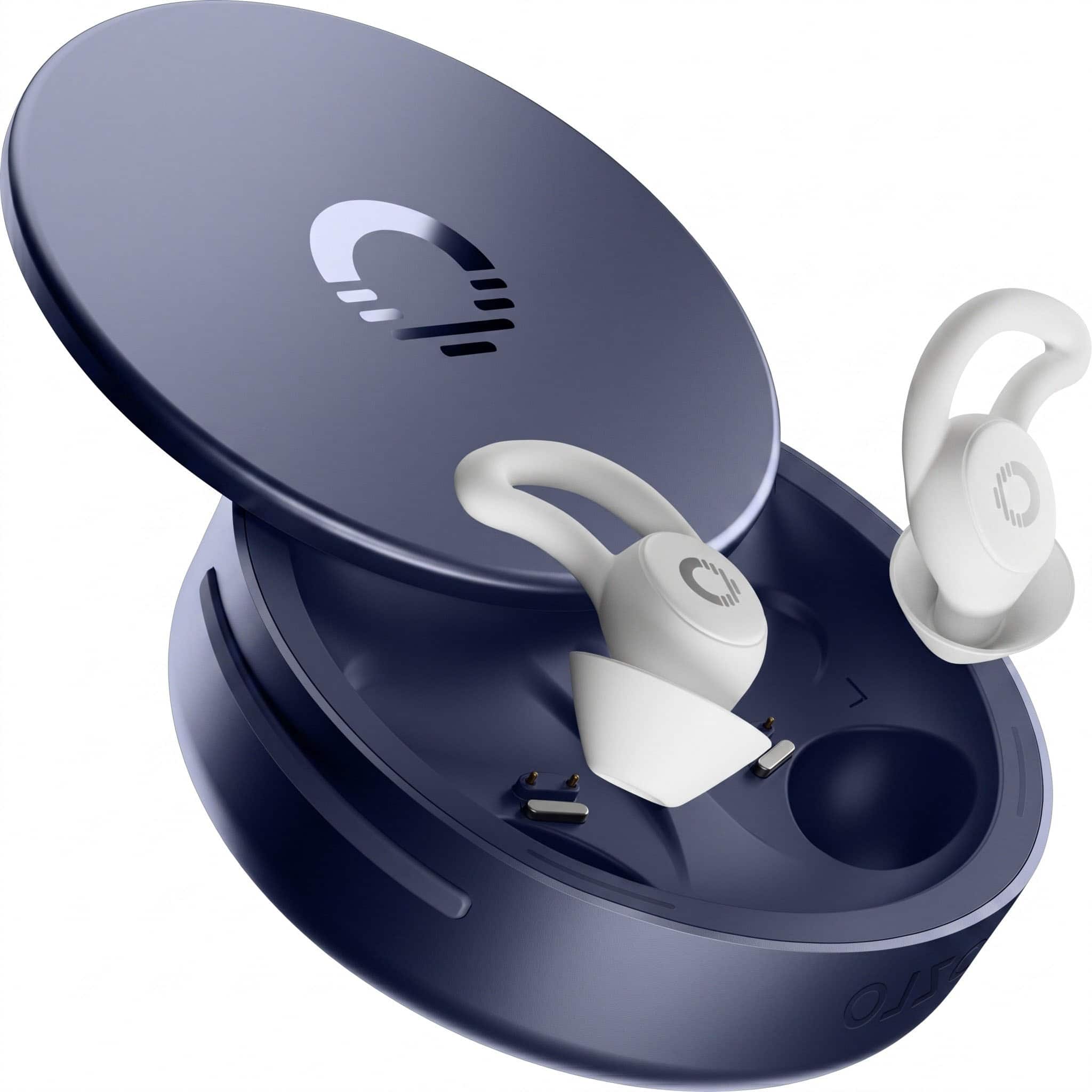
Engineered by the team behind the original Bose Sleepbuds, Ozlo Sleepbuds 2 are built for exactly one job: helping you sleep through the noise. Not music earbuds adapted for bed ~ purpose-built sleep technology. Rather than fighting noise, Sleepbuds 2 cover it. A snug passive seal plus active sound masking layers soothing soundscapes over snoring, traffic, and thin hotel walls, so disruptions never reach you. Fall asleep to your own audio ~ a sleep playlist, a podcast, a meditation ~ streamed straight from your phone. Built-in biometric sensing detects when you've drifted off and switches automatically to masking sound, so you're not woken mid-episode. Flush-fit and feather-light with multiple ear tip sizes included, they stay comfortable all night ~ even face-down on a pillow. A 14-hour battery covers a full night with room to spare, and a personal in-ear alarm wakes you without waking your partner. Personalize your soundscapes, track your sleep, and see what your bedroom is really doing overnight in the Ozlo app.
Customer Rating
5
These will help you get your sleep back!
on August 22, 2026
Posted by: BobinVA
How much is a good night of sleep worth? If you’re considering the purchase of sleep buds, that’s the question you must answer. I generally have no trouble falling asleep, and I prefer to do so in silence, but sometimes my spouse will start snoring, and even minor snoring can be irritating when you’re desperate to fall asleep.
I’ve been in situations where I’m sleeping away from home in a group setting (camping) and the different noises and sleep sounds prevent me from getting any sleep. In those situations, I’ve resorted to putting my regular ear buds in and downloading some “white noise” such as rainfall to help drown it out. Yes, that works, but regular buds aren’t designed for sleeping, and they inevitably fall out, meaning that the noises may wake you back up, and you have a scavenger hunt in the morning to find the lost buds.
Enter the Ozlo Sleep Buds 2. I was intrigued by this product when the first iteration came out, but I never got around to getting them for myself. They’re pretty pricey, especially for something designed for such a specific purpose, but that’s why I asked the question above. If the Ozlo Sleep Buds could give you your sleep back, would that be worth it to you?
I took the plunge and got the latest version, and I must say, I’m impressed! As a side sleeper, I couldn’t imagine being able to lay on my side while wearing earbuds. I’ve tried so many different styles of earbuds for normal usage, and I mostly don’t enjoy having them in my ear canals for very long. Fatigue sets in within about 2 hours, so I was skeptical about the Ozlo Sleep Buds.
They come in a very nice aluminum charging case with a sliding top. Inside the case, you’re greeted with 2 LED light strips indicating the charging status. The only documentation you’ll find in the box is a tri-fold page telling you to download the app. There is a thick little booklet included that’ll give you safety information in lots of different languages—you know, the stuff that none of us read. I usually prefer at least some printed documentation to get me started, but I understand that it would take quite a booklet to convey any meaningful information, so they rely on the app.
The app is well-done, and it walks you through the connection and setup process--it’s pretty smooth. There are 5 different sleep modes, and there’s also a Sleep Shield that will silence phone sounds and alerts while streaming from your phone. The simple, low-distraction mode allows you to simply put the buds in your ears and your sleep sound starts playing without requiring you to use the app. This is nice for when you just want to get to sleep, and it’s what I use. There are more than 30 options for a choice of sleep sounds, including things like rainfall, ocean waves, mountain winds, and more. There are also a number of steady white noise sounds that don’t fluctuate, which is great because there’s no distraction when you’re trying to remain laser-focused on sleep.
While my focus is on masking noise and getting to sleep, these are fully functional Bluetooth earbuds, and that means you can use them to listen to music, podcasts or audiobooks while drifting off to sleep. I was pleasantly surprised at how good they sounded for music, so if that’s how you want to fall asleep, you won’t be disappointed in the sound quality. The buds and the case feature rudimentary sleep tracking functions, so you can set it to switch from streaming music to your chosen sleep sound when it senses you’re asleep. You can also set it to disable all Bluetooth connections after a time. Speaking of the case, I thought it did a good job of tracking my sleep. It actually matched the sleep tracking of my smart watch, which has access to other characteristics such as my heart rate. It’s not a dedicated sleep tracker, but it does a very good job of providing insights into your sleep, including what may have awakened you in the middle of the night.
One of the most important qualities of earbuds is comfort, and this is even more critical for something you intend to wear all night. As I’ve tried out many different regular earbuds, I found the most comfortable ones to be those that featured an oval shape for the ear gels that actually go into the ear canal. The Ozlo Sleep Buds use a slightly oval shape, and I found it very comfortable. They come with several different sized wing tip silicone covers, ranging from size 0 (the smallest) to size 3. Size 2 is installed out of the box, but you’ll want to experiment to get the best fit. The combination of soft silicone and the wing shape work to keep them in your ears. I have yet to have them fall out—the fit is very secure. Here’s the best part—they stayed comfortable even when lying on my side! They’re so thin that the pillow does not push them deeper into the ear. I think that is amazing, and it’s one of the things that truly sets the Ozlo buds apart. I haven’t tried the competition, but in looking at photos of the others, none seem as small and light as these.
Battery life is great, and I’ve had no trouble getting through 8 hours. They’re rated for 14 hours, but I’ve never stayed in bed that long, so I doubt I’ll ever reach that limit. The case is rated for an additional 2 charges. In practice, I haven’t had to charge the case more than about once a week.
The Ozlo Sleep Buds do not include active noise cancellation (ANC), and this is purposeful. I found information where the company said that ANC is not as effective with sudden, erratic noises (such as snoring), and the extra circuitry only adds bulk without much benefit. With sleep sounds on, I found the Sleep Buds to be very effective at blocking out sounds with the combination of white noise and passive physical sound deadening (you’ve got something in your ears). That brings up the question of how you’ll hear your alarms in the morning.
The Ozlo app includes its own alarm, allowing you to choose the type of alarm sound you want and how loud it should be. This works very well. If you choose to disable all Bluetooth connections, you’ll have to rely on the internal alarm. This is where I did find an annoyance. When the alarm went off, it was not brought to the foreground on my phone, requiring me to unlock the phone, bring up the app, and then silence the alarm. That’s pretty frustrating when your goal is to hit snooze and grab a few more winks. Fortunately, I found the alternate way to handle alarms—simply slide the case open and press the button inside. This snoozes the alarm and lets you get right back to sleep. If you don’t want to disable your connections so that you can continue to use your phone, you can do that too. When I did that, I found that the alarm sound played not only through the earbuds, but through the phone’s speaker as well. If you want to wake up without disturbing your partner, you’ll have to opt for the Ozlo app’s built-in alarm.
The Ozlo Sleep Buds 2 simply deliver. Although I normally prefer falling asleep in silence, I found myself looking forward to the comforting environment created by the sleep sounds (just don’t set them to be too loud). Even when I was awakened by my spouse’s snoring in the middle of the night, it was easy to reach over, grab the buds and put them in. The sleep sound started up automatically, and I could go right to sleep.
The Sleep Buds sound quite good for music and audiobooks, but with no controls on the buds themselves, they’re really not suitable to be your one and only pair of earbuds. Which brings us back to my original question: how much is a night of sleep worth? If you’re regularly getting your sleep interrupted, I think you know the answer. These did everything they claimed, and then some. I highly recommend them!
I would recommend this to a friend!
Share this review:


0points
0of 0voted this as helpful.
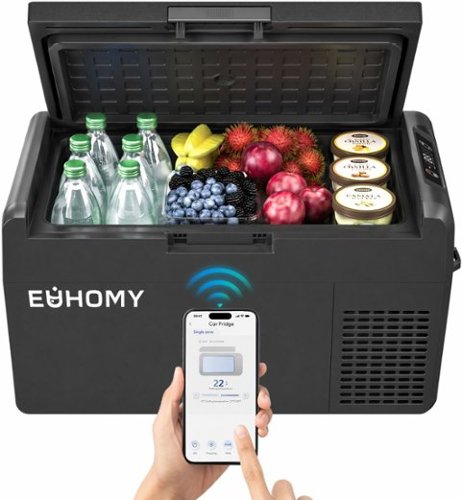
Euhomy 12 Volt Refrigerator - 21QT(20L) Portable Freezer, Electric Cooler for Car Truck RV Van Camping & Road Trip, Fast Cooling Fridge with 12/24V DC & 110-240V AC for Vehicle & Home Use,-4~~68~
Customer Rating
5
Keep food cool on the go!
on August 5, 2026
Posted by: BobinVA
It’s a problem every summer: traveling to the family reunion a few hours away and trying to figure out what food to take. It’s cheaper to make something at home, but nothing can stand to be unrefrigerated for so long, so we end up spending too much money after we get there on restaurant food. The solution? The Euhomy Mobile Refrigerator!
The Euhomy mobile refrigerator is about the size of a typical foam cooler like the ones you can pick up at many stores, but some of that space is taken up by the mechanical portion. That’s not really a problem, since you don’t have to waste space on bags of ice that will just melt anyway. There is a convenient compartment in the top corner of the cool space where you can put items that you want to protect from condensation from the other items. It’s a nice, practical design.
There’s not much in the way of setup, since the refrigerator has only one job: to keep things cool. There’s a small digital screen that allows you to set the desired temperature (-20 C to +20 C), display using Fahrenheit or Celsius, set the level of battery protection, and choose the speed of the compressor (Max or Eco).
Once you’ve chosen your settings, it’s just a matter of time before the refrigerator reaches the desired temperature. Cooling to a refrigerator temp takes only 20-30 minutes (on Max), while getting to freezing can take another 20-30 minutes. Euhomy includes a bottle that serves double duty as a divider that can be filled with water and frozen, which is a thoughtful addition. The unit is well insulated, but don’t expect it to maintain cold temps for very long without the compressor running. Even so, it can keep things fairly cool until you can turn it back on, as long as that’s not too long.
Having a mobile refrigerator is great for trips to the grocery store in summer when you’re not going straight home. This provides an easy way to keep food cool without having to deal with melting ice or freezer packs that take up space. Another benefit is that the Euhomy comes with power cords for both the car and house, meaning that you can take it to your hotel room and keep cooling without having to unload everything into the hotel fridge. It runs quietly enough to be unnoticed, so it won’t disturb your sleep. This would also work at a campsite that features electricity hookups.
Having a mobile refrigerator is great for trips to the grocery store in summer when you’re not going straight home. This provides an easy way to keep food cool without having to deal with melting ice or freezer packs that take up space. Another benefit is that the Euhomy comes with power cords for both the car and house, meaning that you can take it to your hotel room and keep cooling without having to unload everything into the hotel fridge. It runs quietly enough to be unnoticed, so it won’t disturb your sleep. This would also work at a campsite that features electricity hookups.
Euhomy offers an app, but I was never able to get the refrigerator to connect via Bluetooth. The poorly written manual doesn’t even mention how to pair with the app, but the app itself indicates the unit should go into pairing mode when powered up (it does not). Searching the internet yielded some more ideas on how to pair, none of which worked. I’m not sure what the app would have allowed me to do, but I never found out. It’s good that it’s a simple device and thus doesn’t need a lot of detailed explanation, but I would have appreciated some information on what battery protection does or what I could expect from the MAX and ECO modes. I’m tempted to deduct a star for this, but it’s performance that matters, and the Euhomy Mobile Refrigerator does what’s most important and keeps my food cool.
The Euhomy Mobile Refrigerator is a handy way to keep things cool on the go. Having a true refrigerator/freezer in the car makes it possible to take things you might not have considered taking in just a cooler with ice. Its reasonable size doesn’t take up a lot of space when not in use. It’s also reasonably priced, so I recommend it for all your “on the go” cooling needs. Ignore the app and just use the refrigerator—you’ll spare yourself some aggravation!
I would recommend this to a friend!
Share this review:


0points
0of 0voted this as helpful.
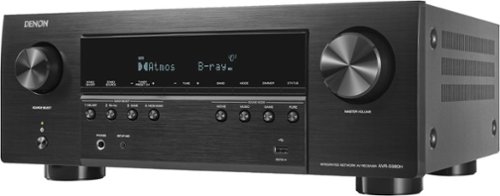
The Denon AVR-S980H makes your TV sound bigger, clearer, and more immersive~no dedicated home theater room required. Power a full speaker system for clear dialogue and lifelike sound that surrounds you, while keeping your setup simple with one hub for TV, gaming, and streaming. The AVR-S980H grows with you: Begin with a 2-channel setup, expand to 5.1 for movie nights, grow into 7.2 surround~using the same AVR every step of the way. Experience brilliant 4K and 8K visuals with supported TVs. With multiroom audio Powered by HEOS, your soundtrack flows throughout your home.
Customer Rating
4
An AVR to reinvigorate your media setup
on July 16, 2026
Posted by: BobinVA
The modern AVR brings multiple components together, allowing you to control all of them from a central unit, and making them function nicely together, resulting in a more pleasant experience overall. The Denon AVR-S980H 7.2 Channel AV Receiver brings a lot of high-end features to a sub-$1000 price point. I’ve had a pretty standard 5.1 setup for years, but I wanted to upgrade the receiver to see if it could breathe new life into my listening experience.
Denon has really put some work into making the setup experience easy, especially for those who may be new to this type of setup. The quick start guide has you connecting the receiver to your TV right away, and I wondered why there was no mention of connecting speakers or other input sources. That’s because the TV is where the process leads you step by step through connecting speakers, Blu-Ray players, streaming devices and even a phonograph (which has a dedicated input). On-screen text and images show you exactly how to connect to the AVR.
At one point in the process, you’re given the choice of creating an account and completing setup on the TV or using the HEOS app on a mobile device. If you’ve ever used a TV remote to input lots of text, you know why I opted for the mobile device. I created my new account, then selected “Denon” to continue, whereupon I was told that I could not complete setup on the app and must go back to the TV. Now I had to manually enter my account name and password using the remote, which feels cheap and has buttons that are sometimes hard to press. This was incredibly annoying and unnecessary—why couldn’t they have read my account information online, since the WIFI settings from the app were transferred to the AVR? Thankfully I only had to go through that once.
While this may seem minor, I really appreciated that Denon included a page of sticker labels for speaker wires and input devices. Labeling all the wires made it easy to move from my old AVR to this one. Nice touch!
Once everything is wired up, you use the included microphone to calibrate your room’s EQ for optimal listening from all seats. Since you want the microphone to be at ear level, you should mount it on a tripod, but even if you don’t have a tripod, Denon includes a cardboard tripod in the box. Another nice touch! At the completion of the 6-step calibration, you’re ready to listen.
With everything set up, I decided to try a blu-ray disc. I had fortunately chosen one with a Dolby Atmos demo at the beginning, and wow, was it great! I had never heard my speakers sound so good! I attribute this to the Audyssey MultEQ room calibration that uses the included microphone mentioned above. It makes things sound great from everywhere in the room. The AVR-S980H supports both Dolby Atmos and DTS:X, and they really make movie audio sound excellent. Unlike my old AVR, the various sound modes included here really make a difference and provide distinctively different sound signatures. There are preset sound modes for movies, music, game and pure, which is an audio setting that bypasses all digital processing and provides an unaltered audio signal. 90 watts per channel provide plenty of power to drive the speakers.
The AVR-S980H features HDMI 2.1 support with 8K/60Hz and 4K/120Hz pass-through. It includes HDR10, HDR10+, Dolby Vision, 1440p pass-through, and AMD FreeSync. It has 6 HDMI inputs (all 8K compatible) and 2 outputs with eARC, plus a built-in moving-magnet phono input for turntables. All of this makes the AVR-S980H more than ready to handle all of your media room needs.
Additional features include built-in Wi-Fi, Bluetooth, Apple AirPlay 2, Spotify Connect, and HEOS multi-room audio (I’m not sure this is available yet, and I couldn’t test it even if it were). Connecting via Bluetooth was super easy, and I was streaming music from my phone in seconds. The unit includes 2 discreet antennae that handle both Bluetooth and WIFI signals.
Additional features include built-in Wi-Fi, Bluetooth, Apple AirPlay 2, Spotify Connect, and HEOS multi-room audio (I’m not sure this is available yet, and I couldn’t test it even if it were). Connecting via Bluetooth was super easy, and I was streaming music from my phone in seconds. The unit includes 2 discreet antennae that handle both Bluetooth and WIFI signals.
I’m thrilled with the way the AVR-S980H breathed new life into my speaker setup, with lots of room for future expansion. I would have been happier with a lower price point, but this packs a lot of functionality in at this price. If you’re considering an upgrade, I think a lot of that decision comes down to all the newer technologies that are included here, which do make it work seamlessly with my new TV. I’m looking forward to enjoying this for many yeas to come, and maybe even with some future speaker upgrades!
I would recommend this to a friend!
Share this review:


0points
0of 0voted this as helpful.
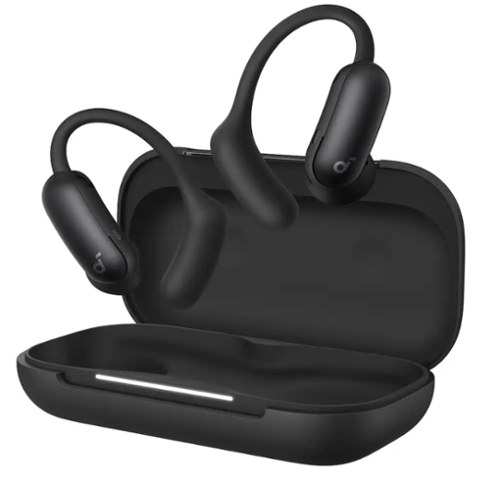
Why choose between open-ear comfort and powerful noise cancellation when you can have both? The Soundcore by Anker AeroFit 2 Pro wireless earbuds feature an innovative dual-form design that transforms with a simple ear hook adjustment, giving you open-ear freedom during workouts and commutes, then switching to active noise cancellation mode when you need deep focus or privacy in noisy environments. This revolutionary versatility means one device adapts seamlessly to every part of your day ~ morning runs, office meetings, evening wind-downs ~ without the discomfort or compromise. The open-ear form keeps your ears breathable and aware of your surroundings while skin-friendly liquid silicone hooks provide a soft, pressure-free fit that feels like nothing at all, even during extended wear. When it's time to block out the chaos, flip to ANC mode and experience effective noise reduction that creates your personal listening space on busy streets or crowded public transit. The A3875Z11 model doesn't sacrifice sound quality for flexibility: immerse yourself in studio-grade audio powered by 11.8mm composite drivers, Hi-Res certification, and LDAC technology, enhanced by dynamic head tracking that delivers a vivid, theater-like spatial experience that moves with you. Stay connected with confidence thanks to 4 microphones and AI-boosted call technology that ensures your voice cuts through background noise with precision and clarity. Engineered to fit approximately 90% of ear shapes, the AeroFit 2 Pro dual-form wireless earbuds come with a 30-day money-back guarantee, so you can experience this game-changing design risk-free and discover how one device can truly do it all.
Customer Rating
4
An exciting new entry in the open-ear market
on June 10, 2026
Posted by: BobinVA
Open-ear earbuds have become my favorite style of earbuds, and I use them all throughout the day every day. Recent models strike just the right balance between sound quality, comfort, and situational awareness. I have models that approach the open-ear concept in different ways, such as bone conduction or “air conduction”, but they all share the same problem: leaving the ear canals open will allow ambient sound to drown out what you’re listening to in certain situations.
Traditional open-ear devices place their drivers (whether bone conduction or tiny speakers) away from the ear canal. This makes it impossible for manufacturers to deploy any kind of active noise cancellation (ANC) in an open-ear design. Not anymore. Anker’s new Aerofit 2 Pro dual-form earbuds offer both open-ear and ANC forms to (hopefully) be the best of both worlds.
Comfort and fit: Anker touts these as being able to fit over 90% of the population with an ear diameter over 5/8”. I didn’t measure mine, but they were quite comfortable. The AeroFit 2 Pro feature an ear hook with the battery located behind the ear. They’re covered in a soft silicone, and the result is a very comfortable earbud. For active usage, such as running, the hook-style earbuds are very secure, and these were no exception. Compared to other hook-style earbuds that I have, these were actually more comfortable. That’s because of the design of the part containing the drivers—there are no hard edges to rub up against any part of the ear. With other models, I always ended up with a sore spot where the driver unit touched my ear, but that didn’t happen with the Aerofit 2 Pro. If earbuds aren’t comfortable, you won’t wear them—these are very comfortable.
Sound quality: this is where Anker is trying to do something new. Open-ear earbuds are my favorite because I love staying connected to the world around me, but they are lacking when I want to immerse myself in my music. The Aerofit 2 Pro attempt to bridge that gap, allowing you to stay aware when you need to, but to be able to tune out the world when you want to.
Anker has come up with an innovative design for the Aerofit 2 Pro. They feature a 5-position switch that allows you to choose 2 levels of open-ear listening and 2 levels of ANC listening, with a neutral position that maintains whatever mode you’re using, to prevent a sudden, jarring transition. In open-ear mode, the Aerofit 2 Pro are comparable to other “air conduction” earbuds (they are not bone conduction). The sound is clean, but just like any open-ear earbuds, you won’t be wowed by the bass response. Moving to either of the ANC modes turns on ANC, and the difference is notable. As you might expect, having them in the ear canal produces a fuller, richer, more bass-heavy sound. Does the ANC compare to traditional in-ear monitors with ANC? No, not really, since they don’t include ear gels that can seal inside the ear canal. The shape of these is similar to those popular white earbuds, so they’re not designed to push deeply into the ear canal. I think this design is more comfortable for long-term wearing, but it does result in allowing more ambient sound to enter your ear than you might like. So, while ANC mode definitely shuts out more external sound than open-ear mode, don’t expect silence. Anker is pretty upfront about this, but it’s important to know that going in. ANC mode allows you to listen in noisier environments, but they will not be shutting out the outside world.
Miscellaneous: Anker made a wise choice to include physical buttons on the Aerofit 2 Pro. Why? Because these are designed to be touched often, switching between modes as often as necessary, and that would likely result in lots of unwanted button presses if the buttons were touch-sensitive. The buttons support single, double and triple-presses with functions that are user-assignable. It gives really good control using only the buttons, including volume changes, which is rare.
Anker’s app provides lots of options. There are multiple EQ options, including the ability to set your own custom EQ, which was my favorite. There’s also an EQ option that boosts volume, and this is useful for audiobooks and podcasts.
Verdict: In the open-ear market, Anker has introduced an exciting new option. Compared to similar offerings from the market leader, the Aerofit 2 Pro not only held their own, but excelled in comfort and were slightly better in sound quality as well. The ability to dynamically get more isolated sound is a feature found nowhere else. You’ll need to understand what you’re getting, however: a really good set of open-ear earbuds with some ANC capability. The ANC definitely helps, but the design still allows ambient sound to enter the ear canal, making them less than fully isolating.
Most earbuds in this category have gotten expensive, and the same applies here. Anker has already offered sales, so look for a good sale, and you’ll be very happy. I think I’m going to replace my previous earhook open-ear earbuds with these.
I would recommend this to a friend!
Share this review:


0points
0of 0voted this as helpful.
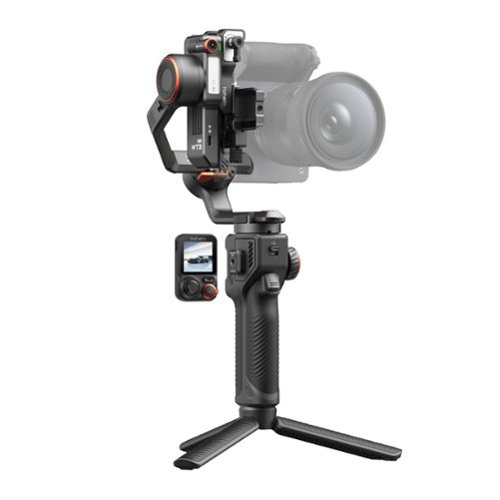
Hohem iSteady MT3 Pro is the most advanced AI camera stabilizer. It tracks humans, pets, vehicles and any subject you want, and it comes with a detachable remote for more flexible control. From camera mounting, balancing, to switching to vertical shooting, everything is quick and easy. The kit version includes the Spot Mini Motor and twist handle for professional, efficient filming.
Customer Rating
4
A serious gimbal for serious cameras
on May 12, 2026
Posted by: BobinVA
I love my camera, a discontinued long-zoom bridge camera with a maximum optical focal length of 600mm, but trying to get smooth hand-held motion videos was next to impossible. No matter how hard I tried, my videos always had that “home video” look that typifies most family videos, and those are hard to watch.
The Hohem MT3 Pro (and its sibling, the MT3) seek to rectify that situation. The Pro version handles payloads of up to 5.5 pounds, more than enough for my DSLR. Here’s my experience with this gimbal…
Unboxing is pretty impressive. The gimbal comes in a classy black box with plenty of custom foam padding. The gimbal itself is made from high-quality black aluminum with orange accents, giving it a high-end look. A screw-in tripod is included to allow you to set the gimbal on a flat surface if you don’t want to hold it continuously. There’s a quick-start guide included, but if you want a detailed user guide, Hohem supplies those via its web site and/or app. The app adds a number of features, but thankfully it isn’t required to get the full use out of the gimbal.
This was my first gimbal, so I wasn’t sure what to expect. The first thing you need to do is to attach your camera and balance the gimbal. The MT3 Pro utilizes an Arca-swiss mounting system, which is the same as what is used on many tripods and monopods, allowing you to quickly switch between those and the MT3. Although my camera certainly isn’t the heaviest (about 2.5 lbs), it’s still considerably weighty, requiring the mounting plate to be securely attached. The plate uses a hand-tightened screw, and it had to be as tight as I could get it or the camera would turn while in use. I mainly shoot horizontally, so that wasn’t a big deal, but when I wanted to go vertical, I had to make sure it was tight. I’ve seen other online commenting about this same thing, so I’m not sure if it’s my camera’s mounting screw or not. A clip-style lock like the ones used throughout the gimbal would have been better.
Having never balanced a gimbal before, I wasn’t sure what I was doing. The Hohem video walked me through it, but it was confusing to understand what I needed to do to balance the tilt axis. It wasn’t until I found another video online that I was able to understand what I needed to do. Each axis can be independently locked, but they must be unlocked when you turn the gimbal on. While the metal is coated in Teflon, I still found it difficult to move the mount where the camera attached. That one also includes a fine-tuning knob on the lower quick-release plate. This makes it very easy to do small adjustments, and I wish they had incorporated something like this for the other axes. Eventually I got the hang of it and the camera remained stationary, meaning I was ready to turn it on. Turning on the power actives the motors, which is where the magic happens. It’s important to calibrate the gimbal before using it, and this can be done using the small screen on the included remote.
Speaking of the remote, the MT3 Pro includes a detachable remote control, which can be used to control the gimbal when you’re not holding it. This is a pretty awesome part of the package, as it allows you to be in your own photos/videos without having to ask someone else to hold your camera. It features a joystick, shutter button, and zoom lever. The joystick allows you to control the gimbal itself, which is great for getting in the shot yourself and getting it just right. For compatible cameras, you can use the zoom lever to zoom in and out, then press the shutter. The remote allows you modify a large number of settings and choose whichever tracking mode you need. Turning on AI shows a live preview of (almost) what the camera sees. Within the live preview, simply draw a box around the person or animal you want to track, press the trigger button, and the gimbal will keep your camera fixed on that object. This works remarkably well.
Using the MT3 Pro is like peeling an onion. At the most basic level, it’s simple: it keeps the camera smooth and steady while you follow a subject or move around a subject, cancelling out the shakiness that you’d normally get with hand-held shooting. There’s so much more to this gimbal, but really mastering it will take time and practice. It has a number of hidden features such as the ability to create a smooth spiral shot, the kind of thing you won’t need much, but when you do, you’ll be glad to have this gimbal. The MT3 Pro also includes a fill light that can vary its brightness as well as its color output. This comes in handy when you’re shooting in low light, especially since adding a light on the camera itself will unbalance the camera, causing you to take time to rebalance. There are a number of features that can be accessed by pressing buttons, either on the gimbal or the remote, and while this is convenient, it’s not easy to remember what to do when you need it, if you don’t do it often.
Using the MT3 Pro is like peeling an onion. At the most basic level, it’s simple: it keeps the camera smooth and steady while you follow a subject or move around a subject, cancelling out the shakiness that you’d normally get with hand-held shooting. There’s so much more to this gimbal, but really mastering it will take time and practice. It has a number of hidden features such as the ability to create a smooth spiral shot, the kind of thing you won’t need much, but when you do, you’ll be glad to have this gimbal. The MT3 Pro also includes a fill light that can vary its brightness as well as its color output. This comes in handy when you’re shooting in low light, especially since adding a light on the camera itself will unbalance the camera, causing you to take time to rebalance. There are a number of features that can be accessed by pressing buttons, either on the gimbal or the remote, and while this is convenient, it’s not easy to remember what to do when you need it, if you don’t do it often.
I used the MT3 Pro gimbal with 2 different cameras and my phone. The phone grip is easy to use, but it does work better when the phone doesn’t have a case on it. The gimbal handled my DSLR (as mentioned above), as well as a mirrorless camera. Switching between them was easy, and only required a rebalancing/calibration, which gets easier the more you do it. I did find that using it with my heavier camera could have benefited from the additional handle that is available in pro kit, or by itself. I did not get the pro kit, but I’m going to buy the handle to make it easier to handle the additional weight and to do things like the “briefcase shot”.
One complaint I have is that sometimes the gimbal will beep but not show any error messages. I had this happen a few times, and if it keeps beeping, it will eventually power itself down and turn off. I think this can happen when it’s out of balance and the motors are working too hard, but I’m not sure. I wish that it would display warning messages to tell me what’s wrong, but I never saw anything like that.
Though I’m just a beginner in the world of gimbals, I’m excited about the new possibilities this will open up for me. Fantastic build quality, professional looks and lots of features make this the one to beat. With a capacity of up to 5.5 pounds, it’ll likely handle your camera. If you are only going to shoot with your phone, you probably don’t need this one and can save some money on one of Hohem’s other models targeting phones. I haven’t tried any competitors, but I can’t imagine a more full-featured gimbal in this price range.
I would recommend this to a friend!
Share this review:


0points
0of 0voted this as helpful.

Upgrade your mobile gaming setup with the GameSir G8 Plus MFi Type-C Mobile Controller ~ the official Apple-certified controller built to deliver true console-level performance on your iPhone, iPad, and Android devices. Designed for gamers who demand precision, speed, and comfort, this controller replaces unreliable Bluetooth connections with a stable, low-latency Type-C wired link, giving you instant response time in every match. Featuring Hall Effect joysticks and analog triggers, the G8 Plus offers drift-free accuracy and long-lasting durability, making it perfect for competitive shooters, racing titles, RPGs, and cloud-gaming platforms. Two remappable back buttons let you trigger advanced moves faster, while the ergonomic, textured grip ensures all-day comfort during intense gaming sessions. The adjustable stretch design securely fits most smartphones and compact tablets (125~215 mm), and pass-through charging keeps your device powered while you play ~ so the action never has to stop. With customizable faceplates and interchangeable thumbsticks, you can tailor the controller to your personal style and gameplay preferences. If you~re tired of touchscreen controls and want a premium, console-style experience on mobile, the GameSir G8 Plus MFi is the perfect upgrade.
Customer Rating
4
Everything I wanted in a mobile controller
on May 3, 2026
Posted by: BobinVA
My review will come from a different perspective than you may find elsewhere—I’m a fairly casual gamer who is a first-time controller user. I don’t have the perspective of a long-time gamer evaluating this controller in comparison to many others, so I’ll share my “newbie” views of getting up to speed with this controller. If you’re shopping for a controller for the first time, I hope this will be helpful to you.
As I’ve gotten more into gaming, especially arcade-style games on my phone, I’ve increasingly been thinking that a controller would make the experience much better. The market for phone controllers seems to be growing, so there are lots of choices, but too many of them require an ongoing subscription. Perhaps that makes sense if you want to be on the cutting edge, getting the latest features as soon as they’re available, but for me that’s a show-stopper.
Since this is my first controller, I wasn’t really sure what to expect. I thought it might be fairly cheap-feeling, but I was pleasantly surprised to find that not to be the case at all. The Gamesir G8+ MFi is a solid controller that feels great and is packed with features.
Physical options: the controller is ready to go out of the box, but there are a number of adjustments available if needed. This thing is very customizable. The 4 main buttons attach magnetically, allowing you to change their configuration to mimic the Xbox or PlayStation layout. Three extra joysticks are included, so you can use whatever you prefer. They don’t change the way the joysticks function, but they feature different surface textures and sizes, which is nice. You can also swap out the rubber bumpers that grip the phone in the case, to accommodate phones and cases of different thicknesses. Even the faceplates attach magnetically, giving the option to purchase replacements in different colors. Lastly, there’s a panel in the “floor” of the controller (under the phone) that can be removed to provide a little more space for the camera bump.
Getting started: An important thing to note about this controller is that it is a USB-C controller, not Bluetooth. It features an innovative movable USB-C connector, so you can move the connector to the proper angle to connect to the phone. Once that’s done, expand it to fit around the phone. The Gamesir logo button lights up to indicate a successful connection. It illuminates in white for iPhones, and blue for Android phones (I tested both). I do wish the controller did a better job of accommodating thicker phones/cases. I have a phone grip attached to my case that is not any thicker than the camera bump, but it is enough to prevent the left side of the phone to line up with the silicone pad on the left side. Taking the case off corrects this, but I wish I didn’t have to do that. It plays just fine with the case on, but it doesn’t feel as secure.
Gameplay: As I said above, my experience with controllers is limited, but I was pretty pleased with the G8+. It offers both left and right joysticks and a D-pad, depending on what you prefer and what your game will support, which is pretty standard. I found all the controls to be very responsive, but just like a new pair of shoes doesn’t make me faster, a good controller didn’t make me a better gamer! The controller worked well with sports games, city-builders (yep, even those), and classic arcade games, letting me explore Apple Arcade more deeply.
Versatility: The G8+ is designed to be used with a number of different devices: phones, tablets and even your PC. Connecting to a PC is accomplished via an additional USB-C connector on the bottom of the controller. This connector also provides pass-through power to your phone, meaning you never have to stop playing to recharge your phone.
Connecting to a tablet seems awkward, but it actually works. Other reviews have dinged the G8+ because of limitations on how wide it can be expanded, but this is mistaken. The included documentation doesn’t mention this, but the controller can actually be separated enough to accommodate a tablet. To do this, pull it to its widest point, then bend it slightly while pulling, and it will separate, revealing a set of 5 springs. Doing this makes you think you’re going to break it, but it’s tough enough to take it. Sure, you’ll have a set of exposed springs behind your tablet, but I think there may be covers available.
The G8+ does support rumble, but not when used with an iPhone. That’s because MFi does not support rumble, but hopefully Apple will allow this in future update to the spec.
Gamesir app: Gamesir provides an app, which is necessary for things like firmware updates. Mine immediately found a firmware update, but it took a few tries to apply it. A number of settings can only be tweaked in the app, so it’s definitely necessary. I’ve seen people say the app didn’t work for them, but I had no trouble with it, and used it to tweak things like joystick dead zones and enabling the hair triggers.
I’m very happy with the G8+, and I’m confident it will help me to enjoy playing mobile games much more than I would have otherwise. It comes at a reasonable price, does not require a subscription, doesn’t need batteries and is very well built. This is a great addition to a crowded market, and it deserves your consideration. For me, it’s a keeper!
I would recommend this to a friend!

Share this review:


0points
0of 0voted this as helpful.
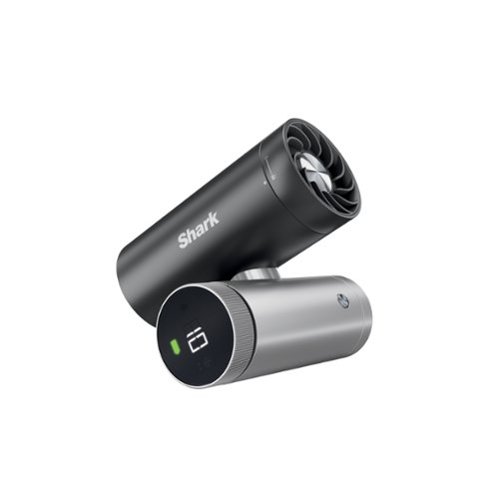
Meet Shark ChillPill, the only 3-in-1 fan, mist, and InstaChill personal cooling system. ChillPill delivers 3 customizable ways to powerfully cool indoors and outdoors. The high-speed fan delivers airflow up to 25 ft per second, while the dry-touch evaporative misting attachment provides an instant refresh. Shark~s revolutionary InstaChill Cooling Plate chills in seconds to drop your skin temperature by up to 16~F on contact.
Customer Rating
4
Powerful cooling in a small, personal device
on April 27, 2026
Posted by: BobinVA
The Shark Chill Pill enters a personal fan market that is crowded by cheap, plastic fans powered by a couple of AA batteries and featuring hi and low speeds, if you’re lucky. The Chill Pill features an innovative design, rechargeable battery and 3 distinctly different ways to cool yourself when you need it.
The design is unlike anything else on the market. Two cylinders are joined together in the middle with a twistable joint, allowing you to position it in whatever way works for you. One of the cylinders holds the rechargeable battery and features a round led screen showing battery level, fan speed and mode icons. The other cylinder holds the fan outlet at one end and a metal mesh filter at the other.
The fan features 10 speeds. Shark recommends the first 5 for indoors and the others for outdoor use. Of course, this is entirely dependent on how hot you are, but one reason for suggesting the lower speeds for indoor use is that this little device is rather loud. You might not want to use this next to someone sleeping next to you. The fan is actually bladeless, but it moves a lot of air and is very effective at providing relief from the heat. Keep in mind that this is personal fan, since it’s small size makes it effective only for one, but that’s why you’re interested in this, right?
Perhaps the most innovative feature of the Chill Pill is the cooling plate, something I haven’t seen anywhere else. Swap out the fan for the cooling plate and start it up. There are 2 levels of cooling to choose from. A smooth, shiny metal plate cools quickly and you simply press the plate to your skin to experience soothing coolness wherever you need it. This is great for providing instant relief when you need it, especially for things like headaches. This is much more convenient than using ice cubes and dealing with the melting.
The third mode of operation is dry-touch mist. This involves a small tank that uses a white wick (4 are included) to absorb water that put into the tiny tank. This then produces a mist that, together with the 10 speeds of cool air, cools you down even more. Shark calls it a “dry mist”, but you wouldn’t want to point this at your face while wearing glasses, unless you don’t mind them getting wet. However, it really is a very fine mist that seems to evaporate before it falls. I tested this by sitting the Chill Pill on a flat surface, with a dry paper towel under the area where the mist fell. Neither the towel nor the surface exhibited any moisture at all. This mode is especially useful on a hot day outside. The tank will last about 8-10 minutes of continuous use, but if you take a bottle of water with you, it’s easy to refill.
The Chill Pill is designed to be a personal cooling device, and it does a great job at that. Shark offers accessories like a clip, cross-body strap, and bike clamp, but none of these is included. In the box you get the Chill Pill, 3 caps for the different operational modes, charging cable, and drawstring bag for holding the caps. The Chill Pill allows you to get some relief from the heat without the need to carry a bulky fan or search for power. While I haven’t done enough testing to really know how long the battery lasts, I’m impressed with how much I’ve been able to use it while hardly impacting the battery. This is truly a personal device that you can take anywhere. I’m looking forward to seeing how well it can do at a hot football game in August. I think it’ll be up to the task.
The Chill Pill retails for $149. It’s very well built, just like everything Shark makes. It does what it promises to do, but this is a pretty expensive item. You do get what you pay for, and you won’t be disappointed with the Chill Pill, but you’ll need to be able to swallow the price to do so.
I would recommend this to a friend!


Share this review:


+2points
2of 2voted this as helpful.
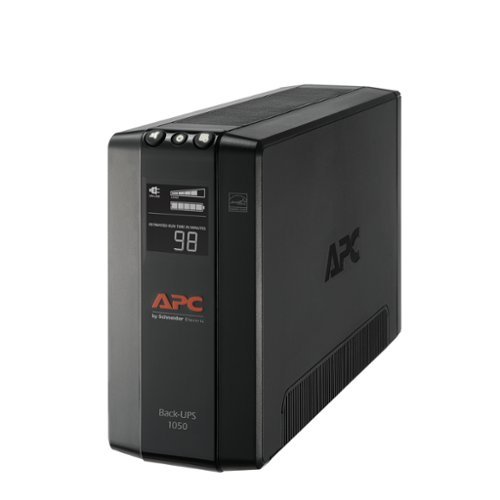
The APC Back-UPS Pro BN1050M mini-tower model is designed to power your critical electronics during blackouts and protect them from the dangers of surges, spikes, lightning, and power outages. By powering your critical electronics during blackouts, you ensure personal and professional connectivity when it matters most. Improvements in size and surge protection come at an affordable price, making the Back-UPS ProBN1050M mini-tower model a perfect solution for your power protection needs.
Customer Rating
5
Peace of mind for power outages
on January 28, 2026
Posted by: BobinVA
As a long-time user of APC’s backup battery products, I was excited to get my hands on the new Back-UPS Pro BN1050M mini-tower model. It provides all of the reliable features I’m accustomed to having, as well as one that my older model did not have: a display screen.
Getting started is easy. After unboxing, you’ll notice the big yellow sticker advising you that the battery is not yet connected. To do so, simply slide open the battery door, connect the pink wire, then close the door. As a bonus, I got to see a little spark as the wire’s metal got close to the connector. That told me that the battery already had a charge.
To start using the UPS, simply choose what to plug in to the 8 provided outlets. While all of the outlets are protected from surges, only 4 of them have battery backup. You’ll want to make sure that the things you’ll need most during a power outage are connected to the outlets with battery backup. The outlets are nicely spaced, and I had no trouble connecting all my devices.
At its core, the BN1050M is a battery and surge protector, but a smart one. In addition to protecting your devices from dangerous electricity spikes, it also regulates the power output so that it’s steady and “clean”. If the power goes out, it can provide enough power to safely shut everything down without losing anything you’ve been working on.
The built-in display shows things like how much power is being put out, charge level of the battery, and load being pulled by the connected devices. When I tested the unit by pulling the plug, it immediately notified me with a loud beep that I was on battery power. These beeps continue every 20 seconds or so to remind you. The LED shows an estimate of how much time is left before the battery runs out. Both the display and the alarm can be turned of if you like. Initially, the display showed a pretty impressive number of more than 90 minutes, but it quickly scaled down until it settled in around 35 minutes. That was based on a laptop and two 4K monitors plugged in. The estimate ended up being pretty accurate, as I did indeed get to keep working for more than 30 minutes, and I still had some power to spare. APC estimates that you can run off battery power for more than 3.5 hours if all you need is your internet router and modem. In a pinch, that could be a good way to go.
The BN1050M also includes a feature that I thought was a great idea, although I did not test it. In the box there is also a cable with an ethernet plug on one end and USB-A plug on the other. When paired with the Powerchute app on a desktop computer, it can safely shut down a desktop computer without human intervention when a power outage is detected. This would be very useful for a desktop that runs unattended throughout the day, but that’s not my use case.
Having a battery backup gives peace of mind to know that even if the power goes out, you’ll be able to safely shut down without losing your work. Even if you only use it to provide internet during an outage, your phones and other mobile devices can keep working for hours, and maybe not miss a beat. The Back-UPS Pro BN1050M is a compact unit that is thoughtfully designed and does what it’s supposed to do. You can rest easy knowing that you’ll be prepared for a temporary power outage. I know I do.
I would recommend this to a friend!
Share this review:


0points
0of 0voted this as helpful.
BobinVA's Review Comments
BobinVA has not submitted comments on any reviews.
BobinVA's Questions
BobinVA has not submitted any questions.
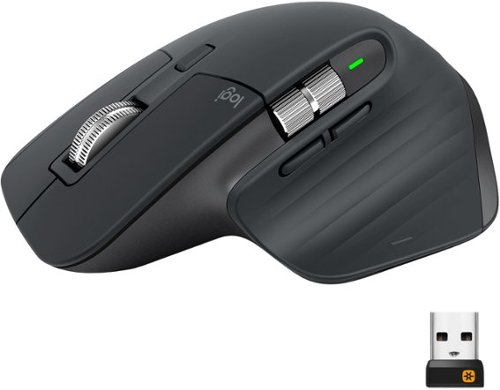
MX Master 3 is instant precision and infinite potential. Designed for designers and engineered for coders, it~s our most advanced Master Series mouse yet. App-specific button customizations speed up your workflow in the apps you use most and the electromagnetic MagSpeed wheel enables fast noiseless scrolling. Your hand rests perfectly on the sculpted form and allows you to work comfortably for hours across multiple computers and operating systems in one fluid workflow. Ready for video calls - predefined settings for Microsoft Teams and Zoom let you instantly mute and Start/Stop your video call. With MX Master 3, you can truly master what you make.
Bluetooth is turned off on our work computers. Will this operate as a wired mouse with the USB cable attached or is it strictly for charging
Yes, it will operate as a wired mouse that way, but that is really defeating its purpose. Can you use the unified receiver instead? I'm doing that instead of bluetooth, and it works very well.
6 years, 11 months ago
by
BobinVA
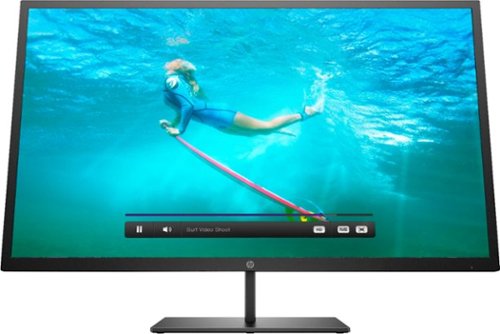
Multitask comfortably using this HP Pavilion 32-inch monitor. The QHD resolution provides immersive visuals for gaming and a spacious work space. Enjoy consistent clarity and color from multiple positions thanks to the 178-degree viewing angle. This HP Pavilion 32-inch monitor features an anti-glare panel for better visibility in bright conditions, while the Low Blue Light mode reduces eyestrain.
Wall mountable - yes How can this be wall mounted? Please suggest a wall mount for this monitor.
The monitor comes with a bracket that you can attach to the back of the monitor. This will allow you to attach it to a mount. I'd suggest a full-motion wall mount that has the square center bracket, as this will match up with the bracket on the monitor itself. I don't think the monitor conforms to the VESA standard for mounting brackets, but I'm not sure. I'm not mounting my monitor, so these are just some thoughts after having just setting mine up. Good luck!
7 years, 3 months ago
by
BobinVA
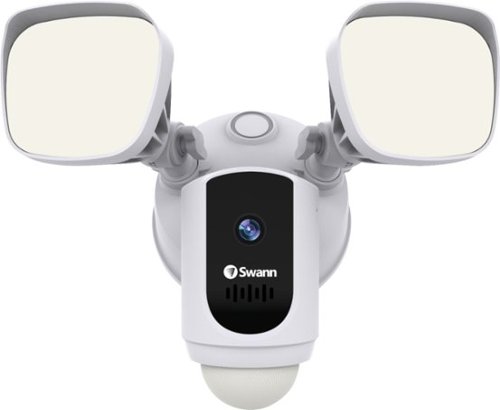
Protect your home or business with this Swann 1080p Wi-Fi floodlight security camera. The Full HD resolution lets you review captured footage in stunning detail, while the floodlight ensures that subjects are illuminated. This Swann 1080p Wi-Fi floodlight security camera includes a siren and two-way audio for scaring off trespassers and potential intruders.
How good is the motion detection really? I have purchased several cams and the motion detection is awful. Thanks
I've found it to be quite good. Sometimes it seems to pick up the motion of swaying tree branches. I'm still trying to figure out the optimal sensitivity setting.
7 years, 4 months ago
by
BobinVA
Protect your home or business with this Swann 1080p Wi-Fi floodlight security camera. The Full HD resolution lets you review captured footage in stunning detail, while the floodlight ensures that subjects are illuminated. This Swann 1080p Wi-Fi floodlight security camera includes a siren and two-way audio for scaring off trespassers and potential intruders.
How long are the recorded clips? Do the clips start before motion is detected?
I think the clips are about 30 seconds. They do seem to start before motion is detected, which results in complete clips of the action.
7 years, 4 months ago
by
BobinVA
Protect your home or business with this Swann 1080p Wi-Fi floodlight security camera. The Full HD resolution lets you review captured footage in stunning detail, while the floodlight ensures that subjects are illuminated. This Swann 1080p Wi-Fi floodlight security camera includes a siren and two-way audio for scaring off trespassers and potential intruders.
Can the floodlight be wired and howlong do the battery last
I'm not sure if there are other models, but mine is wired only. There is no option for it to be battery powered. Given how bright the lights are, and how often they're likely to be tripped, I would think that batteries would go dead pretty often. If you have the choice, hard wire it.
7 years, 4 months ago
by
BobinVA
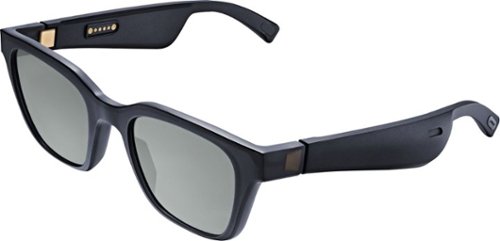
Meet Bose Frames. Bluetooth sunglasses with a soundtrack. The first audio sunglasses with built-in Bose speakers for an immersive audio experience unlike any other. A revolutionary personal audio experience hidden inside two classic designs, each enriched with premium accents and materials. Play music, take calls, and enjoy the sun with UVA/UVB protection. Bose Frames Alto feature a classic angular lenses, available in small and large size.
How long does the battery last?

Unlock new potential for your wireless headphones with this Airfly headphone accessory. It plugs into any conventional headphone jack to enhance your listening experience and can pair with in-flight entertainment systems for added convenience. This Airfly headphone accessory has an eight-hour battery life and recharges through USB, so it's easy to take anywhere.
Can you plug wired headphones into this to make them wireless?
No, this is a wireless transmitter, not a wireless receiver. The headphone jack in the AirFly is for the source of the sound, and it then sends it out to headphones that are able to receive the signal.
7 years, 5 months ago
by
BobinVA

Study or work hard on this HP Envy convertible laptop, which features a large 15-inch screen. The laptop opens up easily to create a tablet for note-taking, while an AMD Ryzen processor supports Windows 10 Home and other applications effortlessly. The reliable128GB solid-state hard drive on this HP Envy convertible laptop stores lots of files and programs.Learn more.
Can this device connect to both 2.4 GHz and 5 GHz WiFi?
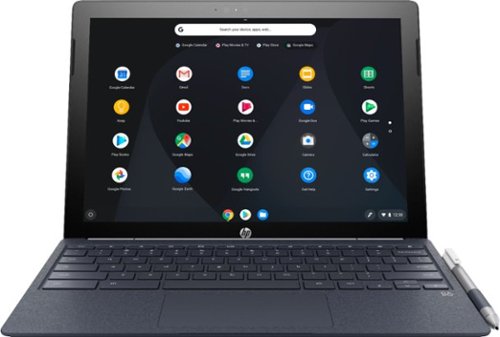
Run programs on this 12.3-inch HP Chromebook convertible laptop. Its detachable touch-screen display lets you enjoy brilliant 2K content, and you can write and draw on it with the included Active Pen. This HP Chromebook convertible laptop has 32GB of storage, and its Intel Core m3 processor and 4GB of RAM provide smooth performance.
Does this computer have a camera in which I can use Skype?
It has both front and rear-facing cameras. However, I don't think there's a version of Skype that will work with Chrome OS. If this is a deal breaker for you, you should research that to find out.
8 years, 3 months ago
by
BobinVA
Run programs on this 12.3-inch HP Chromebook convertible laptop. Its detachable touch-screen display lets you enjoy brilliant 2K content, and you can write and draw on it with the included Active Pen. This HP Chromebook convertible laptop has 32GB of storage, and its Intel Core m3 processor and 4GB of RAM provide smooth performance.