


BobinVA's stats
- Review count163
- Helpfulness votes454
- First reviewDecember 19, 2014
- Last reviewSeptember 1, 2026
- Featured reviews0
- Average rating4.1
Reviews comments
- Review comment count0
- Helpfulness votes0
- First review commentNone
- Last review commentNone
- Featured review comments0
Questions
- Question count0
- Helpfulness votes0
- First questionNone
- Last questionNone
- Featured questions0
- Answer count28
- Helpfulness votes23
- First answerAugust 12, 2016
- Last answerJanuary 22, 2022
- Featured answers0
- Best answers2

NIU - KQi 200P Foldable Electric Kick Scooter w/ 34 mi Max Operating Range & 20 mph Max Speed - Gray
Designed for reliable daily rides with practical power, comfort, and protection. Front suspension smooths city streets and reduces rider fatigue. A smart battery system delivers consistent performance, with 20mph top speeds and up to 34mi of range. Backed by NIU's industry-leading 2-year warranty, you can ride with confidence from day one.
Posted by: BobinVA
This is my second electric scooter, and the first by NIU. I’ve had so much fun zipping around the neighborhood that I thought it would be good to have another for family members to join me.
Assembly is a simple matter, involving unfolding the front tube, inserting the wiring into the tube and fastening a few screws with the included tool. The scooter comes pre-charged with enough juice to try it out, which you’ll want to do right away. A full charge takes 4 or 5 hours. For your first ride, you won’t be able to go faster than 9 mph for the first 200m, which is a safety feature to give you a bit of time to get used to it.
Assembly is a simple matter, involving unfolding the front tube, inserting the wiring into the tube and fastening a few screws with the included tool. The scooter comes pre-charged with enough juice to try it out, which you’ll want to do right away. A full charge takes 4 or 5 hours. For your first ride, you won’t be able to go faster than 9 mph for the first 200m, which is a safety feature to give you a bit of time to get used to it.
The display is very simple and only shows a few bits of information, such as remaining charge (shown as bars), current speed, mode and Bluetooth connection. No distance is shown on the display, it is only shown in the app, which is a must. I wish that more information were shown on the display, and that more settings could be done right from the scooter. As it is, you can switch between e-save mode (limits speed to 9 mph max) and sport, with a top speed of 18.5 mph. Other speed-limiting modes can be selected in the app. A double-press on the main button toggles the light, and five presses puts the scooter in pedestrian mode, useful if you need to walk along beside it.
The pneumatic tires and dual shock absorbers do a good job making the ride smoother. Compared to my other 2 year-old scooter, the 200P definitely feels nicer going over rough spots in the road. Deck space is adequate, and is pretty standard for the category. The deck is covered in a nice grip tape that is replaceable, which is a nice touch. New on this model are integrated turn signals in the handles. I’m torn as to what I think about these. They beep and put out a nice bright light, but they’re likely to be hidden by your hands or body, limiting their usefulness. In the dark they’re very bright and easy to see, so perhaps that’s their main use case. The button to turn them on is big, but it’s easy to hit the wrong one. Nonetheless, this is a good addition that only adds to the safety features of the scooter. The headlight is nice and bright and puts out a square-shaped beam that covers the road in front of you very well. There’s also a daytime running halo that is available if you desire. I really like the lighting options included here.
The pneumatic tires and dual shock absorbers do a good job making the ride smoother. Compared to my other 2 year-old scooter, the 200P definitely feels nicer going over rough spots in the road. Deck space is adequate, and is pretty standard for the category. The deck is covered in a nice grip tape that is replaceable, which is a nice touch. New on this model are integrated turn signals in the handles. I’m torn as to what I think about these. They beep and put out a nice bright light, but they’re likely to be hidden by your hands or body, limiting their usefulness. In the dark they’re very bright and easy to see, so perhaps that’s their main use case. The button to turn them on is big, but it’s easy to hit the wrong one. Nonetheless, this is a good addition that only adds to the safety features of the scooter. The headlight is nice and bright and puts out a square-shaped beam that covers the road in front of you very well. There’s also a daytime running halo that is available if you desire. I really like the lighting options included here.
Braking is extremely important, so let’s talk about it separately. The brakes are smooth and work well. There’s only one brake caliper, for the front drum brake. There’s also an e-brake in back, but it works automatically. There’s also another feature that I’m really liking—regenerative e-braking. With this turned on, the e-brake engages as soon as you let off the throttle. A small amount of power goes back in the battery as you slow down. This is a nice feature that should save on wear and tear on the drum brake. Settings allow you to choose the level of regenerative braking you desire, from none to strong.
The handlebars fold down to allow you to pick up and carry the scooter if you need to do that. It weighs about 53.6 pounds, so it’s not light, but neither is it too heavy to load it into your car to take it with you. On the left handlebar you’ll find a bell to allow you to let others know you’re behind them.
The app is very nice-looking and well designed. It’s easy to find the settings you want, but I find it curious that it only tracks your distance if you think to turn on the tracking at the beginning of each ride. If you forget to do that, nothing is tracked. Remaining charge is prominently shown, as is the button to lock the scooter. Once locked, attempts to move it more than a foot will lock the wheels and sound the alarm and blink the lights. While this won’t stop someone from just picking it up, it will make it harder to actually use it.
The app is very nice-looking and well designed. It’s easy to find the settings you want, but I find it curious that it only tracks your distance if you think to turn on the tracking at the beginning of each ride. If you forget to do that, nothing is tracked. Remaining charge is prominently shown, as is the button to lock the scooter. Once locked, attempts to move it more than a foot will lock the wheels and sound the alarm and blink the lights. While this won’t stop someone from just picking it up, it will make it harder to actually use it.
The NIU Kqi 200P electric scooter is a very nice addition to the crowded market of electric scooters. It’s well built with a nice set of features at a reasonable price. It provides a smooth ride with nice acceleration, and enough range to make it useful. I don’t know the history of the NIU company or how good their customer service is, but I’m pleased with this product so far, and I’m happy to add this one to my stable. I think you will be as well.
I would recommend this to a friend!
Share this review:


0points
0of 0voted this as helpful.

Introducing OpenDots ONE, the new open-ear clip-on earbuds from Shokz. With a fresh take on audio, OpenDots ONE is designed to keep you connected without the isolation. Simply clip them on and immerse yourself in your favorite sounds, wherever life takes you.
Customer Rating

5
Best overall air conduction buds
on April 22, 2025
Posted by: BobinVA
As a runner, I’ve been a fan of open-ear headphones for a while, and while I love bone conduction models, the sound quality is good, but nowhere near great. Shokz has been hard at work to improve this in their open-ear offerings, first with the Open Run Pro 1&2 models, then with OpenFit, and now with the new Opendots One. The Opendots are different than anything else Shokz offers, and are the latest entry into the world of clip-on earbuds.
Pros:
• Super lightweight and comfortable for extended wearing
• Excellent sound quality, rivaling some in-ear buds
• Great battery life
• Very secure fit, good for active lifestyles
• Wireless charging
• Super lightweight and comfortable for extended wearing
• Excellent sound quality, rivaling some in-ear buds
• Great battery life
• Very secure fit, good for active lifestyles
• Wireless charging
Cons:
• Expensive
• Good water and dust resistance, but not water or dust proof
• Expensive
• Good water and dust resistance, but not water or dust proof
Let’s deal with the top areas that I think make the difference for ear buds, then I’ll address the usage profiles where the Opendots would be a good pick.
Comfort – this is a big one for me, because if they’re not comfortable, then I won’t be wearing them. I am a big fan of the neckband style of bone conduction headphones, but I’ll admit they’re a little annoying when used with glasses. The ear cuff style employed by the Opendots is great for use with glasses, as they’re completely out of the way of glasses, similar to in-ear buds. The main concern with the clip-on style is ear soreness, or fatigue at the points where the cuff touches the ear. As with their other models, Shokz uses titanium and soft silicone to make these very comfortable. Unlike other clip-ons that use hard plastic, the Opendots are flexible and comfortable. As with anything that touches the ear for any length of time, I had to shift them from time to time, but I had no problem wearing them for hours at a time. They are also totally secure, and did not budge at all during my run.
Sound quality – this is where the Opendots really shine! These are quite possibly the best sounding earbuds that Shokz has yet produced, and they’re actually better than some in-ear buds as well. As I’ve found with the other “air conduction” models from Shokz, these have have a wider sound stage and a very enjoyable overall sound signature. There are several preset EQ options such as standard, vocal, bass boost and treble boost, as well as a 5-band custom EQ. These are good enough that I found myself putting them in just to listen to my music, something I never did with bone conduction, which I have for use while running. Call quality is excellent, on par with any of the top-shelf alternatives.
Features – the Opendots feature touch controls, and these may be done in two ways. First, you can tap the band that connects the battery to the bud, just like you would with any other touch-sensitive earbud, or you can tap the battery compartment that sits behind your ear. You can also squeeze or double-squeeze the battery compartment. I found these squeezes to be more dependable than tapping the band, which were sometimes ignored. Taps can be used to play/pause, accept or reject/end calls, and raise/lower volume (long press). Unfortunately, there isn’t any way to customize what taps do, and I would have liked to be able to skip forward or back in my playlist. The app does have a place to customize the taps, but currently all you can do is turn them on or off. Hopefully that will be rectified in a future update.
Something unique to the Opendots is that it doesn’t matter which earbud goes in which ear. They sense when they’re properly positioned, as well as which ear they’re in, so you don’t have to worry about keeping them in the right ear or placed in the right spot in the charging case. Speaking of the case, it is small and fits easily in a pocket, and it supports wireless charging, in addition to USB-C. Battery life is great. I didn’t use them long enough continuously to drain the battery, but I never had to worry about running out of power.
So, who are these for? As a runner, I don’t think you can do better than pure bone conduction (without an “air conduction” speaker). I say that because I sweat a lot and bone conduction models are often waterproof, or nearly so. Since the Opendots use tiny speaker drivers, they are by design more open to their surroundings. Shokz rates these at IP54, which means they’re water and dust resistant, but not water and dust proof. If you don’t sweat a lot or run in dusty environments, that would be plenty for you, and it’s enough for me too during the colder months of the year, but I probably won’t use them for running during the summer. That said, they are extremely secure, and I had no worries that they would fall out. In fact, they don’t move at all, so if you have difficulty with traditional earbuds when they get sweaty, that’s not an issue with the Opendots.
I would position the Opendots as all-around earbuds than can also be used for exercise as long as they won’t get too wet. That means wearing them around the house and using them for calls, meetings, and music, while preserving the ability to hear what’s going on around you when you need to do that, then going to the gym or for a walk/run. They’re comfortable enough to be your everyday buds, and sound good enough to use them for whatever you need. As with any open-ear style bud, too much exterior noise can drown out what you’re listening to, so if you need full-blown active noise cancellation and isolation, these aren’t the buds for you.
The market for ear cuff-style buds is growing rapidly. There are much cheaper options available, as well as those that cost a lot more. Build quality and performance put these in the premium category, in my opinion, but you’ll have to decide if that’s worth the price difference over cheaper competitors.
It's crucial to understand how you want to use these before you get them, or you may not be happy. Sound quality is really, really good, but if you don’t care about situational awareness, you’re probably better off with high-quality in-ear monitors. If, like me, you prefer not to have your ear canal filled up, then give these a try. You won’t be disappointed.
I would recommend this to a friend!
Share this review:


0points
0of 0voted this as helpful.

Blueair - 2-in-1 Purify + Humidify Air Purifier with HEPASilent and InvisibleMist Technology - White
Blueair's 2-in-1 Purify + Humidify is a powerful multi-functional air purifier + humidifier that provides both clean and humidified air all in one smart and beautiful device. Blueair's HEPASilent Technology purifies dirty air, while 360~ InvisibleMist Technology humidifies dry air, delivering ultimate air care with clean, fresh air and balanced humidity~ dual-action technology for ultimate air wellness. Independently evaluated for safety standards and third-party tested for performance as part of the AHAM Verifide Program for air cleaners, the fast purification takes only 12.5 minutes to clear the air, removing 99.97%** of all airborne pollutants down to 0.1 microns. Innovative refill through our premium LED display that doubles as a water refill without hassle, Auto Smart control with AutoHydrate feature; app connection, Night and Auto mode available, Designed to be easily cleaned and handled. **Tested on PM2.5 up to 90 minutes
Customer Rating

4
High quality device to improve air quality
on February 13, 2025
Posted by: BobinVA
We decided to buy this new Blueair purifier/humidifier after looking at some options online and placing our order. When the box arrived, we thought we may have gotten the wrong item delivered. We thought we were getting a tabletop unit that was fairly small and could be placed on top of a dresser. Instead, the Blueair 2-in-1 was much larger, and resembled a small water heater! After adjusting to the difference from our expectations, we were ready to get started.
The first thing you have to do is to open up the unit, take out the multiple filters, and remove the plastic from the filters. As I did that, I was struck by how well constructed this thing is. If you’ve ever had a humidifier, you’ll be familiar with the paper wicking filters used to draw water out of a tank. This has one of those, but it’s taller than most, and there’s a plastic frame to hold it in place. Below the filter is the water tank, with clear plastic window for seeing the water level. You can fill the tank by putting it under a faucet, or the recommended method for filling, which I’ll get to later. I filled the tank for the initial time and put the filters back in place. In addition to the water filter, there are 3 other filters for purifying the air, and these are rated to last for up to 9 months.
With the unit put back together, I used the attached handles to carry it to its designated place. The handles feel solid, and were easily able to support the weight of the unit plus water. Even full of water, the unit wasn’t overly heavy.
The control panel features 7 touch-sensitive buttons for operating the unit. After briefly familiarizing myself with the control icons, it was easy to use them to operate the unit, but the smartphone app provides an easier and more customizable way to operate the unit. Pairing the unit with the app was easy, and it even shows you the outdoor air quality as well, which is a nice touch. There are lots of features available, and when using the automatic mode, you can choose the humidity level you want to target. The unit is rated for a space of up to 300 square feet, so it’s not going to handle a large open floor plan space, and that led us to choose our bedroom for its main placement. After all, we spend a lot of time in there, and good air quality while sleeping is important.
The top of the unit features a grid for allowing the air to get out, with a center interface panel. This panel shows things like humidity level and fan speed, as well as indicators for auto mode, night mode, humidification mode, and filter expiry indicators. The brightness of the panel is completely customizable, making it comfortably bright in any ambient light. The panel has a neat trick, however: it is waterproof and doubles as an alternate way to refill the humidifier water level! The first time I did this, I had to overcome my reluctance to pour water onto an electronic display, but it is actually more convenient than taking it all apart to take out the tank for filling.
The fan is super quiet at lower levels, and I barely knew it was on when in use. In our bedroom, it was able to reach our desired humidity level quickly. Just to test it out, I also ran it in a room that was technically too big for it, but it did a good job of humidifying and cleaning the air even in the larger space, it just took a while. When the tank runs out of water, or if humidification is turned off, the unit goes into auto-dry. Auto-dry quickly dries out the wicking water filter when it’s not in use. This is a great feature which should prevent the growth of mold and mildew on a filter that is constantly damp. With older humidifiers, we had to add small amounts of chemicals to achieve the same result. I’ll be keeping an ey on this to see how well it works over time.
So, does it work? This is a very well-built unit with thoughtful features and the quality is evident throughout. But what really matters is how it improves the air quality in my home. Here’s where it gets difficult to determine. In our home, the air quality indicator always says that we have excellent air quality. Cooking is the main time when the quality dips, but the unit handles that pretty quickly. I’m not sure we can rely on the indicator light to determine our overall air quality. That’s not necessarily a bad thing, as air purifiers are meant to quietly do their job night and day, running constantly, so I may end up using the Blueair in that way.
We’ve used it every day for the last week and a half, and while I’m very happy overall with the build, ease of use, and integration with the app, it’ll take time to really tell how well it impacts our air quality. We need to use it over multiple seasons to really put it through its paces, but I have confidence that it will perform well. From what I can tell on the Blueair website, a 3-pack of air filters costs $50 and the water filter costs $25. This is what you can expect to spend every 9 months, and there are discounts available for subscriptions.
Based on our experience so far, we’re pleased with the Blueair 2-in-1 air purifier/humidifier and look forward to many years of improved air quality in our home.
I would recommend this to a friend!

Share this review:


0points
0of 0voted this as helpful.

Experience the next generation of power! The Greenworks Pro 80V 17 Inch Cordless String Trimmer features advanced brushless motor technology, delivering major torque, power and life - with virtually no maintenance required. The incredible power & performance is equivalent to a 30cc gas string trimmer, without the added weight, pesky pull start and noxious fumes of gas and oil. When it comes to outdoor power equipment, you put the emphasis on ~power.~ And why not? For homeowners like you who take on jobs big or small, you need heavy grade construction and long-lasting peak performance. The Greenworks Pro 80V family of tools meet the challenge with a universal battery system that works across multiple products, high-efficiency motors, and innovative smart technology.
Customer Rating
5
Powerful and solid trimmer
on December 23, 2024
Posted by: BobinVA
After years of using a corded electric string trimmer, I made the leap to the Greenworks cordless string trimmer. This year’s model features a more powerful 80V battery for longer run times, although the rated coverage of .5 to .75 acre is plenty for me.
Setup is easy and really doesn’t even require a glance at the user guide. The straight shaft just needs to be “unfolded” and tightened, attach the handle and head guard, and you’re good to go. The trimmer head is pre-loaded and ready out of the box.
The battery comes with a hefty charger that can provide a full charge in 40 minutes. The side effect of a fast charge is that a lot of heat is generated, so the charger has its own fan. I don’t think I’ve ever had a charger with a fan, so it was a little surprising to hear it spin up. You may want to charge it in another room if you’re trying to watch TV.
Once charged up, I headed out to the yard to try it out. Although it’s December, I waited on my last cut/trim of the year because I knew this trimmer was coming. The power this thing has is amazing! I was blasting through all my trimming needs in no time at all. The angle of the shaft allowed me use it to mow small patches instead of having to get in there with a mower, making short work of that part.
One thing that was immediately apparent was smooth sound and operation of the motor. There are two power settings (high and low), although I’m not sure why I would ever use the low power setting. The variable-speed trigger is a really nice touch, allowing precise control in every situation. The “tap to feed” feature works amazingly well—just a tap of the head on the ground advances the string so you barely need to pause to extend the string.
One thing that was immediately apparent was smooth sound and operation of the motor. There are two power settings (high and low), although I’m not sure why I would ever use the low power setting. The variable-speed trigger is a really nice touch, allowing precise control in every situation. The “tap to feed” feature works amazingly well—just a tap of the head on the ground advances the string so you barely need to pause to extend the string.
Construction of the trimmer is solid, with metal motor housing, shaft and clamp. It is very sturdy and feels like it’s built for heavy duty work. I didn’t use it enough to need to reload the spool, but the claim is that it’s easy and quick, so we’ll see.
I like that the battery is also able to be used in other Greenworks tools, so that’ll make it easier for me to expand by tool set.
Hopefully this trimmer will provide years of service. If so, I can’t see ever going back to gas-powered tools. Now that I no longer need to get out the spools of extension cord for my previous trimmer, I’m much more likely to just grab this one and get it done.
If you’re considering a battery-powered trimmer, you can’t go wrong with this one. I’m very happy I got it!
I would recommend this to a friend!
Share this review:


0points
0of 0voted this as helpful.
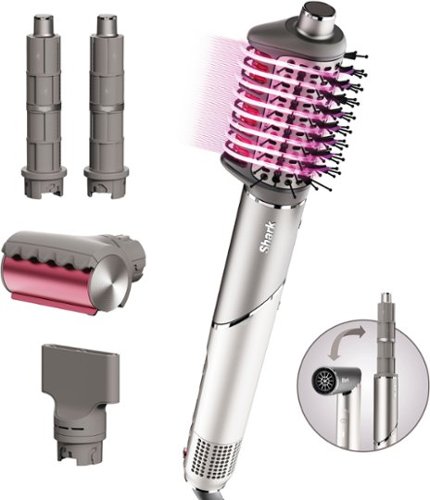
With Shark FlexFusion dry, curl, volumize, and smooth all with one tool. Equipped with Fusion Styling Technology for no heat damage styling & hot tool results. Rotate the hair dryer into a versatile multi-styler that~s now smaller, lighter, and more powerful than the original FlexStyle. Complete with Scalp Shield mode to deliver comfortable air temperatures for your scalp.
Customer Rating
4
An efficient multi-tool hair stylist
on November 18, 2024
Posted by: BobinVA
My hair is thick, wavy, coarse, and a little frizzy. Recently, I decided to get the Shark FlexFusion Air as a potential replacement for my current styling tool. What I find appealing about the Shark FlexFusion is that it addresses the main drawback of my previous tool: the inability to use the dryer as a standalone hair dryer. Like many similar tools, the FlexFusion styling attachments perform much better when your hair is partially dry, the Shark instructions call this “rough dry”. With the push of a button, the FlexFusion barrel rotates, creating a classic gun-shaped blow dryer, allowing me to easily rough dry my hair and get it ready for the styling tools to do their magic!
After my hair is partially dry, I can choose from a nice assortment of tools to finish my style. The Wet-or-Dry Fusion Brush does an excellent job of quickly drying and smoothing my thick, wavy, shoulder-length hair. While the unit includes a cool shot feature, I didn't use it when finishing my style with the brush. There is a handy QR Code printed inside the box lid that took me to an online quiz about my hair type, list the accessories I have, and get video instructions of how to use each tool. The video that gives instructions about how to use the Wet-or-Dry Brush describes the finish this brush gives to wavy hair as a “bouncy blowout”. That is a great description of my hair after using this brush. Drying is fast and effective. I can go from wet to a bouncy style in about 10 minutes. (See picture)
The FlexFusion also comes with two auto-wrap curlers for creating soft curls. I had to switch out these barrels when moving from one side of my head to the other. Because my hair is very thick, it took me longer to curl my hair than if I had used a curling wand. I found that I could only take small sections of hair at a time for curling. Following the instructions, I held each section for about 10 seconds and finished with a cool shot. The curls turned out great and lasted for two days without needing to be touched up. The curls were tighter on the first day, but the soft waves on the second day were still impressive.
Additionally, the Wet-or-Dry Fusion Brush has a heated section that can refresh your hair on its second day without washing it or smooth out a ponytail dent, which worked well for me. The package also comes with a Styling Concentrator, which can be used to target air onto a flat brush or round brush for a smooth finish. Unlike other air concentrators that I have used, this one rotates independently from its connection to the unit. This made rotation for precise air control much easier than some of my past hair dryers. The set also includes a Frizz-fighter Finishing Tool. The tool was easy to use and with a few swipes down the top of my hair, I was convinced that my hair was indeed smoother and had less flyaways. I cannot figure out what is so “magic” about this device…so maybe I am just imagining less frizz.
However, there are a few negatives:
- The instructions are printed on the box, so you can no longer access them once you throw away the box.
- The air intake covers a large band at the bottom of the device, where you are supposed to grip the FlexFusion. I hope to adjust my expectations over time, but for now, I find the grip position on the barrel to be cumbersome.
- The power cord is quite thick, likely due to the power of the FlexFusion. It reminds me of a clothes dryer or large appliance cord, making it unwieldy to wrap up and store in my drawer or cabinet.
- The instructions are printed on the box, so you can no longer access them once you throw away the box.
- The air intake covers a large band at the bottom of the device, where you are supposed to grip the FlexFusion. I hope to adjust my expectations over time, but for now, I find the grip position on the barrel to be cumbersome.
- The power cord is quite thick, likely due to the power of the FlexFusion. It reminds me of a clothes dryer or large appliance cord, making it unwieldy to wrap up and store in my drawer or cabinet.
Overall, I am enjoying the Shark FlexFusion Styling and Drying system. There are additional accessories that can be purchased for use with the base product, and I will most likely be adding the diffuser to my collection. The FlexFusion improves upon my current tool and adds capabilities I didn’t have before, in a compact and well-built package. If you’re looking for a do-it-all tool that can dry and style your hair, give the FlexFusion a look.
I would recommend this to a friend!

Share this review:


0points
0of 0voted this as helpful.
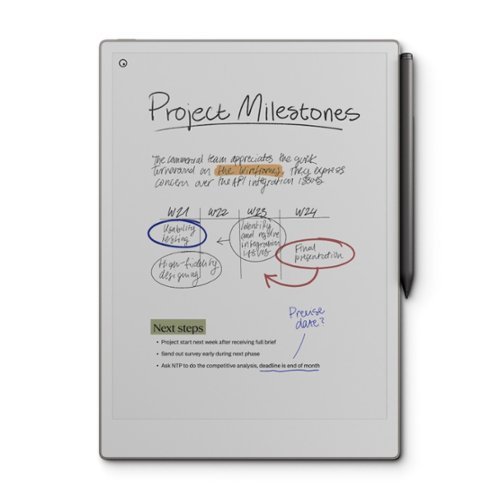
Bring paper into your digital workflow with reMarkable Paper Pro. Ultraslim and portable, but with a full-size 11.8~ color display, adjustable reading light, and an unmatched paper-like writing experience.
Customer Rating

3
Colorful e-ink tablet
on November 17, 2024
Posted by: BobinVA
I’ve read all the articles about how handwriting is actually better for retaining information, and since then I’ve been in pursuit of the perfect tools for taking notes by hand, yet integrating with my digital lifestyle. I’ve tried apps that scan paper pages, physical notebooks with dedicated apps, handwriting apps on Windows 2-in-1 laptops, Chromebook apps, and handwriting apps for my iPad. Each of these have things to commend their use, but ultimately all had some fatal flaw. That’s when my attention turned toward e-ink tablets.
The release of the Paper Pro brought what seemed like the perfect device for writing: excellent hardware utilizing a robust set of tools, and now in color! I picked one up and put it through its paces. If you are in the market for one of these devices, I hope I can help your decision process.
Unwrapping the Paper Pro gives your first glimpse of color on the e-ink screen. The build quality of the Paper Pro is impeccable. It’s a little thicker than the reMarkable 2, but that’s probably due to the frontlight. The aluminum back and sides feel smooth and solid, and there are 4 rubber feet on the back to keep it from moving on a table.
Setup was easy and the step-by-step walkthrough takes you through the entire process. After connecting to wifi and checking for software updates, you’re good to go. Two things are immediately apparent: the large size of the screen and the feel of the Marker Plus on the screen. Other e-ink tablets have textured screens, but compared to the Paper Pro, they feel much smoother. The Paper Pro has a “scratchier” feel and some additional resistance that is actually quite pleasant. I know that not everyone will like this, but I felt that it made my writing more accurate with more definite feedback, so I prefer what reMarkable has done with their latest screen.
The Paper Pro features a wide array of writing instruments, including ballpoint pen, fineliner, highlighter, pencil, mechanical pencil, calligraphy pen, marker, shader, and paintbrush. Each of these has 3 thicknesses and 6-9 different colors. More on color later. The Paper Pro uses an e-ink panel that is not used by other manufacturers, so it behaves a bit differently than others. It is noticeably grayer than others I've used, but not negatively so. It also seems to have a bit less contrast, so I found it necessary to use a thicker line. This is one area that is a bit disappointing—contrast. Using a very fine pen thickness makes it harder to see, and while I can use a thicker pen to help with that, the bottom line is that the panel just has less contrast.
The writing experience is excellent. The Marker Plus feels good in the hand, and it includes a built-in eraser for a more natural experience. Once I found the pen style I liked, I got busy taking notes. The reMarkable operating system is pretty intuitive. It was easy to create folders and notebooks. There is almost no lag while writing, but the screen refreshes are more noticeable than other e-ink screens. That didn’t bother me, but it may be a bit disconcerting at first. Palm rejection is perfect. There seems to be a bit of inconsistency between times when a finger touch works and when you need to use the pen. Moving objects around on screen can be done with a finger, but the pen is required to complete the operation. A similar thing happens when selecting the pen type. I’m sure I’ll get used to it, but thought I’d mention it.
One of the big things introduced with the Paper Pro is color. Highlighting on an e-ink tablet without color was always unsatisfying, so it’s very nice to see highlights in color. Highlights initially show up in gray, then switch to the chosen color after the screen refreshes. Be aware that while the colors are very nice, they’re not bold and vivid like you might see on an lcd tablet or computer screen. That’s just the nature of e-ink, and the colors are still very effective, and much better than not having them. This is one of the best features and one that I intend to use a lot.
Here are a few features that I really like having:
• Settings stay with the document! Things like page orientation, pen style, thickness and color are remembered from document to document—very convenient!
• You can have different page styles within the same document
• The ability to add layers to make sets of changes that can be reversed without affecting the base document.
• Ability to add typed text with formatting, together with handwritten text. This allows for much more flexibility.
• Ability to email documents to anyone directly from the Paper Pro.
• Settings stay with the document! Things like page orientation, pen style, thickness and color are remembered from document to document—very convenient!
• You can have different page styles within the same document
• The ability to add layers to make sets of changes that can be reversed without affecting the base document.
• Ability to add typed text with formatting, together with handwritten text. This allows for much more flexibility.
• Ability to email documents to anyone directly from the Paper Pro.
Another new feature over the reMarkable 2 is the addition of a frontlight. This version of e-ink panel has a noticeably gray tinge, as I mentioned earlier, and this impacts the level of perceived contrast. Using thicker pen styles is one way to combat that, but the frontlight helps as well. Too bad the Paper Pro is equipped with such a weak frontlight. There are 4 levels of brightness, but I would only ever use anything less than maximum if I were in a completely dark room. The frontlight definitely helps, but sometimes I couldn’t tell if it was on. It’s nice to have and definitely makes this a better device, but it’s just underwhelming and makes you wish for more.
The companion apps (desktop and mobile) provide the ability to view your notes on other devices, and the optional Connect subscription also allows editing those notes on other devices. You can also do live screen shares with the app, allowing better collaboration with your notes in a meeting. This is a nice feature. Integrations with OneDrive, Google Drive and Dropbox are a very nice touch and allow for seamless sharing of documents back and forth with those services. Note, however, that this does not mean you’ll have live synch with those services. Documents saved back to your cloud service will need to be renamed to retain your changes.
For me, my main use for a device like the Paper Pro is as my daily planner/to-do list. That means that I need to be able to see those things at a glance, without having to take a deliberate action to do so. That alone eliminates the most traditional tablets from contention, unless you’re willing to leave it plugged in all day. The Paper Pro features “light sleep”, which puts the unit to sleep after 20 minutes with the last-used page still showing, for up to a few hours. I love this! It’s also possible to set the device to never turn off. With the frontlight turned off to save battery, this could be a viable option.
Battery life is good, but not great. With my usage pattern, I can get through almost a week pretty comfortably. The light definitely impacts that, as does the need to charge the Marker Plus, which is done through its magnetic attachment to the side of the unit.
What about reading? Writing is the main purpose of the Paper Pro, but you can also read books in Epub format (if they’re not protected) or PDFs. With the larger screen size, both of these look great. This is especially useful for larger technical documents. It doesn’t feature all the reading-friendly features of a dedicated ereader, so you may not be able to get rid of your e-reader just yet, but if you have a lot of DRM-free material, the Paper Pro is more than adequate as an e-reader.
The biggest roadblock to adoption for the Paper Pro has to be cost. At $629 with the Marker Plus, this is a very expensive writing tablet. While the overall experience is better than what you can get elsewhere, is it $300 better? If you’re most excited about color and the larger size, then perhaps you’d say yes. There are some significant features that are better on the Paper Pro, but again, those have to be weighed against the cost. While I recommend the Paper Pro, it’s really only for those who can afford to pay for the latest and greatest and don’t care about the expense. The first iteration of a color reMarkable is excellent, but it does feel a little like a 1.0 release, so I expect it to improve in future iterations.
I would recommend this to a friend!
Share this review:


+1point
1of 1voted this as helpful.
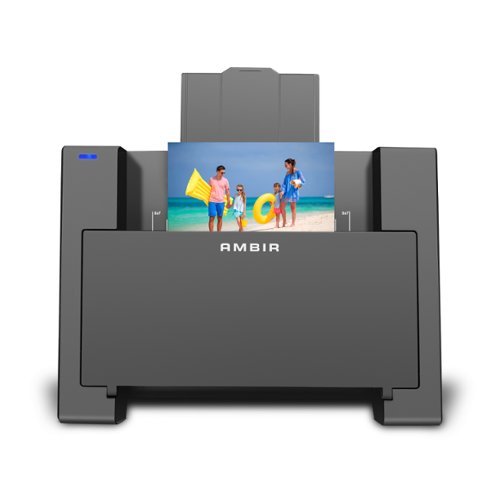
Introducing the ultimate solution for effortlessly preserving and revitalizing your cherished memories. Say hello to our cutting-edge photo scanner and PictureStudio photo editing software, designed to breathe new life into your old, faded photos with just a single touch. Gone are the days of sifting through endless photo albums in search of that one special moment. With our seamless search feature, navigating through your digitized photo collection has never been easier. Simply enter a keyword or filter by tag, and watch as your memories come to life before your eyes. Whether it's restoring colors to faded photographs, organizing your entire photo collection in one convenient location, or effortlessly sharing and backing up your memories, AMBIR has you covered.
Customer Rating
3
What I needed, but has a fatal flaw
on October 28, 2024
Posted by: BobinVA
I’ve scanned many photos using a flatbed scanner, but the process is less than ideal. You have to make sure you keep the glass spotless, and lining up and scanning each photo just takes too much time. For these reasons, I was interested in the Ambir Photo Scanner. It’s a sheet-fed scanner, similar to a document scanner, allowing you to load a photo into the feeder and automatically scan it into the included Picture Studio software.
Setup is easy. It begins by downloading and installing the software from Ambir’s website (.Net Desktop 8.0 is required). Once this is complete, you are prompted to connect the scanner. Next, insert one of the included calibration sheets into the scanner. A few moments later, you’re ready to start scanning your photos.
There are lines on the back of the scanner to indicate where you should place your 5x7 or 4x6 photos, but photos of many different sizes are supported. Available resolutions are 300 dpi and 600 dpi. This is usually sufficient for old family photos, but isn’t high enough if you’re looking for professional tool. Insert the photo face down, then click the scan button in the software. The scanner can also be set to automatically start scanning when it senses a photo being placed in position.
The software is simple, but does provide some good options for enhancing your scanned images. The license for the software is authenticated by connecting the scanner, so it’s not possible to use the software on its own without at least connecting the scanner when you start up the software.
Photo editing options include exposure, white balance, saturation, brightness, contrast, sharpening and blur. There are also a number of pre-set filters included, such as vivid, warm, cool, etc. You can remove red eye, dust and scratches, or change the tint and color levels. Overall, the software provides a decent set of tools for making basic changes and improving your photos, but it’s not a replacement for a full-featured photo editing package.
Photo editing options include exposure, white balance, saturation, brightness, contrast, sharpening and blur. There are also a number of pre-set filters included, such as vivid, warm, cool, etc. You can remove red eye, dust and scratches, or change the tint and color levels. Overall, the software provides a decent set of tools for making basic changes and improving your photos, but it’s not a replacement for a full-featured photo editing package.
Once you’re finished making changes, clicking “save” brings up the choice of output formats, but selecting one doesn’t bring up a button to finish the process. You’re left wondering how to make it save, only to find out that the file has already been saved. Once you know this, it’s okay, but there should be some confirmation of file operations. The software has a bit of a quirky user interface, but you get used to it quickly and can find your way around.
I wasn’t expecting to get bundled software on the level of Adobe Photoshop, so my main interest was more in the hardware as a tool to provide an easy and fast way to digitize my piles of old photos. Unfortunately, almost all of my photos feature a glossy finish, and that finish turned out to be something that didn’t work well with this scanner.
The scanner uses a rubber roller to grip the photo and pull it down and across the camera lens. It does just fine with photos that have a matte finish, but on glossy photos it does not pull the photo through evenly, resulting in skewed, distorted images (sample attached). There is also an included plastic sleeve, called the carrier sheet, that is meant to be used for photos that may be too damaged or fragile to scan on their own. This can be used for scanning glossy photos, but I sometimes had trouble getting the carrier sheet to feed correctly as well. Cleaning the roller with alcohol seemed to correct this, and the carrier sheet worked well after that, so the carrier sheet does seem to be an option. Ultimately, though, I have a large collection of glossy photos, and having to load and unload the carrier sheet for every photo would be much slower than being able to feed the photos through one right after the other.
I want to give kudos to the team at Ambir. In addition to the issues with the feeding of photos, I also had trouble with the drivers for the scanner which rendered the software inoperable. I contacted Ambir for support, and I must say they were wonderful to deal with. They were very responsive to my emails, and then put me on the phone with a technician. They quickly shipped out a new unit the same day. They were trying to determine if the original unit was defective, and although I don’t think it was, I was very impressed with the level of service. They also sent me a pre-release update to the software that corrected my issue with the drivers, so I was able to run the software again. This kind of service is rare these days, and Ambir should be commended for providing such good service!
Is this the right solution for you? If you’re scanning photos with a matte finish and don’t require a lot of complex editing, then yes, this would be a good solution. If you’re like me, however, with loads of slick, glossy photos, then this is not the ideal way to go. The Ambir Photo Scanner is reasonably priced and with a good set of features, but for me its most basic function doesn’t work well enough to meet my needs, and thus I can’t recommend it.
No, I would not recommend this to a friend.

Share this review:


+3points
3of 3voted this as helpful.

With the magic of AI and automation behind the scenes, it~s never been easier to fix flaws, fine-tune specific areas, and add motion to quickly bring your vision to life.
Customer Rating
4
Power and ease, but now for a limited time
on October 24, 2024
Posted by: BobinVA
I have a love/hate relationship with photo editing. I have thousands and thousands of photos, most of which would benefit from editing to improve them. I love the results achieved by making good edits, but I don’t love the effort it takes effort to learn how to do that.
Adobe has been the king of the hill for many years, but its full-featured tools can be more than necessary for casual users, which is where Elements comes in. I’ve been in the habit of getting the new version of Elements every other year, and that pattern holds true this year as well. One of my goals in this review is to highlight the new features added since the 2023 version. Here’s a list of what’s new since 2023:
• Simply brush to remove objects
• Add realistic depth of field with precise control
• Change the color of any object
• Create motion effects with four new one-click Quick Actions
• Match color and tone with one click
• Select a sky or background with one click
• Seamlessly combine multiple photos
• Web app and mobile companion app (??)
• 3-year subscription model
• Add realistic depth of field with precise control
• Change the color of any object
• Create motion effects with four new one-click Quick Actions
• Match color and tone with one click
• Select a sky or background with one click
• Seamlessly combine multiple photos
• Web app and mobile companion app (??)
• 3-year subscription model
One of the things that makes Photoshop Elements so appealing is its mix of power and convenience. Unless you’re trying to do some of the more esoteric professional functions, it’s likely that you’ll be satisfied with the powerful features included in Photoshop Elements. Layers, masks, filters, noise reduction and so much more are available in Elements. Also available are many powerful and easy guided edits that harness some of that power without making you learn all the intricacies required. Here are my experiences with some of the new ones:
Brush to remove objects – a coveted feature on other platforms, this one comes to Elements for 2025. The idea is simple: use a brush to “paint” the object you want to remove, then Elements uses AI to make it disappear. For objects that are fairly set apart and which have clear background elements around them, this works very well. For more complicated compositions, the results can be a little more iffy. I did learn that choosing a good brush size makes a difference, and the AI is pretty impressive in how it interpolates background elements to fill in the area occupied by the object you’re removing. If the automatic removal isn’t perfect, you can revert to the old-fashioned clone stamp tool to clean it up further.
Add realistic depth of field with precise control – this is an easy way to blur out the background to focus on the object(s) in the foreground. You can choose either simple mode (let PS decide what to blur) or custom mode. In custom mode, using the “magic” selection tool, simply select the object you want to stay in focus, then click the blur button to make everything else go out of focus. Simple mode is a little indiscriminate, but custom mode does a pretty good job.
Change the color of any object – if you’ve ever wanted to simply change the color of an object, this is the tool for you. Want to make that purple flower red? Just auto-select it, chose red for your new color, and click ok. Your purple flower is now red, but you’ll need to change your selection if you don’t want everything inside the selection outline to be included. This is a nice shortcut from doing it all yourself.
Select a sky or background with one click – PS 2025 makes it easy to select the sky so that you can substitute another background or change its color. There’s also a guided edit designed specifically to replace the sky. Either way, this is a great way to brighten up those outdoor shots taken on a hazy or extra bright day. It was easy to replace the sky with something more colorful, but watch out for other elements in the photo that are the same color, as those get replaced as well.
To be honest, I was able to do most of this stuff in the 2023 version as well, even if it did sometimes take a few more clicks. In fact, an effect found in the 2023 version, tilt-shift, is no longer available in the 2025 version. This effect made your photo look like a miniature without requiring a tilt-shift lens. I’m sure there’s a reason this was removed, but I couldn’t find it.
To be honest, I was able to do most of this stuff in the 2023 version as well, even if it did sometimes take a few more clicks. In fact, an effect found in the 2023 version, tilt-shift, is no longer available in the 2025 version. This effect made your photo look like a miniature without requiring a tilt-shift lens. I’m sure there’s a reason this was removed, but I couldn’t find it.
There’s a new and improved (?) raw editor this year, but one of the biggest changes can’t be found in the software. New for 2025, Elements is no longer available as a one-time perpetual license. Instead, it is now a 3-year license. Adobe touts this as a “one-time” purchase, but I’m not sure what they want to convey with that statement. Perhaps they’re contrasting that with paying for the license every year. In that case, perhaps we should divide the purchase price by 3 and consider that the true cost of using the software. Nonetheless, you won’t be able to edit photos after the license expires. Is this a good or bad thing? In my opinion, it’s bad as it removes the last available option from Adobe for a tool that I upgrade when I deem it necessary. This will undoubtedly push some to their competitors’ offerings. Ultimately, though, Photoshop Elements is still the best available mix of power and convenience. Competitors may be able to match the ability to do complex edits, but few (if any) of their competitors make the complex easy, as Elements does with its guided edits.
There are no major new features to be found here, as the 2025 version is again an incremental improvement. If you have a version from the last year or two, I’d say sit this one out. If you’re purchasing photo editing software for the first time, Elements is still a good value, even as a new addition to the ranks of subscription software. If you’re truly opposed to subscriptions, there are alternatives, but be prepared to spend some time learning to use them.
I would recommend this to a friend!
Share this review:


0points
0of 0voted this as helpful.

Unlock the power of two ovens in the counter space of one with the Ninja Double Stack XL Countertop Oven & Air Fryer with Pro Cook System. Only Ninja has the FlexDoor that creates 2 separate ovens so you can cook 2 meals, 2 ways at different temperatures and cooking times. Use just the Top Oven for quick snacks, sides, and sheet pan meals~or the Bottom Convection & Air Fry Oven for larger roasts, bakes, or air frying up to 6 lbs of wings. You can also sync both independent ovens to cook a full course meal that finishes cooking at the same time with Smart Finish with DualZone Technology. While your meal cooks, FlavorSeal technology prevents flavor crossover between ovens. Two cooking zones in one eliminate back-to-back cooking for 65% faster meal-making than your traditional oven. The Pro Cook System with Auto Detect Intelligence precisely monitors temperatures, so you don~t have to. Plus, this countertop dual oven features 12 cooking functions for the ultimate versatility.
Customer Rating
5
Versatile oven loaded with features
on October 15, 2024
Posted by: BobinVA
Years ago, my favorite oven had a smaller, thinner oven (like a pizza oven) on top with a larger, more standard-sized oven below. We sold that oven in a house sale and have never had anything like that again. Since then, we’ve become very dependent on a countertop oven that sees more usage than our regular oven by far. Our existing countertop oven has been great, but Ninja just came out with an update to their oven that combines the best of all of these: a dual countertop oven with loads of features!
**Size**
Since you’re probably putting this under your kitchen cabinets, you’ll want to know the size of this oven. Ninja lists the dimensions as follows: 18.6 in L x 16.39 in W x 13.26 in H. By comparison, my previous oven was 11.6” tall, so the Ninja Double Stack adds a small second oven while not giving up much on the height of the main oven, and only adds about 1.25” to the height! For me, this was a big deal, since if it won’t fit under my cabinets, it has no place in my kitchen.
The top oven compartment is ideal for baking small items such as pizza or dinner rolls or a tray of vegetables. It is definitely meant for those kinds of things, so keep that in mind. Trying to put taller items in there will result in the food touching the top and getting burned.
**Controls**
Ninja has done a good job of not overloading the panel with controls. Both ovens have their own time and temp buttons, and there is a dial for selecting things like cooking programs. There are 3 additional buttons for the thermometer: preset, doneness and manual. More on these later. There is one additional control, for turning on the Smart Finish feature, which allows the oven to time the completion of top and bottom ovens so that they’ll finish at the same time.
**Features**
The Ninja Doublestack XL includes 12 cooking programs: Bake, Broil, Reheat, Keep Warm, Toast, Bagel, Air Fry, Conv.Bake, Pizza, Air Roast, Whole Roast, and Dehydrate. These are selected by turning the dial to highlight your choice in the program list.
One thing I think is pretty striking is the display. Unlike most competing ovens, there is no screen on the face of the oven. Instead, information shines through the brushed nickel finish! Before I turned it on, I assumed there was no display, but couldn’t imagine how I would know what choices to make (would it be a series of beeps?). This is a great design decision and contributes to the sleek, modern look of the oven.
New for this year is a plug-in thermometer. The oven features a small port on the side (like a headphone jack) where you can plug in the thermometer. Insert the thermometer in the middle of the meat, then use the thermometer preset button to choose fish, beef, chicken or pork. You can also choose a small or large size (bottom oven only), and a doneness level (rare, medium, etc.). The choice of doneness level determines the internal temperature setting for the meat. The chicken setting only allows one temperature—165 degrees. The manual button allows you to set a temperature to whatever you like.
There is also a button labeled “Smart Finish” which ensures that both ovens finish at the same time. Details about this in the next section.
**Performance**
I’ve been using my Ninja Foodi grill to air fry French fries, so I wanted to see how the Double Stack would compare. Using the included air fry basket, I cooked up a batch of French fries that were crispy on the outside and tender on the inside, easily as good as the results I get from the Foodi, but with less clean-up.
Next, we prepared some meals using the thermometer. We dialed in the settings as described above for the top oven, then chose the settings for the bottom oven. The last step was pressing the Smart Finish button and pressing start. The oven with the shorter cooking time was automatically placed on hold while preheating the other oven. A progress bar showed how things were going on the bottom oven, while the internal temperature of the meat was shown for the top oven. Smart Finish ensured that both ovens finished at the same time—super convenient! More impressive was that if I made a change to the settings for either oven during the cook, it would recalculate the total time and adjust accordingly. After turning out multiple successful meals this way, we may just cook this way all the time.
Random thoughts: using the top oven as a toaster also worked well, but it does take some experimentation to find settings to your liking. One advantage a regular toaster has is that it’s easier to get items out that are not laying on an oven rack. Preheating time in the top oven was only 3 minutes to reach 350 degrees, much faster than our large traditional oven. Convection airflow is noticeable in this oven, which I appreciated, coming from a previous oven that I was never sure actually circulated any air. This makes for speedy convection baking times.
**Negatives**
There really aren’t many, but I’ll mention two. A roast tray is not included, but really should have been, since that’s a needed accessory for roasting a whole chicken. The handle on the door, while being very attractive, is actually too big. When the door is laid down to pull food out of the oven, the handle prevents the door from laying flat, and that can make it a bit tricky to navigate the hot surfaces.
**Conclusion**
The Ninja Double Stack XL oven is an upgrade in multiple ways, and I’m very glad to have gotten it. We’ve had several Ninja kitchen accessories, and they’ve done it again with this one. Like all our other Ninja accessories, the Double Stack oven is built superbly and includes a plethora of thoughtful features that make it a joy to use. The only thing limiting our usage is when we need to cook a very large dish, but thankfully that’s rare. If you’re looking for a countertop oven, I’m not sure you can do better than this versatile model.
I would recommend this to a friend!

Share this review:


+5points
5of 5voted this as helpful.

Introducing the Flex Open Clip Wireless Earbuds, the epitome of convenience and innovation in earbud technology. With its unique, clip-style design, these earbuds offer a distinct open-ear experience unlike any other. Simply clip them around your ear and immerse yourself in your surroundings while still enjoying your favorite tunes. Featuring touch controls directly on the earbud, managing your music and calls has never been easier or more intuitive. With USB-C charging, you can quickly and conveniently power up your earbuds for extended listening sessions. Compatible with the JLab App, you can further personalize your listening experience to suit your preferences. Enjoy a remarkable 21+ hours of playtime, ensuring you never miss a beat throughout your day. Thanks to multipoint technology, you can seamlessly connect to any two devices simultaneously, making it effortless to switch between your smartphone, tablet, or laptop without missing a moment of your audio experience. Experience the freedom and versatility of the Flex Open Clip Wireless Earbuds - where innovative design meets exceptional functionality for the ultimate listening experience.
Posted by: BobinVA
I’m a big fan of earbuds/headphones that leave the ears open to allow you to be aware of your surroundings. I enjoy bone conduction headphones, but they do leave a lot to be desired in the sound quality category. Newer “air conduction” earbuds are attempting to resolve this issue, and there are currently two approaches to this: ear hooks and ear clips. Bose is the first to come out with ear clips, but they are pretty expensive, so I decided to try the new JLab Flex Open earbuds.
The ear clip design is sort of like a large earring around the outer part of the ear. This places the battery/button slightly behind the ear, with the speaker module inside the ear, but not blocking the ear canal.
The ear clip design is sort of like a large earring around the outer part of the ear. This places the battery/button slightly behind the ear, with the speaker module inside the ear, but not blocking the ear canal.
Comfort:
It takes a little getting used to putting an earbud on your ear in this position, but it’s pretty easy. Angling the loop up or down can make it more comfortable, as well as improving the sound. I was concerned that these would not be comfortable, but they were quite comfortable, and a little fiddling allowed me to quickly find the optimal spot. The key here is whether these will work with your ears, since the length from the back of the loop to the speaker and battery is fixed, so I think these will either work for you or they won’t. These are very comfortable, but they did start making my ears sore after about an hour. I’m still in the phase of getting used to these, so I expect that to improve the more I use them.
Aside from the minor discomfort I just mentioned, the Flex Open earbuds are very lightweight and comfortable, making it easy to forget you’re wearing them. The clip approach is surprisingly secure, allowing them to stay put no matter how you move. In spite of that, I’m not sure you’ll want to use these for sports involving a lot of sweating or rain. They’re only rated IPX4, which JLab calls “everyday proof”. Since these essentially use a tiny speaker, that’s an open hole where water can enter, so I won’t be using these while I run.
One big advantage to the clip design is that it doesn’t interfere with glasses at all. This is a big advantage that is shared by in-ear buds as well, but most open buds/headphones using either a headband or ear clips interfere with glasses. Not having to deal with that is nice.
Sound quality:
All of the “open” style earbuds/headphones sacrifice sound quality for situational awareness, and that’s why we buy them. That said, the newer “air conduction” style brings a huge improvement to the sound quality over bone conduction models. I wasn’t sure what to expect from the Flex, but I was very pleasantly surprised at how good they sound. They don’t seal inside the ear canal (they’re not supposed to), so you’re not going to get pounding bass like the best in-ear monitors, but these do a remarkable job, especially at 80% less than the Bose model. I haven’t tried that one, so I’m not able to comment on what may be different, but I can forgive a lot when saving that much money.
Open earbuds create a wider soundstage, which is quite pleasant. The midrange and high notes are crisp and clear, the bass is good, in spite of not being as prominent as in-ear monitors. JLab provides 3 EQ settings: signature (enhanced bass & treble), balanced (flat) and custom (you set using the equalizer in the app). I’m always partial to custom settings, and while you won’t be wowed at your customization options, being able to tweak the sound a little does sound pretty good. Remember that openness is the real goal with this type of earbud, so the idea is to have a reasonably good sound while still being able to hear your surroundings. JLab has delivered an earbud that sounds better than you would expect at this price point.
Open earbuds create a wider soundstage, which is quite pleasant. The midrange and high notes are crisp and clear, the bass is good, in spite of not being as prominent as in-ear monitors. JLab provides 3 EQ settings: signature (enhanced bass & treble), balanced (flat) and custom (you set using the equalizer in the app). I’m always partial to custom settings, and while you won’t be wowed at your customization options, being able to tweak the sound a little does sound pretty good. Remember that openness is the real goal with this type of earbud, so the idea is to have a reasonably good sound while still being able to hear your surroundings. JLab has delivered an earbud that sounds better than you would expect at this price point.
The Flex clips are not as loud as I had hoped. I first noticed this when using them while riding my electric scooter in the neighborhood. The wind blowing into my ears easily overpowered the Flex, requiring me to turn my head to hear. This would happen while riding a bike as well. Comparing these to my Shokz Open Fit, I found that the Shockz are considerably louder, but they cost a whole lot more as well, so take that into account. Given that the Flex are not targeted for use while exercising, the lower volume level isn’t a problem. They’re plenty loud enough for use indoors.
Controls:
I’ve had previous JLab earbuds, and while I prefer physical buttons, JLab’s previous implementation of physical buttons always seemed to be a little too hard to push for my liking. This resulted in me driving the earbud into my ear whenever I wanted to push a button. Touch-sensitive buttons solved this, but I think this version of the touch buttons is JLab’s best yet.
JLab always provides the most functionality at its price point, and the Flex Open is no exception. Touch controls can be mapped to 4 different options for each ear, providing a lot of flexibility to set up the controls to your liking. Every other earbud manufacturer should do it like this!
Call quality:
Call quality is passable, but I wouldn’t say it’s great. It’s not bad either, it’s just that it’s obvious that you’re using something other than the phone itself. That doesn’t inhibit the ability to have a conversation, you just won’t be able to pretend you’re not using earbuds. Sound quality for calls in the earbuds is just as good as podcasts or audiobooks. At this price point, that’s not a showstopper at all.
Conclusion:
With prices moving ever higher for quality earbuds, JLab has delivered another winner in the value space. Full-featured and with great sound, the JLab Flex Open provide a solid open-ear alternative to more expensive alternatives. I’ve had some longevity issues with other JLab earbuds in the past, but if these can avoid that, it’ll make them a no-brainer purchase decision. If you want open earbuds for heavy exercise, I suggest you look at other alternatives, but for light exercise or all-day office usage, these fit the bill nicely.
I would recommend this to a friend!
Share this review:


+1point
1of 1voted this as helpful.
BobinVA's Review Comments
BobinVA has not submitted comments on any reviews.
BobinVA's Questions
BobinVA has not submitted any questions.
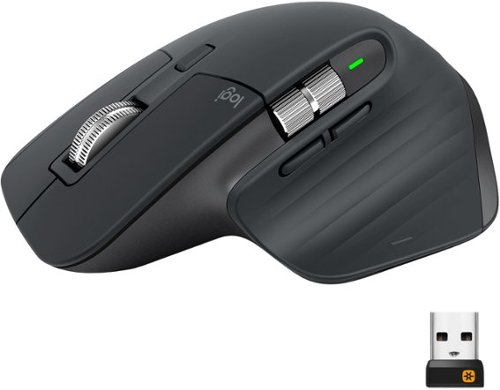
MX Master 3 is instant precision and infinite potential. Designed for designers and engineered for coders, it~s our most advanced Master Series mouse yet. App-specific button customizations speed up your workflow in the apps you use most and the electromagnetic MagSpeed wheel enables fast noiseless scrolling. Your hand rests perfectly on the sculpted form and allows you to work comfortably for hours across multiple computers and operating systems in one fluid workflow. Ready for video calls - predefined settings for Microsoft Teams and Zoom let you instantly mute and Start/Stop your video call. With MX Master 3, you can truly master what you make.
Bluetooth is turned off on our work computers. Will this operate as a wired mouse with the USB cable attached or is it strictly for charging
Yes, it will operate as a wired mouse that way, but that is really defeating its purpose. Can you use the unified receiver instead? I'm doing that instead of bluetooth, and it works very well.
6 years, 11 months ago
by
BobinVA
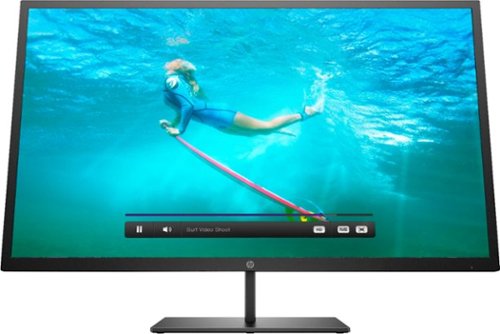
Multitask comfortably using this HP Pavilion 32-inch monitor. The QHD resolution provides immersive visuals for gaming and a spacious work space. Enjoy consistent clarity and color from multiple positions thanks to the 178-degree viewing angle. This HP Pavilion 32-inch monitor features an anti-glare panel for better visibility in bright conditions, while the Low Blue Light mode reduces eyestrain.
Wall mountable - yes How can this be wall mounted? Please suggest a wall mount for this monitor.
The monitor comes with a bracket that you can attach to the back of the monitor. This will allow you to attach it to a mount. I'd suggest a full-motion wall mount that has the square center bracket, as this will match up with the bracket on the monitor itself. I don't think the monitor conforms to the VESA standard for mounting brackets, but I'm not sure. I'm not mounting my monitor, so these are just some thoughts after having just setting mine up. Good luck!
7 years, 3 months ago
by
BobinVA
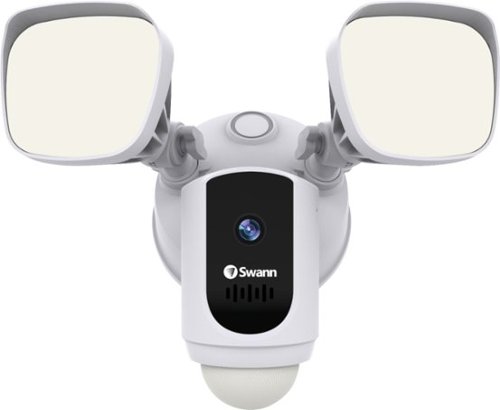
Protect your home or business with this Swann 1080p Wi-Fi floodlight security camera. The Full HD resolution lets you review captured footage in stunning detail, while the floodlight ensures that subjects are illuminated. This Swann 1080p Wi-Fi floodlight security camera includes a siren and two-way audio for scaring off trespassers and potential intruders.
How good is the motion detection really? I have purchased several cams and the motion detection is awful. Thanks
I've found it to be quite good. Sometimes it seems to pick up the motion of swaying tree branches. I'm still trying to figure out the optimal sensitivity setting.
7 years, 4 months ago
by
BobinVA
Protect your home or business with this Swann 1080p Wi-Fi floodlight security camera. The Full HD resolution lets you review captured footage in stunning detail, while the floodlight ensures that subjects are illuminated. This Swann 1080p Wi-Fi floodlight security camera includes a siren and two-way audio for scaring off trespassers and potential intruders.
How long are the recorded clips? Do the clips start before motion is detected?
I think the clips are about 30 seconds. They do seem to start before motion is detected, which results in complete clips of the action.
7 years, 4 months ago
by
BobinVA
Protect your home or business with this Swann 1080p Wi-Fi floodlight security camera. The Full HD resolution lets you review captured footage in stunning detail, while the floodlight ensures that subjects are illuminated. This Swann 1080p Wi-Fi floodlight security camera includes a siren and two-way audio for scaring off trespassers and potential intruders.
Can the floodlight be wired and howlong do the battery last
I'm not sure if there are other models, but mine is wired only. There is no option for it to be battery powered. Given how bright the lights are, and how often they're likely to be tripped, I would think that batteries would go dead pretty often. If you have the choice, hard wire it.
7 years, 4 months ago
by
BobinVA

Meet Bose Frames. Bluetooth sunglasses with a soundtrack. The first audio sunglasses with built-in Bose speakers for an immersive audio experience unlike any other. A revolutionary personal audio experience hidden inside two classic designs, each enriched with premium accents and materials. Play music, take calls, and enjoy the sun with UVA/UVB protection. Bose Frames Alto feature a classic angular lenses, available in small and large size.
How long does the battery last?

Unlock new potential for your wireless headphones with this Airfly headphone accessory. It plugs into any conventional headphone jack to enhance your listening experience and can pair with in-flight entertainment systems for added convenience. This Airfly headphone accessory has an eight-hour battery life and recharges through USB, so it's easy to take anywhere.
Can you plug wired headphones into this to make them wireless?
No, this is a wireless transmitter, not a wireless receiver. The headphone jack in the AirFly is for the source of the sound, and it then sends it out to headphones that are able to receive the signal.
7 years, 5 months ago
by
BobinVA

Study or work hard on this HP Envy convertible laptop, which features a large 15-inch screen. The laptop opens up easily to create a tablet for note-taking, while an AMD Ryzen processor supports Windows 10 Home and other applications effortlessly. The reliable128GB solid-state hard drive on this HP Envy convertible laptop stores lots of files and programs.Learn more.
Can this device connect to both 2.4 GHz and 5 GHz WiFi?
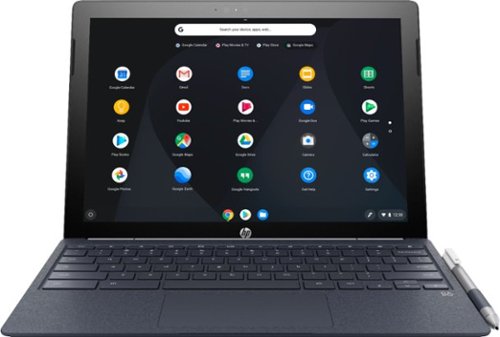
Run programs on this 12.3-inch HP Chromebook convertible laptop. Its detachable touch-screen display lets you enjoy brilliant 2K content, and you can write and draw on it with the included Active Pen. This HP Chromebook convertible laptop has 32GB of storage, and its Intel Core m3 processor and 4GB of RAM provide smooth performance.
Does this computer have a camera in which I can use Skype?
It has both front and rear-facing cameras. However, I don't think there's a version of Skype that will work with Chrome OS. If this is a deal breaker for you, you should research that to find out.
8 years, 3 months ago
by
BobinVA
Run programs on this 12.3-inch HP Chromebook convertible laptop. Its detachable touch-screen display lets you enjoy brilliant 2K content, and you can write and draw on it with the included Active Pen. This HP Chromebook convertible laptop has 32GB of storage, and its Intel Core m3 processor and 4GB of RAM provide smooth performance.