
Share DRTechNerd's profile


DRTechNerd
DRTechNerd's stats
- Review count77
- Helpfulness votes66
- First reviewMarch 6, 2015
- Last reviewJune 23, 2026
- Featured reviews0
- Average rating4.6
Reviews comments
- Review comment count0
- Helpfulness votes0
- First review commentNone
- Last review commentNone
- Featured review comments0
Questions
- Question count0
- Helpfulness votes0
- First questionNone
- Last questionNone
- Featured questions0
Answers
- Answer count0
- Helpfulness votes0
- First answerNone
- Last answerNone
- Featured answers0
- Best answers0

Sonos Ace perfects your personal listening experience. Feel every frequency with superior precision and clarity. Maximize your immersion with lossless streaming, spatial audio with dynamic head tracking, and world-class Active Noise Cancellation. Hear what~s going on around you with Aware mode. Enjoy up to 30 hours of battery life, exceptional comfort, and flawlessly clear calls.
Posted by: DRTechNerd
I am a fan of Sonos products. I think that they make quality, affordable, good sounding products. The Sonos Ace headphones are no different. The build quality of these headphones is excellent. They are lightweight and comfortable to wear. The earpieces are a plush foam with a soft leather cover. They fit around my ears nicely and were comfortable to wear for many hours without issue.
Setup of the headphones was easy with the Sonos app. There is an equalizer inside of the Sonos app that can be used to tweak the sound, but the headphones sound great out of the box. Sound was clear and immersive when streaming content. The headphones have spatial audio with dynamic head tracking and the music adjusts as you move. There are also sensors in the ear cups to detect if they are being worn. When they are taken off, Sonos Ace will automatically pause your content then restart it when they are put back on.
I did not have any issues with streaming via Bluetooth or through the included USB-C to 3.5mm cable. Calls were clear when using them with my iPhone. The headphones have Active Noise Cancellation that works very well to neutralize external sounds. There is also an Aware mode that lets in ambient sounds so you can hear what’s going on around you while you listen to your music. Both of these modes can be activated by a button on the right earpiece or through the Sonos app. There is also a content button on the right earpiece that is uses play/pause content or change the volume. The content button can also be held down to activate TV audio swap. TV audio swap is a neat feature that allows you to swap audio from a Sonos Arc soundbar to your Sonos Ace headphones. TV audio swap is nice when you do not want to disturb others, and the sound through the headphones was immersive when using this feature.
Like other premium headphones, they have the ability to connect to two Bluetooth devices at one time. This allowed me to watch a movie with the headphones while still maintaining a connection to my iPhone to be able to take calls without ever taking off the headphones.
Battery life was good. Charging is through the included USB-C to USB-C cable, and the headphones will last about 30 hours on a charge. They also have a rapid charging feature that when the Sonos Ace reaches 10% power or lower, rapid charging will give you 3 hours of playback with just 3 minutes of charging.
Overall, the Sonos Ace is a great set of headphones with many innovative features. Sound quality is excellent. Battery life is good. They are lightweight and comfortable. They look, feel, and sound like a premium product. Sonos supports their products and I would expect that, as the product matures and firmware/software updates are issued, they will only get better. I would highly recommend them to anyone looking for a quality set of headphones. A+
I would recommend this to a friend!
Share this review:


-2points
0of 2voted this as helpful.
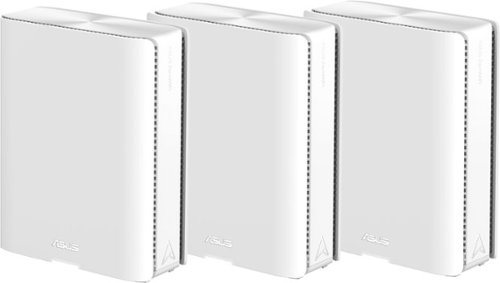
Award-winning meshes bring next-gen Wi-Fi 7 speeds of up to 30 Gbps, extendable coverage of up to 11000 sq. ft. (3pk) for your worry-free smart home.

Posted by: DRTechNerd
I received the Asus ZenWiFi BQ16 Pro BE30000 Quad-band WiFi 7 Mesh Router (3pk) about a week ago. The hardware is well built and hefty. It looks like a larger version of the other model Asus ZenWiFi AiMesh routers. There are five ethernet ports. One of these ports is a 10 Gigabit WAN/LAN port and one of the ports is a 1 Gigabit WAN/LAN port. The three other ports are 1 Gigabit LAN ports. There is also a USB 3.0 port. There were three units included and one has a sticker that identifies it as the “main” unit. Initial setup was straightforward…. I connected the 2.5G port of my modem to the 10 Gigabit WAN port of the “main” unit with the included CAT6 ethernet cable, powered it on, and I set it up it up through the web user interface as a router. The web user interface is similar to other Asus routers. I felt right at home navigating the user interface, having owned Asus routers for many years. After setup, the router provided full advertised ISP speeds (1000Mbps D/L, 200Mbps U/L) through the devices connected through the LAN ports, but the single unit struggled to provide wireless coverage in my 2400 sq ft home. I have two Eufy smart outdoor floodlight cameras and they would not connect to the 2.4 GHz wireless network until I added at least one of the other two units as a node. I did experience issues when adding or removing wireless mesh nodes. Adding a node: when a node is added through the app or the router GUI, it will say that it was not successfully found/added, even though the mesh node is shown on the router GUI/app (i.e., added) when it is powered off and then back on. Removing a node: whenever a mesh node is factory reset with the reset push button, the WPS button, or by removing the node from the app or the router GUI, it will automatically add itself back as a node whenever it powered off then powered back on. Through trial and error, I found that the only way to remove a node from the system is to power off the main router then factory reset the node that you would like to remove. It was a frustrating experience when I tried to change one of the nodes to a wireless access point. After I finally got the mesh network setup and working, wireless speeds were good. I do not have any WiFi 7 devices. So, I was not able to check the functionality of the 6 GHz bands, but 5 GHz and 2.4 GHz coverage and speeds were good initially with the wireless mesh network. However, after a few days, wireless network speeds went to a crawl (less than 25 Mbps) and all of the units had to be powered cycled to restore expected speeds. Through troubleshooting efforts, I noticed that there were missing settings (i.e. wireless control channel, channel bandwidth, wireless security authentication method, etc.) on the wireless settings web user interface that I am used to seeing on my other Asus networking products. The missing settings could be restored by rebooting the router, but within 24 hours they would disappear again. The issues that I experienced were repeatable after factory resetting all of the units’ multiple times. I also own an Asus RT-AX86U Pro with two Asus XT8 nodes and these products do not experience these issues. Asus support was contacted and their suggestion was to factory reset the nodes and setup the Ai Mesh again, which I had already done multiple times. Hopefully, the issues can be resolved with a future firmware update. Unfortunately, in its current beta state, I was unable to use the Asus ZenWiFi BQ16 Pro BE30000 units in my home. They were boxed up, and I went back to using my Asus RT-AX86U Pro with two Asus XT8 nodes.
No, I would not recommend this to a friend.
Share this review:


+7points
8of 9voted this as helpful.
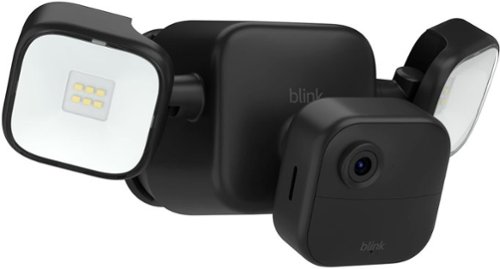
See what~s happening around your home with 700 lumens of motion-triggered LED lights, crisp HD live view, infrared night vision, and person detection. See and speak to people and pets from the Blink app on your smartphone for peace of mind day and night.
Customer Rating

5
Excellent Camera, Bright Floodlight, Easy Install
on November 12, 2023
Posted by: DRTechNerd
I received the Blink Outdoor 4 Floodlight Camera about a week ago and so far, it has performed flawlessly. The floodlight brightness is good and the video quality from the camera is also good. The floodlight camera package comes with a Sync Module, a mounting kit, and batteries for the camera and the floodlight. The camera just snaps and plugs into the floodlight. I mounted the floodlight camera to the siding on the back of my house with the included siding clip which doesn’t require you to drill holes in the siding to mount it. I already had a couple other Blink cameras and a sync module, but I setup the floodlight camera and included sync module as a separate system in the Blink app. This allowed me to setup the floodlight camera on a different schedule from my other Blink cameras. There are several customizable options within the Blink app to include motion sensitivity, camera video quality, floodlight brightness, and more. The default floodlight brightness in the Blink app is 50% and I adjusted it to 100% that made a huge difference in the brightness of the floodlight. The only other setting that I adjusted from the defaults was motion sensitivity from the default of 5 up a couple of notches to 7. Other than those couple of adjustments, it was pretty much plug-and-play and I am very pleased with the product. No complaints…excellent…highly recommended.
I would recommend this to a friend!
Share this review:


0points
0of 0voted this as helpful.
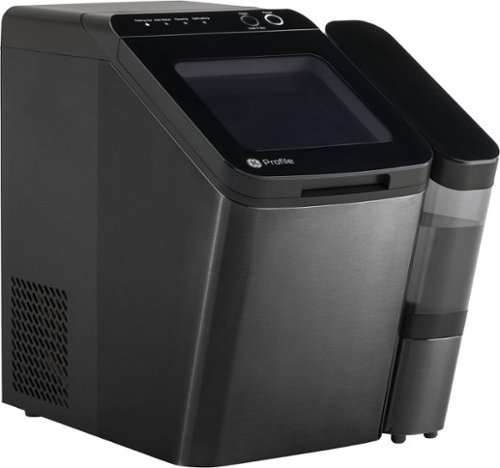
Nugget Ice. Pellet ice. Drive-in ice. Whatever you call it, you know it's "the good ice." Now that chewable ice is available from the convenience of your countertop with the Opal 1.0 Ice Maker with side tank. It is capable of producing up to 34 lbs. of ice in 24 hours and stores up to 3 lbs. of ice at one time. The Opal 1.0 Ice Maker comes with the side tank attachment for 3x more ice production.
Customer Rating

4
Great Nugget Ice Maker that is a little noisy
on October 23, 2023
Posted by: DRTechNerd
I love nugget ice. The GE Opal 1.0 makes nugget ice, and it makes it fast. Within 20 minutes of setup and powering up the ice maker, it started making ice and within a few hours, the ice storage bin was nearly full. The ice maker comes with a refillable side tank that holds about a gallon of water, so you do not have to constantly refill the machine with fresh water. It also comes with a small ice scoop that conveniently stores in slots in the ice storage bin. The flip-top lid is nice and makes it easy to get to the ice. The ice maker with the side tank does take up a fair amount of counter space, so we had to make room for it. It is also fairly noisy. It makes a low (but noticeable) humming noise when it is making ice. It will stop after a while, but anytime that you open the lid and it is powered on, it will start making ice again and the hum will restart. We have started making ice when no one is home and powering off the ice maker when we get home from work. The ice will stay frozen for 8 to 12 hours even if the ice maker is powered off. It also requires a weekly cleaning/sanitization cycle, where you fill the machine with water and a teaspoon of bleach, that takes about thirty minutes to perform. It requires a monthly descaling cycle with a vinegar and water mixture that takes about 18 hours to perform. Aside from the noise and the frequent cleaning/descaling, the GE Opal 1.0 ice maker with the side tank is a good maker of great tasting, chewable nugget ice that I love.
I would recommend this to a friend!
Share this review:


0points
0of 0voted this as helpful.

The new Dell G15 5530 Gaming Laptop - game on a retro-inspired gaming laptop with all the modern essentials for everyday gaming.
Posted by: DRTechNerd
The Dell G15 5530 Gaming Laptop with the Intel Core i7 processor and NVIDIA GeForce RTX 4050 graphics card is a pretty good gaming laptop. The i7 processor and RTX 4050 graphics card allowed me to play most games without issues. The 120Hz display helps with fast paced motion when playing my first-person shooter games, such as Call of Duty. Aesthetically, it looks good, although it is plastic. It is heavy and comes with a very large power brick. It has a decent sized 1TB SSD and has 8GB of included RAM. It would have been better to have 16GB of RAM, but the RAM is easily upgradeable. There is hardly any bloatware pre-installed on the laptop that allows it to operate quickly and efficiently out of the box. The battery life of the laptop is not great, so make sure that run in battery saver mode when you are not connected directly to the power brick. The layout of the keyboard is good and the backlit feature is nice. The touchpad was smooth and responsive, although I prefer to use a mouse. The laptop has good cooling with plenty of vents and it doesn’t get too hot while gaming. It does come with a front facing camera, but it is not compatible with Windows Hello. The Wi-Fi connection was fast with the included Wi-Fi 6 wireless card and can also be connected to the network with a cable through a gigabit ethernet connection. Overall, I am pleased with this laptop and recommend it if you are looking for a good mid-tier gaming laptop.
I would recommend this to a friend!
Share this review:


0points
0of 0voted this as helpful.
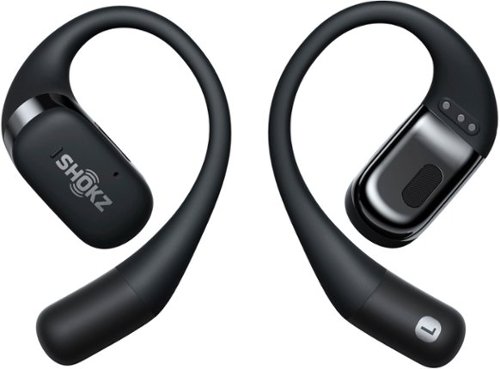
OpenFit continues the Shokz open-ear concept to let users enjoy all-day comfort and hear their own soundtrack while staying open to the world around them. OpenFit offers an ultra-lightweight, open-ear construction to hear both your own audio and every sound around you with crystal clarity. DirectPitch technology produces a full audio experience to immerse yourself in your favorite songs, podcasts, and audiobooks. A flexible ear hook design combines stability and comfort. Moments are precious, and OpenFit gives you the freedom to hear every one of them.
Posted by: DRTechNerd
The Shokz OpenFit Earbuds are excellent. The build quality of the earbuds is good. Like most earbuds, they come with a case that is used to store and charge the earbuds. They also come with a short USB cable to charge the case. Battery life is about 7 hours, and the case will charge them back up several times without having to be recharged. The case recharges quickly.
There is a short 4-step user guide included, detailing how to pair, wear, and use the earbuds. There is also a Shokz app that can be installed to your phone that gives you the ability to update the firmware, change/adjust the sound EQ, customize the controls, and see the battery levels. I would highly recommend installing the app. The app is not mentioned in the included user guide. There is a QR code link to the app when you visit the link specified in the user guide. It would have been good if the QR code link to the app was included in the user guide.
The OpenFit earbuds are lightweight and comfortable. The earbuds sound pretty good for an open-ear style earbud, and it was nice to be able to hear what was going around me during my afternoon bike rides. The controls are simple. You double tap or press-and-hold the buttons on the left or right earbuds to play/pause or skip music tracks. The controls are customizable in the app. Hopefully, single tap control will be added with a future firmware update. I would like to be able to use a single tap for play/pause and a double tap for skipping.
Shokz has made a great set of earbuds with the Openfit earbuds. They are comfortable and sound quality is good. I highly recommend them if you are looking for quality set of open-ear headphones.
I would recommend this to a friend!
Share this review:


0points
0of 0voted this as helpful.
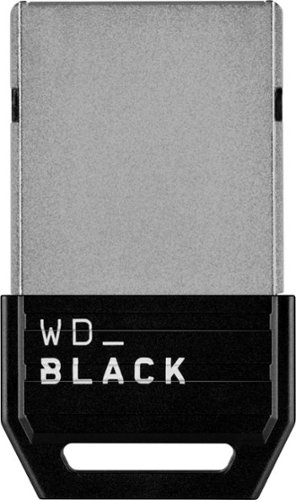
As game files get larger and larger, the WD_BLACK C50 Expansion Card for Xbox is the fast and easy way to give your Xbox Series X or Xbox Series S a big capacity boost so you can keep more titles installed. Just plug this officially licensed card directly into the dedicated slot on the back of your Xbox Series X|S console and it~s good to go, no extra software or installation steps needed. The card delivers similar performance as the Xbox internal storage for a seamless experience when you~re installing, loading, playing, and saving your favorite games. Keep your library ready to play and get into the action fast with the WD_BLACK C50 Expansion Card for Xbox.
Posted by: DRTechNerd
I received the 1TB version of the WD_Black C50 Expansion Card for the Xbox Series X|S a few days ago. The expansion card is well built and blends in well with the look of my Xbox Series X console. It also comes with a cover to keep it protected, if it is not being used. I installed it in my Xbox Series X and so far, it looks to be a solid product. The expansion card is super easy to install by just plugging into expansion slot in the back of the Xbox. The drive is ready to go out of the box. No formatting is required. It was recognized by my Xbox upon powering up after the install. Transferring games from the Xbox internal storage to the expansion card was fast. There was no lag or issues when playing games from the expansion card. There was no difference in play between playing from the expansion card and playing games from the built-in storage. It was nice to be able to essentially double the size of my Xbox Series X storage capabilities, so easily and seamlessly. I no longer have to pick and choose which of my select favorite Xbox Game Pass games that I keep installed on my Xbox. I can now keep all my favorites installed without having to pick and choose which ones to keep due to storage space limitations. So nice! To me, it one of those must-have accessories that every Xbox Series X owner should have and is highly recommended.
I would recommend this to a friend!
Share this review:


0points
0of 0voted this as helpful.

An award-winning teeth whitening kit that combines maximum strength teeth whitening serum with LED light technology to deliver professional-level whitening with virtual zero sensitivity. The at-home teeth whitening kit drastically whitens teeth up to 8 shades in just 9 minutes a day. As the first OTC whitener to focus on alleviating teeth sensitivity, it~s enhanced with potassium nitrate to help block teeth sensitivity and hydroxyapatite to help repair the enamel while whitening!
Posted by: DRTechNerd
My wife has been using the Snow Diamond Teeth Whitening Kit for about 3 weeks now, and we have definitely seen results. The kit comes with a shade guide to track results. The shade guide goes from 1 to 10 with 1 being the whitest shade. She started with a shade of 6 and is now a 4. We expect further improvement, as she continues to use the product. The kit is easy to use. You apply the whitening serum after brushing your teeth. You then put the LED mouthpiece into your mouth while it is plugged into your phone or USB charger. The mouthpiece comes with a multitude of connectors that should work with any phone. It is nice to be able to walk around with your phone while doing the treatments. During each whitening treatment, the mouthpiece stays in your mouth for 9 minutes. You then rinse out your mouth with water. The process is repeated daily until the desired results are met. Snow touts a total smile makeover if the kit is used daily for 9 minutes per day over a 21 day period. The kit comes with 3 whitening serum pens that are enough for 75 treatments. The kit also includes a case for storage of the mouthpiece. After using the kit daily for the past few weeks, my wife has not noticed any teeth sensitivity or pain. It seems to be a good product and we are looking forward to continued improvement of the whiteness of my wife’s beautiful smile.
I would recommend this to a friend!

Share this review:


+1point
1of 1voted this as helpful.

Through a soothing combination of eye and temple massage, heat and vibration, SmartGoggles are designed to relieve stress, eye strain and headaches throughout the day, and help you relax and prepare for sleep at night. Using our exclusive biometric sensor, SmartRelax mode delivers personalized treatments designed to promote relaxation and lower your heart rate. Choose from 3 customizable science-backed treatments, plus enhance relaxation with free TheraMind sound therapy curated to optimize your SmartGoggles treatments. Scientifically proven to improve sleep quality, increase amount of deep sleep, enhance relaxation and reduce stress when worn as part of your bedtime routine, SmartGoggles are your trusted partner for better relaxation.*
Posted by: DRTechNerd
I have had the Therabody Smart Goggles for a little over a week now. The build quality is good and they are comfortable to wear. There is a band that can be adjusted for the correct fit. The goggles integrate with an app that is used to select various modes, such as Smart Relax, Focus, and Sleep. The app will play sound to accompany the heat, vibration, and massage from the Smart Googles. The goggles will measure your heart rate in the Smart Relax mode and adjust vibration to lower your rate and help you relax. Outside of the app, there are buttons on the Smart Goggles for power, and mode selection. The settings can be adjusted for varying levels of heat, vibration, and massage. The googles also come with a nice storage case and a charging cable. The goggles will last a couple of hours on a full charge. With each session lasting about 15 minutes and depending on how much that you use them, the goggles will go several days without having to be recharged. I have used the goggles several times at the end of a long, hard day when I feel a tension headache coming on, and they do work well to relieve tension to prevent the onset of a headache or migraine. I would recommend the Therabody Smart Goggles for people that suffer from tension headaches. The goggles have definitely helped me with tension headache relief.
I would recommend this to a friend!
Share this review:


+1point
1of 1voted this as helpful.
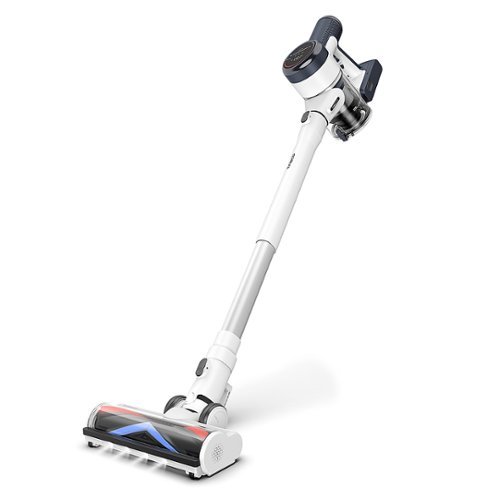
Smart. Sleek. Powerful. PURE ONE S15 Flex is the next generation of clean. Featuring our Direct-Drive Anti-Tangle brush that ensures you get a deep, thorough clean on carpets, bare floors, fabric, and more. Pick up messy spills and pet hair and know your floors are truly clean when Tineco's iLoop Sensory Technology LED changes from red to blue. The PURE ONE S15 Flex is designed for 3 in 1 use - clean your hard floors, carpets and hard to reach areas with the hand vacuum attachment.
Posted by: DRTechNerd
The Tineco Pure One S15 Flex stick vacuum is a good, everyday, household vacuum. It is lightweight and the suction power is good. It is versatile and very quiet. It will lay flat to clean under beds, sofas, and other furniture. It can be converted into a handheld vacuum with the included attachment tools and brushes to clean above floor surfaces, furniture, and car interiors. It has a nice looking, weighted base that charges the vacuum and holds the attachments. I have used it on our hardwood floors, carpets, and the tiles floors in our kitchen. It does a good job in all areas. The vacuum holds a charge for about 30 minutes. It has a large, easy to read LED display that shows battery level, vacuum malfunctions, vacuum power level, and the amount of dirt that you are vacuuming up. There is a LED ring on the display that will change from red to blue as the floor is cleaned. It really helps to give you the confidence that the floor is clean. The vacuum can also be connected to your WiFi network through a downloadable phone app for additional diagnostic information about the operation of the vacuum. The vacuum can be put in AUTO mode that adjusts the suction power, based on the amount dirt, dust, and debris that it is vacuuming up. You can also manually set the suction power level, but I typically leave in the AUTO mode because it gives me longer runtimes with good results. It is very easy to clean. You empty the dust bin with the press of one button. There is a removeable washable HEPA filter and it comes with an extra filter that can be used while the other filter is drying after it is washed. It has a LED lighted, no tangle brush head that doesn’t get built up with long hair.
Overall, it is a really nice vacuum with many modern features. It is versatile and lightweight with good suction and good battery life. The color LED display is the best that I have seen on a stick vacuum. I highly recommend it.
I would recommend this to a friend!
Share this review:


0points
0of 0voted this as helpful.
DRTechNerd's Review Comments
DRTechNerd has not submitted comments on any reviews.
DRTechNerd's Questions
DRTechNerd has not submitted any questions.
DRTechNerd's Answers
DRTechNerd has not submitted any answers.