


EagleCroft's stats
- Review count90
- Helpfulness votes822
- First reviewOctober 11, 2013
- Last reviewJune 7, 2026
- Featured reviews0
- Average rating4.4
- Review comment count1
- Helpfulness votes0
- First review commentApril 6, 2014
- Last review commentApril 6, 2014
- Featured review comments0
Questions
- Question count0
- Helpfulness votes0
- First questionNone
- Last questionNone
- Featured questions0
- Answer count9
- Helpfulness votes26
- First answerAugust 22, 2018
- Last answerApril 17, 2019
- Featured answers0
- Best answers0
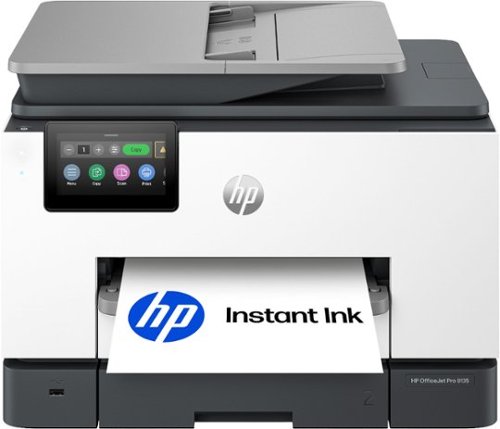
The HP OfficeJet Pro 9135 All-in-One Printer delivers fast color, fade-resistant prints, 500-sheet paper capacity, and single-pass duplex scan, copy capabilities plus fax, perfect for your office. Navigate this printer with the 4.3" color touchscreen and phone-like user interface. It includes wireless and printer security features to keep your multifunction printer up to date and secure, and is made with more than 40% recycled plastic content. Optimize print formatting with HP AI, that easily removes unwanted content from emails and web pages so your prints are just the way you want~no wasted pages or unwanted content. Subscribe to Instant Ink delivery service and get 3 months of free ink delivered directly to the door of your office. The HP OfficeJet Pro 9135 All-in-One also lets you print from anywhere with the HP app.
Customer Rating

5
I plan to keep this printer permanently. Excellent
on June 7, 2026
Posted by: EagleCroft
After researching nearly a dozen mid-tier office printers, I landed on the
HP OfficeJet Pro 9135e (Model: OFFICEJET PRO 9135E / SKU: 6565473) from
Best Buy. Two weeks in, roughly 60 hours of hard daily use, I can say
without hesitation: this is the best office printer I have ever managed.
Fast, quiet, smart, and surprisingly cheap to run. Here is my honest take.
HP OfficeJet Pro 9135e (Model: OFFICEJET PRO 9135E / SKU: 6565473) from
Best Buy. Two weeks in, roughly 60 hours of hard daily use, I can say
without hesitation: this is the best office printer I have ever managed.
Fast, quiet, smart, and surprisingly cheap to run. Here is my honest take.
I was skeptical of the "AI-enabled" label. I was wrong.
Self-Healing Wi-Fi: The router died mid-morning during a busy print
queue. On the old printer, that meant 10 minutes of rebooting and
reconnecting. The 9135e fixed itself silently. No one lost a job.
queue. On the old printer, that meant 10 minutes of rebooting and
reconnecting. The 9135e fixed itself silently. No one lost a job.
Smart Web Print Cleanup: A 4-page article that would have printed with ads,
sidebars, and cookie banners taking up half the pages came out as a clean
2-pager. The AI strips all of it before the job runs. Less paper, better
output, every time.
sidebars, and cookie banners taking up half the pages came out as a clean
2-pager. The AI strips all of it before the job runs. Less paper, better
output, every time.
Proactive Ink Ordering: The printer watches its own ink levels over Wi-Fi
and ships replacements before running low. I have not seen a single "Low
Ink" warning. No emergency store runs. The machine handles its own supply.
and ships replacements before running low. I have not seen a single "Low
Ink" warning. No emergency store runs. The machine handles its own supply.
One-Touch Cloud Scanning: I scanned a 30-page double-sided contract through
the document feeder, tapped Scan-to-Email on the screen, and had a complete
PDF in my inbox in under 60 seconds. No computer touched. One tap, done.
Google Drive, OneDrive, SharePoint, network folders, USB - all configured
once and remembered.
the document feeder, tapped Scan-to-Email on the screen, and had a complete
PDF in my inbox in under 60 seconds. No computer touched. One tap, done.
Google Drive, OneDrive, SharePoint, network folders, USB - all configured
once and remembered.
Custom Shortcuts: I programmed my most-used tasks as single taps on the
screen. Scan receipt to cloud storage, send contract to email, copy a form.
What used to take several steps now takes one.
screen. Scan receipt to cloud storage, send contract to email, copy a form.
What used to take several steps now takes one.
HP Wolf Pro Security: Continuous firmware monitoring and threat detection
built right in. For a mid-tier machine handling sensitive client documents,
this was a genuine and welcome surprise.
built right in. For a mid-tier machine handling sensitive client documents,
this was a genuine and welcome surprise.
Mobile Printing: I print, scan, copy, or fax directly from my phone via the
HP Smart app. Full printer management from anywhere in the building.
HP Smart app. Full printer management from anywhere in the building.
These are not extras bolted onto a standard printer. Every job I run goes
through these systems. They save paper, save time, and make the whole
experience feel like the printer is working with me instead of against me.
through these systems. They save paper, save time, and make the whole
experience feel like the printer is working with me instead of against me.
I have managed enough office printers to know the real trap: cheap hardware,
expensive ink. Run out of cyan printing a client proposal and you are paying
$28 for a single cartridge at the last minute. Budget for ink, miss anyway.
Repeat forever. That is the old model.
expensive ink. Run out of cyan printing a client proposal and you are paying
$28 for a single cartridge at the last minute. Budget for ink, miss anyway.
Repeat forever. That is the old model.
HP Instant Ink ends it.
I pay a flat monthly fee based on how many pages I print. Not by cartridge.
Not by color versus black. Not by how much ink is physically left. Just pages.
Color counts the same as black-and-white. When I print a full-color
presentation, I am not punished for it.
Not by color versus black. Not by how much ink is physically left. Just pages.
Color counts the same as black-and-white. When I print a full-color
presentation, I am not punished for it.
The printer monitors its own ink and ships replacements automatically before
I run low. I activated HP+ at setup, which gave me three free months of ink
to start and extended the warranty from one year to two at no charge. The
ongoing savings versus buying retail cartridges runs 50 to 70 percent.
I run low. I activated HP+ at setup, which gave me three free months of ink
to start and extended the warranty from one year to two at no charge. The
ongoing savings versus buying retail cartridges runs 50 to 70 percent.
I will not buy a retail ink cartridge again.
On power: ENERGY STAR certified, 5.58 watts ready, 1.22 watts in sleep. For
a machine running 10 hours a day, the electricity cost is negligible.
a machine running 10 hours a day, the electricity cost is negligible.
On maintenance: removable print head means a clog, if one ever happens, is a
DIY fix rather than a service call. The build quality is solid. Over 40
percent recycled plastic but it does not feel like it.
DIY fix rather than a service call. The build quality is solid. Over 40
percent recycled plastic but it does not feel like it.
I also added the Best Buy Geek Squad Service Contract. Here is my reasoning:
this machine will log roughly 2,600 hours of use per year. Rollers wear.
Mechanisms fatigue. Having professional backup means no surprise repair
bills, no scramble for a replacement, no downtime. The annual contract cost
is nothing compared to one out-of-warranty repair. It was an easy call.
this machine will log roughly 2,600 hours of use per year. Rollers wear.
Mechanisms fatigue. Having professional backup means no surprise repair
bills, no scramble for a replacement, no downtime. The annual contract cost
is nothing compared to one out-of-warranty repair. It was an easy call.
Zero paper jams. Zero errors. Zero times it was unavailable when someone
needed it. The 9135e has been 100 percent reliable from day one.
needed it. The 9135e has been 100 percent reliable from day one.
Speed holds up in real use. HP claims 25 pages per minute in black and 20 in
color. Printing actual 20-page monthly reports and invoices, those numbers
are accurate. First page out in about 10 seconds from cold.
color. Printing actual 20-page monthly reports and invoices, those numbers
are accurate. First page out in about 10 seconds from cold.
The dual 250-sheet trays give 500 sheets total capacity. I keep one loaded
with letterhead and one with plain paper. Nobody has had to stop mid-job to
reload. The 35-sheet duplex document feeder scans both sides simultaneously,
no manual flipping. It has saved real hours on contracts and multi-page forms.
with letterhead and one with plain paper. Nobody has had to stop mid-job to
reload. The 35-sheet duplex document feeder scans both sides simultaneously,
no manual flipping. It has saved real hours on contracts and multi-page forms.
The 4.3-inch color touchscreen works like a phone. Responsive, organized,
zero lag. I timed a new hire learning to fax and scan to email from scratch:
under 30 seconds each. No training required.
zero lag. I timed a new hire learning to fax and scan to email from scratch:
under 30 seconds each. No training required.
(1) HP+ Lock-In: Activating HP+ means the printer only accepts genuine HP
cartridges going forward. Third-party refills stop being an option. Given
how much cheaper Instant Ink is than retail, this has not bothered me
once. The savings make it irrelevant.
cartridges going forward. Third-party refills stop being an option. Given
how much cheaper Instant Ink is than retail, this has not bothered me
once. The savings make it irrelevant.
(2) Photo Print Speed: Full-bleed photos on specialty paper print slower than
the headline speed. This is an office document printer. For my flyers,
reports, and presentations it is outstanding. For dedicated photo work,
a different machine would be more appropriate.
the headline speed. This is an office document printer. For my flyers,
reports, and presentations it is outstanding. For dedicated photo work,
a different machine would be more appropriate.
(3) Unboxing: There is a lot of blue tape and cardboard inside protecting the
print head and ink carriage during shipping. Follow the setup poster and
remove all of it before powering on. Takes about 15 minutes. Miss a piece
and there will be a problem. Follow the instructions and there will not.
print head and ink carriage during shipping. Follow the setup poster and
remove all of it before powering on. Takes about 15 minutes. Miss a piece
and there will be a problem. Follow the instructions and there will not.
This is the best mid-tier office printer I have owned. The AI features are
real and useful. The ink costs are the lowest I have ever run. The reliability
record after 60 hours is spotless. The touchscreen and Smart app make it
genuinely easy for everyone to use every feature, not just print from a laptop.
real and useful. The ink costs are the lowest I have ever run. The reliability
record after 60 hours is spotless. The touchscreen and Smart app make it
genuinely easy for everyone to use every feature, not just print from a laptop.
I plan to keep this printer permanently, stay enrolled in HP Instant Ink, and
keep the Geek Squad contract active. That combination gives top-tier
performance, predictable low operating costs, and complete service coverage.
keep the Geek Squad contract active. That combination gives top-tier
performance, predictable low operating costs, and complete service coverage.
I would recommend this to a friend!
Share this review:


0points
0of 0voted this as helpful.
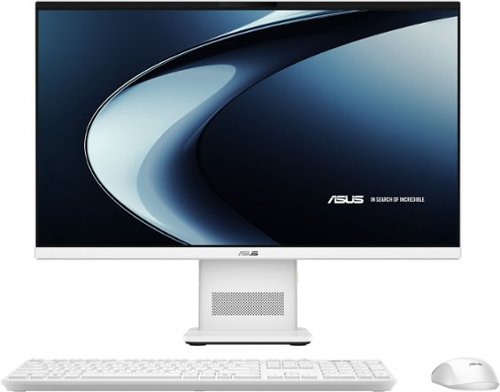
Meet the next wave of everyday computing with the first ASUS All-in-One powered by Snapdragon X Series. Built for fast, responsive performance and AI-enhanced experiences, this sleek 23.8~ touchscreen PC keeps everything you need in one streamlined design. From work tasks and video calls to streaming and browsing, the Snapdragon X platform delivers smooth performance with impressive power efficiency. The vibrant Full HD display with ultra-slim bezels gives you more screen and less distraction, while built-in AI capabilities help optimize performance, enhance video calls, and keep your workflow moving without slowdowns. With a clean white finish, wireless keyboard and mouse, and a clutter-free setup, this all-in-one is designed to fit naturally into any space~whether it~s your home office, dorm, or shared workspace.
Customer Rating
5
Best investment I've made for my business
on June 2, 2026
Posted by: EagleCroft
I absolutely love this computer.
I own a small at home business and needed a reliable computer that could handle everything I do every day without taking up my entire desk. After a lot of research, I decided on the ASUS VM441 24" All-in-One, and it has turned out to be one of the best investments I've made for my business.
I work from this computer all day long. I manage customer orders, update my website, answer emails, track inventory, create social media posts, edit product photos, and attend video meetings. I needed something dependable that I could turn on in the morning and trust to keep running until the end of the day. This ASUS has done exactly that.
What impresses me most is how stable and reliable it has been. It stays on for hours at a time without slowing down, freezing, or acting up. Everything feels fast and responsive. Programs open quickly, websites load smoothly, and I can move between multiple tasks without any frustration. As a small business owner, reliability is more important to me than anything else, and this computer has been rock solid.
I also love the design. The all-in-one setup keeps my workspace clean and organized because there is no bulky computer tower sitting under my desk. The white finish looks beautiful in my studio, and the compact design gives me more room for packaging orders and working on jewelry projects. It looks professional without being flashy.
The touchscreen display is wonderful. The screen is bright, sharp, and easy on my eyes during long workdays. Product photos look beautiful, colors are vibrant, and reviewing images of my handmade products has never been easier. The anti-glare screen is a nice touch too, especially when I'm working near a window.
The Snapdragon X processor, 16GB of memory, and 512GB SSD have been a perfect combination for my business needs. Everything feels quick and effortless. I am not a gamer and I don't need a high-end workstation. I simply need a dependable computer that handles real business work every day, and this machine does that extremely well.
I also appreciate the little details. The wireless keyboard and mouse help keep my desk uncluttered. The Windows Hello camera lets me log in quickly. Video calls look and sound great, and the Wi-Fi connection has been reliable throughout my workday.
What I really wanted was a computer from a trusted brand that I could count on every single day. That's exactly what I got. This ASUS has been quiet, dependable, easy to use, and incredibly reliable. It has become the central hub of my business, and I never have to worry about whether it can keep up.
If you're a small business owner looking for a compact, professional, and reliable computer that can stay powered on all day and handle everything from bookkeeping to customer service to online sales, I highly recommend the ASUS VM441.
Five stars from me. It has made running my business easier, and I couldn't be happier with my purchase.
I would recommend this to a friend!
Share this review:


+1point
1of 1voted this as helpful.

Studio-grade audio meets wireless freedom with the R8 SPECTRE PRO HS, officially licensed for PlayStation~5. Hear the RIG R-SERIES difference with graphene drivers custom-tuned for competitive gaming, delivering ultra-low distortion audio optimized for Tempest 3D on PlayStation 5. Take calls while gaming by seamlessly mixing Bluetooth voice audio over low-latency 2.4GHz game sound. Control your audio experience using the RIG Navigator app available for Android and iPhone. The broadcast-grade boom microphone captures your voice and blocks out background noise, with full bandwidth 16 bit / 48 kHz voice capture and enhanced noise-rejection technology. Settle in for marathon gaming sessions with up to 60 hours of battery life and a comfortable memory foam headband and ear cushions. Dock your headset in the dedicated base station with RGB effects and stay charged between gaming sessions. The R8 SPECTRE PRO. Wireless Game Audio Built Different.
Customer Rating
5
Best gaming cans - wakes up my Playstation. Yes!
on May 13, 2026
Posted by: EagleCroft
So I have to be honest here. I was not expecting much from the RIG R8 Spectre Pro HS. Like, at all. I've been burned before, more times than I care to admit. I've gone through those sad little headsets you find in a bargain bin at a drugstore, the ones where the "leather" peels off after three weeks and the sound is basically just a suggestion of noise. And I've also done the opposite. I've dropped $300 on "pro" headsets that felt like they were designed by someone who hates human skulls. You put them on and within an hour it's like your head is caught in a very expensive, very plastic vice. So my expectations for this one? Somewhere in the middle, leaning toward disappointment. But no. After a few weeks of using this thing on my PS5, I am genuinely, almost annoyingly impressed. It actually made some of my old games feel new again, which is a weird thing to say about a headset but here we are.
Let's talk about the sound first, because that's the whole point, right? They put these 50mm graphene coated drivers inside, which sounds like marketing nonsense until you actually hear them. And you can really tell the difference when things go off the rails on screen. You know how in most headsets, when an explosion happens and the music swells and someone is yelling, it all just turns into this muddy soup of noise? Like you're listening to a battle through a wet blanket? Yeah, not here. The sound is sharp. Unreasonably sharp. I'm hearing things in games I have played for literal years that I somehow never noticed before. Little details like the wind whistling through specific trees, or the tiny difference between footsteps on metal versus wood versus wet concrete. It's almost annoying because now I can't unhear it. And when you pair that with the PS5's 3D audio, it gets a little spooky. The positional accuracy is so good that I can tell exactly where someone is coming from before they even show up on the map. That is a massive deal if you play anything competitive, or if you just enjoy not getting shot in the back like a fool.
Now, battery life. I have trust issues with battery life claims. Companies always say stuff like "up to 60 hours" and then in real life you get maybe 15 if you're lucky and you don't breathe on it wrong. But this time? They say 60 hours on the 2.4GHz wireless connection, and in my experience, that is pretty much spot on. I can game every night for a full week and not even think about charging it. I forget it even has a battery. And when I do finally need to charge it, the base station actually earns its spot on my desk instead of just being a useless piece of plastic that collects dust. You just drop the headset onto the magnetic dock and it clicks into place like it's happy to see you. It's so much better than fumbling around for a tiny USB C cable in the dark when you're half asleep and irritated.
The dual wireless feature is something I did not think I would care about at all. Bluetooth 5.2 and 2.4GHz running at the same time? I figured it was one of those unnecessary bells and whistles that sounds cool in a press release but nobody actually uses. But nope. It's a game changer. I can stay connected to my phone for Discord or even take a quick call without having to take the headset off or pause my game. It just works quietly in the background like a polite coworker instead of a screaming toddler. Seamless. I hate using that word but it fits here.
Comfort is usually where I give up and start shopping around again because I wear glasses. Most headsets start to pinch after about 45 minutes, right behind the ears, and then I spend the rest of the night readjusting and grumbling. But these are surprisingly light for how much tech is crammed inside. They weigh around 315 grams, which is nothing, and they have these memory foam ear cushions that actually breathe instead of trapping heat like a space heater for your ears. I've done some pretty long sessions recently, the kind where you look at the clock and realize three hours have vanished into a black hole, and I haven't dealt with that annoying ear heat or pressure at all. I kind of forget I'm wearing the headset after twenty minutes, which is really the highest compliment you can give a headset.
Even the little stuff is well thought out, and I'm a sucker for good little stuff. The RIG Navigator app is actually easy to use if you want to mess with your EQ settings or change how your mic sounds. No weird menus, no frustration. And the mic itself has a simple flip to mute design. You just flip it up and you're muted. No searching for a tiny button while you are in the middle of a heated match and someone is yelling at you. Just flip and done. It's the little victories.
So here is the bottom line. If you are looking for a new headset and you want something that is best in class without spending a small fortune, I cannot recommend the RIG R8 Spectre Pro HS enough. It is about $180, and I honestly think it performs better than headsets I have owned that cost a hundred dollars more. It completely changed how I enjoy my PS5, and I think anyone who tries it will have a hard time going back to anything else. Total home run. Go buy it and then come back and thank me later. These do NOT disappoint!
I would recommend this to a friend!
Share this review:


+1point
1of 1voted this as helpful.
![Norton - Utilities Ultimate (10 Device) - Android, Apple iOS, Windows [Digital]](https://pisces.bbystatic.com/prescaled/500/500/image2/BestBuy_US/images/products/44dbbe2f-d36f-4c67-9905-287651d0198b.jpg)
Is your Windows PC moving slow? Norton Utilities Ultimate provides you with tools to help clean and reinvigorate your PC to keep it running like new. Automatically help increase your PC~s processing power, memory, and hard drive when you launch high-demand apps, for a smoother gaming, editing, and streaming experience.
Customer Rating

1
Great program - twenty years ago!
on December 30, 2025
Posted by: EagleCroft
It's difficult for me to recommend this product to anyone. If you have any computer skills, there's nothing this program can do that you couldn't do yourself with tools built-into the OS, or available for free (CCleaner). Does it do what it claims to do? Ummm... That's a stretch. None of these types of cleaning tools are actually going to make your old computer feel new, or magically perform better. At best it might put it back to the best performance a system is capable of. But more likely it'll barely make a difference. Modern operating systems do a good job already keeping themselves optimized. Browsers come with their own internal tools for cleaning. Optimizing the Windows Registry can be playing with fire if you don't know what is being changed. There is nothing in this program that I can't do manually, with full control on my own. But if you aren't savvy enough, maybe you can get benefit from this app. But be warned, you can also cause problems. Mess up your registry, without a backup - and you'll be regretting it. Aggressively clean-out your browsers and other system temp files, and you might suddenly find yourself re-inputting things like addresses, passwords, links, and other items that get cleaned without you knowing about it. Maybe you allow the program to free-up space, then you later regret it because the files were deleted locally and in the cloud - and now they're gone. If you know what you are doing, then the program can be controlled. But if you know what you are doing, you don't need this application. This application would have been useful a decade or two ago when operating systems weren't as intelligent, and when storage was at a premium. I think Norton is simply milking this application, something that is no longer needed. It might be easy to justify the purchase when you can load it on up to 10 machines. But it's an annual subscription, so you'll be paying for it every year. It's a thumbs-down from me. There is no value in me using it.
No, I would not recommend this to a friend.
Share this review:


0points
0of 0voted this as helpful.
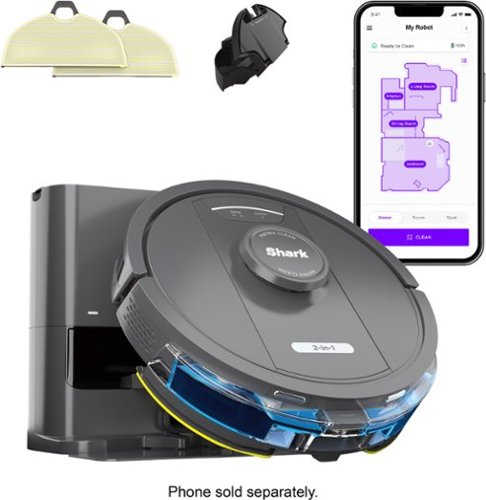
The Shark IQ Robot Vacuum RV2402WS is a whole-home cleaning machine with powerful suction, sonic mopping, and cleaning customization. Sonic Mopping scrubs hard floors 100x per minute to remove stuck-on stains with ease. With Precision Home Mapping, the robot uses its 360~ LiDAR vision to scan your home and build a detailed map, enabling fully autonomous movement. This also allows your robotic vacuum to detect and avoid objects in its path day or night. The multi-surface brushroll pulls trapped debris, dust, and pet hair from carpets and hardwood floors. Forget about vacuuming with the self-empty base that holds up to 30 days of dirt and debris. With Matrix Clean, the robot cleans using a precision grid taking multiple passes over dirt and debris, leaving no spots missed. It creates a precise home map in the SharkClean app so you can select specific areas to clean on demand, initiate Matrix Clean, and set cleaning schedules from anywhere.
Customer Rating
5
My 4th Robot Vacuum - This is the Best Yet!
on December 17, 2025
Posted by: EagleCroft
We both work full time, our pets are home all day, and honestly, cleaning floors was never keeping up. No matter how often we vacuumed, there was always pet hair on the rugs and muddy paw prints by the door. We finally decided to try a robot vacuum and went with the Shark Matrix 2-in-1 Robot Vacuum & Mop with the self-emptying base. After a few weeks, we are officially wondering why we waited so long.
Setup was surprisingly easy, even on a busy weeknight. We plugged in the base, downloaded the SharkClean app, and let the robot map the house using LiDAR. The map was accurate right away, and we could name rooms, block off pet food areas, and tell it where the carpets are so the mop stays on hard floors. Once that was done, it pretty much took over.
The biggest reason we bought this was pet hair, and it delivers. Our pets shed nonstop, and hair used to collect under furniture and along baseboards. The Shark Matrix cleans in neat rows instead of bouncing around randomly, which actually makes a difference. It picks up fur instead of spreading it around, and the brush roll does not constantly clog with hair. Even after a full day of pets lounging and shedding, the floors look clean when we get home.
Then there are the muddy paws. Rainy days used to mean wiping paws and still finding prints everywhere. The mopping feature has been a game changer. It vacuums and mops at the same time, and the gentle scrubbing motion is perfect for fresh paw prints and everyday dirt. Floors look clean without being soaked, which is great for busy homes.
The self-emptying base is honestly our favorite part. After each vacuum run, the robot empties itself into the base automatically. We only have to empty the base about once a month, even with pets. No bags to buy, no daily dust bin dumping, and no clouds of fur flying into the air.
We run it on a schedule while we are at work, and it just does its thing. It recharges on its own and finishes the job without us babysitting it. It is also quieter than we expected, and our pets got used to it quickly.
Maintenance has been simple. Mop pads are easy to wash, filters rinse clean, and the app lets us know when anything needs attention. It never feels like more work.
The best part is coming home to clean floors without having spent any time cleaning them ourselves. Instead of vacuuming after work or mopping on weekends, we actually get to relax and enjoy time with our pets.
If you are a busy, pet-loving household thinking about a robot vacuum for your family, the Shark Matrix 2-in-1 is absolutely worth it. It keeps pet hair under control, handles muddy paws, and takes one big chore off your plate. For us, it has been one of the smartest home purchases we have made. Worth every penny.
I would recommend this to a friend!
Share this review:


+2points
2of 2voted this as helpful.
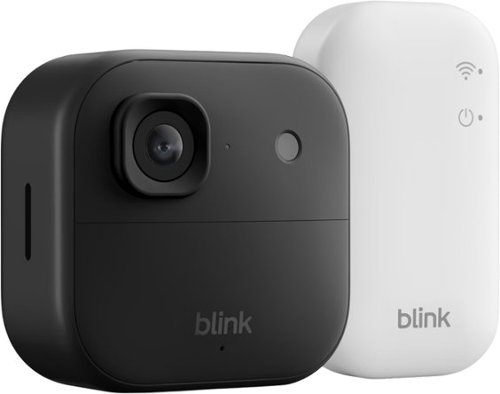
See and hear more ~ better than ever. Battery-powered Outdoor 2K+ delivers sharp 2K video resolution, detailed 4x digital zoom, and crystal-clear two-way audio with advanced noise cancellation. Mount in minutes with no wires, no worries, no compromises.
Customer Rating
5
Review of the Blink Outdoor 2K+ Cam by a Homeowner
on December 11, 2025
Posted by: EagleCroft
As a dad who worries about the safety of my family and home, I needed a security camera that worked without the headache. The Blink Outdoor 2K+ has been that solution. It’s reliable, simple, and gives me real peace of mind. Everything you need comes in the box. I had it up and running in minutes: plug in the little Sync Module, use the app, and mount the camera. The best part is it runs on two AA lithium batteries, so there are no wires to run or outlets to find. I mounted it under the eaves by my front door and forgot about it. The camera is small, tough, and built for the weather. Rain, snow, or summer heat hasn’t been a problem.
The video quality is excellent. I can clearly see faces at the door and read license plates in my driveway. The wide view covers my whole porch without looking warped. At night, if there’s a bit of light from a porch or street lamp, I still get color video. When it’s fully dark, it switches to a very clear infrared picture. It’s a huge step up from older cameras. The two-way audio is clear. I’ve used it to talk to delivery drivers without any issue, even with some street noise. The motion alerts are handy, and you can fine-tune them in the app to ignore areas like the sidewalk. If you choose the optional subscription, it can even tell you if the motion is from a person or a vehicle, which cuts down on unnecessary alerts.
For a homeowner like me, this camera strikes the perfect balance. It’s completely wireless, delivers a sharp picture day and night, and works seamlessly. I don’t have time for complicated gadgets, and this one just does its job. The little Sync Module by my router lets me add more cameras later if I want to expand. The app is straightforward for checking in live, watching past clips, and managing settings. It’s a solid choice for keeping an eye on what matters most.
I would recommend this to a friend!
Share this review:


0points
0of 0voted this as helpful.
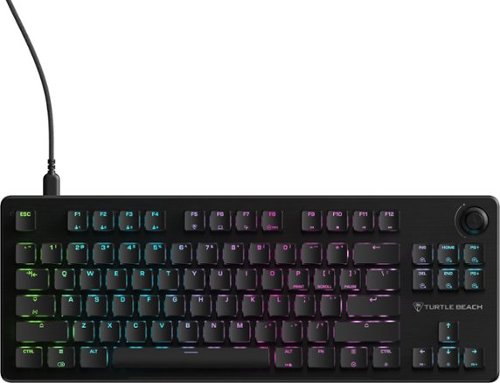
The Turtle Beach Vulcan II TKL mechanical gaming keyboard is a compact powerhouse built for PC gaming enthusiasts for the long haul. Engineered with a tenkeyless form factor that maximizes desk space for quick mouse movement and big swipes, Vulcan II TKL is perfect for fast-paced FPS, MOBA, and all-round competitive play. Its pre-lubed, hot-swappable TITAN HS mechanical linear switches deliver smooth, quiet yet rapid 1.8mm actuation~ideal for both gaming and typing and tested to 50 million keystrokes. Sound dampening foam and upgraded stabilizers provide a satisfying, clean keystroke sound with zero rattle or spring noise for smooth and crisp gaming and typing. ReacTap SOCD technology ensures ultra-fast input response and precise movement~perfect for strafing, tapping, or micro-adjustments in competitive titles while full key (NKRO) with 100% anti-ghosting ensures every key press registers accurately, even when multiple keys are pressed at once for complete reliability during high-speed or competitive gameplay. Featuring user-replaceable parts, a brushed aluminum top plate set on a low-profile housing, T-shaped keycaps, and a stylish, ergonomic layout the Vulcan II TKL is built to last for years. With hot-swappable switches (3-pin & 5-pin compatible), never again throw away a keyboard due to missed or double inputs due to mechanical switch oxidation or wear and tear. Switch replacements or upgrades are made easy without soldering. You can also customize each keycap with any 3rd party compatible cross-mount keycap to replace lost caps or simply to fit your style. Lastly, the detachable braided power cable is also replaceable if worn or upgradeable to match your setup. With per-key RGB illumination and synched AIMO across Turtle Beach PC products via Swarm II and dedicated game mode with EASY-SHIFT[+] key remapping, every keypress counts. A dedicated Artificial Intelligence launch key is added via FN press can be set to instantly access your favorite A.I. application. Up to five onboard profiles allow seamless transitions between setups and an integrated volume wheel with push-to-mute is in easy reach.
Customer Rating
5
Best Gaming Keyboard I've Ever Owned
on December 7, 2025
Posted by: EagleCroft
If you are thinking about getting a high-quality gaming keyboard for yourself, or for someone you love – you will want to check out the Turtle Beach Vulcan II TKL Wired Mechanical Gaming Keyboard. Since owning it, it has become my favorite keyboard to use with my gaming laptop. It is made of quality materials so it’s durable and will last me a long time. A common problem with keyboards in general is that they are cheaply made. Sure, you can get them for not much money but they don’t respond well, they stink to type on and they don’t last. This one will cost you more, but you’ll appreciate the tactile feel, the sounds the keyboard makes when you type, and the accurate responses. I have a business keyboard, and this keyboard for gaming. But I’m finding that I use this one for both purposes. It’s that good! But be aware that this keyboard does not have a tenkey number pad on the right. If you need that, then you’ll want to keep your business keyboard. For gaming purposes, this is a necessity as the shortened keyboard length allows for easier mousing without banging into the keyboard case. My wrist flicks and sweeps no longer result in bruises. The mechanical keys are designed with a short actuation distance for faster reaction times.
The Vulkan II TKL sits nicely on the desk, either flat or angled. Unlike cheap keyboards, this one has some weight to it and stays planted. The keyboard materials are a mix of aluminum and plastics. Inside there are dampening materials to ensure a solid strike with no rebound. The keys strike straight down, with no wiggle or slop. There’s a reassuring near silent ‘click’ to each key strike, it remains quiet and sounds purposeful. Key presses are stable with no wiggle. Key friction is reduced with lubrication, and slick parts. The manufacturer claims the keys are tested to last an amazing 50 million rebounds. As an avid gamer, and PC-builder I appreciate the hot-swappable keyboard switches. I can customize the keyboard easily and safely with the included tools. I can also extend the life of the keyboard by swapping out individual keys as some wear out quicker than others. The design is compatible with keycaps from third-party manufacturers (3-pin and 5-pin switches). I also appreciate the addition of a rotary volume knob on the keyboard itself, tucked out of the way – but easy to get to if I need it. Also, the lighted keys have a beautiful glow to them. There are nearly limitless color variations, and lighted effects which you can program with the included software. I don’t like anything except subdued statically lighted keys, otherwise they become distracting. I get full control on this, and I set it up exactly how I like it. But if I get the urge I may add some color and vibes. I sometimes wish this keyboard were wireless but not having to worry about batteries or recharging it overcome any regret I might have. The cable is long and flexible and stays out of the way. There’s no lag in a wired connection either.
I highly recommend the Turtle Beach Vulcan II TKL keyboard. It costs a bit more, but if you could build this keyboard with separate components, it would cost you twice as much. It’s a keyboard you invest in, and in the end, you will end up enjoying it more and it will ultimately save you money. Remember, for now we interact with computers through keyboards and mice. They are the biggest limiting factors in your gameplay. Don’t cheap out, throw that old membrane keyboard away and get this keyboard and level up your gaming. Now back to Valorant to drop some bombs…
The Vulkan II TKL sits nicely on the desk, either flat or angled. Unlike cheap keyboards, this one has some weight to it and stays planted. The keyboard materials are a mix of aluminum and plastics. Inside there are dampening materials to ensure a solid strike with no rebound. The keys strike straight down, with no wiggle or slop. There’s a reassuring near silent ‘click’ to each key strike, it remains quiet and sounds purposeful. Key presses are stable with no wiggle. Key friction is reduced with lubrication, and slick parts. The manufacturer claims the keys are tested to last an amazing 50 million rebounds. As an avid gamer, and PC-builder I appreciate the hot-swappable keyboard switches. I can customize the keyboard easily and safely with the included tools. I can also extend the life of the keyboard by swapping out individual keys as some wear out quicker than others. The design is compatible with keycaps from third-party manufacturers (3-pin and 5-pin switches). I also appreciate the addition of a rotary volume knob on the keyboard itself, tucked out of the way – but easy to get to if I need it. Also, the lighted keys have a beautiful glow to them. There are nearly limitless color variations, and lighted effects which you can program with the included software. I don’t like anything except subdued statically lighted keys, otherwise they become distracting. I get full control on this, and I set it up exactly how I like it. But if I get the urge I may add some color and vibes. I sometimes wish this keyboard were wireless but not having to worry about batteries or recharging it overcome any regret I might have. The cable is long and flexible and stays out of the way. There’s no lag in a wired connection either.
I highly recommend the Turtle Beach Vulcan II TKL keyboard. It costs a bit more, but if you could build this keyboard with separate components, it would cost you twice as much. It’s a keyboard you invest in, and in the end, you will end up enjoying it more and it will ultimately save you money. Remember, for now we interact with computers through keyboards and mice. They are the biggest limiting factors in your gameplay. Don’t cheap out, throw that old membrane keyboard away and get this keyboard and level up your gaming. Now back to Valorant to drop some bombs…
I would recommend this to a friend!
Share this review:


+1point
1of 1voted this as helpful.

Hear the Best of All Worlds with the SteelSeries Arctis Nova 7X Wireless Gen 2 with real-time audio control via mobile app. Custom Neodymium Magnetic Drivers can mix in Bluetooth simultaneously with your game audio. Plug-&-Play USB-C for 2.4GHz wireless connects instantly to Xbox, PC, PS5, Switch, Handheld, and more. Premium steel headband, and 50+ hours battery life.
Customer Rating
5
Best in class Gaming Headset
on November 25, 2025
Posted by: EagleCroft
If you already are familiar with the top gaming headsets you are familiar with SteelSeries - the brand. But did you know that the parent company is based out of Denmark, the same company owns the Jambra brand as well as many others? That the headphones are manufactured in Vietnam, not in China? The headphones are excellent, and the history of the company is top notch!
The SteelSeries Arctis Nova 7X Gen 2 is the Swiss Army knife of gaming headsets (versatile, reliable), and packed with features that actually matter. Whether you're gaming on Xbox, PlayStation, PC, or Switch, this headset delivers premium comfort, killer sound, and unmatched multi-platform support.
The moment I put on the Nova 7X Gen 2, I understood why comfort is its superpower. The ComfortMAX system uses a stretchy suspension band that distributes weight evenly across your head—no more pressure points or "headset headache" after hours of gaming. The memory foam earcups wrapped in breathable AirWeave fabric keep your ears cool and comfortable, even during intense gaming sessions. I wear glasses and have a larger head, and I hate that clamping feeling most headsets give you. The Nova 7X Gen 2 feels like it's floating on my head. In a particular demo video from the manufacturer, the headband is hit with an anglegrinder to show its strength and resilience. I don't often have an anglegrinder on my head, and I definitely don't recommend it. But it does go to show its durability, and presumably these will stand the test of time. The only gripe I have about the headband is that the material is a bit slippery. I have to reposition it often to keep it in place. The earpad material feels great, and so comfortable! But I worry about how durable it'll be, and how soon they'll need to be replaced.
Powered by custom 40mm neodymium drivers, the Nova 7X Gen 2 delivers balanced, immersive audio that hits the sweet spot for gaming. The bass has enough thump to make explosions feel impactful without muddying crucial audio cues like enemy footsteps. The real game-changer is the 360° spatial audio support, which works seamlessly with Tempest 3D Audio on PS5. You'll hear exactly where enemies are coming from, giving you a competitive edge that feels almost like cheating. Plus, with over 200 game-specific EQ presets accessible through the mobile app, you can optimize the sound for whatever you're playing. The dual wireless connectivity lets you connect to your console via ultra-low latency 2.4GHz while simultaneously pairing with your phone via Bluetooth. Take calls, listen to music, or chat with friends on Discord without ever pausing your game.
The included USB-C dongle is a masterpiece of engineering—with a simple flip of a switch, you can instantly switch between Xbox mode and standard USB for compatibility across PlayStation, PC, Switch, and even mobile devices. It's the ultimate "one headset to rule them all" solution. SteelSeries cranked the battery life up to an insane 54 hours on a single charge—that's more than two full days of continuous gaming. Even with both wireless connections active, you're still looking at 38+ hours of playtime. The fast charging feature gives you 6 hours of gameplay from just a 15-minute charge. That's enough time to grab a snack and get right back into the action. Battery anxiety is officially a thing of the past.
Pros
* Exceptional comfort for marathon gaming sessions
* Outstanding multi-platform compatibility
* Dual wireless connectivity is a game-changer
* Impressive 54-hour battery life with fast charging
* Mobile app control with 200+ EQ presets
* Premium build quality that feels durable
* Exceptional comfort for marathon gaming sessions
* Outstanding multi-platform compatibility
* Dual wireless connectivity is a game-changer
* Impressive 54-hour battery life with fast charging
* Mobile app control with 200+ EQ presets
* Premium build quality that feels durable
Cons
* USB dongle is bulky and can block adjacent ports
* No active noise cancellation
* Microphone quality is good but a bit nasally
* Flashing Bluetooth light can be distracting in the dark
* Confusing Power-on Button and Bluetooth LED after power-off
* USB dongle is bulky and can block adjacent ports
* No active noise cancellation
* Microphone quality is good but a bit nasally
* Flashing Bluetooth light can be distracting in the dark
* Confusing Power-on Button and Bluetooth LED after power-off
Verdict
The SteelSeries Arctis Nova 7X Gen 2 perfectly balances premium features, exceptional comfort, and unmatched versatility in a way that makes it the obvious choice for serious gamers who play across multiple platforms.
I would recommend this to a friend!
Share this review:


+1point
1of 1voted this as helpful.
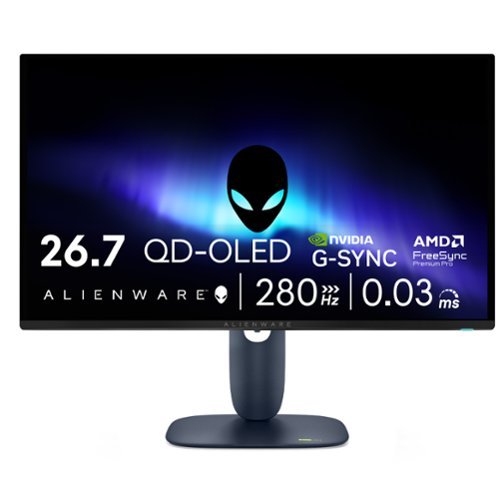
Alienware 27 280Hz QD-OLED Gaming Monitor - AW2725D - 26.7-inch QHD 280Hz, NVIDIA G-SYNC Compatible, AMD FreeSync Premium Pro
Customer Rating
5
A Stunning Gaming Monitor
on November 25, 2025
Posted by: EagleCroft
The Alienware AW2725D is a 27-inch gaming monitor that uses QD-OLED technology (an enhanced OLED screen with even better colors). It delivers stunning image quality and lightning-fast performance. It is an excellent choice for serious gamers who want premium visuals without paying 4K prices.
The picture quality is beautiful, with OLED each pixel creates its own light providing near perfect blacks (unlike on regular monitors) and incredibly vibrant colors that fill the screen. The preferred resolution is 2560x1440 is perfect for gaming. The images are sharp and crisp but not so demanding that an expensive graphics card would be required. My gaming laptop with an NVIDIA graphics handled it just fine.
This monitor is in a different league when it comes to gaming. The speedy refresh rate updates the screen 280 times per second, making motion silky smooth. At 0.03ms the response time practically instant. I notice no motion blur or ghosting, even during fast-action games. Whether I’m playing competitive first-person video games or racing cars, everything looks crystal clear.
The design is sleek and sturdy with matte-black finish that looks sophisticated (looks a nice dark blue in the right light). The stand is compact, and sturdy and fully adjustable for height, tilt, and swivel. There are two HDMI 2.1 ports and a DisplayPort. Plus, it features a USB hub for accessories (the USB hub can't charge laptops or accept video in).
I can choose between two modes for HDR content (movies and games). (1) "True Black" for the most accurate colors, or (2) "Peak 1000" for extra-bright highlights that really pop in dark scenes.
The only real negative with this monitor is its text clarity. It has nothing to do with the quality of Alienware products (which are outstanding). Instead, it has to do with OLED technology and how the screen pixels are arranged. I find that tiny text can show faint color fringing (hazy rainbow effect). As such I would not recommend buying this for working with text and documents. It's designed for higher-end gaming and web browsing.
As with all OLED screens, there's a risk of "burn-in" if static images stay static on screen for too many of hours (i.e.m desktop icons). However, Alienware includes a 3-year warranty that covers burn-in, which should ease your mind. The monitor also runs special anti-burn-in techniques while operating (pixel shifting), and automatic screen maintenance when powered off. If you take care of this monitor, there’s no reason to ever experience burn-in. But all OLED screens will slowing lose color density and vibrance over time. Not unique to this monitor, that’s the price you pay for an OLED screen. It's up to you to decide whether it's worth it.
The screen coating is semi-gloss which helps to display extremely vivid colors. But a semi-gloss screen sometimes reflects light sources, just avoid placing it opposite windows or lamps.
Conclusion:
The Alienware QD-OLED AW2725D is great gaming monitor at an affordable price. Five years ago, a monitor like this would have cost two or three times this amount. I prioritize performance and stunning visuals for my gaming monitor, for business (working on documents, etc.) I use a separate screen. Aside from text clarity, this is one of the best monitors I’ve used for gaming. It's built well, the screen is stunning, and it performs like a champ in games. If as a gamer you value motion clarity and image quality (and are willing to pay for them), then put this on your desk and start playing! If you are looking for dual use (gaming and work), I would advise against it. That's the gotcha. Text looks poor, jagged, blurry and I’d worrying about the long-term effect static text has on the screen itself. I am very pleased with it and will recommend it to friends.
I would recommend this to a friend!
Share this review:


+1point
1of 1voted this as helpful.

The Best Buy essentials 10W Magnetic Wireless Charger for iPhone or Devices Compatible with MagSafe & Qi Charging is an effortless way to power your devices. Its magnetic array attaches to your iPhone for an efficient, 7.5W charge, or place your Qi-compatible device on the charger for up to 10W of power. The built-in USB-C cable plugs into wall adapters, vehicle chargers, and more for versatile charging options. And it~s backed by Best Buy, so you can trust us to keep your phone powered.
Customer Rating

4
It works! How can you find fault at this price?
on November 5, 2025
Posted by: EagleCroft
I was right on the edge of giving this a 5-star rating, but I just couldn’t bring myself to doing it. For such a low price, and the fact that it does exactly what it was designed to do – shouldn’t this be 5-stars? Yes, except one thing annoys me about it. I would have given this a 5-star rating if it had a rubberized bottom under it, or some small rubber pads to keep it from sliding all over the place. I have a Samsung S23 Ultra mobile phone (not an iPhone), it charged just fine. It’s only 10W, so it’s no speed demon. It also heated up a little, but that’s to be expected. It even charged through my leather folding case.
I just can’t fathom why there isn’t a nonslip bottom on it. That combined with the fact that the cable material is not very forgiving. When I first placed it on my desk it flopped around like a fish (queue SpongeBob theme). I’ve solved the problem myself by applying some rubberized pads on the bottom. If this had a non-slip bottom it would get 5 stars. If it also had a more flexible cable, it would get bonus points.
If you are looking for a very basic conductive charger for your compatible mobile phone, no bells and whistles – barebones that works – you cannot go wrong.
I just can’t fathom why there isn’t a nonslip bottom on it. That combined with the fact that the cable material is not very forgiving. When I first placed it on my desk it flopped around like a fish (queue SpongeBob theme). I’ve solved the problem myself by applying some rubberized pads on the bottom. If this had a non-slip bottom it would get 5 stars. If it also had a more flexible cable, it would get bonus points.
If you are looking for a very basic conductive charger for your compatible mobile phone, no bells and whistles – barebones that works – you cannot go wrong.
I would recommend this to a friend!
Share this review:


0points
0of 0voted this as helpful.
EagleCroft's Review Comments

Bose~ SoundLink~ Mini Speaker: Enjoy full, robust sound anywhere you go with this speaker that features an ultracompact design for easy movement from room to room. Bluetooth technology allows you to wirelessly stream music and more from your compatible cell phone, audio player and more.
Overall4 out of 5
4 out of 5King of the Hill "Portable Bluetooth Speakers"
By EagleCroft
from Exeter, NH
I'll admit it, I'm an audio snob. Unfortunately my wallet doesn't match my audio desires - so I try to get the best bang for my buck. I have tried many portable speakers starting at $50 and steadily worked my way up. I really didn't want to spend $200 on a speaker, but once I got to demo the Bose Soundlink Mini I found out that there was something very special about this little gem. I've tested speakers 2 times, even 3 times its size and none have reproduced the full spectrum and warmth of sound that the Soundlink Mini has. To be honest as a self-proclaimed audiophile I have shunned Bose products, they were always too mainstream for me - too mass marketed and price / value never made sense to me. I instead would opt for the more esoteric name brands (and still do). But in this case there is simply no competition at this price point (and Bose products never go on sale). Being able to pack this much sound into such a small case is just unbelievable. The engineers at Bose are simply magicians, or at least "wicked smart". It almost doesn't make sense when you hear this speaker playing, you expect to see a subwoofer hidden somewhere. I’d like to suggest to Bose that they change the name from Soundlink to “The Bose Tardis”, as its size belies its true capabilities (Dr. Who reference). I did several side by side comparisons with more than a half dozen Bluetooth speakers and the closest any one of them came was the UE Boom. The Bose has warmer tones overall, which I particularly like (vocals sound full, but not overdone). The UE Boom has better sound separation; the bass is good – but not as good as the Bose. Its upper end is crisp, and actually too bright for my ears. Of all the sub $200 speakers I’ve tried, these 2 are the crème of the crop. The edges out a win for me, but if I were more interested in portability (throwing the speaker in a backpack and heading to the beach), in that case the UE Boom is a better choice. The Bose is more of a home-body; it looks great perched upon its dock, charging. Frankly the Bose is too nice to bring outside. It’s not without its faults though, the Bose lacks a Line Out jack (which would be nice), and although it’s pointless to me some people might want a speakerphone built-in. The docking station is a great feature too, allowing you to quickly set it down to charge (and it looks good too). The Bose Soundlink Mini is a winner, buy it- you’ll not regret it.

EagleCroft
Exeter, NH
Responding to posted question...
April 6, 2014
To the reader who asked for brand names of esoteric speakers I was referring to, I own a pair by B&W, and a pair by KEF. Not crazy priced speakers, but not mainstream either. I'm still extremely pleased with the purchase of the Bose Soundlink Mini. In fact I took the time to video a review of it, and comparing it to other similarly priced BT speakers (notably the UE Boom). Once I edit and clean up the video, add dialog - I'll be posting on YT. BTW, a couple of other notables about the the Bose: (1) it sounds great a low volume levels. Most reviews focus on how loud a speaker can get. Many times that isn't as important as how -good it sounds at low volume levels. The Mini really, really shines in this area. At low volumes the sound is still warm, and deep and well assembled. It's amazingly efficient. For comparison the UE Boom sounds good at loud volume, but loses its richness at a low volume and the bass all but disappears. Most small speakers suffer this same malady, play them softly and they sound like an old transistor radio. Not the case with the Bose Mini - it's wonderful. The other nice thing that the Bose engineers did (or should I said didn't do) is add all sorts of annoying confirmation tones that most other BT speakers have. I have no idea why other manufacturer's have followed this trend, I don't need to hear loud confirmation tones (or even human voices) to let me know when I power on or hit max volume. Bose is elegant and refined, and doesn't try to show off.
0points
0of 0voted this comment as helpful.
EagleCroft's Questions
EagleCroft has not submitted any questions.
EagleCroft's Answers
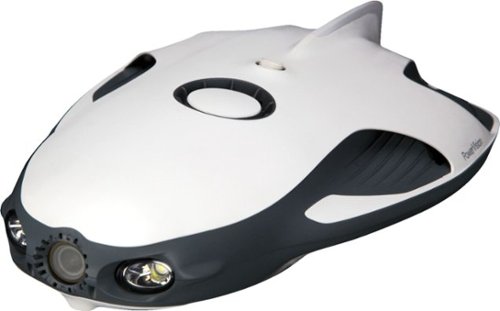
Open a world of ocean exploration with this PowerRay Wizard underwater camera. The detachable PowerSeeker fishfinder can be used by itself to map landscapes, and the 4K Ultra HD camera with wide-angle lens captures photos or videos in lakes or seas. Real-time streaming at 1080p from this PowerRay Wizard underwater camera lets you share your adventures via social networks.
How many lumens does the light produce
Good question!
Power: 3Wx2
Brightness: 450 lumens(with dimming control)
Color Temperature: 6500K
Power: 3Wx2
Brightness: 450 lumens(with dimming control)
Color Temperature: 6500K
7 years, 1 month ago
by
EagleCroft

Enjoy your workout and travel playlists with these JBuds Air true wireless earbuds. Three EQ settings include JLab Signature, Balanced and Bass Boost to customize your listening experience, and the charging case provides 10 hours of additional battery life. Take clear, hands-free phone calls with the built-in microphone and Bluetooth 5.0 technology of these JBuds Air true wireless earbuds.
this headphones are conpatible for iphones?
Yes, I use them on my iPhone 7+. They sound great!
7 years, 5 months ago
by
EagleCroft
Enjoy your workout and travel playlists with these JBuds Air true wireless earbuds. Three EQ settings include JLab Signature, Balanced and Bass Boost to customize your listening experience, and the charging case provides 10 hours of additional battery life. Take clear, hands-free phone calls with the built-in microphone and Bluetooth 5.0 technology of these JBuds Air true wireless earbuds.
Is it possible to just use one?
Yes, you can use just one earbud and keep the other in the case.
7 years, 5 months ago
by
EagleCroft

One solution across all your devices. With Office 365 Personal, you get Word, Excel, PowerPoint, Outlook, and more. Work anywhere with apps that are always updated with the latest features. 12-month automatically renewing subscription for one person including 1TB OneDrive cloud storage.
So does that mean when 12 months is up it automatically renews
Yes, you need to make sure you go into your account and disable the auto-renewal.
7 years, 7 months ago
by
EagleCroft
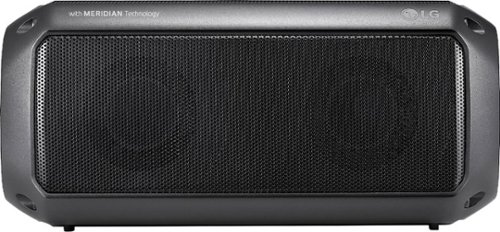
Feel the beat with this LG PK3 portable Bluetooth speaker. It provides dynamic sound and rich bass thanks to its Meridian Audio technology, so you can bring the party with you. The IPX-7 water resistance lets you go anywhere, rain or shine. This LG PK3 portable Bluetooth speaker keeps the music going for up to 12 hours per charge.
I want to use this as a speaker on my TV. Will it work for this purpose if I leave it plugged into a wall outlet for power all the time?
Sure! Just be aware that it uses a Type-C USB connector. The cable is provided, but isn't very long. So depending on your needs and access to a USB port - you may need to buy a longer cable. Otherwise it will need a typical micro audio connector cable to plug it into your TV (unless you use Bluetooth). I hope that helps.
7 years, 8 months ago
by
EagleCroft
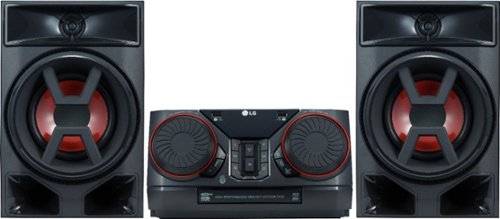
Enjoy room-filling audio in any living space with this LG Hi-Fi shelf system. Its two 150W speakers produce loud, detailed sound, and it streams music via Bluetooth when you pair it with an Android device. This LG Hi-Fi shelf system has an EQ function that optimizes the audio based on the music you're listening to.
Can I connect a turntable to this system? My current shelf system has an AUX input.
Chances are, no... It really depends on your turntable. Unlike most discreet audio components turntables require a preamp to boost the signal before it can be amplified. Some new turntables don't need this, so your best bet would be to check your owner's manual from the turntable and verify that it can run without a preamp.
7 years, 9 months ago
by
EagleCroft
Enjoy room-filling audio in any living space with this LG Hi-Fi shelf system. Its two 150W speakers produce loud, detailed sound, and it streams music via Bluetooth when you pair it with an Android device. This LG Hi-Fi shelf system has an EQ function that optimizes the audio based on the music you're listening to.
Does it have a CD player
Enjoy room-filling audio in any living space with this LG Hi-Fi shelf system. Its two 150W speakers produce loud, detailed sound, and it streams music via Bluetooth when you pair it with an Android device. This LG Hi-Fi shelf system has an EQ function that optimizes the audio based on the music you're listening to.
Does this have a telescoping antenna?
No, it uses a length of wire which is directional as the antenna.
7 years, 9 months ago
by
EagleCroft
Enjoy room-filling audio in any living space with this LG Hi-Fi shelf system. Its two 150W speakers produce loud, detailed sound, and it streams music via Bluetooth when you pair it with an Android device. This LG Hi-Fi shelf system has an EQ function that optimizes the audio based on the music you're listening to.
How can I add speakers to this system. What speakers are compatible?
It comes with two speakers, that are attached with separate R/L +/- speakers wires. You can add more speakers the same way I'm sure, but be aware that the speakers are matched to the system. I'm not sure how many ohms the system speakers run on, and that's critically important to the efficiency and volume of sound. Remember 300 Watt RMS doesn't necessarily mean it can drive large speakers, chances are you need very efficient speakers with a low ohm rating to work well with this system. It's doable, but you'll have to do some homework to make it sound good.
7 years, 9 months ago
by
EagleCroft