


EagleCroft's stats
- Review count90
- Helpfulness votes822
- First reviewOctober 11, 2013
- Last reviewJune 7, 2026
- Featured reviews0
- Average rating4.4
- Review comment count1
- Helpfulness votes0
- First review commentApril 6, 2014
- Last review commentApril 6, 2014
- Featured review comments0
Questions
- Question count0
- Helpfulness votes0
- First questionNone
- Last questionNone
- Featured questions0
- Answer count9
- Helpfulness votes26
- First answerAugust 22, 2018
- Last answerApril 17, 2019
- Featured answers0
- Best answers0
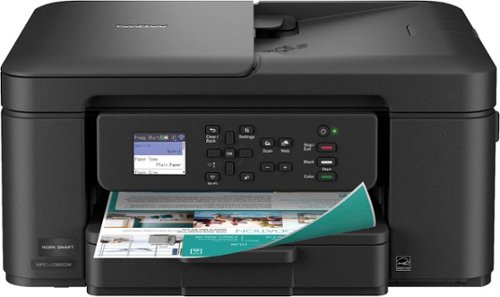
The Brother Work Smart 1360 Wireless All-in-One Refresh Subscription Eligible Inkjet Printer is the perfect choice for a reliable printer with robust efficiency-boosting features. With tools like automatic duplex (2-sided) printing, a 20-page single-sided automatic document feeder(1), and wireless(2) and Cloud connectivity(3) options available on the 1.8~ color display, this multifunction printer helps you get your work done with simplicity and ease. Perfect for printing anything from to-do lists to business reports, this color inkjet printer outputs quality prints at fast speeds. Brother Page Gauge(4) monitors your ink usage so you know when you~re running low. When paired with the Brother Mobile Connect app(5), setup is quick and easy ~ plus, you~ll be able to print from virtually anywhere on your mobile device(6). Print Confidently with Brother Genuine LC501 Ink in your Brother Work Smart 1360 for reliable, consistent prints ~it~s the only brand we recommend for your Brother printer.
Customer Rating

5
BEST Color Inkjet for under a $100. Prove me wrong
on October 1, 2025
Posted by: EagleCroft
The Brother MFC-J1360DW is a new all-in-one printer that many families and small businesses can use every day: the printer. This compact printer can handle printing, copying, and scanning wirelessly.
Unboxing the Brother MFC-J1360DW I was happy to see it is a small unit with a small footprint; I appreciate its size. It’s not a giant machine that takes over your whole desk. It has a simple, no-nonsense design to fit in just about anywhere (home office, dorm room, or in a small business). Up in front is a small, 1.8-inch color screen. It’s not very fancy and is limited in functionality, but it makes navigating the features and configuration possible without needing a manual. The unit has a solid feel to it, but still light enough to move around.
Pros
This printer is an "all-in-one", need to print a school essay? Done! Make a copy of a grocery receipt? Yup! Scan in an old photo to edit on your computer? Check! It does all these tasks well, eliminating the need for separate machines and saving you money.
One of its best features is its wireless connectivity. After a simple setup, you can print directly from your laptop, phone, or tablet that shares the same Wi-Fi connection. You can even have it print something directly from your Google Drive without turning on the computer.
A smart way to save money is to print on both sides of a sheet of paper. A terrific feature is automatic double-sided printing. You just tell the printer to do it, and it will automatically flip the paper and print on both sides. This saves paper, money and the environment.
This little printer is plenty fast. It prints out black and white pages very quickly, faster than I expected! Color pages will be slower but that is expected – and it’s still plenty fast. The ink cartridges are inserted separately, which is great! This means cost to replace cartridges is less money since you are only replacing a color that is depleted. The black cartridge, which gets the most use, is significantly larger than the color cartridges and lasts quite a bit longer.
Cons
A ‘Pro’ I mentioned also has a ‘Con’ to it. This is the one thing to be careful about. If you sign-up for replacement cartridges, you will get a discount – but you may be surprised when they get delivered to your home. The printer uses four separate color cartridges (black, cyan, magenta, yellow). Like recurring subscription fee, the printer has intelligence to order new cartridges when they get low. Pretty cool, but I prefer to have full control over purchases. Simple enough to decline this feature if you don’t want it though.
I mentioned in the ‘Pros’ section that there is a feature to print on both sides automatically. Which is great! But that feature doesn’t extend to copying… It has a 20-page automatic document feeder for scanning a stack of papers one after the other. Unfortunately, the feeder can only scan one side of a page at a time. If you have double-sided documents to scan, you’ll have to flip and restack them yourself (collating properly) and run them through again. But at this price point, I really can’t complain about this small inconvenience.
Not much worth mentioning about the LCD screen. It is basic and barebones: While the small color screen is useful, it looks and feels a little old-fashioned. Especially when we are all used to big, beautiful screens on our phones. Navigating through some menus is tedious and slow, but for basic functions, it’s fine. The home screen of the LCD is sort of confusing too. I don’t understand why a better static screen isn’t displayed. Instead, you always see the setup menu, which is silly, and you may end up going round and round the menus trying to figure out where the home screen is (hint: I did this). Also, the panel can tilt upwards, but only a little. If you aren’t careful, you may pull too hard on it and break it (thinking it’ll tilt up further for better viewing). Best thing to do is to set the print up and push the panel back flush and out of the way.
Summary
I like the small Brother MFC-J1360DW printer. I’ve found it to be a reliable, fast printer with a bonus of scanning and copying. It may not be the flashiest or the most feature-rich, but it excels at the core features. Its ability to print, copy, and scan – and can do so wirelessly. Its space-saving design and paper-saving double-sided printing make it an excellent choice for a home, student, or small office. It punches well above its weight class, and simply amazing for the price point that you can bring it home for.
It's a definite “BUY” from me. I don’t see how you can complain about this color printer. For less than the price of going out to dinner (these days), you can have a well-made, quality printer that makes no excuses, and performs like a little champ!
I would recommend this to a friend!
Share this review:


+1point
1of 1voted this as helpful.
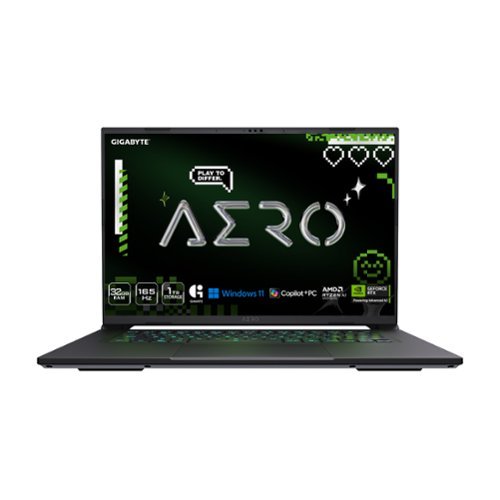
The GIGABYTE AERO X16 Copilot+ PC redefines mobile computing, seamlessly blending cutting-edge performance with a sleek and thin design. Weighing just 1.9 kgs, its precision crafted chassis houses the powerful AMD Ryzen 7 AI 350 processor, delivering best-in-class CPU and NPU performance for demanding productivity tasks. The NVIDIA GeForce RTX 5070 Laptop GPU unleashes next-generation graphics capabilities for both gaming and creative pursuits. Equipped with GIGABYTE GiMATE~an intelligent AI agent that personalizes performance to your workflow~ adapting system operations to your unique needs. With a creator-class display, portable build, and versatile performance, the AERO X16 is the ultimate laptop for gamers and creators alike.
Customer Rating
5
Greater than the sum of its parts!
on July 22, 2025
Posted by: EagleCroft
I got this laptop to use as a Digital Content Creator. As a side-benefit I wanted a powerful machine that could play the latest video games and be used for scientific use. This laptop hit it out of the park for me. The Gigabyte Aero X16 Copilot+ is an excellent laptop for content creation, especially for users working in photo editing, video production, digital design, streaming, and light 3D modeling. It's specifically designed to meet the needs of creators who want powerful performance in a portable, professional chassis.
Highlights that stood out to me:
Plenty of ports, from legacy to current. It wasn’t lacking any connectivity (even MicroSD).
Lightweight design, strong construction, built to last (some flex on the outside shell).
Nice tactile keyboard with good clicks (some flex in the center, but not too bad).
AI generation hardware, ready to step into the AI age swiftly and confidently.
Beautiful screen. Not OLED, but good contrast, and refreshing. No ghosting, and pantone-calibrated display equals accurate edits every time.
Great battery life doing office-type work (8 hours). Full throttle gaming saw about 2 hours.
Thermals were excellent, for this amount of CPU and GPU power the thermal management does a great job. The keyboard gets warm, but never too hot.
The included GiMate application software is very good, and easy to use. Ran the system in Creator mode most of the time.
Fans are quiet most of the time but expectedly grew louder when the processors were cranked up.
Mux switch made it easy to control GPU behavior (requires a reboot).
Good built-in audio quality. Dolby Atmos audio system is immersive for playback.
Handles Photoshop, Premiere Pro, and Blender with ease.
Highlights that stood out to me:
Plenty of ports, from legacy to current. It wasn’t lacking any connectivity (even MicroSD).
Lightweight design, strong construction, built to last (some flex on the outside shell).
Nice tactile keyboard with good clicks (some flex in the center, but not too bad).
AI generation hardware, ready to step into the AI age swiftly and confidently.
Beautiful screen. Not OLED, but good contrast, and refreshing. No ghosting, and pantone-calibrated display equals accurate edits every time.
Great battery life doing office-type work (8 hours). Full throttle gaming saw about 2 hours.
Thermals were excellent, for this amount of CPU and GPU power the thermal management does a great job. The keyboard gets warm, but never too hot.
The included GiMate application software is very good, and easy to use. Ran the system in Creator mode most of the time.
Fans are quiet most of the time but expectedly grew louder when the processors were cranked up.
Mux switch made it easy to control GPU behavior (requires a reboot).
Good built-in audio quality. Dolby Atmos audio system is immersive for playback.
Handles Photoshop, Premiere Pro, and Blender with ease.
My review:
The Gigabyte Aero X16 Copilot+ is a formidable portable computer, created to cater to a diverse spectrum of users—from digital content creators, gamers to corporate professionals. It melds high-octane hardware into a svelte form, rendering it an outstanding selection for individuals requiring a potent machine on the move.
At the core of the Gigabyte Aero X16 resides the AMD Ryzen AI 7 350 processor, which incorporates an inherent Neural Processing Unit (NPU). This NPU is specifically engineered to accelerate artificial intelligence functionalities, rendering the laptop "Copilot+ ready" and perfectly suited for harnessing AI-enhanced attributes within Windows and various applications, such as dictation and workflow automation. Complementing the central processing unit is the NVIDIA GeForce RTX 5070 Laptop GPU, boasting 8 GB of GDDR7 video random access memory and a thermal design power of up to 85W. While not representing the apex of graphics processing unit wattage currently available, this arrangement achieves an admirable equilibrium between potency and energy conservation, facilitating fluid 1440p gaming and efficient handling of creative workloads. The AI NPU can offload certain tasks in Copilot+ apps, video conferencing, or background transcription. It's optimized for multitasking and AI-assisted workloads that are becoming more common in creator tools.
Regarding volatile and persistent memory, the Aero X16 is outfitted with a generous 32 GB of DDR5-5600 MHz synchronous dynamic random-access memory, readily upgradable by the user to a remarkable 64 GB. Data storage is managed by a rapid 1 TB Gen4 Non-Volatile Memory Express solid-state drive, with an additional slot accessible for a second M.2 drive, providing ample capacity and adaptability for subsequent expansion.
I am running the following games with no issues:
• Counter‑Strike 2
• Call of Duty (Modern Warfare II / Warzone / Black Ops 6)
• Cyberpunk 2077: Phantom Liberty (with Path Tracing)
• Flight Simulator 2024 (MSFS)
• Red Dead Redemption 2
• Crysis Remastered
The Gigabyte Aero X16 Copilot+ is also a very good laptop for content creators, particularly those working in video production, photo editing, motion graphics, streaming, and light 3D animation. It was designed with creators in mind and has the specs and features to back it up.
Applications I am currently using, flawlessly:
• Adobe Photoshop
• Adobe Lightroom
• Adobe Premiere Pro
• Adobe After Effects
• DaVinci Resolve
• Blender 3D
• OBS Studio
• Canva / CapCut
• Unreal Engine / Unity
This laptop showcases a magnificent 16-inch WQXGA (2560x1600) In-Plane Switching display featuring a buttery-smooth 165 Hz refresh rate. This anti-glare, expansive sRGB panel offers roughly 400 nits of luminance and, crucially, absence of pulse-width modulation flicker, rendering it comfortable for prolonged usage, particularly for artistic individuals who demand precise color reproduction. The display is Pantone-verified and factory-calibrated, guaranteeing superb color fidelity for photographic and video editing endeavors.
In terms of its outward presentation, the Aero X16 flaunts a trim, compact chassis with a brushed aluminum cover and a robust plastic foundation. Tipping the scales at approximately 4.1 lbs (1.9 kg) and merely 16.7 mm in thickness, it is remarkably convenient to transport for a high-performing apparatus. Its aesthetic is professional and subdued, eschewing the ostentatious embellishments frequently linked with gaming laptops, thereby making it appropriate for any setting. The keyboard employs a "Golden Curve" configuration, delivering a gratifying and hushed tactile experience, complemented by an ample and responsive touch-sensitive pad.
The Gigabyte Aero X16 shines in several pivotal domains:
• Harmonized Performance: The amalgamation of the AMD Ryzen AI 7 350 and RTX 5070 (Blackwell architecture, 8 GB GDDR7), bestows robust performance for 1440p gaming, content generation, and AI-accelerated tasks. It effortlessly manages demanding applications such as Adobe Premiere Pro, Photoshop, and Blender.
• Portability: Its featherlight and slender construction renders it exceedingly mobile, empowering users to transport formidable computational power wherever their journey takes them without concession.
• Expandability: The effortless ability to augment both Random Access Memory (up to 64 GB) and persistent storage (dual M.2 slots) prolongs the laptop's operational lifespan and its capacity to adapt to evolving requirements.
• Display Excellence: The high-resolution, color-accurate, and flicker-free In-Plane Switching panel represents a significant advantage, particularly for creative professionals.
• Battery Endurance: Users can anticipate approximately 6–8 hours of battery autonomy during undemanding usage (web Browse, office applications), which can extend to 10 hours with specific optimizations, providing all-day utility. Even during moderate gaming, it can sustain operation for about an hour unplugged.
• AI Preparedness: With the integrated Neural Processing Unit and Copilot+ certification, the laptop is primed to harness the forthcoming wave of AI tools for heightened productivity and imaginative workflows.
• Thermal Management: The Windforce Infinity cooling system effectively maintains comfortable surface temperatures, and while cooling fans are perceptible under heavy loads, their acoustical output remains generally lower than many comparable high-performance gaming machines.
While the Aero X16 is an extraordinary laptop, a few compromises warrant attention:
• Graphics Processing Unit Power Limitations: The RTX 5070's 85W Thermal Design Power and 8 GB Video Random Access Memory, while efficient, signify it is not conceived for 4K ultra-high definition gaming or exceedingly VRAM-intensive operations, such as colossal 8K video editing projects or extensive AI model training.
• Display Type: The In-Plane Switching display, though superb, lacks the profound blacks and infinite contrast characteristic of an Organic Light-Emitting Diode panel.
• Connectivity Peculiarities: Some reviewers noted the inclusion of Universal Serial Bus 2.0 ports and the omission of Wireless Fidelity 7, which might appear somewhat antiquated for a premium portable computer.
• Minor User Interface Issues: The keyboard omits full-sized arrow and home/end keys, which some users, particularly proficient typists, might perceive as inconvenient.
• Pre-installed Artificial Intelligence Software: Although promising, some of the pre-loaded AI features and Copilot+ functionalities are still in their developmental stages and may occasionally exhibit glitches.
Conclusion
The Gigabyte Aero X16 Copilot+ truly stands as an exceptional portable computing device that achieves an impressive equilibrium between sheer computational might, elegant aesthetics, and pragmatic portability. It is a highly recommended apparatus for digital content creators, academics, software developers, and professionals who demand robust performance for arduous applications while appreciating a refined, unpretentious appearance. Its potent central processing unit, capable graphics processing unit, superb display, and upgradability render it a future-proof investment. While it possesses minor constraints in extreme gaming scenarios or specialized creative workflows necessitating maximal video random access memory, these are overshadowed by its overarching adaptability and competitive pricing.
For anyone seeking a high-performance, AI-ready portable computer that excels in both productive endeavors and entertainment without sacrificing elegance or ease of transport, the Gigabyte Aero X16 Copilot+ unequivocally merits a 5-star commendation. It represents a computing device that empowers users to conceive, code, game, and innovate with assurance, truly serving as a command center poised for the challenges of the future. (Future-Proofed Performance = 32GB of DDR5 RAM and a 1TB Gen4 SSD. The RTX 5070 GPU supports video editing, AI modeling, finance apps, and gaming).
The Gigabyte Aero X16 Copilot+ offers everything you need to work fast, produce quality content, and stay mobile, all at a very competitive price for the power you get.
The Gigabyte Aero X16 Copilot+ is a formidable portable computer, created to cater to a diverse spectrum of users—from digital content creators, gamers to corporate professionals. It melds high-octane hardware into a svelte form, rendering it an outstanding selection for individuals requiring a potent machine on the move.
At the core of the Gigabyte Aero X16 resides the AMD Ryzen AI 7 350 processor, which incorporates an inherent Neural Processing Unit (NPU). This NPU is specifically engineered to accelerate artificial intelligence functionalities, rendering the laptop "Copilot+ ready" and perfectly suited for harnessing AI-enhanced attributes within Windows and various applications, such as dictation and workflow automation. Complementing the central processing unit is the NVIDIA GeForce RTX 5070 Laptop GPU, boasting 8 GB of GDDR7 video random access memory and a thermal design power of up to 85W. While not representing the apex of graphics processing unit wattage currently available, this arrangement achieves an admirable equilibrium between potency and energy conservation, facilitating fluid 1440p gaming and efficient handling of creative workloads. The AI NPU can offload certain tasks in Copilot+ apps, video conferencing, or background transcription. It's optimized for multitasking and AI-assisted workloads that are becoming more common in creator tools.
Regarding volatile and persistent memory, the Aero X16 is outfitted with a generous 32 GB of DDR5-5600 MHz synchronous dynamic random-access memory, readily upgradable by the user to a remarkable 64 GB. Data storage is managed by a rapid 1 TB Gen4 Non-Volatile Memory Express solid-state drive, with an additional slot accessible for a second M.2 drive, providing ample capacity and adaptability for subsequent expansion.
I am running the following games with no issues:
• Counter‑Strike 2
• Call of Duty (Modern Warfare II / Warzone / Black Ops 6)
• Cyberpunk 2077: Phantom Liberty (with Path Tracing)
• Flight Simulator 2024 (MSFS)
• Red Dead Redemption 2
• Crysis Remastered
The Gigabyte Aero X16 Copilot+ is also a very good laptop for content creators, particularly those working in video production, photo editing, motion graphics, streaming, and light 3D animation. It was designed with creators in mind and has the specs and features to back it up.
Applications I am currently using, flawlessly:
• Adobe Photoshop
• Adobe Lightroom
• Adobe Premiere Pro
• Adobe After Effects
• DaVinci Resolve
• Blender 3D
• OBS Studio
• Canva / CapCut
• Unreal Engine / Unity
This laptop showcases a magnificent 16-inch WQXGA (2560x1600) In-Plane Switching display featuring a buttery-smooth 165 Hz refresh rate. This anti-glare, expansive sRGB panel offers roughly 400 nits of luminance and, crucially, absence of pulse-width modulation flicker, rendering it comfortable for prolonged usage, particularly for artistic individuals who demand precise color reproduction. The display is Pantone-verified and factory-calibrated, guaranteeing superb color fidelity for photographic and video editing endeavors.
In terms of its outward presentation, the Aero X16 flaunts a trim, compact chassis with a brushed aluminum cover and a robust plastic foundation. Tipping the scales at approximately 4.1 lbs (1.9 kg) and merely 16.7 mm in thickness, it is remarkably convenient to transport for a high-performing apparatus. Its aesthetic is professional and subdued, eschewing the ostentatious embellishments frequently linked with gaming laptops, thereby making it appropriate for any setting. The keyboard employs a "Golden Curve" configuration, delivering a gratifying and hushed tactile experience, complemented by an ample and responsive touch-sensitive pad.
The Gigabyte Aero X16 shines in several pivotal domains:
• Harmonized Performance: The amalgamation of the AMD Ryzen AI 7 350 and RTX 5070 (Blackwell architecture, 8 GB GDDR7), bestows robust performance for 1440p gaming, content generation, and AI-accelerated tasks. It effortlessly manages demanding applications such as Adobe Premiere Pro, Photoshop, and Blender.
• Portability: Its featherlight and slender construction renders it exceedingly mobile, empowering users to transport formidable computational power wherever their journey takes them without concession.
• Expandability: The effortless ability to augment both Random Access Memory (up to 64 GB) and persistent storage (dual M.2 slots) prolongs the laptop's operational lifespan and its capacity to adapt to evolving requirements.
• Display Excellence: The high-resolution, color-accurate, and flicker-free In-Plane Switching panel represents a significant advantage, particularly for creative professionals.
• Battery Endurance: Users can anticipate approximately 6–8 hours of battery autonomy during undemanding usage (web Browse, office applications), which can extend to 10 hours with specific optimizations, providing all-day utility. Even during moderate gaming, it can sustain operation for about an hour unplugged.
• AI Preparedness: With the integrated Neural Processing Unit and Copilot+ certification, the laptop is primed to harness the forthcoming wave of AI tools for heightened productivity and imaginative workflows.
• Thermal Management: The Windforce Infinity cooling system effectively maintains comfortable surface temperatures, and while cooling fans are perceptible under heavy loads, their acoustical output remains generally lower than many comparable high-performance gaming machines.
While the Aero X16 is an extraordinary laptop, a few compromises warrant attention:
• Graphics Processing Unit Power Limitations: The RTX 5070's 85W Thermal Design Power and 8 GB Video Random Access Memory, while efficient, signify it is not conceived for 4K ultra-high definition gaming or exceedingly VRAM-intensive operations, such as colossal 8K video editing projects or extensive AI model training.
• Display Type: The In-Plane Switching display, though superb, lacks the profound blacks and infinite contrast characteristic of an Organic Light-Emitting Diode panel.
• Connectivity Peculiarities: Some reviewers noted the inclusion of Universal Serial Bus 2.0 ports and the omission of Wireless Fidelity 7, which might appear somewhat antiquated for a premium portable computer.
• Minor User Interface Issues: The keyboard omits full-sized arrow and home/end keys, which some users, particularly proficient typists, might perceive as inconvenient.
• Pre-installed Artificial Intelligence Software: Although promising, some of the pre-loaded AI features and Copilot+ functionalities are still in their developmental stages and may occasionally exhibit glitches.
Conclusion
The Gigabyte Aero X16 Copilot+ truly stands as an exceptional portable computing device that achieves an impressive equilibrium between sheer computational might, elegant aesthetics, and pragmatic portability. It is a highly recommended apparatus for digital content creators, academics, software developers, and professionals who demand robust performance for arduous applications while appreciating a refined, unpretentious appearance. Its potent central processing unit, capable graphics processing unit, superb display, and upgradability render it a future-proof investment. While it possesses minor constraints in extreme gaming scenarios or specialized creative workflows necessitating maximal video random access memory, these are overshadowed by its overarching adaptability and competitive pricing.
For anyone seeking a high-performance, AI-ready portable computer that excels in both productive endeavors and entertainment without sacrificing elegance or ease of transport, the Gigabyte Aero X16 Copilot+ unequivocally merits a 5-star commendation. It represents a computing device that empowers users to conceive, code, game, and innovate with assurance, truly serving as a command center poised for the challenges of the future. (Future-Proofed Performance = 32GB of DDR5 RAM and a 1TB Gen4 SSD. The RTX 5070 GPU supports video editing, AI modeling, finance apps, and gaming).
The Gigabyte Aero X16 Copilot+ offers everything you need to work fast, produce quality content, and stay mobile, all at a very competitive price for the power you get.
I would recommend this to a friend!
Share this review:


+3points
3of 3voted this as helpful.
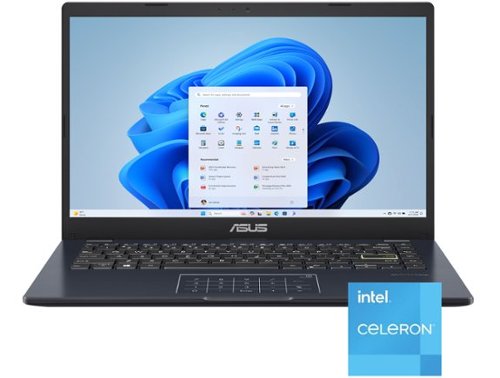
Life is all about finding the right balance, and Vivobook Go 14 delivers just that. Lightweight and compact, it sports a stylish new look that fits right in with your dynamic lifestyle. Designed for daily computing and productivity tasks, and boasting innovative features such as the ASUS NumberPad, Vivobook Go 14 gives you everything you need for work or play.
Customer Rating

4
Buy Windows 11 + Office - get a free laptop! jk
on July 17, 2025
Posted by: EagleCroft
After two weeks with the ASUS Vivobook Go 14 E410KA-CL4128, I can say it’s a fantastic budget laptop for basic tasks like Microsoft Office, web browsing, and email, priced under $200. It’s not a powerhouse—expect compromises in speed, storage, and display—but for students or casual users needing a lightweight, affordable device for indoor use, it delivers. Here’s my honest take.
Let me start by putting a boundary on this review. This is a sub-$200 laptop, and I will review it as such. The laptop comes with a complete version of Microsoft Office (a $60 value – on sale). It also comes installed with Windows 11 (not ChromeOS). That’s another hundred-dollar value. Basically, you are buying Microsoft software and getting free hardware to use them on.
The hardware is solid, well-constructed, and has decent materials. Very little to no flex on the keyboard and surrounding area. Trackpad is also nice, although I could do without the numeric overlay.
Design and Portability
At just 2.87 pounds and 0.72 inches thick, this laptop is a portability champ, slipping easily into a backpack for school or coffee shop trips. The Star Black finish with a yellow Enter key and patterned lid adds a stylish, youthful flair, though the plastic chassis attracts fingerprints and flexes slightly under pressure. The fanless design ensures silent operation, perfect for quiet spaces like libraries. The 180-degree hinge is handy for sharing content, but I rarely used it.
Performance: Basic but Functional
Powered by an Intel Celeron N4500 and 4GB non-upgradable RAM, it handles light tasks—Word, Excel, Google Docs, Zoom calls, and streaming—without issues if you stick to one or two apps. Open more than 5–6 Chrome tabs or multitask heavily, and it lags, occasionally showing “not responding” errors. It’s not for gaming (even Minecraft struggles) or resource-intensive software. Using web apps like Office Online helps conserve RAM.
Display: Adequate for Indoors
The 14-inch Full HD (1920x1080) display with anti-glare coating is sharp enough for documents and casual streaming indoors. However, at 200–250 nits with a 45% NTSC color gamut, it’s dim, with dull colors and poor viewing angles that wash out off-center. It’s unsuitable for outdoor use or vibrant media consumption.
Build and Features
The plastic build feels sturdier than expected, meeting MIL-STD-810H durability standards with minimal flex. The keyboard is comfortable for long typing, but the lack of backlighting is a pain in low light. The NumberPad 2.0 touchpad is a standout for spreadsheet work, though it can accidentally activate during scrolling. The 720p webcam with a privacy shutter is grainy but functional for video calls. The speakers are weak, so headphones are recommended.
Battery and Connectivity
Battery life shines at 6–8 hours for light use (browsing, Office, Zoom), with fast charging via a 45W barrel connector—USB-C charging isn’t supported, which feels outdated. Ports are solid: USB-C, USB-A (3.2 and 2.0), HDMI 1.4, 3.5mm audio jack, and a microSD slot, making it easy to connect peripherals.
Storage: A Major Limit
The 128GB eMMC storage (about 100GB usable after Windows 11 S Mode and apps) is slow compared to SSDs and fills up quickly. I rely on cloud storage and an external drive for files. Switching out of S Mode for non-Microsoft Store apps is simple but may strain the limited RAM further. Note: Some sources incorrectly claim NVMe M.2 storage upgradability, but this model’s storage is fixed.
Who’s It For?
• Students: Perfect for notes, research, and online classes.
• Casual Users: Great for email, browsing, Netflix, and light Office work.
• Budget Buyers: Ideal for those capped at $200
Avoid It If: You’re a gamer, power user (multitasking, video editing), or need outdoor visibility.
Verdict
The Vivobook Go 14 E410KA-CL4128 is a 4/5-star value for budget-conscious users needing a portable laptop for basic indoor tasks. The included one-year Microsoft 365 subscription, silent operation, and solid port selection add appeal. However, limited RAM, tight storage, and a dim display mean it’s not for everyone.
Conclusion:
The out of box experience was very good, Asus does a good job packaging their products. Loading Win11 was not pleasant, however. The version of W11 installed must be rather old, as it took forever to load updates, reboot, load updates, reboot, and so on. It took well over an hour before the laptop settled down and stopped updating. For a very light user, this computer is fine. If you connect to a work computer, or a remote school computer – this is also fine since the processing and storage is on the remote computer. If you aren’t in a hurry, if you just need a basic machine to run Windows applications, and you don’t need a lot of speed, or a bright crisp screen – for $200 you can’t go wrong. It’s kind of a bargain to be honest. But for me, it doesn’t fit my needs. I’m more of a power user, and this is just too slow. I’d rather spend $200 on a used laptop that has a better processor in it. The other possibility is to replace the OS in this laptop with Linus, or ChromeOS Flex. But if you do that, you are on your own. You’ll need to know a thing or two on how to configure those. For the right person, this is a steal. Neat laptop. Great price. Deserves 4 stars. But it’s not for me.
Let me start by putting a boundary on this review. This is a sub-$200 laptop, and I will review it as such. The laptop comes with a complete version of Microsoft Office (a $60 value – on sale). It also comes installed with Windows 11 (not ChromeOS). That’s another hundred-dollar value. Basically, you are buying Microsoft software and getting free hardware to use them on.
The hardware is solid, well-constructed, and has decent materials. Very little to no flex on the keyboard and surrounding area. Trackpad is also nice, although I could do without the numeric overlay.
Design and Portability
At just 2.87 pounds and 0.72 inches thick, this laptop is a portability champ, slipping easily into a backpack for school or coffee shop trips. The Star Black finish with a yellow Enter key and patterned lid adds a stylish, youthful flair, though the plastic chassis attracts fingerprints and flexes slightly under pressure. The fanless design ensures silent operation, perfect for quiet spaces like libraries. The 180-degree hinge is handy for sharing content, but I rarely used it.
Performance: Basic but Functional
Powered by an Intel Celeron N4500 and 4GB non-upgradable RAM, it handles light tasks—Word, Excel, Google Docs, Zoom calls, and streaming—without issues if you stick to one or two apps. Open more than 5–6 Chrome tabs or multitask heavily, and it lags, occasionally showing “not responding” errors. It’s not for gaming (even Minecraft struggles) or resource-intensive software. Using web apps like Office Online helps conserve RAM.
Display: Adequate for Indoors
The 14-inch Full HD (1920x1080) display with anti-glare coating is sharp enough for documents and casual streaming indoors. However, at 200–250 nits with a 45% NTSC color gamut, it’s dim, with dull colors and poor viewing angles that wash out off-center. It’s unsuitable for outdoor use or vibrant media consumption.
Build and Features
The plastic build feels sturdier than expected, meeting MIL-STD-810H durability standards with minimal flex. The keyboard is comfortable for long typing, but the lack of backlighting is a pain in low light. The NumberPad 2.0 touchpad is a standout for spreadsheet work, though it can accidentally activate during scrolling. The 720p webcam with a privacy shutter is grainy but functional for video calls. The speakers are weak, so headphones are recommended.
Battery and Connectivity
Battery life shines at 6–8 hours for light use (browsing, Office, Zoom), with fast charging via a 45W barrel connector—USB-C charging isn’t supported, which feels outdated. Ports are solid: USB-C, USB-A (3.2 and 2.0), HDMI 1.4, 3.5mm audio jack, and a microSD slot, making it easy to connect peripherals.
Storage: A Major Limit
The 128GB eMMC storage (about 100GB usable after Windows 11 S Mode and apps) is slow compared to SSDs and fills up quickly. I rely on cloud storage and an external drive for files. Switching out of S Mode for non-Microsoft Store apps is simple but may strain the limited RAM further. Note: Some sources incorrectly claim NVMe M.2 storage upgradability, but this model’s storage is fixed.
Who’s It For?
• Students: Perfect for notes, research, and online classes.
• Casual Users: Great for email, browsing, Netflix, and light Office work.
• Budget Buyers: Ideal for those capped at $200
Avoid It If: You’re a gamer, power user (multitasking, video editing), or need outdoor visibility.
Verdict
The Vivobook Go 14 E410KA-CL4128 is a 4/5-star value for budget-conscious users needing a portable laptop for basic indoor tasks. The included one-year Microsoft 365 subscription, silent operation, and solid port selection add appeal. However, limited RAM, tight storage, and a dim display mean it’s not for everyone.
Conclusion:
The out of box experience was very good, Asus does a good job packaging their products. Loading Win11 was not pleasant, however. The version of W11 installed must be rather old, as it took forever to load updates, reboot, load updates, reboot, and so on. It took well over an hour before the laptop settled down and stopped updating. For a very light user, this computer is fine. If you connect to a work computer, or a remote school computer – this is also fine since the processing and storage is on the remote computer. If you aren’t in a hurry, if you just need a basic machine to run Windows applications, and you don’t need a lot of speed, or a bright crisp screen – for $200 you can’t go wrong. It’s kind of a bargain to be honest. But for me, it doesn’t fit my needs. I’m more of a power user, and this is just too slow. I’d rather spend $200 on a used laptop that has a better processor in it. The other possibility is to replace the OS in this laptop with Linus, or ChromeOS Flex. But if you do that, you are on your own. You’ll need to know a thing or two on how to configure those. For the right person, this is a steal. Neat laptop. Great price. Deserves 4 stars. But it’s not for me.
I would recommend this to a friend!
Share this review:


+2points
2of 2voted this as helpful.
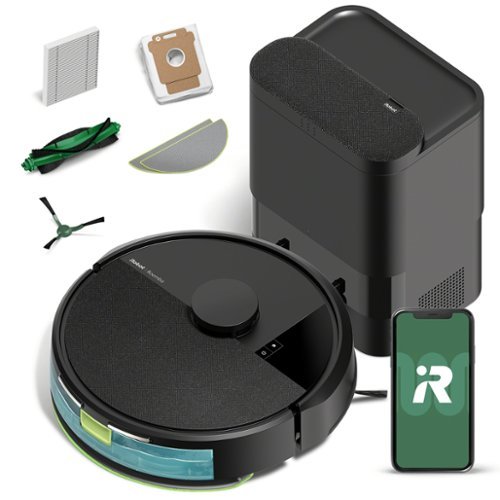
The Roomba 105 Combo Robot + AutoEmpty Dock is made for every kind of wet and dry floor-cleaning task. The self-emptying dock holds up to 75 days of debris in a bag you just lift out and toss away. The 4-stage cleaning system delivers high-performance cleaning by combining 70X more intense power-lifting suction*, an edge-sweeping brush that cleans 20% better*, a multi-surface brush to pick up all kinds of dirt, and a washable, re-usable microfiber pad to wipe away spills. ClearView LiDAR quickly maps your home for precise coverage. Choose from 3 cleaning options - mop, vacuum, or vacuum-and-mop at the same time. Using water or cleaning solution**, choose the perfect amount of liquid for the job, and set SmartScrub to 2X deeper scrubbing*** on high-traffic areas the way you would to erase the messes of the day. Tap the app, push the robot's buttons or ask your preferred voice assistant**** for an on-demand clean.
Customer Rating
4
It Sucks! In a really good way! 4 Stars!
on July 13, 2025
Posted by: EagleCroft
I was looking for a robot vacuum that actually works, but wouldn't break the bank. My friend suggested the iRobot Roomba 105 Combo (Model Y354020), and after using it for a bit, I've got the lowdown for ya!
What I'm Loving:
1. Packs a Punch! This thing has serious suction – 7,000 Pa! They say it's 70x stronger than old Roombas, and it really cleans my hard floors and low-pile carpets. It grabs most pet hair, crumbs, and litter, making daily cleanups a breeze.
2. Smart Navigator: It uses ClearView™ LiDAR to map your home in neat rows, even in the dark. No more random bumping! Plus, it's smart enough to avoid mopping your rugs.
3. Vacuums AND Light Mop: It does both! The mop is great for quick swipes and light spills, though it's not a deep cleaner. There's even a 'SmartScrub' mode for a little extra effort.
4. AutoEmpty Dock is Gold: This dock automatically sucks the dirt out of the robot's bin into a sealed bag that holds up to 75 days of debris. Less dust, less hassle for me!
5. Easy Setup: Setting it up with the Roomba Home app was super simple. And it works with Alexa, Google Assistant, and Siri for voice commands.
2. Smart Navigator: It uses ClearView™ LiDAR to map your home in neat rows, even in the dark. No more random bumping! Plus, it's smart enough to avoid mopping your rugs.
3. Vacuums AND Light Mop: It does both! The mop is great for quick swipes and light spills, though it's not a deep cleaner. There's even a 'SmartScrub' mode for a little extra effort.
4. AutoEmpty Dock is Gold: This dock automatically sucks the dirt out of the robot's bin into a sealed bag that holds up to 75 days of debris. Less dust, less hassle for me!
5. Easy Setup: Setting it up with the Roomba Home app was super simple. And it works with Alexa, Google Assistant, and Siri for voice commands.
What Could Be Better:
1. Mop is Basic: Don't expect miracles. It's for light spills, not sticky messes, and can sometimes just smear things around.
2. AutoEmpty Isn't Flawless: Sometimes, it doesn't fully empty the bin, so I still have to do it manually now and then.
3. Bumps Around: It uses bumper sensors, so you need to pick up cords, socks, and small items before it runs.
4. App Can Be Glitchy: The app can be slow, and updates sometimes get stuck, forcing a reset. I often just hit the button on the robot.
5. Battery for Smaller Spaces: Battery life is 90-120 minutes. Fine for most, but big homes might need a mid-clean recharge.
2. AutoEmpty Isn't Flawless: Sometimes, it doesn't fully empty the bin, so I still have to do it manually now and then.
3. Bumps Around: It uses bumper sensors, so you need to pick up cords, socks, and small items before it runs.
4. App Can Be Glitchy: The app can be slow, and updates sometimes get stuck, forcing a reset. I often just hit the button on the robot.
5. Battery for Smaller Spaces: Battery life is 90-120 minutes. Fine for most, but big homes might need a mid-clean recharge.
My Takeaway:
The Roomba Y354020 is a solid vacuum with smart mapping and the AutoEmpty dock, all at a good price. It's great for daily vacuuming, busy homes with pets/allergies, and mixed floors where a light mop helps. Worth it? Yes! If you want a low-maintenance vacuum with smart navigation and less bin emptying. Just know the mop is light-duty, clear your floors, and be ready for occasional app quirks. I'm happy with mine!
I would recommend this to a friend!
Share this review:


+2points
2of 2voted this as helpful.

ASUS ExpertBook CX54 Chromebook Plus is expertly engineered to elevate your competitive edge, combining advanced power, speed, memory, and high-speed storage. The crisp touchscreen display and high-definition camera offer an optimal visual experience, while built-in video call controls enhance clarity, lighting, sound, and background blur. Powered by the latest Intel Core Ultra 5 processor and ChromeOS with Google AI, it delivers smart, seamless performance. With premium features like a fingerprint sensor for secure access and an all-metal chassis, it's the Chromebook that lets nothing hold you back.
Customer Rating
5
Definitely NOT your grandfather's Chromebook!
on June 3, 2025
Posted by: EagleCroft
The Asus ExpertBook CX54 Chromebook Plus (model CX5403CMA-DB588, Best Buy SKU: 6588600) is a standout in the evolving world of Chromebooks. As someone who has used various laptops—Windows, Macs, and an early Chromebook from another brand—I’m thoroughly impressed by this device. My first Chromebook, purchased three years ago, was a reliable web browser but limited in scope. It still functions today, outlasting other laptops that degraded faster, cementing my appreciation for Chromebooks’ simplicity, speed, and security. The CX54 takes this to a new level, blending premium hardware with a refined ChromeOS, making it an ideal choice for home use, students, or professionals seeking a secure, high-performing laptop. I highly recommend it.
Why a Chromebook?
Chromebooks have transformed from basic, budget devices to powerful alternatives to traditional laptops. The Chromebook Plus line, exemplified by the CX54, pairs top-tier hardware with a versatile ChromeOS that boots in seconds, offers all-day battery life, and supports a vast app ecosystem. Its Linux-based OS ensures robust security, perfect for sensitive tasks like online banking. Enabling a full Linux environment is simple, adding flexibility for advanced users. Even gamers benefit, as high-end models like the CX54 support local and online games effectively, though gaming isn’t their primary focus. For those with a Windows work laptop, the CX54 is a secure, efficient home companion.
Chromebooks have transformed from basic, budget devices to powerful alternatives to traditional laptops. The Chromebook Plus line, exemplified by the CX54, pairs top-tier hardware with a versatile ChromeOS that boots in seconds, offers all-day battery life, and supports a vast app ecosystem. Its Linux-based OS ensures robust security, perfect for sensitive tasks like online banking. Enabling a full Linux environment is simple, adding flexibility for advanced users. Even gamers benefit, as high-end models like the CX54 support local and online games effectively, though gaming isn’t their primary focus. For those with a Windows work laptop, the CX54 is a secure, efficient home companion.
Design and Build Quality
The CX54’s aluminum chassis is exceptionally sturdy, with no flex in the body or hinges. Weighing just over 3 pounds and remarkably thin when closed, it’s highly portable, slipping easily into a backpack. The hinge design elevates the keyboard for a comfortable typing angle while improving airflow to keep the system cool—a thoughtful touch. Opening the lid requires two hands due to the lightweight materials, but this minor inconvenience underscores the laptop’s solid construction.
Display
The 14-inch, 16:10 WQXGA (2560x1600) touchscreen display is stunning. Its thin bezels maximize screen space, and the anti-glare coating reduces reflections and smudges while enhancing viewing angles. The high-resolution panel delivers crisp, vibrant visuals with minimal ghosting, even during gaming. Fonts are sharp, making it ideal for prolonged reading or home office tasks.
The CX54’s aluminum chassis is exceptionally sturdy, with no flex in the body or hinges. Weighing just over 3 pounds and remarkably thin when closed, it’s highly portable, slipping easily into a backpack. The hinge design elevates the keyboard for a comfortable typing angle while improving airflow to keep the system cool—a thoughtful touch. Opening the lid requires two hands due to the lightweight materials, but this minor inconvenience underscores the laptop’s solid construction.
Display
The 14-inch, 16:10 WQXGA (2560x1600) touchscreen display is stunning. Its thin bezels maximize screen space, and the anti-glare coating reduces reflections and smudges while enhancing viewing angles. The high-resolution panel delivers crisp, vibrant visuals with minimal ghosting, even during gaming. Fonts are sharp, making it ideal for prolonged reading or home office tasks.
Webcam
The 8MP webcam, equipped with a privacy shutter, HDR, and AI-enhanced imaging, rivals smartphone-quality video. It performs exceptionally in varied lighting, delivering clear, vibrant streams for video calls. The AI processing ensures visuals remain sharp and appealing, impressing anyone on the other end of a conference call.
The 8MP webcam, equipped with a privacy shutter, HDR, and AI-enhanced imaging, rivals smartphone-quality video. It performs exceptionally in varied lighting, delivering clear, vibrant streams for video calls. The AI processing ensures visuals remain sharp and appealing, impressing anyone on the other end of a conference call.
Performance and Storage
Powered by an Intel Core Ultra 5 processor with Google AI capabilities, the CX54 balances performance and efficiency. With 16GB of RAM and a 256GB NVMe 3.0 SSD, it delivers fast, responsive performance. While 256GB is ample for local storage, cloud integration (e.g., Google Drive) is seamless. Wi-Fi 6E ensures rapid internet connectivity, and Bluetooth 5.2 connects peripherals like mice and headphones instantly, with no lag or setup issues.
Powered by an Intel Core Ultra 5 processor with Google AI capabilities, the CX54 balances performance and efficiency. With 16GB of RAM and a 256GB NVMe 3.0 SSD, it delivers fast, responsive performance. While 256GB is ample for local storage, cloud integration (e.g., Google Drive) is seamless. Wi-Fi 6E ensures rapid internet connectivity, and Bluetooth 5.2 connects peripherals like mice and headphones instantly, with no lag or setup issues.
Connectivity
The CX54 offers impressive connectivity for its size: four Thunderbolt USB-C ports and one HDMI 2.1 port. These enable versatile setups, from external drives to multiple monitors. I connected a 32-inch curved monitor via HDMI, and it worked instantly, highlighting the laptop’s plug-and-play reliability.
The CX54 offers impressive connectivity for its size: four Thunderbolt USB-C ports and one HDMI 2.1 port. These enable versatile setups, from external drives to multiple monitors. I connected a 32-inch curved monitor via HDMI, and it worked instantly, highlighting the laptop’s plug-and-play reliability.
Keyboard and Trackpad
The keyboard provides excellent tactile feedback with satisfying key travel and a pleasant click. However, the gray keys with lowercase lettering and uneven backlighting can be hard to read, especially in low light. Adjusting the backlight to maximum helps, but it’s a minor weak point. The trackpad is precise and responsive, complementing the overall experience.
The keyboard provides excellent tactile feedback with satisfying key travel and a pleasant click. However, the gray keys with lowercase lettering and uneven backlighting can be hard to read, especially in low light. Adjusting the backlight to maximum helps, but it’s a minor weak point. The trackpad is precise and responsive, complementing the overall experience.
Security
ChromeOS’s Linux-based foundation makes it inherently more secure than Windows laptops, ideal for protecting online activities and data. The CX54 enhances this with a fingerprint sensor for quick, secure logins and a Titan C2 security chip for added protection. These features make it a top choice for privacy-conscious users.
ChromeOS’s Linux-based foundation makes it inherently more secure than Windows laptops, ideal for protecting online activities and data. The CX54 enhances this with a fingerprint sensor for quick, secure logins and a Titan C2 security chip for added protection. These features make it a top choice for privacy-conscious users.
Value Proposition
The CX54 delivers premium features at a reasonable price, rivaling more expensive Windows laptops and Macs. The Intel Core Ultra 5 processor offers ample power for most tasks, including light gaming and AI-driven applications, while maintaining exceptional battery life—I can work all day without plugging in. The Intel Core Ultra 7, while available, isn’t necessary for most users, as the Ultra 5 hits the sweet spot for performance and efficiency. The build quality, port selection, and display quality make this Chromebook a fantastic value.
The CX54 delivers premium features at a reasonable price, rivaling more expensive Windows laptops and Macs. The Intel Core Ultra 5 processor offers ample power for most tasks, including light gaming and AI-driven applications, while maintaining exceptional battery life—I can work all day without plugging in. The Intel Core Ultra 7, while available, isn’t necessary for most users, as the Ultra 5 hits the sweet spot for performance and efficiency. The build quality, port selection, and display quality make this Chromebook a fantastic value.
Conclusion
The Asus ExpertBook CX54 Chromebook Plus earns a solid five stars for its blend of premium hardware, robust security, and outstanding build quality. It’s reliable, portable, and versatile, making it perfect for home use, education, or professional tasks. I’d buy it again without hesitation and recommend it to anyone seeking a high-end Chromebook.
The Asus ExpertBook CX54 Chromebook Plus earns a solid five stars for its blend of premium hardware, robust security, and outstanding build quality. It’s reliable, portable, and versatile, making it perfect for home use, education, or professional tasks. I’d buy it again without hesitation and recommend it to anyone seeking a high-end Chromebook.
I would recommend this to a friend!
Share this review:


+3points
3of 3voted this as helpful.
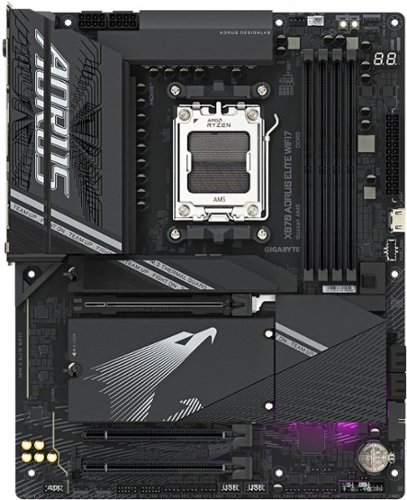
The X870 AORUS ELITE WIFI7 supports AM5 Processors and features unparalleled performance. GIGABYTE X870 motherboards come with upgraded power design, high grade storage standards, and outstanding connectivity that enables you to optimize your performance.
Customer Rating
5
Price, Performance, Quality = Great Value. 5 STARS
on May 16, 2025
Posted by: EagleCroft
I recently finished a PC build using the Gigabyte X870 AORUS ELITE WIFI7 motherboard, and I'm here to share my experiences. This board really stands out as a great option for anyone looking to put together a powerful and future-proof gaming rig on a budge. It's got a ton of cutting-edge features, delivers excellent performance, and the assembly process was surprisingly smooth and straightforward. I installed it into a Cooler Master Elite 301 Micro-ATX case, along with a EK-Nucleus CR360 AIO cooler, and everything came together in about four hours. Gigabyte’s EZ-Latch system for the GPU and M.2 drives made installation easier, and the standoffs aligned perfectly, so there were no unexpected issues. Even for those new to PC building, Gigabyte’s design makes the process intuitive. Intuitive BIOS and Setup The UEFI BIOS is a highlight—it’s clean, user-friendly, and packed with options. I did have to perform a quick BIOS update, but Gigabyte’s process made it a non-issue. The BIOS includes features like AIO fan control, customizable themes, and Active OC Tuner, which offers flexibility for both casual users and those who want to overclock. My setup, which included a Ryzen 7 7700X and four G.Skill Trident DDR5-6400 sticks, worked flawlessly.
My Build Specs CPU: AMD Ryzen 7 7700XRAM: 4x G.Skill Trident Z5 Neo RGB DDR5-6400GPU: SAPPHIRE Pulse Radeon RX 6600 XTPSU: Thermaltake GF1 850WStorage: Gen 4 NVMe SSDsOS: Windows 11. All the components integrated seamlessly, and the board's robust Digital Twin VRM and VRM Thermal Armor ensure stable power delivery and good thermal performance, even under heavy loads. The Wi-Fi 7 (MediaTek MT7925) and Bluetooth 5.4 are a big plus. I’ve experienced very low latency and fast speeds, which is excellent for gaming and VR. The USB4 ports and PCIe Gen 5 slots handled everything I threw at them, from high-speed storage to peripherals. This board feels future-proof and ready for new tech. Surprisingly Great Audio. The Realtek ALC1220 is audiophile-grade and delivers rich and immersive sound (through a BOSE SLIII). Whether I’m gaming, streaming music, or watching movies, the audio quality is crisp and detailed (headphone experience is amazing). For most users, a separate sound card isn’t necessary since the onboard solution is solid. The X870 AORUS ELITE WIFI7 has a high-quality feel. It's outfitted with durable heatsinks, has a clean layout, and sleek design make it look good in my build, especially with RGB LEDs. It’s built to last and offers a premium value overall.
Stellar Gaming Performance. I tested the system with demanding games like Resident Evil Village, Borderlands 3, Far Cry New Dawn, and Assassin’s Creed Valhalla. All ran smoothly at high/ultra settings, without any performance issues. The motherboard’s stability and performance provide a responsive and immersive gaming experience. Even without overclocking, the system feels very fast on Windows 11.
Customer Support. I contacted Gigabyte’s support team with a few setup questions, and they responded quickly with helpful answers. It’s good to know they offer reliable support.
Pros: Streamlined installation with EZ-Latch and Sensor Panel Link. Intuitive, feature-rich BIOS. Cutting-edge connectivity (Wi-Fi 7, USB4, PCIe Gen 5). Exceptional onboard audio. Robust thermals and power delivery. Premium build quality. Responsive customer support.
Cons: Requires a BIOS update out of the box (but it’s a minor issue).
Overall, the Gigabyte X870 AORUS ELITE WIFI7 is a phenomenal motherboard. Its combination of performance, features, and ease of use makes it an easy recommendation for anyone building a PC. Whether you’re focused on high frame rates, future-proof connectivity, or a stable foundation for your rig, this board is a great choice. I’m extremely satisfied with it.
I would recommend this to a friend!
Share this review:


+1point
1of 1voted this as helpful.
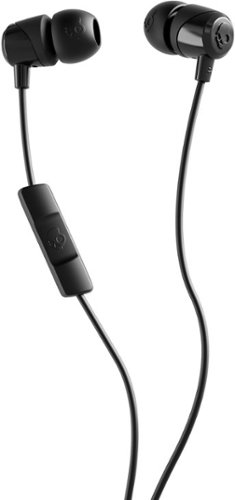
WIRED ESSENTIAL. Rediscover simplicity with Jib USB-C. This no-frills, plug-and-play earbud connects instantly to your phone or laptop~no charging, no pairing, no fuss. Just crisp audio, total control of your calls and media with the in-line mic/remote, and a direct connection for those who value ease over extras.
Customer Rating

3
Doesn't work on all USB devices. Inexpensive.
on May 8, 2025
Posted by: EagleCroft
What I liked:
Decent sound for the price.
Does the job.
Inexpensive.
Does the job.
Inexpensive.
What I didn't like:
Cheaply made.
Cable is too short.
Cable flexibility stinks. Wire covering doesn't 'give' enough. Constantly swatting the cable out of the way.
Earbuds are tiny. That can be good or bad. For my big fingers it made it difficult to place in my ears.
Cheap earbud tip material. Thin, smooth, falls out of my ears easily.
Doesn't provide enough tip sizes. You have 3 total, and they come in a cheap plastic bag.
Packaging is on the cheap. On the one hand that is good for the environment. On the other hand there's nothing worth saving to store the earbuds when not in use. Good for the landfill, bad for keeping things organized.
Cable is too short.
Cable flexibility stinks. Wire covering doesn't 'give' enough. Constantly swatting the cable out of the way.
Earbuds are tiny. That can be good or bad. For my big fingers it made it difficult to place in my ears.
Cheap earbud tip material. Thin, smooth, falls out of my ears easily.
Doesn't provide enough tip sizes. You have 3 total, and they come in a cheap plastic bag.
Packaging is on the cheap. On the one hand that is good for the environment. On the other hand there's nothing worth saving to store the earbuds when not in use. Good for the landfill, bad for keeping things organized.
Verdict - I consider these spontaneous buy earbuds when you are in need, and there's not much else. They might work for you. I'm not that much of a fan. Too inexpensive to bother returning for a refund. Perhaps that is the point.
IMPORTANT! These only worked on certain USB-C devices, they did not work on my portable MP4 devices. Probably because the USB-C ports are for power only. They did work in my Samsung S23 Ultra mobile phone.
Be aware they may not work in your devices.
From online search results: "USB Audio Class and Audio Alternate Mode USB-C supports audio transmission through USB Audio Class and Audio Alternate Mode1. To determine if a USB-C port supports audio output, check for Alternate Mode (Alt Mode) and Audio Accessory Mode (AAM)2. However, even if a port supports Alt Mode or AAM, the manufacturer may not have implemented audio output capabilities2."
Would I buy again. No. Well, yes maybe but only if I was desperate I would because they are inexpensive.
No, I would not recommend this to a friend.
Share this review:


+1point
1of 1voted this as helpful.
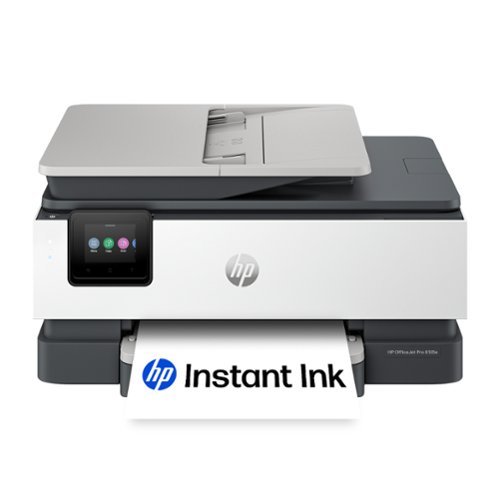
The HP OfficeJet Pro 8135e delivers fast color printing, 225-sheet paper capacity, and scan, copy and fax capabilities. It's AI-enabled to intuitively adapt to your workflow, with wireless and security features that keep your multifunction printer up to date and secure.
Customer Rating
4
Excellent all-in-one printer for the home and SOHO
on November 1, 2024
Posted by: EagleCroft
The printer came nicely packaged, with plenty of packing materials keeping everything in place and snug. Included also with the printer is Setup Ink - which is enough to just whet your appetite. You will have to buy replacement ink ASAP or you will find yourself running out quickly after setup completes. Take time to make sure all the shipping materials are removed from the printer (blue tape, Styrofoam, etc.). Make sure you have a Smartphone and a computer with WIFI available and ready to connect to. If you do not have WIFI you will need an Ethernet cable or an old school printer cable. You will be using WIFI. First time the setup was simple. Follow along with the instructions, using your smartphone and the HP App or computer with the HP software downloaded. Install the ink, paper, and start setting up through the application. Scanning is easy, but the printer lacks scanning both sides automatically. You can do it but requires manual intervention. Setting up the printer includes copying and scanning too. The HP Smart App will ask you to set up an account during installation, which is a little annoying because I figure it is mostly for marketing purposes. The Smart App puts full control of the all-in-one printer into the palm of your hand. Tip: during setup, or before completing setup, check the firmware. Mine was out of date and I was able to update the firmware before completion, out of the box. The 4-ink cartridges make it easy to maintain and affordable. I recommend buying replacement ink at the time you buy the printer. The ink cartridges that come with the printer are just to start out with. They do not have as much ink in them as does the ink you buy separately. Black text printing is outstanding, and the color is jaw-dropping (on the right photo paper). Printing black text without graphics, on regular print paper is fast – 20 pages per minute fast. Color printing takes a bit of patience but is completely acceptable. The paper tray holds more than enough paper in it. If you need it to hold more, you have the wrong type of printer. Consider buying a Laser printer instead. Printing from a Smartphone works great, I have had zero trouble. Plain text printing is fast enough for my use, on regular paper. If you change the paper, or change the ink cartridges – do not forget to update the settings either on the printer LCD panel or through the HP APP. And as far as ink goes, only buy HP branded ink, and never attempt to refill cartridges. That is asking for trouble and a mess. The HP Instant Ink program is a clever idea if you do a bunch of printing. If you have a SOHO, then yes, it is money well spent. If the printer is for the family and used occasionally – I would personally avoid it. Final words about this printer are that it is well-made, I have had HP printers in the past and they have always served me well. I expect this one will too, and I recommend it. Check it out at Best Buy and ask for a demo.
I would recommend this to a friend!
Share this review:


+2points
2of 2voted this as helpful.

Best for home offices and small teams, the Brother HL-L2460DW Wireless Compact Black & White (Monochrome) Laser Printer combines affordability and reliable quality. Designed to provide high-volume printing with exceptional efficiency, it consistently produces crisp, easy-to-read black & white prints at speeds up to 36 ISO pages per minute (1) (ppm). The convenient 250-sheet paper tray (2) means you'll make fewer paper refills, while the automatic duplex printing feature saves additional time and decreases paper waste. Flexible connection options include dual-band wireless, Ethernet, and USB 2.0 interfaces. Best of all, you can print from virtually anywhere with the Brother Mobile Connect App. (3) Plus, you can feel safe knowing that advanced security features are helping to protect your information and maintain secure connections while you're printing.
Customer Rating
4
A solid little reliable Laser Printer
on February 5, 2024
Posted by: EagleCroft
I own a small business and I needed a new printer for my office. I was interested in a small B&W laser printer that can print about 50 sheets of paper every day. I use mostly regular letter stock paper, but I also want to print on labels and envelopes. I understand the critical role that a reliable printer plays in day-to-day operations. I have found that the Brother HL-L2460DW laser printer is an excellent choice for my needs The HL-L2460dw uses laser technology, which means it prints quickly and consistently.
The HL-L2460DW is designed with efficiency in mind. It's compact, which means it won't hog precious office space; can print out up to 36 pages per minute all at a very low cost to buy, use and maintain. As a small business owner, every dollar counts, and this printer delivers. When I'm handing out proposals, I want them to look sharp. This Brother printer consistently produces crisp black and white prints. I am very impressed, and I know my clients will be too.
There are several connectivity features such as dual-band wireless (2.4GHz and 5GHz). Now I can print from the sales floor or from my office with ease - from my laptop, tablet, or phone. There's also an ethernet port and a USB 2.0 port available on the back. It handles my regular letter stock, but it's also prints on labels. The 250-sheet paper tray lasts for several days before I have to refill it. The manual feed slot is for specialty stock, and odd-sized printing (like envelopes). It also features Double-Sided Printing eliminating paper usage waste.
The Brother HL-L2460DW has been uber dependable and I've never had a problem with it. It was easy to set up, the included software installed easily on my Windows 11 laptop. I also use it with my mobile phone. The app provided prints directly from my phone and tablet. The toner is still not emptied, Brother’s toner cartridges are efficient and last a long time. I won’t need to replace them frequently but if I do Brother offers a replenishment service. This service ensures effortless toner supply management, eliminating the need for last-minute panic buys. It offers substantial savings over the printer's lifetime. Cartridge recycling means less waste and is better for the environment. The subscription includes discounts on replacement cartridges. Overall, it saves me money and ensures I always have a supply of toner ready to print with.
This printer was a perfect replacement for the old HP printer I had. It is not an all-in-one type unit, this is a printer only - which is fine because I already have a copier. Why buy features I will never use? This printer takes up less space. is quick, reliable, and easy to use. A bargain for a small business like mine!
I would recommend this to a friend!
Share this review:


+1point
1of 1voted this as helpful.
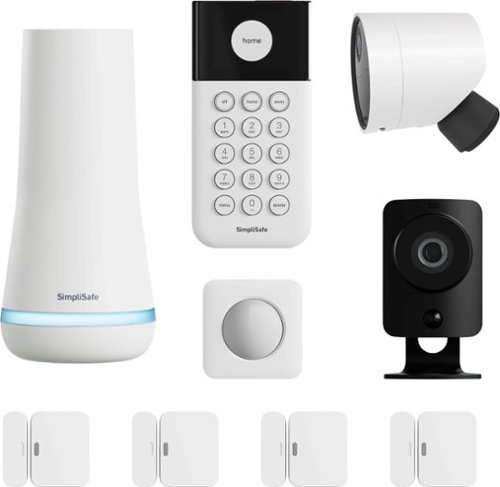
SimpliSafe delivers advanced security solutions that put you, your home, and your safety first. With optional professional monitoring powered by Fast Protect Technology, SimpliSafe combines innovative hardware with advanced AI and real people ~ for 24/7 professional monitoring that delivers fast emergency response when you need it most. The award-winning SimpliSafe system is effective, intuitive, and affordable ~ so that home can be safe and secure for everyone. You can protect every inch of your home. SimpliSafe has sensors for every room, window and door. HD security cameras for inside and out. Smarter ways to detect motion that alert you only when a threat is real. Hazard sensors that detect floods, and other threats to your home. Powerful sirens that can help stop intruders in their tracks. And, it~s backed by optional 24/7 professional monitoring~experts who are ready to dispatch emergency help immediately. That~s the unmatched combination that separates SimpliSafe Home Security from the others. Our bundles are designed from the start to be effective yet affordable. And with no long-term contracts or hidden fees. This 9-piece bundle provides layers of whole home protection from the outside in. Outside, the Wireless Outdoor Security camera keeps watch with a 140 degree field of view, 1080p HD resolution and color night vision, and includes 2-way audio. Inside, the wired Indoor security camera lets you see what's happening with crystal clear 1080p HD video as well as a 120~ field of view day and night. A smash-safe Keypad that is soft to touch, easy to use during the day and night, and is wireless. The Base Station is the brains of the system and includes a battery backup that lasts up to 24 hours and a 95 dB siren. Entry Sensors (4 total) protect your doors, windows, and cabinets. And the Motion Sensor is designed for human detection, not pet detection. Advanced security, whole home protection. There's no safe like SimpliSafe.
Customer Rating
5
Innovative, Reliable, Built-to-last!
on October 19, 2023
Posted by: EagleCroft
Once installed the SimpliSafe Whole Home Security System is like having an invisible force field covering over and protecting your property 24/7. It has in its armament 9 integrated security technologies in a bundle to protect your home from most dangers. This wireless and Wi-Fi enabled security system is equipped with a base station, a wireless outdoor security camera, a wired indoor security camera, a ‘smash-safe’ keypad, 4 entry sensors, and a motion sensor. A battery backup is integrated into the base station so that if you lose power the system can continue operating for up to 24 hours. In addition to notifying and alerting you via smartphone, a 95 dB siren will blare locally – loud enough to get any intruder to think twice and then head for the hills.
SimpliSafe has been innovative from the very start, pushing the edge and challenging old security technologies. My understanding is that the original system was created because the inventors couldn’t find a security system for apartments (rentals). So, they built their own! They’ve pioneered “Fast Protect Technology” which results in fast response by first responders. SimpliSafe offers other optional professional monitoring services. Professional monitoring ensures that your house is always guarded, even if you’re away. I chose to self-monitor since I don’t travel much and have a good system in place should something occur.
SimpliSafe invented Fast Protect Technology to provide users with an even faster and more reliable response when an emergency occurs. For the entire system to work optimally and as designed, the system will need a monitoring subscription. Contact SimpliSafe to set that up (note: the first month is free). When all pieces are in place, and monitored remotely by agents, the innovative hardware, and applications, greatly improves the overall product usefulness. The full system will provide optimal and accurate emergency response times. FPT automatically sends alarm texts and critical alarm notifications.
With my smartphone, if there is an event, I’ll receive a text message the instant an alarm goes off. Remotely I’m able to check in on the system and could get help or to cancel the alarm immediately. I’ve used another security system; this one was by far the easiest to set up. With fast protect technology and the excellent app software I can control the security system remotely, allowing for me to cancel a false alarm without having to go through a monitoring agency or having to run back home to reset it. My old system had many annoying false alarms. With the alarm text feature most of that problem is eliminated. My neighbors surely appreciate that false alarms are a rarity now. Self-generated text alerts from the system may come in handy if some other emergency occurs and you need help quickly (assuming you are signed up for monitoring). This is a great safety feature to have in your home to protect yourself, and your loved ones. A monitoring agent will get your system’s message and dispatch people to help you immediately.
There are many options available for a home security system, the choices are nearly unlimited. The SimpliSafe system stands out for its ease of use, ease of installation and configuration. Plus, it’s portable, so you don’t need to hardwire it into your home. If you are in an apartment, the system can be packed up and taken with you when you move out. I highly recommend SimpliSafe.
Just a good product. Worth every penny!
I would recommend this to a friend!
Share this review:


+1point
1of 1voted this as helpful.
EagleCroft's Review Comments

Bose~ SoundLink~ Mini Speaker: Enjoy full, robust sound anywhere you go with this speaker that features an ultracompact design for easy movement from room to room. Bluetooth technology allows you to wirelessly stream music and more from your compatible cell phone, audio player and more.
Overall4 out of 5
4 out of 5King of the Hill "Portable Bluetooth Speakers"
By EagleCroft
from Exeter, NH
I'll admit it, I'm an audio snob. Unfortunately my wallet doesn't match my audio desires - so I try to get the best bang for my buck. I have tried many portable speakers starting at $50 and steadily worked my way up. I really didn't want to spend $200 on a speaker, but once I got to demo the Bose Soundlink Mini I found out that there was something very special about this little gem. I've tested speakers 2 times, even 3 times its size and none have reproduced the full spectrum and warmth of sound that the Soundlink Mini has. To be honest as a self-proclaimed audiophile I have shunned Bose products, they were always too mainstream for me - too mass marketed and price / value never made sense to me. I instead would opt for the more esoteric name brands (and still do). But in this case there is simply no competition at this price point (and Bose products never go on sale). Being able to pack this much sound into such a small case is just unbelievable. The engineers at Bose are simply magicians, or at least "wicked smart". It almost doesn't make sense when you hear this speaker playing, you expect to see a subwoofer hidden somewhere. I’d like to suggest to Bose that they change the name from Soundlink to “The Bose Tardis”, as its size belies its true capabilities (Dr. Who reference). I did several side by side comparisons with more than a half dozen Bluetooth speakers and the closest any one of them came was the UE Boom. The Bose has warmer tones overall, which I particularly like (vocals sound full, but not overdone). The UE Boom has better sound separation; the bass is good – but not as good as the Bose. Its upper end is crisp, and actually too bright for my ears. Of all the sub $200 speakers I’ve tried, these 2 are the crème of the crop. The edges out a win for me, but if I were more interested in portability (throwing the speaker in a backpack and heading to the beach), in that case the UE Boom is a better choice. The Bose is more of a home-body; it looks great perched upon its dock, charging. Frankly the Bose is too nice to bring outside. It’s not without its faults though, the Bose lacks a Line Out jack (which would be nice), and although it’s pointless to me some people might want a speakerphone built-in. The docking station is a great feature too, allowing you to quickly set it down to charge (and it looks good too). The Bose Soundlink Mini is a winner, buy it- you’ll not regret it.

EagleCroft
Exeter, NH
Responding to posted question...
April 6, 2014
To the reader who asked for brand names of esoteric speakers I was referring to, I own a pair by B&W, and a pair by KEF. Not crazy priced speakers, but not mainstream either. I'm still extremely pleased with the purchase of the Bose Soundlink Mini. In fact I took the time to video a review of it, and comparing it to other similarly priced BT speakers (notably the UE Boom). Once I edit and clean up the video, add dialog - I'll be posting on YT. BTW, a couple of other notables about the the Bose: (1) it sounds great a low volume levels. Most reviews focus on how loud a speaker can get. Many times that isn't as important as how -good it sounds at low volume levels. The Mini really, really shines in this area. At low volumes the sound is still warm, and deep and well assembled. It's amazingly efficient. For comparison the UE Boom sounds good at loud volume, but loses its richness at a low volume and the bass all but disappears. Most small speakers suffer this same malady, play them softly and they sound like an old transistor radio. Not the case with the Bose Mini - it's wonderful. The other nice thing that the Bose engineers did (or should I said didn't do) is add all sorts of annoying confirmation tones that most other BT speakers have. I have no idea why other manufacturer's have followed this trend, I don't need to hear loud confirmation tones (or even human voices) to let me know when I power on or hit max volume. Bose is elegant and refined, and doesn't try to show off.
0points
0of 0voted this comment as helpful.
EagleCroft's Questions
EagleCroft has not submitted any questions.
EagleCroft's Answers
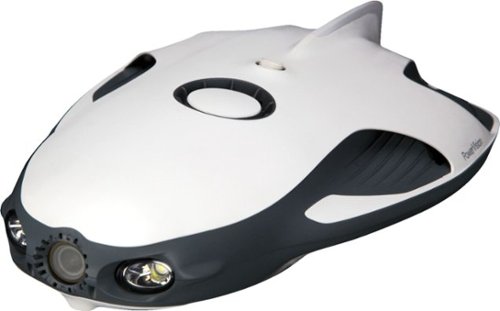
Open a world of ocean exploration with this PowerRay Wizard underwater camera. The detachable PowerSeeker fishfinder can be used by itself to map landscapes, and the 4K Ultra HD camera with wide-angle lens captures photos or videos in lakes or seas. Real-time streaming at 1080p from this PowerRay Wizard underwater camera lets you share your adventures via social networks.
How many lumens does the light produce
Good question!
Power: 3Wx2
Brightness: 450 lumens(with dimming control)
Color Temperature: 6500K
Power: 3Wx2
Brightness: 450 lumens(with dimming control)
Color Temperature: 6500K
7 years, 1 month ago
by
EagleCroft

Enjoy your workout and travel playlists with these JBuds Air true wireless earbuds. Three EQ settings include JLab Signature, Balanced and Bass Boost to customize your listening experience, and the charging case provides 10 hours of additional battery life. Take clear, hands-free phone calls with the built-in microphone and Bluetooth 5.0 technology of these JBuds Air true wireless earbuds.
this headphones are conpatible for iphones?
Yes, I use them on my iPhone 7+. They sound great!
7 years, 5 months ago
by
EagleCroft
Enjoy your workout and travel playlists with these JBuds Air true wireless earbuds. Three EQ settings include JLab Signature, Balanced and Bass Boost to customize your listening experience, and the charging case provides 10 hours of additional battery life. Take clear, hands-free phone calls with the built-in microphone and Bluetooth 5.0 technology of these JBuds Air true wireless earbuds.
Is it possible to just use one?
Yes, you can use just one earbud and keep the other in the case.
7 years, 5 months ago
by
EagleCroft

One solution across all your devices. With Office 365 Personal, you get Word, Excel, PowerPoint, Outlook, and more. Work anywhere with apps that are always updated with the latest features. 12-month automatically renewing subscription for one person including 1TB OneDrive cloud storage.
So does that mean when 12 months is up it automatically renews
Yes, you need to make sure you go into your account and disable the auto-renewal.
7 years, 7 months ago
by
EagleCroft
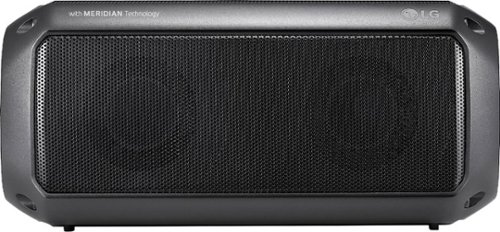
Feel the beat with this LG PK3 portable Bluetooth speaker. It provides dynamic sound and rich bass thanks to its Meridian Audio technology, so you can bring the party with you. The IPX-7 water resistance lets you go anywhere, rain or shine. This LG PK3 portable Bluetooth speaker keeps the music going for up to 12 hours per charge.
I want to use this as a speaker on my TV. Will it work for this purpose if I leave it plugged into a wall outlet for power all the time?
Sure! Just be aware that it uses a Type-C USB connector. The cable is provided, but isn't very long. So depending on your needs and access to a USB port - you may need to buy a longer cable. Otherwise it will need a typical micro audio connector cable to plug it into your TV (unless you use Bluetooth). I hope that helps.
7 years, 8 months ago
by
EagleCroft
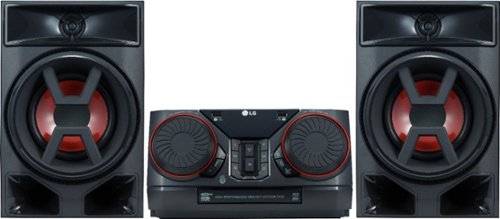
Enjoy room-filling audio in any living space with this LG Hi-Fi shelf system. Its two 150W speakers produce loud, detailed sound, and it streams music via Bluetooth when you pair it with an Android device. This LG Hi-Fi shelf system has an EQ function that optimizes the audio based on the music you're listening to.
Can I connect a turntable to this system? My current shelf system has an AUX input.
Chances are, no... It really depends on your turntable. Unlike most discreet audio components turntables require a preamp to boost the signal before it can be amplified. Some new turntables don't need this, so your best bet would be to check your owner's manual from the turntable and verify that it can run without a preamp.
7 years, 9 months ago
by
EagleCroft
Enjoy room-filling audio in any living space with this LG Hi-Fi shelf system. Its two 150W speakers produce loud, detailed sound, and it streams music via Bluetooth when you pair it with an Android device. This LG Hi-Fi shelf system has an EQ function that optimizes the audio based on the music you're listening to.
Does it have a CD player
Enjoy room-filling audio in any living space with this LG Hi-Fi shelf system. Its two 150W speakers produce loud, detailed sound, and it streams music via Bluetooth when you pair it with an Android device. This LG Hi-Fi shelf system has an EQ function that optimizes the audio based on the music you're listening to.
Does this have a telescoping antenna?
No, it uses a length of wire which is directional as the antenna.
7 years, 9 months ago
by
EagleCroft
Enjoy room-filling audio in any living space with this LG Hi-Fi shelf system. Its two 150W speakers produce loud, detailed sound, and it streams music via Bluetooth when you pair it with an Android device. This LG Hi-Fi shelf system has an EQ function that optimizes the audio based on the music you're listening to.
How can I add speakers to this system. What speakers are compatible?
It comes with two speakers, that are attached with separate R/L +/- speakers wires. You can add more speakers the same way I'm sure, but be aware that the speakers are matched to the system. I'm not sure how many ohms the system speakers run on, and that's critically important to the efficiency and volume of sound. Remember 300 Watt RMS doesn't necessarily mean it can drive large speakers, chances are you need very efficient speakers with a low ohm rating to work well with this system. It's doable, but you'll have to do some homework to make it sound good.
7 years, 9 months ago
by
EagleCroft