


enem156's stats
- Review count177
- Helpfulness votes342
- First reviewJune 7, 2013
- Last reviewJune 10, 2026
- Featured reviews0
- Average rating4.5
- Review comment count1
- Helpfulness votes1
- First review commentFebruary 25, 2016
- Last review commentFebruary 25, 2016
- Featured review comments0
Questions
- Question count0
- Helpfulness votes0
- First questionNone
- Last questionNone
- Featured questions0
- Answer count2
- Helpfulness votes3
- First answerMarch 24, 2018
- Last answerJuly 15, 2020
- Featured answers0
- Best answers0
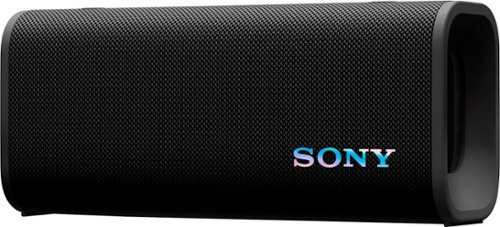
Powerful bass from a portable speaker. The ULT FIELD 3 is designed to be carried in one hand and comes with a stowable shoulder strap to make it easy to transport. It's also waterproof and dustproof, so that you can take your favorite music to the beach and beyond.
Customer Rating

4
Very portable speaker with above average sound
on April 20, 2025
Posted by: enem156
I have several Sony portable/party speakers and one thing they all have in common is stellar bass output. The ULT FIELD 3 continues that tradition in a highly portable size that will surprise you with the amount of quality sound you get out of a compact device.
There are a lot of things to like about Sony speakers. They've been in the business a long time and offer high quality sound devices that, from my hands on experiences, blow the competition away. This size speaker is designed to fit a specific niche. Given the size of the FIELD 3, it will reside easily on a desk, shelf or countertop. To add more versatility, it can be placed in either a horizontal or vertical position. Given that the speakers are on either end, I suspected the vertical choice would really hurt the sound quality but, amazingly the sound is pretty much the same either way. That said, this speaker has BIG sound. Big enough to fill a good size room with sound. It can go incredibly loud. The ULT button cranks up the bass and presence of whatever is being played. It's possible Sony just included this as a button so that you can hear the difference between using the ULT and not, because I can't imagine anyone using the ULT once and not leaving it on all the time. The ULT does give the music a ton of punch and dynamic range.
The controls on the FIELD 3 are nice and basic without any button that leaves you wondering “what the heck does that button mean?”. A power button (obvious), a Bluetooth button (also obvious), a Connect button for connecting this speaker to other ULT series speakers in party mode, a single transport button for play/pause/phone, and of course the volume + and – buttons. Oh and the ULT button, which you'll only press one time to turn it on. These buttons all have a great feel to them and are located on the top (where you'd expect them to be). Also on the top are the two strap attachment points. If you want to use the strap, you just need to pull each of these guys up, rotate them, and put them back in to expose the strap attachment points. The strap itself is heavy duty and adjustable. The hooks that slide in to the tie points are beefy and metal, without looking looking huge and drawing attention to themselves. It helps the hooks are painted the same color as the strap.
Pairing was about as easy as it could possibly be. I turned on the FIELD 3, it connected automatically to my S24 Ultra. This is possibly due to the fact that I already have the Sony Sound Connect app because that's also used for all the other Sony speakers I have. As far as the overall appearance of this speaker, I like the size of it. It's very portable. I would say this is its' main strength. If I'm at home and outside, I go with one of my larger Sony Bluetooth speakers because they have better sound quality. But Sony has made a good portable here. The fabric on the main body is comfortable when carrying, and textured for a good grip. It also has an IP67 rating for water and dust which is perfect for pool areas, beach environments, camping situations and in general good for overall changing weather conditions. The color, I'm not thrilled with. Looking online, this speaker is shown in a very nice looking “Forest Gray” color, which looks like a cool sage green. Disappointingly, this is not how mine looks (even though the box mine came in says it is indeed Forest Gray). The color does seem to change in different lighting conditions, at times it seems like a richer gray color, but nothing I would call green. The online photos seem to greatly enhance the green color a lot more than I see in the real life edition. This particular unit does not come with any LED lighting which I'm totally fine with. On a portable speaker this size, it's completely not needed.
If you're looking for the best sound quality in a wireless speaker, Sony has other, larger speakers that are better suited with this in mind. If you're looking for a highly portable Bluetooth speaker that offers way more bass than a speaker this size has any right to have, this is a really good choice. It took me between 15 and 20 minutes to charge from 60 to 100% using a 100W charger. Battery life seems respectable and none of my use cases drained the battery. Sony claims 24 hours of battery life which is probably reasonable, and it should easily last for a weekend camping trip no problem. You can also use the USB-C connection to charge a device like a phone. Even after visiting Sony's web page, I still can't explain what the “ULT” refers to in the name of this speaker series. Is it short for “ultimate”? Is it some acronym? I don't know! But it's in the name, and on a large button, so clearly it means something to Sony. For the sub $200 price, I feel that for that cost you're getting a really good speaker with great sound quality and top notch engineering that should allow this speaker to hold up for years of use.
I would recommend this to a friend!





Share this review:


-1point
0of 1voted this as helpful.
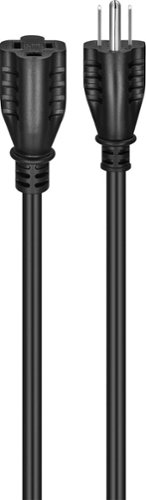
Are you seeking more flexibility between your electronic devices and your power outlets? The Best Buy Essentials 12~ 16ga Indoor/Outdoor Extension Power Cord provides a safe and reliable solution. This extension cord is rated for indoor or outdoor use, adding an additional 12 ft. (3.66m) to reach an existing outlet. Its grounded design delivers safe, reliable power from your outlet and is compatible with both 2-prong and 3-prong electronics. As always, it~s backed by Best Buy, so you can trust that it will get the job done
Customer Rating

5
The extension cord all others aspire to be
on February 21, 2025
Posted by: enem156
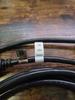
This is a great all around extension cord. It can be used either indoor or outdoor. It's 12' length offers great placement flexibility for any device you need to place in a location of your choice. The black color allows it blend in with other cords and not draw attention to itself.
It's capable of handling 13A (although the Best Buy web page, and the cable itself says 15A. I'm guessing this is for just the cable and the entire assembly is rated at 13A). At any rate the 16AWG wire is large enough for most general applications. The cable itself has an SJTW rating, meaning that it's rated for 300 volts, hard service cord, thermoplastic insulation (resistant to heat and moisture), and weather resistant.
One of the things I like most about this cord is that even though it's a substantial wire gauge, it's very flexible and easy to run. It also allows the cord to relax it's shape and not have permanent curves and kinks in it. It lays nice and straight without much effort. Something that I feel is really not emphasized enough on the web page and packaging is the fact that this cord has a UL Certified classification. Try finding that on any cord offered by the Large Warrior Woman site. This is something that's missing on a lot of electrical products lately, and it's really worth mentioning that UL has certified this extension cord.
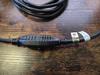
The ends are molded in place and have a very solid feel. They plug in easily, but tightly and the mating connector fits very flush and tight. In short, this is how every extension cord should be. I can honestly find nothing to complain about on this cord, and on top of all the great features it has, it's reasonably priced to boot!
I would recommend this to a friend!

Share this review:


0points
0of 0voted this as helpful.

Push performance to the next level with the blazing speed and massive bandwidth of Crucial DDR5 Pro OC Gaming Memory. With support for next-gen multi-core CPUs and the ~sweet spot~ speed of 6,400MT/s, our gaming memory harnesses the power of low latency so you can beat the clock and focus on outplaying your opponent instead of worrying about performance bottlenecks. This powerful, flexible memory supports next-gen multi-core CPUs and stable overclocking with Intel XMP 3.0 and AMD EXPO. Available in black or white in a 16GB density with a unique, origami-inspired aluminum heat spreader for a winning aesthetic. Unlock a new world of gaming performance with Crucial DDR5 Pro Gaming Memory.
Customer Rating
5
Great, stable memory for gaming and everyday
on December 22, 2024
Posted by: enem156
Adding Crucial memory is probably the best upgrade I've made to my desktop machine. I have an Acer Predator Orion 5000 gaming machine with an i7 processor. It came stock with 16GB of memory which I always thought was a bit slim. Upgrading to 32GB made a noticeable difference in not only games, but in my every day usage as well.
Even though the Predator is by nature a gaming computer, it serves as my everyday machine too. Looking at my memory usage, I'm on average at just over 14GB. That's with a word editor program open, my Photoshop Elements program for editing photos and lots and lots of browsers with at least a dozen tabs in each one. So I guess it's safe to say that my previous 16GB of memory was certainly at the limit just in everyday usage.
These new Pro Overclocking series UDIMM modules are certainly capable of giving me the added memory space I need, and on top of that can be over-clocked for gaming. I personally don't overclock my machine, but you're welcome to with this 32GB kit, which supports both Intel XMP and AMD EXPO profiles up to 6400MHz. These modules are really cool looking with their outer shell design. The “heat spreaders” work to dissipate heat and keep them cool. I really like the matte black color, but since there's no integral lighting, you may find that getting the white color would show them off better inside your case. I replaced my two stock 8GB UDIMMs with the two 16GB UDIMMs. It was about the easiest upgrade I could have hoped for and took literally about five minutes to complete (which also included opening up the case). They are plug and play for the majority of us, and all I did was power up and look in my system settings to see that the Installed RAM now shows 32.0 GB. If you're interested in overclocking, you'll probably need to go into your BIOS and make a change there. Most machines differ with what they call that option, so it's best to look in your user manual for guidance.
Overall, using my machine after upgrading to the Crucial RAM is a better experience. Everything just seems to run very smooth. No glitchiness, and no waiting for programs to finish working on something. As far as games, I like playing first person shooters a lot. DOOM and DOOM Eternal look absolutely amazing when all the video options are maxed out. The benefit from the extra memory was plain to see. If you were always interested in seeing the benefits of being able to turn on ray tracing effects, you can now do that without fear that you're game play will suffer because of it. I'm seeing my games in a whole way, and I love what I see! There's no lag or stutter (which I didn't get with my 16GB of memory, but then I didn't have all the video options topped out). With the more advanced games coming out, I think it's safe to say that soon the norm will be for gaming machines to come with 32GB instead of 16GB. My machine isn't even a year old and I see this happening already on a lot of systems.
So, upgrading your memory can easily send you down a rabbit hole trying to find out exactly what specs your current memory has and which memory devices are actually going to work in your system. Before I chose this upgrade kit from Crucial, I made it a point to visit their website and use their extremely helpful tools to find my exact machine to see which DDR5 modules will actually work for me. If you can't find your machine listed, you're probably just looking in the wrong place. They have thousands of machines listed and any manufacturer you can think of. I don't know how they do it, but they cross reference your machine and show you only the RAM that will work in your system. It's pretty amazing, and I didn't run across any other memory manufacturer that had an even remotely good product finder as Crucial. They are tops in the industry, and it's easy to see why. I love the added RAM and I'm really glad I upgraded.
I would recommend this to a friend!




Share this review:


+1point
1of 1voted this as helpful.
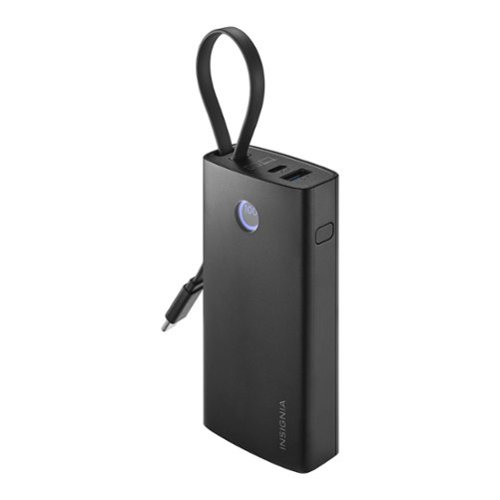
The Insignia 30W 10,000mAh Portable Charger for Most Smartphones, Tablets and other USB-C devices offers a multitude of charging options, including the built-in USB-C cable, a second USB-C port and a USB port. The charging bank features a 10,000mAh capacity, letting you charge multiple devices before needing a recharge. An LCD screen on the power bank displays battery level and charging duration, and a battery indicator blinks when the battery level drops below 5 percent.
Customer Rating
5
Great power bank for a very reasonable price
on December 16, 2024
Posted by: enem156
Portable chargers are evolving so fast these days, what was new technology last year has been blown away by stronger and faster chargers this year. Smaller is better, and with phones able to fast, and super fast charge, people want chargers that can charge as fast as their phones can handle.
The new Insignia 10,000mAh Portable Charger offers a lot of features in a small package. It's physical size is roughly 2” x 4” x 1”, which means you could actually put it in your pocked without any trouble. That's something most chargers in this class can't boast because they're shape makes it awkward to do so. What I really like about this charger is that it has a built in USB-C cable that can be used to either charge your device, or charge the power bank. It saves you from having to worry about bringing a charging cable with you because it's all self contained. And the fact that it can be used as an IN/OUT port means you don't have to worry about plugging it in wrong. The additional USB-C port can also be used this way, to either charge a device or charge the charger. They've also included a standard USB-A port however this port can only be used for device charging. That's not a bad thing, it's just the USB-A spec that determines this. USB-C by nature supports bi-directional charging. Both of these USB-C ports are 30W true PD (power delivery). I verified this with the Insignia customer support team, who responded very quickly to my question.
I also really like the small display that's included. It shows you exactly what you want to know. In normal charging use it shows a numeric percentage reading along with a circular indicator that lets you see at a glance how much charge your charger has remaining. When you switch to low power mode, there's a small dot that comes on in the display to alert you to being in that mode. When you connect it to recharge, it shows you not only the percentage of charge it has, but also the hours and minutes it will take to fully charge it back up. The display is small but shows a lot of information. It's bright and pretty easy to read. As far as charging the power bank, I ran it completely empty of charge. I then connected it to a 100W USB-C power adapter. I was able to charge the power bank to 100% in 1 ½ hours. That's really good. Of course you can use lower powered, power adapters to charge it, but keep in mind it will take longer to get to 100%.
I have a Samsung S24 Ultra smartphone that is capable of super fast charging. When I connect the Insignia Portable Charger to it, it does show that it's in “super fast charging” mode and it does charge very quickly. If you travel on airlines, this power bank is allowed in your carry-on as it's 10,000mAh capacity is well below the 27,000mAh limit set by the airline industry. It would be nice if the power bank indicated it was safe for airline travel, I have other power banks that do have this label on them. It makes it easy for the luggage inspectors to sign off on a power bank if it has this type of label. I've used it to charge my phone and also several pairs of ear buds. I kept the power bank in it's default (PD) mode while charging my ear buds and it worked just fine. If you have an Apple watch or AirPods, this is where the low power mode would be used. Double clicking the button on the power bank puts it into low power mode for these devices. Double clicking the button again, returns it to it's default (PD) charging mode.
Because it has a total of three charging ports on it, you could charge up to three devices at the same time, but keep in mind this is a 30W maximum output which will be divided between all the ports being used, not 30W for each device that's plugged in. That being said, it should also be noted that this power bank is geared for smaller device charging (phones, wearables, small tablets, etc.). If you want to charge your laptop, generally speaking you would need more power than the 30W this power bank can provide (although you may be able to get some life into your laptop with it, it will be a slow charge). This is in no way a knock at this power bank. I only bring it up because the box itself mentions it can charge laptops, while the listing on Best Buy does not. It charges lower power devices very well, and not everyone needs the added power (and added expense) to charge laptops. I actually did connect the power bank to two of my laptops. On my “standard” format laptop, it didn't register that it was charging at all, but on my Asus ProArt, which is more of a tablet format of laptop, it did go into charging mode but told me to use a higher power charger. So you're results will vary, it just depends on the power consumption during charging for your laptop.
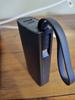
This power bank has a very sleek look and with the built in cable that can function as a carrying strap, which is a handy way to deal with the cable when it's not in use. I like the fast charging ability which works great with my S24 Ultra. The matte black color is stylish and classic. I've listed the pros and cons below as I see them. This is a great charger for this low price, and it will certainly save you on long trips or hikes.
PROS
Small, slim form factor (fits easily in a pocket)
Lightweight
30W PD fast charge capable
built in charging cable
Bright, informative display.
Ability to charge a wide variety of smaller devices including AirPods and Apple Watches
Small, slim form factor (fits easily in a pocket)
Lightweight
30W PD fast charge capable
built in charging cable
Bright, informative display.
Ability to charge a wide variety of smaller devices including AirPods and Apple Watches
CONS
Given the cable is built in, I can only think that extra care needs to be taken to not stress the cable more than necessary (although it appears very sturdy)
Can't charge the power bank and charge a device at the same time
Given the cable is built in, I can only think that extra care needs to be taken to not stress the cable more than necessary (although it appears very sturdy)
Can't charge the power bank and charge a device at the same time
I would recommend this to a friend!




Share this review:


0points
0of 0voted this as helpful.
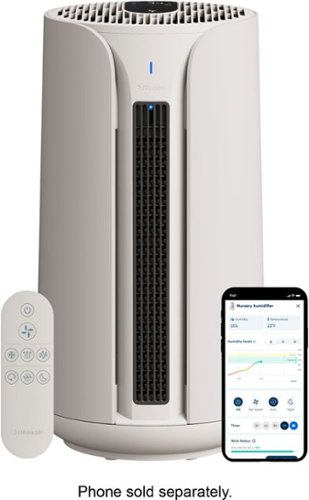
Blueair - ComfortPure Most Powerful 3-in-1 HEPASilent T10i Air Purifier: Heat + Cool + Purify - Gray
Blueair's ComfortPure 3-in-1 is the most powerful* triple-function air purifier designed to look good and perform to your preferred comfort year round. The TripleFlow Hot&Cool Technology features three unique outlets, which are designed to always deliver purified air through all three boosted modes of heating, cooling, and purifying. Independently evaluated for safety standards and third-party tested for performance as part of the AHAM Verifide Program for air cleaners, the fast purification takes only 12.5 minutes to clear the air, removing 99.97%** of all airborne pollutants down to 0.1 microns. Easy control with direct User Interface, app or through the Blueair app; 350 degree oscillation, Night and Eco mode for ultimate personalization and comfort. *Blueair 3-in-1 T10i in Boosted purification mode tested on CADR (AHAM AC-1) vs Dyson & Shark 3-in-1 air purifiers at max fan speed **Tested on PM2.5 up to 90 minutes. Tested on bacteria (S. aureus, K. pneumoniae, P. aeruginosa), virus (MS2) and mold allergen (A.niger) with a minimum reduction rate of 99.8% in 60 min. Blueair does not claim to prevent transmission of airborne illnesses.
Customer Rating
5
Another great purifier from Blueair
on December 3, 2024
Posted by: enem156
You can't go wrong having a HEPA air purifier in your home. This is my second Blueair air purifier, and you just can't beat the amount of features you get with these purifiers. They constantly monitor the air quality of your room and automatically (if you set it to Auto) switch to the appropriate setting to quickly clean the air.
The ComfortPure is a competent air purifier in a compact size. It's just the right height to be at home on the floor, or up on a table. In fact, it has a handy built in carrying strap on the back that let's you move it anywhere you need to clean the air. It comes with an easy to use remote control, which will let you use all the functions and modes. The remote is intuitive and straight forward. You can also just use the touch control panel on the top of the machine. These controls are the same that the remote has, but you can also see which mode you're in and what the fan speed is set to. There's also a numeric readout that is multi functional and lets you cycle through the various filtration settings and temperature. You also get a WiFi icon to let you know your purifier is connected to your home network.
There are two indicators on the front. The uppermost one is a visual indication of the air quality it's measuring and shows you via different colors. The smaller indicator below this one shows which mode the purifier is in. So in addition to the standard air purifier mode, there's also a Heat mode that filters the air and blows warm air out to help heat colder rooms. This does provide a generous amount of heat, and feels like what a stand alone room heater would feel like. The last mode is a Cool mode, which like the Heat mode, blows cool air into the room. The cool mode is great when you have an oven going and need some additional cooling in the room. Or if you have a tech heavy room like a computer gaming room or home theater that likes to heat the place up. While it's not like having an AC unit blowing on you, it does help to keep the air temperature down. The ComfortPure also has an oscillating feature. This not only helps to move more air around the room but you can actually set how much of an angle the purifier will rotate.
One of the best things that's included is the Blueair app (when I say “included”, that means free to download). This is a very full featured and informative app. There's a ton of information and you can control it remotely and see what's going on with your air quality. The top of the app shows several things like purification, indoor temperature and humidity. Below that is a colorful graph that illustrates your air quality over time. You can turn the purifier on or off and set the mode you want, the fan speed you like and the oscillation. If you only want to run it for a specific amount of time, there's a timer to let you do that. There's even a filter life percentage bar so you can see how much life your filter has left. You can add schedules for different days and choose start and stop times.
The HEPA filter is great for true air cleaning and will filter particles down to 0.1 microns. It will help to eliminate odors, bacteria, virus and mold. Anyone wanting to have truly clean air in their home will enjoy the benefits and features that Blueair air purifiers offer. Once you have one, you won't want to go back to not using one. The HEPA filter is easy to install/replace and is accessible from the back of the machine. Just pull off the magnetically attached vent panel, pull out the filter assembly and remove and install the filter in the holder. Blueair makes feature packed HEPA air purifiers that clean your home's air continuously and removes odors from cooking and other sources. Great product from a leader in the industry.
I would recommend this to a friend!





Share this review:


0points
0of 0voted this as helpful.

With the magic of AI and automation behind the scenes, it~s never been easier to create amazing photos and shareworthy videos.
Customer Rating
4
Fantastic photo editing tools for everyone
on October 25, 2024
Posted by: enem156
I've used Photoshop Elements in the past, but not much since I first got it in 2018. So I consider myself a new user. I also want to use it on any picture I capture with my S24 Ultra smartphone. So while it's not technically a stand alone camera, it has some really incredible camera feature specs that I want to highlight with Elements. It also shoots amazing video, so also having Premier Elements is just what I was looking for when it comes to editing software.
It will take quite awhile to go through all or even some of the editing tools that Elements comes with. To regularly use them efficiently and be aware they are included is actually half the battle. And I say that in a good way because it will take time and practice to become good at using all these tools. One of the best ways to edit photos (and videos), is to take a lot of time and sit down and scrutinize all your favorite photos. Ever since capturing photos went digital, the skies the limit on how many photos everyone actually takes. I like to take a lot of pictures, that way I won't miss anything I want to see later (or so I tell myself). For me it's about taking the time to absorb the way a photo I took looks, and how I could make it better. In a lot of my pics, I always seem to find something I want to remove, which is true with a lot of shots I take while hiking. So I decided to try and become good at unwanted object removal, and Elements really made it relatively easy to do that, because it does what you want it to do, but you also have the control you want to make sure that what you expect to be edited, is the only thing getting edited.
With my S24 I also have the ability to shoot in RAW mode and I wanted an editor that would be able to deal with these files as well. One of the features I was anxious to try out on the S24 was the virtual ND filters. Neutral density filters are typically glass filters you put on your camera lens to block out light to the CCD in measured increments. This lets you take those extraordinary slow shutter speed pics of waterfalls, making them look ethereal and mysterious. When using the virtual version on my phone, I went a bit too heavy handed and a lot of my photos turned out darker than I intended. As you can see in my waterfall photo, I was able to more than compensate for my mistake using Photoshop Elements. It allowed me to actually see the photo as I imagined it should look, and instead of chalking it up to inexperience and never looking at the photo again, I saved it and made something I enjoy looking at.
So in using the editor, you can open any photo you want from your collection and then decide which mode you'd like to process it in. There's Quick mode that has a cut down toolbar collection. This is for more basic edits or for those that only want to stick a toe in the editing waters to get a feel for what can be changed. Then there's Guided mode that presents you with a bunch of different editing possibilities and literally guides you through the steps to get the most out of each one. Finally, there's Advanced. This is where you will be able to get the most serious editing done. The tool bar is full and you can even use layers for adding all kinds of extras. Both the Quick and the Advanced also have a lower right tool bar that lets you add effects, filters, styles and graphics. Some are AI driven and some are more manual. The point is, there is a ton of things to go through and try out. If you even need more help with an editing type, the Adobe web site is also filled with tutorials for any of their products, Elements in this case. When you have a need to edit RAW files (mine have the .dng extension), Elements will have you covered as well. When you open one of these files in the Photoshop Elements editor, you get a whole other series of tool bars to work with. These are grouped under three different expandable headings. The Basic tab expands to show you slider adjustment tools for things like tint, exposure, contrast, clarity, saturation, vibrance, etc.. The Detail tab has sliders for sharpening and noise reduction and lastly you have a Calibration tab. There's also a dynamic histogram up in the corner that changes every time you modify the settings. What's cool about using this tool is that if you're unsure what one of the sliders does, just hover your cursor over the name of the slider and you'll see a small pop-up that shows an example of what the tool does. It's great for learning, and reminding you of what each tool does. I've been able to create and “fix” a lot of my photos with this tool.
I think if you're new to Photoshop Elements or really any of the Adobe packages, the biggest learning curve has to do with the terminology in the various pull downs, and also just getting used to the way even seemingly “easy” tasks can sometimes be elusive to find. For example, I struggled with finding the way to save a RAW photo as a .jpg. You can do this easily once you know how. Open up the Organizer and select the photo you want a different format of, select File and choose Export as New File(s). This brings up a pop-up window where you can select from different formats to save your photo as. Don't bother looking for the “Save As” choice to do this.
Elements is a very powerful tool that brings professional photo editing to people like me who probably won't use it for every single photo, but will use it more and more to refine my editing skills and create fun photos and layouts or rescue photos that would likely never be looked at or appreciated. I love this suite of tools and I will definitely keep using it. Is it worth a subscription fee? It seems most every products Adobe offers is going that route, and I'm not going to spend money every month to edit photographs, and I'm sure a lot of people will be in the same boat with me on this. This is a fantastic entry level product that I'd hate to think I'll need to stop using some day to avoid paying a monthly subscription fee. If it remains a stand alone program, I'd be fine with that, but I understand that a lot of the AI features are just easier to develop and maintain by having a subscription, but honestly, I'm at my limit already with companies wanting me to pay a subscription for everything they offer.
I would recommend this to a friend!






Share this review:


0points
0of 0voted this as helpful.

The Shark CarpetXpert HairPro with StainStriker, 2-in-1 upright deep carpet cleaner with built-in spot & stain remover provides unbeatable deep carpet cleaning* and unbeatable tough stain elimination~ for all homes. Shark~s deep-cleaning HairPro innovation is designed to pull up deeply embedded hair from carpet fibers with no clogs, no clumps, and no hair wrap. Instantly eliminates odors - even smoke and pet urine. Disclaimers: *Shark CarpetXpert models vs. consumer carpet cleaners based on ASTM F2828 using included cleaning solution as of May 15, 2024. ~Based on pet stains (TM116) and household stains (TM110) vs. extractor market, using included stain cleaner and best-performing accessory. .
Customer Rating
5
Great machine for pet stains or carpet cleaning
on October 15, 2024
Posted by: enem156
Over the years I've bought and used many home carpet cleaners. It's been a long time since I've used one that actually worked as well as it claimed. The Shark CarpetXpert is a great system that is easy to disassemble and clean and also has enough suction to get a lot of the water back off the carpet. A place where most of the competitors fail miserably, leaving your carpets soggy and water logged.
The Shark CarpetXpert HairPro is a great choice for anyone with a pet, especially a cat or a dog. We have a long hair cat and we vacuum easily once a day to keep up with it. She also seems to be prone to hairballs which we have to deal with cleaning off the carpet quite regularly. Using the Shark is very easy. Fill the water tank with fresh water, add the Deep Clean Pet formula to the tank and if you plan on using the hose, spot cleaning attachments, add the OXY StainStriker solution to the separate blue tank in the front.
Upright carpet cleaning
This is the way a lot of people will use this machine. It's best for cleaning large areas and full rooms of carpet. After filling the cleaning solution tank, turn the power on and you're ready to go. The upright has an automatic cleaning solution dispenser system. Pushing the upright forward will dispense the cleaning solution from the tank. There's a sweet spot for the amount of solution you want to dispense. Pushing it forward faster allows a smaller amount of solution to be sprayed, while pushing slower sprays more solution, or more accurately sprays the same amount of solution over a smaller area, so it gets the carpet wetter. To vacuum up the water, all you need to do is pull the upright back over what you just sprayed. Since this back and forth motion is automatic, spraying and vacuuming, you need to be a bit strategic to plan out the course you need to take in order to get the entire carpet. The vacuum is strong enough to get a lot of the water back into the machine and deposits it in the Dirty Water Tank. I find it's best to switch over to dry only mode by pressing the mode button next to the power button. This forces the upright to not dispense any solution, and puts it into vacuum only mode where you can slowly go back over the carpeting to remove as much water as possible. The cord is long enough to get you a fair distance, but I wasn't sold on the plastic feel of it. It was pretty stiff and retained the bends from having it wound up on the cord holder. It may be that this material is necessary to ensure good insulation between wet floors and bare feet, but it does hamper the operation somewhat by getting tangled.
This is the way a lot of people will use this machine. It's best for cleaning large areas and full rooms of carpet. After filling the cleaning solution tank, turn the power on and you're ready to go. The upright has an automatic cleaning solution dispenser system. Pushing the upright forward will dispense the cleaning solution from the tank. There's a sweet spot for the amount of solution you want to dispense. Pushing it forward faster allows a smaller amount of solution to be sprayed, while pushing slower sprays more solution, or more accurately sprays the same amount of solution over a smaller area, so it gets the carpet wetter. To vacuum up the water, all you need to do is pull the upright back over what you just sprayed. Since this back and forth motion is automatic, spraying and vacuuming, you need to be a bit strategic to plan out the course you need to take in order to get the entire carpet. The vacuum is strong enough to get a lot of the water back into the machine and deposits it in the Dirty Water Tank. I find it's best to switch over to dry only mode by pressing the mode button next to the power button. This forces the upright to not dispense any solution, and puts it into vacuum only mode where you can slowly go back over the carpeting to remove as much water as possible. The cord is long enough to get you a fair distance, but I wasn't sold on the plastic feel of it. It was pretty stiff and retained the bends from having it wound up on the cord holder. It may be that this material is necessary to ensure good insulation between wet floors and bare feet, but it does hamper the operation somewhat by getting tangled.
Cleaning with the hand tools
Using the hand tools for spot cleaning is easy because the hose is stored on board. The several tools I tried worked really well and I had great luck getting out a handful of stains I'd been wanting to work on. It also works effectively for any high traffic areas that are always magnets for grime. I used the hand tools to pre-wash the traffic areas before I used the upright on them and it really helped to get them clean. The CarpetXpert comes with four hand tools. One is already attached to the hose. When you want to use any of the other, wider tools, the small spot treater slides inside of the other ones and clicks into place. Very easy and intuitive. When you use the hose attachments, the solution that gets sprayed out is a combination of the normal solution tank and also the OXY StainStriker solution, which you pour straight from the bottle into it's own tank. The idea is that the OXY solution boosts the cleaning power of the standard mixed solution. I really liked using the tools, I found them to be very effective. Spray with the trigger, use the brush or rubber fingers to scrub the area and vacuum up the water. There's a lot of different attachment possibilities to choose from and most of the tools have a reversible brush/rubber fingers or pet hair extractor on them. You can clean the hose after use in a sink or tub by removing it from the upright, or for the smaller tools, you can use the built in Rinse & Go feature. Just place the hand tool on top the solution tank and press down to clean the tool and hose while they're still connected to the machine.
Using the hand tools for spot cleaning is easy because the hose is stored on board. The several tools I tried worked really well and I had great luck getting out a handful of stains I'd been wanting to work on. It also works effectively for any high traffic areas that are always magnets for grime. I used the hand tools to pre-wash the traffic areas before I used the upright on them and it really helped to get them clean. The CarpetXpert comes with four hand tools. One is already attached to the hose. When you want to use any of the other, wider tools, the small spot treater slides inside of the other ones and clicks into place. Very easy and intuitive. When you use the hose attachments, the solution that gets sprayed out is a combination of the normal solution tank and also the OXY StainStriker solution, which you pour straight from the bottle into it's own tank. The idea is that the OXY solution boosts the cleaning power of the standard mixed solution. I really liked using the tools, I found them to be very effective. Spray with the trigger, use the brush or rubber fingers to scrub the area and vacuum up the water. There's a lot of different attachment possibilities to choose from and most of the tools have a reversible brush/rubber fingers or pet hair extractor on them. You can clean the hose after use in a sink or tub by removing it from the upright, or for the smaller tools, you can use the built in Rinse & Go feature. Just place the hand tool on top the solution tank and press down to clean the tool and hose while they're still connected to the machine.
When the DWT is full, the LEDs on top of the control panel will show you so you know when it's time to empty the tank. It's easy to remove and shocking how much dirt the machine pulls out of your carpet. When the “full” level is reached, it stops sucking up any water, so it's very helpful that the LEDs are there to show you when it's time to empty. Unfortunately, the solution tank does not have the same type of indication for when your cleaning solution has run out. This would have been very handy and the first time I used the machine I made a number of passes without realizing it was empty, so yeah, just something to be aware of. I was able to get a small size room done with one tankful of solution. Having a smaller solution tank does keep the weight down overall and that's a plus because it can be a bit of a workout pushing and pulling the upright around the room. The Shark CarpetXpert is actually lighter than most I've used though.
Cleanup
Just about every part on this machine comes apart for cleaning. The beater bar is accessible and is easy to take out and rinse, all the tanks pull off for emptying and rinsing, the hose is removable and just takes a sink or tub to make rinsing easy.
Just about every part on this machine comes apart for cleaning. The beater bar is accessible and is easy to take out and rinse, all the tanks pull off for emptying and rinsing, the hose is removable and just takes a sink or tub to make rinsing easy.
I've had a fun time using this machine and overall, it's quick to use and does a fantastic job of handling stains and cleaning carpets. I never had a problem with it getting clogged with hair or carpet lint and it just seemed to work as advertised from the first time I used it.
I would recommend this to a friend!





Share this review:


+1point
1of 1voted this as helpful.
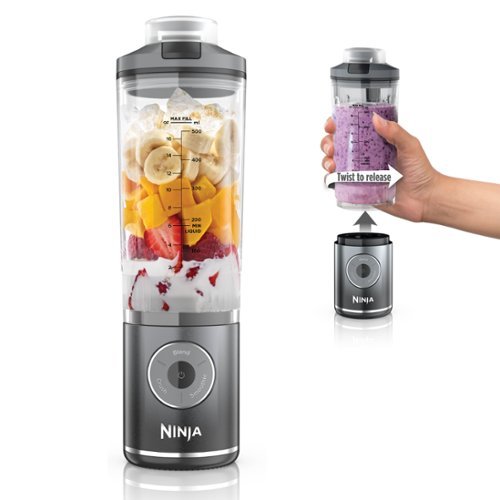
Meet the Ninja Blast Max - the performance of a corded blender* ~ now cord free. Blend, Twist & Go with a XL 22.oz vessel that detaches from the motor base for maximum portability. *versus Oster (BLSTMEG-G00-000)
Customer Rating
4
Personal cordless blender with amazing power
on October 9, 2024
Posted by: enem156
Smoothies on the go! Ninja makes some really great products and this one is right up there with the best of them. I never put much stock in a battery powered blender, but after I tried this one, I couldn't believe how well it performed.
Ninja always seems to engineer their products from a user perspective and always delivers items that not only perform well but bring added features you didn't even know you wanted to the table. The 22oz. Size blending cup is the perfect size for smoothies and personal drinks. My wife and I both use it for healthy smoothies and I can see it's already going to come in handy and get a lot of use. I really like the carry handle that's built right into the lid. It's got a soft silicone feel to it and it's set up to slip all your fingers through when you are drinking from it. The flip top is perfect for taking it with you in the car as long as your drink isn't too thick, as the opening is a little on the small side. Speaking of taking it with you, both the no leak blender cup and even the battery base will fit inside a standard car cup holder. The blade is built into the cup but it is dishwasher safe (on the top rack, no heated dry), so not really a problem. The cup installs in the base and twist locks in place.
The rechargeable base is super powerful. It blasts through ice and frozen fruit like nothing. For as compact as the base is, I was really amazed at how easily it crushed anything frozen. Not sure how long the battery is supposed to last but we've made smoothies for three days on the same battery charge and the power button is still green. I like the control panel, it's intuitive and easy to read. The Crush and Smoothie buttons use what's called the Intelligent Auto IQ programs. These buttons only need a single press and run the programs to create consistent drink results. The Blend button is a manual button that runs it for 30 seconds. In the center is the power button which also acts as the battery indicator by changing color as the battery drains. Actually, it only has green and red for status colors, so if the power indicator turns red you need to charge it, simple as that. As far as charging, it's a bit disappointing that if I want to bring it anywhere, I need to remember to bring the specific wall charger it came with. I already have a large number of cords and chargers to keep track of and this will just add to that mess. I would have liked a more universal way to charge the base using a charger I already own along with a more standard type of charging cable. I mean there are chargers I have that will easily charge a laptop, I don't think it would be a stretch to use the same type of charger for the Ninja Blast.
All in all, I really like the Ninja Blast. It's highly portable and cordless. It has an amazing amount of power for such a compact design. The cup and lid are unique and leak proof and the control panel is easy to use and not overly complicated. And just for fun it comes in 7 different colors.
What's great about it:
Tons of power to crush ice and frozen fruit
Intuitive display panel with easy operation
Compact and self contained
Cup (and base) fit in a car cup holder
Good battery life
Tons of power to crush ice and frozen fruit
Intuitive display panel with easy operation
Compact and self contained
Cup (and base) fit in a car cup holder
Good battery life
What could be better:
The hole in the lid could be bigger
A more standard method of charging
The hole in the lid could be bigger
A more standard method of charging
I would recommend this to a friend!
Share this review:


0points
0of 0voted this as helpful.

The portal between playing and creating. Experience amazing visuals and ultrafast gameplay with the OMEN Transcend 32 OLED Gaming Monitor. Play and create like never before with a QD-OLED, 4K UHD, color accurate display that offers a 240 Hz refresh rate and .03ms response time. USB-C with 140W power delivery and OMEN Gear Switch enables you to seamlessly flow between gaming and working, making this a gamer's best friend and a boss's worst nightmare.
Customer Rating
5
Big and beautiful OLED display
on September 21, 2024
Posted by: enem156
This is an absolutely beautiful monitor. The colors are rich and vibrant. You just can't beat an oled display, they always deliver the best picture far and away. Playing games on this monitor is just an incredible experience. I play first person shooters mainly, and the 240Hz refresh rate is really beneficial with fast paced games like this. The 32” size is basically, in your face immersive. It takes a little getting used to in fact. I replaced a 27” LED monitor with this one and it's a huge difference. The actual physical bezels are very slim, like 1/16th of an inch. Since the color of the monitor back is white, the bezels actually stand out more than if they were black, but this isn't a big deal.
The stand it come with is quite adequate, but I had to reuse my after market stand in order to get the monitor to go low enough where it would fit under the desktop cabinet. I did try the stand it came with first, and I really liked it, very easy to attach and moving the monitor up or down was easy. Unfortunately, it just wouldn't go down far enough for my application. As I said, the housing of the monitor is white. For me, the color is not much of a concern because the rear of the monitor faces the back of my desktop cabinet. I really like the illuminated strip on the rear of the monitor. Even though I have it in a cabinet, you can still see the lights. If you have the monitor facing out into the room, it would probably be a cooler feature, but I'm forced to have it facing the back of the cabinet. At any rate, you can use the setup menu of the monitor to change the color of the lights, so you can change up the look if you want.
According to the setup pamphlet, you can use the Omen Gaming Hub to adjust all the settings of the monitor. I had no luck with app at all. I was able to download it from the Microsoft store and install it, but I couldn't change any parameters at all using the Gaming Hub. The only way I could change any of the settings were from the buttons on the back of the monitor (which worked fine). And as a side note, if you go into the Windows settings you can change the resolution and various other basic display settings and Windows does have a Dynamic Lighting setting but it doesn't work either. Apparently, HP is “planning” to have support for this but there's no word on when this might happen. So if you want to change any of the more advanced monitor settings, use the built in buttons on the back (for now at least). I do like the native settings user interface. It's straight forward and easy to understand. The buttons are intuitive for navigating the menu and you can change a lot of settings.
This monitor also lets you connect two PCs to it and offers you several ways to use this feature. One of the nice things about this is that you can actually drag and drop files from one machine to the other. Connecting both PCs to the monitor will require you to connect your primary machine to the USB-C video port. The second PC needs two connections to the monitor. One to the HDMI or Display Port and the other to the USB-C data port. Then, you need to connect any peripherals to the monitor instead of your machine. This includes keyboards, mice, game controllers, cameras, headsets, etc.. Then, you need to select the viewing mode you want. You can have side by side or picture in picture (several different versions of each). Not sure if all these connections are worth the trouble but you have the option if this is something you can benefit from. You also have the option of using the on board speakers. These are descent and have a pretty sound, but I opted to use my existing Bose speaker system. It also comes with a handy magnetic hook attachment you can use for headsets or whatever else you may want to hang on it. I was a bit skeptical at first but the magnet that holds it in place is quite strong and stays in place well. This monitor also comes with a USB-C to USB-C cable, a USB-A to USB-C cable, a standard size Display Port cable and an HDMI ultra high speed cable so no need to worry about getting cables. Everything you need is included.
I plan to use this monitor for both gaming and office work. In both uses, it's a fantastic picture. I would say if you want to use this monitor for either one, you won't be disappointed, that is, if you can swallow the price tag on this guy. With a price tag north of $1200, it's not cheap by any stretch of the imagination, but it is a solid performer.
I would recommend this to a friend!





Share this review:


0points
0of 0voted this as helpful.

Meet ProArt PZ13 ~ your ultimate 2-in-1 creative companion for the studio and on the move. Its OLED touchscreen ensures precise color accuracy for flawless proofing, while versatile I/O ports seamlessly connect all your peripherals. This next-gen AI laptop packs a Snapdragon X Plus 8-core processor with 45 TOPs NPU and Qualcomm X Elite Adreno graphics, a pairing that will supercharge all your creative endeavors. With AI-enhanced creative features and a long-lasting battery, ProArt PZ13 transforms any setting into your studio
Customer Rating
5
Portable and packed with features
on September 6, 2024
Posted by: enem156
I really like smaller laptops like this for their extreme portability. The ProArt PZ13 is a perfect 13.3” display. Think of it as a small laptop or a large tablet, it just depends on your point of view. There are a lot of features on this machine to like, but it's obviously best suited for content developers, photographers or digital artists. This is just based on how it's setup and doesn't mean that if you're looking for a good all around portable laptop, you wouldn't be happy choosing this one. It's a great machine.
I don't like to dwell on posted specs that people can find easily enough for themselves, but I think in this case it's warranted because it's a machine with a specific set of features that are becoming more and more popular these days. It's able to play some games but I would not call it a gaming machine. It's strengths lie in a different direction. The processor is a Qualcomm Snapdragon X Plus. It includes a Neural Processor for AI development and performs very well as a business machine or general use use machine in addition to the artwork generation capabilities.
The tablet portion is an AMOLED touchscreen and has a full HD resolution of 2880 X 1800. It's bright and responsive and I would have really liked to have tried out the stylus with this tablet but alas, this version doesn't come with one, and in fact if you want one, it will cost you an additional 100 bucks. But if you do decide to get the stylus, the tablet is already equipped with an integrated cloth strap style right on the case. You can use it as a tablet when it's removed from the included keyboard, or as a laptop when the keyboard is attached. The connection mechanism between the two is magnetic, so it's easy to guide the tablet onto the keyboard. The keyboard also functions as a durable case which is attached to the back of the tablet, also with a very strong magnet. It's got a great grippy feel and also has some texture to it which makes it very easy to grab and go with confidence.
Photographers will appreciate not only the 1TB SSD but the built in SD card slot as well. It even comes with an SD to microSD adapter. Additionally, the machine has two USB 4 ports. USB 4 can transfer data at 40Gbps so it works well for large data transfers from say, a portable solid state drive. As far as memory is concerned it has 16GB. The GPU could have been updated and stands as an integrated Adreno. It's fine for more general purpose and video that doesn't move as fast as higher end games do. For content creators or virtual meeting people, there's a 5MP front facing IR camera (and mic) and also a respectable 13MP rear camera. The use possibilities are pretty endless for this machine.
If you are a person who loves the idea of AI and likes to use it in things like creating artwork with the newest version of MS Paint that includes AI input and creation, this machine comes with it built in. You have a built in CoPilot key on the keyboard that brings up, you guessed it, the MS CoPilot chat window. There's also built in camera features that allow you (using AI) to select the amount of Bokeh blur behind you in meeting calls or helping to render you in a flattering way with lighting filters and facial augmentation. These are all presented by Microsoft as applications, but the machine is nicely set up for you to access these features easily. While using the AI is (for now, at least) more fun than a truly functional tool, you can see the direction things are going with this new technology.
So aside from all these bonus features, there's still more! The keyboard is also backlit which I feel is an absolute necessity these days. It also has a huge track pad with easy to find left and right mouse buttons. The built in speakers are surprisingly good and can play movies at a good volume level with reasonable sound quality. It has Bluetooth for anyone who prefers to connect a pair of earbuds or headphones, and battery life that continues to impress me. I've had the machine about a week and after the initial charge, I've only topped it off once (and I was only down to about 60%). Granted, I haven't tried using it all day on just battery power, and obviously your results are going to vary depending on how you like to use it, but I found it to be dependable.
I currently can only muster up a few minor gripes. The “door” that covers the SD card slot is a wonky thing that I'm never sure I'm using correctly, or about to break off. It also sits in front of the stylus holder, so I can only imagine how awkward it would be to use while storing the stylus. The other thing I find a bit annoying is the small clicking noise the keyboard makes from under my right palm. Every time I move my palm, it makes a low pitched clicking sound. Not sure what's actually making the sound but sounds internal. And finally, a 4K display resolution would have really been outstanding. I'm used to my machines having 4K displays so when you see one that's half that, you miss it. But for the money, you really can't beat the features this guy comes with. Like I said, minor gripes. The machine is a pleasure to use and for my purposes, I'll mostly be using it for it's small size, portability and healthy storage abilities. It will come in handy to download RAW photos from my S24 Ultra when we go on trips, and it has the accessibility most (if not all) people want and need. Plus the battery lasts a lot longer than I'll ever be away from a charging plug, which by the way, it does come with a hefty wall charger to USB-C plug. But I do wish it came with the stylus, I like to take notes and scribble quick drawings and the stylus would have also made it more fun to use the AI creation abilities in Paint. But a really nice machine overall!
I would recommend this to a friend!





Share this review:


+1point
1of 1voted this as helpful.
enem156's Review Comments
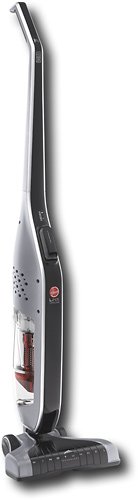
Retire your dustpan and broom and transform your everyday floor cleaning! This sleek, versatile stick vacuum is always ready to deliver upright performance with Fade Free Lithium-Ion battery power. The only stick vacuum with Hoover WindTunnel~ technology and cyclonic filtration even when moving from hard floors to low pile carpet.
Overall 1 out of 5
1 out of 5Not enough suction
By BHIHIFI
I bought this after reading a positive review in a leading consumer magazine. It comes with an impressive number of accessories but the suction is weak. It would not even vacuum up bits of grass on my doormat. I returned it and bought the portable Dyson instead. Night and day difference.

enem156
Chicago, Il
Wrong vacuum review?
February 25, 2016
I'm not sure that you're reviewing the vacuum you think you are. This vacuum really doesn't have any accessories...
+1point
1of 1voted this comment as helpful.
enem156's Questions
enem156 has not submitted any questions.
enem156's Answers
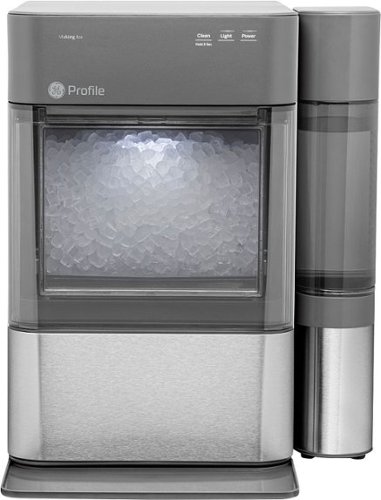
Nugget Ice. Pellet ice. Drive-in ice. Whatever you call it, you know it's "the good ice." Now that chewable ice is available from the convenience of your countertop with the Opal 2.0 Ice Maker. It is capable of producing up to 38 lbs. of ice in 24 hours and stores up to 3 lbs. of ice at one time. The Opal 2.0 Ice Maker has WiFi connection capability and comes with the side tank attachment for 3x more ice production.
Does it need to be connect to waterline
No, it's a completely stand alone unit. It uses a water container on the side that you can remove and refill, much like a coffee maker.
5 years, 10 months ago
by
enem156

With up to 40 hours of battery life, Beats Solo3 Wireless is your perfect everyday headphone. With Fast Fuel, a 5-minute charge gives you 3 hours of playback. Enjoy award-winning Beats sound with Class 1 Bluetooth~ wireless listening freedom. The on-ear, cushioned ear cups are adjustable so you can customize your fit for all-day comfort.
Can you answer phone calls with them
Yes, you can. Provided you're connected with your phone via Bluetooth.
8 years, 2 months ago
by
enem156