
Share BRogers's profile


BRogers
BRogers's stats
- Review count34
- Helpfulness votes26
- First reviewNovember 9, 2020
- Last reviewFebruary 13, 2026
- Featured reviews0
- Average rating3.5
- Review comment count1
- Helpfulness votes0
- First review commentNovember 9, 2020
- Last review commentNovember 9, 2020
- Featured review comments0
Questions
- Question count0
- Helpfulness votes0
- First questionNone
- Last questionNone
- Featured questions0
- Answer count12
- Helpfulness votes4
- First answerMay 21, 2022
- Last answerDecember 19, 2025
- Featured answers0
- Best answers1
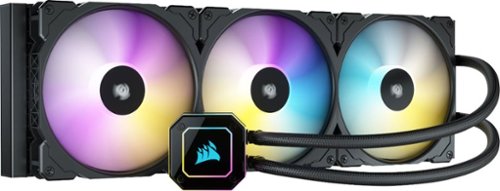
The CORSAIR iCUE H170i ELITE CAPELLIX Liquid CPU Cooler delivers powerful, low-noise cooling for the largest and most ambitious PC builds, with a massive 420mm radiator and three CORSAIR ML140 RGB PWM fans controllable between 400 and 2,000 RPM. 33 CAPELLIX LEDs on the pump head and eight RGB LEDs per fan let you completely personalize your CPU cooler~s look. Connect to the included CORSAIR iCUE COMMANDER CORE and powerful CORSAIR iCUE software to orchestrate synchronized RGB lighting, adjust fan speeds, and enable Zero RPM mode on up to six RGB PWM fans. Easy to install on most major CPU sockets, with a thermally optimized split-flow cold plate and low-noise centrifugal pump, the H170i ELITE CAPELLIX puts the spotlight on high-end CPU cooling.
Customer Rating

4
Great cooling! But Linux users look elsewhere.
on March 28, 2022
Posted by: BRogers
Verified Purchase:Yes
I bought the iCUE H170i ELITE to cool my Ryzen 9 5950X in a Corsair 5000D Airflow case.
Works well! Instructions were clear and I had a working system in minutes.
Mounting to the CPU was a bit fiddly, but that is more a flaw of the AM4 socket than it is this AIO.
Only downside is limited control of this device when using Linux. Even with OpenRGB an LiquidCTL installed, this product is difficult to configure.
Once I can fully modify the settings in linux, I'll upgrade to 5 stars.
Length of ownership: 6
Mobile Submission: False
I would recommend this to a friend!
Quality

5
Value

3
Ease of Use
3

Share this review:


+2points
2of 2voted this as helpful.
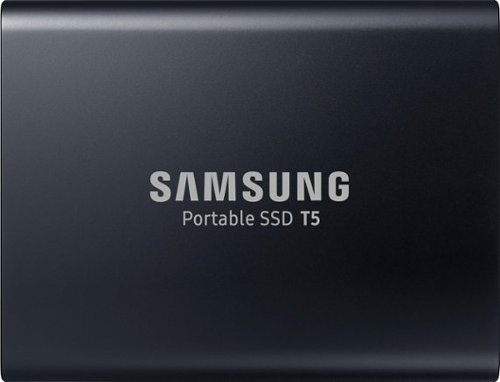
Store files securely on this 1TB Samsung portable SSD. It transfers data at speeds of up to 540MB/s for increased work productivity, and it connects to Android smart phones with a downloadable app, so you can backup pictures and music. This Samsung portable SSD is smaller than a standard business card for easy transport.
Customer Rating

5
Reliable and FAST exactly what I need.
on March 14, 2021
Posted by: BRogers
Verified Purchase:Yes
I don't have too much to say about this product - after all, it does one thing and it does it well - Store data.
I've manually partitioned my T5 for use as a portable linux "drive" and everything works wonderfully. I've not had any issues with SWAP partition performance, in fact, I'm surprised it's been so fast. That Random IO performance really shows!
Now I just have to see if I can enable the disk encryption and still be able to boot from the drive. But I don't really have any expectation for it to do so at this point. It would just be a nice bonus!
Length of ownership: 7
Mobile Submission: false
I would recommend this to a friend!
Ease of Use
5
Quality
5
Value
5
Share this review:


0points
0of 0voted this as helpful.
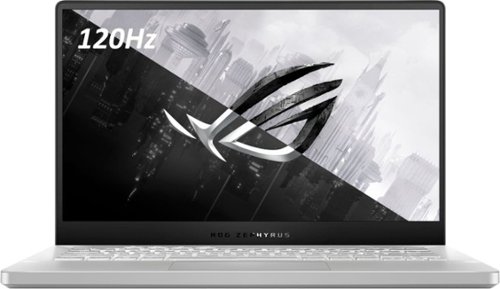
ASUS ROG Zephyrus G14 Gaming Laptop: Enjoy everyday gaming with this ASUS notebook PC. The AMD Ryzen 9 processor and 16GB of RAM let you run graphics-heavy games smoothly, while the potent NVIDIA GeForce RTX 2060 Max-Q graphics produce high-quality visuals on the 14-inch Full HD display. This ASUS notebook PC has 1TD SSD that shortens load times and offers ample storage.
Customer Rating

1
Mobo spontaneously combusted at idle - 6 months in
on November 9, 2020
Posted by: BRogers
Verified Purchase:Yes
I've had the unit about 6 months now. Seemed to be working great until yesterday.
Laptop was left idle with Discord running in the background. We then heard a loud "pop" and smelt this awful burning smell. Once we figured out it was the laptop we unplugged and made sure it wasn't smoldering.
Currently trying to start an RMA and there is extreme skepticism every step of the way. They seem to think we've damaged our laptop somehow, but that's not the case.
Laptop was always kept cool and dry, it hasn't even seen a sneeze to the keyboard. Device was also on a cooling mat almost 100% of the time. We were only using 2 USB devices at the time - a cooling pad and a wireless adapter for a logitech mouse.
We've configured the device to stop charging battery at 70% so as to reduce potential battery issues as well.
Basically, we've done everything we could to ensure that this device functions properly for a long time. This seems like a manufacturing defect far more than a user error.
Length of ownership: 155
Mobile Submission: false
No, I would not recommend this to a friend.
Ease of Use

4
Quality

1
Value
4
Share this review:


+1point
2of 3voted this as helpful.
ASUS ROG Zephyrus G14 Gaming Laptop: Enjoy everyday gaming with this ASUS notebook PC. The AMD Ryzen 9 processor and 16GB of RAM let you run graphics-heavy games smoothly, while the potent NVIDIA GeForce RTX 2060 Max-Q graphics produce high-quality visuals on the 14-inch Full HD display. This ASUS notebook PC has 1TD SSD that shortens load times and offers ample storage.
Customer Rating
1
Unit lasted 6 months before breaking.
on November 9, 2020
Posted by: BRogers
Verified Purchase:Yes
Unit lasted 6 months before spontaneously combusting. Laptop was just sitting on a laptop cooling pad on AC power when we heard a pop and smelled burning before pulling the AC plug.
Laptop no longer starts at all.
Started RMA process, but it's looking like they think we did something.
Let me be clear, we've taken excellent care of this machine, it has never suffered a spill/drop or extreme conditions. It has only ever remained in a cool, dry room with plenty of ventilation. We are also within the 12 month warranty.
If you do decide to go with this unit, be sure to buy the Best Buy coverage because ASUS might give you the run-around.
Before this, I'd rate this laptop 5/5. But since it broke in such a fantastic way, I'm bringing it down to 1 star. If RMA goes well, it will go up to a 4/5.
Length of ownership: 155
Mobile Submission: false
No, I would not recommend this to a friend.
Ease of Use
4
Quality
1
Value
4
Share this review:


0points
0of 0voted this as helpful.
BRogers's Review Comments
ASUS ROG Zephyrus G14 Gaming Laptop: Enjoy everyday gaming with this ASUS notebook PC. The AMD Ryzen 9 processor and 16GB of RAM let you run graphics-heavy games smoothly, while the potent NVIDIA GeForce RTX 2060 Max-Q graphics produce high-quality visuals on the 14-inch Full HD display. This ASUS notebook PC has 1TD SSD that shortens load times and offers ample storage.
Overall1 out of 5
1 out of 5Mobo spontaneously combusted at idle - 6 months in
By BRogers
I've had the unit about 6 months now. Seemed to be working great until yesterday.
Laptop was left idle with Discord running in the background. We then heard a loud "pop" and smelt this awful burning smell. Once we figured out it was the laptop we unplugged and made sure it wasn't smoldering.
Currently trying to start an RMA and there is extreme skepticism every step of the way. They seem to think we've damaged our laptop somehow, but that's not the case.
Laptop was always kept cool and dry, it hasn't even seen a sneeze to the keyboard. Device was also on a cooling mat almost 100% of the time. We were only using 2 USB devices at the time - a cooling pad and a wireless adapter for a logitech mouse.
We've configured the device to stop charging battery at 70% so as to reduce potential battery issues as well.
Basically, we've done everything we could to ensure that this device functions properly for a long time. This seems like a manufacturing defect far more than a user error.

BRogers
RE: Brand response from ASUS Answers
November 9, 2020
Uhhh, I am NOT in contact with Best Buy on this. I wasn't asked to until _after_ I already shipped the device with the RMA Shipping Label provided by ASUS.
Seems like this RMA could be in limbo now. All because the ASUS phone rep didn't refer me to the correct resources.
Could you please follow up on the email I sent?
Kind Regards,
BRogers
0points
0of 0voted this comment as helpful.
BRogers's Questions
BRogers has not submitted any questions.

ARRIS SURFboard S34 DOCSIS 3.1 Cable Modem
Can I use either rear port directly to a computer or do I need to go through a router first? What’s the purpose of 2 rear ports? Is there a difference in speed?
Only one of the LAN ports have internet at a given time. The only difference is that the top one is 2.5G and the bottom one is 1G. I'm unsure which it selects for Internet if both are connected.
I have heard that most people use the second port for accessing the management interface with a device directly. But I've not confirmed this works myself.
You do not need to go through a router first, but I highly recommend one once you've confirmed connectivity. Otherwise you can only connect a single device.
I have heard that most people use the second port for accessing the management interface with a device directly. But I've not confirmed this works myself.
You do not need to go through a router first, but I highly recommend one once you've confirmed connectivity. Otherwise you can only connect a single device.
5 months, 3 weeks ago
by
BRogers
ARRIS SURFboard S34 DOCSIS 3.1 Cable Modem
ARRIS SURFboard S34 DOCSIS 3.1 Cable Modem
Is it compatible with Cox
Yes - but they won't be very helpful if you need support since it's a BYOD modem.
Here's a quick cheat sheet based on my experience:
1. Does the light turn solid blue? If yes, you have a cable connection.
2. When connected directly (no router), check your _gateway_ ip. If it is 192.168.1.100 you do not yet have a DHCP lease from Cox.
3. If your gateway IP is anything else, then you have a DHCP lease and Cox is able to provide service. (even if they claim otherwise)
3a. If you have a Cox IP AND DNS IP's then you _should_ be able to reach the internet. If you cannot, it means you are in the "Cox internet captive portal" and there are issues with provisioning. (again, even if they claim otherwise).
I hope these pointers help someone get through the madness that is COX internet support.
Sincerely,
Someone who was a cable tech at one point.
Here's a quick cheat sheet based on my experience:
1. Does the light turn solid blue? If yes, you have a cable connection.
2. When connected directly (no router), check your _gateway_ ip. If it is 192.168.1.100 you do not yet have a DHCP lease from Cox.
3. If your gateway IP is anything else, then you have a DHCP lease and Cox is able to provide service. (even if they claim otherwise)
3a. If you have a Cox IP AND DNS IP's then you _should_ be able to reach the internet. If you cannot, it means you are in the "Cox internet captive portal" and there are issues with provisioning. (again, even if they claim otherwise).
I hope these pointers help someone get through the madness that is COX internet support.
Sincerely,
Someone who was a cable tech at one point.
5 months, 3 weeks ago
by
BRogers
ARRIS SURFboard S34 DOCSIS 3.1 Cable Modem
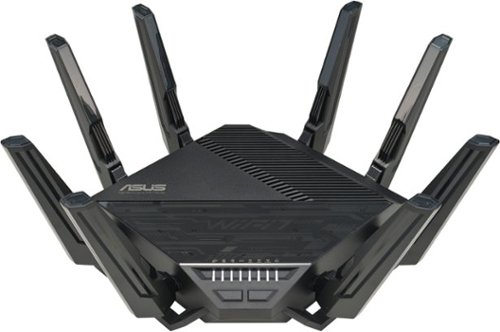
The RT-BE96U~s dual 10 Gbps ports make it a great choice for servers or NAS devices. These are more convenient than simply combining multiple gigabit Ethernet ports, and they help increase your available bandwidth to avoid data bottlenecks throughout your whole network. Users are also empowered to leverage multiple high-speed internet service providers.
Is this router compatible with cox Internet? I own a large one story house that is built on a big piece of property. Can I buy two and spread them out on the property? Last question will this router work with CCTV IP Cameras?
1. You will need a modem for it to work with Cox cable internet. Ideally a DOCSIS 3.1 or greater modem for the best speeds. If you're lucky enough to have Cox Fiber, it should work out of the box, just plug in the ethernet from your fiber terminal and away you go.
2. You can buy two and you can link them in a wifi mesh, yes! Though you might be surprised at what a single AP can do with range. The 2.4Ghz band, particularly, has MASSIVE range. A single router is more than enough for a mid-sized single family home (2000 sq ft).
3. ASUS Routers are known to work well with CCTV devices. I don't personally have any, but you should be able to manage them pretty well on this device.
2. You can buy two and you can link them in a wifi mesh, yes! Though you might be surprised at what a single AP can do with range. The 2.4Ghz band, particularly, has MASSIVE range. A single router is more than enough for a mid-sized single family home (2000 sq ft).
3. ASUS Routers are known to work well with CCTV devices. I don't personally have any, but you should be able to manage them pretty well on this device.
2 years, 3 months ago
by
BRogers
The RT-BE96U~s dual 10 Gbps ports make it a great choice for servers or NAS devices. These are more convenient than simply combining multiple gigabit Ethernet ports, and they help increase your available bandwidth to avoid data bottlenecks throughout your whole network. Users are also empowered to leverage multiple high-speed internet service providers.
Are the satellite nodes included? if so i dont see the pics or mentioned anywhere clearly.
The RT-BE96U~s dual 10 Gbps ports make it a great choice for servers or NAS devices. These are more convenient than simply combining multiple gigabit Ethernet ports, and they help increase your available bandwidth to avoid data bottlenecks throughout your whole network. Users are also empowered to leverage multiple high-speed internet service providers.
I see the question asked if the satellites are included, with two answers of no but listing clearly says it is. Number of Wi-Fi Satellites Included: 8. I just want to confirm before taking the drive out to pick it up.

The RT-BE96U~s dual 10 Gbps ports make it a great choice for servers or NAS devices. These are more convenient than simply combining multiple gigabit Ethernet ports, and they help increase your available bandwidth to avoid data bottlenecks throughout your whole network. Users are also empowered to leverage multiple high-speed internet service providers.

The RT-BE96U~s dual 10 Gbps ports make it a great choice for servers or NAS devices. These are more convenient than simply combining multiple gigabit Ethernet ports, and they help increase your available bandwidth to avoid data bottlenecks throughout your whole network. Users are also empowered to leverage multiple high-speed internet service providers.
Are any of you using the dual wan and if so how is it working out? I looked at the manual and the interface it shows for this router is much different than for the BE98 pro model which is very comprehensive and more like my current Asus router.
Dual WAN works well in both Load Balance and Failover mode. The key thing is making sure that the upstream modems/gateways are in transparent mode and assign the WAN ip to the router. Otherwise it has a hard time failing over correctly.
I currently have my Xfinity internet on WAN1 and my Verizon Home Internet on WAN2.
Sometimes I have to go into the router interface to force the failback, but I haven't had to do that for a while.
I currently have my Xfinity internet on WAN1 and my Verizon Home Internet on WAN2.
Sometimes I have to go into the router interface to force the failback, but I haven't had to do that for a while.
2 years, 3 months ago
by
BRogers
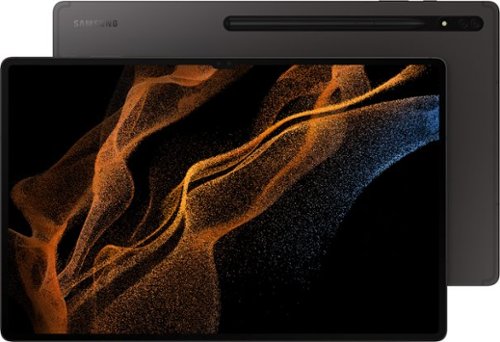
Live that ultra lifestyle on the ultimate tablet, featuring our largest screen to help you do more.
Does the new s8 line up support smart cards and smart card readers?
Smart Cards? Like the ones in use by the military?
Short Answer: Yes - the kernel is new enough to work with most hardware.
Long Answer: Yes, but it's not "built-in" to android. So it's up to the card reader company to get their drivers into the android kernel. Then it's up to developers (or the card reader company) to make android software to actually make use of the kernel drivers. Only then can an app with CAC login support be used.
In this case, I recommend talking to the I.T divisions on base about what's best supported and go with that. If you are with a civilian agency, talk to I.T. about what they prefer.
If you want to use the smart card as a way to log in to the phone itself, I'm pretty sure that's not supported. If you want this type protection go with a Yubikey or Titan Key.
Short Answer: Yes - the kernel is new enough to work with most hardware.
Long Answer: Yes, but it's not "built-in" to android. So it's up to the card reader company to get their drivers into the android kernel. Then it's up to developers (or the card reader company) to make android software to actually make use of the kernel drivers. Only then can an app with CAC login support be used.
In this case, I recommend talking to the I.T divisions on base about what's best supported and go with that. If you are with a civilian agency, talk to I.T. about what they prefer.
If you want to use the smart card as a way to log in to the phone itself, I'm pretty sure that's not supported. If you want this type protection go with a Yubikey or Titan Key.
3 years, 10 months ago
by
BRogers