Samsung
Samsung's Stats
Reviews
- Review Count0
- Helpfulness Votes0
- First ReviewNone
- Last ReviewNone
- Featured Reviews0
- Average Rating0
Reviews Comments
- Review Comment Count0
- Helpfulness Votes0
- First Review CommentNone
- Last Review CommentNone
- Featured Review Comments0
Questions
- Question Count0
- Helpfulness Votes0
- First QuestionNone
- Last QuestionNone
- Featured Questions0
- Answer Count74143
- Helpfulness Votes37,976
- First AnswerApril 24, 2013
- Last AnswerSeptember 8, 2026
- Featured Answers0
- Best Answers3951
Samsung's Reviews
Samsung has not submitted any reviews.
Samsung's Questions
Samsung has not submitted any questions.
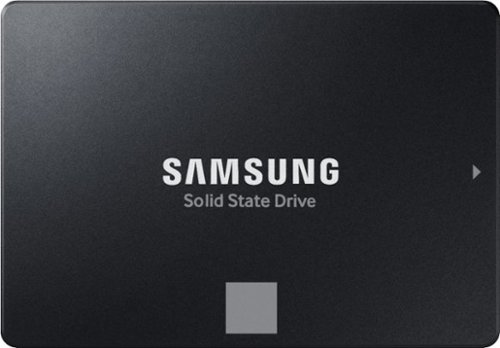
The perfect choice for creators, IT professionals or everyday users, the latest 870 EVO has indisputable performance, reliability and compatibility built upon Samsung~s pioneering technology.
Will this work with the Dell 5820

Andy:
Yes, the Samsung 870 EVO SSD is compatible with the Dell Precision 5820 workstation. The 870 EVO is a 2.5-inch SATA SSD, and the Dell Precision 5820 supports SATA drives in its drive bays.
- Samsung Memory
Yes, the Samsung 870 EVO SSD is compatible with the Dell Precision 5820 workstation. The 870 EVO is a 2.5-inch SATA SSD, and the Dell Precision 5820 supports SATA drives in its drive bays.
- Samsung Memory
1 year, 8 months ago
by
Posted by:
Samsung
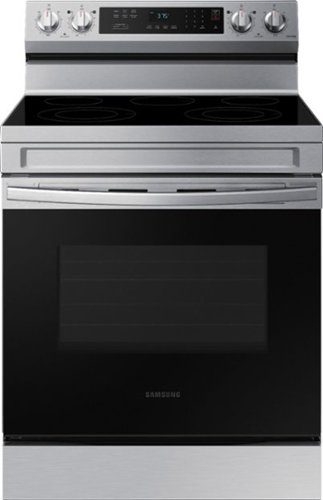
Elevate the look of your kitchen with Samsung~s Smart Freestanding Electric Range. Our Stainless Steel design elegantly wraps around cooktop sides and up through the slim control panel. Upgraded technology makes cooking simple and fun.
While making breakfast I smelled something burning, that wasn’t my breakfast. I wait for the glass top to cool off before disconnecting. Next day the Glass is broken. Why don’t yall cover the replacement glass?
Hi Josie,
I understand how frustrating it can be when something unexpected happens, especially when it impacts your daily routine. We are here to help.
If the electric cooktop of your Samsung range is giving off a burnt smell, it can be caused by food or oil residue on the surface or around the burners burning off when you heat the cooktop, creating a burnt smell. Even small spills from cooking could cause this odor. Clean the cooktop thoroughly after each use, especially around the burners. Use appropriate cooktop cleaner to remove any food or grease buildup. I have shared a Samsung link below to help with the maintenance of the cooktop. The link shared below has an embedded video that we recommend watching.
Clean and care for your Samsung electric cooktop:
https://www.samsung.com/us/support/answer/ANS00060833/
In addition, if you prepare your breakfast in the oven. I have shared a Samsung link that will help with your experience with the smell coming from the oven.
Odor or smoke from Samsung oven:
https://www.samsung.com/us/support/troubleshooting/TSG01110185/
We would love to speak to you directly to gather more information about the glass cooktop and determine what steps can help with it. Please feel free to get back to us via the following options:
1. Facebook Messenger: http://m.me/samsungsupport
2. Twitter: https://twitter.com/messages/compose?recipient_id=18768513
3. Samsung Community: https://us.community.samsung.com/t5/Samsung-Community/ct-p/us
When you message us, please provide us with this reference number 1148057280 to help our team pull up your information.
Leo
I understand how frustrating it can be when something unexpected happens, especially when it impacts your daily routine. We are here to help.
If the electric cooktop of your Samsung range is giving off a burnt smell, it can be caused by food or oil residue on the surface or around the burners burning off when you heat the cooktop, creating a burnt smell. Even small spills from cooking could cause this odor. Clean the cooktop thoroughly after each use, especially around the burners. Use appropriate cooktop cleaner to remove any food or grease buildup. I have shared a Samsung link below to help with the maintenance of the cooktop. The link shared below has an embedded video that we recommend watching.
Clean and care for your Samsung electric cooktop:
https://www.samsung.com/us/support/answer/ANS00060833/
In addition, if you prepare your breakfast in the oven. I have shared a Samsung link that will help with your experience with the smell coming from the oven.
Odor or smoke from Samsung oven:
https://www.samsung.com/us/support/troubleshooting/TSG01110185/
We would love to speak to you directly to gather more information about the glass cooktop and determine what steps can help with it. Please feel free to get back to us via the following options:
1. Facebook Messenger: http://m.me/samsungsupport
2. Twitter: https://twitter.com/messages/compose?recipient_id=18768513
3. Samsung Community: https://us.community.samsung.com/t5/Samsung-Community/ct-p/us
When you message us, please provide us with this reference number 1148057280 to help our team pull up your information.
Leo
1 year, 8 months ago
by
Posted by:
Samsung

Samsung - 43 Class DU7200 Series Crystal UHD 4K Smart Tizen TV (2024)
This essential TV features a range of contrast and color and smart capabilities. Enjoy your content with richer details, brighter images and clearer resolution with 4K Upscaling.
Do I need a soundbar with this television? Ethel thanks you!
Hi FredMertz,
The DU7200 TV comes with 2 20-watt speakers built-in, and you do not necessarily need a soundbar.
~Samsung Advisor
The DU7200 TV comes with 2 20-watt speakers built-in, and you do not necessarily need a soundbar.
~Samsung Advisor
1 year, 8 months ago
by
Posted by:
Samsung
Samsung - 55 Class DU7200 Series Crystal UHD 4K Smart Tizen TV (2024)
This essential TV features a range of contrast and color and smart capabilities. Enjoy your content with richer details, brighter images and clearer resolution with 4K Upscaling.
Does this TV connect to the internet like a computer?
Hi Lola,
Yes, you can connect to the internet and use the browser to surf the web. To connect, you can utilize an ethernet cord or Wi-Fi connection.
~Samsung Advisor
Yes, you can connect to the internet and use the browser to surf the web. To connect, you can utilize an ethernet cord or Wi-Fi connection.
~Samsung Advisor
1 year, 8 months ago
by
Posted by:
Samsung
Samsung - 85 Class DU7200 Series Crystal UHD 4K Smart Tizen TV (2024)
This essential TV features a range of contrast and color and smart capabilities. Enjoy your content with richer details, brighter images and clearer resolution with 4K Upscaling.
How can I buy this?
Hi Santhan,
Please reach out to Best Buy customer service to better assist you.
~Samsung Advisor
Please reach out to Best Buy customer service to better assist you.
~Samsung Advisor
1 year, 8 months ago
by
Posted by:
Samsung
Samsung - 85 Class DU7200 Series Crystal UHD 4K Smart Tizen TV (2024)
This essential TV features a range of contrast and color and smart capabilities. Enjoy your content with richer details, brighter images and clearer resolution with 4K Upscaling.
Are there places on back of tv to attach cable box shelf/holder
Hi Pen,
No there is not a box or shelf on the back of the TV.
~Samsung Advisor
No there is not a box or shelf on the back of the TV.
~Samsung Advisor
1 year, 8 months ago
by
Posted by:
Samsung
Samsung - 85 Class DU7200 Series Crystal UHD 4K Smart Tizen TV (2024)
This essential TV features a range of contrast and color and smart capabilities. Enjoy your content with richer details, brighter images and clearer resolution with 4K Upscaling.
You say it weighs 33 pounds and 77 pounds in the Q/A section, which is it?
Hi Kap64,
I apologize for the confusion. The 85" DU7200 TV weighs 71.7 pounds and 32.5kg.
~Samsung Advisor
I apologize for the confusion. The 85" DU7200 TV weighs 71.7 pounds and 32.5kg.
~Samsung Advisor
1 year, 8 months ago
by
Posted by:
Samsung
Samsung - 65 Class DU7200 Series Crystal UHD 4K Smart Tizen TV (2024)
This essential TV features a range of contrast and color and smart capabilities. Enjoy your content with richer details, brighter images and clearer resolution with 4K Upscaling.
Will this model rotate vertically and display screensavers in portrait ? (Such as displaying artwork and photos)
Hi Tton,
No, you cannot rotate the DU7200 TV.
~Samsung Advisor
No, you cannot rotate the DU7200 TV.
~Samsung Advisor
1 year, 8 months ago
by
Posted by:
Samsung
Samsung - 43 Class DU7200 Series Crystal UHD 4K Smart Tizen TV (2024)
This essential TV features a range of contrast and color and smart capabilities. Enjoy your content with richer details, brighter images and clearer resolution with 4K Upscaling.
So I need to mount this using an existing wall mount that held the previous Vizio TV. The Vizio TV had 4 standard bolts to connect the TV to the mount. What do I need to mount this TV?
Hi David,
You will need to ensure the mount is compatible with a VESA Map of 200x200mm, and you will need 4xM8 screws 19-21mm.
~Samsung Advisor
You will need to ensure the mount is compatible with a VESA Map of 200x200mm, and you will need 4xM8 screws 19-21mm.
~Samsung Advisor
1 year, 8 months ago
by
Posted by:
Samsung
Samsung - 85 Class DU7200 Series Crystal UHD 4K Smart Tizen TV (2024)
This essential TV features a range of contrast and color and smart capabilities. Enjoy your content with richer details, brighter images and clearer resolution with 4K Upscaling.
what is the actual width and height of the tv?
Hi,
The 85" DU7200 TV measurements are 74.9" x 42.9" x 2.4" (WxHxD).
~Samsung Advisor
The 85" DU7200 TV measurements are 74.9" x 42.9" x 2.4" (WxHxD).
~Samsung Advisor
1 year, 8 months ago
by
Posted by:
Samsung