Samsung
Samsung's Stats
Reviews
- Review Count0
- Helpfulness Votes0
- First ReviewNone
- Last ReviewNone
- Featured Reviews0
- Average Rating0
Reviews Comments
- Review Comment Count0
- Helpfulness Votes0
- First Review CommentNone
- Last Review CommentNone
- Featured Review Comments0
Questions
- Question Count0
- Helpfulness Votes0
- First QuestionNone
- Last QuestionNone
- Featured Questions0
- Answer Count74148
- Helpfulness Votes37,978
- First AnswerApril 24, 2013
- Last AnswerSeptember 9, 2026
- Featured Answers0
- Best Answers3951
Samsung's Reviews
Samsung has not submitted any reviews.
Samsung's Questions
Samsung has not submitted any questions.

Samsung - 50 Class DU6900 Series Crystal UHD 4K Smart Tizen TV (2024)
This essential TV features a range of contrast and color and smart capabilities. Enjoy your content with richer details, brighter images and clearer resolution with 4K Upscaling
How do you turn off this TV? I tried and it turns back on automatically.

Bond,
We have a few troubleshooting steps that may help if your TV is turning itself on.
1. Unplug the TV from the wall outlet or surge protector and leave it unplugged for 30 seconds.
2. Check the power cord to see if there is any visible damage.
3. Plug the TV power cord back into the wall outlet. If you were using a surge protector, bypass it for now and use a wall outlet.
4. Try to update the software. In some cases, a software update can correct the problem. There is a risk, however. If the TV turns off during the software update, it could damage the TV. Updates can take up to 30 minutes, depending on network speed, so if the TV is not turning off too frequently, try updating the software.
5. Disable the Power On with Mobile option. TVs that can connect to SmartThings can be turned on using compatible devices, sometimes automatically. However, if abnormal "power on" signals are sent through the wireless network, they will trigger this function and make the TV turn on. If you do not want this function, navigate to Settings > All Settings> General > Network > Expert Settings > Power On with Mobile, and turn the setting off.
If the TV continues to turn on by itself continuously, please contact our Samsung Customer Support at our site.
~Samsung Pro
We have a few troubleshooting steps that may help if your TV is turning itself on.
1. Unplug the TV from the wall outlet or surge protector and leave it unplugged for 30 seconds.
2. Check the power cord to see if there is any visible damage.
3. Plug the TV power cord back into the wall outlet. If you were using a surge protector, bypass it for now and use a wall outlet.
4. Try to update the software. In some cases, a software update can correct the problem. There is a risk, however. If the TV turns off during the software update, it could damage the TV. Updates can take up to 30 minutes, depending on network speed, so if the TV is not turning off too frequently, try updating the software.
5. Disable the Power On with Mobile option. TVs that can connect to SmartThings can be turned on using compatible devices, sometimes automatically. However, if abnormal "power on" signals are sent through the wireless network, they will trigger this function and make the TV turn on. If you do not want this function, navigate to Settings > All Settings> General > Network > Expert Settings > Power On with Mobile, and turn the setting off.
If the TV continues to turn on by itself continuously, please contact our Samsung Customer Support at our site.
~Samsung Pro
1 year, 9 months ago
by
Posted by:
Samsung
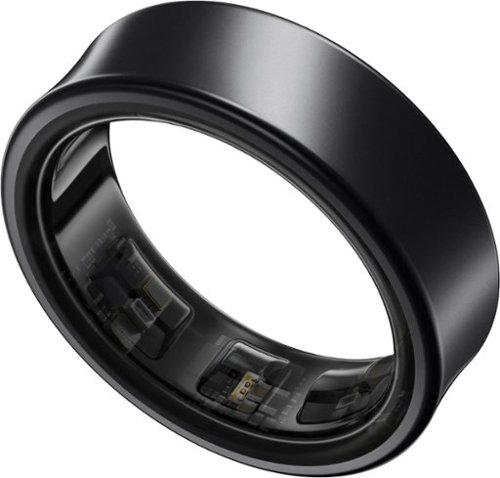
Get a deeper understanding of your body with the all-new Galaxy Ring. Merging the convenience of a wellness tracker with the timeless elegance of a sleek band, Galaxy Ring helps go-getters track their busy days in style. Packing the latest tracking innovations into a compact design that fits comfortably on your finger, Galaxy Ring tracks the valuable wellness insights you need to keep a pulse on your life, from the conference room to the yoga studio to dinner with family and friends. Enhanced by Galaxy AI,~ Galaxy Ring gives you new ways to feel amazing, like Energy Score ~ just open your phone to learn how ready you are to take on the day. You~ll also get a great night~s rest while Galaxy Ring does its thing ~ this sleep tracker is so comfortable, you~ll hardly know it~s there. The feather light silhouette slips seamlessly into your life with a durable design~ that allows you to wear it confidently from your morning shower to the gym, while a long-lasting battery~ lets you track insights for up to six days~ in between charges. Slip on a new, easier way to keep your health on track ~ Galaxy Ring
I have the Galaxy watch. Will there be a conflict issue in the app if I wear both at the same time?
Greetings Phillip62, thank you for finding the opportunity to ask us your question about the Samsung Galaxy Ring. That's a great question! The Samsung Galaxy Ring and Galaxy Watch can be used at the same time to track health. Feel free to contact Samsung Support if you have additional questions or us. Thank you for being a trustworthy Samsung customer. - Debra
1 year, 9 months ago
by
Posted by:
Samsung
Samsung - 50 Class DU6900 Series Crystal UHD 4K Smart Tizen TV (2024)
This essential TV features a range of contrast and color and smart capabilities. Enjoy your content with richer details, brighter images and clearer resolution with 4K Upscaling
Will the Bluetooth work with hearing aids?
Farmboy,
If your hearing aids allow TV pairing via Bluetooth, the DU6900 can connect.
~Samsung Pro
If your hearing aids allow TV pairing via Bluetooth, the DU6900 can connect.
~Samsung Pro
1 year, 9 months ago
by
Posted by:
Samsung
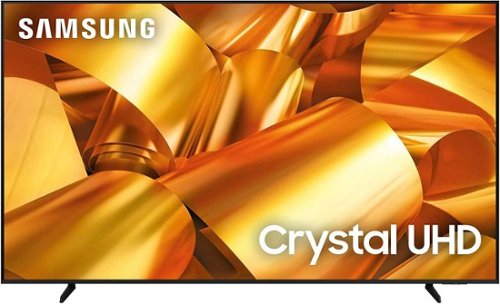
Samsung - 75 Class DU6950 Series Crystal UHD 4K Smart Tizen TV (2024)
This essential TV features a range of contrast and color and smart capabilities. Enjoy your content with richer details, brighter images and clearer resolution with 4K Upscaling.
Does this tv support Dolby atmos?
Headhunter,
The DU6950 TV uses Dolby sound system. The DU6950 TV can also be used with soundbars that feature Dolby Atmos.
~Samsung Pro
The DU6950 TV uses Dolby sound system. The DU6950 TV can also be used with soundbars that feature Dolby Atmos.
~Samsung Pro
1 year, 9 months ago
by
Posted by:
Samsung
Samsung - 50 Class DU6900 Series Crystal UHD 4K Smart Tizen TV (2024)
This essential TV features a range of contrast and color and smart capabilities. Enjoy your content with richer details, brighter images and clearer resolution with 4K Upscaling
Can Tablo be connected to this TV ?
Shar,
Yes, Tablo antennas are compatible with the DU6900 TV.
~Samsung Pro
Yes, Tablo antennas are compatible with the DU6900 TV.
~Samsung Pro
1 year, 9 months ago
by
Posted by:
Samsung

Samsung - 55 Class DU6900 Series Crystal UHD 4K Smart Tizen TV (2024)
This essential TV features a range of contrast and color and smart capabilities. Enjoy your content with richer details, brighter images and clearer resolution with 4K Upscaling.
Can this TV be wall mounted?
JUD,
Yes, the DU6900 TV can be wall mounted.
~Samsung Pro
Yes, the DU6900 TV can be wall mounted.
~Samsung Pro
1 year, 9 months ago
by
Posted by:
Samsung
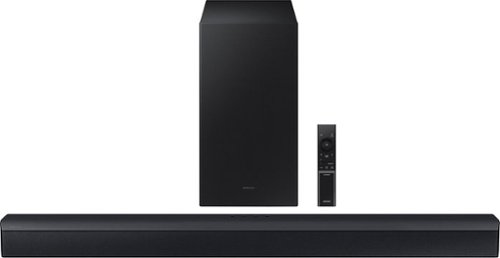
Samsung - HW-C450 2.1 Channel B-Series Soundbar with Wireless Subwoofer, DTS Virtual: X - Titan Black
Versatile and easy to use, this soundbar comes equipped with tech to enhance your listening, viewing and gaming experience~with DTS Virtual: X, an included subwoofer and bass you can boost with a tap
Is this compatible with an app?
Hi carrie. No, the HW-C450 Soundbar cannot connect to an app to control the soundbar. ~ Samsung Solutions
1 year, 9 months ago
by
Posted by:
Samsung
Samsung - Galaxy S24+ 256GB (Unlocked) - Onyx Black
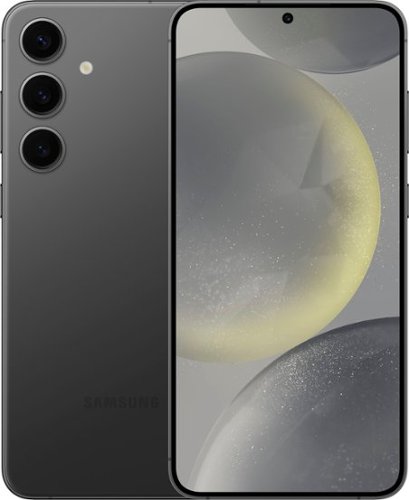
Plus up your day with Galaxy AI on Galaxy S24+. Wonder where your favorite influencer got their shoes? Simply Circle to Search with Google to see where you can buy your own pair. Then, snap a photo to show off your new kicks and elevate your pic from good to great on the Galaxy S24+. Before you head out in style, call up that new authentic Japanese restaurant to make a reservation and impress the staff as you use Live Translate to speak their language in real time. And, with our powerful processor, you can smoothly switch between texting friends, taking photos of your food and searching for your next culinary adventure. Life just got a whole lot easier and a lot more fun. Epic, just like that.
Is the unlocked version fully compatible with Verizon Visual Voicemail or is there a similar Samsung voicemail app preloaded on the S24+?
Hello there Rivverat, thank you for finding the available time out of your day to ask us your question about the Samsung Galaxy S24+. We recommend reaching out to Verizon to inquire about the compatibility of devices with their visual voicemail. If you have any other questions for us, do not hesitate to contact Samsung Support. Thank you for being a steadfast Samsung customer. - Debra
1 year, 9 months ago
by
Posted by:
Samsung
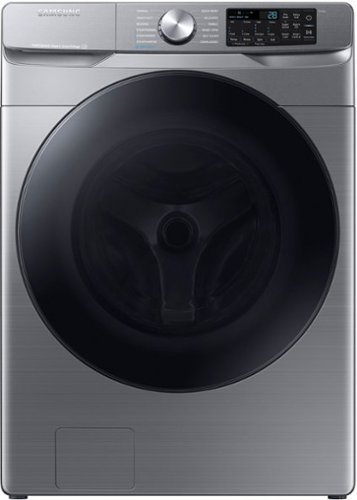
Samsung~s new 4.5 cu. ft. large capacity Front Load Washer features Super Speed Wash, so you can wash full loads with full performance in just 28 minutes, and has built-in Wi-Fi so you can receive end of cycle alerts and remotely start, stop, and schedule laundry right from your smartphone.
My Samsung washer is 13 years old recently got an error code not draining. The pump has been replaced as well as door latch. Problem still not solved. What else could it be?
Hi there,
Thank you for sharing details about your Samsung WF45B6300AP washer. Since you've already replaced the drain pump and door latch but the issue persists, there could be other factors affecting the draining functionality.
Here are some suggestions for further troubleshooting:
- Clogged or Blocked Drain Hose: Ensure the drain hose is not kinked, clogged, or improperly installed. Check for obstructions throughout the hose and at the connection points.
- Faulty Drain Filter: The washer's drain filter might be clogged with debris, which can prevent proper draining. Cleaning the filter often resolves such issues.
- Pressure Sensor or Water Level Switch: A malfunction in the pressure sensor could misread the water level, preventing the washer from initiating the drain cycle.
- Control Board Issue: If other components are functional, the control board could be responsible for mismanaging the drain process.
For detailed troubleshooting steps, refer to the "Troubleshooting" section in your user manual, starting on page 44 and ending on page 47. These pages also provide additional error code explanations and possible fixes.
Here is the link to your washer's user manual for convenience:
https://downloadcenter.samsung.com/content/UM/202401/20240124193442537/DC68-04355A-04_IB_WF6300B_EN_CFR_MES_240123.pdf
I have provided a link below to help you ensure your washer drains properly. Kindly select the scenario that best fits your situation and learn more by checking the hyperlinks and embedded video.
If the suggestions above don't resolve the issue, it may be time to consult a Samsung technician for a more in-depth diagnosis. You can schedule a service appointment directly through Samsung Support.
Should you need more assistance, please feel free to get back to us via the following options:
1. Facebook Messenger: http://m.me/Samsungsupport
2. Twitter: https://twitter.com/messages/compose?recipient_id=18768513
3. Samsung Community: https://us.community.Samsung.com/t5/Samsung-Community/ct-p/us
When you message us, please provide us with this reference number (1147680281) to help our team gather your information.
Have a great day.
^Charles
Thank you for sharing details about your Samsung WF45B6300AP washer. Since you've already replaced the drain pump and door latch but the issue persists, there could be other factors affecting the draining functionality.
Here are some suggestions for further troubleshooting:
- Clogged or Blocked Drain Hose: Ensure the drain hose is not kinked, clogged, or improperly installed. Check for obstructions throughout the hose and at the connection points.
- Faulty Drain Filter: The washer's drain filter might be clogged with debris, which can prevent proper draining. Cleaning the filter often resolves such issues.
- Pressure Sensor or Water Level Switch: A malfunction in the pressure sensor could misread the water level, preventing the washer from initiating the drain cycle.
- Control Board Issue: If other components are functional, the control board could be responsible for mismanaging the drain process.
For detailed troubleshooting steps, refer to the "Troubleshooting" section in your user manual, starting on page 44 and ending on page 47. These pages also provide additional error code explanations and possible fixes.
Here is the link to your washer's user manual for convenience:
https://downloadcenter.samsung.com/content/UM/202401/20240124193442537/DC68-04355A-04_IB_WF6300B_EN_CFR_MES_240123.pdf
I have provided a link below to help you ensure your washer drains properly. Kindly select the scenario that best fits your situation and learn more by checking the hyperlinks and embedded video.
If the suggestions above don't resolve the issue, it may be time to consult a Samsung technician for a more in-depth diagnosis. You can schedule a service appointment directly through Samsung Support.
Should you need more assistance, please feel free to get back to us via the following options:
1. Facebook Messenger: http://m.me/Samsungsupport
2. Twitter: https://twitter.com/messages/compose?recipient_id=18768513
3. Samsung Community: https://us.community.Samsung.com/t5/Samsung-Community/ct-p/us
When you message us, please provide us with this reference number (1147680281) to help our team gather your information.
Have a great day.
^Charles
1 year, 9 months ago
by
Posted by:
Samsung
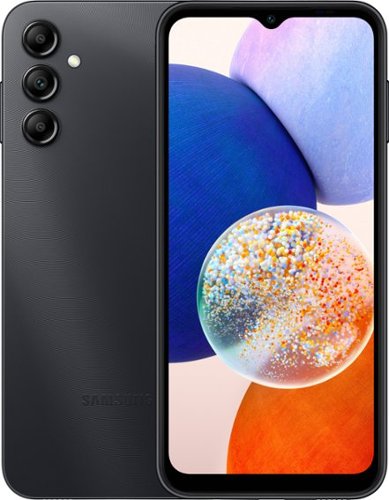
Samsung - Galaxy A14 5G 64GB (Unlocked) - Black
Keep up with life with a phone that gets you. Find everything you need online with 5G connectivity, and see your favorite games and apps up close with a 6.6" screen. Stay ready for all life~s moments with a long lasting battery, and snap stunning selfies with an awesome front camera. Built with all the essentials to stay connected, Galaxy A14 5G is the perfect match for those wanting to upgrade their phone at an amazing value.
Does this phone work with assurance wireless?
Greetings Tazz, thank you for finding the time out of your day to ask us your question about the Samsung Galaxy A14. The advertised unlocked Galaxy A14 is compatible with AT&T, Boost Mobile, Cricket, Google Fi, H2O Wireless, Metro by T-Mobile, Sprint, T-Mobile, Total by Verizon, US Cellular, and Verizon. Feel free to contact Samsung Support if you think of any other questions you may have for us. Thank you for being a dedicated Samsung customer. - Debra
1 year, 9 months ago
by
Posted by:
Samsung