Samsung
Samsung's Stats
Reviews
- Review Count0
- Helpfulness Votes0
- First ReviewNone
- Last ReviewNone
- Featured Reviews0
- Average Rating0
Reviews Comments
- Review Comment Count0
- Helpfulness Votes0
- First Review CommentNone
- Last Review CommentNone
- Featured Review Comments0
Questions
- Question Count0
- Helpfulness Votes0
- First QuestionNone
- Last QuestionNone
- Featured Questions0
- Answer Count74215
- Helpfulness Votes37,973
- First AnswerApril 24, 2013
- Last AnswerSeptember 11, 2026
- Featured Answers0
- Best Answers3948
Samsung's Reviews
Samsung has not submitted any reviews.
Samsung's Questions
Samsung has not submitted any questions.
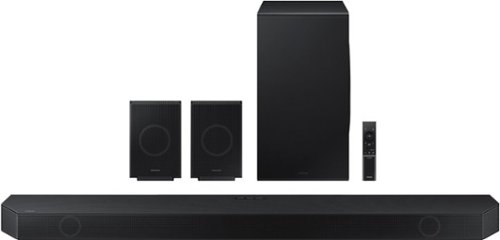
Samsung - HW-Q990D/ZA 11.1.4 Channel Q-Series Soundbar with Wireless Subwoofer and Rear Speakers, Dolby Atmos and Q-Symphony - Black
Experience our greatest of all time-level audio synchronized with your TV~s speakers* and customized to your living space. With intelligently tuned, 11.1.4 Ch. True Dolby Atmos Sound, the Q990D stands above the rest.
What is the difference between the Q990C and the Q990D ?

Hi Matt! Great question! Both models feature 11.1.4Ch audio for a true (& wireless) Dolby Atmos experience, Q-Symphony for synchronized TV+Soundbar audio, as well as features like SpaceFit Sound Pro, Adaptive Sound, and AVA (Active Voice Amplifier). New in 2024, our Q990D Soundbar introduces Private Rear Sound to allow you to watch TV without disturbing others – especially at night – by activating sound solely from the included rear speakers, upgraded Game Mode Pro to further optimize sound to each gaming genre while better separating 3D audio, and an enhanced music experience to enjoy Hi-Fi and Spatial Audio via Tidal Connect, Dolby Atmos Music, and Sound Grouping. Hope this helps!
~ Samsung Solutions
~ Samsung Solutions
2 years, 4 months ago
by
Posted by:
Samsung
Samsung - HW-Q990D/ZA 11.1.4 Channel Q-Series Soundbar with Wireless Subwoofer and Rear Speakers, Dolby Atmos and Q-Symphony - Black
Experience our greatest of all time-level audio synchronized with your TV~s speakers* and customized to your living space. With intelligently tuned, 11.1.4 Ch. True Dolby Atmos Sound, the Q990D stands above the rest.
I have an A//V receiver. My front projection TV, Cable box, and 4K Blu Ray player are all plugged into the receiver. Can I use the A/V as a switcher and run one HDMI cable from receiver output to sound bar input? I would not use the A/V speakers at all.
Hello Esteban. Samsung Soundbars are designed to connect directly to the TV to provide an easy and seamless experience with no extra audio equipment required. If you would like to connect the soundbar to an existing receiver, please check with the manufacturer of your receiver to see if it supports this type of audio pass through.
~ Samsung Solutions
~ Samsung Solutions
2 years, 4 months ago
by
Posted by:
Samsung
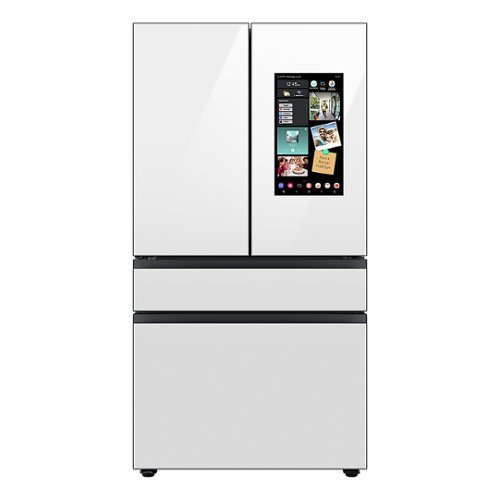
Samsung - BESPOKE 23 cu. ft. 4-Door French Door Counter Depth Smart Refrigerator with Family Hub - White Glass
Counter Depth 4-Door French Door Refrigerator featuring Samsung~s Family Hub which lets you see inside your refrigerator, manage your family~s calendars, stream music, see who~s at the front door and much more, all right from your fridge. It also features the Beverage Center with both a water dispenser and AutoFill Water Pitcher. Plus a Dual Ice Maker with cubed ice and Ice Bites.
Can it be mounted so that the front is flush with surrounding cabinetry, or do the doors need to stick out?
Hi Pablo,
No, it can't be mounted. Our counter-depth refrigerators have a depth of 24-25 inches (not including the doors or handles). They will typically fit better on your counter with only the doors sticking out and increase the walking space.
Counter Depth models are useful for a sleeker look in the kitchen and can mean not reaching very far into the refrigerator to get things from the back.
Have a great day!
Chrystel
No, it can't be mounted. Our counter-depth refrigerators have a depth of 24-25 inches (not including the doors or handles). They will typically fit better on your counter with only the doors sticking out and increase the walking space.
Counter Depth models are useful for a sleeker look in the kitchen and can mean not reaching very far into the refrigerator to get things from the back.
Have a great day!
Chrystel
2 years, 4 months ago
by
Posted by:
Samsung
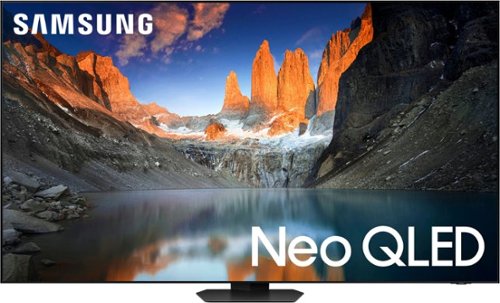
Samsung - 65 Class QN90D Series Neo QLED 4K Mini LED Smart Tizen TV (2024)
This Samsung AI TV features crisp resolution, clear motion and high contrast. It has a brilliant and smooth picture made possible by ultra-fine lighting and brightness ~ all with a 3D-like image and sound to enhance your viewing experience.
Does the QN90D have an ATSC 3.0 (nextgen tv) tuner?
Hi Ochemdoc - The QN90D has a built-in ATSC 1.0/ClearQAM tuner; when stepping up to our 2024 QN900D or QN800D 8K, you’ll gain a built-in ATSC 3.0 tuner for receiving digital broadcasts.
~ Samsung Specialist
~ Samsung Specialist
2 years, 4 months ago
by
Posted by:
Samsung
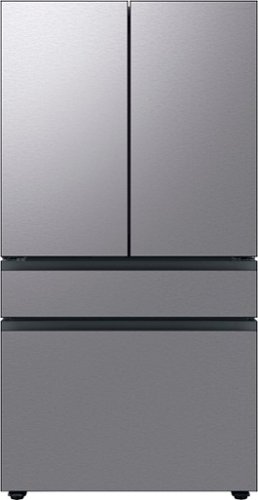
Extra-large capacity 4-Door French Door Refrigerator; a revolution in convenience and design, the concealed Beverage Center features both a water dispenser and AutoFill Water Pitcher. Plus a Dual Ice Maker with cubed ice and Ice Bites.
Can I operate this fridge also in Europe with 220v? And also in the US for 110v ?
Hi there,
Yes, it can be used outside the country. However, we highly recommend using a standard power supply of 115 volts.
Have a great day!
^Chrystel
Yes, it can be used outside the country. However, we highly recommend using a standard power supply of 115 volts.
Have a great day!
^Chrystel
2 years, 4 months ago
by
Posted by:
Samsung
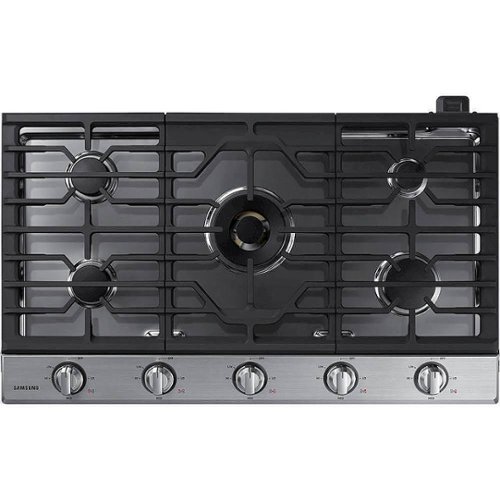
This Samsung Gas Cooktop offers a full range of burners for all of your cooking needs. Its 22K BTU true dual-power burner with two heat options quickly boils water or maintains a simmer. Use the griddle to cook breakfast foods, grill sandwiches or saut~ vegetables. Easily accommodate a round bottom wok on the custom wok grate. Blue LED illuminated knobs visually let you know your cooktop is on even at a distance.
I found 2 small plastic pieces after it was installed. Are they for the wi fi that I will not be using. I was told one was for that, which is marked "smart connect". I found a second rectangular piece, 1 inx3inches. I'd like to know it's use.
Hi there,
We understand your interest to know more about the functions and feature of the cooktop. Let us help you with the details you want to know.
Please seepage 16 under the "Using the Smart connect Feature" for more information on how to use the smart connect feature.
Manual
https://downloadcenter.samsung.com/content/UM/202312/20231228151644561/O_01._DG68-01089A-07_IB_FULL_NA30N6555TG_EN.pdf
Should you need more assistance, please feel free to get back to us via the following options:
1. Facebook Messenger: http://m.me/Samsungsupport
2. Twitter: https://twitter.com/messages/compose?recipient_id=18768513
3. Samsung Community: https://us.community.Samsung.com/t5/Samsung-Community/ct-p/us
When you message us, please provide us with this reference number (1147061679) to help our team gather your information.
Have a great day.
^Charles
We understand your interest to know more about the functions and feature of the cooktop. Let us help you with the details you want to know.
Please seepage 16 under the "Using the Smart connect Feature" for more information on how to use the smart connect feature.
Manual
https://downloadcenter.samsung.com/content/UM/202312/20231228151644561/O_01._DG68-01089A-07_IB_FULL_NA30N6555TG_EN.pdf
Should you need more assistance, please feel free to get back to us via the following options:
1. Facebook Messenger: http://m.me/Samsungsupport
2. Twitter: https://twitter.com/messages/compose?recipient_id=18768513
3. Samsung Community: https://us.community.Samsung.com/t5/Samsung-Community/ct-p/us
When you message us, please provide us with this reference number (1147061679) to help our team gather your information.
Have a great day.
^Charles
2 years, 4 months ago
by
Posted by:
Samsung
Extra-large capacity 4-Door French Door Refrigerator; a revolution in convenience and design, the concealed Beverage Center features both a water dispenser and AutoFill Water Pitcher. Plus a Dual Ice Maker with cubed ice and Ice Bites.
The water filter reset will not work no matter how long I hold the button and continues to flash it doesn’t appear any of the buttons on the internal fridge are functioning to the touch. How can I trouble shoot this?
Hi there,
We can feel the difficulty you're experiencing with the refrigerator. Let's get you the help you need.
To help rectify the control panel's efficiency, we recommend following the troubleshooting link below. Please watch the YouTube video and click on the hyperlink for additional help.
The refrigerator panel will not respond:
https://www.samsung.com/us/support/troubleshooting/TSG01202605/#refrigerator-panel-will-not-respond
Should you require further assistance, please feel free to get back to us via the following options:
1. Facebook Messenger: http://m.me/samsungsupport
2. Twitter: https://twitter.com/messages/compose?recipient_id=18768513
3. Samsung Community: https://us.community.samsung.com/t5/Samsung-Community/ct-p/us
When you message us, please provide us with this reference number 1147061242, to help our team pull up your information.
Have a great day!
^Chrystel
We can feel the difficulty you're experiencing with the refrigerator. Let's get you the help you need.
To help rectify the control panel's efficiency, we recommend following the troubleshooting link below. Please watch the YouTube video and click on the hyperlink for additional help.
The refrigerator panel will not respond:
https://www.samsung.com/us/support/troubleshooting/TSG01202605/#refrigerator-panel-will-not-respond
Should you require further assistance, please feel free to get back to us via the following options:
1. Facebook Messenger: http://m.me/samsungsupport
2. Twitter: https://twitter.com/messages/compose?recipient_id=18768513
3. Samsung Community: https://us.community.samsung.com/t5/Samsung-Community/ct-p/us
When you message us, please provide us with this reference number 1147061242, to help our team pull up your information.
Have a great day!
^Chrystel
2 years, 4 months ago
by
Posted by:
Samsung

Samsung - Galaxy S24 256GB (Unlocked) - Cobalt Violet
Make every day epic with Galaxy AI on Galaxy S24. See a delicious looking dish on your social feed but don~t see a recipe? Simply Circle to Search with Google to find it in seconds. Then head to a sunny farmer~s market to pick up the ingredients and see your list clearly on the bright, adaptive display of Galaxy S24. Once the meal is ready, capture stunning close ups of your dish and dinner guests, no matter the lighting, with a high res camera and Nightography. And all the while, you can stay plugged into the moment, not the outlet, with a long lasting battery. Do more easily with Galaxy AI on Galaxy S24. Epic, just like that.
Will this phone work with Spectrum Voice and if so, can BB set it up for me or do I have to go to a Spectrum store?
Hi Juliet, we appreciate your question about the Samsung Galaxy S24. This device as unlocked is listed as compatible with AT&T, Boost Mobile, Cricket, H2O Wireless, MetroPCS, Mint Mobile, Simple Mobile, Sprint, T-Mobile, Ultra Mobile, US Cellular, Verizon, Google Fi. You can always reach out directly to Spectrum Voice to ask if they are able to connect with this device or if they have steps you can take to do so. You can also reach out directly to the store of purchase for options on connecting. Thank you for being a Samsung customer. -Elizabeth
2 years, 4 months ago
by
Posted by:
Samsung
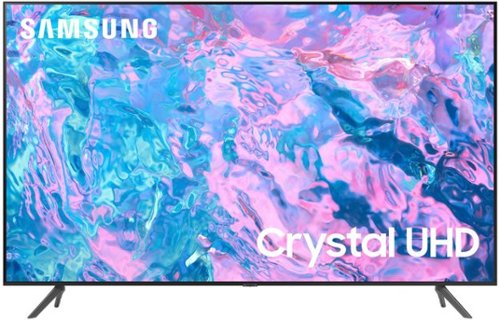
Samsung - 65 Class CU7000 Crystal UHD 4K Smart Tizen TV (2023)
True-to-life color. Effortless connectivity. Dazzling 4K value. Samsung Crystal UHD is worth a look (and more). Effortlessly access TV shows, movies and ambient content using the Samsung Smart Hub, or find a range of great games on the Samsung Gaming Hub.* Enjoy content even more clear than it was created as its upgraded to 4K resolution
Is this TV compatible with using a ROKU Stick?
Hi Rjp1956,
Yes, you can connect your Roku device via USB or HDMI.
~Samsung Advisor
Yes, you can connect your Roku device via USB or HDMI.
~Samsung Advisor
2 years, 4 months ago
by
Posted by:
Samsung
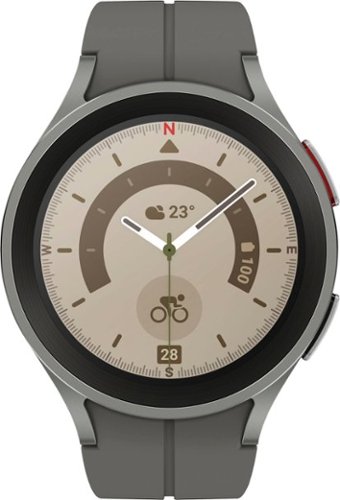
Samsung - Galaxy Watch5 Pro Titanium Smartwatch 45mm BT - Gray - (2022)
Take on your ultimate adventure with Galaxy Watch5 Pro~. It~s our most advanced outdoor watch yet, featuring a 2x stronger~ Sapphire Crystal Glass display. Power through intense activities, even with GPS on, with a long-lasting battery. Stay on the right trail even in unfamiliar terrain thanks to voice or vibration guided turn-by-turn navigation~. Push your body further with accurate sensors that help keep a closer eye on your heart rate~, and BIA~ measurements that help you track your physique. Get the rest you need to stay energized on your journeys with Advanced Sleep Coaching~. Look sharp on every expedition with bands and watch faces that you can match to any outfit. Plus, pair your watch with the rest of your Galaxy for a connected network of devices that work together to help go stronger and harder than ever before. Whether you~re hiking, kayaking~ or camping, get ready to take it to the extreme with Galaxy Watch5 Pro.
I’ve never heard of GPS as a carrier. What is the difference between this option and unlocked?
Hi there CarrierGPS, thank you for your question about the Samsung Galaxy Watch5 Pro. It appears that the GPS mentioned refers to the Bluetooth version of this device that does not require a data plan and can be used fully so long as you are in range of your cellular device. The Unlocked option refers to the LTE version that would require an additional data plan and can be used without being in range of your cell phone. Thank you for being a Samsung customer. -Elizabeth
2 years, 4 months ago
by
Posted by:
Samsung