Samsung
Samsung's Stats
Reviews
- Review Count0
- Helpfulness Votes0
- First ReviewNone
- Last ReviewNone
- Featured Reviews0
- Average Rating0
Reviews Comments
- Review Comment Count0
- Helpfulness Votes0
- First Review CommentNone
- Last Review CommentNone
- Featured Review Comments0
Questions
- Question Count0
- Helpfulness Votes0
- First QuestionNone
- Last QuestionNone
- Featured Questions0
- Answer Count74220
- Helpfulness Votes37,974
- First AnswerApril 24, 2013
- Last AnswerSeptember 13, 2026
- Featured Answers0
- Best Answers3948
Samsung's Reviews
Samsung has not submitted any reviews.
Samsung's Questions
Samsung has not submitted any questions.
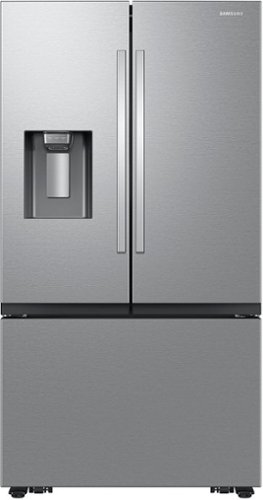
Samsung Mega Capacity 3-Door French Door Counter Depth refrigerator with 26 cu. ft. comes with four types of ice and modern design. Store more groceries, including big and bulky items. The Dual Auto Ice Maker makes two types of ice ~ cubed or Ice Bites while the external dispenser offers two additional ice options, curved and crushed.
Have they fixed the ice maker from freezing up? Ive had 2 samsung refrigerators both had the problem as well as many other people. hate to fall into that trap again.

Hi Max,
We understand the convenience of having a good working ice maker in our daily needs. Let us help you.
Please see the link below for the steps if the ice maker is freezing up.
https://www.samsung.com/us/support/troubleshooting/TSG01001791/
It would also be great if we could talk to you directly and gather more information about your concern.
Please feel free to reach us via the options below, as we look forward to assisting you in the best possible way.
1. Facebook Messenger: http://m.me/samsungsupport
2. Twitter: https://twitter.com/messages/compose?recipient_id=18768513
3. Samsung Community: https://us.community.samsung.com/t5/Samsung-Community/ct-p/us
When you message us, please provide us with this reference number 1146983818, which will help our team pull up your information.
^Rainly
We understand the convenience of having a good working ice maker in our daily needs. Let us help you.
Please see the link below for the steps if the ice maker is freezing up.
https://www.samsung.com/us/support/troubleshooting/TSG01001791/
It would also be great if we could talk to you directly and gather more information about your concern.
Please feel free to reach us via the options below, as we look forward to assisting you in the best possible way.
1. Facebook Messenger: http://m.me/samsungsupport
2. Twitter: https://twitter.com/messages/compose?recipient_id=18768513
3. Samsung Community: https://us.community.samsung.com/t5/Samsung-Community/ct-p/us
When you message us, please provide us with this reference number 1146983818, which will help our team pull up your information.
^Rainly
2 years, 5 months ago
by
Posted by:
Samsung
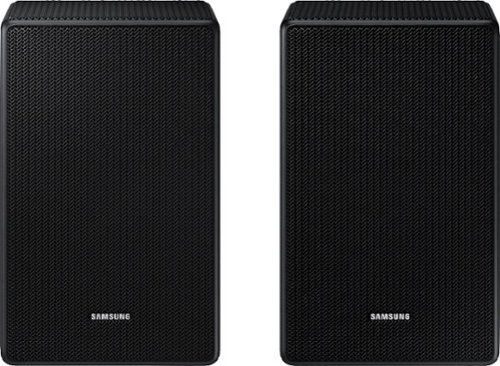
Is this compatible with the q800c soundbar?
Hi there! Yes, the SWA-9500S Rear Speakers are compatible with the HW-Q800C Soundbar. ~ Samsung Solutions
2 years, 5 months ago
by
Posted by:
Samsung
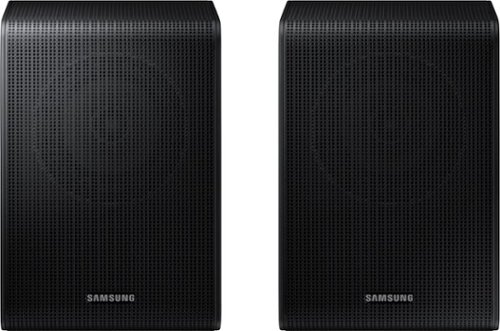
Samsung - SWA-9200S/ZA 2.0 Channel Wireless Rear Speaker Kit - Black
Connect easily and wirelessly to Samsung speakers for room-filling sound.
Do I need a soundbar for these? Can I connect these via Bluetooth directly to my tv for sound speakers?
Hi! Yes, you will need a Soundbar. The HW-Q600C, HW-Q60C, HW-S60B, HW-S50B, HW-B650, HW-B550 or HW-C450 Soundbars are compatible with the The SWA-9200S Rear Kit. ~Samsung Solutions
2 years, 5 months ago
by
Posted by:
Samsung
Samsung - SWA-9200S/ZA 2.0 Channel Wireless Rear Speaker Kit - Black
Connect easily and wirelessly to Samsung speakers for room-filling sound.
Hello just purchased sound bar B550 will this work together ?
Hello Compatibility! Yes, the SWA-9200S Rear Speakers are compatible with the HW-B550 Soundbar. ~ Samsung Solutions
2 years, 5 months ago
by
Posted by:
Samsung
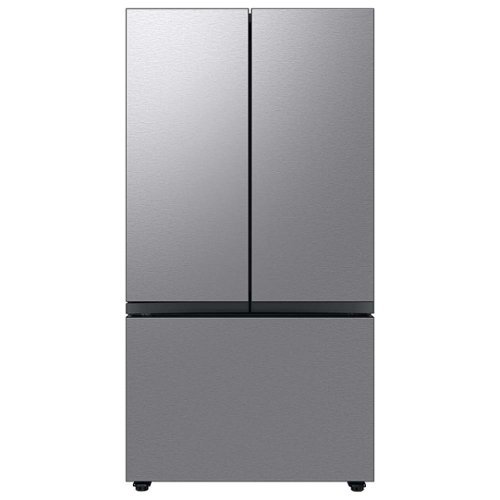
Extra-large capacity 3-Door French Door Refrigerator : a revolution in convenience and design, the concealed Beverage Center features both a water dispenser and AutoFill Water Pitcher. Plus a Dual Ice Maker with cubed ice and Ice Bites.
Hello, how to unlock wheels for fridge to move forward? There is a black long cover, cannot figure out how to move it. Thanks!
Greetings,
We are glad to receive your inquiry about the Samsung refrigerator wheel. Let us answer your question.
This Samsung refrigerator doesn't have wheels. To move the refrigerator, we highly suggest following the steps on page 21 of the model's user manual linked below.
https://downloadcenter.samsung.com/content/UM/202311/20231114133649358/FDR_RF8000B_DA68-04402K-01_EN_MES__CFR.pdf
Please feel free to reach us via the options below, as we look forward to assisting you in the best possible way.
1. Facebook Messenger: http://m.me/samsungsupport
2. Twitter: https://twitter.com/messages/compose?recipient_id=18768513
3. Samsung Community: https://us.community.samsung.com/t5/Samsung-Community/ct-p/us
When you message us, please provide us with this reference number 1146983692, which will help our team pull up your information.
^Rainly
We are glad to receive your inquiry about the Samsung refrigerator wheel. Let us answer your question.
This Samsung refrigerator doesn't have wheels. To move the refrigerator, we highly suggest following the steps on page 21 of the model's user manual linked below.
https://downloadcenter.samsung.com/content/UM/202311/20231114133649358/FDR_RF8000B_DA68-04402K-01_EN_MES__CFR.pdf
Please feel free to reach us via the options below, as we look forward to assisting you in the best possible way.
1. Facebook Messenger: http://m.me/samsungsupport
2. Twitter: https://twitter.com/messages/compose?recipient_id=18768513
3. Samsung Community: https://us.community.samsung.com/t5/Samsung-Community/ct-p/us
When you message us, please provide us with this reference number 1146983692, which will help our team pull up your information.
^Rainly
2 years, 5 months ago
by
Posted by:
Samsung

Samsung - HW-B650/ZA 3.1 Channel Soundbar with Wireless Subwoofer, Dolby 5.1 / DTS Virtual:X - Black
Dolby Atmos creates realistic 3D sound by projecting it from all around you, including from above, while DTS Virtual: X expands your listening experience without having to add extra speakers. Boost the bass with a touch of a button. The built-in center speaker delivers enhanced dialogue so you won't miss a word. Experience the intensity of action movies with the powerful bass coming from the included subwoofer. Enjoy optimized audio with enhanced voice clarity on all your favorite video content.
My soundbar connects but there’s no sound. What do I do?
Hi Jess! If available, we recommend using the HDMI connection to your TV.
Connecting your soundbar to a TV through HDMI will provide the best audio and user experience, often eliminating any connection or delay issues you may be experiencing. There are 2 ways to connect your soundbar with HDMI: you can connect a device to your soundbar (like a Blu-ray player) and then connect the soundbar to the TV, or you can use HDMI ARC. The first method will give you the best possible sound from external devices you regularly use. ARC is the way to go if you want great sound from streaming apps on your TV and a soundbar.
If connected via Bluetooth to the TV and the soundbar is dropping out intermittently there are a few things to check before performing any troubleshooting:
1) The maximum wireless signal transmission distance is about 33 ft.
2) If there is a device that uses the same wireless frequency near the Soundbar, interference may cause some sound interruption.
4) Check all the sources on the soundbar. If the audio is dropping while watching TV it could be an issue with the broadcast.
5) Also, please be sure you have the latest firmware update. You can update your firmware by using a USB device. You can find the update on the product page of your HW-B650 on the Samsung website.
~ Samsung Solutions
Connecting your soundbar to a TV through HDMI will provide the best audio and user experience, often eliminating any connection or delay issues you may be experiencing. There are 2 ways to connect your soundbar with HDMI: you can connect a device to your soundbar (like a Blu-ray player) and then connect the soundbar to the TV, or you can use HDMI ARC. The first method will give you the best possible sound from external devices you regularly use. ARC is the way to go if you want great sound from streaming apps on your TV and a soundbar.
If connected via Bluetooth to the TV and the soundbar is dropping out intermittently there are a few things to check before performing any troubleshooting:
1) The maximum wireless signal transmission distance is about 33 ft.
2) If there is a device that uses the same wireless frequency near the Soundbar, interference may cause some sound interruption.
4) Check all the sources on the soundbar. If the audio is dropping while watching TV it could be an issue with the broadcast.
5) Also, please be sure you have the latest firmware update. You can update your firmware by using a USB device. You can find the update on the product page of your HW-B650 on the Samsung website.
~ Samsung Solutions
2 years, 5 months ago
by
Posted by:
Samsung
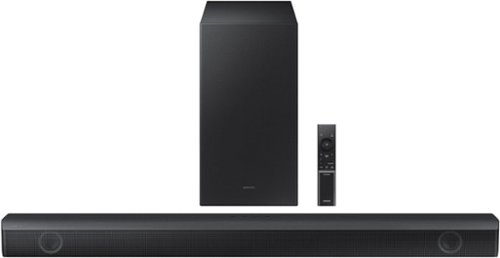
Samsung - HW-B550 2.1ch Soundbar with Dolby Audio / DTS Virtual:X - Black
Dolby Audio creates realistic 3D sound by projecting it from all around you, including from above, while DTS Virtual: X expands your listening experience without having to add extra speakers. Boost the bass with a touch of a button. Experience the intensity of action movies with the powerful bass coming from the included subwoofer. .Enjoy optimized audio with enhanced voice clarity on all your favorite video content.
I have this soundbar connected to my Samsung tv using the optical cord and the tv remote will turn the volume up and down but I can’t get the tv remote to turn the sound bar off or on. Am I doing something wrong here? What can I do to fix this issue?
Hi JesstySauceIf! If your soundbar and Samsung TV are connected by an optical cable, Auto Power Link will turn your soundbar on automatically when you turn on the TV. If you have the soundbar connected with an HDMI cable to the Samsung TV, Anynet+ will turn the soundbar on automatically. No need to reach for the soundbar remote every time you want to watch TV! To use Auto Power Link, follow the steps below: 1) Connect your soundbar to your TV with an optical cable. 2) Set the soundbar to D.IN mode by pressing Source on the remote or soundbar. 3) Press and hold the left direction on the direction pad on the remote for more than 5 seconds or until Auto Power Link appears on the soundbar display to activate or deactivate Auto Power Link. ~ Samsung Solutions
2 years, 5 months ago
by
Posted by:
Samsung
Samsung - HW-B550 2.1ch Soundbar with Dolby Audio / DTS Virtual:X - Black
Dolby Audio creates realistic 3D sound by projecting it from all around you, including from above, while DTS Virtual: X expands your listening experience without having to add extra speakers. Boost the bass with a touch of a button. Experience the intensity of action movies with the powerful bass coming from the included subwoofer. .Enjoy optimized audio with enhanced voice clarity on all your favorite video content.
I have this soundbar connected to my Samsung tv using the optical cord and the tv remote will turn the volume up and down but I can’t get the tv remote to turn off the sound bar. Am I doing something wrong? Oh do I fix this?
Hi JesstySauceIf! If your soundbar and Samsung TV are connected by an optical cable, Auto Power Link will turn your soundbar on automatically when you turn on the TV. If you have the soundbar connected with an HDMI cable to the Samsung TV, Anynet+ will turn the soundbar on automatically. No need to reach for the soundbar remote every time you want to watch TV!
To use Auto Power Link, follow the steps below:
1) Connect your soundbar to your TV with an optical cable.
2) Set the soundbar to D.IN mode by pressing Source on the remote or soundbar.
3) Press and hold the left direction on the direction pad on the remote for more than 5 seconds or until Auto Power Link appears on the soundbar display to activate or deactivate Auto Power Link.
~ Samsung Solutions
To use Auto Power Link, follow the steps below:
1) Connect your soundbar to your TV with an optical cable.
2) Set the soundbar to D.IN mode by pressing Source on the remote or soundbar.
3) Press and hold the left direction on the direction pad on the remote for more than 5 seconds or until Auto Power Link appears on the soundbar display to activate or deactivate Auto Power Link.
~ Samsung Solutions
2 years, 5 months ago
by
Posted by:
Samsung
Samsung - HW-B550 2.1ch Soundbar with Dolby Audio / DTS Virtual:X - Black
Dolby Audio creates realistic 3D sound by projecting it from all around you, including from above, while DTS Virtual: X expands your listening experience without having to add extra speakers. Boost the bass with a touch of a button. Experience the intensity of action movies with the powerful bass coming from the included subwoofer. .Enjoy optimized audio with enhanced voice clarity on all your favorite video content.
Can I connect this to a Bluetooth record player
Hi! The HW-B550 features three ways to connect to an external device: HDMI (ARC), digital optical audio, and Bluetooth wireless audio technology. If the device is compatible with one of these three audio connections, you should have no issue connecting the soundbar to it. ~Samsung Solutions
2 years, 5 months ago
by
Posted by:
Samsung
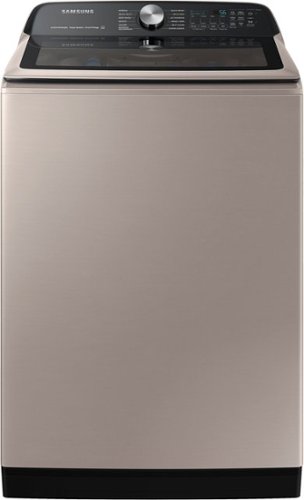
Samsung - 5.2 Cu. Ft. High-Efficiency Smart Top Load Washer with Super Speed Wash - Champagne
Samsung~s new 5.2 cu. ft. Large Capacity Smart Top Load Washer helps you fit more in every load and cut down on laundry time. Also, with Super Speed Wash you can wash a full load of laundry with full performance in just 28 minutes, and with integrated Wi-Fi you can receive end of cycle alerts and remotely start, stop, and schedule laundry right from your smartphone.
Hi. I am interested in this washer but it says not available in my area. What does this mean? Can I purchase this item? Thanks
Dear Valued Best Buy Client,
To better assist you with this matter, please contact Best Buy customer service department at P. (888) 237-8289 H. 24 hours a day.
They can either answer your question or transfer you to your local store to answer your inquiry about the washer not being available in your area.
-Kimberly
To better assist you with this matter, please contact Best Buy customer service department at P. (888) 237-8289 H. 24 hours a day.
They can either answer your question or transfer you to your local store to answer your inquiry about the washer not being available in your area.
-Kimberly
2 years, 5 months ago
by
Posted by:
Samsung