Samsung
Samsung's Stats
Reviews
- Review Count0
- Helpfulness Votes0
- First ReviewNone
- Last ReviewNone
- Featured Reviews0
- Average Rating0
Reviews Comments
- Review Comment Count0
- Helpfulness Votes0
- First Review CommentNone
- Last Review CommentNone
- Featured Review Comments0
Questions
- Question Count0
- Helpfulness Votes0
- First QuestionNone
- Last QuestionNone
- Featured Questions0
- Answer Count74386
- Helpfulness Votes37,977
- First AnswerApril 24, 2013
- Last AnswerSeptember 17, 2026
- Featured Answers0
- Best Answers3947
Samsung's Reviews
Samsung has not submitted any reviews.
Samsung's Questions
Samsung has not submitted any questions.
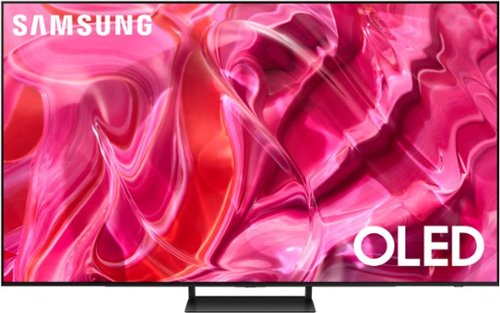
Samsung - 55" Class S90C OLED 4K UHD Smart Tizen TV (2023)
Prepare to be captivated. Whether you prefer dramatic thrillers or fantasy football, lose yourself in the viewing adventure w ith a contrast rich picture. Let your picture do the talking with the sleek and thin LaserSlim design. You~ll see pure blacks, bright whites and dramatic color, while the audio pulls you into the action thanks to Dolby Atmos built in and Object Tracking Sound Lite. The Samsung OLED experience doesn~t stop there shifting adventures is a breeze with access to the latest Smart TV apps and Samsung Gaming Hub. ~ ~High speed internet connection, additional gaming service subscriptions and compatible controller required.
I am unable to pair my DISH remote control with this tv. This model is not among the many Samsung models listed in the DISH remote pairing list. How can I pair my DISH remote to turn my tv on and off and adjust the volume?

CAJ - Please give us the opportunity to better assist with this by reaching Samsung Support at: 1-800-SAMSUNG, 8AM - 12AM EST, 7 days a week, or Chat with us on Samsung.com: https://www.samsung.com/us/support/contact/
~ Samsung Specialist
~ Samsung Specialist
2 years, 8 months ago
by
Posted by:
Samsung
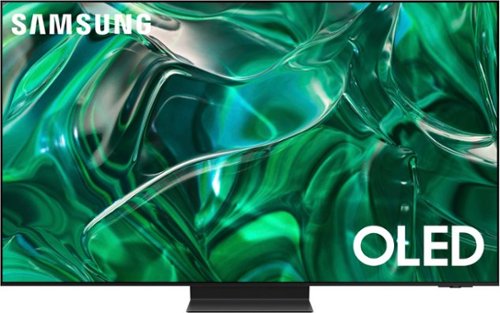
Samsung - 55" Class S95C OLED 4K UHD Smart Tizen TV (2023)
Steal the show with the bold contrast, dramatic sound, and vibrant colors of Samsung OLED. Samsung~s Infinity One Design is sleek, slim and impossibly thin. Imagination becomes reality with the infinite amount of dramatic detail made possible by self-illuminating pixels. Sit back and be mesmerized as your content is transformed to 4K. Priority Order
I have a tv portable stand with wheels and ability to swivel and turn the tv left and right. Can I mount this tv to such a stand?
LGM - The 55" S95C can be mounted to any type of stand/mount that supports a VESA pattern of 400mm x 300mm.
~ Samsung Specialist
~ Samsung Specialist
2 years, 8 months ago
by
Posted by:
Samsung
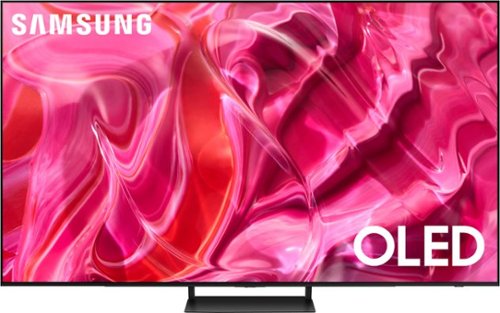
Samsung - 77" Class S90C OLED 4K UHD Smart Tizen TV (2023)
Prepare to be captivated. Whether you prefer dramatic thrillers or fantasy football, lose yourself in the viewing adventure w ith a contrast rich picture. Let your picture do the talking with the sleek and thin LaserSlim design. You~ll see pure blacks, bright whites and dramatic color, while the audio pulls you into the action thanks to Dolby Atmos built in and Object Tracking Sound Lite. The Samsung OLED experience doesn~t stop there shifting adventures is a breeze with access to the latest Smart TV apps and Samsung Gaming Hub. ~ ~High speed internet connection, additional gaming service subscriptions and compatible controller required.
What is the distance between the surface the TV stand rests on and the start of the panel/screen? I am trying to understand if I can put a Q910C soundbar and the TV on a TV stand not have the soundbar obscuring any part of the screen.
Dash - The 77” S90C has a clearance of 2.8” beneath the TV when set up with the stand.
~ Samsung Specialist
~ Samsung Specialist
2 years, 8 months ago
by
Posted by:
Samsung

Samsung - 77 Class S89C OLED 4K UHD Smart Tizen TV
Prepare to be captivated. Whether you prefer dramatic thrillers or fantasy football, lose yourself in the viewing adventure with a contrast rich picture. Let your picture do the talking with the sleek and thin Laser Slim design. You~ll see pure blacks, bright whites and dramatic color, while the audio pulls you into the action thanks to Dolby Atmos built in and Object Tracking Sound Lite. The Samsung OLED experience doesn~t stop there shifting adventures is a breeze with access to the latest Smart TV apps and Samsung Gaming Hub.
How are you supposed to hang this TV on the wall. the holes in the back are not threaded. Are you supposed to thread them yourself?
The 77" S89C can be mounted with any type of wall mount that supports a VESA pattern of 400mm x 300mm.
~ Samsung Specialist
~ Samsung Specialist
2 years, 8 months ago
by
Posted by:
Samsung
Samsung - 77 Class S89C OLED 4K UHD Smart Tizen TV
Prepare to be captivated. Whether you prefer dramatic thrillers or fantasy football, lose yourself in the viewing adventure with a contrast rich picture. Let your picture do the talking with the sleek and thin Laser Slim design. You~ll see pure blacks, bright whites and dramatic color, while the audio pulls you into the action thanks to Dolby Atmos built in and Object Tracking Sound Lite. The Samsung OLED experience doesn~t stop there shifting adventures is a breeze with access to the latest Smart TV apps and Samsung Gaming Hub.
Does this TV have built Chromecast?
VicStPete - Chromecast is not directly built into Samsung TVs.
~ Samsung Specialist
~ Samsung Specialist
2 years, 8 months ago
by
Posted by:
Samsung
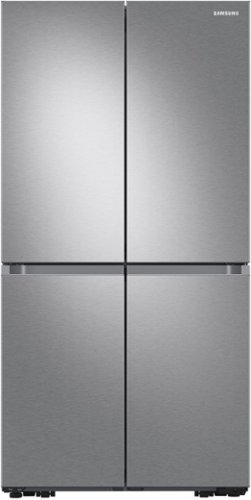
Samsung - 29 cu. ft. 4-Door Flex French Door Smart Refrigerator with Dual Ice Maker - Stainless Steel
Extra-large capacity Smart 4-Door French Door Flex refrigerator features the AutoFill Water Pitcher, a built-in pitcher that automatically refills with fresh, filtered water and a Dual Ice Maker with Ice Bites.
I live 4 hours away from the nearest Best Buy and you don’t deliver here. If I want to buy this refrigerator I will have to put it together? How does that work?
Dear Valued Best Buy Client,
Thank you for bringing this to our attention. We apologize for any inconvenience this may have caused you. The experience is not what we expect from our customers. To better assist you with this issue, please contact the Best Buy customer service department at P. (888) 237-8289 H.24 Hours a Day. They can either answer your question or transfer you to your local store to answer your specific concerns.
Have a great day.
^Camille
Thank you for bringing this to our attention. We apologize for any inconvenience this may have caused you. The experience is not what we expect from our customers. To better assist you with this issue, please contact the Best Buy customer service department at P. (888) 237-8289 H.24 Hours a Day. They can either answer your question or transfer you to your local store to answer your specific concerns.
Have a great day.
^Camille
2 years, 8 months ago
by
Posted by:
Samsung
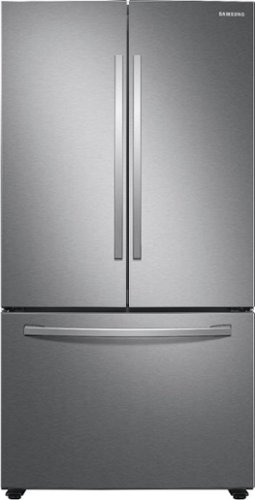
Samsung - 28 cu. ft. 3-Door French Door Refrigerator with Large Capacity - Stainless Steel
Samsung~s 28 cu. ft. large capacity 3-Door French Door refrigerator is beautifully designed, with sleek-edged doors, and EZ-Open Handle. The clean lines and modern form blend beautifully into your kitchen while the fingerprint resistant finish withstands everyday smudges.
What is delivery charges to Murphy,NC. 28906? WHAT IS OPEN BOX ?
Dear Valued Best Buy Client,
Thank you for asking. To better assist you with your query, please contact the Best Buy customer service department at P. (888) 237-8289 H.24 Hours a Day. They can either answer your question or transfer you to your local store to answer your specific concerns.
Have a great day.
^Camille
Thank you for asking. To better assist you with your query, please contact the Best Buy customer service department at P. (888) 237-8289 H.24 Hours a Day. They can either answer your question or transfer you to your local store to answer your specific concerns.
Have a great day.
^Camille
2 years, 8 months ago
by
Posted by:
Samsung
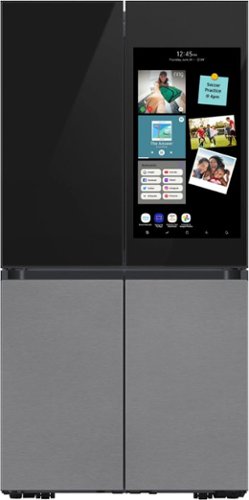
Samsung - BESPOKE 29 cu. ft. 4-Door Flex French Door Smart Refrigerator with Family Hub+ - Charcoal Glass Top
Bespoke 4-Door Flex 29 cu. ft. Refrigerator with customizable and changeable door panels available in premium colors and finishes featuring the Family Hub+. The Family Hub+ features a screen that is 2x larger than current Family Hub models. Samsung~s Family Hub lets you share pictures, stream music and videos, access recipes, and much more, all from the fridge. The Beverage Center features a water dispenser and AutoFill Water Pitcher. Dual Auto Ice Maker makes two types of ice ~ cubed or Ice Bites.
I would like to get the panels in the bottom what is the number for the charcoal glass are they the same for left side and right side
Gina, the model number for the Bespoke 4-Door Flex™ Refrigerator Panel in Charcoal Glass - Bottom Panel would be RA-F18DBB33/AA.
This is the same for the right and left side panels.
Please check this link for more details.
Bottom Panel
https://www.samsung.com/us/home-appliances/home-appliances-accessories/refrigerators/bespoke-4-door-flex-refrigerator-panel-in-charcoal-glass-bottom-panel-ra-f18dbb33-aa/
I have also shared our Bespoke design studio for you to play around in designing your Bespoke Fridge.
Bespoke Design Studio
https://www.samsung.com/us/refrigerators/bespoke/design-studio/
Have a great day.
^Camille
This is the same for the right and left side panels.
Please check this link for more details.
Bottom Panel
https://www.samsung.com/us/home-appliances/home-appliances-accessories/refrigerators/bespoke-4-door-flex-refrigerator-panel-in-charcoal-glass-bottom-panel-ra-f18dbb33-aa/
I have also shared our Bespoke design studio for you to play around in designing your Bespoke Fridge.
Bespoke Design Studio
https://www.samsung.com/us/refrigerators/bespoke/design-studio/
Have a great day.
^Camille
2 years, 8 months ago
by
Posted by:
Samsung
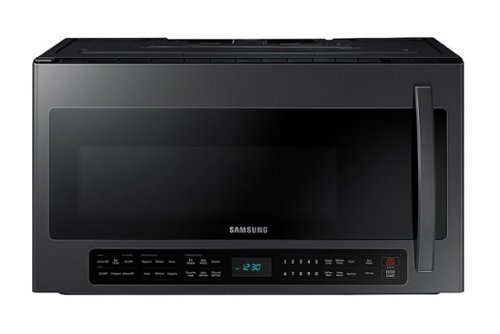
2.1 cu. ft. extra-large-capacity over-the-range microwave makes preparing multiple dishes effortless by accommodating even your biggest dishes. The Sensor Cook technology automatically adjusts your cooking time for optimal results. Additionally, the ceramic enamel interior provides a durable, scratch-resistant and easy-to-clean interior, making everyday maintenance simple.
The word filter came up on my screen where the time is shown. Where and how do you clean the filter
Hi Kim,
We are glad to help with cleaning the filter on your Samsung microwave model.
Your microwave model has two types of filters (Grease and Charcoal). The Grease Filter can be cleaned; however, the Charcoal Filter can only be replaced. I have shared this model's user manual link below. Please turn to page 22 for the steps in cleaning the Grease filter and turn to page 23 for replacing the Charcoal Filter. Turn to page 10 for removing the "Filter" message on the control panel after cleaning and replacing the filters.
Should you need more assistance, please feel free to get back to us via the following options:
1. Facebook Messenger: http://m.me/samsungsupport
2. Twitter: https://twitter.com/messages/compose?recipient_id=18768513
3. Samsung Community: https://us.community.samsung.com/t5/Samsung-Community/ct-p/us
When you message us, please provide us with this reference number 1146710903 to help our team pull up your information.
Leo
We are glad to help with cleaning the filter on your Samsung microwave model.
Your microwave model has two types of filters (Grease and Charcoal). The Grease Filter can be cleaned; however, the Charcoal Filter can only be replaced. I have shared this model's user manual link below. Please turn to page 22 for the steps in cleaning the Grease filter and turn to page 23 for replacing the Charcoal Filter. Turn to page 10 for removing the "Filter" message on the control panel after cleaning and replacing the filters.
Should you need more assistance, please feel free to get back to us via the following options:
1. Facebook Messenger: http://m.me/samsungsupport
2. Twitter: https://twitter.com/messages/compose?recipient_id=18768513
3. Samsung Community: https://us.community.samsung.com/t5/Samsung-Community/ct-p/us
When you message us, please provide us with this reference number 1146710903 to help our team pull up your information.
Leo
2 years, 8 months ago
by
Posted by:
Samsung
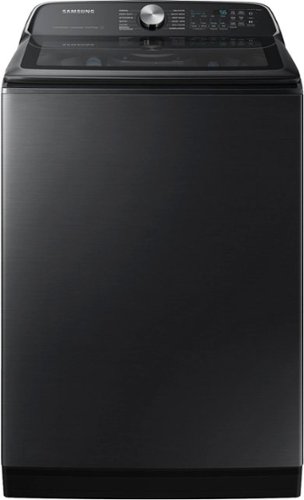
Samsung - 5.4 Cu. Ft. High-Efficiency Smart Top Load Washer with ActiveWave Agitator - Brushed Black
Samsung's 5.5 cu. ft. Extra-Large Capacity Top Load Washing Machine is equipped with Super Speed Wash, which powerfully cleans a full load of laundry in just 28 minutes without sacrificing cleaning performance. With Wi-Fi connectivity, you can remotely start, stop, or delay your smart washer from our simple-to use SmartThings App. Active Waterjet, a built-in water faucet, lets you easily pretreat heavily soiled and stained clothes.
What happened to the my cycle. I loved that. I always have a heavy load when washing so I could just preset my wash option and choose my cycle and it goes to what I have it set on. I didn't have to set the wash cycle each time. Missing that option.
Hi Jadabug,
Let us help you with the cycle feature on this Samsung washing machine model.
This washing machine model has a downloaded cycle feature. You will have to connect your washer to the SmartThings app to gain access to additional cycle options. I have shared a Samsung link below where you can download and connect your washer to the app.
Use SmartThings to monitor your Samsung washing machine remotely:
https://www.samsung.com/us/support/answer/ANS00082522/
Should you need more assistance, please feel free to get back to us via the following options:
1. Facebook Messenger: http://m.me/samsungsupport
2. Twitter: https://twitter.com/messages/compose?recipient_id=18768513
3. Samsung Community: https://us.community.samsung.com/t5/Samsung-Community/ct-p/us
When you message us, please provide us with this reference number 1146710834 to help our team pull up your information.
Leo
Let us help you with the cycle feature on this Samsung washing machine model.
This washing machine model has a downloaded cycle feature. You will have to connect your washer to the SmartThings app to gain access to additional cycle options. I have shared a Samsung link below where you can download and connect your washer to the app.
Use SmartThings to monitor your Samsung washing machine remotely:
https://www.samsung.com/us/support/answer/ANS00082522/
Should you need more assistance, please feel free to get back to us via the following options:
1. Facebook Messenger: http://m.me/samsungsupport
2. Twitter: https://twitter.com/messages/compose?recipient_id=18768513
3. Samsung Community: https://us.community.samsung.com/t5/Samsung-Community/ct-p/us
When you message us, please provide us with this reference number 1146710834 to help our team pull up your information.
Leo
2 years, 8 months ago
by
Posted by:
Samsung