Samsung
Samsung's Stats
Reviews
- Review Count0
- Helpfulness Votes0
- First ReviewNone
- Last ReviewNone
- Featured Reviews0
- Average Rating0
Reviews Comments
- Review Comment Count0
- Helpfulness Votes0
- First Review CommentNone
- Last Review CommentNone
- Featured Review Comments0
Questions
- Question Count0
- Helpfulness Votes0
- First QuestionNone
- Last QuestionNone
- Featured Questions0
- Answer Count74749
- Helpfulness Votes37,984
- First AnswerApril 24, 2013
- Last AnswerOctober 7, 2026
- Featured Answers0
- Best Answers3954
Samsung's Reviews
Samsung has not submitted any reviews.
Samsung's Questions
Samsung has not submitted any questions.
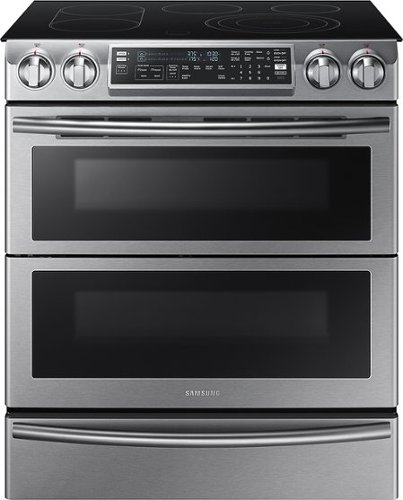
Samsung - 5.8 Cu. Ft. Electric Flex Duo Self-Cleaning Slide-In Smart Range with Convection - Stainless Steel
Make the most of every meal. Heat two dishes at once by creating a double oven inside this Samsung range. Use the smart divider and dual door to cook with different temperatures at the same time. Plus, you can stay connected through Wi-Fi, to control your oven from anywhere in the house.
How wide is the oven really? I am looking for the area from side to side. I know it has that overlap feature on top to prevent food from falling into the gap thereby making it 31~ inches but can it fit into a 30~ inch opening?

Hi NJSHOPPER,
Thank you for reaching out and we hope you are in good health. We appreciate your interest in Samsung home appliances, specifically with Samsung - 5.8 Cu. Ft. Electric Flex Duo Self-Cleaning Slide-In Smart Range with Convection - Stainless steel.
The minimum cabinet opening is 30 inches for the range to fit. I have shared the installation link below. Please access the link and turn to page 5 for the clearances and dimension for the range.
https://downloadcenter.samsung.com/content/EM/201811/20181130090015185/Install_NE58H9970WS_AA_AC_DG68-00594A-07_EN-MES-CFR.pdf
Please feel free to communicate with us through the channels below if you have additional questions.
1. Facebook Messenger: http://m.me/samsungsupport
2. Twitter: https://twitter.com/messages/compose?recipient_id=18768513
3. Samsung Community: https://us.community.samsung.com/t5/Samsung-Community/ct-p/us
Your reference number: 1144427125
Leo
Thank you for reaching out and we hope you are in good health. We appreciate your interest in Samsung home appliances, specifically with Samsung - 5.8 Cu. Ft. Electric Flex Duo Self-Cleaning Slide-In Smart Range with Convection - Stainless steel.
The minimum cabinet opening is 30 inches for the range to fit. I have shared the installation link below. Please access the link and turn to page 5 for the clearances and dimension for the range.
https://downloadcenter.samsung.com/content/EM/201811/20181130090015185/Install_NE58H9970WS_AA_AC_DG68-00594A-07_EN-MES-CFR.pdf
Please feel free to communicate with us through the channels below if you have additional questions.
1. Facebook Messenger: http://m.me/samsungsupport
2. Twitter: https://twitter.com/messages/compose?recipient_id=18768513
3. Samsung Community: https://us.community.samsung.com/t5/Samsung-Community/ct-p/us
Your reference number: 1144427125
Leo
4 years, 5 months ago
by
Posted by:
Samsung
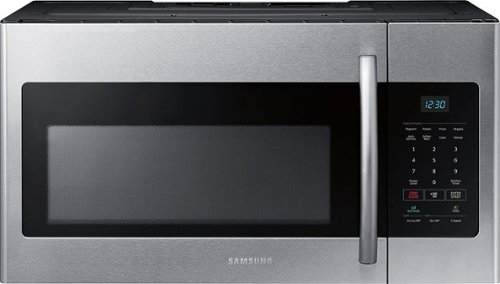
Samsung - 1.6 cu. ft. Over-the-Range Fingerprint Resistant Microwave - Stainless Steel
This sleek, yet spacious, over-the-range microwave looks beautiful in any kitchen. Its large display is brightly lit with a clean, ice-blue color for elegance and easy reading. This stainless steel microwave features intuitive controls and a variety of auto cook presets that save you time while preparing meals. It even features an Eco Mode that reduces energy consumption so you can save money, too.
Can you exhaust it out the back?
Hi Exhaust,
Thank you for reaching out and we hope you are in good health. We appreciate your interest in Samsung home appliances, specifically with Samsung - 1.6 cu. ft. Over-the-Range Fingerprint Resistant Microwave -Stainless Steel - Stainless steel.
Yes, this over-the range microwave can exhaust out the back. There are 3 ventilation types for this microwave. I have shared the installation guide link below. Please access the link and turn to pages 11 - 14 for instruction in setting up the vent type.
https://downloadcenter.samsung.com/content/EM/202202/20220223181324341/SMH8165_XAA_DE68-03587A-12_EN_220120.pdf
Please feel free to communicate with us through the channels below if you have additional questions.
1. Facebook Messenger: http://m.me/samsungsupport
2. Twitter: https://twitter.com/messages/compose?recipient_id=18768513
3. Samsung Community: https://us.community.samsung.com/t5/Samsung-Community/ct-p/us
Your reference number: 1144427009
Leo
Thank you for reaching out and we hope you are in good health. We appreciate your interest in Samsung home appliances, specifically with Samsung - 1.6 cu. ft. Over-the-Range Fingerprint Resistant Microwave -Stainless Steel - Stainless steel.
Yes, this over-the range microwave can exhaust out the back. There are 3 ventilation types for this microwave. I have shared the installation guide link below. Please access the link and turn to pages 11 - 14 for instruction in setting up the vent type.
https://downloadcenter.samsung.com/content/EM/202202/20220223181324341/SMH8165_XAA_DE68-03587A-12_EN_220120.pdf
Please feel free to communicate with us through the channels below if you have additional questions.
1. Facebook Messenger: http://m.me/samsungsupport
2. Twitter: https://twitter.com/messages/compose?recipient_id=18768513
3. Samsung Community: https://us.community.samsung.com/t5/Samsung-Community/ct-p/us
Your reference number: 1144427009
Leo
4 years, 5 months ago
by
Posted by:
Samsung
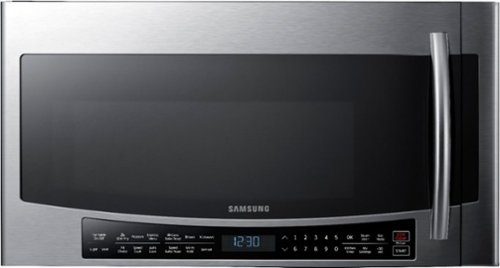
Samsung - 1.7 Cu. Ft. Convection Over-the-Range Fingerprint Resistant Microwave - Stainless Steel
Cook with variety. This Samsung over-the-range microwave lets you create quick, healthy meals, crispy fried foods, baked or roasted dishes, and much more. Convection and Slim Fry technologies heat food faster and more evenly than traditional microwave cooking.
is this considered a radiate bake oven and a microwave?
Hi happycook.
Thank you for reaching out regarding Samsung - 1.7 Cu. Ft. Convection Over-the-Range Fingerprint Resistant Microwave if this is a radiate bake. Regarding your concern, this over-the-range microwave is not radiate bake and microwave. This is only a microwave.
I suggest you check this link for the full specs, dimensions, and features.
https://www.samsung.com/us/home-appliances/microwaves/over-the-range/mc17j8000cs-1-7-cu-ft-over-the-range-convection-microwave-stainless-steel-mc17j8000cs-aa/#specs
Should you need more assistance, please feel free to get back to us via the following options:
1. Facebook Messenger: http://m.me/samsungsupport
2. Twitter: https://twitter.com/messages/compose?recipient_id 18768513
3. Samsung Community: https://us.community.samsung.com/t5/Samsung-Community/ct-p/us
Thank you for being a valued customer of Samsung. Have a great day.
Reference Ticket Number: 1144427015
^Camille
Thank you for reaching out regarding Samsung - 1.7 Cu. Ft. Convection Over-the-Range Fingerprint Resistant Microwave if this is a radiate bake. Regarding your concern, this over-the-range microwave is not radiate bake and microwave. This is only a microwave.
I suggest you check this link for the full specs, dimensions, and features.
https://www.samsung.com/us/home-appliances/microwaves/over-the-range/mc17j8000cs-1-7-cu-ft-over-the-range-convection-microwave-stainless-steel-mc17j8000cs-aa/#specs
Should you need more assistance, please feel free to get back to us via the following options:
1. Facebook Messenger: http://m.me/samsungsupport
2. Twitter: https://twitter.com/messages/compose?recipient_id 18768513
3. Samsung Community: https://us.community.samsung.com/t5/Samsung-Community/ct-p/us
Thank you for being a valued customer of Samsung. Have a great day.
Reference Ticket Number: 1144427015
^Camille
4 years, 5 months ago
by
Posted by:
Samsung
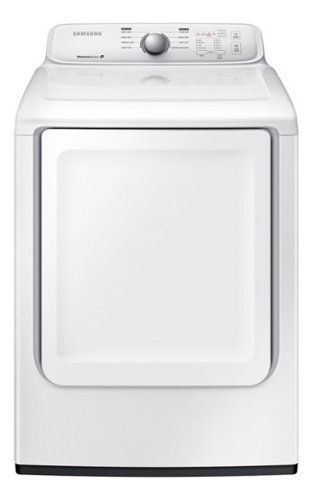
Samsung - 7.2 Cu. Ft. Electric Dryer with 8 Cycles - White
With 8 preset cycles and 4 temperature settings, this Samsung DV40J3000EW electric dryer offers the versatility needed to provide ideal drying levels for clothing, bedding and more. Noise-reduction technology helps ensure quiet performance.
Does the dryer suppose to leaks or drains water or condensation from the bottom of the system.
Hi dwatts,
Thank you for reaching out and we hope you are in good health. We appreciate your interest in Samsung home appliances, specifically with Samsung - 7.2 Cu. Ft. Electric Dryer with 8 Cycles - White.
I have shared a link below that will help with your concerns with the dryer. Please click on the link and follow through the steps.
https://www.samsung.com/us/support/troubleshooting/TSG01109103/
Please feel free to communicate with us through the channels below if you have additional questions.
1. Facebook Messenger: http://m.me/samsungsupport
2. Twitter: https://twitter.com/messages/compose?recipient_id=18768513
3. Samsung Community: https://us.community.samsung.com/t5/Samsung-Community/ct-p/us
Your reference number: 1144426966
Leo
Thank you for reaching out and we hope you are in good health. We appreciate your interest in Samsung home appliances, specifically with Samsung - 7.2 Cu. Ft. Electric Dryer with 8 Cycles - White.
I have shared a link below that will help with your concerns with the dryer. Please click on the link and follow through the steps.
https://www.samsung.com/us/support/troubleshooting/TSG01109103/
Please feel free to communicate with us through the channels below if you have additional questions.
1. Facebook Messenger: http://m.me/samsungsupport
2. Twitter: https://twitter.com/messages/compose?recipient_id=18768513
3. Samsung Community: https://us.community.samsung.com/t5/Samsung-Community/ct-p/us
Your reference number: 1144426966
Leo
4 years, 5 months ago
by
Posted by:
Samsung
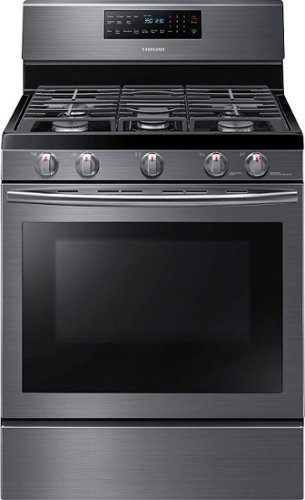
Samsung - 5.8 Cu. Ft. Self-Cleaning Freestanding Fingerprint Resistant Gas Convection Range - Black Stainless Steel
This 5.8 cu. ft. large capacity oven allows you to cook multiple dishes at once. Two oven racks let you prepare enough food for large gatherings. Cook food faster and more evenly with a heated fan system that is great for baking and broiling.
What is the height to the top of the stove, not including the control panel. I have a 35 1/2" counter height and I want to make sure the stove does not sit lower than the counter top.
Greetings!
Thank you for reaching out and we hope you are in good health. We appreciate your interest in Samsung home appliances, specifically with Samsung - 5.8 Cu. Ft. Self-Cleaning Freestanding Fingerprint Resistant Gas Convection Range - Black stainless steel.
The height from the floor to the stovetop is 36 3/16 inches. I have shared the installation guide link below. Please access the link and turn to page 16 for the complete dimension of the range.
https://downloadcenter.samsung.com/content/EM/202011/20201113101642382/Install_NX58H56_DG68-00524A-13_EN-MES-CFR_201013.pdf
Please feel free to communicate with us through the channels below if you have additional questions.
1. Facebook Messenger: http://m.me/samsungsupport
2. Twitter: https://twitter.com/messages/compose?recipient_id=18768513
3. Samsung Community: https://us.community.samsung.com/t5/Samsung-Community/ct-p/us
Your reference number: 1144426822
Leo
Thank you for reaching out and we hope you are in good health. We appreciate your interest in Samsung home appliances, specifically with Samsung - 5.8 Cu. Ft. Self-Cleaning Freestanding Fingerprint Resistant Gas Convection Range - Black stainless steel.
The height from the floor to the stovetop is 36 3/16 inches. I have shared the installation guide link below. Please access the link and turn to page 16 for the complete dimension of the range.
https://downloadcenter.samsung.com/content/EM/202011/20201113101642382/Install_NX58H56_DG68-00524A-13_EN-MES-CFR_201013.pdf
Please feel free to communicate with us through the channels below if you have additional questions.
1. Facebook Messenger: http://m.me/samsungsupport
2. Twitter: https://twitter.com/messages/compose?recipient_id=18768513
3. Samsung Community: https://us.community.samsung.com/t5/Samsung-Community/ct-p/us
Your reference number: 1144426822
Leo
4 years, 5 months ago
by
Posted by:
Samsung
Samsung - 5.8 Cu. Ft. Electric Flex Duo Self-Cleaning Slide-In Smart Range with Convection - Stainless Steel
Make the most of every meal. Heat two dishes at once by creating a double oven inside this Samsung range. Use the smart divider and dual door to cook with different temperatures at the same time. Plus, you can stay connected through Wi-Fi, to control your oven from anywhere in the house.
Is this oven a down draft capable one?
Hi CJG,
Thank you for reaching out and we hope you are in good health. We appreciate your interest in Samsung home appliances, specifically with Samsung - 5.8 Cu. Ft. Electric Flex Duo Self-Cleaning Slide-In Smart Range with Convection - Stainless steel.
The range is not equipped with a down draft system for venting purposes.
I have included the user manual link below for you to have access to the features of the range.
https://downloadcenter.samsung.com/content/UM/201904/20190417144045179/NE58K9850WS_AA_DG68-00723A-06_EN-MES-CFR.pdf
Please feel free to communicate with us through the channels below if you have additional questions.
1. Facebook Messenger: http://m.me/samsungsupport
2. Twitter: https://twitter.com/messages/compose?recipient_id=18768513
3. Samsung Community: https://us.community.samsung.com/t5/Samsung-Community/ct-p/us
Your reference number: 1144426718
Leo
Thank you for reaching out and we hope you are in good health. We appreciate your interest in Samsung home appliances, specifically with Samsung - 5.8 Cu. Ft. Electric Flex Duo Self-Cleaning Slide-In Smart Range with Convection - Stainless steel.
The range is not equipped with a down draft system for venting purposes.
I have included the user manual link below for you to have access to the features of the range.
https://downloadcenter.samsung.com/content/UM/201904/20190417144045179/NE58K9850WS_AA_DG68-00723A-06_EN-MES-CFR.pdf
Please feel free to communicate with us through the channels below if you have additional questions.
1. Facebook Messenger: http://m.me/samsungsupport
2. Twitter: https://twitter.com/messages/compose?recipient_id=18768513
3. Samsung Community: https://us.community.samsung.com/t5/Samsung-Community/ct-p/us
Your reference number: 1144426718
Leo
4 years, 5 months ago
by
Posted by:
Samsung
Samsung - 1.7 Cu. Ft. Convection Over-the-Range Fingerprint Resistant Microwave - Stainless Steel
Cook with variety. This Samsung over-the-range microwave lets you create quick, healthy meals, crispy fried foods, baked or roasted dishes, and much more. Convection and Slim Fry technologies heat food faster and more evenly than traditional microwave cooking.
Can this item be ordered in Black finish instead of restaurant looking stainless steel?
Hi Brian.
Thank you for reaching out regarding Samsung - 1.7 Cu. Ft. Convection Over-the-Range Fingerprint Resistant Microwave if this is available in black finish. Regarding your concern, this over-the-range microwave is available in black stainless steel or stainless steel.
I suggest you check the link for the full specs, dimensions, and features.
https://www.samsung.com/us/home-appliances/microwaves/over-the-range/mc17j8000cs-1-7-cu-ft-over-the-range-convection-microwave-stainless-steel-mc17j8000cs-aa/
Should you need more assistance, please feel free to get back to us via the following options:
1. Facebook Messenger: http://m.me/samsungsupport
2. Twitter: https://twitter.com/messages/compose?recipient_id 18768513
3. Samsung Community: https://us.community.samsung.com/t5/Samsung-Community/ct-p/us
Thank you for being a valued customer of Samsung. Have a great day.
Reference Ticket Number: 1144426727
^Camille
Thank you for reaching out regarding Samsung - 1.7 Cu. Ft. Convection Over-the-Range Fingerprint Resistant Microwave if this is available in black finish. Regarding your concern, this over-the-range microwave is available in black stainless steel or stainless steel.
I suggest you check the link for the full specs, dimensions, and features.
https://www.samsung.com/us/home-appliances/microwaves/over-the-range/mc17j8000cs-1-7-cu-ft-over-the-range-convection-microwave-stainless-steel-mc17j8000cs-aa/
Should you need more assistance, please feel free to get back to us via the following options:
1. Facebook Messenger: http://m.me/samsungsupport
2. Twitter: https://twitter.com/messages/compose?recipient_id 18768513
3. Samsung Community: https://us.community.samsung.com/t5/Samsung-Community/ct-p/us
Thank you for being a valued customer of Samsung. Have a great day.
Reference Ticket Number: 1144426727
^Camille
4 years, 5 months ago
by
Posted by:
Samsung
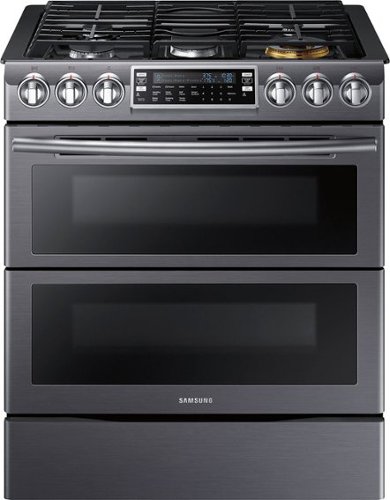
Samsung - Flex Duo 5.8 Cu. Ft. Self-Cleaning Fingerprint Resistant Slide-In Gas Convection Range - Black Stainless Steel
Get dinner on the table. The five-burner stovetop on this Samsung range gives you even more space to get your gourmet going. Dual oven temperatures and double doors let you vary up your menu and bake or roast at the same time. Plus, you can control it all remotely if you download the app to your smart device.
Are any of the included racks Samsung's gliding rack?
Hi santabarbarian.
Thank you for reaching out regarding Samsung - Flex Duo™ 5.8 Cu. Ft. Self-Cleaning Fingerprint Resistant Slide-In Gas Convection Range if a gliding rack is included. Regarding your concern, 2 pieces of wire and 1 split rack are included.
I suggest you check the link for the full specs, dimensions, and features.
https://www.samsung.com/us/home-appliances/ranges/slide-in/nx58k9850sg-slide-in-gas-flex-duo-range-with-dual-door-black-stainless-steel-nx58k9850sg-aa/#specs
Should you need more assistance, please feel free to get back to us via the following options:
1. Facebook Messenger: http://m.me/samsungsupport
2. Twitter: https://twitter.com/messages/compose?recipient_id 18768513
3. Samsung Community: https://us.community.samsung.com/t5/Samsung-Community/ct-p/us
Thank you for being a valued customer of Samsung. Have a great day.
Reference Ticket Number: 1144426694
^Camille
Thank you for reaching out regarding Samsung - Flex Duo™ 5.8 Cu. Ft. Self-Cleaning Fingerprint Resistant Slide-In Gas Convection Range if a gliding rack is included. Regarding your concern, 2 pieces of wire and 1 split rack are included.
I suggest you check the link for the full specs, dimensions, and features.
https://www.samsung.com/us/home-appliances/ranges/slide-in/nx58k9850sg-slide-in-gas-flex-duo-range-with-dual-door-black-stainless-steel-nx58k9850sg-aa/#specs
Should you need more assistance, please feel free to get back to us via the following options:
1. Facebook Messenger: http://m.me/samsungsupport
2. Twitter: https://twitter.com/messages/compose?recipient_id 18768513
3. Samsung Community: https://us.community.samsung.com/t5/Samsung-Community/ct-p/us
Thank you for being a valued customer of Samsung. Have a great day.
Reference Ticket Number: 1144426694
^Camille
4 years, 5 months ago
by
Posted by:
Samsung
Samsung - 1.7 Cu. Ft. Convection Over-the-Range Fingerprint Resistant Microwave - Stainless Steel
Cook with variety. This Samsung over-the-range microwave lets you create quick, healthy meals, crispy fried foods, baked or roasted dishes, and much more. Convection and Slim Fry technologies heat food faster and more evenly than traditional microwave cooking.
what is the width and height
Greetings!
Thank you for reaching out and we hope you are in good health. We appreciate your interest in Samsung home appliances, specifically with Samsung - 1.7 Cu. Ft. Convection Over-the-Range Fingerprint Resistant Microwave -Stainless Steel - Stainless steel.
The dimensions of the microwave can be found below:
Width: 29 7/8 inches
Height: 16 15/16 inches
Depth: 18 9/16 inches
I have shared the user manual link below.
Please access the link and turn to page 52 for the complete specification of the microwave.
https://downloadcenter.samsung.com/content/UM/201904/20190417134224394/MC17J8000CG_AA_DE68-04224E-02_EN-MES.pdf
Please feel free to communicate with us through the channels below if you have additional questions.
1. Facebook Messenger: http://m.me/samsungsupport
2. Twitter: https://twitter.com/messages/compose?recipient_id=18768513
3. Samsung Community: https://us.community.samsung.com/t5/Samsung-Community/ct-p/us
Your reference number: 1144426696
Leo
Thank you for reaching out and we hope you are in good health. We appreciate your interest in Samsung home appliances, specifically with Samsung - 1.7 Cu. Ft. Convection Over-the-Range Fingerprint Resistant Microwave -Stainless Steel - Stainless steel.
The dimensions of the microwave can be found below:
Width: 29 7/8 inches
Height: 16 15/16 inches
Depth: 18 9/16 inches
I have shared the user manual link below.
Please access the link and turn to page 52 for the complete specification of the microwave.
https://downloadcenter.samsung.com/content/UM/201904/20190417134224394/MC17J8000CG_AA_DE68-04224E-02_EN-MES.pdf
Please feel free to communicate with us through the channels below if you have additional questions.
1. Facebook Messenger: http://m.me/samsungsupport
2. Twitter: https://twitter.com/messages/compose?recipient_id=18768513
3. Samsung Community: https://us.community.samsung.com/t5/Samsung-Community/ct-p/us
Your reference number: 1144426696
Leo
4 years, 5 months ago
by
Posted by:
Samsung
Samsung - 1.7 Cu. Ft. Convection Over-the-Range Fingerprint Resistant Microwave - Stainless Steel
Cook with variety. This Samsung over-the-range microwave lets you create quick, healthy meals, crispy fried foods, baked or roasted dishes, and much more. Convection and Slim Fry technologies heat food faster and more evenly than traditional microwave cooking.
Did anyone else receive theirs with missing paperwork?
We ordered ours online and upon opening it noticed that it had no product manual, installation instructions or even a template included. I'm wondering if anyone else had this issue?
Hi RaeDrew.
Thank you for reaching out regarding Samsung - 1.7 Cu. Ft. Convection Over-the-Range Fingerprint Resistant Microwave user manual. Regarding your concern, let me go ahead and assist you by providing you with the link to your user manual.
Here is the link to your user manual.
https://downloadcenter.samsung.com/content/UM/201904/20190417134224394/MC17J8000CG_AA_DE68-04224E-02_EN-MES.pdf
Should you need more assistance, please feel free to get back to us via the following options:
1. Facebook Messenger: http://m.me/samsungsupport
2. Twitter: https://twitter.com/messages/compose?recipient_id 18768513
3. Samsung Community: https://us.community.samsung.com/t5/Samsung-Community/ct-p/us
Thank you for being a valued customer of Samsung. Have a great day.
Reference Ticket Number: 1144426668
^Camille
Thank you for reaching out regarding Samsung - 1.7 Cu. Ft. Convection Over-the-Range Fingerprint Resistant Microwave user manual. Regarding your concern, let me go ahead and assist you by providing you with the link to your user manual.
Here is the link to your user manual.
https://downloadcenter.samsung.com/content/UM/201904/20190417134224394/MC17J8000CG_AA_DE68-04224E-02_EN-MES.pdf
Should you need more assistance, please feel free to get back to us via the following options:
1. Facebook Messenger: http://m.me/samsungsupport
2. Twitter: https://twitter.com/messages/compose?recipient_id 18768513
3. Samsung Community: https://us.community.samsung.com/t5/Samsung-Community/ct-p/us
Thank you for being a valued customer of Samsung. Have a great day.
Reference Ticket Number: 1144426668
^Camille
4 years, 5 months ago
by
Posted by:
Samsung