Samsung
Samsung's Stats
Reviews
- Review Count0
- Helpfulness Votes0
- First ReviewNone
- Last ReviewNone
- Featured Reviews0
- Average Rating0
Reviews Comments
- Review Comment Count0
- Helpfulness Votes0
- First Review CommentNone
- Last Review CommentNone
- Featured Review Comments0
Questions
- Question Count0
- Helpfulness Votes0
- First QuestionNone
- Last QuestionNone
- Featured Questions0
- Answer Count74939
- Helpfulness Votes37,964
- First AnswerApril 24, 2013
- Last AnswerOctober 20, 2026
- Featured Answers0
- Best Answers3945
Samsung's Reviews
Samsung has not submitted any reviews.
Samsung's Questions
Samsung has not submitted any questions.
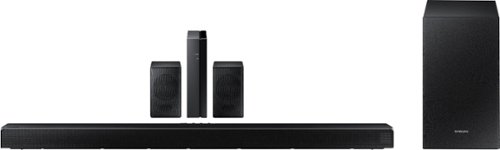
Samsung - HW-Q65T 7.1ch Soundbar with Dolby 5.1 / DTS Virtual:X - Black
Elevate your entertaining experience with immersive 3D sound. The power of Samsung sound bar Q65T makes surround soundbar comes to life with speakers that fire all around you.
Are the rear speakers not compatible with some movies/shows even if the movie supports Dolby 5.1? Some programs on Hulu are not playing though the rear speakers while others and music do.

Hi! Different sound modes will have different effect on the rear speaker audio. If you set the sound mode to SURROUND, GAME PRO, or ADAPTIVE, you should get surround sound effect from the rear speakers. For additional assistance, please reach out to Samsung Support at: 1-800-SAMSUNG, available 8AM - 12AM EST, 7 days a week, or Chat with us on Samsung.com: https://www.samsung.com/us/support/contact/
^Tim
^Tim
4 years, 10 months ago
by
Posted by:
Samsung
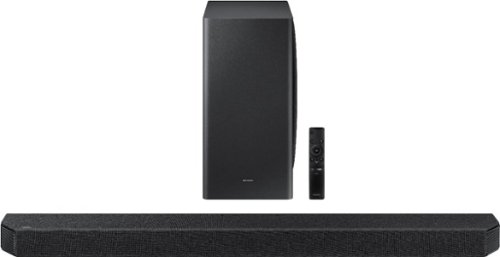
Samsung - HW-Q900A 7.1.2ch Soundbar with Dolby Atmos - Black
The next level of sound immersion.
Hi, how can I set Alexa or google assistant on q900a? And is q900a can do screen mirroring for apple product using airplay 2?
Hi Chaiz! To set up the Alexa functionality, you must do it within the SmartThings app. Select the soundbar from the SmartThings home page, then tap on the 3 vertical dots on the top right corner and tap on “Alexa Settings” to log in to your Amazon account. The soundbar also supports Airplay 2 technology. To enable AirPlay 2 on your soundbar, you must again first connect your Smartphone and soundbar to the same Wi-Fi network and add your new soundbar to the SmartThings app. Should you need additional assistance, please reach out to Samsung Support at: 1-800-SAMSUNG, available 8AM - 12AM EST, 7 days a week, or Chat with us on Samsung.com: https://www.samsung.com/us/support/contact/
^Tim
^Tim
4 years, 10 months ago
by
Posted by:
Samsung

Samsung - 5.1.2-Channel Soundbar with Dolby Atmos/DTS:X
Explore realistic 3D audio with sound precisely projected from above, in front, behind and to the side of you with the latest acoustic technologies.
If this only has one HDMI input, how will it play sound when I want to play a DVD or Apple TV? What should my DVD player/devices be plugged into? Thanks!!
Hi Mark! There are two ways to utilize the HDMI connections on the soundbar. HDMI ARC allows you to connect your devices to the TV, then run one HDMI from the soundbars output to the TVs HDMI ARC port. All sound from the TV will then play through the soundbar. Alternatively, you can connect a device to the soundbars HDMI input, then run an HDMI cable from the soundbar's output to the TV. This will allow you to play the audio from the device through the soundbar, and pass the video through to the TV.
^Tim
^Tim
4 years, 10 months ago
by
Posted by:
Samsung
Samsung - HW-Q65T 7.1ch Soundbar with Dolby 5.1 / DTS Virtual:X - Black
Elevate your entertaining experience with immersive 3D sound. The power of Samsung sound bar Q65T makes surround soundbar comes to life with speakers that fire all around you.
II just got it this morning. But when want to install. I can not turn in the power. Is this something wrong?
Hi! I’m sorry to see that you are having difficulties with the power of your soundbar.
So that we can better troubleshoot towards a solution, please reach out to Samsung Support at: 1-800-SAMSUNG, available 8AM - 12AM EST, 7 days a week, or Chat with us on Samsung.com: https://www.samsung.com/us/support/contact/
^Tim
So that we can better troubleshoot towards a solution, please reach out to Samsung Support at: 1-800-SAMSUNG, available 8AM - 12AM EST, 7 days a week, or Chat with us on Samsung.com: https://www.samsung.com/us/support/contact/
^Tim
4 years, 10 months ago
by
Posted by:
Samsung
Samsung - 5.1.2-Channel Soundbar with Dolby Atmos/DTS:X
Explore realistic 3D audio with sound precisely projected from above, in front, behind and to the side of you with the latest acoustic technologies.
hello is the system / speakers powered ? Do I need additional get reciver or amp? Thank you Maria
Hi Maria! The HW-Q850A's soundbar, subwoofer, and rear speaker module will include a power cable that will need to be connected to a wall outlet to provide power. You do not need to purchase an additional receiver or amplifier.
^Tim
^Tim
4 years, 10 months ago
by
Posted by:
Samsung
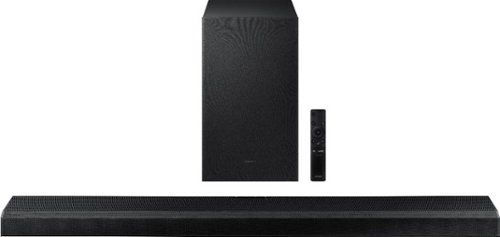
Samsung - 3.1.2-Channel Soundbar with Wireless Subwoofer, Dolby Atmos/DTS:X and Voice Assistant - Black
Powerful speaker deliver robust 3D surround sound that fire from front, side and above, for the most immersive sound for your home theatre experience.
Hi, Can I add two "SWA-9500S" to this sound bar?.
Hi Ram! The HW-Q700A, along with all Samsung soundbars, is only compatible with one set of wireless rear speakers at a time. This model will connect to one pair of the wireless rear speakers model SWA-9500S, but will not connect to two.
^Tim
^Tim
4 years, 10 months ago
by
Posted by:
Samsung
Samsung - HW-Q65T 7.1ch Soundbar with Dolby 5.1 / DTS Virtual:X - Black
Elevate your entertaining experience with immersive 3D sound. The power of Samsung sound bar Q65T makes surround soundbar comes to life with speakers that fire all around you.
Can I connect a radio or other devices to the soundbar and then sync the sound. The goal is to listen to local sportscasters while watching a game. The lag can be close to a minute.
Hi JB! The HW-Q65T can only play sound from one audio source at a time. You can either connect it to the TV or a Bluetooth audio device. You will need to switch the source on the soundbar depending on what connection type is being used.
^Tim
^Tim
4 years, 10 months ago
by
Posted by:
Samsung
Samsung - HW-Q65T 7.1ch Soundbar with Dolby 5.1 / DTS Virtual:X - Black
Elevate your entertaining experience with immersive 3D sound. The power of Samsung sound bar Q65T makes surround soundbar comes to life with speakers that fire all around you.
Can I use it with a my smart LG tv?
Hi Willow! The HW-Q65T is not brand restricted and is compatible with any TV supporting HDMI ARC, digital optical audio, and Bluetooth wireless audio technology. Check the specifications, or the user manual if needed, of your LG TV to determine if it supports one of these three audio connections for compatibility. ^Tim
4 years, 10 months ago
by
Posted by:
Samsung
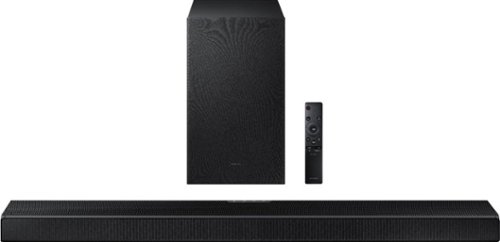
Samsung - HW-Q600A 3.1.2ch Sound bar with Dolby Atmos - Carbon Mid Silver
Elevate your entertaining experience with immersive 3D sound. The power of Samsung sound bar Q600A makes surround soundbar comes to life with speakers that fire from front, side and above.
Is this Samsung soundbar system compatible with other brands? I have an LG 4K smart tv about 3 years old.
Hi MovieFan! The HW-Q600A is not brand restricted and is compatible with any TV supporting HDMI ARC, digital optical audio, and Bluetooth wireless audio technology. Check the specifications, or the user manual if needed, of your TV to determine if it supports one of these three audio connections for compatibility. ^Tim
4 years, 10 months ago
by
Posted by:
Samsung
Samsung - HW-Q65T 7.1ch Soundbar with Dolby 5.1 / DTS Virtual:X - Black
Elevate your entertaining experience with immersive 3D sound. The power of Samsung sound bar Q65T makes surround soundbar comes to life with speakers that fire all around you.
Will this work with a insignia tv
Hi Sms! The HW-Q65T is compatible with HDMI ARC, digital optical audio, and Bluetooth wireless audio technology. Check the specifications, or the user manual if needed, of your TV to determine if it supports one of these three audio connections for compatibility.
^Tim
^Tim
4 years, 10 months ago
by
Posted by:
Samsung