Samsung
Samsung's Stats
Reviews
- Review Count0
- Helpfulness Votes0
- First ReviewNone
- Last ReviewNone
- Featured Reviews0
- Average Rating0
Reviews Comments
- Review Comment Count0
- Helpfulness Votes0
- First Review CommentNone
- Last Review CommentNone
- Featured Review Comments0
Questions
- Question Count0
- Helpfulness Votes0
- First QuestionNone
- Last QuestionNone
- Featured Questions0
- Answer Count75065
- Helpfulness Votes37,962
- First AnswerApril 24, 2013
- Last AnswerOctober 26, 2026
- Featured Answers0
- Best Answers3949
Samsung's Reviews
Samsung has not submitted any reviews.
Samsung's Questions
Samsung has not submitted any questions.
Samsung - 65" Class Q80A Series QLED 4K UHD Smart Tizen TV (2021)
Nothing will get by you with the precise visible details, even in the darkest scenes, and sound that moves around you.
What are the dimensions of the TV without the stand? I need to know if it will clear my fireplace mantle. I only have 33 7/8” from the mantle to the ceiling.

Cajun - Here are the dimensions of the 65" Q80A TV without the stand attached (WxHxD in INCHES): 56.9 x 32.7 x 2.2. ^Gina
5 years, 1 month ago
by
Posted by:
Samsung
Samsung - 85" Class Q80A Series QLED 4K UHD Smart Tizen TV (2021)
Nothing will get by you with the precise visible details, even in the darkest scenes, and sound that moves around you.
Does this tv work with the Samsung HW A650 3.1 ch. Soundbar with Dolby Digital and DTS X
kiddarren - Yes, you can connect the HW-A650 Soundbar to the Q80A TV via HDMI or Optical cable, or wirelessly via Bluetooth. ^Gina
5 years, 1 month ago
by
Posted by:
Samsung
Samsung - 55" Class QN90A Neo QLED 4K UHD Smart Tizen TV (2021)
Our best 4K picture offers lush visuals and crisp detail that create an unmatched cinematic experience.
Can I use screen mirroring with my samsung galaxy s10+ and the neoQN90A TV?...
Hi Breezy - Yes, you can screen mirror from your Samsung device to the QN90A TV via SmartThings. ^Gina
5 years, 1 month ago
by
Posted by:
Samsung
Samsung - 60" Class Q60A Series QLED 4K UHD Smart Tizen TV (2021)
Enter a world saturated with color and sharpened to refreshing clarity, all of it made possible through the power of Quantum Dot technology
Does this tv have a film over the screen? The picture is not as crisp as it should be
Emily - if there is a protective film on your screen, it will be indicated with a large blue triangle in the upper left corner. The triangle will have an illustration showing how to remove the protective film. If you do not have a blue triangle in the upper left corner, then that means there is no protective film on the screen, so please do not try to peel off anything. You will damage what is actually the screen. ^Gina
5 years, 1 month ago
by
Posted by:
Samsung
Samsung - 55" Class QN90A Neo QLED 4K UHD Smart Tizen TV (2021)
Our best 4K picture offers lush visuals and crisp detail that create an unmatched cinematic experience.
is this TV able for me to hook up my VHS player
Hi! The QN90A features HDMI and Optical connections; in order to connect a VHS player, you may need to use an adapter. Please directly contact or visit your local Best Buy to find the adapter you need. ^Gina
5 years, 1 month ago
by
Posted by:
Samsung
Samsung - 50" Class Q60A Series QLED 4K UHD Smart Tizen TV
Enter a world saturated with color and sharpened to refreshing clarity, all of it made possible through the power of Quantum Dot technology
Will iphone 12 work with multi view on the right screen or just the left? Can’t seem to get anything to work on the right hand side
Hi Carl - Multi View allows you to screen mirror from iOS and Android devices on the screen placed on the right side of the TV. ^Gina
5 years, 1 month ago
by
Posted by:
Samsung
Samsung - 55" Class Q60A Series QLED 4K UHD Smart Tizen TV
Enter a world saturated with color and sharpened to refreshing clarity, all of it made possible through the power of Quantum Dot technology
Is there a plastic protective film on the actual tv face as well as the frame of the tv?
Curious - if there is a protective film on your screen, it will be indicated with a large blue triangle in the upper left corner. The triangle will have an illustration showing how to remove the protective film.
If you do not have a blue triangle in the upper left corner, then that means there is no protective film on the screen, so please do not try to peel off anything. You will damage what is actually the screen. ^Gina
If you do not have a blue triangle in the upper left corner, then that means there is no protective film on the screen, so please do not try to peel off anything. You will damage what is actually the screen. ^Gina
5 years, 1 month ago
by
Posted by:
Samsung
Samsung - 75" Class QN800A Series Neo QLED 8K UHD Smart Tizen TV (2021)
The QN800A transforms everything you watch into ultra-high contrast 8K with unimaginable picture details. The lightning fast Neo Quantum Processor 8K uses AI deep learning to elevate every picture to crisp 8K. The QN800A tracks sound to the onscreen action, and powers feature that go beyond Smart TV. These ultra-premium Samsung TVs use densely packed Quantum Mini LEDs that dim and brighten for rich deep darks and pure whites. Plus, you can reduce cable clutter with Attachable Slim One Connect.
Is this tv have a next-gen tuner
Hi Rabbit - Yes, the QN800A features an ATSC 3.0 tuner. ^Gina
5 years, 1 month ago
by
Posted by:
Samsung
Samsung - 85" Class QN800A Series Neo QLED 8K UHD Smart Tizen TV (2021)
The QN800A transforms everything you watch into ultra-high contrast 8K with unimaginable picture details. The lightning fast Neo Quantum Processor 8K uses AI deep learning to elevate every picture to crisp 8K. The QN800A tracks sound to the onscreen action, and powers feature that go beyond Smart TV. These ultra-premium Samsung TVs use densely packed Quantum Mini LEDs that dim and brighten for rich deep darks and pure whites. Plus, you can reduce cable clutter with Attachable Slim One Connect.
Does this TV have Dolby Atmos and a ARC e HDMI input
Hi Samsung8K85inch - The QN800A TV will support Dolby Atmos pass-through via eARC when connected to an Atmos-enabled device. eARC support is found in HDMI port number 3. ^Gina
5 years, 1 month ago
by
Posted by:
Samsung
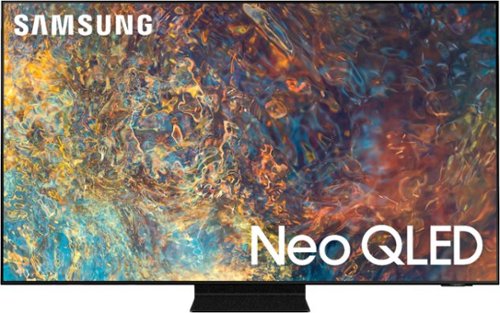
Samsung - 65" Class QN90A Neo QLED 4K UHD Smart Tizen TV (2021)
The QN90A is the finest of the Samsung 4K TV lineup. This series features Quantum HDR 32X which delivers spectacularly vibrant, bright, and vivid colors. Using a precise array of Quantum Mini LEDs, our game-changing Quantum Matrix Technology creates impeccable contrast so you can see intense picture detail. Object Tracking Sound+ follows the action as it happens on-screen to deliver a highly immersive experience. Plus, with the Ultra Viewing Angle and anti-glare screen technology, every seat is now the best seat.
I have connected my Bose Soundbar. How can I make it my default sound source and not have to choose it every time I turn the TV on
DD - The QN90A TV's Anynet+ feature controls external devices that are connected to the TV via an HDMI cable, and will turn on/off when you turn the TV on/off. To take advantage of this feature, your soundbar needs to support Anynet+ (HDMI-CEC). If your soundbar supports this, you can enable Anynet+ on your TV by going to: Settings > General > External Device Manager > Anynet+ (HDMI-CEC). ^Gina
5 years, 1 month ago
by
Posted by:
Samsung