Samsung
Samsung's Stats
Reviews
- Review Count0
- Helpfulness Votes0
- First ReviewNone
- Last ReviewNone
- Featured Reviews0
- Average Rating0
Reviews Comments
- Review Comment Count0
- Helpfulness Votes0
- First Review CommentNone
- Last Review CommentNone
- Featured Review Comments0
Questions
- Question Count0
- Helpfulness Votes0
- First QuestionNone
- Last QuestionNone
- Featured Questions0
- Answer Count73548
- Helpfulness Votes37,918
- First AnswerApril 24, 2013
- Last AnswerAugust 10, 2026
- Featured Answers0
- Best Answers3939
Samsung's Reviews
Samsung has not submitted any reviews.
Samsung's Questions
Samsung has not submitted any questions.

Samsung - 65" Class The Frame Series LED 4K UHD Smart Tizen TV (2021)
Transform your home with The Frame. Showcases artwork, watch television, movies, or display photos on this beautiful QLED screen. TV when it~s on, and art when it~s off. In Art Mode, the screen becomes a work of art, and with a subscription to the Samsung Art Store, you can choose from an entire library of artists~ works with something for everyone. You can even change the onscreen artwork as often as you like. Quantum Processor 4K automatically upscales all you content to 4K, and 100% Color Volume with Quantum Dot enriches every scene with millions of shades of color. The Frame truly changes the definition of what a TV can be.
Does this TV experience the WiFi connection issues (constant dropping from network) that the previous versions have had or has Samsung updated the firmware with this version to resolve this?

Hi! With more and more of our devices depending on our home network, our 2021 lineup was engineered with Wi-Fi connection needs in mind. ^Val
5 years, 4 months ago
by
Posted by:
Samsung

Samsung - 55" Class The Frame Series LED 4K UHD Smart Tizen TV (2021)
Artwork, television, movies, and memories -The Frame TV showcases it all on a beautiful QLED screen. Every piece of content is displayed in stunning 4K resolution and accented by a customizable, stylish bezel that seamlessly complements your home~s d~cor.
What is the size of the one connect box for the 55in 2021 model?
Hi Questioner, The One Connect Box that comes with The Frame TV is 13.7 x 5.4 x 2.6 (WxHxD in inches) ^Val
5 years, 4 months ago
by
Posted by:
Samsung
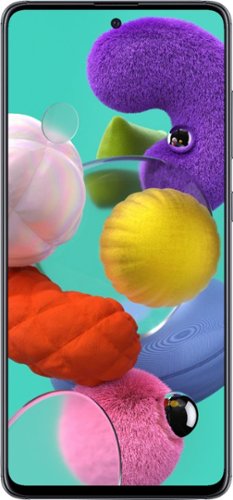
Samsung - Galaxy A51 with 128GB Memory Cell Phone (Unlocked) - Prism Crush Black
Communicate effectively with this unlocked Samsung A51 smartphone. The 4GB RAM ensures fast processing speed and increased performance, while the 128GB storage offers ample space for media and documents. This Samsung A51 smartphone has a 4000 mAh battery that provides enough power for all-day use, and Bluetooth connectivity lets you access music and other media wirelessly.
my samsung galaxy a51 - won't stay logged on, after being logged on with a password.
Hello, Nick. We would love to get more information to assist you. Please reach out to us on Facebook at (http://m.me/samsungsupport) or Twitter at (https://twitter.com/messages/compose?recipient_id=18768513). We look forward to speaking with you. ^Kayla
5 years, 4 months ago
by
Posted by:
Samsung
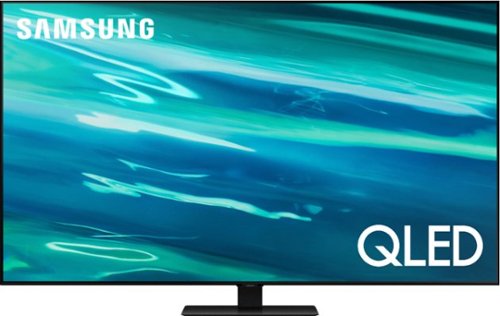
Samsung - 55" Class Q80A Series QLED 4K UHD Smart Tizen TV (2021)
Nothing will get by you with the precise visible details, even in the darkest scenes, and sound that moves around you.
What wall mount can I get with this tv that has gap between the wall and the tv ??
Hi Joshua520, This TV VESA Compliant and will work with any wall mount or stand that is also VESA Compliant and designed for the TV's size. For the 55" TV, you would need a VESA bolt pattern of 200 mm x 200 mm. Screws and adapters are not included with your TV. You will need 4 x M8 screws, 26-28 mm length, and 1.25mm pitch. ^Val
5 years, 4 months ago
by
Posted by:
Samsung
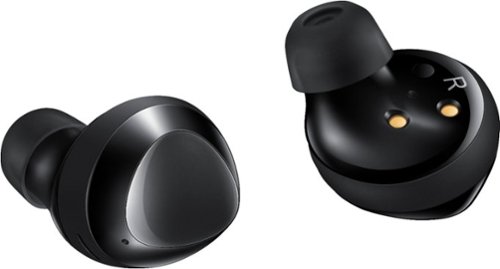
Samsung - Galaxy Buds+ True Wireless Earbud Headphones - Black
Get lost in your favorite playlist with these Samsung Galaxy Buds+ earphones. The premium AKG technology delivers crisp, high notes and deep bass for a full-bodied sound, while the built-in battery delivers up to 22 hours of nonstop playtime for limitless entertainment. When paired with your smartphone, these rechargeable Samsung Galaxy Buds+ earphones are compatible with virtual assistants like Bixby or Alexa for convenient hands-free control.
What is the warranty on these earbuds?
Hello there! The Galaxy Buds+ come with a standard one-year limited warranty. Thank you for asking this question. ^Kayla
5 years, 4 months ago
by
Posted by:
Samsung
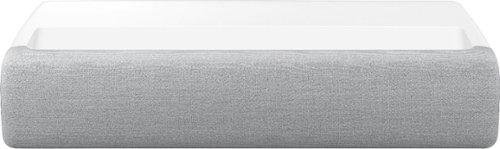
Samsung - The Premiere 4K UHD Triple Laser Wireless Smart Ultra Short Throw Projector with High Dynamic Range - White
Get ready for a whole new home cinema experience. Experience immersive detail from any angle with the 130-inch wide screen, while crystal 4K resolution provides staggeringly crisp images and optimized color expression.
I have read several reviews stating the projector has a rainbow effect on the screen as well as many are dead on arrival when plugged in. Have these issues been resolved in this projector? I’m really interested in buying, but have these concerns.
Hi Phoenix, The Premiere Triple Laser Short Throw Throw Projector does not utilize a color wheel which may be the source of the type of effect you mention. Our LSP9T projector is backed by a limited 2-year manufacturer warranty should you experience any issues. ^Val
5 years, 4 months ago
by
Posted by:
Samsung
Samsung - 55" Class The Frame Series LED 4K UHD Smart Tizen TV (2021)
Artwork, television, movies, and memories -The Frame TV showcases it all on a beautiful QLED screen. Every piece of content is displayed in stunning 4K resolution and accented by a customizable, stylish bezel that seamlessly complements your home~s d~cor.
When will this be available to purchase?
Hi Brian, the 2021 55" Frame TV is available now on BestBuy.com. Please check with your local store for availability if you would like to pick it up. https://www.bestbuy.com/site/samsung-55-class-the-frame-series-led-4k-uhd-smart-tizen-tv/6451485.p?skuId=6451485 ^Val
5 years, 4 months ago
by
Posted by:
Samsung

Samsung - 75" Class The Terrace Series LED Outdoor Partial Sun 4K UHD Smart Tizen TV (2020)
Upgrade your audiovisual experience with this 75-inch Samsung The Terrace outdoor TV. The 4K UHD QLED display produces lifelike details, while the wide viewing angle offers comfortable viewing and minimizes neck strain. This smart Samsung The Terrace outdoor TV boasts an IP55 weather-resistant rating to withstand the elements, and Motion Rate 240 reduces motion blur for immersive viewing.
The Terrace series only comes in 75 inch?
Hi Jess, the Terrace comes in three sizes. 75", 65", and 55". You can check them all out here: https://www.bestbuy.com/site/searchpage.jsp?st=terrace&_dyncharset=UTF-8&_dynSessConf=&id=pcat17071&type=page&sc=Global&cp=1&nrp=&sp=&qp=&list=n&af=true&iht=y&usc=All+Categories&ks=960&keys=keys ^Val
5 years, 4 months ago
by
Posted by:
Samsung
Samsung - 55" Class The Frame Series LED 4K UHD Smart Tizen TV (2021)
Artwork, television, movies, and memories -The Frame TV showcases it all on a beautiful QLED screen. Every piece of content is displayed in stunning 4K resolution and accented by a customizable, stylish bezel that seamlessly complements your home~s d~cor.
How many inches between the two mounts?
Hi Looking4TV, the 2021 55" Frame TV has a VESA standard of 200 mm x 200 mm. ^Val
5 years, 4 months ago
by
Posted by:
Samsung

Samsung - 32" Class The Frame Series Full HD Smart Tizen TV
Enjoy a cinematic viewing experience with this 32-inch Samsung Life Style Full HD smart TV. Voice control through Bixby, Alexa and Google Assistant allows seamless hands-free operation, while the 20W speaker system delivers powerful sound. This Samsung Life Style Full HD smart TV has Wi-Fi connectivity for streaming online content smoothly, and Bluetooth technology lets you wirelessly connect devices.
The No Gap Mount in the box is included. Does this mean it can be mounted to a corner in the room? Thanks!
Hi Jen, the No Gap Wall mount is intended to mount your TV snug to a flat wall. Since mounting it in a corner would mean that there would be space behind the TV, you would need a wall mount specifically designed for corners. ^Val
5 years, 4 months ago
by
Posted by:
Samsung