Samsung
Samsung's Stats
Reviews
- Review Count0
- Helpfulness Votes0
- First ReviewNone
- Last ReviewNone
- Featured Reviews0
- Average Rating0
Reviews Comments
- Review Comment Count0
- Helpfulness Votes0
- First Review CommentNone
- Last Review CommentNone
- Featured Review Comments0
Questions
- Question Count0
- Helpfulness Votes0
- First QuestionNone
- Last QuestionNone
- Featured Questions0
- Answer Count73539
- Helpfulness Votes37,914
- First AnswerApril 24, 2013
- Last AnswerAugust 7, 2026
- Featured Answers0
- Best Answers3940
Samsung's Reviews
Samsung has not submitted any reviews.
Samsung's Questions
Samsung has not submitted any questions.
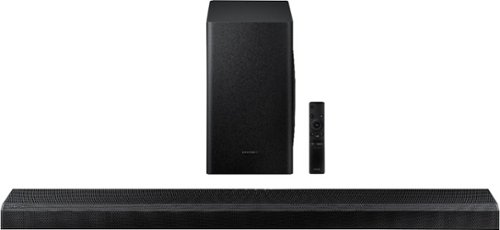
Samsung - 3.1.2-Channel Soundbar with Wireless Subwoofer and Dolby Atmos/DTS:X (2020) - Black
Customize your home theater system with this Samsung sound bar. The 1.5-inch tweeters and the 6.5-inch subwoofer deliver crisp, powerful sound, while the included remote control allows easy multimedia handling. This Samsung sound bar has Bluetooth connectivity for streaming audio files from compatible devices smoothly, and the wall-mountable design helps declutter your space.
I purchased the Q80T tv and the Q70T sound bar. Hooked them up using the Earc cable. Sound doesn't not sync with the picture. You can see lips move just prior to the sound kicking in. It is very annoying to watch. Why could this be happening.

Hi Dennis, There is an adjustment in the TV Menu to fix this issue. You just need to hit the Home button to access the TV Menu. Then follow this guide to get to the right setting adjustment: Sound > Expert Settings > Digital Output Audio Delay. You can adjust that up and down while watching TV to get it synced correctly. ^Jeremy
5 years, 7 months ago
by
Posted by:
Samsung
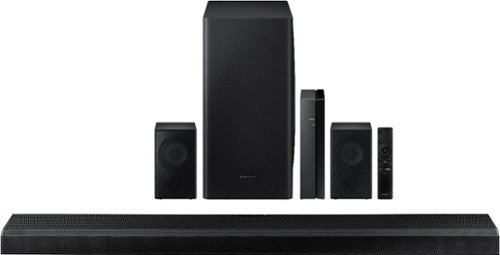
Samsung - 5.1.2-Channel Soundbar with Wireless Rear Speakers and Dolby Atmos/DTS:X - Black
Enhance your movie and audio experience with this Samsung Acoustic Beam Q Series sound bar. The 8-inch subwoofer and 1.5-inch tweeters produce powerful room-filling sound, while the included remote control lets you adjust settings and handle playback effortlessly. This Samsung Acoustic Beam Q Series sound bar has Bluetooth connectivity for streaming audio smoothly, and the wall-mountable design allows for a customized setup.
Hello, just bought a Q80T TV with a Q850T Soundbar. Everything's connected, TV+Soundbar appears on TV for sound option. But, TV speaker sound is better that TV+Soundbar sound (Q-Symphony)... Possible to force TV+Soundbar tu use more TV Speaker?
Hi Mironskidoo, The Soundbar should sound better than the TV speakers and the Q-Symphony should enhance that sound. I would suggest contacting our Samsung Customer Care center for help with this particular issue. Please reach out to Samsung Support via any of these options:
Phone: 1-800-SAMSUNG
Available 8 AM - 12 AM EST 7 days a week
LiveChat or Text: https://www.samsung.com/us/support/contact/
Facebook Messenger: https://www.facebook.com/samsungsupport
Twitter: https://twitter.com/SamsungSupport
The Samsung TV Community is also a great resource for getting help from Samsung moderators and customers: https://us.community.samsung.com/ ^Jeremy
Phone: 1-800-SAMSUNG
Available 8 AM - 12 AM EST 7 days a week
LiveChat or Text: https://www.samsung.com/us/support/contact/
Facebook Messenger: https://www.facebook.com/samsungsupport
Twitter: https://twitter.com/SamsungSupport
The Samsung TV Community is also a great resource for getting help from Samsung moderators and customers: https://us.community.samsung.com/ ^Jeremy
5 years, 7 months ago
by
Posted by:
Samsung
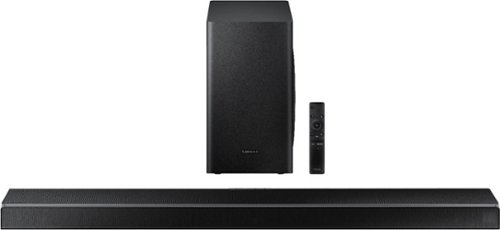
Samsung - 5.1-Channel Soundbar with Wireless Subwoofer and Acoustic Beam - Black
Upgrade your entertainment room with this Samsung soundbar. The 6.5-inch subwoofer and 1.5-inch tweeters deliver powerful well-balanced sound, and Bluetooth connectivity lets you stream audio wirelessly. This Samsung soundbar includes a remote control for handling playback easily, while the HDMI and USB ports allow for flexible connectivity to a wide range of devices.
Is this compatible with Alexa?
Hi Alexa, The first Soundbar in the Q series that works with Alexa is the HW-Q70T. We also have the HW-Q850T, HW-Q900T, HW-Q950T and HW-S60T that have Alexa built in. ^Jeremy
5 years, 7 months ago
by
Posted by:
Samsung
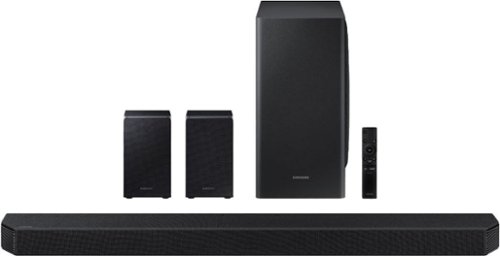
Samsung - 9.1.4-Channel Soundbar with Wireless Subwoofer and Dolby Atmos/DTS:X - Black
The HW-Q950T has immersive sound quality with True 9.1.4ch sound. With Up-firing rear speakers including Q-symphony, Dolby Atmos, DTS:XUsability-, adaptive sound, game Pro Mode. Premium Design textile by Kvadrat along with seamless connectivity and built in voice assistant, this is the best fit for Samsung QLED TV.
I have a cable-tv box connected to the hdmi 1 and an atv4 to the hdmi 2 on the soundbar. The earc is connected to the tv. When I try to switch to the cable-tv box, it jumps right back to the atv4. Any solutions?
Hi there, I'm sorry you are having this issue. I would recommend contacting the Samsung Customer Center to make sure everything is working properly. Please reach out to Samsung Support via any of these options:
Phone: 1-800-SAMSUNG
Available 8 AM - 12 AM EST 7 days a week
LiveChat or Text: https://www.samsung.com/us/support/contact/
Facebook Messenger: https://www.facebook.com/samsungsupport
Twitter: https://twitter.com/SamsungSupport
The Samsung TV Community is also a great resource for getting help from Samsung moderators and customers: https://us.community.samsung.com/ ^Jeremy
Phone: 1-800-SAMSUNG
Available 8 AM - 12 AM EST 7 days a week
LiveChat or Text: https://www.samsung.com/us/support/contact/
Facebook Messenger: https://www.facebook.com/samsungsupport
Twitter: https://twitter.com/SamsungSupport
The Samsung TV Community is also a great resource for getting help from Samsung moderators and customers: https://us.community.samsung.com/ ^Jeremy
5 years, 7 months ago
by
Posted by:
Samsung
Samsung - 9.1.4-Channel Soundbar with Wireless Subwoofer and Dolby Atmos/DTS:X - Black
The HW-Q950T has immersive sound quality with True 9.1.4ch sound. With Up-firing rear speakers including Q-symphony, Dolby Atmos, DTS:XUsability-, adaptive sound, game Pro Mode. Premium Design textile by Kvadrat along with seamless connectivity and built in voice assistant, this is the best fit for Samsung QLED TV.
Are the rear surrounds used with this soundbar different than the ones used with the HW-Q850T? If so are they compatible with the 850 and can they be purchased separately?
Hi there, The rear speakers that come with the HW-Q950T are ATMOS Rear speakers that only work with this Soundbar. They only come included with the HW-Q950T in the box. ^Jeremy
5 years, 7 months ago
by
Posted by:
Samsung
Samsung - 82" Class 9 Series LED 4K UHD Smart Tizen TV (2020)
Advance your home entertainment with this 82-inch Samsung Ultra HD 4K smart TV. The Crystal processor delivers sharp 4K resolutions, while the game enhancer provides lag-free, high-speed gameplay. This Samsung Ultra HD 4K smart TV features HDR for detailed pictures and videos and Motion Rate 240 for fast refresh rates to enhance motion clarity.
Hi, is this 82” Samsung come with warranty ? If so for how many years Thanks, Kwek
Hi there, The 82RU9000, is warranted by Samsung against manufacturing defects in materials and workmanship for period of 3 Years. ^Jeremy
5 years, 7 months ago
by
Posted by:
Samsung

Samsung - 65" Class 9 Series LED 4K UHD Smart Tizen TV
Watch your favorite movies in high definition with this 65-inch Samsung Crystal 4K smart TV. The ultra-fast processor and dynamic crystal display deliver true-to-life color and a high-resolution picture, so you never miss a detail. With next-gen apps and automatic game enhancer settings, this Samsung Crystal 4K smart TV is packed with entertainment options while ensuring an optimal gaming experience.
I purchased the Ru9000 (65") and set it up yesterday. I am a little disappointed with the picture .No better than my prior 5 year old Vizio that did not have HDR or 4K. Is there something I need to do with the settings to achieve a crisper picture?
Hi RJJ, the RU9000 utilizes Dynamic Crystal Color, which features millions of colors producing a true-to-life picture that HDTVs can’t display. It also features our Crystal Processor 4K, which allows you to view all content in stunningly clear color with the powerful 4K upscaling capabilities. The RU9000 includes 4 different Picture Modes, so you can select the Picture Mode that provides the best viewing experience.• Dynamic makes the picture brighter and clearer in bright viewing environments. • Standard is the default mode suitable for general viewing environments. • Natural reduces eye strain for a comfortable viewing experience. • Movie is suitable for watching TV or movies in a dark room. You can also individually adjust the brightness and contrast to achieve the picture quality you desire. ^Jeremy
5 years, 7 months ago
by
Posted by:
Samsung
Samsung - 82 Class 6 Series LED 4K UHD Smart Tizen TV
Enhance your viewing experience with this 82-inch Samsung 4K UHD smart TV. The HDR technology and 4K UHD resolution render sharp details and realistic colors, while a Crystal processor delivers exceptional picture quality on the flat-panel display. This Bluetooth-enabled Samsung 4K UHD smart TV is voice controllable for hands-free operation and seamless wireless streaming
How do you connect your soundbar to this TV
Hi Precious, There are 2 ways to connect a Soundbar. HDMI is the recommended output and you can also use the Digital Optical Output. ^Jeremy
5 years, 7 months ago
by
Posted by:
Samsung
Samsung - 82 Class 6 Series LED 4K UHD Smart Tizen TV
Enhance your viewing experience with this 82-inch Samsung 4K UHD smart TV. The HDR technology and 4K UHD resolution render sharp details and realistic colors, while a Crystal processor delivers exceptional picture quality on the flat-panel display. This Bluetooth-enabled Samsung 4K UHD smart TV is voice controllable for hands-free operation and seamless wireless streaming
I currently have HBOMax, Disney+, Netflix, Apple +, Hulu, Vudu, Showtime Anytime, Peacock, Shudder, and IFC but I cannot support all of these on my television. Can this television support all of these? I also have a TiVo box from my cable company.
Hi Dano, The Samsung App store features HBO Max, Disney+, Netflix, Apple TV+, Hulu, Vudu, Showtime Anytime currently. Other apps could be watched on the TV by using a mobile device and casting to the TV via SmartThings or Apple AirPlay 2. ^Jeremy
5 years, 7 months ago
by
Posted by:
Samsung
Samsung - 65" Class 8 Series LED 4K UHD Smart Tizen TV
Stream all your favorite shows on this 65-inch Samsung Smart TV. The variety of smart features and applications provides access to a range of streaming services, and compatibility with virtual assistants offers convenient voice-controlled functionality. This Samsung Smart TV has a Crystal Processor 4K that automatically enhances the image quality of movies and shows.
what does the two year warranty cover
Hi there, This TV does come with a One Year Manufacturer's Warranty against defective parts and labor. Best Buy does offer a protection plan that gives you extra coverage. You can contact your local store to find out what that coverage will give you in addition. ^Jeremy
5 years, 7 months ago
by
Posted by:
Samsung