Samsung
Samsung's Stats
Reviews
- Review Count0
- Helpfulness Votes0
- First ReviewNone
- Last ReviewNone
- Featured Reviews0
- Average Rating0
Reviews Comments
- Review Comment Count0
- Helpfulness Votes0
- First Review CommentNone
- Last Review CommentNone
- Featured Review Comments0
Questions
- Question Count0
- Helpfulness Votes0
- First QuestionNone
- Last QuestionNone
- Featured Questions0
- Answer Count75153
- Helpfulness Votes37,972
- First AnswerApril 24, 2013
- Last AnswerOctober 30, 2026
- Featured Answers0
- Best Answers3950
Samsung's Reviews
Samsung has not submitted any reviews.
Samsung's Questions
Samsung has not submitted any questions.
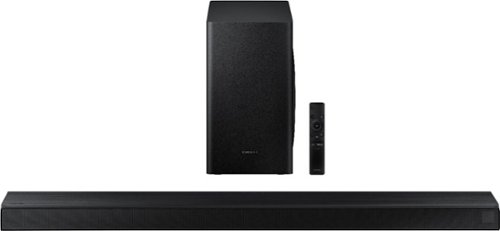
Samsung - 3.1-Channel Soundbar with Wireless Subwoofer and DTS Virtual:X/Dolby Digital - Black
Enjoy high-grade audio at home with this Samsung T Series acoustic beam sound bar. Dolby Audio and DTS provide rich, robust sound for a 3-D surround sound experience, and the center-channel speaker provides clear dialog reproduction. Game mode automatically adjusts the output of this Samsung T Series acoustic beam sound bar in real time for complete audio immersion.
Is it possible to upgrade the included subwoofer to a more powerful one? If so, is there any wireless subwoofer with multiple compatibility’s that includes this specific soundbar? Offers amazing sound, just could use a little more range in bass.

Hello Jay,
No, the subwoofers are only compatible with their designated subwoofer. ^Cristian
No, the subwoofers are only compatible with their designated subwoofer. ^Cristian
5 years, 11 months ago
by
Posted by:
Samsung
Samsung - 3.1-Channel Soundbar with Wireless Subwoofer and DTS Virtual:X/Dolby Digital - Black
Enjoy high-grade audio at home with this Samsung T Series acoustic beam sound bar. Dolby Audio and DTS provide rich, robust sound for a 3-D surround sound experience, and the center-channel speaker provides clear dialog reproduction. Game mode automatically adjusts the output of this Samsung T Series acoustic beam sound bar in real time for complete audio immersion.
Any eq controls for bass, mid and treble besides the woofer volume? And any way to control/boost the center speaker?
Hello James,
Yes, your One remote that comes with the sounbar, has a settings button that looks like a gear. You can find the settings there. ^Cristian
Yes, your One remote that comes with the sounbar, has a settings button that looks like a gear. You can find the settings there. ^Cristian
5 years, 11 months ago
by
Posted by:
Samsung
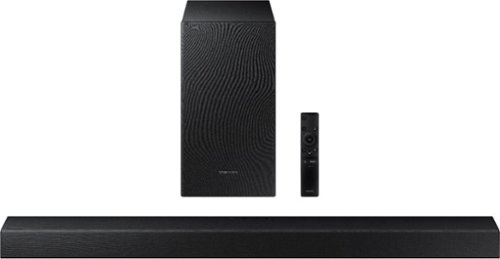
Samsung - 2.1-Channel Soundbar with Wireless Subwoofer and Dolby Audio (2020) - Black
Experience immersive entertainment with this Samsung soundbar system. The built-in Bluetooth lets you stream music from compatible devices, while the Smart Sound system automatically detects what you are watching and optimizes the audio for enhanced enjoyment. This Samsung soundbar system has an optical input that lets it connect directly to your Samsung TV.
2020 T Series Soundbar w/ Wireless Subwoofer (HW-T47M) is connected to a Samsung Smart TV using bluetooth and optical. Speakers work fine with TV but audio-video sync is off. Troubleshooting recommendations on Samsung web site tried to no avail.
Hello jacrp289,
So that we can walk you through the connection setup, please reach out to Samsung Audio Support at:
• Phone: 1-800-SAMSUNG / Available 8 AM - 9 PM EST, Mon - Fri
• LiveChat or Email: https://www.samsung.com/us/support/#contact_us_for_support
We look forward to hearing from you.
^Cristian
So that we can walk you through the connection setup, please reach out to Samsung Audio Support at:
• Phone: 1-800-SAMSUNG / Available 8 AM - 9 PM EST, Mon - Fri
• LiveChat or Email: https://www.samsung.com/us/support/#contact_us_for_support
We look forward to hearing from you.
^Cristian
5 years, 11 months ago
by
Posted by:
Samsung
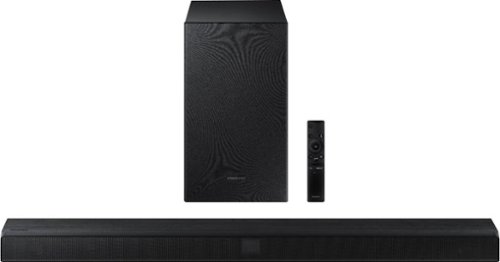
Samsung - 2.1-Channel Soundbar with Wireless Subwoofer and Dolby Audio/DTS Virtual:X (2020) - Black
Elevate your sound system with this Samsung 2.1-channel sound bar. Dolby Audio and DTS Virtual technologies produce accurate audio and simulate a complete surround sound experience, while Bluetooth multi-connection lets you connect two devices and easily switch between them. This 320W Samsung 2.1-channel sound bar features a wireless subwoofer for enhanced bass.
Where can I listen to this soundbar before buying? It seems most best buys have many of the soundbars not working and Ive never seen this one on display. Ive never seen a sony on display to listen to that either. Id like to here a few of these in person
Hello Wildncrazyguy,
Hi there! For further information on HW-T550, please visit or contact your local Best Buy. ^Cristian
Hi there! For further information on HW-T550, please visit or contact your local Best Buy. ^Cristian
5 years, 11 months ago
by
Posted by:
Samsung
Samsung - 3.1-Channel Soundbar with Wireless Subwoofer and DTS Virtual:X/Dolby Digital - Black
Enjoy high-grade audio at home with this Samsung T Series acoustic beam sound bar. Dolby Audio and DTS provide rich, robust sound for a 3-D surround sound experience, and the center-channel speaker provides clear dialog reproduction. Game mode automatically adjusts the output of this Samsung T Series acoustic beam sound bar in real time for complete audio immersion.
Can you use an Apple TV+ With this unit
Hello Fred,
Yes, aslong as your TV is selected to output audio to the soundbar it will work with your Apple TV. ^Cristian
Yes, aslong as your TV is selected to output audio to the soundbar it will work with your Apple TV. ^Cristian
5 years, 11 months ago
by
Posted by:
Samsung
Samsung - 2.1-Channel Soundbar with Wireless Subwoofer and Dolby Audio/DTS Virtual:X (2020) - Black
Elevate your sound system with this Samsung 2.1-channel sound bar. Dolby Audio and DTS Virtual technologies produce accurate audio and simulate a complete surround sound experience, while Bluetooth multi-connection lets you connect two devices and easily switch between them. This 320W Samsung 2.1-channel sound bar features a wireless subwoofer for enhanced bass.
I have the Samsu series 8 tv will this work with it and will it play sound with the tv?
Hello Question,
No, the HW-T550 does not support Q-Symphony. You will have to choose either TV audio or soundbar audio. ^Cristian
No, the HW-T550 does not support Q-Symphony. You will have to choose either TV audio or soundbar audio. ^Cristian
5 years, 11 months ago
by
Posted by:
Samsung
Samsung - 3.1-Channel Soundbar with Wireless Subwoofer and DTS Virtual:X/Dolby Digital - Black
Enjoy high-grade audio at home with this Samsung T Series acoustic beam sound bar. Dolby Audio and DTS provide rich, robust sound for a 3-D surround sound experience, and the center-channel speaker provides clear dialog reproduction. Game mode automatically adjusts the output of this Samsung T Series acoustic beam sound bar in real time for complete audio immersion.
will this soundbar work in harmony with a vizio 210 50 inch 4kv uhd series 505-h tvs
Hello jimmy,
Yes, the HW-T650 will work with you TV. ^Cristian
Yes, the HW-T650 will work with you TV. ^Cristian
5 years, 11 months ago
by
Posted by:
Samsung
Samsung - 2.1-Channel Soundbar with Wireless Subwoofer and Dolby Audio/DTS Virtual:X (2020) - Black
Elevate your sound system with this Samsung 2.1-channel sound bar. Dolby Audio and DTS Virtual technologies produce accurate audio and simulate a complete surround sound experience, while Bluetooth multi-connection lets you connect two devices and easily switch between them. This 320W Samsung 2.1-channel sound bar features a wireless subwoofer for enhanced bass.
Can the bluetooth function on the HW-T550 be used to output sound to bluetooth headphones/earbuds to enable private listening?
Hello MiWiGa,
Yes, aslong as your TV allowds for Bluetooth connectivity then yes you could listen in private with your Bluetooth wireless headphones. ^Cristian
Yes, aslong as your TV allowds for Bluetooth connectivity then yes you could listen in private with your Bluetooth wireless headphones. ^Cristian
5 years, 11 months ago
by
Posted by:
Samsung
Samsung - 2.1-Channel Soundbar with Wireless Subwoofer and Dolby Audio/DTS Virtual:X (2020) - Black
Elevate your sound system with this Samsung 2.1-channel sound bar. Dolby Audio and DTS Virtual technologies produce accurate audio and simulate a complete surround sound experience, while Bluetooth multi-connection lets you connect two devices and easily switch between them. This 320W Samsung 2.1-channel sound bar features a wireless subwoofer for enhanced bass.
With this sound bar will I have sound through headphones and TV at the same time? Thank you!
Hello daine,
The multi-audio support is based on your TV's capabilities. If your TV supports it then yes it will work. ^Cristian
The multi-audio support is based on your TV's capabilities. If your TV supports it then yes it will work. ^Cristian
5 years, 11 months ago
by
Posted by:
Samsung
Samsung - 3.1-Channel Soundbar with Wireless Subwoofer and DTS Virtual:X/Dolby Digital - Black
Enjoy high-grade audio at home with this Samsung T Series acoustic beam sound bar. Dolby Audio and DTS provide rich, robust sound for a 3-D surround sound experience, and the center-channel speaker provides clear dialog reproduction. Game mode automatically adjusts the output of this Samsung T Series acoustic beam sound bar in real time for complete audio immersion.
can i connect a dvd/blu ray player directly to the sound bar (bypassing the tv) to play audio cds?
Hello dancee,
No, the HW-T650 does not have audio pass-through. Please check out the HW-Q70T for audio pass-through support. https://www.bestbuy.com/site/samsung-hw-q70t-3-1-2ch-soundbar-with-dolby-atmos-dtsx-2020-black/6400660.p?skuId=6400660
^Cristian
No, the HW-T650 does not have audio pass-through. Please check out the HW-Q70T for audio pass-through support. https://www.bestbuy.com/site/samsung-hw-q70t-3-1-2ch-soundbar-with-dolby-atmos-dtsx-2020-black/6400660.p?skuId=6400660
^Cristian
5 years, 11 months ago
by
Posted by:
Samsung