Lenovo Product Expert
Lenovo Product Expert's Stats
Reviews
- Review Count0
- Helpfulness Votes0
- First ReviewNone
- Last ReviewNone
- Featured Reviews0
- Average Rating0
Reviews Comments
- Review Comment Count0
- Helpfulness Votes0
- First Review CommentNone
- Last Review CommentNone
- Featured Review Comments0
Questions
- Question Count0
- Helpfulness Votes0
- First QuestionNone
- Last QuestionNone
- Featured Questions0
- Answer Count37808
- Helpfulness Votes24,825
- First AnswerApril 21, 2014
- Last AnswerOctober 9, 2026
- Featured Answers0
- Best Answers2827
Lenovo Product Expert's Reviews
Lenovo Product Expert has not submitted any reviews.
Lenovo Product Expert's Questions
Lenovo Product Expert has not submitted any questions.
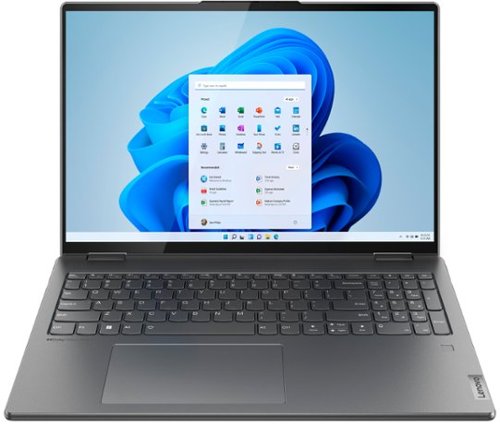
Lenovo - Yoga 7i 16" 2.5K Touch 2-in-1 Laptop - Intel Evo Platform - Core i5-1240P - 8GB Memory - 256GB SSD - Storm Grey
The Lenovo Yoga 7i combines versatile portability and enhanced productivity, thanks to the boundary-breaking performance and responsiveness of 12th generation Intel Core processors and vibrant WQXGA clarity with Intel Iris Xe graphics. Go anywhere with a sleek 2-in-1 metal chassis featuring thoughtful details including a webcam privacy shutter.
How clear is the picture?

This Intel Evo-Certified, lenovo Yoga 7i 16, model number 82QG0001US, ships with a 16:10 aspect ratio, 16 Inch (screen size measured diagonally) IPS - 2.5K (2560x1600) 10-point Multi-touch screen, with a brightness level of 400 nits, has a Glossy Finish. This screen provides 100 Percent of the sRGB color gamut for excellent color accuracy. This screen is TÜV Low Blue Light and Dolby Vision Certified.
4 years ago
by
Posted by:
Lenovo Product Expert
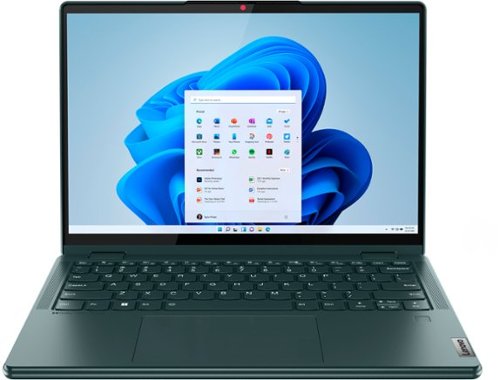
Lenovo - Yoga 6 13.3" WUXGA (1920 x 1200) Touch 2-in-1 Laptop -Ryzen 7 5700U - 16GB Memory - 512GB SSD - Dark Teal
Thin, light and framed by the comfort edge of the Lenovo Yoga 6 is both portable and comfortable to use. Add into that our commitment to sustainability, and we have the perfect on-the-go product for throwing in your bag and taking anywhere. Bring big-screen cinema to life with Dolby Vision on the breathtaking 16:10 FHD display with 100% sRGB for color accuracy paired with immersive Dolby Atmos optimized on front-firing speakers.
Does this have forced-air cooling (i.e. a fan) or is it passive cooled (i.e. no moving parts)?
This Lenovo Yoga 6 13, model number 82UD0000US, uses both an internal fan (System FAN C 82UD Forcecon FAN, Lenovo Part Number - 5F10S14015) as well as a heatsink (Heatsink C 82UD Kipo
HEAT SINK, Lenovo Part Number - 5H40S20526) for system cooling.
HEAT SINK, Lenovo Part Number - 5H40S20526) for system cooling.
4 years ago
by
Posted by:
Lenovo Product Expert
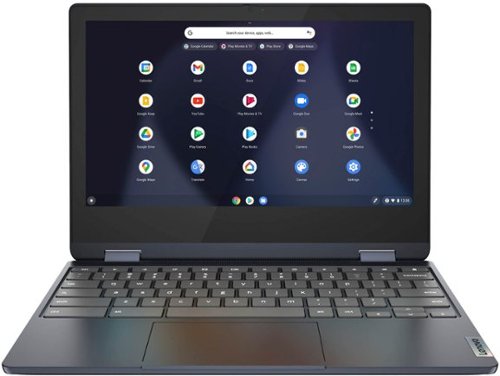
Lenovo - Flex 3 Chromebook 11.6" HD Touch-screen Laptop - Mediatek MT8183 - 4GB - 64GB eMMC - Abyss Blue
Packs what makes Chromebook so amazing into one svelte 360-degree convertible. Versatile and portable, the IdeaPad Flex 3 Chromebook measures just 19.6 mm thick and weighs 1.2 kg with a full keyboard and spacious trackpad, and can be viewed in tent, tablet, laptop or stand modes. Watch crisp visuals in high definition with its 10-point touchscreen on the 11.6" IPS display while being more productive with help from Google. Just say ~Hey Google,~ to manage tasks, enjoy your entertainment, get answers, or control smart home devices.
Can you use a blue-tooth speaker with this device? Thanks!
This Lenovo Flex 3 11 Chromebook, model number 82KM0003US, ships with Bluetooth 4.2 Version capability, built in. Be sure your Bluetooth Speaker is compatible with the Chrome Operating System as well.
4 years ago
by
Posted by:
Lenovo Product Expert
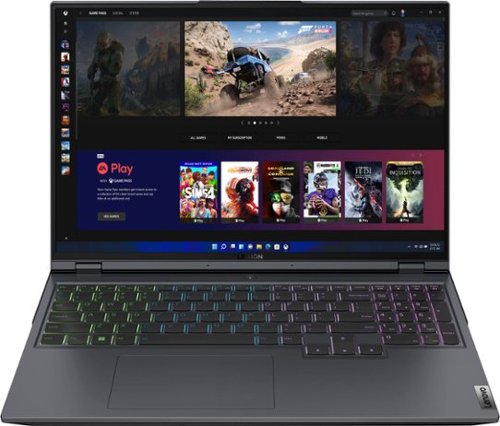
Lenovo - Legion 5 Pro 16" WQXGA Gaming Laptop - Ryzen 7 6800H - 16GB Memory - NVIDIA GeForce RTX 3050 Ti - 512GB SSD - Storm Grey
Engineered to deliver devastation in and out of the arena, the Lenovo~ Legion 5 Pro features the latest generation AMD processing and NVIDIA GeForce RTX graphics, dishing out high-resolution gaming at optimal-frame-rates with the Legion AI Engine, and optimally cooled via the Legion Coldfront 3.0 thermal system. The world~s first 16" WQXGA gaming laptop sets up a killer ~winning zone~ that towers over your enemies~ sight lines, giving you an extra edge in screen real estate by upping your peripheral vision. Combined with Nahimic 3D audio that pinpoints their footsteps in space, you~ll be able to see and hear any scrub headed your way before they even hit firing range. Enjoy elite gaming experiences on the Legion 5 Pro, available in Storm Grey.
Does this Laptop comes with Dual Channel Ram installed or single Channel?
This Lenovo Legion 5 Pro 16 Gaming Laptop, model number 82RY000KUS, ships with 16GB DDR5-4800MHz RAM (2x 8GB SO-DIMM DDR5-4800MHz RAM). There are two DDR5 SO-DIMM slots, dual-channel capable.
4 years ago
by
Posted by:
Lenovo Product Expert
Lenovo - Legion 5 Pro 16" WQXGA Gaming Laptop - Ryzen 7 6800H - 16GB Memory - NVIDIA GeForce RTX 3050 Ti - 512GB SSD - Storm Grey
Engineered to deliver devastation in and out of the arena, the Lenovo~ Legion 5 Pro features the latest generation AMD processing and NVIDIA GeForce RTX graphics, dishing out high-resolution gaming at optimal-frame-rates with the Legion AI Engine, and optimally cooled via the Legion Coldfront 3.0 thermal system. The world~s first 16" WQXGA gaming laptop sets up a killer ~winning zone~ that towers over your enemies~ sight lines, giving you an extra edge in screen real estate by upping your peripheral vision. Combined with Nahimic 3D audio that pinpoints their footsteps in space, you~ll be able to see and hear any scrub headed your way before they even hit firing range. Enjoy elite gaming experiences on the Legion 5 Pro, available in Storm Grey.
does this laptop have per key RGB lighting on keyboard as shown in the pictures..?
No. This Lenovo Legion 5 Pro 15 Gaming Laptop, model number 82RY000KUS, ships with a 4-Zone RGB Backlit, English (US) Version standard QWERTY keyboard, with 10-Key Numeric Pad included. It does not have individual key RGB, but has 4-Zones of RGB color control.
4 years ago
by
Posted by:
Lenovo Product Expert
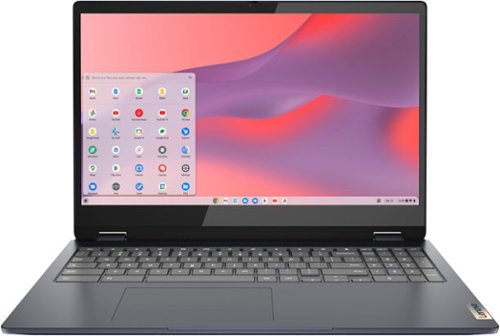
Lenovo - Flex 3i Chromebook 15.6" FHD Touch-Screen Laptop - Celeron N4500 - 4GB Memory - 64GB eMMC - Abyss Blue
One of the most versatile Chromebooks on the market, the IdeaPad Flex 3i Chromebook 15" merges accessibility with power, with an Intel Celeron N4500 processor to handle even the most arduous tasks without a hint of strain. Its slim and light 360~ convertible design and 10 hours of battery life makes it suitable for any setting. And as a Chromebook, you can quickly access all your files, photos, music, and more. You can also talk to Google to help you multitask, control your smart home devices or manage your day. Get Minecraft and 3 months of Realms Plus at no cost* with purchase of a new Chromebook. Terms Apply. *Offer valid for qualifying Chromebooks purchased on or after July 1st, 2023 through September 30th, 2023 while supplies last.
Can you use an HP Office Jet Pro 6968 printer with this unit
That will depend on the requirements and compatibility of the specific printer model with the Chrome Operating System. We recommend you check with your printer manufacturer's web site about the compatibility of your specific printer model with the Chrome OS. Here is a link to instructions for connecting a compatible printer to a Chromebook: https://support.google.com/chromebook/answer/7225252?hl=en. If you have questions about your Lenovo Flex 3i 15 Chromebook, we recommend you contact lenovo Tech Support for Chromebooks at: 800-426-7378.
4 years ago
by
Posted by:
Lenovo Product Expert
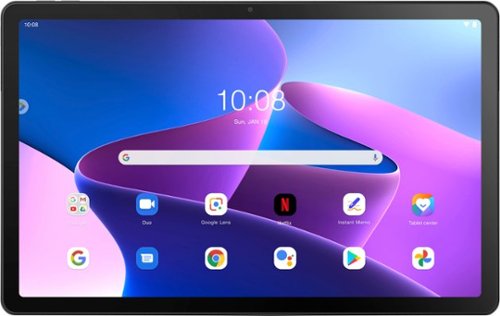
Lenovo - Tab M10 Plus (3rd Gen) - 10.61" - Tablet - 32GB - Storm Grey
Lenovo Tab M10 Plus is one impressive media tablet from the 3rd generation tab family. Its standout metal design gives you a premium look and feel with modern simplicity. Inside lies a 10.6" FHD IPS screen and four Dolby Atmos speakers for truly immersive entertainment. This is one tablet you will want to use and pass around the house.
Can the Lenovo Tab M10 Plus connect to a projector via a usb-c to hdmi adapter? I am reading elsewhere online that it does not work, but I had hoped to acquire this tablet for using with a projector.
No. This Lenovo Tab M10 Plus 3rd Gen Tablet, model number ZAAJ0006US, ships with 1x USB-C 2.0 (support data transfer and Power Delivery) port that does not have video out capability.
4 years ago
by
Posted by:
Lenovo Product Expert

Lenovo - IdeaPad Duet 3 Chromebook 2-in-1 Laptop - 11" 2K Touchscreen - Snapdragon 7cG2 - 4G RAM - 128G eMMC - Keyboard - Misty Blue
Fast, flexible, and fun, the Lenovo Duet 3 Chromebook 11" laptop brings everyone~s favorite Chromebook features, housed in a slim chassis, running on the lightning-fast Chrome OS that boots up in seconds, updates automatically, and is protected by built-in virus protection. Powered by Snapdragon SC7180 processor offers up to 10 hours of battery life, to seamlessly run all of your favorite apps at the same time.
Does this Chromebook support bluetooth?
Yes. This Lenovo Chromebook Duet 3 11, model number 82T6000EUS, ships with Bluetooth 5.1 Version capability, built in.
4 years ago
by
Posted by:
Lenovo Product Expert
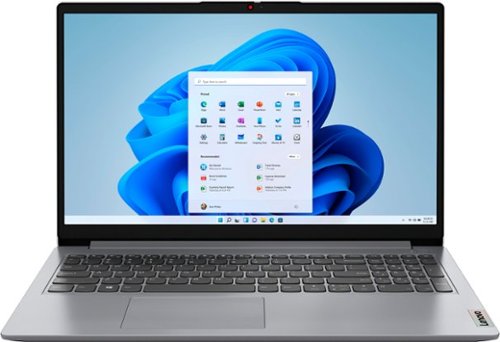
Lenovo - Ideapad 1 15.6" FHD Touch-Screen Laptop - Ryzen 7 5700U - 12GB Memory - 512GB SSD - Cloud Grey
Browse, explore and connect with confidence on the Lenovo IdeaPad 1 powered by ultra-fast AMD Ryzen~ 5000 U Series Mobile Processors on selected models. The IdeaPad 1 packs responsive performance in a thin and compact 17.9 mm chassis, making multitasking on-the-go a breeze. Get the most out of your device with a frameless display for more screen and Dolby Audio~ speakers, along with 10 hours of battery life and rapid charge. Great for video calls, the 1MP camera comes with a privacy shutter to keep out spying eyes, as well as Smart Noise Cancelling to eliminate background noise.
can it play a CD?
This Lenovo IdeaPad 1 15 laptop, model number 82R4002PUS, does not have a built in CD/DVD drive. You can use an external, USB-based, Windows compatible CD/DVD drive with this laptop, like this one: https://www.bestbuy.com/site/lg-8x-external-usb-double-layer-dvdrw-cd-rw-drive-black/5852919.p?skuId=5852919
4 years ago
by
Posted by:
Lenovo Product Expert
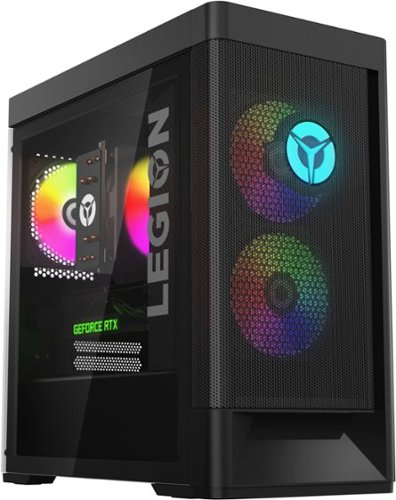
Lenovo - Legion Tower 5i Gaming Desktop - Intel Core i5-12400 - 16GB Memory - NVIDIA GeForce RTX 3050 - 256GB SSD + 1TB HDD - Black
Dominate your competition with the savage power and blistering speeds of your essential battlestation: the Lenovo Legion Tower 5i. 12th Generation Intel Core processors and the latest NVIDIA GeForce graphics cards deliver a stunning show of force with speed-barrier-breaking refresh rates at 4K, along with cool and quiet performance in a compact casing marked by a clean design and build.
this model of the Lenovo Legion tower 5i, the model number 90SU000RUS, how come i cannot find this exact model anywhere on the internet. is this legit lenovo? and will the product even be whats shown in the picture?, since whats in the picture isnt a 5i.
This Lenovo Legion Tower 5i Gaming Desktop Computer, model number 90SU000RUS, is a Best Buy exclusive configuration and not available at Lenovo.com. Here is a link to the complete parts list for this model configuration: https://pcsupport.lenovo.com/us/en/products/desktops-and-all-in-ones/legion-series/legion-t5-26iab7/90su/90su000rus/parts/display/model
4 years ago
by
Posted by:
Lenovo Product Expert