Lenovo Product Expert
Lenovo Product Expert's Stats
Reviews
- Review Count0
- Helpfulness Votes0
- First ReviewNone
- Last ReviewNone
- Featured Reviews0
- Average Rating0
Reviews Comments
- Review Comment Count0
- Helpfulness Votes0
- First Review CommentNone
- Last Review CommentNone
- Featured Review Comments0
Questions
- Question Count0
- Helpfulness Votes0
- First QuestionNone
- Last QuestionNone
- Featured Questions0
- Answer Count37808
- Helpfulness Votes24,825
- First AnswerApril 21, 2014
- Last AnswerOctober 9, 2026
- Featured Answers0
- Best Answers2827
Lenovo Product Expert's Reviews
Lenovo Product Expert has not submitted any reviews.
Lenovo Product Expert's Questions
Lenovo Product Expert has not submitted any questions.

Lenovo - Chromebook 3 11.6" HD Laptop - Celeron N4020 - 4GB Memory - 64GB eMMC - Onyx Black
Fast, flexible, and fun, the Lenovo IdeaPad 3 Chromebook 11" brings everyone~s favorite Chromebook features, housed in a slim chassis, running on the lightning-fast Chrome OS that boots up in seconds, updates automatically, and is protected by built-in virus protection. Powered by Intel Celeron processor offers up to 10 hours of battery life, to seamlessly run all of your favorite apps at the same time.
can i work with javascript

That will depend on the requirements and compatibility of the specific APP you want to use. This Lenovo Chromebook 3 11, model number 82BA001FUS, ships with the Chrome Operating System installed and is compatible with Google Play Store APPs. Not all Google Play Store APPs are optimized for the Chrome OS. We recommend you check with the specific APPs software publisher's web site, of the APP you want to use, for their compatibility with the Chrome operating system and the minimum/recommended hardware requirements (Is a Graphics card required, the processor speed and the minimum required system RAM and the minimum available hard drive space) to run their program, then compare those requirements to this Chromebook's configuration.
4 years, 1 month ago
by
Posted by:
Lenovo Product Expert
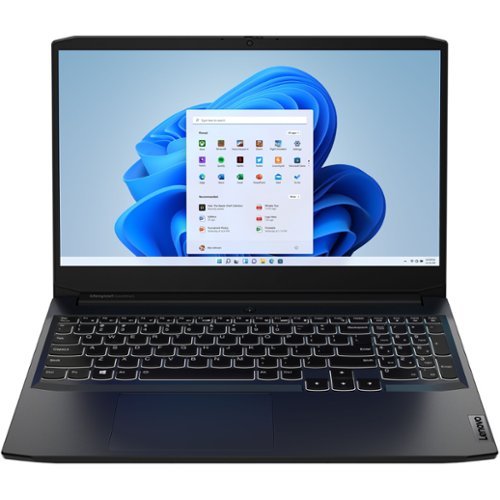
Lenovo - IdeaPad Gaming 3 15IHU6 15.6" Gaming Laptop - Intel Core i5 - 8 GB Memory - NVIDIA GeForce RTX 3050 - 256 GB SSD - Shadow Black
Lenovo Gaming 3 Series. Experience gaming like never before on the IdeaPad Gaming 3i laptop powered by an Intel Core processor. Play and stream PC games at peak performance on the IdeaPad Gaming 3i with up to 4.4GHz clock speed, 4 core, 8MB cache, NVIDIA GeForce RTX 3050 Graphics, High Definition Audio, and Wi-Fi 6 with Bluetooth 5.0.
Can this work without a battery and just the adaptor that come with?
No. This Lenovo IdeaPad 3 15 Gaming Laptop, model number 82K1015EUS, ships with a Integrated 45Wh, Lithium-Polymer Battery installed that is not user removeable.
4 years, 1 month ago
by
Posted by:
Lenovo Product Expert
Lenovo - IdeaPad Gaming 3 15IHU6 15.6" Gaming Laptop - Intel Core i5 - 8 GB Memory - NVIDIA GeForce RTX 3050 - 256 GB SSD - Shadow Black
Lenovo Gaming 3 Series. Experience gaming like never before on the IdeaPad Gaming 3i laptop powered by an Intel Core processor. Play and stream PC games at peak performance on the IdeaPad Gaming 3i with up to 4.4GHz clock speed, 4 core, 8MB cache, NVIDIA GeForce RTX 3050 Graphics, High Definition Audio, and Wi-Fi 6 with Bluetooth 5.0.
it says it has no wifi card for the connectivity on the spec page. Is this correct?
No. This Lenovo IdeaPad 3 15 Gaming Laptop, model number 82K1015EUS, ships with the Intel AX201 NV WiFi-6 Chip installed for wide range/high speed 2x2 802.11ax frequency WiFi capability, which is also backward compatible to older a/b/g/n/ac frequency WiFi frequencies as well.
4 years, 1 month ago
by
Posted by:
Lenovo Product Expert
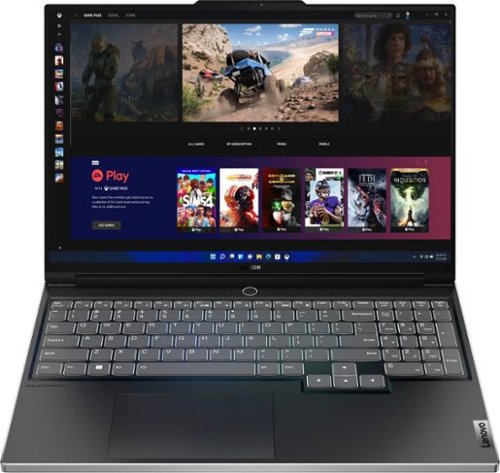
Lenovo - Legion Slim 7i 16" Full HD Gaming Laptop - Core i7-12700H - 16GB Memory - NVIDIA GeForce RTX 3060 - 512GB SSD - Onyx Grey
Engineered for those who know gaming is a way of life, the Lenovo~ Legion Slim 7, in Onyx Grey, is calibrated for next-gen creation and gaming alike. Redefine gaming experiences with the latest generation Intel Core i7 processor and NVIDIA GeForce RTX graphics that are AI-optimized via the Legion AI Engine, all the while cooled by the Legion Coldfront 3.0~s thermal system. The Legion Slim 7~s light and exhilarating design is further machined from an Aluminum and Magnesium blend that defies all basic laws of laptop engineering. Crush the competition in WUXGA for immersive gaming anywhere life takes you.
What is the tdp of gpu for this laptop ?
This Lenovo Legion Slim 7i 16 Gaming Laptop, model number 82TF000RUS, ships with the NVIDIA GeForce RTX 3060 GPU, with 6GB GDDR6 VRAM on the card and has a Boost Clock of 1605MHz and a TGP of 100W.
4 years, 1 month ago
by
Posted by:
Lenovo Product Expert

Lenovo - Yoga 7 16IAP7 16" Laptop - Intel Core i7 - 16 GB Memory - 512 GB SSD - Storm Gray
Yoga 7i. Stylish Portability and Performance. The Lenovo Yoga 7i combines versatile portability and enhanced productivity, thanks to the performance and responsiveness of Intel Core processors and vibrant FHD clarity with Intel graphics. Go anywhere with a sleek 2-in-1 metal chassis featuring thoughtful details including a webcam privacy shutter. Crafted from sandblasted anodized metal, the Yoga 7i's subtly rounded edges are designed to feel comfortable in your hands; and a 360 degree hinge offers stability as you transition from tablet to laptop mode and back.
What is the difference between this model and the 82QG0000US model?
The Intel Evo-Certified, Lenovo Yoga 7i 16, model number 82QG0000US, is an lighter, Arctic Grey case color while the Intel Evo-Certified, Lenovo Yoga 7 16, model number 82QG0012US, is a darker, Storm Gray case color.
4 years, 1 month ago
by
Posted by:
Lenovo Product Expert
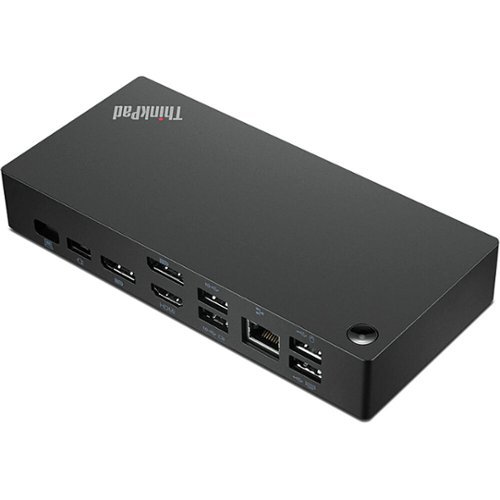
Lenovo - ThinkPad Universal USB-C Smart Docking Station - Black
Designed to enhance everyday productivity, the Lenovo ThinkPad Universal USB-C Smart Dock is at the cutting edge of our new series of docks offering a smarter way to work. A bridge to a more intelligent future, the dock features a rich array of data, display, and power ports, including universal USB-C compatibility, while driving incredible performance for commercial users and a secure cloud-based management solution for IT managers. And it~s all powered by Microsoft Azure Sphere.
Is this the Docking Station compatible with the Lenovo Thinkpad X13 2nd Generation laptop?
No. The Lenovo ThinkPad X13 2nd Gen Laptop, model number 20WK00JAUS, ships with 2x Thunderbolt 4 / USB4 40Gbps (support data transfer, Power Delivery 3.0 and DisplayPort 1.4a) ports. You will want a universal docking station that is compatible with Thunderbolt 4.0, like this one: https://www.bestbuy.com/site/lenovo-thinkpad-universal-thunderbolt-4-docking-station-black/6492406.p?skuId=6492406
4 years, 1 month ago
by
Posted by:
Lenovo Product Expert
Lenovo - Yoga 7 14IAL7 14" Laptop - Intel Core i7 - 16 GB Memory - 1 TB SSD - Storm Gray
Yoga 7i. Stylish Portability and Performance. The Lenovo Yoga 7i combines versatile portability and enhanced productivity, thanks to the performance and responsiveness of Intel Core processors and vibrant FHD clarity with Intel graphics. Go anywhere with a sleek 2-in-1 metal chassis featuring thoughtful details including a webcam privacy shutter. Crafted from sandblasted anodized metal, the Yoga 7i's subtly rounded edges are designed to feel comfortable in your hands; and a 360 degree hinge offers stability as you transition from tablet to laptop mode and back.
Does this model include a stylus? pen?
No. This Lenovo Yoga 7 14 Model Number 82QE001NUS, is compatible with an AES Protocol Active/Digital Pen, which is sold separately, like this one: https://www.bestbuy.com/site/wacom-bamboo-ink-smart-stylus-for-windows-ink-2nd-generation-gray/6374981.p?skuId=6374981
4 years, 1 month ago
by
Posted by:
Lenovo Product Expert
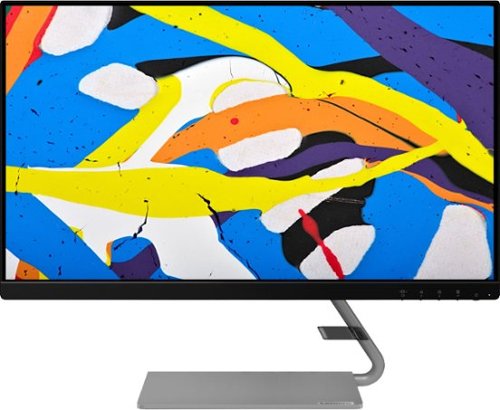
Lenovo - Q24i-1L 23.8" IPS LED FHD FreeSync Monitor Natural Low Blue Light Built-in Speakers (HDMI, VGA) - Black
Add a touch of class and confidence to your living space with the elegantly designed, ultra-slim Lenovo Q24i-1L monitor. Be it in the living room or the study, this sleek display with Full-HD resolution and NearEdgeless bezels bring beauty and functionality together in a perfect 23.8-inch package. Experience superior visuals with its In-Plane Switching display that makes the view from any angle striking. Bid goodbye to eye strain with Natural Low Blue Light and Eyesafe Display Certification that minimize harmful blue light and yellow distortions without impacting color accuracy. Moreover, T~V Rheinland Eye Comfort-certified panel ensures endless viewing comfort. Take your world of entertainment to the next level with the AMD FreeSync~ technology and dual speakers that offer seamless picture quality and rich audio for an immersive experience, every time.
Is this monitor portable?
This Lenovo Q24i-1L Monitor, model number 66C0KCC3US weighs 4.50 kg / 9.92 lbs with the stand attached. It has one power cord connection and one cable connection to the computer/video source that would need to be disconnected to move the monitor.
4 years, 1 month ago
by
Posted by:
Lenovo Product Expert
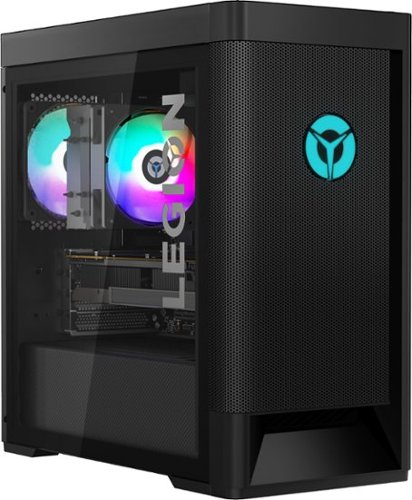
Lenovo - Legion Tower 5 AMD Gaming Desktop - AMD Ryzen 7-5800 - 16GB Memory - NVIDIA GeForce RTX 3060 - 256GB SSD + 1TB HDD - Raven Black
Engineered out of a passion for savage power and unmatched speed, the Lenovo Legion Tower 5 AMD delivers mind-blowing performance that combines AMD Ryzen processors and top-of-the-line NVIDIA GeForce graphics cards for blazing-fast frame rates at up to 4K resolution. Pushing far beyond the upper bounds of smaller rig configurations while keeping things cool and whisper quiet, the Legion Tower 5 is a marvel of build and design, accentuated by its illuminated blue LED logo and lighting, as well a transparent side panel that can properly showcase your internals.
If the desktop were to stop working and not start properly how much would it cost to be fixed
That will depend on the nature of the problem causing the system shutdown. Once you have setup your new PC, and before you start truly using the PC for what you purchased it for, create recovery media. This may allow you to restart your computer and repair issues that are software-based. Here is a link to instructions for creating a recovery media drive: https://support.microsoft.com/en-us/windows/create-a-recovery-drive-abb4691b-5324-6d4a-8766-73fab304c246. If your PC stops working and you do not have recovery media available, you can use another computer to go online to: https://pcsupport.lenovo.com/. Here you can select your specific computer model by inputting its serial number. You can select diagnostics and see a list of troubleshooting tips for your specific problem. You can also call Lenovo Legion Ultimate Support about issues with your Lenovo Legion Tower 5 at: 888-278-9707. Finally, you can contact your local Best Buy Store and make an appointment with the Geek Squad and have a Geek Squad Agent assess your computer's problem and provide an estimate of the cost to repair. Check with the Geek Squad Agent on the phone about the cost to evaluate your computer's problem before repairs are made as well.
4 years, 1 month ago
by
Posted by:
Lenovo Product Expert
Lenovo - Chromebook 3 11.6" HD Laptop - Celeron N4020 - 4GB Memory - 64GB eMMC - Onyx Black
Fast, flexible, and fun, the Lenovo IdeaPad 3 Chromebook 11" brings everyone~s favorite Chromebook features, housed in a slim chassis, running on the lightning-fast Chrome OS that boots up in seconds, updates automatically, and is protected by built-in virus protection. Powered by Intel Celeron processor offers up to 10 hours of battery life, to seamlessly run all of your favorite apps at the same time.
Can you play Sims?
That will depend on the requirements and compatibility of the game you want to play. This Lenovo Chromebook 3 11 ships with the Chrome Operating System installed and is compatible with Google Play Store APPs. Not all Google Play Store APPs are optimized for the Chrome OS. We recommend you check with the specific game's software publisher's web site, of the specific game version you want to play, for their compatibility with the Chrome operating system and the minimum/recommended hardware requirements (Is a Graphics card required, the processor speed and the minimum required system RAM and the minimum available hard drive space) to run their program, then compare those requirements to this Chromebook's configuration.
4 years, 1 month ago
by
Posted by:
Lenovo Product Expert