
Share 91preludesi's profile


91preludesi
91preludesi's stats
- Review count102
- Helpfulness votes161
- First reviewApril 13, 2008
- Last reviewJune 1, 2026
- Featured reviews0
- Average rating4.4
Reviews comments
- Review comment count0
- Helpfulness votes0
- First review commentNone
- Last review commentNone
- Featured review comments0
Questions
- Question count0
- Helpfulness votes0
- First questionNone
- Last questionNone
- Featured questions0
- Answer count10
- Helpfulness votes26
- First answerAugust 18, 2019
- Last answerMay 17, 2021
- Featured answers0
- Best answers2
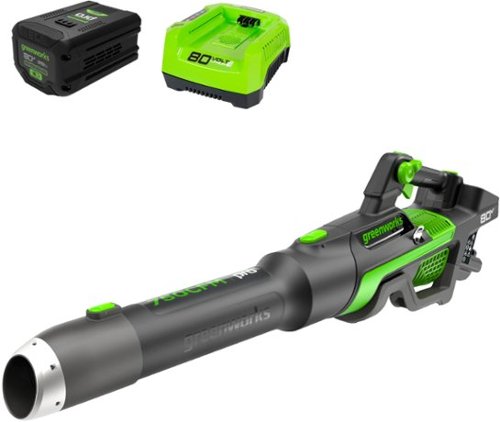
Heavy, wet leaves and other stubborn debris are no match for the Greenworks 80V battery powered handheld leaf blower. The jet fan design provides up to 750 CFM of constant airflow for blasting through heavy, wet leaves and tough debris with ease; and a variable speed trigger delivers on-demand power and up to 170 MPH of high-velocity air speeds. It~s one of the most powerful battery-powered handheld blowers in the industry, with Greenworks exclusive Intelligent Power that combines Brushless motor technology, lithium-ion battery power, and ultra-fast control systems for power output equivalent to a 26cc gas-powered motor. Includes 2.5 Ah battery and rapid charger. Battery is compatible with 75+ Greenworks 80V products. Life. Powered. By Greenworks.

Posted by: 91preludesi
I got this blower because my old gas powered blower needs some work and it was a pain dealing with the maintenance of it. I wanted a battery powered blower where all you have to worry about is having a charged battery.
Out of the box, it comes with two nozzles, a battery and the charger. Setup is as simple as snapping it together and putting the battery in. It arrived with 1 bar of battery (out of 3). I charged it first and then started to use it. I expected it to last a while being an 80-volt battery, so I didn't pay attention to how long it ran. I blew the leaves off the grass at the top of the driveway and it died. Being a lithium-ion battery, it died instantly. I pulled the trigger and nothing happened. It was such a short run time that I thought that there was a problem. I pushed the button on the battery to check it and no lights came on.
I then went to charge the battery. I plugged the charger in and inserted the battery. The charger has a very loud fan. I charged it in the garage and went inside to the living room. My living room shares a wall with the garage. Sitting on the couch I could hear the charger fan running in the garage! Once it was done charging, I decided to do a timed run. I started my timer and set the cruise control to full power. I got through most of the driveway and the grass next to it and it died again. I checked the timer and it was exactly 10 minutes. I did this test again and once again it ran for 10 minutes and died. I got through half of the 4' wide patch of grass next to my driveway by the woods and I gave up.
I wanted to blow the leaves out of my front yard, but I live on one acre. It would probably take me 50 charges to get it done. It's just not worth it. I have an 80-volt weed eater from a big box home improvement brand (think blue). I can use it at full throttle for 30 minutes per use for an entire season (about seven months where I live) before I need to charge that battery. That's about 14 uses between charges. I'm not saying this blower should last an entire season on one charge, but I should at least be able to blow off my driveway on one charge!
If you have a very small area (1/4 acre or less), this might be perfect for you.
Some pros are that it's not as loud as a gas-powered blower, although it's not incredibly quiet either. It has cruise control, which is nice that you don't have to continually hold the trigger. It is a fully variable trigger/cruise control. The different nozzles are easy to attach and remove. It breaks down to be fairly compact. It's powerful enough to get the job done, while it has power.
As far as cons, for me, it's not worth pulling out and using. I'll probably just use it to blow out the garage. At least I can get that done on one charge! With the massive battery, it is fairly heavy. You'll be switching hands often. It has a loop for a strap, but that's a separate accessory that you have to buy. Something that simple and cheap should be included in my opinion. The battery life is absolutely terrible. Running for 10 minutes is pointless. Sure, the company will tell you to barely pull the trigger so that it's running at minimal power, but that's not enough to move the leaves. I cannot recommend this blower. Steer clear and find something else.
No, I would not recommend this to a friend.
Share this review:


+1point
1of 1voted this as helpful.
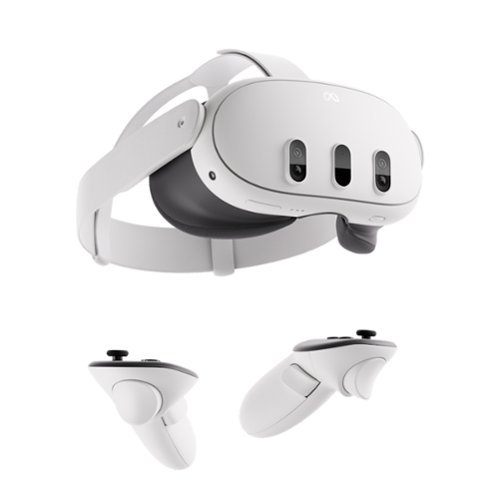
Get ready for the most powerful Meta Quest yet*. With mixed reality, stream shows on giant vibrant screens that you can adjust to the perfect size ~ all while you see the world around you. Dive into full immersion, where you~ll feel like you~re actually inside your favorite games, thanks to brilliant 4K resolution and rich spatial audio. With Infinite Display, enjoy the widest field of view of any Quest for the most immersive experiences yet. The slim, wireless design offers you premium comfort to move freely in workouts, or easily take your headset on the go. From complex games to vibrant movies, enjoy the ultimate experience with the power of Meta Quest 3. *Based on the graphic performance of the Qualcomm Snapdragon XR2 Gen 2 platform vs the Meta Quest 2 platform.
Posted by: 91preludesi
This is my second experience with VR. My first was the Samsung one that I got with my S8+ phone many years ago. It wasn't anything close to the Meta Quest 3. You snapped your phone into the headset to have VR. This being a complete standalone VR headset is miles ahead.
First, after the initial setup, I set my home as the spaceship. Then I played the game from there. It had me map the room that I was in, which was simply walking around and looking around the room so that it could see the obstacles. I was in my living room, so the couch, coffee table, Christmas tree, end tables and TV were all mapped out. Then the game began. A little space ship broke through the ceiling. Pieces of the ceiling that were broken then landed on the floor, and some landed and stayed on the ceiling fan. Little fuzzy balls started cracking the walls and coming into the living room. You then shoot them to collect them. By the time I was finished, most of my walls were gone, revealing a completely different world behind it.
It comes with Batman: Arkham Shadow (not my normal type of game) so I decided to try it. I've got to say, it's amazing. Although I typically play FPS (Battlefield) and racing games, I was drawn into the world. Actually being in it changes everything. Being able to turn your head to look around versus pushing a joystick was great. It's a lot more realistic to how things work in the real world. To climb a ladder, you reach up and grab a rung and pull up, then put your next hand on the next rung and climb. I will say that some motions can be tricky. For example, I play sitting down. Your Batarang is on your belt, so you're supposed to reach down to your waist to grab it. While sitting down, reaching down to your waist doesn't move your arm far enough for the game to know that your hands are at waist level. I spent 5 minutes just trying to grab it before finally giving up. If I stood up, it was no problem to grab it. That takes you out of the experience quickly.
The Meta Horizon Worlds are interesting. You can play mini games, watch concerts, and explore a lot of other things to do. I went to VR experiences and watched people climbing Everest. It was like you were right there with them. Looking around from the top of the world was amazing.
A couple of downsides for me were the experience with the Batman game not knowing that I was reaching for my belt, and occasionally the screen is off-center. The only thing I can come up with is if you are not looking straight ahead when that screen comes up, it will be off-center. You then have to go into the Quest menu and reset the center point.
There are features to help avoid motion sickness, which can easily occur with VR. I did notice on a longer play session that I did get a little nauseated, so I just stopped for the night. That feeling did last for about 30 minutes afterwards. There is so much to see and do. From playing games, to watching TV and movies, I've only begun to scratch the surface, but my time with it so far has been amazing!
I would recommend this to a friend!
Share this review:


0points
0of 0voted this as helpful.
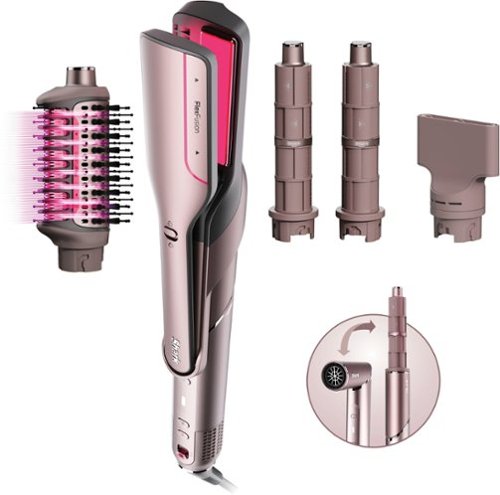
Shark FlexFusion Straight is the only luxury multi-styler with air straightening. Powered by FlexFusion Style-Safe Technology, combining powerful airflow and heat-controlled ceramic to transform your hair from wet to silky straight with ZERO hot tool damage*. Now smaller, lighter, and more powerful than the original FlexStyle and complete with scalp shield mode to embrace your healthiest hair. *in wet-to-dry mode.
Posted by: 91preludesi
I bought my wife the original the original Shark FlexStyle and she's always loved it. The FlexFusion is an absolute upgrade to the original FlexStyle. While it comes with different attachments than the FlexStyle, in my opinion, they're an upgrade. The new FlexFusion is more powerful, smaller, and lighter than the FlexStyle.
First, full disclosure, I'm a man. I got this mainly for me, although I know my wife will be using it a lot as well. The main reason that I got it was for my beard. I have a longer beard and it's always been a pain drying and straightening it after a shower. I have a heated beard straightener comb, but it's never done very well. About all it did was make my hair sizzle and leave it tangled. I used the FlexFusion air straightener and it's amazing! In a couple of minutes my beard was perfectly straight, smooth and tangle free! It's never felt or looked this good.
This set comes with the hair dryer, auto-wrap curlers, wet-or-dry fusion air straightener and the wet-or-dry fusion brush, as well as a styling concentrator. The core of it is the hair dryer. There are three different fan speeds. Low, medium and high. I would say that the low setting is about what you get out of a typical hair dryer. On high, this thing has some force. You can feel it pushing back against your hand. You will get you hair dry much faster with this. There are heat and cool settings. It also has scalp shield which automatically adjusts the temperature to protect your scalp from too much heat. Most typical hair dryers just continually heat up, this one maintains the temperature.
I had my wife try the curlers, air straightener and the brush. She loved them all. On her original FlexStyle it came with the FrizzFighter finishing tool, which she used as a straightener. It worked well, but she said the Fusion air straightener was much better. The Fusion brush gave her noticeably more volume. She's a redhead with thinner hair and I definitely noticed a difference in the volume. Having the heat and air coming through the accessories changes everything. Now you don't have to blow dry while combing. With this, you can eliminate your separate curlers and straightener. It's all in one.
I would recommend this to a friend!


Share this review:


0points
0of 0voted this as helpful.
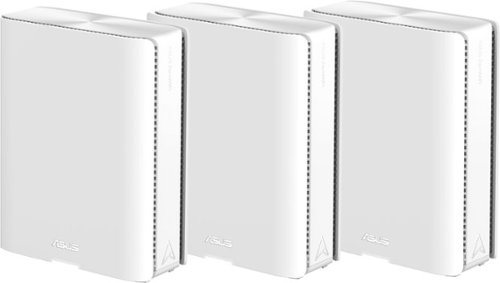
Award-winning meshes bring next-gen Wi-Fi 7 speeds of up to 30 Gbps, extendable coverage of up to 11000 sq. ft. (3pk) for your worry-free smart home.
Customer Rating

5
Great for a lot of devices and large coverage area
on November 3, 2024
Posted by: 91preludesi
My last router died so I went back to my really old router to have something while searching for what router I wanted to get next. It's great how much they've advanced in a relatively short period of time. While we don't have the biggest home (about 1480 sq. ft.), it is anything but an open floor plan. We've always struggled with the far reaches of the house getting a good signal due to the router signal having to go through several walls.
I previously had a mesh system before my last router (geared towards gaming), and it's great for our setup. This mesh router supports up to 200 devices. It sounds like a lot until you start to realize how much is connected to your router. I have a TV in the garage, 4 more in the house and a camera outside of the garage and this router easily covers everything. Even in slower times when not as much is being used, we have about 30 things connected to the router. During peak times, that number jumps significantly. For me, setup was quick and easy. You just connect the main router and then the nodes, then place them where you want them. Download the app and scan the QR code on the main router. For us, the main is in the living room, node 1 is in our bedroom and node 2 is in the dining room (closer to the garage). This gives us ample coverage throughout the house and yard.
One great feature is the additional IoT network. I use this network separately running only 2.4G for devices that only support 2.4G. It's perfect for IoT devices like cameras, thermostats, smart plugs/lights, etc. Having this separate allows you to modify settings on the main network without affecting these devices. since their settings rarely change. On previous routers I would constantly have to keep changing these devices back to 2.4G because the routers would keep trying to put them on 5G, and they wouldn't work with it.
The app has a lot of features, most people won't use the majority of them, but it's nice to have. You can see real-time traffic information, see which devices are connected to which node, use parental controls for kid's devices, a speed test, and a huge bonus is the ability to use the app to turn off the LED light. Of course, the light shows you the status, but for the one in our bedroom, I turned the light off as it was annoying shining in the dark. None of my previous routers had this feature. The best you could do was to cover the light. I can check the status in the app, I don't need a light to see the status. It has AiProtection which secures the network. The funny thing is, it has protected against 63 events and 62 of those (spam, phishing and malware) have been against my wife and daughter's iPhones. There's only been one attempt against my Samsung phone so far. It's nice that it is behind the scenes blocking things before they even get to the phone. It also has family member grouping so that you can group all of the smartphones/tablets of your kids and limited them all as one. Overall, I've had zero issues and it's been great. Our speeds are faster than they've ever been and it's worked flawlessly. Although pricey, it's definitely worth it if you have a lot of devices and/or a large coverage area.
I would recommend this to a friend!



Share this review:


0points
0of 0voted this as helpful.

Shark StainStriker HairPro is a portable spot & stain remover designed to tackle stains and odors with 3x more pet hair pick-up* without clogging, clumping, or tangles.
Posted by: 91preludesi
We've had a regular Shark vacuum for a few years and absolutely love it. We've also had another spot pet cleaner (I'll call them competitor B if that tells you anything). While it worked, it wasn't great. When I saw that Shark had a pet mess cleaner, I had to try it. We have three cats and two dogs, so there's always some mess happening.
First, out of the box, this thing is compact! It's more of a square design than my former large oval pet cleaner. It has basically five different attachments. The first is permanent on the hose. It's the mini stain eliminator. It's perfect for tiny spot stains, or stains that are up against the wall. There is also a 3.5" stain eliminator, a 7" stain eliminator, a pet mess extractor and a pet hair extractor tool. I've always used hot water with my older pet stain cleaner, but the Shark says NOT to use hot water. Warm water is okay to use, but I just used cold water.
The clean water/solution tank pulls off and you fill with water to the water line and then add the deep clean pet formula to its mark. When you replace the tank, there is a noticeable click to let you know its seated properly. You then remove the StainStriker tank and fill it with the OXY Multiplier. That tank also seats with a nice click. It has instructions on various stain types and how to best remove them (wet vs. dry stain for example).
Knowing that I was getting this, and against my better judgement, I left a stain for about a week. It was the first one that I used it on. I simply sprayed it and let it sit for a couple of minutes and then sucked it up in a couple of different directions. It took two runs, but it was gone. I then went around to other stains and had the same results. Bear in mind that I have old carpet (about 23 years old), so it's never going to be perfect anyway, but the StainStriker easily pulled out the stains. My old pet mess cleaner wouldn't have gotten those out very well and it was a pain to clean it.
There are a couple of great features on the StainStriker. First, it's incredibly easy to clean. The dirty water tank comes off with a pull of the handle. If you rotate the handle all the way back, the lid comes off to dump and clean it. Inside the dirty water tank is the hair filter (pictured with the yellow handle). It caught all of the hair (both pet and my wife and daughter's!) before it ever went into the dirty water tank. You can simply pull on the yellow hand to remove it from the basket and throw away the hair. Also under the dirty water tank is an air filter. It had a little bit of hair around it, but you simply remove it and the hair rinses away easily.
One of the hardest things to deal with on my old cleaner was cleaning the attachments. Although you could remove the clear plastic top piece, it was hard to get into all of the places and get everything clean. The StainStriker has a Rinse & Go Self Wash Cycle. It's on the back of the unit at the top. You simply place the hose attachment on it and it sucks up the fresh water/cleaning solution through the tool to self clean. That's brilliant and it works great! No more pulling off attachments and trying to clean them in the sink. The suction on this thing is also far beyond my old one. It is very powerful and helps to clean and dry and area quickly. The Deep Clean Pet formula had a slight floral scent to me, but it wasn't overpowering and not noticeable after it dried.
My only complaint is that you have all of these attachments and there is no storage on the StainStriker for them, so you'll need a cabinet or shelf to store those on. You only have the option to have one of them attached to the hose while it's stored on the unit. With that said, there's nothing better out there. Don't skip this if you don't have pets either. This would be perfect for kid (and adult) messes also!
I would recommend this to a friend!





Share this review:


+2points
2of 2voted this as helpful.

Meet the Ninja DoubleStack XL Smart 2-Basket Air Fryer, the only stacked 2-basket air fryer that can cook up to 4 foods at once. Designed for efficiency, versatility, and easier family-sized meals, Ninja~s stacked 10-QT design maximizes counter space while giving you the power and capacity of 2 air fryers in the footprint of 1. Only Ninja has DoubleStack Air Frying technology that delivers the optimal air flow and even heat required to cook 4 foods at once for crispy, golden perfection every time. Also included is Ninja~s Smart Cook System. Ninja's Smart Cook System allows you to achieve the perfect doneness at the touch of a button with the integrated Foodi Smart Thermometer~no guesswork required. Simply load your veggies onto the crisper plate, insert the stacked meal rack into the basket, and place your proteins on top to cook 2 different foods in one basket. Two 5-QT baskets allow you to simultaneously prepare different dishes, making multi-tasking in the kitchen a breeze. Cook more food in a smaller footprint~easily fits two 5-lb chickens or 5 lbs of wings in each drawer. Perfect for smaller kitchens, enjoy delicious homemade meals while keeping your countertops clear of clutter. * vs NINJA AF080 (power) and CHEFMAN 5QT Air Fryer
Posted by: 91preludesi
We've had the Ninja Foodi air fryer for years and loved it. However, it was always a pain with a family of four. Even just doing fries, we had to do two batches to have enough. The DoubleStack XL solves that problem!
The DoubleStack XL is smaller width wise than our Foodi, which is nice. It is of course a lot taller. As such, we just leave it on the counter as there's no cabinet space big enough to store it. We use it often enough that we just leave it out. Something to note is that the air vents on it are on the right side at the rear. You'll want to have a clear area next to it to not overheat anything. There is a learning curve with this thing. It's not just the simple set a time and temperature like the Foodi, but you can do so much more with it. It's not bad, just different.
First, there are obviously two baskets for two different cooking zones. Each basket also has a stack rack, one for each basket to elevate food. This gives you the option to cook four different foods at once (assuming that two and two cook at the same time/temp.). There are six functions with this air fryer. Air fry, air broil, bake, roast, reheat and dehydrate. There is a thermometer which can be used with the bottom basket. Perfect for steak, pork chops or fish to get your perfect doneness.
A couple of really great features are Smart Finish and Match Cook. Smart Finish allows you to cook two different things which may have different cook times/temperatures or functions (air fry vs roast for example) at the same time. You set the time, temperature and function of zone one, then zone two. When you press start, the zone with the longest cook time will start. The other zone will hold and wait to start until the end times will match. You could have something in the top basket that takes 30 minutes to cook and something in the bottom basket that takes 15 minutes to cook and they will both finish at the same time. You don't have to try to remember and time it properly, it does it for you.
Match Cook allows you to cook more of the same food in both baskets. This is great for us, since we do a lot of fries at once. Now we no longer have to do two batches back to back like we did before. One thing that I haven't figured out is why it takes longer to cook in the DoubleStack than it did in the Foodi. For example, we used to make one pound of fries at 375 degrees for 18 minutes. The double stack is 400 degrees and takes 20-25 minutes for one pound or 35-40 minutes when using both baskets (two pounds). If you do two pounds in both baskets the cooking time is over an hour for fries! The booklet that comes with it has a ton of foods on the air fry cooking chart along with several recipes in the back. Cleanup is simple, you can put the baskets and crisper plates in the dishwasher. Note that they say to extend the life of them they recommend hand washing.
It took some getting used to, but overall we love this thing! It makes dinner time so much simpler. Whether you've had an air fryer before, or this is your first one, I highly recommend getting the DoubleStack XL.
I would recommend this to a friend!
Share this review:


0points
0of 0voted this as helpful.
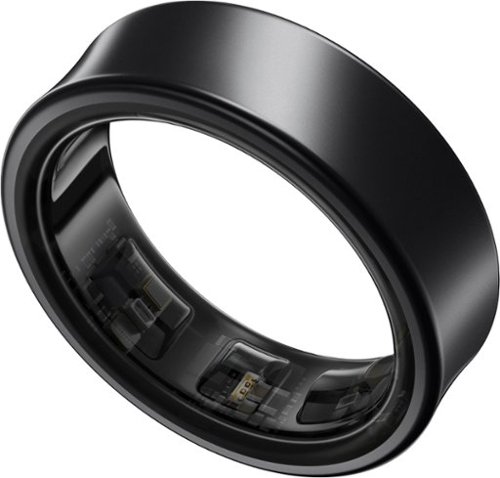
Get a deeper understanding of your body with the all-new Galaxy Ring. Merging the convenience of a wellness tracker with the timeless elegance of a sleek band, Galaxy Ring helps go-getters track their busy days in style. Packing the latest tracking innovations into a compact design that fits comfortably on your finger, Galaxy Ring tracks the valuable wellness insights you need to keep a pulse on your life, from the conference room to the yoga studio to dinner with family and friends. Enhanced by Galaxy AI,~ Galaxy Ring gives you new ways to feel amazing, like Energy Score ~ just open your phone to learn how ready you are to take on the day. You~ll also get a great night~s rest while Galaxy Ring does its thing ~ this sleep tracker is so comfortable, you~ll hardly know it~s there. The feather light silhouette slips seamlessly into your life with a durable design~ that allows you to wear it confidently from your morning shower to the gym, while a long-lasting battery~ lets you track insights for up to six days~ in between charges. Slip on a new, easier way to keep your health on track ~ Galaxy Ring
Customer Rating

4
A nice addition to the Samsung Wear family.
on August 15, 2024
Posted by: 91preludesi
I got this ring as an addition to my Samsung ecosystem (phone and watch). I wanted something that I could wear while sleeping. I don't wear my watch to bed. It's just too bulky.
First things first. Get the Galaxy Ring Sizing Kit to find your perfect size. Something that I did not do that you should is that when you find a size that works, wear the sizing ring for a while doing your normal activities. I only wore it for about 10 minutes to get my size. What I didn't take into account is how much my fingers swell while I'm working.
Out of the box, the ring is in a clear charging case. It's sturdy and comes with a USB-C to USB-C charging cable. The case is also compatible for wireless charging. Syncing the ring to the Wear app is simple. Just open the app on your phone and open the charging case and your phone will find and pair the ring.
Pros:
Battery life. The battery life on the Galaxy ring is incredible. I got five and a half days out of the initial charge. I decided to charge it when the battery level got to 39% so I wouldn't take a chance of it dying while I was at work.
Health tracking. When wearing the ring consistently it gives you a daily energy score. This score is based on several factors. Average sleep time, bed/wake time consistency, sleeping heart rate, sleeping skin temperature, etc. Under the sleep tab you can find how long you slept, physical recovery, sleep cycles, etc. It tracks the different levels of sleep. Awake time, REM sleep, light sleep and deep sleep and gives you a graph of each type. It also tracks your blood oxygen level during sleep. It also tracks and records your snoring. The first night it showed that I snored for 31 minutes. The next night it said that I snored for 7 minutes. Although, I will say that my wife said that it must have missed some because according to her, I snored much longer than that. So maybe take that with a grain of salt.
It also has a find my ring feature. There are two green and one red lights on the sensors. They are of course tiny, but using the find my ring feature the red and green lights flash in an alternating pattern. You would need to have a completely dark room and have the lights facing you to notice them. Another feature of the lights is that they are a (limited) battery level indicator. They can't tell you exactly what the battery level is, but if you take the ring off and the green lights flash you have more than 15% battery left. If the red light flashes the battery level is below 15%.
The sensors must be positioned on the bottom of your finger to work properly. There is a little ridge on the outside of the ring to indicate where the sensors are. They are not noticeable when wearing the ring.
Durability. I make hydraulic hoses and sell adapters. All day long I'm working with metal. I have intentionally been extremely rough with this ring. While I do wear nitrile gloves when making hoses, I have to put a lot of force on some fittings to get them onto the hoses. I have had 1,000s of metal fittings and adapters banging against the ring day after day. I have yet to see a single scratch or blemish on the ring. The only thing I could do to be harder on this ring is hit it with a hammer. I've seen that other people are saying that it scratches easily. I can't imagine what they are doing to get that to happen. It may be different colors that do not hold up so well. For me, the black has been great.
Cons.
There aren't many, and my situation may be unique because of what I do, but this ring can hurt. I initially sized the ring (13) to wear on my index finger of my right (dominate) hand. However, after a couple of hours at work my fingers swelled so much that I couldn't get it off. I had to run my hand under cold water to get the swelling to go down and get it off. I have since switched to wearing it on my middle finger. The fit is much better. I've been wearing a silicone wedding band for years. Being silicone, it is soft and flexible, I don't notice that I'm wearing it. With this ring, if I'm not working I don't notice it. However, at work I feel it all day long. When I'm squeezing something tight and my fingers are pinched together, I feel the ring in my adjacent fingers. It gets to the point to where it's quite painful and the points where the ring pushes against the other fingers stays sore. As I said, that is probably unique to the type of work that I do, but it's something to think about if you do something similar, like a mechanic who is holding wrenches all day. I know that it has to be a solid ring due to what's inside it, but it's making me second guess wearing it all of the time. I might just resort to wearing it when I sleep and on the weekends. With that said, I do recommend it if you're already in the Samsung ecosystem. It has a lot of great features and for most people, they will never experience the cons that I feel with it.
I would recommend this to a friend!



Share this review:


+1point
1of 1voted this as helpful.
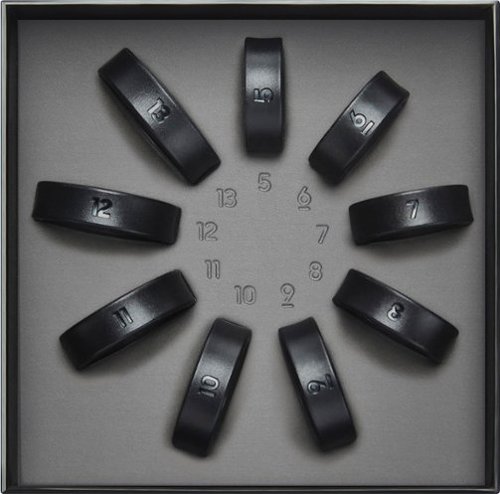
Finding your Galaxy Ring size is a breeze with our Galaxy Ring Sizing Kit. Simply select your best fit from a variety of sizing options and receive a $10 Best Buy Gift Card towards your future Galaxy Ring purchase.
Posted by: 91preludesi
You absolutely need to get the Galaxy Ring Sizing Kit before purchasing the ring. The ring may not be your normal size. The ring sizing kit has the shape of the sensors built into each one so that you can get an exact fit. If you're going to spend the money for the Galaxy Ring, you need to spend a few dollars on the sizing kit first. It's well worth it! One thing that I suggest doing (that I didn't and learned the hard way) is to actually wear the sizing ring for a while. Do what you normally do and make sure it fits the same throughout your day. I wore it for about 10 minutes on the hand and finger that I wanted to wear my Galaxy Ring on and that was it. After getting my ring and wearing it at work, I discovered just how much my fingers swell throughout the day. It became tight on my pointer finger on my dominate hand and I couldn't get it off. I had to hold my hand under cold water for a while and then it came off. I have since moved it to my middle finger and that has worked fine. I have larger knuckles, so it's hard to get it off some times.
The sizing kit comes with whole sizes 5-13. There are no half sizes, so you will need to find which whole size is best for you. This gives you 9 options. I understand with what it takes to make these rings that adding half sizes would add a lot more that they would have to build, but it would be a nice option to have. Not having half sizes is the reason it isn't 5-stars for me. Other than that, you should definitely get the sizing kit first since it is specific to the Galaxy Ring.
I would recommend this to a friend!
Share this review:


0points
0of 0voted this as helpful.
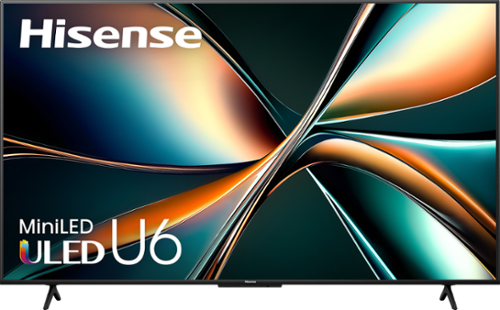
Things are looking bright! The U6 series smart display from Hisense makes Mini-LED accessible to everyone. Mini-LED along with QLED Quantum Dot color technology create a more colorful and realistic picture that appears sharp no matter the light. Whether you~re a move buff, sports fan or gamer, experience the lasts in cinema-quality technology from the comfort of your own home.
Posted by: 91preludesi
Years ago I would walk in to Best Buy and see all of the big name/high priced TVs and I absolutely wanted one. However, several years ago I got my first Hisense 65" TV and I haven't looked back. This makes my third Hisense TV. They all still work great. I have one in the bedroom, this one in the living room and my former living room TV is now in the garage.
First, the picture quality is excellent. I would put it up against the big name brands. Are theirs a little better? Sure, but is that worth double or even triple the price? I personally don't think so. The colors are bright and vibrant. Blacks are truly black. Out of the box, I found most of the settings were fairly spot on. This TV has tons of adjustments for the picture. Everything from your basic brightness setting to specifically the black level and dark detail. You can set the active contrast level to really make the images pop. I find that Dolby Vision IQ handles everything well.
The remote is often overlooked, but this one is great. It is backlit which is great for nighttime viewing. Simply touch it or pick it up and it lights up. There are dedicated buttons for Netflix, YouTube, Prime Video, Disney+, tubi and a "heart" (or favorite) button. In the settings, you can set this button to your most used service that is not already there. I've set ours to open Hulu. It doesn't have number buttons, but it does have a button for numbers. Pressing this brings up the numbers on the screen that you can select. I don't mind this as it (and the TV itself) have voice controls, and I don't really use anything that would need them anyway.
As far as gaming goes, the first thing I noticed when I started my PS5 was that the TV switched to game mode. This helps with the Variable Refresh Rate and response time when gaming. However, I did notice that it made the brightness far too dark for what I like, so I had to make adjustments to it to get it where I wanted it. Another thing that I found was that if you press the menu button on the remote, it takes you to a menu bar on the TV. It's like a quick access button to various settings. These include, picture settings, picture mode (so you can quickly switch between Dolby Vision IQ, IQ Dark, IQ Custom and IQ game modes), sound, game settings, sleep timer, etc. You can also edit it to include up to 26 of the settings, so you can customize it to what you need the most, and remove the ones you don't need. The interesting one is the "Game Bar". Going to this allows you to get to the settings for gaming. It has dark detail, brightness, instant game response, crosshair and more. If you go to more settings, you can enable your FPS viewing (showing the current frames per second on the screen) and you can set it to any of the four corners. The crosshair setting is interesting. I've only seen it on PCs. While all shooting games have a crosshair, having it from the TV in the exact center can be helpful. There are six different crosshair types, so you can choose the one that works best for you.
A couple of things that could be improved. First, I did notice some bloom in one specific instance. A guy was being interviewed outside. It was a fairly bright background and he was wearing a black cowboy hat and dark blue shirt. At first I didn't pick up on what I was seeing, I just noticed something was "off" about it. I paused it and then noticed the bloom around him. It was like he had a bright white aura around him. I spent about 20 minutes playing with various settings (brightness, color, contrast, local dimming, etc.). I was able to make it less noticeable, but it never went away completely. I haven't noticed it any other time than that one particular scene. With the TV having a microphone, they give you the ability to turn it off. However, when you do, 4 yellow LEDs turn on next to the switch at the bottom of the TV. They are fairly dim, but still noticeable. Mine is covered by my soundbar, so it doesn't bother me. If you have the TV mounted or it's not covered, you may find this annoying. There doesn't seem to be a way to disable them, so you would probably just have to cover it with tape or something to not see them. I wish there was a little more room between the HDMI ports. I use a Fire Stick and with the power cable coming out of it, it wouldn't fit with another HDMI (my soundbar) plugged in above it. I had to use an extender so it would fit properly. Just something to note if you use a Fire Stick.
Overall, at this price point, you're getting a lot for your money. I definitely recommend this Hisense TV as it has a ton of great features and customization options.
I would recommend this to a friend!

Share this review:


+7points
7of 7voted this as helpful.
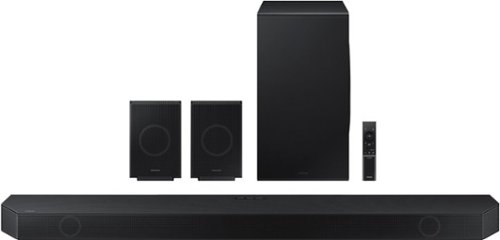
Experience our greatest of all time-level audio synchronized with your TV~s speakers* and customized to your living space. With intelligently tuned, 11.1.4 Ch. True Dolby Atmos Sound, the Q990D stands above the rest.
Posted by: 91preludesi
My previous soundbar (9.1) with two up-firing speakers was great. It had deep, punchy bass. However, I find the Samsung to be much more well-rounded.
First, setup is as easy as it gets. Get it out of the box, plug it in and you're done. I have it in my "SmartThings" app, which I recommend. (All of this can be done through the remote as well). There are many options to control through the app. Of course volume control, but also sound mode (Standard, surround, game and adaptive sound). An equalizer, which has fine-tuning controls in "standard" mode. In surround mode, you only get bass and treble customization. The subwoofer also has its own control. It has an option for surround speaker mode. This allows you to set up the rear speakers in the front or the rear. Another great option is "private rear sound". When you activate this, only the rear speakers play sound. This is perfect for me because my living room TV is on the wall to our bedroom. That way, if my wife goes to bed and I still want to watch TV, the sound isn't too loud. SpaceFit Sound adapts the sound to the room. If one side of the room is more open, or closer to a wall, it will automatically adapt the sound to the room. Active voice amplifier is also nice. It's perfect for when shows or movies have a lot of other noises going on. When voices would normally be somewhat drowned out, this makes it a lot clearer. If you want to listen to music from your phone, the soundbar has Tap Sound. Just tap your phone to the soundbar and it will start playing it. It doesn't get any easier than that!
As far as the sound. It's great. It absolutely fills the room with sound. There are 11 forward-facing speakers, 1 subwoofer, and 4 up-firing speakers. You can pinpoint exactly where a sound is coming from. If there is a sound coming from the left rear, you can tell that it's at your 7 o'clock. The built-in microphone is constantly listening to the sound and making adjustments. I will say that the subwoofer isn't punchy like my last one at all. It doesn't have the really deep bass that will rattle the windows, and honestly, I kind of like that. It's more true to the sound itself. It's more quality over quantity.
The size of this soundbar is quite large. This includes the bar itself as well as the rear speakers. The subwoofer enclosure is slightly smaller than my last with the same size subwoofer. My previous soundbar sat on my TV stand and fit between the legs. This soundbar is so long that it has to sit on the legs of the TV as it can't fit between them. This is with a 65" TV. This presents a little problem for me. As the TV's remote sensor is at the bottom, it's now covered. I can't sit on the couch and turn the TV on. I have to walk over to it and aim the remote down at it behind the soundbar. I have a new TV on the way and I'm waiting to see if it will fit between the legs of that TV. If it doesn't, I plan to mount the TV to the wall and have the soundbar on the TV stand. If you plan to mount the soundbar and/or rear speakers, make sure you mount it to studs. Both are quite heavy.
If you have a Samsung TV, Q-Symphony also uses your TV speakers with the soundbar for enhanced sound. I don't have a Samsung TV, so I can't speak to the pros/cons of this feature.
Overall, this is a great soundbar and I highly recommend it!
I would recommend this to a friend!
Share this review:


+4points
4of 4voted this as helpful.
91preludesi's Review Comments
91preludesi has not submitted comments on any reviews.
91preludesi's Questions
91preludesi has not submitted any questions.
91preludesi's Answers
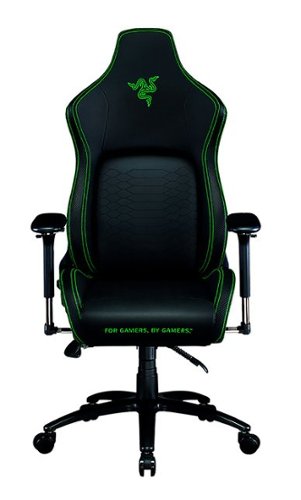
Keep the competition in your kill zone, as you enter your comfort zone with the Razer Iskur~an ergonomic gaming chair designed for posture-perfect hardcore gaming. Fitted with an adjustable, ergonomic lumbar support system, we~ve got your back when it comes to keeping you in prime gaming form.
Is this the all-black edition Iskur chair? I asked support and they said it was, but right before ordering, I decided to double-check the model number. When comparing to another site, it seems this is the Black/Green Edition. Which is it?
It is black with lime green accents.

5 years ago
by
91preludesi
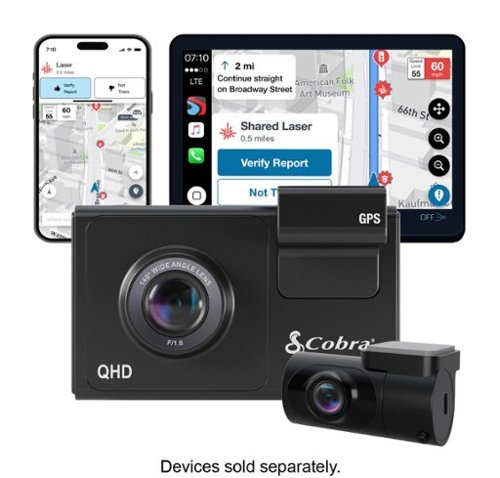
SC 200D - The dash cam that can see the future. We designed the Cobra SC 200D smart dash cam to offer state-of-the-art protection against anything the road throws at you. With QHD 1600P front-view resolution and rear FHD 1080P, built-in Wi-Fi and GPS, heads-up navigation, and voice commands, you can capture everything that happens in or around your vehicle on the road or in the lot. Learn how a SC 200D dash cam can be your extra pair of eyes on the road, protecting the ones you love against life's blindspots.
#1) do you have to purchase mounts separately or is the mounting system included? #2) what do you mean by park mode? #3) does this camera system record a rear-end accident or is it just cabin recording?
1) The mounts are included. 2) Parking mode is when the camera will come on and start recording automatically, even when the vehicle is off. This way, if you're in a store and someone bumps into your vehicle it will record the incident. 3) You could choose to mount the rear camera in the front for cabin recording, but there is so much cable length that it is meant to go in the rear windshield to record a rear-end accident. The camera screen overlays the rear camera onto the front camera, however, in the recordings, they will be two separate files.
5 years, 5 months ago
by
91preludesi
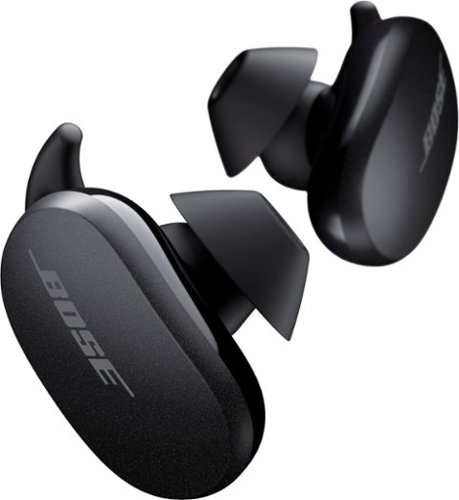
Better sound begins with better silence. That~s why Bose QuietComfort Earbuds are engineered with the world-class noise cancelling and high-fidelity audio. Microphones inside and outside the earphones sense noise and react instantaneously to cancel the signal. Get rid of disruptions so you can turn up the music on your wireless earbuds and amplify whatever you~re most passionate about ~ from hiking or circuit training to coding or baking. And when you need to be more aware of your surroundings, minimize noise cancelling with a quick double tap, so you can walk down a busy street or listen for your boarding announcement. StayHear Max tips provide extra comfort and stability for an even better experience. Rule the Quiet with Bose QuietComfort Earbuds and get an exhilarating experience that~s tough to find in any other Bluetooth earbuds. The Bose QuietComfort Noise Cancelling Earbuds are available in Triple Black, Soapstone and limited-edition Sandstone or Stone Blue.
does the charge case support qi wireless charging?
Yes, it does.
5 years, 8 months ago
by
91preludesi
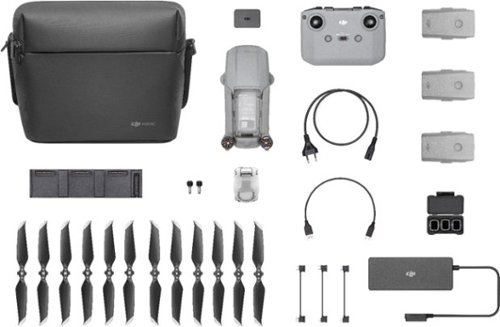
Shoot pro-quality aerial footage with this DJI Mavic Air 2 drone. The three-axis gimbal stabilizes the 48.0MP camera for stunning photos and clear videos, while the 3500 mAh battery delivers dependable power for every flight. This DJI Mavic Air 2 drone features FocusTrack technology for advanced obstacle avoidance and target tracking.
When using the new DJI Mavic 2 Air Do you need an adapter to use a galaxy s9plus with a case on it
I have the Galaxy S8+ with the Otterbox defender case and I have to remove it to fly. The phone/case fit in the controller fine, but the connector is too short to reach through the case and get to the charging port.
6 years, 1 month ago
by
91preludesi
Shoot pro-quality aerial footage with this DJI Mavic Air 2 drone. The three-axis gimbal stabilizes the 48.0MP camera for stunning photos and clear videos, while the 3500 mAh battery delivers dependable power for every flight. This DJI Mavic Air 2 drone features FocusTrack technology for advanced obstacle avoidance and target tracking.
How many batteries come with the bundle
Three batteries come in the fly more combo.
6 years, 1 month ago
by
91preludesi
Shoot pro-quality aerial footage with this DJI Mavic Air 2 drone. The three-axis gimbal stabilizes the 48.0MP camera for stunning photos and clear videos, while the 3500 mAh battery delivers dependable power for every flight. This DJI Mavic Air 2 drone features FocusTrack technology for advanced obstacle avoidance and target tracking.
Does this come with ads-b I heard the Europe version has it stripped out. But I see no mention of it here either
I am in the US and it has ADS-B.
6 years, 1 month ago
by
91preludesi
Shoot pro-quality aerial footage with this DJI Mavic Air 2 drone. The three-axis gimbal stabilizes the 48.0MP camera for stunning photos and clear videos, while the 3500 mAh battery delivers dependable power for every flight. This DJI Mavic Air 2 drone features FocusTrack technology for advanced obstacle avoidance and target tracking.
DJI offers a crash and damage replacement warranty for 79.00 - the only warranty I see here is GS for 2yr 350.00 Is the DJI warranty not available if bought through BB?
I received an offer through the DJI Fly app after connecting my drone to purchase their warranty.
6 years, 1 month ago
by
91preludesi
Shoot pro-quality aerial footage with this DJI Mavic Air 2 drone. The three-axis gimbal stabilizes the 48.0MP camera for stunning photos and clear videos, while the 3500 mAh battery delivers dependable power for every flight. This DJI Mavic Air 2 drone features FocusTrack technology for advanced obstacle avoidance and target tracking.
I have the Samsung s9+, and have heard and read about compatibility issues with Android phones. Has this been resolved so the app works with Android phones now. They seem to have a 5 star drone and a 2 star +- app. Thx
I have the Samsung Galaxy S8+ and have no issues at all. The app works perfectly for me. I have had zero issues.
6 years, 1 month ago
by
91preludesi
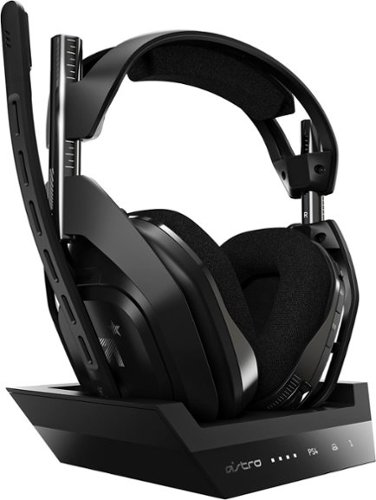
Experience legendary performance and sound of ASTRO Audio V2, with the convenience and freedom that comes without wires. The A50 Wireless + Base Station for PS5 /PS4 / PC delivers top-of-the-line acoustics, ergonomics, comfort and durability that gamers demand. The all-new Base Station provides clear, low-latency voice communication, while making headset pairing and charging simple. The ASTRO Command Center software allows gamers and streamers to tune every input and output parameter of the A50 precisely for their specific setup. Experience absolute audio immersion with the A50 Wireless + Base Station.
How does this headset connect to a ps4 slim? Does it still require the optical cords? Is there anything extra needed to be purchased to make this compatable for a ps4 slim?
I was told that you can connect the optical cable to the TV since the slim doesn't have an optical cable port. However, I've been using mine without the optical cable at all and they work perfectly.
6 years, 9 months ago
by
91preludesi
Experience legendary performance and sound of ASTRO Audio V2, with the convenience and freedom that comes without wires. The A50 Wireless + Base Station for PS5 /PS4 / PC delivers top-of-the-line acoustics, ergonomics, comfort and durability that gamers demand. The all-new Base Station provides clear, low-latency voice communication, while making headset pairing and charging simple. The ASTRO Command Center software allows gamers and streamers to tune every input and output parameter of the A50 precisely for their specific setup. Experience absolute audio immersion with the A50 Wireless + Base Station.
Is this a light headset? If not, will it cause any head pain or anything? Im using this for long term use.
These are fairly light. I just used them for 4 hours with no fatigue. They're not hot on the ears either. My Turtle Beach Elite Pro 2s would get very hot on my ears.
6 years, 9 months ago
by
91preludesi