Samsung
Samsung's Stats
Reviews
- Review Count0
- Helpfulness Votes0
- First ReviewNone
- Last ReviewNone
- Featured Reviews0
- Average Rating0
Reviews Comments
- Review Comment Count0
- Helpfulness Votes0
- First Review CommentNone
- Last Review CommentNone
- Featured Review Comments0
Questions
- Question Count0
- Helpfulness Votes0
- First QuestionNone
- Last QuestionNone
- Featured Questions0
- Answer Count74582
- Helpfulness Votes37,991
- First AnswerApril 24, 2013
- Last AnswerSeptember 28, 2026
- Featured Answers0
- Best Answers3951
Samsung's Reviews
Samsung has not submitted any reviews.
Samsung's Questions
Samsung has not submitted any questions.
Mini LEDs are made better with Quantum Dots to deliver astonishing brightness and 100% color volume. Precise backlighting unlocks captivating contrast with dazzling highlights, while advanced AI processing dynamically adjusts how your content looks and sounds to augment what you're watching , whether it's a thrilling live soccer match or your favorite old movie.
Can I get Netflix on it?

Hi Charlie, Netflix is a preinstalled application on the QN70H TV. ~ Samsung Ambassador
11 hours ago
by
Posted by:
Samsung
Discover expanded color like you've never seen before with 100% BT.2020 color area. The AI engine finely controls thousands of micro sized red, green and blue LEDs for ultra wide spectrum color with stunning brightness, precise contrast and true depth for a lifelike vie wing experience.
can you pair bluetooth headphones for listening to the tv
Hey! You can connect Bluetooth headphones to the R85H TV. Refer to your headphone's user manual for how to pair. Once paired to the TV, go to: Home > top directional key Settings > All Settings > Sound > Sound Output > Bluetooth Speaker List. Choose the headphones you wish to use for sound output. ~ Samsung Ambassador
11 hours ago
by
Posted by:
Samsung
Discover expanded color like you've never seen before with 100% BT.2020 color area. The AI engine finely controls thousands of micro sized red, green and blue LEDs for ultra wide spectrum color with stunning brightness, precise contrast and true depth for a lifelike vie wing experience.
Is the Samsung R85 glare free
Hi there, in short, no. The R85H offers Wide Viewing Angle, as well as Adaptive Picture technology to optimize your picture with a lighting system that automatically senses, reacts, and adjusts to the brightness of the space you're in. Starting with our R95H Micro RGB TV, you’ll gain Glare Free technology to provide you with enhanced color and minimized glare to help you enjoy shows without distractions. ~ Samsung Ambassador
11 hours ago
by
Posted by:
Samsung
Discover expanded color like you've never seen before with 100% BT.2020 color area. The AI engine finely controls thousands of micro sized red, green and blue LEDs for ultra wide spectrum color with stunning brightness, precise contrast and true depth for a lifelike vie wing experience.
Can you have side by side inputs?
Hi Sdave, in short, no. Multi View, available on Samsung’s M80H Mini LED Series and above, allows you to display two types of content on-screen at once. You can view an app or HDMI source on the left, while mirroring your smartphone or casting from a compatible app on the right. While two HDMI sources can’t be displayed together, Multi View gives you the flexibility to combine streaming, live TV, mobile content, and more – side-by-side. ~ Samsung Ambassador
11 hours ago
by
Posted by:
Samsung
Unbeatable contrast with AI-powered pixel-level control, on a floating, glare-free screen that enhances movies, games and your home decor. Enjoy 5,000+ artworks from world-renowned artists and galleries, and you can reduce cable clutter on up to 8 HDMI devices with Wireless One Connect Ready. Also, get blazing-fast, ultra-smooth frame rates in video games with the Ultimate Gaming Pack.
I need to have the tv mounted to an existing wall mount the bracket needs to come off the back of the old tv and put on the new tv and placed back on the wall mount. Wall mount is already attached to the wall. Is this possible
Hi Imon, the 77" S95H TV supports any universal wall mount that matches its VESA pattern of 400 X 400. If the existing bracket/mount supports this pattern and the weight of the TV (69.9 pounds without the stand), it is possible. ~ Samsung Ambassador
11 hours ago
by
Posted by:
Samsung
Bright, detailed colors pair together with deep, cinematic contrast in your favorite smart apps and video games thanks to precise control with Mini LEDs, delivering a realistic picture no matter what you watch. Get thousands of subscription free channels, including 700+ premium channels with Samsung TV Plus. Rest assured your personal data is secured with Knox Security.
Does it have a digital optical output?
Hi Emptycods,
The M70H does not feature an optical output.
~Samsung Advisor
The M70H does not feature an optical output.
~Samsung Advisor
12 hours ago
by
Posted by:
Samsung
Bright, detailed colors pair together with deep, cinematic contrast in your favorite smart apps and video games thanks to precise control with Mini LEDs, delivering a realistic picture no matter what you watch. Get thousands of subscription free channels, including 700+ premium channels with Samsung TV Plus. Rest assured your personal data is secured with Knox Security.
Does Best Buy install the tv
Hi Lk,
For TV mounting and installation services, we recommend contacting your local Best Buy or visiting:
https://www.bestbuy.com/site/tv-home-theater-services/tv-mounting-packages/pcmcat748300648009.c?id=pcmcat748300648009#1
~ Samsung Advisor
For TV mounting and installation services, we recommend contacting your local Best Buy or visiting:
https://www.bestbuy.com/site/tv-home-theater-services/tv-mounting-packages/pcmcat748300648009.c?id=pcmcat748300648009#1
~ Samsung Advisor
12 hours ago
by
Posted by:
Samsung

Get the party started and keep it going with powerful sound and lights that move with your music. With built in wheels and a telescopic handle, effortlessly bring the beat to backyard BBQs, tailgate parties, and karaoke sessions. The splash resistant design lets you take the fun outside, while the long lasting battery keeps the music going. It's time to get the music rolling, stream your favorite playlist, and turn up the party vibes.
How do u pair Samsung tower speaks
Hello Tony! To pair your Samsung Sound Tower speakers, first power on both speakers. On the primary speaker, press the Group Play or Stereo Pair button (the button name varies by model) until pairing mode is activated. Then press the same button on the second speaker. Once the speakers successfully connect, the display or indicator lights will confirm the pairing status. After pairing is complete, connect your phone, tablet, or other audio source via Bluetooth to the primary speaker, and audio will play through both units. This can also be done through the Samsung Sound Tower App.
~ Samsung Solutions
~ Samsung Solutions
12 hours ago
by
Posted by:
Samsung
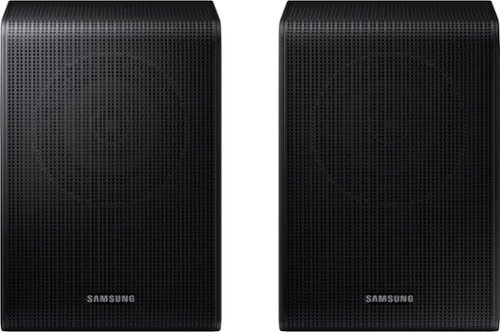
Get a truly cinematic experience from your home theater with rear speakers that connect wirelessly to your soundbar for simple setup and less clutter. With true surround sound, add audio depth and dimension with sound that comes from all sides, making you feel like you're in the scene.
I have the Q800H (2026) Samsung soundbar which surround speakers will work
Hello Pittsburgh! The HW-Q800H is compatible with the SWA-9500S Wireless Rear Speaker Kit. ~ Samsung Solutions
12 hours ago
by
Posted by:
Samsung
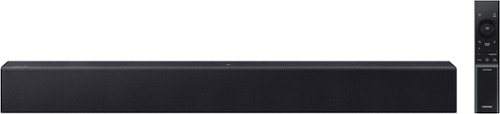
All you need is one this soundbar delivers balanced audio and features a built in woofer so you can enjoy everyday content with robust, rich sound. Enjoy clearer voices in your shows and movies with automatically amplified dialogue, so you won't have to rewind or turn on t he subtitles. Plus, you can simplify your home theatre setup by controlling everything with your Samsung TV remote. Simple like that.
Does this work with Apple TV?
Hi Jae! The HW-B400F features three ways to connect to an external device: HDMI (ARC), digital optical audio, and Bluetooth wireless audio technology. If your TV is compatible with one of these three audio connections, you should have no issue connecting the soundbar to your TV. ~Samsung Solutions
12 hours ago
by
Posted by:
Samsung