Lenovo Product Expert
Lenovo Product Expert's Stats
Reviews
- Review Count0
- Helpfulness Votes0
- First ReviewNone
- Last ReviewNone
- Featured Reviews0
- Average Rating0
Reviews Comments
- Review Comment Count0
- Helpfulness Votes0
- First Review CommentNone
- Last Review CommentNone
- Featured Review Comments0
Questions
- Question Count0
- Helpfulness Votes0
- First QuestionNone
- Last QuestionNone
- Featured Questions0
- Answer Count37798
- Helpfulness Votes24,825
- First AnswerApril 21, 2014
- Last AnswerOctober 8, 2026
- Featured Answers0
- Best Answers2826
Lenovo Product Expert's Reviews
Lenovo Product Expert has not submitted any reviews.
Lenovo Product Expert's Questions
Lenovo Product Expert has not submitted any questions.
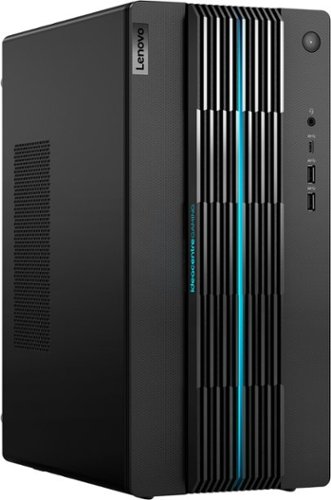
Lenovo - IdeaCentre Gaming 5i Gaming Desktop - Intel Core i7-12700 - 16GB Memory - NVIDIA GeForce RTX 3060 LHR - 512GB SSD - Raven Black
Fast-track your entry into gaming and esports with the Lenovo IdeaCentre Gaming 5i, powered by the latest 12th Generation Intel Core i7 processors, a seriously powerful, future-proof machine that keeps pace with top games for years to come, with the upgradeability to go even further. Complement your home office or elite battlestation with the functional aesthetics of the generous 17L chassis accented by blue lighting along the bezels and 2D/3D striped patterns across the front, enhancing ventilation and looking cool.
What is max video resolution of system and how many monitors may be driven at that resolution . . .

This Lenovo IdeaCentre 5i Gaming Desktop Computer, model number 90T00007US, ships with the discrete, NVIDIA GeForce RTX 3060 GPU, with 12GB GDDR6 VRAM on the card this GPU ships with 3x DisplayPort 1.4a connections and 1x HDMI 2.1 connection for a total of 4 external monitors. 7680x4320@60Hz(HDMI), 5120x2880@60Hz(DP).
3 years, 11 months ago
by
Posted by:
Lenovo Product Expert

Lenovo - Chromebook 3 11.6" HD Laptop - Celeron N4020 - 4GB Memory - 64GB eMMC - Onyx Black
Fast, flexible, and fun, the Lenovo IdeaPad 3 Chromebook 11" brings everyone~s favorite Chromebook features, housed in a slim chassis, running on the lightning-fast Chrome OS that boots up in seconds, updates automatically, and is protected by built-in virus protection. Powered by Intel Celeron processor offers up to 10 hours of battery life, to seamlessly run all of your favorite apps at the same time.
Can either a larger keyboard OR a mouse be connected to this? We are older and more comfortable using a mouse to redirect the cursor.
You can use either a external keyboard and/or external mouse that is compatible with the Chrome Operating System with this Lenovo Chromebook 3 11, model number 82BA001FUS. We recommend you check with either the keyboard and/or mouse manufacturer's web site for compatibility with the Chrome OS.
3 years, 11 months ago
by
Posted by:
Lenovo Product Expert
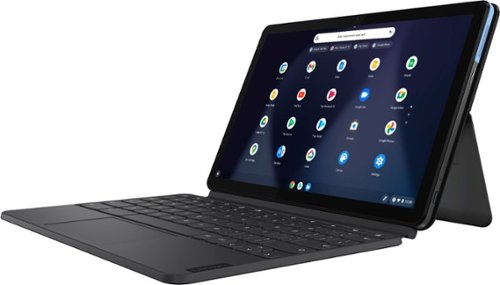
Lenovo - IdeaPad Duet Chromebook - 10.1 (1920x1200) Touch 2-in-1 Tablet - MediaTek P60T - 4G RAM - 128G eMCP4x - with Keyboard - Ice Blue + Iron Gray
Work on pending assignments while on the move with this Lenovo Chromebook Duet. The 10.1-inch touch screen provides an interactive user experience, while the 128GB of internal storage offer ample space for apps and media files. This Lenovo Chromebook Duet features a MediaTek Helio P60T processor and 4GB of RAM for effortless multitasking.
What is the AUE (Chromebook Google Auto Update Expiry?
This Lenovo IdeaPad Duet Chromebook, model number ZA6F0016US, will continue to receive Google automatic updates through June 2028.
3 years, 11 months ago
by
Posted by:
Lenovo Product Expert

Lenovo - IdeaPad 3 15" HD Touch Screen Laptop - Intel Core i3-1115G4 - Intel UHD Graphics - 8GB Memory - 256GB SSD - Almond
Engineered for long-lasting performance, the Lenovo IdeaPad 3 is the perfect laptop for your everyday tasks with features that you can depend on.
Can you use a cd/ DVD player
Although this Lenovo IdeaPad 3 15 Laptop, model number 81X800KLUS, has no built in CD/DVD drive, you can use an external, USB-based Windows Compatible CD/DVD drive with this laptop, like this one, sold separately: https://www.bestbuy.com/site/lg-8x-external-usb-double-layer-dvdrw-cd-rw-drive-black/5852919.p?skuId=5852919
3 years, 11 months ago
by
Posted by:
Lenovo Product Expert
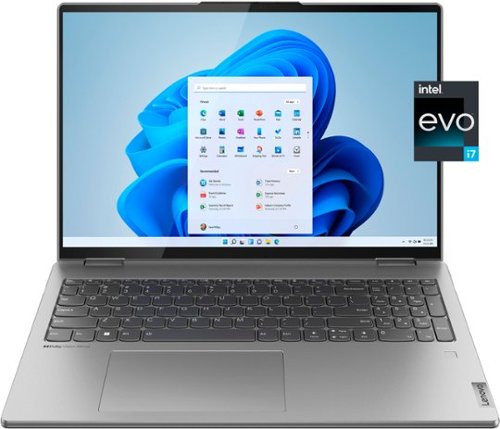
Lenovo - Yoga 7i 16" 2.5K Touch 2-in-1 Laptop - Intel Evo Platform - Core i7-12700H - 32GB Memory - Intel Arc A370M - 1TB SSD - Arctic Grey
The Lenovo Yoga 7i combines versatile portability and enhanced productivity, thanks to the boundary-breaking performance and responsiveness of 12th generation Intel Core processors and vibrant WQXGA clarity with Intel Arc A370M graphics. Go anywhere with a sleek 2-in-1 metal chassis featuring thoughtful details including an IR camera with privacy shutter.
1. Does this have Bluetooth 5.1 capability; t I cannot find any reference to it in the Best Buy specs for this model. 2. Can you direct me to a Lenovo site which has a complete set of specs for this computer?
Yes, this Intel Evo-Certified, Lenovo Yoga 7i 16, model number 82UF0000US, ships with Bluetooth 5.1 Version capability, built in. Here is a link to the specifications for this model: https://psref.lenovo.com/Detail/Yoga_7_16IAH7?M=82UF0000US. If you have questions about your Lenovo Yoga 7i 16, we recommend you contact Lenovo Tech Support for additional information at: 877-453-6686.
3 years, 11 months ago
by
Posted by:
Lenovo Product Expert
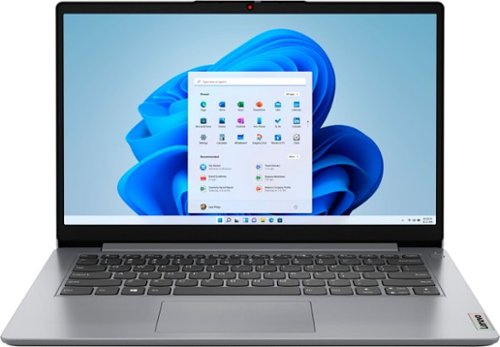
Lenovo - Ideapad 1i 14.0" HD Laptop - Celeron N4020 - 4GB Memory - 64GB eMMC - Cloud Grey
The IdeaPad 1i raises the bar on every affordable laptop with a super-efficient Intel Celeron N4020 processor in a thin and compact 17.9 mm chassis with up-to-10 hours of battery life and rapid charge. Get more value with four-sided narrow bezels for maximum screen, Dolby Audio speakers and Flip to Start for instant bootup.
Does this have windows?
Yes. This entry-level, Lenovo IdeaPad 1i 14 Laptop, model number 82V6S00000, ships with Windows 11 S-Mode, 64-bit Operating System installed. Windows 11 S-Mode provides added security by only allowing APPs available ( and therefore certified by Microsoft) at the Microsoft Store. If you don't need the added security or you need to install APPs not available at the Microsoft Store, you can switch to standard Windows 11 Home 64-bit Operating System, at no additional cost. If you choose to switch from Windows S-Mode to Windows 11 Home: Here is a link to instructions for switching from Windows 11 S-Mode to Windows 11 Home: https://support.microsoft.com/en-us/windows/switching-out-of-s-mode-in-windows-4f56d9be-99ec-6983-119f-031bfb28a307#WindowsVersion=Windows_11
3 years, 11 months ago
by
Posted by:
Lenovo Product Expert
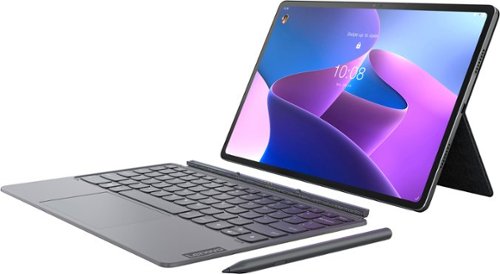
Lenovo - Tab P12 Pro - 12.6" - Tablet - 8GB - 256GB - with Keyboard - Storm Grey
The Lenovo Tab P12 Pro doubles as a wireless second screen for your laptop while also supporting touch and pen input, thanks to Lenovo Project Unity. A perfect entertainment, gaming, and productivity powerhouse that's built for use outdoors and indoors, with an all-day battery and bright 12.6" 2K AMOLED display.
Can this tablet connect to wireless networks via SIM card?
No. This Lenovo Tab P12 Pro Tablet, model number ZA9D0000US, has no cellular/broadband data capability. This Tab P12 Pro Tablet uses WiFi-6, 802.11a/b/g/n/ac/ax frequency WiFi for internet connectivity, only.
3 years, 11 months ago
by
Posted by:
Lenovo Product Expert
Lenovo - IdeaCentre Gaming 5i Gaming Desktop - Intel Core i7-12700 - 16GB Memory - NVIDIA GeForce RTX 3060 LHR - 512GB SSD - Raven Black
Fast-track your entry into gaming and esports with the Lenovo IdeaCentre Gaming 5i, powered by the latest 12th Generation Intel Core i7 processors, a seriously powerful, future-proof machine that keeps pace with top games for years to come, with the upgradeability to go even further. Complement your home office or elite battlestation with the functional aesthetics of the generous 17L chassis accented by blue lighting along the bezels and 2D/3D striped patterns across the front, enhancing ventilation and looking cool.
Is there space to add a second internal hard drive (HDD)?
This Lenovo IdeaCentre 5i Gaming Desktop Computer, model number 90T00007US, ships with a 512GB M.2 2280 PCIe 3.0x4 NVMe solid state hard drive installed. The maximum storage capacity that this model configuration can support is: Up to three drives, 2x 3.5 Inch HDD + 1x M.2 SSD
• 3.5 Inch HDD up to 2TB, • M.2 SSD up to 1TB. We recommend you consult with your certified technician about your storage upgrade options.
• 3.5 Inch HDD up to 2TB, • M.2 SSD up to 1TB. We recommend you consult with your certified technician about your storage upgrade options.
3 years, 11 months ago
by
Posted by:
Lenovo Product Expert
Lenovo - IdeaPad 3 15" HD Touch Screen Laptop - Intel Core i3-1115G4 - Intel UHD Graphics - 8GB Memory - 256GB SSD - Almond
Engineered for long-lasting performance, the Lenovo IdeaPad 3 is the perfect laptop for your everyday tasks with features that you can depend on.
Does this have a cd player
No, this Lenovo IdeaPad 3 15 Laptop, model number 81X800KLUS, does not have a built in CD/DVD drive. You can use an external, USB-based Windows compatible CD/DVD drive with this laptop, like this one: https://www.bestbuy.com/site/lg-8x-external-usb-double-layer-dvdrw-cd-rw-drive-black/5852919.p?skuId=5852919
3 years, 11 months ago
by
Posted by:
Lenovo Product Expert
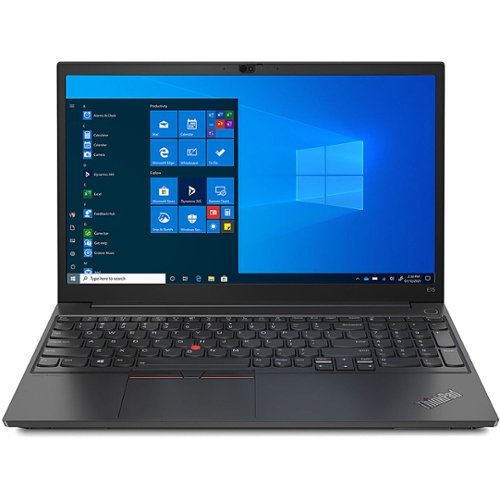
Lenovo - 15.6" ThinkPad E15 Gen 3 Laptop - AMD Ryzen 5 5500U - 8GB Memory - AMD Radeon - 256 SSD - Black
Empower your workforce to stay productive from anywhere with this sleek and sensible 15~ notebook. Powerful AMD Ryzen 5000 series mobile processors, dual SSD storage, plus integrated AMD Radeon graphics ensure a smooth computing experience.
Is this a 64 bit o/s? What is GhZ?
This Lenovo ThinkPad E15 Gen 3 Laptop, model number 20YG003EUS, ships with Windows 10 Pro 64-bit, English Version Operating System installed. This configuration ships with the 6-Core/12-Thread AMD Ryzen 5 5500U Processor, with a base speed of 2.1GHz and a boost speed of up to 4.0GHz.
3 years, 11 months ago
by
Posted by:
Lenovo Product Expert