Lenovo Product Expert
Lenovo Product Expert's Stats
Reviews
- Review Count0
- Helpfulness Votes0
- First ReviewNone
- Last ReviewNone
- Featured Reviews0
- Average Rating0
Reviews Comments
- Review Comment Count0
- Helpfulness Votes0
- First Review CommentNone
- Last Review CommentNone
- Featured Review Comments0
Questions
- Question Count0
- Helpfulness Votes0
- First QuestionNone
- Last QuestionNone
- Featured Questions0
- Answer Count37282
- Helpfulness Votes24,642
- First AnswerApril 21, 2014
- Last AnswerJuly 24, 2026
- Featured Answers0
- Best Answers2777
Lenovo Product Expert's Reviews
Lenovo Product Expert has not submitted any reviews.
Lenovo Product Expert's Questions
Lenovo Product Expert has not submitted any questions.
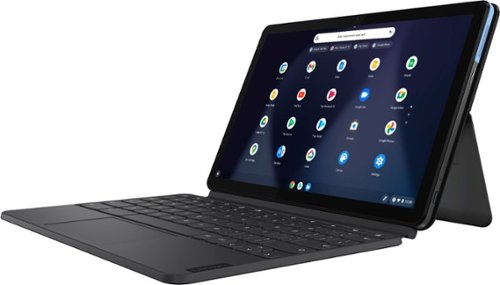
Lenovo - IdeaPad Duet Chromebook - 10.1 (1920x1200) Touch 2-in-1 Tablet - MediaTek P60T - 4G RAM - 128G eMCP4x - with Keyboard - Ice Blue + Iron Gray
Work on pending assignments while on the move with this Lenovo Chromebook Duet. The 10.1-inch touch screen provides an interactive user experience, while the 128GB of internal storage offer ample space for apps and media files. This Lenovo Chromebook Duet features a MediaTek Helio P60T processor and 4GB of RAM for effortless multitasking.
Hi, Can you tell me if you can hook up an external mic on the Duet as you can on the 10e (through the microphone jack)? Thanks

Yes, there is a USB Type-C to 3.5 mm Audio Jack adapter included with the Lenovo Duet Chromebook.
6 years ago
by
Posted by:
Lenovo Product Expert
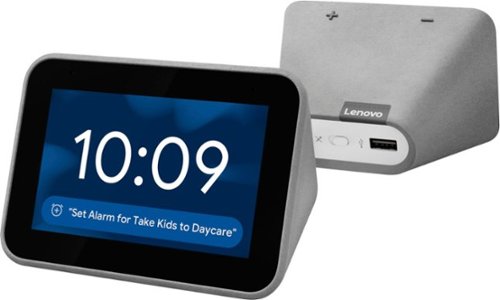
Lenovo - Smart Clock with Google Assistant - Gray
Wake up and start your day with this Lenovo smart clock. Wi-Fi connectivity and Google Assistant integration let you use voice commands to play music, check schedules and control smart home devices. This Lenovo smart clock offers hundreds of audio and media alarm options so you can choose how to wake up.
Does the operating system and Google Assistant come with Spanish language?
Hi! Yes, currently the Lenovo Smart Clock with Google Assistant supports Spanish. To change the default language of your google assistant please follow these steps.
1. On your Android phone or tablet, open the Google app .
2. At the bottom right, tap More Settings Voice Language.
3. Choose a language.
For more detailed information please visit the Google Support Site.
https://support.google.com/assistant/answer/7544506?ctx=assistant_partner_lenovo
1. On your Android phone or tablet, open the Google app .
2. At the bottom right, tap More Settings Voice Language.
3. Choose a language.
For more detailed information please visit the Google Support Site.
https://support.google.com/assistant/answer/7544506?ctx=assistant_partner_lenovo
6 years ago
by
Posted by:
Lenovo Product Expert
Lenovo - Smart Clock with Google Assistant - Gray
Wake up and start your day with this Lenovo smart clock. Wi-Fi connectivity and Google Assistant integration let you use voice commands to play music, check schedules and control smart home devices. This Lenovo smart clock offers hundreds of audio and media alarm options so you can choose how to wake up.
How tall are there numbers in the largest digital setting? I'm nearsighted and need to be able to read this with my glasses off.
Hi there! The Lenovo Smart Clock with Google Assistant has a 4” display with multiple clock faces. The largest of which, are almost the size of the entire screen, making the time easy to read day or night! Additionally, you can adjust the light/dark settings of each clock face for optimal viewing.
6 years ago
by
Posted by:
Lenovo Product Expert
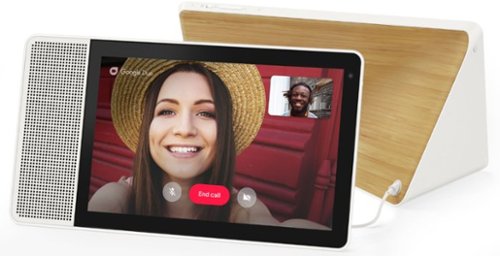
Lenovo - 10" Smart Display with Google Assistant - White Front/Bamboo Back
Make everyday life easier with this 10-inch Lenovo Smart Display. Its built-in Google Assistant responds quickly to your voice commands, whether you need to check your morning commute or bring up a recipe, and the brilliant Full HD touch screen offers a colorful, crisp view. This Lenovo Smart Display lets you catch up with family and friends using video chat.
Why is my google assistant showing a black screen. Can not see anything on the screen.
Hi Rose, we are sorry to hear you are experiencing this issue! Please try power cycling your device by unplugging it for 20 seconds and plugging it back in. If you’re still having this issue please perform a factory reset on the device by holding down the “Volume + and Volume –“ buttons simultaneously for 10 seconds. If the issue persists, please reach out to our support team at 866-426-0911.
6 years ago
by
Posted by:
Lenovo Product Expert
Lenovo - 10" Smart Display with Google Assistant - White Front/Bamboo Back
Make everyday life easier with this 10-inch Lenovo Smart Display. Its built-in Google Assistant responds quickly to your voice commands, whether you need to check your morning commute or bring up a recipe, and the brilliant Full HD touch screen offers a colorful, crisp view. This Lenovo Smart Display lets you catch up with family and friends using video chat.
Is it possible to set the Lenovo 10" Smart Display to loop a youtube video? Repeating a video over and over for my disabled son for example without having to push replay. If anyone has an alternative way to accomplish this...please let me know!
Hello, Currently the YouTube App on the Lenovo Smart Display with Google Assistant does not support the auto loop feature. You can however tell your assistant to “replay the last video” once the video has ended.
6 years ago
by
Posted by:
Lenovo Product Expert
Lenovo - Smart Clock with Google Assistant - Gray
Wake up and start your day with this Lenovo smart clock. Wi-Fi connectivity and Google Assistant integration let you use voice commands to play music, check schedules and control smart home devices. This Lenovo smart clock offers hundreds of audio and media alarm options so you can choose how to wake up.
Is Google Home app available on android to setup the clock?
Hi Opal, Yes! The Google Home app is available to download on your android smart phone/tablet allowing you to setup your Lenovo Smart Clock with ease.
6 years ago
by
Posted by:
Lenovo Product Expert
Lenovo - 10" Smart Display with Google Assistant - White Front/Bamboo Back
Make everyday life easier with this 10-inch Lenovo Smart Display. Its built-in Google Assistant responds quickly to your voice commands, whether you need to check your morning commute or bring up a recipe, and the brilliant Full HD touch screen offers a colorful, crisp view. This Lenovo Smart Display lets you catch up with family and friends using video chat.
THIS DEVICE WORKS WITH iOS/APPLE MUSIC?
Hi Ray! The Lenovo 10” Smart Display with Google Assistant is compatible with any smart phone or tablet with the Google Home App installed. Currently you can stream from Spotify, YouTube Music, Pandora, and your favorite radio station. At this time Apple Music is not supported.
6 years ago
by
Posted by:
Lenovo Product Expert
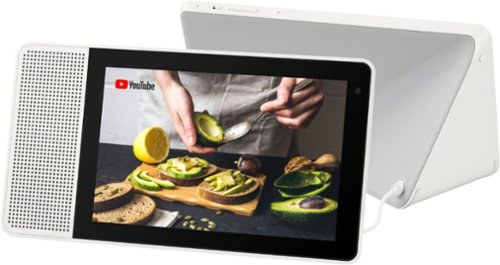
Lenovo - 8" Smart Display with Google Assistant - White Front/Gray Back
Watch programs or surf the Internet with this Lenovo smart display. The 8-inch screen has 1280 x 800 high-definition resolution for clear images, and the integrated Google Assistant function lets you get instant answers to questions as well as reminders of important events. This Lenovo smart display also lets you make video calls.
Are you able to set recurring alarms with this (Monday-Friday) and multiple alarms such as a recurring alarm and an alarm for later in a day?
Hello, yes! You can set recurring alarms and multiple alarms in one day.
6 years ago
by
Posted by:
Lenovo Product Expert
Lenovo - 8" Smart Display with Google Assistant - White Front/Gray Back
Watch programs or surf the Internet with this Lenovo smart display. The 8-inch screen has 1280 x 800 high-definition resolution for clear images, and the integrated Google Assistant function lets you get instant answers to questions as well as reminders of important events. This Lenovo smart display also lets you make video calls.
Could this work as a drawing tablet?
Hi Kat! The Lenovo Smart Displays bring you the best of the Google Assistant in a visually, more engaging way. Designed for the home, it lets you stream music & videos, relive your best memories, check the weather & traffic, control your smart home, and more. All you need to do is ask. It does not function as a stand-alone drawing tablet.
6 years ago
by
Posted by:
Lenovo Product Expert
Lenovo - Smart Clock with Google Assistant - Gray
Wake up and start your day with this Lenovo smart clock. Wi-Fi connectivity and Google Assistant integration let you use voice commands to play music, check schedules and control smart home devices. This Lenovo smart clock offers hundreds of audio and media alarm options so you can choose how to wake up.
Can I switch the clock to am/pm?
Hi Frankie, Your Lenovo Smart Clock with Google Assistant will automatically set the time when connected to Wi-Fi. You can set your alarm for am/pm.
6 years ago
by
Posted by:
Lenovo Product Expert