Lenovo Product Expert
Lenovo Product Expert's Stats
Reviews
- Review Count0
- Helpfulness Votes0
- First ReviewNone
- Last ReviewNone
- Featured Reviews0
- Average Rating0
Reviews Comments
- Review Comment Count0
- Helpfulness Votes0
- First Review CommentNone
- Last Review CommentNone
- Featured Review Comments0
Questions
- Question Count0
- Helpfulness Votes0
- First QuestionNone
- Last QuestionNone
- Featured Questions0
- Answer Count37959
- Helpfulness Votes24,861
- First AnswerApril 21, 2014
- Last AnswerOctober 26, 2026
- Featured Answers0
- Best Answers2831
Lenovo Product Expert's Reviews
Lenovo Product Expert has not submitted any reviews.
Lenovo Product Expert's Questions
Lenovo Product Expert has not submitted any questions.
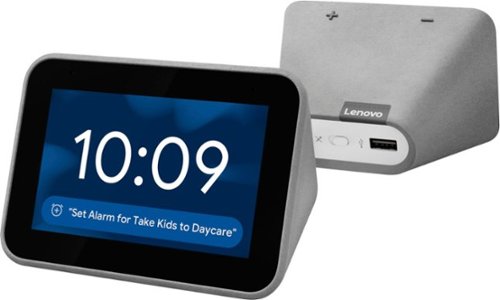
Lenovo - Smart Clock with Google Assistant - Gray
Wake up and start your day with this Lenovo smart clock. Wi-Fi connectivity and Google Assistant integration let you use voice commands to play music, check schedules and control smart home devices. This Lenovo smart clock offers hundreds of audio and media alarm options so you can choose how to wake up.
Does home kit or siri work

Hey there! Thanks for your question. The Lenovo Smart Clock with Google Assistant works with Google Assistant and the Google Home App. It does not work with Siri or HomeKit.
6 years, 3 months ago
by
Posted by:
Lenovo Product Expert
Lenovo - Smart Clock with Google Assistant - Gray
Wake up and start your day with this Lenovo smart clock. Wi-Fi connectivity and Google Assistant integration let you use voice commands to play music, check schedules and control smart home devices. This Lenovo smart clock offers hundreds of audio and media alarm options so you can choose how to wake up.
I'm looking for a product that will display the time, weather, and my google calendar all at the same time, will this product do that?
Hello! Your Lenovo Smart Clock with Google Assistant Displays the time, weather, and can show/tell you about your appointments on a given day. At this time you are not able to pull up your full google calendar. You can setup a morning routine that gives you all of this information with a simple voice command like “Hey Google, good morning” or “Okay Google tell me about my day”. You can also have your appointments shown to you by saying something like “Okay google whats my schedule?”.
6 years, 3 months ago
by
Posted by:
Lenovo Product Expert
Lenovo - Smart Clock with Google Assistant - Gray
Wake up and start your day with this Lenovo smart clock. Wi-Fi connectivity and Google Assistant integration let you use voice commands to play music, check schedules and control smart home devices. This Lenovo smart clock offers hundreds of audio and media alarm options so you can choose how to wake up.
Will this connect to my Vivint Home system and is it hooked to my Google home network
Hey there! Yes, Vivant is compatible with the Google Nest Hub so it will work with any Google Assistant device on your home network. Your Lenovo Smart Clock with Google Assistant is indeed part of your google home network once connected to your W-Fi.
6 years, 3 months ago
by
Posted by:
Lenovo Product Expert
Lenovo - Smart Clock with Google Assistant - Gray
Wake up and start your day with this Lenovo smart clock. Wi-Fi connectivity and Google Assistant integration let you use voice commands to play music, check schedules and control smart home devices. This Lenovo smart clock offers hundreds of audio and media alarm options so you can choose how to wake up.
If there is a power interrupt will the Lenovo Smart Clock remember alarms?
Hi there! If you have a repeating alarm set the clock will retain this information during a brief power outage. If you have an alarm set for a single day/time this information will not be stored and the alarm will not sound.
6 years, 3 months ago
by
Posted by:
Lenovo Product Expert
Lenovo - Smart Clock with Google Assistant - Gray
Wake up and start your day with this Lenovo smart clock. Wi-Fi connectivity and Google Assistant integration let you use voice commands to play music, check schedules and control smart home devices. This Lenovo smart clock offers hundreds of audio and media alarm options so you can choose how to wake up.
Do you have the option to display military time?
Hello, thanks for your question. Yes, you can adjust the time to 12 or 24 hour by accessing your clocks settings in the Google Home App.
6 years, 3 months ago
by
Posted by:
Lenovo Product Expert
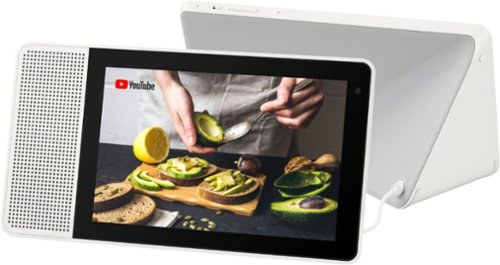
Lenovo - 8" Smart Display with Google Assistant - White Front/Gray Back
Watch programs or surf the Internet with this Lenovo smart display. The 8-inch screen has 1280 x 800 high-definition resolution for clear images, and the integrated Google Assistant function lets you get instant answers to questions as well as reminders of important events. This Lenovo smart display also lets you make video calls.
How is the speaker quality compared to Google Home ?
Hi, thanks for your question! The Lenovo Smart Display with Google Assistant features Full-range speakers with dual passive radiators expand the bass range, delivering a clear, natural, balanced sound whether it’s your favorite playlist or a call with loved ones.
6 years, 3 months ago
by
Posted by:
Lenovo Product Expert
Lenovo - Smart Clock with Google Assistant - Gray
Wake up and start your day with this Lenovo smart clock. Wi-Fi connectivity and Google Assistant integration let you use voice commands to play music, check schedules and control smart home devices. This Lenovo smart clock offers hundreds of audio and media alarm options so you can choose how to wake up.
How do I turn the mic on on my smart clock with Google Assistant
Hi! To toggle your microphone ON/OFF on your Lenovo Smart Clock with Google Assistant slide the switch on the back of the unit to the left or right. This switch is denoted with a symbol of a MIC. You will hear audio confirmation from your assistant if the MIC has been set to ON or OFF.
6 years, 3 months ago
by
Posted by:
Lenovo Product Expert
Lenovo - Smart Clock with Google Assistant - Gray
Wake up and start your day with this Lenovo smart clock. Wi-Fi connectivity and Google Assistant integration let you use voice commands to play music, check schedules and control smart home devices. This Lenovo smart clock offers hundreds of audio and media alarm options so you can choose how to wake up.
Does the clock have backup if the power goes out?
Hello and thanks for your question! No, it does not have a power backup. The Lenovo Smart Clock requires power from your AC Outlet to function. If you have a re-occurring alarm set, this information will be stored in the event of a brief power outage.
6 years, 3 months ago
by
Posted by:
Lenovo Product Expert
Lenovo - Smart Clock with Google Assistant - Gray
Wake up and start your day with this Lenovo smart clock. Wi-Fi connectivity and Google Assistant integration let you use voice commands to play music, check schedules and control smart home devices. This Lenovo smart clock offers hundreds of audio and media alarm options so you can choose how to wake up.
Anyone else have it confirm a timer but simultaneously in a lower voice talking about something else? Also, does anyone else's show numbers for no reason? 50 appeared today without asking, but the temp is 32F out. Defective??
Hi! We are sorry to hear you are experiencing issues with your device. Try power cycling the clock by unplugging it, plugging it back in, and allowing it to reboot. If the issue persists please perform a factory reset by holding down the “Volume + and –“ buttons simultaneously for 8 seconds. If after following these steps, your issue still hasn’t been resolved, please reach out to our Smart Home Technical Support team at 866-426-0911
6 years, 3 months ago
by
Posted by:
Lenovo Product Expert
Lenovo - Smart Clock with Google Assistant - Gray
Wake up and start your day with this Lenovo smart clock. Wi-Fi connectivity and Google Assistant integration let you use voice commands to play music, check schedules and control smart home devices. This Lenovo smart clock offers hundreds of audio and media alarm options so you can choose how to wake up.
My clock talks when it's quite especially at night what can I do
Hi Joy! You can activate “Do Not Disturb” on your Lenovo Smart Clock by swiping up. This will silence notifications. You can also access “Night Mode” settings on your device on the Google Home App on your smartphone/tablet. From here you can set the volume of your device to a certain level at night between the hours you specify.
6 years, 3 months ago
by
Posted by:
Lenovo Product Expert