Lenovo Product Expert
Lenovo Product Expert's Stats
Reviews
- Review Count0
- Helpfulness Votes0
- First ReviewNone
- Last ReviewNone
- Featured Reviews0
- Average Rating0
Reviews Comments
- Review Comment Count0
- Helpfulness Votes0
- First Review CommentNone
- Last Review CommentNone
- Featured Review Comments0
Questions
- Question Count0
- Helpfulness Votes0
- First QuestionNone
- Last QuestionNone
- Featured Questions0
- Answer Count37959
- Helpfulness Votes24,861
- First AnswerApril 21, 2014
- Last AnswerOctober 26, 2026
- Featured Answers0
- Best Answers2831
Lenovo Product Expert's Reviews
Lenovo Product Expert has not submitted any reviews.
Lenovo Product Expert's Questions
Lenovo Product Expert has not submitted any questions.
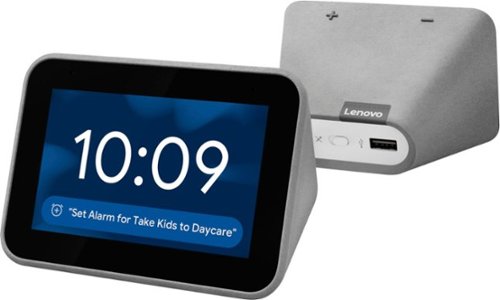
Lenovo - Smart Clock with Google Assistant - Gray
Wake up and start your day with this Lenovo smart clock. Wi-Fi connectivity and Google Assistant integration let you use voice commands to play music, check schedules and control smart home devices. This Lenovo smart clock offers hundreds of audio and media alarm options so you can choose how to wake up.
Does it reconnect to WiFi without needing a manual reboot, if WiFi drops temporarily?

Hey Jared! Yes, the Lenovo Smart Clock with Google Assistant will atomically reconnect to the internet in the event of a temporary outage.
6 years, 3 months ago
by
Posted by:
Lenovo Product Expert
Lenovo - Smart Clock with Google Assistant - Gray
Wake up and start your day with this Lenovo smart clock. Wi-Fi connectivity and Google Assistant integration let you use voice commands to play music, check schedules and control smart home devices. This Lenovo smart clock offers hundreds of audio and media alarm options so you can choose how to wake up.
Can more than one alarm be set for the same day?
Hey there! To answer your question, yes you may set multiple alarms in the same day and you have 6 different alarm sounds to choose from on your Lenovo Smart Clock with Google Assistant.
6 years, 3 months ago
by
Posted by:
Lenovo Product Expert
Lenovo - Smart Clock with Google Assistant - Gray
Wake up and start your day with this Lenovo smart clock. Wi-Fi connectivity and Google Assistant integration let you use voice commands to play music, check schedules and control smart home devices. This Lenovo smart clock offers hundreds of audio and media alarm options so you can choose how to wake up.
Can the display screen turn off completely at night time? I do not like to see the time or any light from the clock when I am trying to sleep.
Hi Taylor. Yes, the display can be turned off! Simply say “Okay Google turn off my screen”. You can also have your Lenovo Smart Clock automatically turn off the screen by adjusting its "Low Light" settings.
6 years, 3 months ago
by
Posted by:
Lenovo Product Expert
Lenovo - Smart Clock with Google Assistant - Gray
Wake up and start your day with this Lenovo smart clock. Wi-Fi connectivity and Google Assistant integration let you use voice commands to play music, check schedules and control smart home devices. This Lenovo smart clock offers hundreds of audio and media alarm options so you can choose how to wake up.
can i set the alarm from my phone? If so what distance away can i be
Hi Jeremy, I’m happy to answer this question for you. Currently there are only two methods for setting an alarm on the Lenovo Smart Clock with Google Assistant.
• Method 1: Talk to the Lenovo Smart Clock. Say something like: “Hey Google, set an alarm for 8 a.m.”
• Method 2:Swipe left on the home screen, then tap Create an alarm.
• Method 1: Talk to the Lenovo Smart Clock. Say something like: “Hey Google, set an alarm for 8 a.m.”
• Method 2:Swipe left on the home screen, then tap Create an alarm.
6 years, 3 months ago
by
Posted by:
Lenovo Product Expert
Lenovo - Smart Clock with Google Assistant - Gray
Wake up and start your day with this Lenovo smart clock. Wi-Fi connectivity and Google Assistant integration let you use voice commands to play music, check schedules and control smart home devices. This Lenovo smart clock offers hundreds of audio and media alarm options so you can choose how to wake up.
Can you change the time from your phone?
Hi Terri! Thanks for your question. No, this function is not supported as the time is automatically set based on your location. You can setup the clock from your smartphone with the google home app. For a more detailed list of the device’s capabilities please check out support.lenovo.com or call 866-426-0911.
6 years, 3 months ago
by
Posted by:
Lenovo Product Expert
Lenovo - Smart Clock with Google Assistant - Gray
Wake up and start your day with this Lenovo smart clock. Wi-Fi connectivity and Google Assistant integration let you use voice commands to play music, check schedules and control smart home devices. This Lenovo smart clock offers hundreds of audio and media alarm options so you can choose how to wake up.
For some reason I can no longer ask Google to play music for a certain amount of time and have it shut off? Has there been some update to take away this function? Perhaps I am not asking my request in the correct manner....help?
Hi Mitch! We are sorry to hear you are experiencing this issue with your Lenovo Smart Clock with Google Assistant. First please try to reboot the device by unplugging, and plugging it back in. If this issue persists, please factory reset the device by pressing VOL+ and VOL- for 8 Seconds. After you do this you will need to setup the device again through the google home app. If you are still experiencing this issue after the reboot and factory reset, please contact Lenovo Smart Device technical support at 866-426-0911
6 years, 3 months ago
by
Posted by:
Lenovo Product Expert
Lenovo - Smart Clock with Google Assistant - Gray
Wake up and start your day with this Lenovo smart clock. Wi-Fi connectivity and Google Assistant integration let you use voice commands to play music, check schedules and control smart home devices. This Lenovo smart clock offers hundreds of audio and media alarm options so you can choose how to wake up.
Will work in 240V
Hi Dinesh! The AC adapter of the Lenovo Smart Display has an input capacity of 100V-240V 1.3A 50-60Hz. The AC adapter is Dual Voltage, with a USA compatible wall side plug, so to use the Smart Clock outside the USA, you will need a wall side plug adapter, compatible with the country the Smart Clock will be used in.
6 years, 3 months ago
by
Posted by:
Lenovo Product Expert
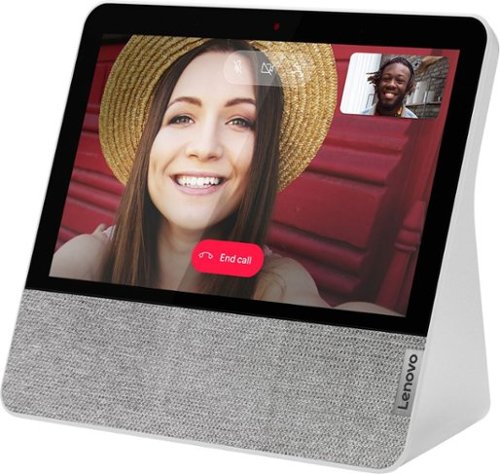
Lenovo - 7" Smart Display with Google Assistant - Blizzard White
Stay connected and entertained with this Lenovo Smart Display 7. The built-in Google Assistant enables seamless hands-free operation, while the front-facing 2.0MP camera and dual-array microphone let you make and receive video calls conveniently. This Lenovo Smart Display 7 has Wi-Fi connectivity for streaming content, and the 7-inch touch screen allows for easy menu navigation.
What is this? An Android tablet?
Hi Bob! Lenovo Smart Displays bring you the best of the Google Assistant in a visually, more engaging way. Designed for the home, it lets you stream music & videos, relive your best memories, check the weather & traffic, control your smart home, and more. All you need to do is ask.
6 years, 3 months ago
by
Posted by:
Lenovo Product Expert
Lenovo - 7" Smart Display with Google Assistant - Blizzard White
Stay connected and entertained with this Lenovo Smart Display 7. The built-in Google Assistant enables seamless hands-free operation, while the front-facing 2.0MP camera and dual-array microphone let you make and receive video calls conveniently. This Lenovo Smart Display 7 has Wi-Fi connectivity for streaming content, and the 7-inch touch screen allows for easy menu navigation.
Can google assistant be UNINSTALLED? Google doesn't need to know $%^&.
Hello and thanks for your question. No, the Google Assistant can’t be uninstalled from this device. With the Google Assistant built in, this Lenovo Smart Display is designed to make everyday life easier. Check your morning commute or the weather. Stream music, radio, YouTube videos and more. The device also comes equipped with microphone and camera on/off switches for privacy.
6 years, 3 months ago
by
Posted by:
Lenovo Product Expert
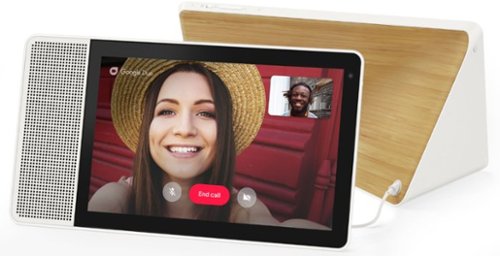
Lenovo - 10" Smart Display with Google Assistant - White Front/Bamboo Back
Make everyday life easier with this 10-inch Lenovo Smart Display. Its built-in Google Assistant responds quickly to your voice commands, whether you need to check your morning commute or bring up a recipe, and the brilliant Full HD touch screen offers a colorful, crisp view. This Lenovo Smart Display lets you catch up with family and friends using video chat.
What is the voltage required
Hello, The AC adapter of the Lenovo Smart Display has an input capacity of 100V-240V 1.3A 50-60Hz.
6 years, 3 months ago
by
Posted by:
Lenovo Product Expert