Lenovo Product Expert
Lenovo Product Expert's Stats
Reviews
- Review Count0
- Helpfulness Votes0
- First ReviewNone
- Last ReviewNone
- Featured Reviews0
- Average Rating0
Reviews Comments
- Review Comment Count0
- Helpfulness Votes0
- First Review CommentNone
- Last Review CommentNone
- Featured Review Comments0
Questions
- Question Count0
- Helpfulness Votes0
- First QuestionNone
- Last QuestionNone
- Featured Questions0
- Answer Count37959
- Helpfulness Votes24,861
- First AnswerApril 21, 2014
- Last AnswerOctober 26, 2026
- Featured Answers0
- Best Answers2831
Lenovo Product Expert's Reviews
Lenovo Product Expert has not submitted any reviews.
Lenovo Product Expert's Questions
Lenovo Product Expert has not submitted any questions.
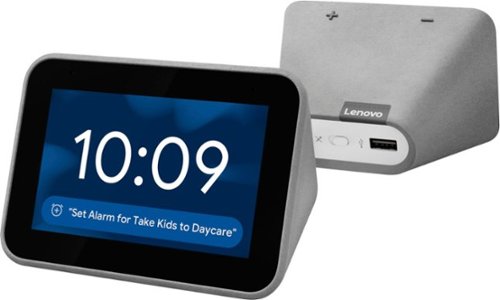
Lenovo - Smart Clock with Google Assistant - Gray
Wake up and start your day with this Lenovo smart clock. Wi-Fi connectivity and Google Assistant integration let you use voice commands to play music, check schedules and control smart home devices. This Lenovo smart clock offers hundreds of audio and media alarm options so you can choose how to wake up.
Can work at night light ?

Hello. Yes, the Lenovo Smart Clock with Google Assistant can function at night and used as a night light. The clock has a 4” color screen that has an ambient light sensor. If you swipe up on the Clock you can set the brightness between 1 and 10 depending on your preference, or select "Auto" for the clock to automatically adjust the brightness of the screen.
6 years, 3 months ago
by
Posted by:
Lenovo Product Expert
Lenovo - Smart Clock with Google Assistant - Gray
Wake up and start your day with this Lenovo smart clock. Wi-Fi connectivity and Google Assistant integration let you use voice commands to play music, check schedules and control smart home devices. This Lenovo smart clock offers hundreds of audio and media alarm options so you can choose how to wake up.
HEY .... DOES THIS HAVE A BUILT-IN BATTERY ????
Hi there! Thanks for your question. No, the Lenovo Smart Clock with Google Assistant does not have a built-in battery currently. The unit needs to be plugged in with the included AC adapter to function.
6 years, 3 months ago
by
Posted by:
Lenovo Product Expert
Lenovo - Smart Clock with Google Assistant - Gray
Wake up and start your day with this Lenovo smart clock. Wi-Fi connectivity and Google Assistant integration let you use voice commands to play music, check schedules and control smart home devices. This Lenovo smart clock offers hundreds of audio and media alarm options so you can choose how to wake up.
If I loose wifi will alarms go off on time with lost wifi connection?
Hi, thanks for your question. Yes, previously set alarms will work on your Lenovo Smart Clock with Google Assistant even if the internet goes out. You will not however be able to set new alarms or give voice commands without an internet connection.
6 years, 3 months ago
by
Posted by:
Lenovo Product Expert
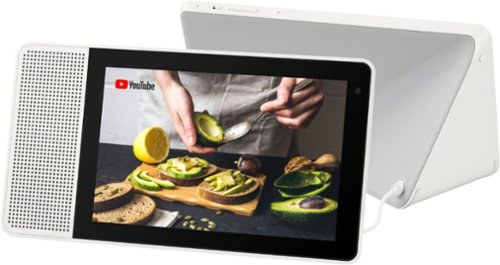
Lenovo - 8" Smart Display with Google Assistant - White Front/Gray Back
Watch programs or surf the Internet with this Lenovo smart display. The 8-inch screen has 1280 x 800 high-definition resolution for clear images, and the integrated Google Assistant function lets you get instant answers to questions as well as reminders of important events. This Lenovo smart display also lets you make video calls.
My Lenovo - 8" Smart Display with Google Assistant - White Front/Gray Back has stopped all voice or sound. I've tried several times resetting the unit by unplugging it and resetting my router with no success. Help!!!
Hey there, we are sorry to hear you are experiencing this issue with your Lenovo 8” Smart Display with Google Assistant. Please try the following steps.
1. Please try to turn up the volume by pressing volume up button
2. Please try to reboot device and check it again.
3. Please use another device to play the video or music to check whether its an issue with the media itself.
4. Please reset the Device (Long press VOL+ and VOL- 8 Seconds).
5. If the issue persists, please contact customer service at 866-426-0911
1. Please try to turn up the volume by pressing volume up button
2. Please try to reboot device and check it again.
3. Please use another device to play the video or music to check whether its an issue with the media itself.
4. Please reset the Device (Long press VOL+ and VOL- 8 Seconds).
5. If the issue persists, please contact customer service at 866-426-0911
6 years, 3 months ago
by
Posted by:
Lenovo Product Expert
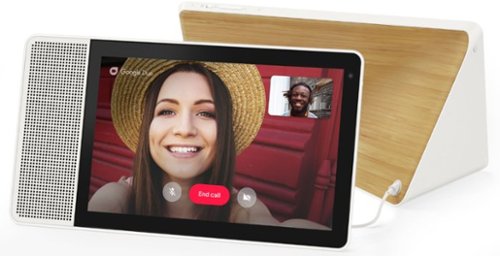
Lenovo - 10" Smart Display with Google Assistant - White Front/Bamboo Back
Make everyday life easier with this 10-inch Lenovo Smart Display. Its built-in Google Assistant responds quickly to your voice commands, whether you need to check your morning commute or bring up a recipe, and the brilliant Full HD touch screen offers a colorful, crisp view. This Lenovo Smart Display lets you catch up with family and friends using video chat.
how do i set it up i forgot.
Hi Dolly. Setting up your Lenovo 10” Smart Display with Google Assistant is a breeze.
1. Connect the power adapter to the device, plug it in to your AC outlet, and allow it to power on.
2. download and run the Google Home app on a smart phone or tablet.
3. Pair and set up the smart display by following the instructions in the Google Home App on your
phone/tablet
4. Make sure your device is connected to the internet by following the on-screen instructions (Your Lenovo smart device should be connected to the same network as your phone/tablet being used to set it up).
It’s really that simple. If you would like more detailed instructions, you can find a great guide at the following URL. https://www.tomsguide.com/us/lenovo-smart-display-setup-guide,review-5634.html
1. Connect the power adapter to the device, plug it in to your AC outlet, and allow it to power on.
2. download and run the Google Home app on a smart phone or tablet.
3. Pair and set up the smart display by following the instructions in the Google Home App on your
phone/tablet
4. Make sure your device is connected to the internet by following the on-screen instructions (Your Lenovo smart device should be connected to the same network as your phone/tablet being used to set it up).
It’s really that simple. If you would like more detailed instructions, you can find a great guide at the following URL. https://www.tomsguide.com/us/lenovo-smart-display-setup-guide,review-5634.html
6 years, 3 months ago
by
Posted by:
Lenovo Product Expert
Lenovo - 10" Smart Display with Google Assistant - White Front/Bamboo Back
Make everyday life easier with this 10-inch Lenovo Smart Display. Its built-in Google Assistant responds quickly to your voice commands, whether you need to check your morning commute or bring up a recipe, and the brilliant Full HD touch screen offers a colorful, crisp view. This Lenovo Smart Display lets you catch up with family and friends using video chat.
Hi, do you know if this product support Portuguese (BR) voice commands?
Hi Leandro! At this time the Lenovo 10” Smart Display with Google Assistant does not support Portuguese voice commands. A full list of google devices with their supported languages can be found at https://support.google.com/assistant/answer/7394513?co=GENIE.Platform%3DAndroid&hl=en
6 years, 3 months ago
by
Posted by:
Lenovo Product Expert
Lenovo - 10" Smart Display with Google Assistant - White Front/Bamboo Back
Make everyday life easier with this 10-inch Lenovo Smart Display. Its built-in Google Assistant responds quickly to your voice commands, whether you need to check your morning commute or bring up a recipe, and the brilliant Full HD touch screen offers a colorful, crisp view. This Lenovo Smart Display lets you catch up with family and friends using video chat.
Where can I get a replacement for the plug in?
Hi Trent! The Lenovo Smart Clock model ZA4R replacement adapter part # is SA18C27239. We recommend getting in touch with your local Best Buy or Geek Squad to see about ordering a new one. Also, please feel free to reach out to our customer support team at 866-426-0911
6 years, 3 months ago
by
Posted by:
Lenovo Product Expert
Lenovo - Smart Clock with Google Assistant - Gray
Wake up and start your day with this Lenovo smart clock. Wi-Fi connectivity and Google Assistant integration let you use voice commands to play music, check schedules and control smart home devices. This Lenovo smart clock offers hundreds of audio and media alarm options so you can choose how to wake up.
Will the alarm feature still work if the internet goes out?
Hello, thanks for your question. Yes, the alarm feature will still work on your Lenovo Smart Clock with Google Assistant even if your internet goes out. Any previously set alarms will sound. You will not however be able to set new alarms or give voice commands without an internet connection.
6 years, 3 months ago
by
Posted by:
Lenovo Product Expert
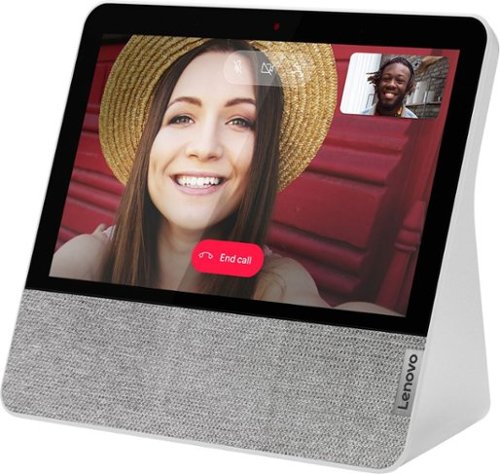
Lenovo - 7" Smart Display with Google Assistant - Blizzard White
Stay connected and entertained with this Lenovo Smart Display 7. The built-in Google Assistant enables seamless hands-free operation, while the front-facing 2.0MP camera and dual-array microphone let you make and receive video calls conveniently. This Lenovo Smart Display 7 has Wi-Fi connectivity for streaming content, and the 7-inch touch screen allows for easy menu navigation.
Can you ask questions like an amazon alexa
Hello! Yes, you can ask your Lenovo 7” Smart Display with Google Assistant for info or help with everyday tasks. Just say “Hey Google” followed by your question. An example of a question you can ask is “What’s the weather today?”, or “How’s the traffic on my way to work?”.
6 years, 3 months ago
by
Posted by:
Lenovo Product Expert
Lenovo - Smart Clock with Google Assistant - Gray
Wake up and start your day with this Lenovo smart clock. Wi-Fi connectivity and Google Assistant integration let you use voice commands to play music, check schedules and control smart home devices. This Lenovo smart clock offers hundreds of audio and media alarm options so you can choose how to wake up.
Do you sell the adapter separately? My dog chewed mine.
Hi there! The We are sorry to hear about your adapter. The Lenovo Smart Clock model ZA4R replacement adapter part # is SA18C27239. We recommend getting in touch with your local Best Buy or Geek Squad to see about ordering a new one. Also, please feel free to reach out to our customer support team at 866-426-0911
6 years, 3 months ago
by
Posted by:
Lenovo Product Expert