


blah's stats
- Review count106
- Helpfulness votes723
- First reviewFebruary 27, 2015
- Last reviewJuly 21, 2026
- Featured reviews0
- Average rating4.4
Reviews comments
- Review comment count0
- Helpfulness votes0
- First review commentNone
- Last review commentNone
- Featured review comments0
Questions
- Question count0
- Helpfulness votes0
- First questionNone
- Last questionNone
- Featured questions0
- Answer count4
- Helpfulness votes0
- First answerMarch 21, 2019
- Last answerMarch 21, 2019
- Featured answers0
- Best answers0
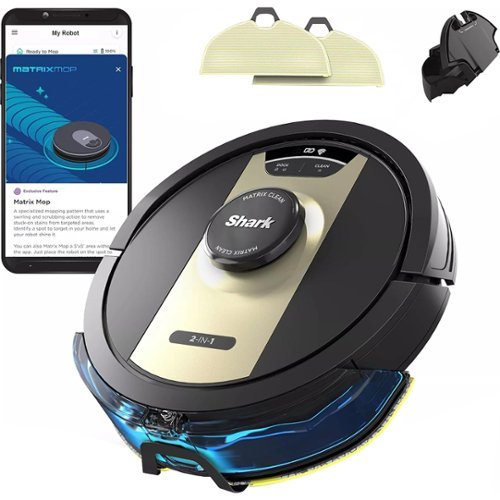
The Shark Matrix~ 2-in-1 robot is the complete package. It not only vacuums hard floors and rugs, but it also vacuums & sonic mops hard floors~at the same time. Other features include: Matrix Clean for a deeper clean leaving no spots missed, Home Mapping for customizing your clean; Voice Control; and a self-cleaning brushroll for picking up all types of hair. Product Features. The Shark Matrix 2-in-1 robot is the complete package. It not only vacuums hard floors and rugs, but it also vacuums & sonic mops hard floors-at the same time. Other features include: Matrix Clean for a deeper clean leaving no spots missed, Home Mapping for customizing your clean; Voice Control; and a self-cleaning brushroll for picking up all types of hair. POWERFUL SUCTION AND SONIC MOPPING: First, it's a powerful whole home vacuum on carpets and floors. Second, it's a powerful vacuum that sonic mops hard floors at the same time. NO SPOTS MISSED: With Matrix Clean, the vacuum cleans using a precision grid taking multiple passes over dirt and debris for whole home, deep cleaning coverage. TACKLE STUCK ON STAINS: Sonic Mopping scrubs hard floors 100x per minute and for extra deep cleaning initiate Matrix Mop in the app to get 50% better stain cleaning in targeted zones (vs. RV2001WD, modified IEC 62885-6). PRECISION HOME MAPPING: 360~ LiDAR vision quickly and accurately maps your home so your robot can methodically clean detecting and avoiding objects in its path, day or night, adapting to everyday changes in the home. HANDS-FREE CONTROL: Set a cleaning schedule, initiate on-demand cleaning, or activate Matrix Clean, all with sound of your voice using Amazon Alexa or Google Assistant. PERFECT FOR HOMES WITH PETS: With powerful suction, Sonic Mopping, and Shark's self-cleaning brushroll, the robot picks up pet hair and eliminates stuck-on pet messes with ease.
Customer Rating

3
not bad for small rooms
on October 24, 2017
Posted by: blah
from New York, NY
I have never had a robotic vacuum before, but this one was a bit lacking, though would be ok for small rooms. The problem is that for larger rooms it never gets a chance to get back to it's charging station on it's own, as it runs out of a charge in about an hour of cleaning. In that one hour of cleaning, it does an ok job, but never gets to complete the room I have been using it in, because it runs out of power. It takes 3 hours to charge again before you can run it. I do like that it is very quiet, and that it can go under furniture! In fact, that is probably what I like most about it. Also, it performs best on hardwood floors, and less well on carpet, as it is not high powered enough as a traditional vacuum for carpets in my opinion.
If you have a pet that sheds a lot, I could totally see this ION ROBOT as being very handy in smaller rooms.
My Best Buy number: 2960219775
Mobile Submission: False
I would recommend this to a friend!
Share this review:


+2points
2of 2voted this as helpful.
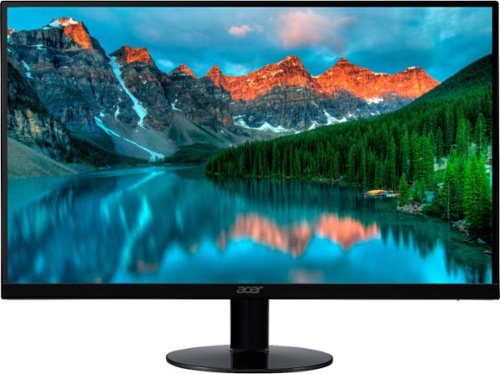
Set up your workstation with this 23-inch Acer widescreen monitor, and enjoy ample space for graphics or document work. The ultra-thin backlit LED display offers easy viewing in any light from any angle, and brilliant 1920 x 1080 resolution brings your work alive. This Acer widescreen monitor features an adjustable tilt stand for comfort.
Customer Rating

4
very good and very slim monitor
on October 18, 2017
Posted by: blah
from New York, NY
This is the first Acer monitor I have ever had, and I was pretty surprised how good it is for the price point. My biggest gripe with monitors in this price range is when viewing off angle, a lot of grey introduced to the screen image, but the viewing range is pretty good on this monitor.
The monitor is only HD, 1920x1080, which is ok, but if you are an heavy gamer, you might want more resolution, like 2560x1440, though those monitors tend to cost more, and you will need a more expensive video card to drive video games at that resolution with all the settings turned high up. At 1920x1080, even a GTX 1060 will make most games like Doom run at a very fast rate. I tried Doom, it looked great, though because this monitor is only 60hz, there was screen tearing as it could not keep up at the frame rate my GTX 1060 laptop card could output (which was 90+ frames per second at this resolution).
The monitor itself is quite plain, but that was ok with me, as what I really cared about was how thin it was, and it is pretty thin. There is no swivel, or height adjustment either. This is an IPS screen, with a 4ms response time, and I could not see any ghosting to my eyes, either gaming or using windows 10. The monitor does tilt up and down slightly.
There are single HDMI, DVI, and VGA ports, but I wish it had included DisplayPort, which it does not.
There are single HDMI, DVI, and VGA ports, but I wish it had included DisplayPort, which it does not.
Overall, unless you need a monitor that has Nvidia G-Sync this is a pretty good monitor.
My Best Buy number: 2960219775
Mobile Submission: False
I would recommend this to a friend!
Share this review:


0points
0of 0voted this as helpful.

Take control of your food prep with this Ninja food processor. Its two interchangeable attachments accomplish a wide range of kitchen tasks, including chopping nuts, slicing vegetables and pureeing fruit, and its auto spiralizer lets you make versatile vegetable noodles. This Ninja food processor has a drizzle hole lid for conveniently adding oils and other liquids.
Customer Rating
4
great for vegetarians and more
on October 11, 2017
Posted by: blah
from New York, NY
I only have 1 other Ninja product, and it has served me well for about 2 years now, a small blender which has served me very well in the time I have had it.
This food processor is really good for the money. You can blend, chop, mix, and even spiralize all in one device. Easy to assemble, has suction cups to hold it onto your countertop. It has two blades. I never really thought about spiralizing food, but as a vegetarian, this is pretty cool!
One gripe is that takes a bit to clean by hand. Also, I wish the bowl was larger, so I could make things that require more space. Otherwise, this thing has been really handy so far!
My Best Buy number: 2960219775
Mobile Submission: False
I would recommend this to a friend!
Share this review:


0points
0of 0voted this as helpful.
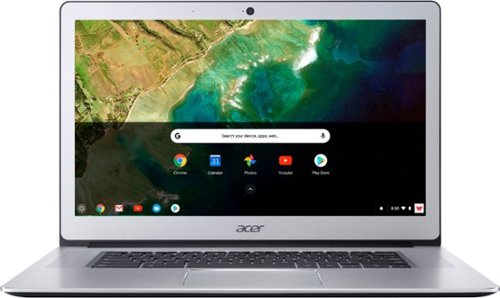
Stay productive wherever you go with this Acer Chromebook computer. Its quad-core Intel Pentium processor and 4GB of RAM run programs and apps efficiently, and its 32GB of storage holds personal documents and photographs. This Acer Chromebook computer has a 15.6-inch Full HD touch screen for clear viewing of videos and movies.
Customer Rating
4
good chromebook for the money
on October 11, 2017
Posted by: blah
from New York, NY
Need a fairly inexpensive “laptop” to consume media, browse the web, email, and light productivity like word processing? And in a light package?
Well, this new revamp of the Acer Chromebook 15, model CB515-1HT-P39B, can do all of those things. This is not however a complete laptop or desktop replacement. This would probably be ok for most high school students, and even some college students that don’t need to install programs made for windows, like some engineering and science students do.
The processor is an Intel Quad Core N4200, 4gb of Memory has bult in wi-fi, and bluetooth, and surprisingly decent 1920x1080 IPS touch LCD panel. There is 32gb of on board storage. There is also a web cam on it for skype, recording video, etc.
Later this year, this thing will become even more useable, as this refresh of the chromebook 15 will be supporting Google Play Store apps.
Connectivity wise, there two USB 3.1 Type-C ports, two USB 3.0 ports, HDMI port, headphone port (thank you for not removing Acer!!), Bluetooth 4.2, and even a SD card reader (officially supporting up to 128gb SDXC cards.
This model also has a touchscreen, which will be great once Google Play apps are supported later this year, as those apps are designed to work with those screens, and not trackpads.
All in all this is a pretty good chromebook for the money.
My Best Buy number: 2960219775
Mobile Submission: False
I would recommend this to a friend!
Share this review:


+5points
6of 7voted this as helpful.
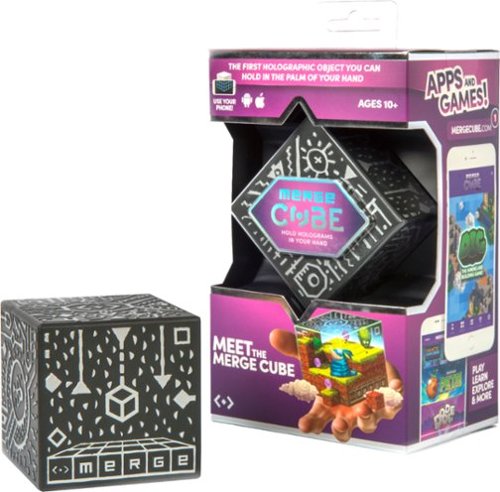
Fuse physical and digital worlds with this Merge cube. It's a toy hologram that you can hold in the palm of your hand, and it works with free apps downloaded onto your iOS or Android smart device at the Merge Miniverse site. This Merge cube lets you play your favorite games with virtual reality goggles.
Customer Rating

5
great stocking stuffer for kids!
on October 2, 2017
Posted by: blah
from New York, NY
The Merge Cube VR, will work not only with the Merge VR googles, but also with any google cardboard device out there.
Essentially, it is once you view it thru various apps available on iOS and Android, including iPad tablets, it changes that cube into a 3D tracked object on screen, replacing the real cube with another shape. There are quite a few games and apps available, and while fun, they are mostly aimed towards children. There is defintley a wow factor here, and I am excited for where this augmented reality will take us down the line. You can literally rotate another 3D object around, hold it closer to your VR googles or your tablet camera, it is pretty amazing.
The apps I played with also showed you the actual video feed from the camera lens, so when you have your replaced 3D object, it makes it really fun to see this other augmented reality object in it’s place, which you can rotate and spin around, etc.. while the video is still there. You can see your hand manipulating the object in real time.
Some apps allow you to record the video as you are messing with it. Very cool. Some apps will also fake a shadow if the cube is on a surface. In one instance, I played with a firework crate (in place of the cube), and set the fireworks off, and you can follow it around. Tilt your head and follow the launched fire works. Very cool!
For the money this a great stocking stuffer for kids!
My Best Buy number: 2960219775
Mobile Submission: False
I would recommend this to a friend!
Share this review:


-1point
0of 1voted this as helpful.
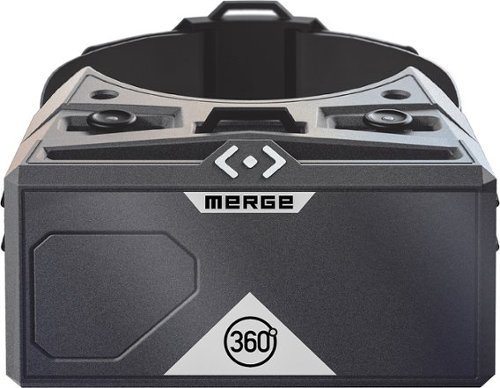
Be transported into another world with the Merge VR Goggles. Compatible with Android and iOS devices, Merge VR Goggles provide an immersive virtual reality experience powered by your smartphone.Explore virtual worlds with these Merge VR goggles. The input system lets you perform simultaneous action, such as running and jumping, and the soft foam construction keep you comfortable. These Merge VR goggles take you to new worlds via hundreds of apps with VR START, and they~re compatible with newer Android and iPhone devices for versatility.
Customer Rating
5
This Merge VR set is very well designed
on October 2, 2017
Posted by: blah
from New York, NY
This is essentially on the google cardboard VR design, which users could make themselves out of you guessed it, cardboard.
This Merge VR set is very well designed. It is made of a very soft foam that is lightweight, and quite comfortable. Good thing it is lightweight, as you phone, Android or iPhone, will be mounted in the front of the headset. There are slots for you to put a headphone wire thru to the phone, on both sides, and also allow any speakers to pass thru sound and actually amplify them as they go out a bit too. There is also an area where your nose will fit into, so good thing this thing is soft. There is a flexible elastic band for wrapping around your head, plus an extra band for going from the back of the main band, over the top of your head, to help distribute the weight a bit. The design of that works very well. There is also access a front eye piece foam, which can be removed if you are using an app that is supposed to work in conjunction with, like if an app needs access to the phones camera, etc. Most of the time you would have that eye piece put in to block out any light.
This VR headset will fit even larger phones, like the LG V10, and will stay put inside that very soft foam.
One very awesome thing of the design, is that the lenses themselves will move left to right, to adjust for varying head sizes, so you can really get a good customization for your head. Most other google cardboard products don’t do this, and you kind of hold them, and then have to either keep them close to your head, or hold them away from your head. This solves that issue for such a relatively inexpensive device. The sliders for this adjustment also doubles as a push-down, in-app selection device in supported software. This slider/button is on top of the headset.
The viewing experience is pretty good, not much latency that I could sense at least. The viewing experience was great, and not blurry as you might think for an item in this price range.
This is a great gift for a young person(over 8 I would imagine), and even grown ups. Very fun to watch movies on too, without disturbing your significant other.
My Best Buy number: 2960219775
Mobile Submission: False
I would recommend this to a friend!
Share this review:


+3points
3of 3voted this as helpful.
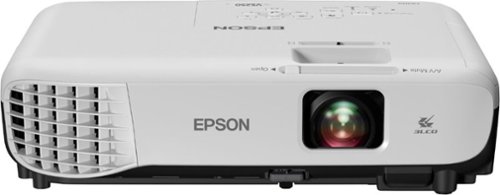
Display work or school presentations on this Epson projector. It produces 3200 lumens of white and color brightness for vivid images, and its easy setup lets you customize specifications in minimum time. This Epson projector is equipped with an HDMI port, so you can connect it to your computer or HD device.
Customer Rating
4
really good business projector - and portable!
on September 29, 2017
Posted by: blah
from New York, NY
I have a similar projector in my office that never quite got bright enough. This projector solved that problem for us in the office. Even after only 2 days use, I can immediately tell the difference. Even with some lights in the room on we get good brightness on the projected image.
I would not buy this projector for strict home theatre use, but for occasional entertainment use it is great for the price, however the small built-in speaker does not get loud enough for movies. It is perfect for office meetings. Keep in mind this projector is not HD resolution, and meant for business use. However you can still play movies thru your computer or media device to it, even if those are HD. You could always connect speakers direct to your video source and output the sound that way if you need better and louder sound.
Projector comes with the projector itself (around 7 pounds), power cable, VGA cable (for older computers/laptops), remote control, and manuals. I wish they would have thrown in an HDMI cable (it does not come with one).
You can connect some older format devices, composite for example, and VGA. The maximum output resolution is 800x600. But you can still connect any HDMI output devices to it, and HDMI devices will also pass thru your sound to the built in speakers. Most newer laptops have HDMI outputs, while older ones have VGA. Because this is a fairly light weight projector, it is easy to take with you. I would keep the box for taking it with you.
There is a built in speaker, but keep in mind you will have to figure out a way to get sound out directly from your laptop if you don’t want it coming from the speaker on the projector. It might be a bit hard to hear in very large rooms.
You can adjust the size of the projected image, and focus on the projector itself. There are feet to adjust the angle and height of the projector if you are just putting it on a flat surface. The projector is also mountable, but I would imagine most people would not be using it that way, as this is intended more as a portable projector, and not a home theatre one. Remote is useful whether it is mounted or just sitting on a desk or other flat surface. It can be used to control volume, control power, and also switch inputs, incase you have more than 1 device connected to it at once.
Overall, I would say this is a very good little business projector, and would recommend it to anyone needing something small and portable for presentations.
My Best Buy number: 2960219775
Mobile Submission: False
I would recommend this to a friend!
Share this review:


+7points
8of 9voted this as helpful.
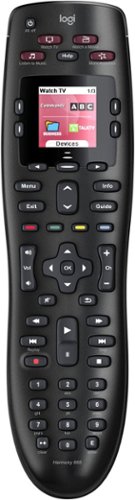
Throw away your extra remotes in favor of the Logitech Harmony 665 remote control. This functional remote works with a range of devices, from basic cable to Apple TV, and can combine up to 10 remotes in one versatile unit. This Logitech Harmony 665 remote control offers one-button setup for easy incorporation with your entertainment system.
Customer Rating
4
Throw away multiple remotes, this replaces all!!
on August 22, 2017
Posted by: blah
from New York, NY
Ok.. I am a long time Logitech Harmony remote control user.. Going back to around the launch of the Xbox 360. I had tons of remote controls in my living room. TV, BluRay/DVD Player, surround sound amplifier, and even more. It was literally a mess of controls in my living room.
Enter the Logitech Harmony series of remotes. The one I had years ago worked great, and with this new Logitech 655, I can dool all I did before, in a revised physical design, a nicer more premium physical feel, and yet not break the bank as with the higher end logitech harmony remotes.
This remote controls up to 10 separate devices, even really, REALLY old and obscure manufacturers. I had a really old pioneer surround receiver that had was in the setup program’s database of devices. The list of devices is exhaustive.
Setup is done from either a PC or Mac, and to be honest, is a bit of work to get going the first time. You basically define which devices you own, TV, Consoles, Amps, Media Streamers, etc.. Then you define “activities”, such as “Watch TV”, “Play Xbox One”, “Watch a Movie” etc. The setup asks for each activity which TV input should be used for that activity, should the Amp be on? What setting should the amp be on? How about, your media streamer? Should that be on, etc.. You can define the order of the devices turning on too. You can even customize it more if you would like, rename the activity, etc. You save all this information on your Harmony online account, you will need to register one, and then it will save back to your remote control. When you are all done, you unplug it from your computer and try it out.
The great thing is, once you go thru this process one time, and say you lose or break your remote, you get either a replacement, or a newer remote, it can even be a different model, and, BAM, Bob’s yer uncle, you can transfer your old remote’s programming to your new/replacement remote. BRILLIANT. You can even define multiple remotes for different rooms too.
The remote itself glows in the dark when you reach for it, and are using it, though not all the keys light up. Most of them do.
You can even control each device to actually emulate all of the original remote’s setup. Basically if there are keys that it does not have physically, let’s say for a setup menu on your tv for example, that button will appear on your LCD screen as a “button”.
For me, I basically always just use the activities. Ahh.. and my favorite.. If you have a device that did not turn on because you were pointed a little off when you lanuched the activity? You click the “HELP” button, and the remote basically will try to turn on, or off, all devices, or whatever your last “activity” was set to perform. Still doesn’t work? It will then ask for each stage of that activity if that device is on, set to the correct input, etc.
There are some downsides.. This will take you around 30-45 minutes to setup the first time, and I had some issues getting Windows 10 to see the device as connected to my PC, but managed to get thru it in about 30. Also, I wish the remote was not so slippery. This thing falls out of my hands alot.
And here is my single biggest gripe with basically all of the harmony remotes that have followed this general design, though hopefully not with this one. Eventually, the buttons will be pushed so often that they will need to be pushed down very hard. I have gone thru several harmony remotes like this. What is happening is that the circuit board inside the remove is slowly getting bent down, and losing connection with certain buttons. In the past it has taken about 2 years to get to this point on other remotes, so I was ok with it, given how fantastic the performance of the line of remotes has been in the past.
Overall, for the price, the remote is fantastic. Highly recommended.
My Best Buy number: 2960219775
Mobile Submission: False
I would recommend this to a friend!
Share this review:


+4points
4of 4voted this as helpful.
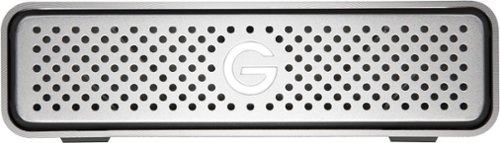
Take your data on the go with this 4TB G-Technology G-DRIVE 0G03594 external USB 3.0 hard drive, which features a compact, all-aluminum enclosure that enables you to safely transport important videos, documents, music and other files, wherever you are.
Customer Rating
5
expensive, but these are the best drives for pros
on July 12, 2017
Posted by: blah
Verified Purchase:Yes
Vert expensive, but these are the best drives for creative pros that need to be sure they have drives that last. There is a reason G-Drive are so popular for video and photo professionals.
My Best Buy number: 2960219775
My Best Buy number: 2960219775
Mobile Submission: False
I would recommend this to a friend!
Share this review:


0points
0of 0voted this as helpful.

Broaden the content you enjoy on your PlayStation system with this convenient $20 PlayStation Network Card. Use the card to purchase downloadable games, game add-ons, full-length movies, TV shows and other content that you can play or view on your PlayStation 4, PlayStation 3 or PS Vita.
Customer Rating
4
great for gifts to kids/young adults
on February 22, 2017
Posted by: blah
Verified Purchase:Yes
These are great for giving to kids and young adults that don't have credit cards for buying games on Playstation devices.
My Best Buy number: 2960219775
My Best Buy number: 2960219775
I would recommend this to a friend!
Share this review:


0points
0of 0voted this as helpful.
blah's Review Comments
blah has not submitted comments on any reviews.
blah's Questions
blah has not submitted any questions.
blah's Answers
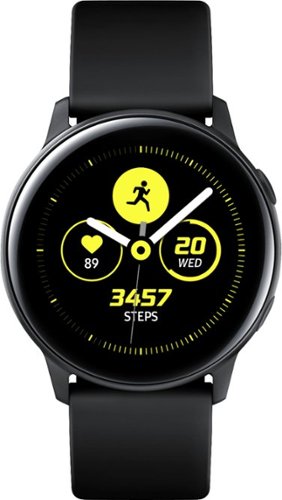
Reach fitness goals with this Samsung Galaxy Watch Active smart watch. Featuring advanced workout tracking, this smart watch helps optimize workouts and monitors your progress by tracking up to 40 exercises. This Samsung Galaxy Watch Active smart watch monitors your heart and sends real-time alerts in the event of irregular activity.
Dose this watch have the SOS mode where if you are in trouble you hit one of the buttons three times and it sends up to four phone calls, and one to the police?
Reach fitness goals with this Samsung Galaxy Watch Active smart watch. Featuring advanced workout tracking, this smart watch helps optimize workouts and monitors your progress by tracking up to 40 exercises. This Samsung Galaxy Watch Active smart watch monitors your heart and sends real-time alerts in the event of irregular activity.
Are the watch bands interchangeable on the Samsung active?
yes, they are standard 20mm watch bands, that are easily swappable.
7 years, 4 months ago
by
blah
Reach fitness goals with this Samsung Galaxy Watch Active smart watch. Featuring advanced workout tracking, this smart watch helps optimize workouts and monitors your progress by tracking up to 40 exercises. This Samsung Galaxy Watch Active smart watch monitors your heart and sends real-time alerts in the event of irregular activity.
Can u make calls from it
Yes.. you can. You can start calls from it, and speak into the microphone. Also you will get texts and emails to it.
7 years, 4 months ago
by
blah
Reach fitness goals with this Samsung Galaxy Watch Active smart watch. Featuring advanced workout tracking, this smart watch helps optimize workouts and monitors your progress by tracking up to 40 exercises. This Samsung Galaxy Watch Active smart watch monitors your heart and sends real-time alerts in the event of irregular activity.
Can you store music on the watch
yes.. you can. Though it will not hold much. It does also come with Spotify app, though you will need either your phone or a wifi connection to use that.
7 years, 4 months ago
by
blah