


blah's stats
- Review count106
- Helpfulness votes723
- First reviewFebruary 27, 2015
- Last reviewJuly 21, 2026
- Featured reviews0
- Average rating4.4
Reviews comments
- Review comment count0
- Helpfulness votes0
- First review commentNone
- Last review commentNone
- Featured review comments0
Questions
- Question count0
- Helpfulness votes0
- First questionNone
- Last questionNone
- Featured questions0
- Answer count4
- Helpfulness votes0
- First answerMarch 21, 2019
- Last answerMarch 21, 2019
- Featured answers0
- Best answers0
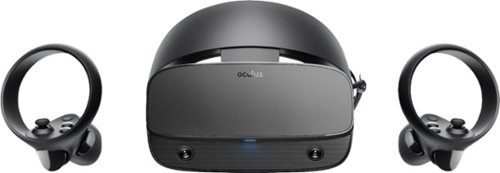
Step into virtual reality with this Oculus Rift S PC-powered headset. The advanced optics produce a sharp display with bright, vivid colors, and Oculus Insight tracking removes the need for external sensors to convert movements into virtual reality. This Oculus Rift S PC-powered headset has a fit wheel that secures the headset with a quick twist.
Customer Rating

3
nice hardware and setup, but where are the games?
on June 15, 2019
Posted by: blah
from Millwood
Rift-S is not a bad VR Headset by any means, and as far as wired, tethered VR Headsets go, setup on this one is actually really easy. Before you buy anything, go to the oculus website, and download the PC app to determine if your PC can actually work with this headset. You need to have a DisplayPort in order to use this. If you have a computer, laptop or desktop, gaming rig, that doesn’t have that port, you will not be able to get it to work on that system. The app will help those less technically inclined, have a displayPort capable machine, a USB 3 port, and that their video card is enough to drive he Rift-S.
Ok, back to setup. They really thought this through. You basically download their oculus app, and they walk you through plugging it in, putting in batteries, and, setting up an account with them, and keep in mind Oculus in now a Facebook company, will try to get you to link a Facebook account. It seems like they are trying to get people to game with other Facebook friends. I did not do this, it is possible to not tie a facebook account at all. I personally am a little put off that they would want so much access to my facebook account. I just want to play games personally. I don’t want to share with people my VR experiences, or invite people to play with me. Once you are done with setting up your Oculus account (this is how you buy games from Oculus(facebook) store, they have a part in the walk thru where you put on your googles, and your hand controllers, and setup your “play space”. You literally see thru the googles, what your real environment looks like, and it asks you to draw a line around where your “boundaries” would be for that play space. This is done, so that while playing, games will warn you that you are out of bounds, and don’t accidentally hit walls, trip on something, etc. After you have setup your “play space”, you will go into a bit of a demo on how VR works, and it is pretty entertaining. Grabbing items in a space station with a robot edging you on with what to do with virtual items, like a ping pong ball and paddle, toys, virtual butterflies, etc. It is a pretty cool intro in to their world.
One thing on hardware… those built in speakers? Real let down, they are not very good. You will want to get a good set of headphones that you plug in for better immersion. Keep in mind, you might have to find a pair that fit comfortably while you have the Rift-S on.
One thing on hardware… those built in speakers? Real let down, they are not very good. You will want to get a good set of headphones that you plug in for better immersion. Keep in mind, you might have to find a pair that fit comfortably while you have the Rift-S on.
Ok.. so far so good, but here is my biggest gripe, as a hardcore video gamer…. Where is the gaming content? I mean real games, games console gamers would play.
Rift-S…. Pretty cool hardware, better “tech” than PSVR, however for hardcore gamers, in my opnion, I think most will be let down, the content, in-terms of AAA titles is just not there yet. For casual gamers, yes, they will love games like Beat Saber and the like. Almost all the games available are very short experiences. Most are like “demos” rather than full experience games. As Facebook is now calling the shots, I suspect we will get more of these more casual games, as they are really seem to be pushing towards getting the masses on board, ie: facebook users, rather than really getting true gamers on board. That is very obvious because they also released the Rift Quest (a different VR headset, which doesn’t need a PC, and totally wireless), though not nearly as powerful as a Rift-S being driven by a decent gaming rig. I really wish they had brought all of that wireless, untethered tech to the Rift-S. It feels a little like the Rift-S are the step-children of the family now.
Mobile Submission: False
I would recommend this to a friend!
Share this review:


+1point
1of 1voted this as helpful.
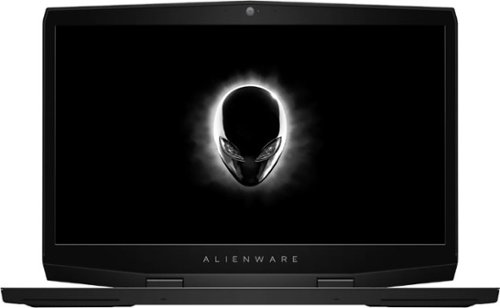
Get the tools to achieve victory with this 17.3-inch Dell Alienware gaming laptop. Featuring an NVIDIA GeForce RTX 2070 graphics card with Max-Q design, this laptop smoothly handles visually intensive titles at high settings. This Dell Alienware gaming laptop delivers vivid colors and makes games look sharp and detailed with its 17.3-inch Full HD display.
Customer Rating

4
Great gaming laptop, hampered by 60hz display
on March 25, 2019
Posted by: blah
from Millwood
This is a great laptop overall, but this really should have been released as at least a 144hz screen for the asking price. My previous laptop, also an Alienware 13R with OLED screen, has much better resolution, and obviously much better black levels by far and viewing angles. This screen is only 1920x1080, which would be ok, but includes a fairly powerful RTX 2070 Max-Q mobile processor, capable of way over 60 frames per second at the laptop resolution for most games. So if you game off the actual laptop screen, you will see screen tearing, as the display only runs at 60hz (60hz, basically means it can only display about 60 frames per second). This really isn’t all that bad, as just about all games have a function called “V-Sync” and it will bascially cap your video card from passing 60fps, and keep away that screen tearing. I understand they were trying to keep the price down on this laptop offering, but this is really a shame, as there are other manufacturers of exact same CPU, and GPU configurations that do have higher refresh rate monitors, and at least one of them, at a higher resolution to boot.
This is a big laptop, but really not as heavy as you would believe. You probably wouldn’t want to lug this thing around everyday, but weight wise, it is not very heavy, only a bit heavier than my Alienware 13R with OLED that does not contain a hard drive. This laptop configuration, has a 512gb SSD for the boot system drive, and a hybrid 1tb+8GB hard drive. This is a great setup, as you will quickly fill up a regular 512gb SSD alone, as I did with my previous gaming laptop. I use Adobe Creative Cloud, mostly Premiere Pro, and After Effects, and this laptop runs both fantastically! The 17” screen has been fantastic, even if running a lower resolution.
The build quality of this laptop is absolutely stellar. This is built like a TANK!! Love it. Love the looks. I can get away at freelance jobs bringing this in and be ok with it. The only thing I do not like, are the huge screen screen bezels. These not only give the laptop a cheap feel, but they put the ALIENWARE logo type right underneath it. It just makes an otherwise great looking laptop look a bit low budget. The screen itself is not too bad, but definitely not a OLED screen in terms of black levels, however, you will not have to worry about potential burn-in like I do on my older alienware OLED model.
Ok.. so, now on to how it games.
I installed Resident Evil 2 remake, and had a few issues setting it up, as many people did, but it is not the fault of this laptop. There apparently bugs related to the game not starting because of it being confused as to which video processor to use at launch, and the game will hang and not begin. I followed directions directly from Capcom, on the Steam Support forums, and I did finally get it working. It basically involves going to the NVIDIA Control Panel, and adding in a custom option to force the Resident Evil 2 .exe file, to always use the RTX 2070, and prefer performance over battery life. You should always game while plugged in, not just for performance, but also you will not get alot of gaming time on any gaming laptop running off a battery for modern games. Once I got it working, I pretty much maxed out all my settings, per a great youtube channel, Digital Foundry, and gaming right on my laptop screen was great! Nice frame rate, no tearing with V-Sync on, at default resolution of 1920x1080 on the laptop screen. So on to a bigger test. I recently got both a 65 Sony 4K tv and Sony Dolby Atmos receiver. I have an Xbox One X that looks great on it, especially with HDR compatible games. After a bit of noodling around, I was able to get my TV as my gaming display, including getting Resident Evil 2 to display HDR!! Looks great. At first, I setup the game to run at my tv’s default 4K resolution, but the frame rate was very unstable. Playable, but not great. It would fluctuate a bit. To get your m17 to display HDR, you definitely need a HDR capable TV, set windows display settings by right clicking on your desktop to “Display Settings” and make sure it is set to play games in HDR color. I did this, but the game would not allow me to turn on HDR itself! I could see the HDR mode on my Windows desktop, but when I would start Resident Evil 2 it would go back SDR. Again, after some googling, what you need to do, in addition to setting Windows 10 display settings to HDR mode, is to make the laptop only use one display, your HDR display. Don’t extend or use your laptop as 2nd monitor. It confuses games, and the HDR settings. You also, and this is a big one, need to go back into NVIDIA Control Panel, and change the color settings to use HDR mode!! Otherwise, it seems windows only thinks the non gaming optimus video card is the one using HDR. There is a customize option, where you can set this up, and change the bit color depth, and I was able to do this here. Once I did that, rebooted, and ran Resident Evil 2, bingo, I was able to get the HDR mode option turned on, when connected to my TV as the only display! Gaming was great this way. I had great frame rates, very steady, and looked about the same as my Xbox One X, even though I had to lower my resolution to 1920x1080, vs. full 4k. The resolution difference was not noteable! But the HDR mode was. Much better in HDR if you have a 4K HDR tv. Even surround sound passed thru to my amp from the laptop! I got in maybe 4 hours of game time with my TV this weekend. I use a xbox 360 wireless USB adapter on the laptop, and game from about 8 feet away with it.
I also had a chance to install Call of Duty WWII. This game also supports HDR modes, but I was not able to get it to work, and it looks like no one, can get it to work, as evidenced by Steam forums for the game. This game I was however get to run a a very high and steady frame rate, with just about every option maxed out, at 4K resolution with no issues at all. Surround sound pass thru also worked great.
I setup Alienware Mobile Connect on this laptop, as it will suggest you do it. This allows you to get all your phone notifications direct on your laptop. This is great, and is something Mac computers have been doing for years. Just a heads up, when gaming, set this to “Do Not Distub” otherwise if you get a notification, the game will minimize, to show you the notification.
Speakers on this laptop are also a plus. They just sound great, considering they are in a laptop. I will always use headphones while gaming off the screen, but for other things, they sound really good.
While gaming, this machine get hot. I mean really hot. You will not be able to game on this thing on your lap. Even on a table, you will feel the heat off this thing, not only blowing out of the sides, but also on the bottom. While gaming, I would advise people to either get a laptop cooler pad, or even something like a engineering scale, to lift the back of the unit up a little, to allow for better ventilation. In my testing, my computer never shutdown, from overheating or anything like that, but heat will degrade your battery life over time, and I did not use anything to lift it up, but will be ordering a laptop cooler very soon.
USB transfer speeds were also great. Connected up 2 different USB hard drives, and they both were copying files to and from each other around 160mb/second. Not bad at all.
Overall, since I mostly will be gaming directly on my 65” living room TV, with occasional laptop gaming for some games, I am VERY happy with this as a gaming laptop, but also as a video editing machine! Very recommended as long as you aren’t exclusively gaming all the time on the laptop screen. And even then it might be ok for most people after turning on V-Sync.
Mobile Submission: False
I would recommend this to a friend!

Share this review:


+12points
17of 22voted this as helpful.
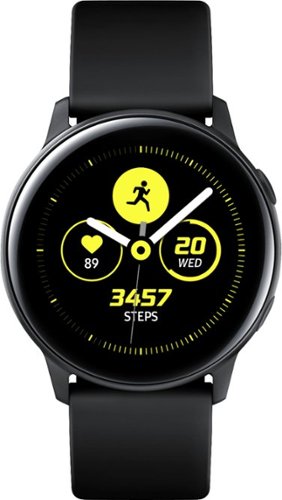
Reach fitness goals with this Samsung Galaxy Watch Active smart watch. Featuring advanced workout tracking, this smart watch helps optimize workouts and monitors your progress by tracking up to 40 exercises. This Samsung Galaxy Watch Active smart watch monitors your heart and sends real-time alerts in the event of irregular activity.
Customer Rating

5
Great watch for active person, or want to be!!
on March 21, 2019
Posted by: blah
from Millwood
Great watch if you are an active person, or on the road to be.
Had this watch about a week now, having never had a smartwatch before.
At first I found the watch a bit on the feminine side, but it has defintely grown on me. I wish the watch face was bigger, but I bet it saves on battery consumption. It is very easy to setup, I am on a LG v30, and it was pretty easy to setup, via Samsung Wearables app, and Samsung Health app for general tracking.
Battery life on the watch itself isn’t too bad. The more you look at the watch, receive notifications, it will drain faster. I am a very active person. I walk a few miles a day in the middle of the day, then workout for about an hour. If I charge the phone to 100 right before bed, and moderately check notifications, by the time I go to bed again I am at around 65% on the battery.
My hardest workout days are one day a week, I have an early 1 hour swim fit class, and I was thrilled that this watch caught every single lap of swimming! You first set the watch to track swimming, and it will set a mode on the watch so it doesn’t turn the screen on, or accidentally register a splash as you touching the screen, or hitting a button on the face. This watch is rated as being water resistance of 164 feet, but don’t go pressing either of the two physical buttons on it. When you are done with that swim mode I mentioned, the watch even reminds you to shake the water off before using again. Probably because moisture might get in via those physical buttons. I do shower with the watch on, without putting on that water mode, and noticed when warm water hits the watch it does register it as a touch. I have the “gesture” mode on the watch set to off, as otherwise when you move your arm up to look at the watch, it will turn the screen on, which often turns into it to turning the screen on just walking around, or lifting weights. Touching the screen makes the watch “wake up”. Ok, back to my hardest workout day of the week … I then walk about 8 miles in the middle of the day, and by this point, my battery is fairly low, around 35-40%. Then, my last 1 hour workout of the day, after that I am down maybe 20% or so. Not too bad overall, considering it is tracking steps, GPS, and heart rate during all that time. What is bad, is the Samsung Health app on my phone. Not only will it not sync with Google Fit, MapMyRide, or anything other than Strava. The Samsung Health app is a serious battery drainer on Android. Prior to installation of Samsung Health, on my LG v30, I had alot better battery life. This is not a deal breaker, and battery life did improve a little once uninstalling Google Fit, but it is something to be aware of.
Ok.. so on to tracking my workouts… if you do not actualy start a workout activity, there are nearly 100 of them there to choose from, the watch will realize after about 5-10 minutes that you are being active and try to figure out what you are doing. First workout I did, was alot of plyometric jump training, and I didn’t start an actual track for that activity, and the watch started one for me, called “Dynamic Training”. The next few workouts, I would just start it myself, as this is the most accurate way to track it. I love that it tracks my heart rate as I am working out, EVEN WHILE SWIMMING, and even senses when I take a break, asking if I am done, or if I should continue. For me, I workout at home, and usually take way too many breaks until I got this watch. Now I am encouraged to KEEP GOING, so the tracker doesn’t ask me that, and I can see that I am getting a better, and faster workout because of it! For me, this is worth the asking price alone!! It is a fitness MOTIVATOR!!
Other side notes.. You can control music playing on your phone via, play, pause, skip track, volume up/down, and it shows you the art on the watch face. Also you get notifications for texts, and emails if you want it too. You can also shut that off per app on the phone, within the Samsung Wearables app itself. I don’t like to get annoyed by emails all day, so I only have it set to notify me on my watch for text messages. It shows the person texting you, and, I really like that I can respond back via voice to the watch! It was fairly accurate the few times I did use this while I was out walking. I have not tried typing on the watch, but there is an option for it.
So far so good with this watch. I highly recommend it if you don’t need all the features of much more expensive smartwatches, and are either looking to inspire yourself to be more active, or push it even further!
Mobile Submission: False
I would recommend this to a friend!


Share this review:


+26points
31of 36voted this as helpful.
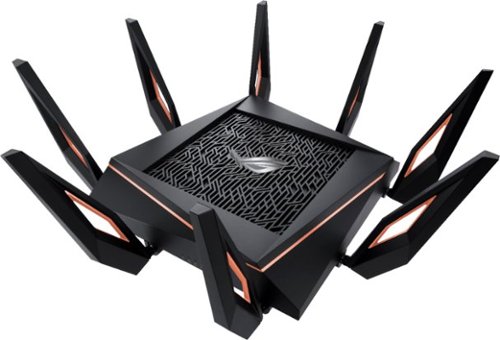
Make sure your wireless connection reaches every room in your home with this ASUS ROG Rapture gaming router. Speeds of up to 11000 Mbps deliver interruption-free connectivity throughout intense games and binge-watching sessions. Built-in network security defends against potential breaches, and the 4X capacity makes this ASUS ROG Rapture gaming router ideal for households running multiple devices.
Customer Rating

2
Great features, poor firmware at moment
on February 20, 2019
Posted by: blah
from Millwood
Feature rich router, but I believe there are still a lot of issues with the firm router.
Unfortunately have had a lot of problems with this router, from dropping the speed of local ethernet clients, to randomly dropping it’s wifi signal on the 5G networks (both of them at least once a day).
There are networking forums with others having similar issues, not just with this router, but the router model just under this one. It appears to be a firmware issue.
My first issue was that while I am rated to get a 200Mbps download speed from my ISP, I would, from time to time, get only 15 - 30 Mbps, on a wired ethernet connection. Speaking with tech support solved nothing, as the router was so new they didn’t know what to do, other than for me to return the router to the store which it came. I then figured out that unplugging the ethernet port on the back of the router into another one of the ports, fixed it, but only temporarily. I then also then realized what seems to trigger the issue with wired ethernet clients dropping speed is having the router admin site open for long periods of time.
My bigger issue with this router, is that for the very high price, I should not be having an even weaker 5g signal, which drops about once a day to all my devices. My house is not even that big, and my router is not even 50 feet away from the device that loses it’s 5g connection the most, my NVIDIA shield. When the NVIDIA Shield loses it’s 5g connection to this router, it usually cannot find it again, it just shows up as out of range, even after a reboot of the Nvidia shield itself. I literally need to reboot the router from the router login page.
This router will be overkill for about 99 percent of home users, including gamers. It is great that the router does have so many features, but most people will totally be lost on what to do with them. They are far better served by getting a less expensive router, that has a more reliable firmware. This product is still relatively new, and there is currently a beta firmware that is being tested in the community right now, but only time will tell if ASUS has fixed the issues I have had with a firmware update.
My last router did not have as much range of a connection, either on wireless N/B/G, or wireless AC (aka 5g). But it never randomly dropped it’s connections, either wired or wireless clients, like this router does.
Also, as others have mentioned, this thing is HUGE. I mean it is massive. Make sure you have space for it if you do decide to get it, because ASUS did not include a way to mount it on a wall, like many other routers.
Feature rich router, but I believe there are still a lot of issues with the firmware, that will hopefully be addressed via future updates. When it works, which is most the time, it is great, but otherwise, it is very annoying to have to reboot it to regain your wireless 5g networks.
Mobile Submission: False
No, I would not recommend this to a friend.
Share this review:


+12points
15of 18voted this as helpful.
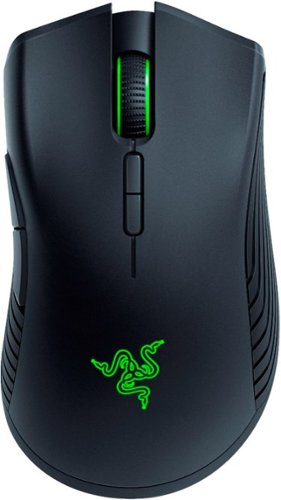
Gain the edge over your rivals with this Razer Mamba wireless gaming mouse. Its precise sensor delivers unbeatable accuracy onscreen, allowing instantaneous reactions and unrestricted movement with complete control. Tweak the click force to your precise needs to play with this Razer Mamba wireless gaming mouse even while charging and never miss a moment of the game.
Posted by: blah
from Millwood
I must admit, I wasn't sure about this mouse, but wow, am I impressed.
I have a desktop PC and a laptop, and as great as the mouse looks and feels, the fact that I have a different profile via the Razer Synapse software, you can have different profiles for various computers.
What gets saved with those profiles? Basically everything. Your DPI settings, RGB color settings, macro settings for games, and more.
This is awesome. So on my desktop PC I have an amber colored backlit keyboard from Logitech. So in the Synapse software I have changed the color on the mouse to match the keyboard light color. On my Alienware R13 laptop, I have a blue backlit color light setup, so I changed it in the Synapse profile to have this mouse follow suit. As soon as you connect the mouse, either wired, or wireless, it just knows you are connected to that specific computer automatically, and follows those settings . Awesome!
Razer really thought of the design of this thing too. The bottom of the mouse holds the wireless USB adapter when you are on the go. They also include a very long micro USB cable for charging the mouse. You can charge the mouse and use it at the same time. What is really great is they also included an adapter, so that you can use this same cable to extend where your wireless USB receiver to somewhere you can access it from very easily. I have it setup this way, so that when I am home on my desktop PC, I don't have to go behind my PC to pull the USB receiver out to use it on my laptop. I just leave that long cable plugged in with the adapter, and it just sits on my desktop. When I am ready to go mobile, just unplug the USB receiver, and boom ready to go.
The performance of this mouse is great too. This is my first wireless mouse and I honestly cannot tell the difference compared to the performance of my previous favorite mouse, the Logitech G502. I would even say, that this mouse is actually more comfortable. Game performance was stellar too. No lag at all!!
Mobile Submission: False
I would recommend this to a friend!


Share this review:


0points
0of 0voted this as helpful.

Dive right in and do something amazing with your videos. Auto-generated photo and video slideshows and collages are created just for you and delivered upon launch. Get up and running quickly with the new home screen - see what's new since your last version, discover fun things to try, and get inspiring ideas, help, and tutorials. Effortlessly edit and create thanks to photo and video automation powered by Adobe Sensei AI technology. Easily make movies in the redesigned Quick Edit mode, which offers a simplified scene line that puts clips, transitions, text, effects, and more at your fingertips. Try artistic techniques and effects with 20 step-by-step guided edits. And share your favorite memories in everything from animated GIFs and video collages to dynamic slideshows and full-length movies.
Customer Rating
5
Great editing software for those looking to get pr
on November 2, 2018
Posted by: blah
from New York, NY
I love, love, LOVE, this software. They took so many high end features from their Creative Cloud software and made it easier to use for novice users. What is great is all the phone formats this software will import, not just iPhone but virtually every other phone and camera that exists. Variable frame rate footage from phones like the iPhone are fully supported.
There is a automated editing mode called “quick edit”, that will take your still photos and videos and quickly combine them and trim away any moving footage that does not have any moving action. It has some kind of AI (artificial intelligence) that scans thru video to do this, and trims away areas that have no action thru your videos, preferring shots that have multiple people in them too. You can also have it concentrate on either people or action, and even has a slider for you to weigh in on which it should lean on more heavily. You also get a storyboard type view, called sceneline, and it shows you your video and still clips, all the creative options you have availabe to you, and you can still see a storyboard of your whole main timeline cut in the same window. Very helpful, as you can see title options, fades, music, transition all in one centralized location.
Speaking of editing, there are tons of transitions to choose from, and all of them make your videos look really cool.
Overall, this is a great app, and you will not have to pay a monthly fee like their pro, Creative Cloud apps. This program is especially good for teens looking to get their feet wet in the world of video editing. Who knows where it could possibly lead them. Also great for anyone looking to make great YouTube videos!
Mobile Submission: False
I would recommend this to a friend!
Share this review:


+3points
3of 3voted this as helpful.
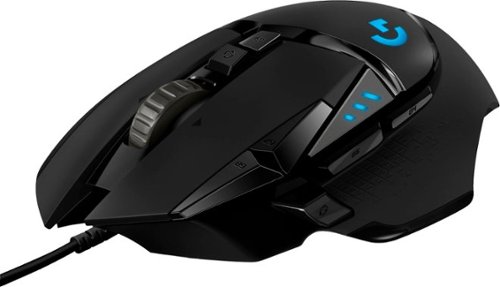
Step up your game with this Logitech HERO Core wired gaming mouse.Customize RGB lighting to match your style and environment or sync to other Logitech G products. G502 High Performance Gaming Mouse features Logitech HERO 25K optical sensor for maximum tracking accuracy and precision. No matter your gaming style, it~s easyto tweak G502 to match your requirements, with custom profiles for your games, adjustable sensitivity from 200 up to 25,600 DPI, and tunable weight system that allows for tuning and balancing of up to five additional weights for just the right balance andfeel.
Customer Rating
5
Another fantastic gaming mouse!! Homerun!!
on October 9, 2018
Posted by: blah
from New York, NY
I have had the original Logitech G502 mouse around 3 years now. Was my favorite mouse in years. Comfortable, sturdy, and very, very well designed. In short, I love that mouse.
Just got the new G502 Hero version, and let me tell you, once again Logitech has knocked it out of the park!! Bravo. This mouse upgrades the sensor to an even higher DPI than the original, now weighing in at 16,000 dpi from 12,000.
I prefer a slightly heavier mouse, but you can customize the weight to your liking with the included adjustable weight system (just a couple pieces of metal that you can put in, or take out. 11 programmable buttons, several profiles that you can save on board to the mouse itself, including the RGB color setup. The logitech software will control your mouse setup, and any other logitech devices you might have on your PC, including keyboards. It is great looking software too.
In short, another great mouse, that will keep me happy! This mouse was so good I decided to buy a second one for my workplace, because The ergonomics are also fantastic! It just feels great in my hand!
Mobile Submission: False
I would recommend this to a friend!
Share this review:


0points
0of 0voted this as helpful.
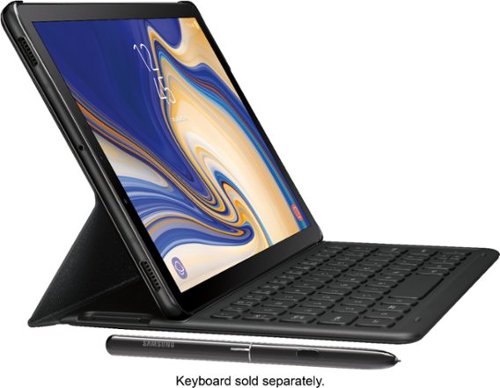
Explore, work and watch your favorite shows on a clear and stunningly brilliant screen. Transform your Galaxy Tab S4 into a PC experience with the taskbar you~re used to with the revolutionary DeX. Create a PowerPoint presentation and revise budgets in Excel at your favorite caf~. Then edit, sketch and capture inspiration with the included S Pen. And using far-field mics, you can even control your Tab S4 from a distance with Google Assistant. ~ DeX can be activated via Samsung Galaxy Tab S4 keyboard cover (SKU: EJFT830UBEGUJ) sold separately.
Customer Rating
3
Great screen display for movie/show watching - but
on September 10, 2018
Posted by: blah
from New York, NY
If all you want to do is watch movies and tv shows, and want the best display you can buy on a tablet, and don’t mind paying the price premium on this tablet, it is great. But otherwise, this tablet should have been priced lower. Other tablets, looking at you new Microsoft Surface line, offer more for around the same amount of money, if you need it for more than just media consumption. At very least what Samsung should have done with the Galaxy Tab S4 is include the keyboard case cover. At the asking price, and the official keyboard cover very high cost, you would be better suited with a Microsoft Surface, which is a fully functional Windows 10 device. The Galaxy Tab S4, without the official keyboard cover case (which also holds the included s-pen), is really just another android tablet, just with a better aspect ratio for media viewing, and also way better aspect ratio for widescreen content too. Even Samsung including the S-Pen with this tablet is great, but there is no where to put it without buying one of their two official cases, both of which are very expensive. There are less expensive cases from other manufacturers that have a pen holder thankfully.
The beautiful display on this tablet, and great 4 speaker sound for a tablet come at a price. While watching media, I found that the battery life did drain alot faster than the iPad I had. It likely had a lot to do with the very high resolution display. That is alot of pixels to push, and 4 speakers to drive, all taking it’s toll on that battery life. I wish Samsung had included a larger capacity battery like the one in the current generation iPad Pros. Luckily the charger in this things charges pretty quickly.
Also given Samsungs asking price here, they should have included more RAM. It would have helped with having more applications going at once.
All in all, this a great media consumption device, but it is not exactly a laptop replacement.
Mobile Submission: False
I would recommend this to a friend!
Share this review:


+4points
4of 4voted this as helpful.
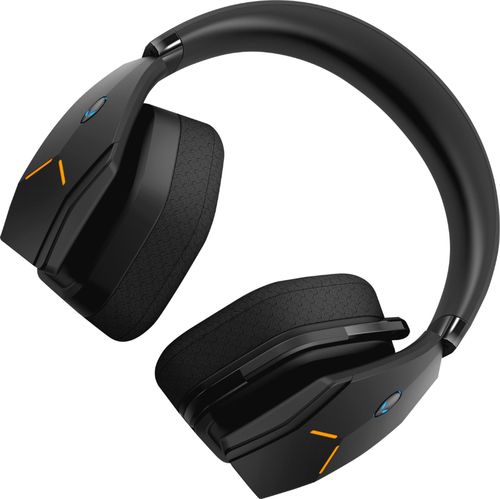
Dive into your favorite games with this Alienware wireless gaming headset. A noise-cancelling microphone keeps your voice clear as you call out commands to teammates, and 7.1 virtual surround sound enhances the audio quality so you never miss a whisper. Featuring two custom lighting zones and 6.8 million colors, this Alienware wireless gaming headset lets you create a custom look that accents your signature gaming style.
Customer Rating
3
Good headphones, but not great for the asking pric
on September 6, 2018
Posted by: blah
from New York, NY
Ok.. these are pretty good headphones for gamers overall, but overpriced for the sound quality you are getting, either wired, or wireless.
The absolute best thing about these headphones are the way they were physically designed. BULID QUALITY IS GREAT. Microphone tucks away, volume control on a slider, game vs. chat mixer on slider, battery charge level indicator, all built in to the left side ear cup. The right side ear cup has a little magnetic holder to hold the wireless USB adapter you will be using to use this as a wireless headset. This a great idea, as I can see people losing this thing so easily.
You need to install alienware software to get this thing going on PC. The software is fairly intuitive, and has different presets for movies, gaming (and sub gaming genres like shooters, etc..). You can also change lighting on the RGB lights on the side of the headphones. The interface is pretty nice.
Now here is the deal with sound quality. This is where I feel, for the money, you could do much better. The bass on these headphones is pretty wimpy. Whether wireless or wired, it just doesn’t create a whole lot of bass. That might be ok if you are not a bass head, but Alienware is marketing this thing for gamers, and for me, it just doesn’t provide enough bass. Also, wirelessly, it can get fairly loud, but not nearly as loud as other headphones, and specifically gaming headphones. This might have been a conscious decision to save on the wireless battery life, as the louder it goes, the faster the battery would drain. If you want louder sound, and in my opinion much better sound while gaming on your PC, plug it in. I am able to eek out a little more bass, though not much more, and, all the fake surround options are just that, fake sounding if you ask me. Stereo will always provide a better experience, provided you tune the gaming you a turning to headphones. Don’t get me wrong, the audio quality on these headphones is not bad, it just is not up to par with the asking price. I have headphones half the cost that sound better, and provide much more bass. They may not have the RGB lighting on the side, but they sound better. That being said, those headphones are not wireless, they are wired. These Alienware AW988 even connected to a great audio source wired, with a good amp, just don’t get as loud as other headphones I have. Case in point, connected to my LG v30 with a HiFi Quad DAC (digital analog converter), they just don’t get very loud at all.
Now, this headset will also work with a PS4 wireless with the USB adapter plugged into the PlayStation 4. It will also worked wired direct into the PS4 controller itself. This is great. Until you realize the volume is even LESS than when you are on a PC. I even checked the audio mixer on the side of the headphones for mixing between chat and game volume, and while I did get the game volume up a bit by sliding it the full way, it was just way too quiet, even compared to the PC wireless and wired volume.
So I would overall say, these are decent wireless headphones if you are not necessarily into bass. The build quality itself is really great. I just wish there was more bass, and they could get louder overall, especially considering the price point these sell for.
Mobile Submission: False
No, I would not recommend this to a friend.


Share this review:


+1point
1of 1voted this as helpful.
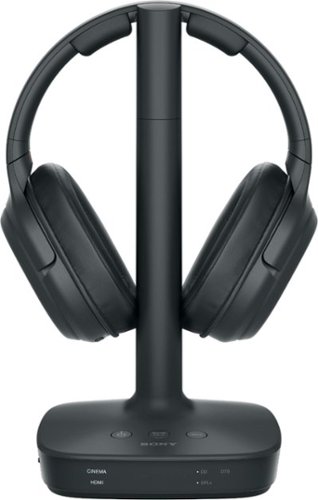
Enjoy cinematic sound with these Sony digital surround wireless headphones. Their four sound modes optimize the audio of whatever you're watching, and their 30m range lets you move freely around your home without missing a moment of the action. These Sony digital surround wireless headphones have a 17-hour battery life for hours of uninterrupted listening.
Customer Rating
5
Great wireless headphones w/ surround simulation!!
on June 12, 2018
Posted by: blah
from New York, NY
Great wireless headphones w/ surround simulation!!.
These are very comfortable, and great sounding headphones. Great if you happen to live in an apartment, or are a night owl who like to watch movies. While these, or other headphones that simulate surround sound will never replace true surround speakers, I found that these do a great job at simulating surround if they are fed a good surround source, like a blu-ray.
These are also great if you don’t want to add an amp into a smaller room, and still want to be more immersed into the content.
Getting everything connected is pretty straight forward. Just plug in play. Just make sure your TV supports HDMI ARC, most tv’s made in the last 8 years or so do. The sound processor also acts as a headphone stand / charger. So when you are done, just make sure you shut the headphones off and place them on the processor to charge away. The processor itself will enter a standby mode when you actually shut the headphones off manually. If your TV does not support ARC, fear not.. As it does take an optical cable that can come from your audio source. Some TVs still have that kind of audio, as does the original PlayStation 4.
Of the sound fields you can select from, I found that CINEMA in general sounded the best, even for videogames. If you have a 2.0 stereo source, while used with what Sony is calling their matrix decoder, when set the matrix decoder is set to “ON”, and you have CINEMA, GAME, or SPORTS, it will process the sound using Dolby Pro LogicIIx up to 7.1, faking the surround-back channels. It depends on the content, but I found for certain things it worked pretty well.
These headphones support Dolby Digital, Dolby Digital EX, Mult Channel PCM, and also DTS(!!)
Overall I think these are really good wireless headphones, if you don’t already have a surround amp, and want to still experience sound immersion from movies, shows and videogames. These are also extremely comfortable headphones!
My Best Buy number: 2960219775
Mobile Submission: False
I would recommend this to a friend!
Share this review:


0points
0of 0voted this as helpful.
blah's Review Comments
blah has not submitted comments on any reviews.
blah's Questions
blah has not submitted any questions.
blah's Answers
Reach fitness goals with this Samsung Galaxy Watch Active smart watch. Featuring advanced workout tracking, this smart watch helps optimize workouts and monitors your progress by tracking up to 40 exercises. This Samsung Galaxy Watch Active smart watch monitors your heart and sends real-time alerts in the event of irregular activity.
Dose this watch have the SOS mode where if you are in trouble you hit one of the buttons three times and it sends up to four phone calls, and one to the police?
Reach fitness goals with this Samsung Galaxy Watch Active smart watch. Featuring advanced workout tracking, this smart watch helps optimize workouts and monitors your progress by tracking up to 40 exercises. This Samsung Galaxy Watch Active smart watch monitors your heart and sends real-time alerts in the event of irregular activity.
Are the watch bands interchangeable on the Samsung active?
yes, they are standard 20mm watch bands, that are easily swappable.
7 years, 4 months ago
by
blah
Reach fitness goals with this Samsung Galaxy Watch Active smart watch. Featuring advanced workout tracking, this smart watch helps optimize workouts and monitors your progress by tracking up to 40 exercises. This Samsung Galaxy Watch Active smart watch monitors your heart and sends real-time alerts in the event of irregular activity.
Can u make calls from it
Yes.. you can. You can start calls from it, and speak into the microphone. Also you will get texts and emails to it.
7 years, 4 months ago
by
blah
Reach fitness goals with this Samsung Galaxy Watch Active smart watch. Featuring advanced workout tracking, this smart watch helps optimize workouts and monitors your progress by tracking up to 40 exercises. This Samsung Galaxy Watch Active smart watch monitors your heart and sends real-time alerts in the event of irregular activity.
Can you store music on the watch
yes.. you can. Though it will not hold much. It does also come with Spotify app, though you will need either your phone or a wifi connection to use that.
7 years, 4 months ago
by
blah