


blah's stats
- Review count106
- Helpfulness votes723
- First reviewFebruary 27, 2015
- Last reviewJuly 21, 2026
- Featured reviews0
- Average rating4.4
Reviews comments
- Review comment count0
- Helpfulness votes0
- First review commentNone
- Last review commentNone
- Featured review comments0
Questions
- Question count0
- Helpfulness votes0
- First questionNone
- Last questionNone
- Featured questions0
- Answer count4
- Helpfulness votes0
- First answerMarch 21, 2019
- Last answerMarch 21, 2019
- Featured answers0
- Best answers0

Outdoor Cam Plus deliver a wide field of view in Retinal 2K video. 1 Mount it wherever. Power it however. And get full-color clarity across your home or business; even in low light.
Customer Rating

5
Great camera if you are already in the Ring system
on March 30, 2025
Posted by: blah
This is a great new addition to Ring cameras and their security ecosystem. This camera is a wired "Plug-in" electrical outlet one and can be set up to work if you have access to an electrical outlet. This may not be ideal for everyone’s outdoor use, but I set up my camera in an outdoor location near an outdoor outlet. For me it would be a little too much work to have the wireless/battery version of this same camera in this location because I would have to pull the camera off the included mount and bring it in to charge it. This camera can also be set up to be used indoors as well.
The camera comes with mounting hardware for various installation types, and was very easy for me to install. I would recommend that you make sure you pair this Ring camera to your ring app and account prior to mounting it in any fixed location, to be sure it maintains a good wifi signal to your router. There is no floodlight on this camera, which is good in my case, as I didn’t want motion detection to set off the floodlight on the neighbor’s side of the adjoining fence. This camera also has a low-light feature for night which also works very well.
I have been a Ring user for a few years now, and have a ring doorbell, and a ring pan-tilt indoor camera as well at our home. While Ring may not have the most technologically advanced cameras, this Outdoor Cam Plus is only a 2k camera, what Ring does well is make everything super easy and intuitive to setup and use. Although the camera is 2k which I think is even more than enough resolution, I find that it is more than sharp enough for my use. I have it setup on the side of my home pointing down an area I previously did not have monitored. Setup was pretty quick and easy, and in just a few minutes I went ahead and mounted the camera. I have it setup pointing vertically so that it can catch the narrow space between my home and my neighbors fence.
Overall, Ring I think has the best security ecosystem, and I would highly recommend this new addition to their outdoor camera.
I would recommend this to a friend!





Share this review:


+1point
1of 1voted this as helpful.
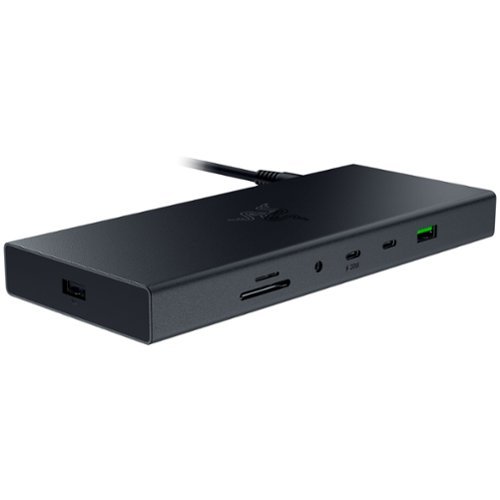
Transform your workspace into the ultimate place for gaming and productivity with the Razer USB 4 Dock. Powered by ultra-fast USB 4 connectivity, unify your desktop or mobile setup with a 14-port design featuring dual display output, continuous power delivery, and ultra-low latency for all your devices.
Customer Rating
5
Great dock!! You won’t need any other!
on January 24, 2025
Posted by: blah
Great dock!! You won’t need any other!
If you really want to make your laptop into a desktop replacement, this dock will let you do that easily!
You will be able to have multiple displays thru a single connection to your laptop, including charging your laptop thru this dock. I have a standalone computer monitor via DisplayPort cable and a 65” 4K OLED via HDMI cable, and the laptop display itself, all running at once with no problems at all.
If you have multiple USB devices and run out of ports on your laptop, this is great. I have a USB keyboard, USB wireless mouse, USB wireless game controller, 2 USB hard drives. I can now have it all plugged in at once. The drives all seem to run at the max speed. What is great about this setup is that if I take my laptop with me away from the desk, when I can return home, not only is it just one plugin away from the whole setup being ready to go at my desktop with all my peripherals, but it just keeps everything neat and tidy on my desktop. It will also charge my laptop at up to 100 watts with this dock's included charger, but I can also charge my phone as well, not needing the laptop to do this.
I also get full ethernet speed out of the dock to my laptop. I have an ethernet line wired directly to my desktop, and just like that I can max out my bandwidth.
You also get an SD card reader, which works out great for me, as I don’t have one built in to my laptop. You can also use this with a Steam Deck and ROG Ally X, and it works just as well for both situations too, and because this comes with a 100 watt charger, you won’t need your other charger for those handheld devices.
This dock also frees up my ports directly on the laptop in case I did ever need to plug anything else in. While this isn’t the most inexpensive dock, it does present a really great value, considering other docks are at least this much money, and most do not have this many ports!
Highly recommended for those needing extra ports when at home.
I would recommend this to a friend!

Share this review:


+1point
1of 1voted this as helpful.

Experience the next generation of power! The Greenworks Pro 80V 17 Inch Cordless String Trimmer features advanced brushless motor technology, delivering major torque, power and life - with virtually no maintenance required. The incredible power & performance is equivalent to a 30cc gas string trimmer, without the added weight, pesky pull start and noxious fumes of gas and oil. When it comes to outdoor power equipment, you put the emphasis on ~power.~ And why not? For homeowners like you who take on jobs big or small, you need heavy grade construction and long-lasting peak performance. The Greenworks Pro 80V family of tools meet the challenge with a universal battery system that works across multiple products, high-efficiency motors, and innovative smart technology.
Customer Rating
5
Wish I had this sooner for our home.
on December 23, 2024
Posted by: blah
Great for those hard to reach spots you can't get with a lawn mower, and for really trimming stuff up nicely.
Best thing about it is the 80V battery and charger, which also works with my other greenworks 80V lawnmower and charger that I already owned. Because this runs on battery I can get as far as I want from my home as opposed to a plug in electric model that always kept me on a leash once I got further away from an outlet.
I do wish this did however come with a shoulder strap, it does not. Everything else, including the weight, is very good, lighter than a previous plugin model I had from a different manufacturer and easier to work with.
Setup is pretty quick out of the box, just a few steps with included tools for putting it together. Trimming just got a little easier on our property on harder to reach areas. The motor is brushless and is pretty powerful, it feels like it cuts back a bit easier than my other wired power model (a different brand) and because it has variable speed, you can lower the speed down for easier to cut areas to save on battery life if you are trying to work on a larger property. At full speed though it gets through stuff really easily considering this thing is running on a rechargeable battery.
I would recommend this to a friend!




Share this review:


-1point
0of 1voted this as helpful.
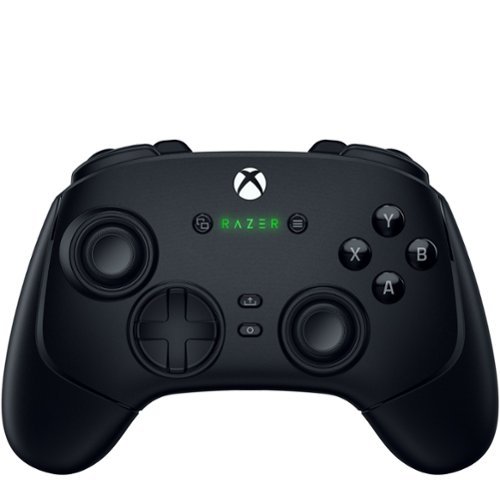
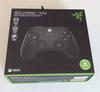
Stay one step, one shot, and one level above the competition with the Razer Wolverine V3 Pro~the definitive wireless esports controller. Officially licensed by Xbox, perform like the pros on console and PC with speed, control, and precision that helps you clutch for the win.
Posted by: blah
I have a Razer V2 Pro Controller for PS5/PC, and this new Razer V3 Pro Wireless for Xbox/PC to me took the few shortcomings of that controller and changed things for the better for this new Xbox V3 Pro Wireless version. So glad they listened to their customers, as overall, this is my new favorite controller.
The Razer V3 Pro Wireless controller is very comfortable, and has rear buttons that are customizable via the app that you install directly on your xbox or your windows PC. There are four buttons on the back of this controller that are great. They are mouse click style buttons, meaning that they kind of feel like buttons on a mouse you would click. These can be mapped via the software to other functions. There are also two more customizable triggers on the top that Razer calls “claw“ triggers. These are nice to have but they are in an awkward place that are uncomfortable to use as gaming buttons, at least for my hands. The back buttons however are in a great position for my average size hands.
The triggers, I love these triggers. This controller’s triggers have a switch for left and right, and say you want to play a driving game, where you want those triggers to be in an analog mode. You leave the trigger stops in the default open mode, so you can have a full, deep press range of motion. But, if you also play games like first person shooters like Call of Duty or anything like that,or even metroidvanias, you can set the triggers to be in their other positions allowing for a much faster click registration. They are no longer “deep pulls” I guess you could say for a click to actually be registered in game.
The face buttons are really good too. They feel like micro switch buttons to me, and much better than the stock Xbox One Series controllers which feel more mushy to me having now tried the Wolverine V3 Pro Wireless. I can never go back to anything less. If you have ever tried a mechanical keyboard, it is a similar feeling on each press.
Ahh.. the thumbsticks. These have hall effect thumbsticks. While this does not mean they will never get stick drift like most other Xbox controllers, even the Xbox Elite controllers all will eventually develop stick drift. Stick drift it was eventually happens to most controllers sticks, meaning you will take your thumbs off the direction you were pushing/pulling and it should go back to the “dead center” and not move at all. When you develop stick drift, it means the stick will seemingly stay drifting off in the last direction it was pushed or pulled. Hall effect sticks work differently than traditional controller thumbsticks that would wear away inside causing stick drift. Hall effect sticks work with magnets that are far less prone to this failure. These sticks also feel great on this controller to boot. This controller also comes with two extra thumbsticks if you want a different feel that are easily replaceable.
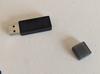
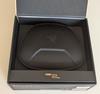
Finally, a controller that comes with a case! This was just a bonus for me, but this controller actually comes with a portable case. With spots to hold your extra thumbsticks included and the wireless USB adapter. There is also a pouch you can put your charging / playing cable in.
The controller also comes with a 10 foot USB cable to charge and also play wired when needed. This for me is just enough from my xbox series x to my couch. It is made of a nice braided material too.
The only downside for this controller is that unfortunately, for any kind of wireless use, you need to use the included Razer HyperSpeed Wireless 2.5ghz USB dongle. My gripe here is that if you lose that USB dongle you will only be able to have a wired controller, as Razer unfortunately does not sell replacement dongle for any of their wireless controllers. I actually reached out to them, and they told me they do not sell replacements. They do sell wireless dongles for some of their other products but not for this wireless controller. So make sure if you do not lose this dongle! Just an FYI, there is no connecting this controller via Bluetooth on Xbox or on Windows PC. Other than that gripe, this is a fantastic controller!
I would recommend this to a friend!



Share this review:


+1point
1of 1voted this as helpful.

Introducing the Crucial P310 Gen4 NVMe SSD, delivering read speeds up to 7,100MB/s, making it a gaming storage leader in the Gen4 space. Engineered with the latest Micron 3D NAND technology, the Crucial P310 can level up your gaming experience in generous capacities and offers backward compatibility, performing 2x faster than Gen3 SSDs.
Customer Rating

4
Great 2TB Gen 4 budget drive
on October 20, 2024
Posted by: blah
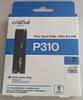
Great 2TB m.2 2280 Gen4 PCIe (standard length SSD size), but I probably would only get this to use as a storage drive and not primary operating drive if you want the absolutely fastest speed. That is how I am using this drive myself, as a secondary storage drive for games and media. However, most users probably would never notice a difference in speed from this drive and a more expensive one on a day to day basis.
Because this is supposed to be a more budget friendly drive, for somewhat more casual non-power users, it does not have any DRAM which usually means these drives will run a little slower. For purely storage purposes, like having media files, music, video, photos, and even loading installed video games in windows, this won’t really make a whole lot of difference in real world use, but if you move very large files around all the time if you edit video for example, you might want a different drive that has DRAM on board. The good thing about it not having DRAM on board is that it also means it typically should run cooler than faster drives that have DRAM, which is really good should you be using this SSD in a laptop with less airflow than a desktop computer. This drive is a PCIe 4.0 compliant drive and the standard 2280 SSD length and is backwards compatible. It has a 5 year warranty from Crucial.
This drive is rated as up to 7,100MB per second for reading, and 6,000MB per second for writing, and in my testing I got just a little bit slower than this for writing, but they were very large video files. I would say the write speeds for me were as advertised on my Gen4 motherboard. Read speed, which I think is where most people would notice more of a difference (for example loading installed games), was just about as advertised also on my motherboard.
Overall, I would easily recommend this drive to just about anyone as a secondary storage drive. If you are not a power user, don’t need the absolute fastest speeds in the world for writing, want to save some money, this drive would be fine for those users as well. This is a very solid drive overall that you can’t go wrong with unless you have a motherboard on your PC or a laptop with the older PCIe 3.0 drive slots, where it would work but you wouldn’t be able to get to the advertised speeds and could go with older and less expensive SSD options.
I would recommend this to a friend!
Share this review:


+4points
4of 4voted this as helpful.

The Ninja Flip Toaster Oven & Air Fryer is a convection oven, air fryer, and toaster that crisps and flips up and away. Get extra-large capacity without sacrificing counter space with its unique design that allows you to flip it up against your backsplash when not in use so you can save 50% more space on your countertop. OvenCrisp Technology combines infrared heat with rapid, circulating hot air all around your food for quick, edge-to-edge even cooking providing you with optimum cooking results. The Ninja Flip includes 8 functions so no matter what you~re craving, you can make it all in this countertop appliance~air fry, roast, broil, bake, pizza, toast, bagel, dehydrate all in one.
Customer Rating
4
Great toaster oven / air fryer overall
on October 13, 2024
Posted by: blah
Great toaster oven / air fryer overall.
This toaster oven can be stored vertically, but after using it make sure it says FLIP insuring it has cooled down enough to be safe to move vertically. Hence the name Ninja FLIP Toaster Oven and Air Fryer.
The toaster oven is about 16” tall when in its flipped back state, it literally can be tilted back to save some storage space on a countertop. It even has extra feet on the back of it that lifts it off the back and I like how the feet have some grooves to manage the power cord. In my kitchen, it is too tall to fit under my kitchen cabinet. However, I believe this would fit under most peoples' countertops. It is too bad, as this would have saved me some counterspace, and it looks really nice from the bottom when stored upwards. Still, I like this toaster oven enough that it isn't a deal breaker for me.
This toaster oven/air fryer comes with an air fry basket, sheet pan, wire rack (must be used at all times, it holds the other accessories), and a crumb tray that can be easily pulled out for cleaning out.
Usage steps are essentially: you turn the entire unit on, select one of the 8 available modes: Air Fry, Air Roast, Bake, Pizza, Broil, Toast, Bagel, Dehydrate. Depending on the mode you choose you can set the actual oven temperature, it will preheat for some modes, and then you select how much time you want it to go for. We really liked using it for reheating leftover pizza quickly in the oven’s pizza mode.
Air frying was pretty good for us for things like fries and vegetables. It crisps very well using the air frying basket.
While of course you can obviously do things like toast bread, we find we have to run the toaster twice to get as toasted as we like, even at full toasting settings. Wish it just got toasted darker, setting it just once.
Overall, if you have the counterspace for this, and want something that can also air-fry this is a great buy for the money.
I would recommend this to a friend!



Share this review:


+3points
3of 3voted this as helpful.
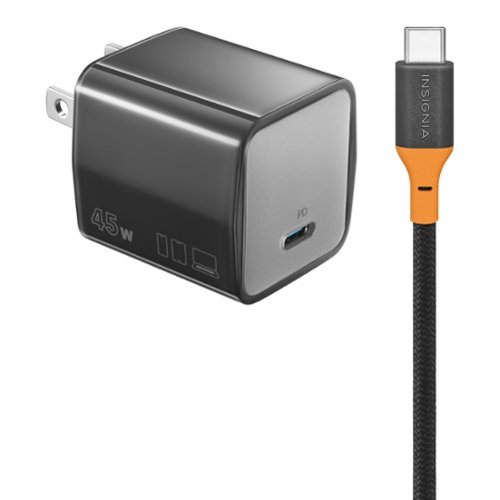
The Insignia 45W Wall Charging Kit with 240W Cable is compatible with USB-C smartphones, tablets and more. Keep all of your USB-C devices charged with up to 45 watts of power and an included 6 ft. USB-C cable. The cable is braided for durability and the charger~s folding plug means it can easily fit in a pocket or purse for easy transport.
Customer Rating
5
Great little GAN 45 watt charger
on September 20, 2024
Posted by: blah
Great little charger, with an included USB-C to USB-C that can pass 240 watts. This is a GAN charger, which can output up to 45 watts. It gets a little warm, but not nearly as warm as other non GAN chargers I have had that are of similar wattage.
Although it is heavily marketed towards Samsung and Apple mobile products on the packaging, I had absolutely no problems fast charging Google Pixel 8 and Google Pixel 9 phones. I also had no problems charging a Microsoft Surface Go Tablet. The charger is very small as you can see in my photos, and the electrical prongs fold down making it even smaller to fit into a bag. Great USB-C to USB-C that is 6 feet long and pretty durable with an attached fastener to help store it. For the money, this is a great charger that can charge phones and more.
This charger also has PPS charging, which changes voltage as needed when it senses the device needs more or less of it. I found that this to be the case when I had it charging my tablet which seemed to feel cooler as it approached a 90 percent charge on it.
I would recommend this to a friend!




Share this review:


+1point
1of 1voted this as helpful.

Meet the new shape of sound ~ Galaxy Buds3 Pro ~ now completely redesigned with improved hardware to bring you deeper into your audio.~ With Galaxy AI,~ your Buds create a great listening experience by optimizing sound based on your surroundings and how you wear them ~ while providing a snug fit for all-day comfort, no matter what you do. Buds3 Pro get how much you love your audio. From jamming while cooking to listening to your favorite show on a crowded subway to taking a work call, your Buds will adjust to the different sounds around you using Adaptive Active Noise Cancellation so you always hear what~s important. Plus, they~re packed with features to create a convenient listening experience ~ from auto-switching~ your audio between your Galaxy phone and your Galaxy PC to immersing you in the latest TV shows with 360 Audio, now available on Samsung TVs.~ And it doesn~t stop there ~ Buds make perfect companions for your Galaxy phone as you travel. Real-time Interpreter with Galaxy AI~ allows you to speak like a local as your phone translates speech right in your Buds so you never miss a word from your local tour guide. No matter what you listen to or how you listen, we~ve redesigned our Buds to give you a great immersive audio experience with Galaxy Buds3 Pro.
Customer Rating

3
best features only available with galaxy devices
on September 15, 2024
Posted by: blah
These could have been even better.
Fantastic sounding earbuds for music, almost as good as flagship Sony WF-1000XM5, however there are drawbacks as most of the innovative features are hidden behind owning the highest end and newest Samsung Galaxy phones. Take those features away, and you are left with earbuds that are good overall, but not worth the somewhat expensive asking price considering the Sony flagship buds do not hide their features to certain users, and have superior build quality in my opinion.
Setup of the earbuds right out of the box is pretty easy, at least if you do not have to swap out the incredibly delicate ear tips. It seems they come out of the box with the M size tips installed, and S and L tips in the box next to the included USB-C charging cable. I personally did not have to change the eartips but you can tell they are very fragile. Follow the included directions very carefully to ensure you don’t accidentally rip them.
The (ANC) noise canceling, providing you get a good fit, is pretty good, though again, it is not as good as other older earbuds at this price point. Call quality and mic pick up in my testing was great however, and everyone I spoke to said I sounded great, and even when walking down a busy street with traffic they told me they couldn’t hear much of anything but my voice.
Luckily one feature which was not left for only top tier Samsung phone devices, is the built-in voice control. Want to stop music… just say out loud - Play Music, Stop Music, Next Song, Previous Song, Volume Up, Volume Down, Answer Call, Reject Call - all of these work great. It is a little weird to get used to, but I think this is awesome (so long as no one is around me). Controlling media otherwise is all done thru the stem on the earbuds if you do not want to do it directly on your phone itself. At first it is very tricky to get used to even putting the buds in, as if you happen to put your fingers over certain parts of the buds, it will make a very loud squeal in your ears. However after a few hours of getting used to where and more importantly where NOT to hold them on insertion, the loud squealing in the ear buds very rarely happens to me now. It is some kind of audio feedback loop that seems to cause this. I also randomly heard this squeal while playing music once. Not sure if it was some kind of dropped bluetooth connection to my Google Pixel 8 phone as it was 30 feet away when this happened. You can also just use the pinch and slide physical controls on the stem, though for me it was a little hard to get used to the pinch controls, though luckily my personal most used control on the stem is just sliding up or down to raise and lower volume, and that feels very natural for me. Pinching requires multiple “pinches” depending what you want to do, but it just didn’t feel right to me. I would much rather just use the voice controls or the phone itself.
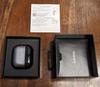
The charging case on the Buds Pro 3 is made of some kind of plastic made to look like it is metal. The case door also doesn’t have as strong a closing magnet as most other charging cases at this price point I have used. The case is also very prone to scratches, which I guess Samsung must realize as they also sell their own case for the buds 3 pro case. I personally don’t think this is a huge deal, but at least I would have liked to have had a nicer stronger magnet for when you close it. I am always a bit afraid that the case will open up and the buds will fall out if it happens to get loose in my jeans pocket. It hasn’t happened to me, but I can see it happening as that magnet isn’t all that strong.
Ok.. and here is my biggest gripe with these earbuds considering the price point. The most innovative and unique features are all hidden behind using not only Samsung Galaxy phones, but the newest Galaxy phone at that. The missing features are Interpreter mode - which will listen for foreign language and pipe back in English for you, enhanced audio quality modes over bluetooth, and this one is the one that literally even some much cheaper earbuds offer is multi-point audio. That is right, there is no multi-point audio unless you are on certain Galaxy devices. This means you can only actively be paired to one device at a time. I use earbuds on more than one device at a time, most notably on my laptop and my phone. I cannot do that with these. So, I have to just stick to one at a time, and when I want to change devices I need to move to that other device and that is that. For example, I could be watching a movie or show on my laptop or TV, but I will not get notified if I got an email or text on my phone, or an incoming call on the phone. So, I need to ask someone to hold on as I go to the phone and pair it to talk to them for example. Like I said I have earbuds that cost less than half of this that have multi-point pairing and this just doesn’t sit right with me given the high cost of these earbuds.
Now, the audio quality on these earbuds is really fantastic, especially after setting up some custom equalizer settings. I listened to all kinds of music and there was nothing I didn’t like hearing through these earbuds! They just sound great! They sound close to as good as the Sony WF-1000XM5 in my opinion. Bass is very strong for these and I just need to say these are probably the strongest bass you can get out of earbuds, even the WF-1000XM5 in this case. There is a feature that I also like quite a bit which is called Voice Detect (you can turn it on or off in the Galaxy Wear app). That Voice Detect feature detects if you are speaking it will lower the music to a very low level.
Ok, so for me personally, I wanted to like these a lot more than I do. They sound fantastic, and I can live with the somewhat generic stem style look of these, but given that so many features, most notably that multi-point pairing is missing unless you are on certain Galaxy phones, it is a tough sell at this price point. I think there is more value with other options in this price point that sound just as good. However, if you happen to have the latest Galaxy Phones, this is one of your best options.
No, I would not recommend this to a friend.




Share this review:


+4points
6of 8voted this as helpful.

Meet Pixel 9 with Gemini. Engineered by Google, Pixel gets the best of Google~s AI first. So you can take amazing photos, make edits like magic, and get things done even easier. Pixel can protect against spam and other threats. It helps you in an emergency.10 And it~s built to last.
Customer Rating
5
My favorite Pixel phone in a few years
on September 3, 2024
Posted by: blah
I have had a few pixel phones over the years, but so far, this has been my favorite since the Pixel 5. I also have last year's Pixel 8.
This year's Pixel 9 feels much nicer in the hand than the Pixel 8 does. I love the design of the Pixel 9 and in particular I love the rear back camera design. It finally feels like Google has made a phone that has a great build quality that is as nice as the current generation iPhone and Samsung offerings. The Pixel 9 phone moves up to their Tensor G4 processor.The battery
life is much improved over the Pixel 8. The Pixel 9 does not get hot like my Pixel 8 did even under fair heavy use of the camera. The Pixel 9 has a 4700 mAh battery, supports fast charging and wireless charging. I finally feel like I am getting a full day of battery life on a full charge. I used an older pixel charger that came with my previous pixel, but it still charged fairly fast. I was also able to wireless charge with an Anker wireless standing charger even with a silicone case on the phone.
life is much improved over the Pixel 8. The Pixel 9 does not get hot like my Pixel 8 did even under fair heavy use of the camera. The Pixel 9 has a 4700 mAh battery, supports fast charging and wireless charging. I finally feel like I am getting a full day of battery life on a full charge. I used an older pixel charger that came with my previous pixel, but it still charged fairly fast. I was also able to wireless charge with an Anker wireless standing charger even with a silicone case on the phone.
The Pixel 9 also now supports WiFi 7 and Bluetooth 5.3. I only have a WiFi 6E router in my home and max out my 500mbps home internet bandwidth on it. The display on this phone is fantastic. It looks great and is really bright, I mean really bright, totally usable in daylight. Video looks great, and the display has VRR (Variable Refresh Rate) 60hz or 120hz. YouTube and Netflix content looks great. This year the Pixel 9 has changed its fingerprint sensor from the previous year, and while it is definitely better I do not feel that it is as good as fingerprint readers where the sensor was located on the back of the device. I continue to get missed presses now and then, especially after washing my hands, but that being said, it is MUCH BETTER than the Pixel 8, which had a pretty bad fingerprint sensor.
The cameras on the phone are all very good, I especially love the macro focus on the rear camera. Speaking of cameras, the single most impressive thing this phone can do is a new AI feature called “Add Me”. Add Me lets you take a photo of a group and then you can ask one of your other party to take a photo of you at the same general angle. The phone then shows you the previous photo and lines it up with the new person in frame as a preview of what the new photo will look like. AI basically then combines both photos together into a new AI composited one. For the most part, when this works, it works very well and it can be hard to discern that it was not shot that way naturally. I think this will keep getting better as time goes on and machine learning (AI) gets better. I am someone that mostly travels alone with my wife so there are always moments where it is either her in the photo alone, or vice-versa. I wouldn’t take every photo this way, but this is something I will definitely use quite a bit.
With the newly designed Weather app, AI is used to summarize the weather for the day for you. I guess the Gemini AI is combining multiple weather reports up and averaging them out?
Much like last year's Pixel 8, this year's Pixel 9 will have 7 years of software support. I do hope that Google keeps this promise going forward.
Gemini Live is similar to the previous Google Assistant except it will talk back to you conversationally. You can set up the voice from several different voices and they all sound very natural. When asking Gemini Live questions, you can keep talking back and forth with it like a conversation, including things like suggestions on any topic you might want. For example, you can ask it for ideas for a party, and later ask what kind of food you might want to have, and how old your guests might be, etc. It surprised me as to how useful this would turn out to be.
Overall, I think this is a great phone for the money. It is very fast for everything I use it for and the cameras are fantastic. Everything is very snappy in the operating system. Moving in and out of apps is a breeze. I especially like the design and feel of the phone.
I would recommend this to a friend!




Share this review:


+3points
3of 3voted this as helpful.
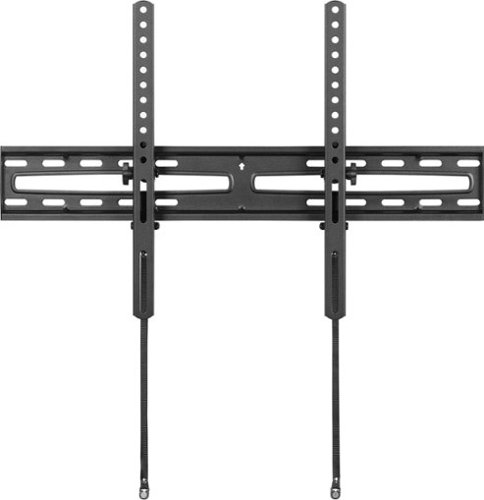
Take away your fear of accidental tip-overs by mounting your big screen TV safely and securely with the Best Buy essentials Large Tilting TV Wall Mount for Most 47-84" TVs. This mount features a discreet profile hanging just 2.1 in. from the wall with a matte black finish to blend in. It also includes tilt technology, angling your TV from -15~ to 3~ to reduce glare and improve your view. This steel wall mount can hold up to 110 lbs. and is VESA compliant to work with TVs from 47 to 84 in. And it~s backed by Best Buy, so you can trust your TV is secure.
Customer Rating
5
Great, low profile, inexpensive tilting mount.
on August 1, 2024
Posted by: blah
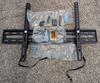
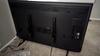
I am not terribly handy, but throwing this tilting wall mount up in my living room was pretty easy. My mounting wall is a dry wall and was able to catch two studs with the included hardware. Best Buy includes just about everything you will need in terms of bolts, including screws, bolts, washers, anchors and some spacers in case they are needed. I have posted photos of everything in the box with this review.
The instructions are well written, and easy to follow. This is a very low profile to wall mount, that tilts up and down. Just keep in mind that there will not be a whole lot of room between the TV and the wall. There are other TV mounts that also extend outwards in addition to tilt up and down. Those might be a better option if you need to get behind your TV more often, but for my use case this is worth the relatively low price and good quality. My TV is a 55” 200mm x 400mm VESA pattern, and it feels as sturdy as another TV mount in my home that extends out that was quite a bit more money.
I would recommend this to a friend!


Share this review:


0points
0of 0voted this as helpful.
blah's Review Comments
blah has not submitted comments on any reviews.
blah's Questions
blah has not submitted any questions.
blah's Answers

Reach fitness goals with this Samsung Galaxy Watch Active smart watch. Featuring advanced workout tracking, this smart watch helps optimize workouts and monitors your progress by tracking up to 40 exercises. This Samsung Galaxy Watch Active smart watch monitors your heart and sends real-time alerts in the event of irregular activity.
Dose this watch have the SOS mode where if you are in trouble you hit one of the buttons three times and it sends up to four phone calls, and one to the police?
Reach fitness goals with this Samsung Galaxy Watch Active smart watch. Featuring advanced workout tracking, this smart watch helps optimize workouts and monitors your progress by tracking up to 40 exercises. This Samsung Galaxy Watch Active smart watch monitors your heart and sends real-time alerts in the event of irregular activity.
Are the watch bands interchangeable on the Samsung active?
yes, they are standard 20mm watch bands, that are easily swappable.
7 years, 4 months ago
by
blah
Reach fitness goals with this Samsung Galaxy Watch Active smart watch. Featuring advanced workout tracking, this smart watch helps optimize workouts and monitors your progress by tracking up to 40 exercises. This Samsung Galaxy Watch Active smart watch monitors your heart and sends real-time alerts in the event of irregular activity.
Can u make calls from it
Yes.. you can. You can start calls from it, and speak into the microphone. Also you will get texts and emails to it.
7 years, 4 months ago
by
blah
Reach fitness goals with this Samsung Galaxy Watch Active smart watch. Featuring advanced workout tracking, this smart watch helps optimize workouts and monitors your progress by tracking up to 40 exercises. This Samsung Galaxy Watch Active smart watch monitors your heart and sends real-time alerts in the event of irregular activity.
Can you store music on the watch
yes.. you can. Though it will not hold much. It does also come with Spotify app, though you will need either your phone or a wifi connection to use that.
7 years, 4 months ago
by
blah