


blah's stats
- Review count106
- Helpfulness votes723
- First reviewFebruary 27, 2015
- Last reviewJuly 21, 2026
- Featured reviews0
- Average rating4.4
Reviews comments
- Review comment count0
- Helpfulness votes0
- First review commentNone
- Last review commentNone
- Featured review comments0
Questions
- Question count0
- Helpfulness votes0
- First questionNone
- Last questionNone
- Featured questions0
- Answer count4
- Helpfulness votes0
- First answerMarch 21, 2019
- Last answerMarch 21, 2019
- Featured answers0
- Best answers0

Play your way with the ROG Ally X, the ultimate Windows gaming handheld. Access all your games as the Ally X is fully compatible with Steam, GOG, Xbox Game Pass, Epic, and more. Powered by the AMD Ryzen Z1 Extreme processor and equipped with 24GB of LPDDR5X RAM and 1TB of storage, the Ally X can handle all your gaming demands. Its 80Wh battery and redesigned ergonomics ensure comfort during long gaming sessions. With ROG Intelligent Cooling, featuring a Zero Gravity thermal system and dual fan design, the Ally X stays cool and quiet in any orientation, letting you game your way. The Full HD 120Hz high refresh rate display with FreeSync Premium provides a crystal-clear view of the action, even in fast-paced games. Experience gaming like never before with the Ally X.
Customer Rating

4
Great gaming hand held held back by Windows OS
on July 29, 2024
Posted by: blah
ROG Ally X - great handheld - hampered by windows OS - this is only for those that are already windows gamers.
First thing is first. If you already have a ROG Ally, or even a Legion Go, or a Steam Deck, this is not worth getting right now as a replacement. While the ROG Ally X is a great piece of hardware over-all, it is currently very expensive compared to relatively recently released gaming handhelds. AMD is the company that makes the Z1 Extreme CPU and they are releasing a more powerful version in the future that will likely make it into all the new Windows based gaming handhelds. In the case of last year’s ROG Ally itself, gaming performance across most games was only slightly faster and would likely not be very noticeable to most users of the original ROG Ally. What will be VERY noticeable is the biggest ROG Ally X’s biggest upgrade, it’s 80 kwh battery, double last year’s ROG Ally battery capacity, what was probably the single biggest gripe had with that launch unit, where more demanding games would require you to be plugged in with a charger with very short battery life for some of the more recent AAA games.
The Ally X is essentially a mid generation upgrade, where everything the original ROG Ally did well has been made better across the hardware, with exception of the actual CPU/GPU which has remained the same. Asus has thankfully redesigned the internals with a better cooling configuration and most importantly fixed the dreaded microSD card slot that plagued the first generation hardware destroying users' microSD cards.
Hardware:
Great battery life compared to previous ROG Ally, effectively doubling physical battery capacity. Some lower end indie games will run for over 6 hours if you take the power profile down to lower settings. The controller is great, including fantastic analogue control sticks, a really good d-pad, and nice buttons. I would say this is close to being the most comfortable handheld mobile controller, but still not quite as good as either model of the Steam Deck which is near perfection. However, if you purchase the Ally X, I would advise only purchasing from somewhere with a good return policy in event you get a unit that has hardware defects such as dead pixels on the screen, sticky triggers or buttons that feel crunchy.
Great battery life compared to previous ROG Ally, effectively doubling physical battery capacity. Some lower end indie games will run for over 6 hours if you take the power profile down to lower settings. The controller is great, including fantastic analogue control sticks, a really good d-pad, and nice buttons. I would say this is close to being the most comfortable handheld mobile controller, but still not quite as good as either model of the Steam Deck which is near perfection. However, if you purchase the Ally X, I would advise only purchasing from somewhere with a good return policy in event you get a unit that has hardware defects such as dead pixels on the screen, sticky triggers or buttons that feel crunchy.
Because the ROG Ally X has such a large battery, you can now use up to a 100 watt charger, but unfortunately Asus decided to only include the same 65 watt charger they included with the original ROG Ally. Given the high asking price of the ROG Ally X, they should have at least thrown in the 100 watt charger, as effectively you will take twice as long as you used to take if you are used to charging the original Ally X. Also to note, if you plan to game thru a dock connected to a PC monitor, or to a TV, the 65 watt charger will not let you play in turbo 30 watt turbo mode while running thru a dock. You will need a 100 watt charger, and a dock that can support 100 watts or more. Running in Turbo 30 watt mode allows you to run the ROG Ally X at its highest possible performance mode with things like AAA games. Keep in mind you probably don’t want to do this all the time, and not every game will even get much out of it. You wouldn’t want to do this for example with a low powered indie platformer /metroidvania game.
There are now 2 USB-C ports on the ROG Ally X which is great. Now you can charge and also have another USB-C device plugged in at once. One of the USB-C ports is even USB 4 and thunderbolt compatible, and also will let you connect to a DisplayPort monitor if you have one. There is a microSD port so you can have extra storage. As mentioned earlier, Asus has moved the placement of the port away from the heatpipes that were the possible culprit for destroying the original ROG Ally’s microSD cards for so many users.
Asus did not include a system case with the Ally X, which is also very disappointing given this is a very fragile device, meant to be used as a portable on the go device. The steam decks in comparison, all come with a very decent hard case, and every configuration of their steam decks come in at a much lower price than the Ally X.
Operating system:
The fact that it is based on windows is both its greatest asset and its greatest detriment. Windows opens up the world of letting you play games from not only just about every PC gaming storefront which is great, but it is terrible to use on a handheld, and unfortunately it is a pain to use if you aren’t plugged into a bigger screen with a mouse/keyboard.
The fact that it is based on windows is both its greatest asset and its greatest detriment. Windows opens up the world of letting you play games from not only just about every PC gaming storefront which is great, but it is terrible to use on a handheld, and unfortunately it is a pain to use if you aren’t plugged into a bigger screen with a mouse/keyboard.
The ROG Ally X, as powerful as it may be for a gaming handheld, is NOT for someone who doesn’t tinker in Windows. Even though Asus has their own ROG Armory crate front end, you will still need to go back into windows now and then to set things up or figure out weird bugs to get games working. My biggest gripe here, is that even in 2024, you cannot just easily and reliably put the device to sleep in a game as you can on something like a Nintendo Switch or Steam Deck which both do this perfectly!! I have had a Steam Deck for over a year and love that I can play anything I want and not need to worry about getting to save point in any game, as I can just hit the power button and it will go to sleep and I can wake it back up in seconds, exactly in the game in the exact state it was in. You cannot reliably do this on the ROG Ally X. I don’t blame Asus for this, but it is really just Windows. Windows is a very good OS on laptops and computers, but it was never designed to be a handheld gaming OS. While if you are good or at least ok with laptop or desktop PC gaming, if you are someone that doesn’t want to have to figure out why a game will not launch, or randomly just stop working with the controller, you will not want this handheld. You really need a solid grasp of Windows. I really wish at times that Asus would directly work with Microsoft on making a specific customized version of Windows and get rid of all the bloat to really make the ROG Ally X shine.
Gaming:
And so here we are, time to talk about gaming. And thankfully, gaming on this handheld is really great, frankly fantastic even though the Ally X is still using the same CPU as the launch Ally. Because the screen has Variable Refresh Rate (VRR) any dips or swings in frame rate are not noticeable, they appear steady as you play. This is possibly the best hand held screen of all, even the OLED steam deck in my opinion which does not have VRR.
And so here we are, time to talk about gaming. And thankfully, gaming on this handheld is really great, frankly fantastic even though the Ally X is still using the same CPU as the launch Ally. Because the screen has Variable Refresh Rate (VRR) any dips or swings in frame rate are not noticeable, they appear steady as you play. This is possibly the best hand held screen of all, even the OLED steam deck in my opinion which does not have VRR.
The controllers are also great. However, in one of the games I tested, the controls would just lose their pairing with the game. I managed to tab back into armory crate and it would go back to working again, only to happen again minutes later. I found that switching the control setting in the ROG software from automatic to controller. After I did that, it behaved fine. I think this is likely just a ROG Armory Crate software issue that hopefully will get fixed in future updates.
I played Halo Infinte from my Xbox Game Pass subscription, and even on the middle profile power mode, I was able to maintain about 60fps at 1080p resolution, while running off the battery which I thought was really good. All the controls felt great with this first person shooter, and the handful of other games I tried out. Other less demanding games I could get similar to higher frame rates, even with that middle of the road power setting. The less demanding the game is, the longer battery life you will get too.
Verdict:
The Ally X is a great system for sure, and by far, the BEST WINDOWS handheld, but keep in mind it is very expensive compared to the much lower priced handhelds that offer similar performance and MUCH easier to setup and go. Even setting the Ally X up out of the box, it will take you about an hour or more, with windows updates, asus software updates, bios updates, etc. You need to be comfortable with working in windows with this handheld.
The Ally X is a great system for sure, and by far, the BEST WINDOWS handheld, but keep in mind it is very expensive compared to the much lower priced handhelds that offer similar performance and MUCH easier to setup and go. Even setting the Ally X up out of the box, it will take you about an hour or more, with windows updates, asus software updates, bios updates, etc. You need to be comfortable with working in windows with this handheld.
With the Ally X you do however get a very well designed piece of hardware, great feeling controls, a great screen with Variable Refresh Rate, the BEST SCREEN for handheld gaming, and the longest battery life of any gaming handheld to date, that can on top of that play a HUGE amount of games from virtually every available windows gaming storefront, including the Microsoft / Xbox Store!! (You cannot do that on a Steam Deck.) If you are already a Xbox Game Pass user, the ROG Ally X is fantastic. Even if you happen to have an Xbox Series console, because the Ally X is a windows handheld, you can “remote play” into your home console, and get seemingly better performance if you have a good internet connection to both your Xbox home console, and your ROG Ally X. And, because all the “hard” work is being done on your remote console, you are mostly getting much better battery life as you are pretty much just streaming video to your Ally X and not pushing the system much at all! I was shocked how good this was. Microsoft really needs to partner with Asus to make a custom Windows handheld OS, and catch up to the experience you can get out of the Steam Deck OS experience which is so much easier to use out of the box. If you are a comfortable windows gamer however, this is still a great system, but it is not worth upgrading from a gaming handheld in the last 2 years regardless of manufacturer.
Cannot wait to see what the future holds from Asus with their gaming handhelds. And all this competition is only good for consumers in the end. Asus has really upped the bar for battery life in a powerful package here. I think this is the single best improvement with the ROG Ally X, because if you don’t have battery life, you can’t play, and luckily, you can now play about twice as long if you are coming from the launch Ally and even the Steam Deck.
I would recommend this to a friend!





Share this review:


+10points
11of 12voted this as helpful.
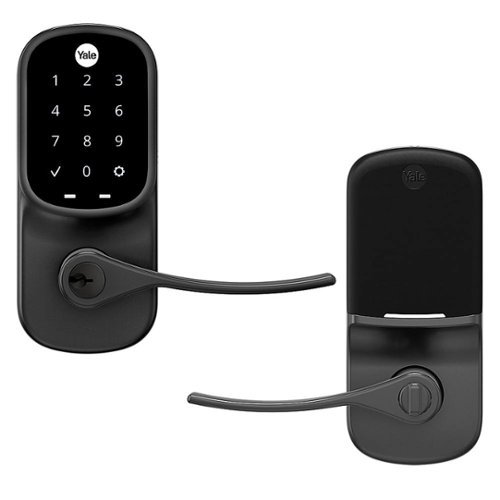
Upgrade your door with the Assure Lever, a smart keypad lever lock for key-free entry. The lever has Wi-Fi and Bluetooth so it allows you to lock/unlock, share access and see who comes and goes all using your app, from anywhere! For ultimate convenience, your Assure Lever will unlock automatically as you approach the door and it will relock once the door is closed! Plus, you can lock, unlock or check current status with voice assistants including Amazon Alexa, Hey Google or Siri. The lock features a backlit keypad so even when you don't have your phone, you can unlock your door without the hassle of keys. It's super easy to use and installs in minutes with just a screwdriver on standard doors (1-3/8" to 1-3/4" thick). Compatible with doors with no deadbolt (i.e. side entry, garage entry, basement, home office, etc.)
Customer Rating
4
Good lock for inside your home.
on July 26, 2024
Posted by: blah
Good lock for inside your home. In my case, this lock was installed inside my garage on a door that leads into my home, not a door that faces the outside of the home. This works great for that use, or possibly if you share an area with people you need to restrict access to, but don’t need a full deadbolt.
Installation was fairly easy since I have a standard size door in my garage. Lock can be installed either on the left or right side. Though the door does have wifi and app capabilities, because it is inside my home, I mostly just find it easier to just use the keypad code I chose to manually open it. The keypad illuminates, as the lock uses batteries for power. There is also a physical key as well.
I already have a main door to my home covered with another Yale lock, that one is a full deadbolt lock, and I already had the app ready, so I just needed to add in this additional lock to the app. The app allows you to create lock codes, that can even be temporary, for something like guests or people doing work in your home, etc. It also allows you to know who has opened your lock, etc. It will also let you know if your lock didn’t actually lock. I had this happen, and when I went to look, the bolt hadn’t been able to close into the hole in the door frame, but then I readjusted the lock bolt and have not that issue again, but it is good to be able to know in the app just incase I don’t close the door behind me, etc.
Overall, this is a pretty good and versatile smart lock. If you need something for an interior door in your home, and already have an outdoor Yale lock, I would get this one to have one less app to have to deal with.
I would recommend this to a friend!



Share this review:


+2points
2of 2voted this as helpful.

See all around your home and enjoy 360~ coverage with the versatile Pan-Tilt Indoor Cam. Get a better view of what~s up and what~s down right from your phone with pan-tilt controllable via the Ring App, HD Video and Color Night Vision. Or see less with a manual Privacy Cover that turns off your cam until you need it next.
Customer Rating
4
Great little camera if you are already in the ring
on July 17, 2024
Posted by: blah
Great little camera if you are already in the ring security ecosystem.
Great camera if you are already in the ring security ecosystem. Keep in mind this camera requires a wire to run to a power outlet.
Installation with this is nearly identical to all other Ring cameras, which is to say you can have it up and running in just a few minutes once you are set up on your home wifi via your smartphone.
In my case, I have this mounted on a ground floor rear window sill, and it covers my back-yard area, and I can literally control it to 360 around, and also tilt upwards to view the interior of my home. I mostly want this to just cover my yard, so that I do not have to install an outdoor mounted camera. What I really like about this camera is that it allows me to free up another ring camera I had in the same space to another area of my home, as this essentially can cover more than just one view, because you can control the view if needed if you are away via the app on your smartphone. The camera is only 1080p resolution, but the saved video quality is still very good in my opinion.
Like just about every other Ring camera, viewing through the app is just about as easy as can be, and you can control the pan and tilt from directional controls in the app. This camera also has a privacy shutter you can manually spin around and close, if you just don’t want to have it be able to view through the app. However it must be done manually, you cannot do this via the ring app on your smartphone. I don’t think this would be an issue in my case.
I however wish this camera was wireless, with a rechargeable battery. It would just make it a very clean and simple setup, and I think make it much more versatile for most people. You do have the ability to mount it to a wall or a ceiling with the included mount, which is something I would have done had it been completely wireless with a rechargeable battery.
I already have a ring doorbell and a few other ring cameras in my home, so this was a great add-on camera to my home, that I only wish had a rechargeable battery, to help hide it away even more. If you have the ability to put this camera somewhere on a table top, or shelf top this is probably ideal, as the power cord / wire just blends in, and can cover viewing of an entire room, and possibly more.
Recommended if you happen to be in the Ring camera system. Otherwise, I would look at less expensive camera alternatives that also do pan and tilt, and offer some extra features without a subscription.
I would recommend this to a friend!






Share this review:


+1point
1of 1voted this as helpful.
Introducing BRAVIA Theater Bar 9, our top-of-the-line soundbar that takes surround sound technology to new heights. Featuring 13 speakers and 360 Spatial Sound Mapping, hear the room filled with truly immersive theater-like surround sound perfectly optimized to your space. And unlock sound with even greater impact with optional wireless subwoofer and rear speakers.
Customer Rating
4
Great sounding, but hindered by required app usage
on June 10, 2024
Posted by: blah
Great soundbar, but setup requires mobile phone software that requires a sony account login to use.
First of all, I am coming to this review from owning a previous Sony soundbar, the HT-A7000, which has and continues to be a fantastic soundbar.
This new soundbar, in my same medium size living room area, definitely sounds better. Not by leaps and bounds, but it does sound better to me. However, you now have to set up everything in an app via your phone. The app unfortunately requires a sony account login. Should you already have a PlayStation account, you can use that same Sony account to log in, but there truly should be no real reason you need to have to be logged in to use the app. Sony has a history of trying to force its customers to make a Sony account, and has had many recent controversies with their PC published games forcing users to create Sony accounts. Unfortunately this feels like the same thing PC gamers have been grumbling about in recent weeks. It makes no sense to me as to why they need you to do this. While you can use the soundbar right out of the gate without the app, and it does sound great out of the box, the only way to access some of the features is via the app, including calibrating for your room. The app itself at least is pretty robust, but all of this was previously done on their previous HT-A7000 directly on the soundbar via on TV screen menus. I really wish they had just made using the app optional, and left everything totally usable without an app like the previous models. Once setup via the app however, everything does sound fantastic!!
Now, the only other issue I have with this soundbar is that they increased the price for this soundbar, yet took away 1 HDMI input. So you can only have 1 HDMI input on this soundbar versus the previous HT-A7000 that had 2 HDMI 2.1 inputs which was fantastic. Most major TV manufacturers only have 2 HDMI 2.1 inputs on their TVs, and if you have let’s say a PlayStation 5 and an Xbox Series X, you will lose one of those HDMI 2.1 ports on your TV with this soundbar. Because of the high price point on this soundbar, I am disappointed they didn’t leave it with 2 HDMI 2.1 ports on the soundbar, this just feels like a step back and not forward at this price point.
Ok, so now, now all setup, I do have to say, this soundbar is a CHAMP! It really sounds fantastic, and a setup from my previous HT-A7000 in terms of sound, and even bass. It really gets loud, and most people will not even feel like they need to get the optional external wireless subwoofer, especially in a smaller viewing room. This thing just sounds great with Dolby Atmos 7.1 and DTS-X movies!! Before I was a soundbar user, I only had AV receivers with 5.1 speakers setup, but this is one of those products that I would say I wouldn’t even bother considering any more. It sounds better than every traditional wired speaker setups that I have had! There are 13 speakers in the soundbar if you do not add in any optional rear channel speakers, or wireless subwoofer. I recommend that you connect your main HDMI 2.1 device directly to the sound bar for best performance (though I cannot say I had any issues with any HDMI 2.1 devices I tried regardless). In my usage case, I fed my Nvidia Shield directly to the soundbar input, leaving consoles plugged into the TV, and also be sure if your TV has an eARC port to be sure you go from there to the soundbar output port. This is the only way your TV will “pass thru” Dolby Atmos and DTS-X surround audio to your soundbar.
So the question then I guess comes down to what you might be coming from if this is an upgrade. If I were coming directly from a HT-A7000, I would stay there, this isn’t quite enough of an upgrade to justify moving to this soundbar. While the sound is better, I think the HT-A7000 sound bar is better as you can customize everything on the TV screen via menus, and doesn’t require this BRAVIA app, plus you have 2 HDMI 2.1 inputs. If you are however coming from an older soundbar, or even a lower end one, even though it is a little frustrating to have to do everything via the app, the sheer quality of the sound, and surround track handling makes it very worth the couple minutes of setup, and I would absolutely get this soundbar. Most people likely will not need to go to the app very often after initial setup and can use the included physical remote control for most things afterwards.
I would love to have given this a five star rating, but have to take off 1 star for the use of the app for configuration. Otherwise, this thing is an absolutely stellar sound performer!
I would recommend this to a friend!


Share this review:


+9points
10of 11voted this as helpful.
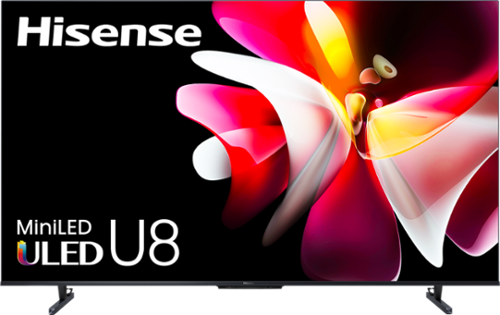
Meet the MVP of TVs! The award-winning U8 Series Mini-LED smart display from Hisense just got even better. This model is packed with lots of exciting features that dramatically improve the color, contrast and detail of every picture. Think: double the local dimming zones of our previous version, Up to Peak Brightness 3000, QLED Quantum Dot color technology, Dolby Vision HDR and Anti-Glare Low Reflection technology. Bring the sounds of the cinema directly to your living room with Dolby Atmos and a 50W 2.1.2 multi-channel audio system. We even equipped the U8 with a NEXTGEN TV ATSC 3.0 tuner and Wi-Fi 6E router compatibility, making it virtually future-proof. Plus, level up your gaming with 144Hz VRR panel, Dolby Vision Gaming and FreeSync Premium Pro.
Customer Rating
4
Great TV picture for the money!
on April 18, 2024
Posted by: blah
Great TV picture for the money, especially if you have it in a bright room. But, you may want to have a better media streamer, this one’s built in OS is a bit laggy to navigate through.
Picture quality is a step up from a Sony X900H I own that is 3 years old, however even that older TV’s operating system based on google TV is faster than this google based OS TV. It TV OS isn’t super slow, but it is slow enough that coming from anything Sony and LG have made in the last 3 years will feel slower. I also own a 3 year old LG C1 whose operating system feels faster to me. I suspect Hisense is using a slower processor built into the TV to cut down on costs. I also have an Nvidia Shield, and that runs great on this TV. For me, this will be the way I will do all my media streaming, as it is just significantly faster than the built in Hisense apps running on Google TV. I wish the built in hardware ran faster. I suspect the built in OS runs slower because of the million ads you get while on the Google TV OS, which unfortunately is a lot.
Now, on actually running native Amazon Prime 4K on the built in Hisense Google TV OS, it does look great when showing 4K HDR content. It gets really bright, much brighter than a LG C1 OLED TV I have, and compared to my Sony X900H, a LED based TV (though not mini-LED of this Hisense) it has much better local dimming, as this TV has a lot more dimming zones inside, and each LED light is smaller, hence the name “mini-LED”. So what I get here on this U8N is far less backlight blooming when there is a lot of contrast on the screen. This TV does look fantastic when it comes to how bright it can get for sure, butI still think it is behind in overall black levels available in OLED TVs which are literally INK BLACK. However OLED TVs are not a great option if you watch tv in bright rooms, as they do not get bright enough. This TV is perfect for bright rooms, and you will not have to worry about burn in like you do on OLED based displays.
Another great step up from other TVs in my home are the built-in speakers on this year’s 55UN8. There is more bass on this TV than either of my other more expensive TVs. It won’t replace a decent soundbar, but it does sound better than built-in speakers from TVs I have in the home that are from 3 years ago.
This TV also comes with what I think is a great remote. It is the perfect size and looks great.
Overall, for the money, this is a great TV for most people that want a really good picture, and especially that want that in a bright sunlit room! Just keep in mind you may want to opt for a better media streamer like an AppleTV or a Nvidia Shield.
I would recommend this to a friend!




Share this review:


+11points
15of 19voted this as helpful.
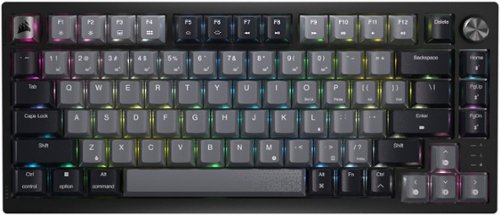
Stand out from the crowd with superior skill and distinctive design. The CORSAIR K65 PLUS WIRELESS is a 75% gaming keyboard that maxes out on performance and personality. Step up your switch game with pre-lubricated CORSAIR MLX Red linear switches that make each keystroke silky smooth and responsive. Integrated sound dampening tempers annoying clacks and pings, so you can enjoy subtle, pleasant acoustics as you play and type. Easily connect to PC, Mac, and other devices via ultra-fast 2.4GHz wireless or Bluetooth, and power through your playing sessions for longer than ever ~ up to 266 hours on a single charge. On the K65 PLUS WIRELESS, skill meets style.
Customer Rating

5
Premium feeling wireless mechanical keyboard
on February 15, 2024
Posted by: blah
This is one of the best mechanical keyboards I have ever used. Even if you are not a gamer, this keyboard, a 75% set of keys type of one, is somewhat of a hybrid between a full sized “100%” keyboard layout with number pad and the very minimalist 65% keyboards. I currently have a nice 100% wired mechanical keyboard, but this 75% is PERFECT on my desktop, saving space, and looking really cool for a work from home setup, which also doubles as my PC gaming setup. The fact that it is a wireless keyboard is great for people also looking for that clean and elegant aesthetic for their computer work space. For me, the fewer cables, the better, and using the included wireless adapter on my windows setup, I had no issues working with zero perceptible lag in either pro video editing and graphics programs I use, or FPS gaming. Playing Cyberpunk 2077 with the RGB lighting on just immersed me in the game even more.
My other full size mechanical keyboard use cherry red keys, and the K65 here uses Corsair’s own inhouse MLX red keys, that are a bit quieter than my previous keyboard, which is great, because the feel on key presses are still about the same, just with a little less noise than before. To my ears, it just sounds like this keyboard's keys have had some of the treble reduced, which is what felt like travelled soundwise in my home more than the bassier end of the key presses. This was never a huge issue in my use environment, but it might be in smaller workspace areas.
The RGB lighting is fully customizable using iCUE, but even if you do not use iCUE, it just looks great right out of the box. You get a usb-c port for charging, or using wired, bluetooth wireless, a rotary dial for controlling media (volume and more). In iCUE you can also setup per key RGB lighting profiles and save them directly to the keyboard, so if you move over to say a PlayStation 5, or Xbox Series X, it will keep your lighting settings on board.
Completely subjective here, but I am not a big fan of the gold keys on the top left, and the dial on the right. I would have LOVED if these had been some kind of silver instead of gold. It just looks a bit tacky to my taste. But again, this is completely subjective, and luckily it is only on these two keys.
Included with the keyboard is also a keycap puller, and you can replace keys yourself. This is something I personally have never done, but like they included these.
This is a great keyboard if you need a mechanical keyboard primarily aimed at gamers, but also highly functional as a workplace keyboard. So much so that in fact, I occasionally work in video on Mac workstation environments, and will be taking this keyboard with me to these locations, as I am not a fan of Mac keyboards. There is a switch on this keyboard between working wireless from WIndows to Mac protocols. I can customize the RGB lighting to highlight different keys that are very important in those programs I use. On the back they even included a spot on the rear of the keyboard that can hold your USB wireless adapter so you won’t lose it while in transit!!
Overall, this is a really premium feeling keyboard and feels so good to type on!
I would recommend this to a friend!





Share this review:


0points
0of 0voted this as helpful.
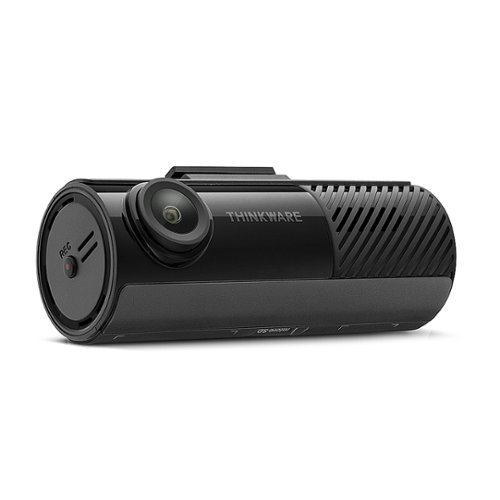
Introducing the F70 PRO, a 1080p dash cam that strikes the perfect balance between compact design and power to capture all of your drives with crystal-clear clarity. Adjust settings or download files on the go with built-in Wi-Fi, and enjoy parking protection with advanced Parking Surveillance modes like Motion and Impact detection, Time Lapse, and Energy Saving mode.
Customer Rating
4
Very good dash cam for the money.
on October 20, 2023
Posted by: blah
Very good dash cam for the money.
The Thinkware F70 Pro comes with a power cable for plugging into a 12v lighter plug. I installed this into a Honda Civic sedan, not a problem at all. Running it this way will not get you the parking recording features. For that you will need to be hard wired into the fuse box and need to purchase an additional kit for that. This dash cam will also provide GPS data to recorded footage and even warn you of traffic cameras, however it will require another module you will have to purchase separately.
The android app is pretty basic, but does the job just fine. The dash cam connects via wifi or bluetooth to download your recorded footage. A word to anyone picking this dash cam up, before you mount it, place it where you think you want it and pair it with your phone via the app. You want to do this because you want to make sure you have the camera pointed where you want it before you lock it down with the windshield mount. Also, make sure you really clean and dry the inner windshield to make sure this doesn't come off. There is an included tool for prying apart places to sneak and tuck the power cable thru your car. Take your time with this, as you can accidentally scratch up plastic interior panels.
I would also pair this up before you even attempt installing in your car, while your car is actually turned off. I only mention this because you could have issues if you use your phone paired to the car radio bluetooth phone.
While recorded footage during the day is pretty good, it isn't great, and it can be hard to read license plates while things are in motion. This may partially be because this camera is only 1080p and not 4K, which is literally 4 times the resolution. However, if cars are not moving too fast, or if both cars are moving around the same speed, I can make out plates that aren't too far away.
Overall, I do like this as an entry level dash cam. Once you start adding in hardwiring to your fuse box for additional parking camera footage however, you might want to consider a higher resolution camera. I would recommend this camera for most people however. I just don't think most people would get that much out of the parking recording features. Very good dash cam for the money.
I would recommend this to a friend!
Share this review:


-1point
0of 1voted this as helpful.
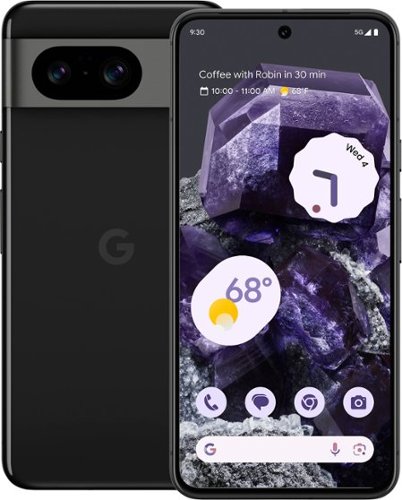
Meet Pixel 8. The helpful phone engineered by Google, with an amazing camera, powerful security, and an all-day battery. [1] With Google AI, you can do more, even faster ~ like fix photos, screen calls, and get answers. [2] And Pixel 8 has personal safety features for added peace of mind. [3]
Customer Rating
5
Easily one of the best phones of 2023
on October 18, 2023
Posted by: blah
Great smaller phone, fixes issues prevalent with Pixel 7. The biggest issue I had with the 7 was the poor battery life. This Pixel 8 seems to have resolved those issues, and also provided better call quality amongst many other improvements. Most of those improvements are not based around hardware, but rather Android 14 OS improvements specific to the Pixel 8.
A big issue with my previous Pixel 7 was not just battery life but also how hot the battery got. This seems to also have been fixed here with the Pixel 8. It just runs slightly warm at the highest use scenarios for me right now. Call quality also seems to now be improved for me across T-Mobile from the 7 to this new Pixel 8, and my t-mobile calls seem to have better quality now.
There are so many new improvements based around AI that it is hard to know where to start and how I really feel about some of them. "Top Shot" lets you take a series of photos with groups of people. The AI will then let you choose subjects best shot. For example if someone looks good in one of the sequence, you can swap the heads out with their head from one of the other shots. This is pretty cool, and in my testing it does work, and I cannot tell if these photos were manipulated or not. This type of thing would have had to be done in Photoshop in years before. Not only that, but Pixel 8 now has something else called Magic Editor, which acts a evne a whole lot more like photoshop. You can do things like select a person or object in a photo, move them somewhere else in frame, and the AI processing with the new Tensor G3 chip will essentially select what it "thinks" you are trying to move, and select around it, let you move it, and even replace what was previously behind the moved person/selection you moved. This works fairly well, though I have seen it make a few weird things happen to the filled back in backgrounds, with odd shadow shapes on occasion. While all of these generative AI features are fun to use, in the age of deep fakes, it does kind of make me feel weird about if these are "true" moments or time captured in photos, or are they something else. It will be interesting to see how the future sees this turn of events with AI technology.
Shooting video on the pixel 8 has other AI tricks up its sleeve too. They have something now called Audio Magic Erase, and it uses its AI to remove things like background noise. This is one of my favorite features, and one I am sure people will love. I was able to remove background noise from a busy street as a subject spoke to the camera. It removed just about all the noise in the background without altering the speaker's voice.
Hardware wise, the new screen on this Pixel 8 is fantastic. The biggest plus on this year's pixel is the 120hz refresh rate. This is one of those things that once you experience, it will be hard to go back to a lower refresh rate screen. Pull down a website, it feels smooth as butter! Watch some high resolution video, super smooth, now smearing or screen tearing. The display also gets SUPER BRIGHT now, and makes it so much easier to use in very bright outdoor environments. I really love the way the pixels have physically looked the last few years, since moving to the rear camera "bar", and this year continues that trend. I just love the way the phone looks, especially against the competition. It just looks more of a design evolution to me. It being a bar like that also provides a nice flat bar should you want to type while the phone is resting on a flat area. The cameras on other flagship phones give you a wobbly surface, while that camera bar here on the Pixel 8 is dead flat, and again, just looks nicer to my tastes.
While I am very glad to hear that Google is promising 7 years of OS and feature drops to the Pixel 8, this is a fantastic plus for those that care about the environment. I also am weary of Google promising things today, and in the not so distant future pulling the plug on promises. I want to fully believe they will hold true to the 7 year of updates, but recent things they have pull the plug on keep me weary. Only time will tell.
This is a great phone for most people, and the best update to the Pixel phone line up since the Pixel 5!! A true great update if you need a great camera, great hardware, really good call quality and a phone that isn't huge in your hands. Easily one of the best phones of 2023, if not THE best overall. There are some quirks for sure, but overall this has been a better experience for me than another family member's flagship phone.
I would recommend this to a friend!




Share this review:


0points
0of 0voted this as helpful.

Experience high-quality game audio on your Xbox, PlayStation, PC or Nintendo Switch with the RIG 600 PRO HX. Master your game audio using dual-mode wireless with low-latency 2.4GHz and Bluetooth 5.1. Stay connected across multiple gaming platforms and mobile devices with Bluetooth and a universal wireless adapter for Xbox, PlayStation, Nintendo Switch, PC. Bass-boosted, high-sensitivity 40mm drivers with tuned acoustic chambers deliver balanced sound and enhanced volume levels without distortion. Gain a competitive edge to react faster and more accurately with Dolby Atmos for Headphones. Experience a rich 3D soundscape that provides depth and dimension, allowing you to detect every sound, including overhead and unseen. The lightweight wireless headset offers all-day comfort and up to 24-hour battery life via Bluetooth and up to 18 hours using the 2.4GHz USB-C wireless dongle. Enjoy the comfort of sound-isolating earcups and a cushioned headband that~s both flexible and virtually unbreakable.
Customer Rating

3
Decent for the price, but not much bass.
on September 27, 2023
Posted by: blah
These are overall ok headphones for the asking price, however there are better sounding options. Even after installing the Dolby app on Windows they sound better, but still not as good as many other headphones.
They are fairly comfortable because of pretty deep and plush earcups, but do not rotate around at the earcup and are fairly rigid so they don’t move with the shape of your head much. Most of the headphones feel like plastic and I don’t like how the headphones can only be adjusted to just 3 height positions via a pop on the earcups themselves.
All sound customizations for the mic and equalizer are on your smartphone via an app , and require to be paired via bluetooth to make any changes. The only things you can physically change directly on one of the ear cups is power, volume level, audio track control for media, and a button for moving between bluetooth, wireless, and USB-C wired modes. The app itself does have 3 custom equalizer settings that can be saved, and settings for the mic gain levels.
The mic is not removable. It does fold directly into the earcup it comes out of, however that is the single axis it goes, just up and down. You cannot move the mic side to side.
While on PC using the 2.4ghz wireless adapter, I had very stable connections, no drops. Bluetooth however was a bit less stable, and I had to try a few times before being able to even pair it with my Pixel 5 phone.The USB-C wireless adapter design is nice in that the male connector part is off to the side, so if plugging into a hard to reach area, or do not want to block another computer port, you can just flip it over to save that space. This is very useful.
All in all, these are ok headphones for the price, but I would not get these if you really want a lot of deep bass while gaming.
No, I would not recommend this to a friend.





Share this review:


+6points
6of 6voted this as helpful.

Get ready to download more games to your gaming platform with up to 1TB of storage on M.2 2230 with the WD_BLACK SN770M Mobile NVMe SSD. Bring your whole game library anywhere, any place you go. Turbo charge and increase the storage in your ultrathin laptop with WD_BLACK SN770M Mobile NVMe SSD with PCIe Gen 4.0.
Customer Rating
5
5 year warranty by reputable company
on September 13, 2023
Posted by: blah
To start off, it will be much easier if you clone your existing ROG Ally with an external USB SSD enclosure. This is what I did, otherwise you will have to start from scratch with the ROG ally setup reinstalling the OS to the new SSD, and this will take you much longer. I wish the SSD would have included an external enclosure with the SSD. I am however glad that WD includes their own software to clone directly inside of Windows, and it is pretty easy to do so once you install it from the WD website. If you just swap out the SSDs, when you first start the ROG Ally, it will dump you into the ROG Ally BIOS and do an Asus Cloud Recovery on the OS, but you will have to reinstall all of your games and any other apps you may have previously installed. I highly recommend just cloning the original SSD, it is much easier and faster if you have already customized your ROG ally with Steam games. SSD enclosures are not very expensive, and after the cloning, you can always keep the original ROG Ally SSD inside the enclosure and use it as a portable external drive.
It is very easy to upgrade any ROG Ally - Make sure the console is actually turned totally off, not just asleep. There are 6 screws on the back of the ROG ALly, the bottom middle screw doesn’t actually fully come out - it just screws out but stays in place to the housing, carefully removing the back housing. Now, you just need to pull out the battery connector you will now see exposed. This is to prevent it from frying the parts inside while performing the upgrade. Now, there is a black plastic cover / sticker that you can pull up, and it will expose the SSD card. There is a single m.2 SSD screw holding the SSD in place, remove it, and you will see a shiny black thing to help lift the SSD out of the socket, and slide it towards you and out. Make sure to not lose the m.2 screw you just pulled out that held the existing SSD in place. Next, pull out the existing SSD, insert your new one, use that m.2 screw to hold down the SSD, and make sure to reinsert the battery cable back like it was, and finally put back the cover and close up with those screws again. That is essentially it. Just replace everything in reverse, close it up, and you are good to go.
In my testing, the 1tb SSD seems to be a bit faster than the original Asus ROG Ally SSD. In my opinion upgrading the internal SSD with this WD model is much better than using micro SD cards in the ROG Ally. There are currently many issues causing microSD cards to be damaged in the ROG Ally. While there have been firmware updates, they have not fixed the issues damaging microSD cards. The internal SSD storage will also always be much faster than microSD cards.
One thing about this SSD card vs other m2 2230 cards you can buy is that this one is made from a very trusted company, and isn’t a used device just pulled out of old laptops. WD also backs this up with a 5 year warranty. This card will also work on other handheld gaming devices, and not just the ROG Ally. As long as that device uses a m2 2230 sized SSD you can use it.
Overall, this is a great card, and I highly recommend anyone with a ROG Ally to get this over using microSD cards to install games to.
I would recommend this to a friend!

Share this review:


+4points
4of 4voted this as helpful.
blah's Review Comments
blah has not submitted comments on any reviews.
blah's Questions
blah has not submitted any questions.
blah's Answers

Reach fitness goals with this Samsung Galaxy Watch Active smart watch. Featuring advanced workout tracking, this smart watch helps optimize workouts and monitors your progress by tracking up to 40 exercises. This Samsung Galaxy Watch Active smart watch monitors your heart and sends real-time alerts in the event of irregular activity.
Dose this watch have the SOS mode where if you are in trouble you hit one of the buttons three times and it sends up to four phone calls, and one to the police?
Reach fitness goals with this Samsung Galaxy Watch Active smart watch. Featuring advanced workout tracking, this smart watch helps optimize workouts and monitors your progress by tracking up to 40 exercises. This Samsung Galaxy Watch Active smart watch monitors your heart and sends real-time alerts in the event of irregular activity.
Are the watch bands interchangeable on the Samsung active?
yes, they are standard 20mm watch bands, that are easily swappable.
7 years, 4 months ago
by
blah
Reach fitness goals with this Samsung Galaxy Watch Active smart watch. Featuring advanced workout tracking, this smart watch helps optimize workouts and monitors your progress by tracking up to 40 exercises. This Samsung Galaxy Watch Active smart watch monitors your heart and sends real-time alerts in the event of irregular activity.
Can u make calls from it
Yes.. you can. You can start calls from it, and speak into the microphone. Also you will get texts and emails to it.
7 years, 4 months ago
by
blah
Reach fitness goals with this Samsung Galaxy Watch Active smart watch. Featuring advanced workout tracking, this smart watch helps optimize workouts and monitors your progress by tracking up to 40 exercises. This Samsung Galaxy Watch Active smart watch monitors your heart and sends real-time alerts in the event of irregular activity.
Can you store music on the watch
yes.. you can. Though it will not hold much. It does also come with Spotify app, though you will need either your phone or a wifi connection to use that.
7 years, 4 months ago
by
blah