


TravisJ's stats
- Review count179
- Helpfulness votes263
- First reviewNovember 6, 2016
- Last reviewJune 8, 2026
- Featured reviews0
- Average rating4.8
Reviews comments
- Review comment count0
- Helpfulness votes0
- First review commentNone
- Last review commentNone
- Featured review comments0
Questions
- Question count0
- Helpfulness votes0
- First questionNone
- Last questionNone
- Featured questions0
- Answer count2
- Helpfulness votes0
- First answerOctober 28, 2017
- Last answerNovember 20, 2018
- Featured answers0
- Best answers0
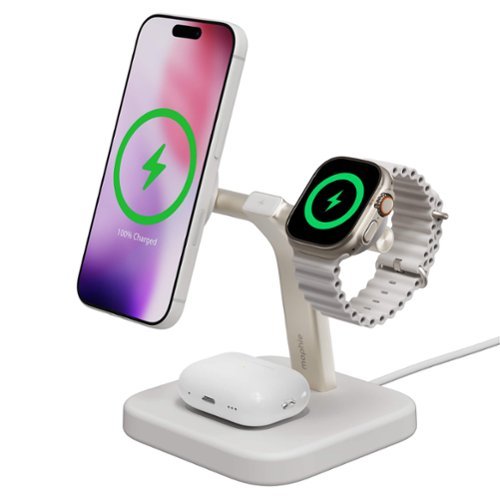
Place your iPhone, Apple Watch, and AirPods/AirPods Pro on the 3-in-1 Wireless Charging Stand and charging starts on contact. This compact, space-saving device fits neatly on your nightstand and provides up to 15W of fast-flowing power.
Customer Rating

5
Perfect for Nightstand or Desk
on December 17, 2025
Posted by: TravisJ
This is the perfect night stand or office desk charger for your phone, watch, and airpods. It is well built with a clean look, offering a minimalistic design.
First thing I noticed when unboxing is how well built and hefty it felt. You want a magsafe stand to be either a bit on the heavy side so it doesn’t wobble around when trying to remove the phone, or small and light weight so you can pick it up and pull the stand away from the phone. I found that this one fell in the first category, as being a bit more on the heavy side, but I also enjoyed how the magnet held on firmly. It wouldn’t quite pull straight off but if you angled your phone off the mount, it comes off about how you’d expect it to, without flopping the mount about.
It’s also nice to see a long cable along with a charging brick so that you can route the cable to get to an outlet if needed. If you need a much shorter cable, you’ll be happy to know Mophie included a cable management recess on the underside to help out with keeping things tidy. Along with other thoughtful functionality, you can rotate the phone wireless charger to adjust for angle. I thought this was a neat feature so you can roll over and watch a show as you fall asleep or just adjust it up or down depending on how your bed or desk is angled for your view.
There was enough space between the phone and watch charger you can put your phone in landscape without interfering with the watch charger. The watch also fit nicely and had a good grip. I have the larger apple watch ultra and didn’t have any issues with hold. If not being perfectly positioned bother’s you, a watch with bulkier bands or heavier watch might take a bit of finesse to get it “upright”, but honestly, being slightly cant doesn’t affect the charging.
No fit concerns with the air pods. The case fits nicely in the indention and keeps it in the right spot to charge. I didn’t have any issues with any of the chargers being aligned correctly. Once it was on the charger, charging began immediately and without interruption.
No fit concerns with the air pods. The case fits nicely in the indention and keeps it in the right spot to charge. I didn’t have any issues with any of the chargers being aligned correctly. Once it was on the charger, charging began immediately and without interruption.
Finally, I did a short charging test. In a 30 minute test, my iPhone Pro Max went from 45% to 69% and my Apple Watch Ultra 3 went from 49% to 70%. I felt like this was a fairly decent charging for a short amount of time, especially for wireless charging. I personally use mine as a nightstand, so quick charging isn’t necessarily something I need, but it’s good to know if you throw it on the charger while you get ready for a night out, you can get a few more hours of usage out of your phone and watch.
I would recommend this to a friend!
Share this review:


0points
0of 0voted this as helpful.
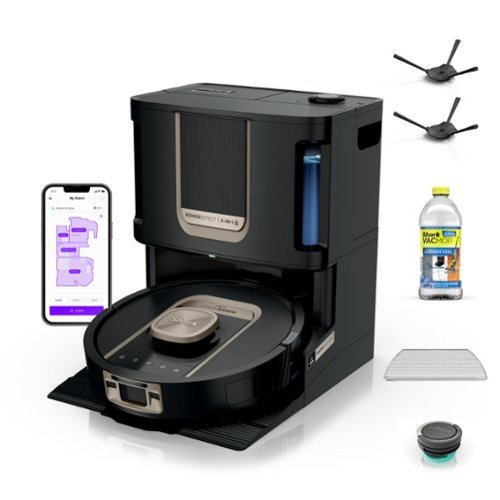
Experience up to a month of hands-free cleaning with the Shark PowerDetect ThermaCharged 2-in 1 Robot vacuum and Mop. Its NeverTouch Pro Base washes the mop with 185~F water, dries with 175~F air, and empties debris automatically. With Dirt Detect, edge-to-edge cleaning, Neverstuck charged technology, and DryGuard protection, it delivers nonstop, deep-cleaning performance.
Customer Rating
5
Heated Cleaning is the Way
on November 28, 2025
Posted by: TravisJ
As the owner of two long hair and two short hair cats, you I can’t really clean my floors often enough. I was very excited to see how they’ve taken what was already a great vacuum and use heat to clean and dry the mop pad to make it even better.
--==Cleaning==--
Shark uses LiDAR and camera system to build a map of your home, navigate each room, and detect dirt and obstacles. It has different sensors for detecting floor type and extra dirty areas. I like how it drops the mop pad off to hit the carpets and area rugs and picks it back up to vacuum and mop the hardwood floors.
Like mentioned, I can end up with pet hair and it sometimes can make its way to the corners and walls where some vacuums might struggle to clean. The dry edge detect which blasts air down in the area to push debris out where it can be picked up is a feature that works really well with the pet dander. Once the vacuum run is done, it makes its way back to the base, dumps the debris it found, and picks up the mop pad.
The mopping is probably my favorite part of having a robot vacuum and I love the added features that come with the ThermaCharged model. The base has both a clean and dirty tank. The clean tank fills the Shark robot that pre-wets the mop pad and goes to work. It oscillates as it mops giving a gentle scrub as it traverses the home. I find that it does an excellent job of staying on top of keeping the floors clean. It did well detecting an area where my cat had vomited, making extra passes in the area to clean it up well. The floors do get wet but it’s not excessive and dries within 15-20 minutes.
It does a great job at obstacle avoidance and can prevent itself from getting stuck by raising itself up to get over area rugs or hardwood to carpet trim that may be difficult for other robot cleaners. It will also raise itself up on area rugs to prevent from getting them wet. I also like the obstacle avoidance. It does a great job of moving around items that have a bit of height to them. It did struggle a bit with longer “snake” like toys we use to play with the cats. I recommend using the app to schedule a time to clean the floors for when you’re home and do a quick sweep of the area to pick up any low profile items you don’t want swept up. Aside from being able to target certain rooms for cleaning, you can also spot clean, if you have an area within a room that needs attention, you can send the vacuum there for a quick cleanup.
Once done it goes back to the base for some heated cleaning. The base uses hot water and a brush system to clean the mopping pad. Previous models did not have a heated feature, so while it would still get clean, it didn’t kill odor generating bacteria the same way soap and hot water together does. Because of this, you’re mop pad isn’t spreading bacteria from the mop pad when it cleans the floors. The heated dry too is nice because it takes less time to dry the mop pad so you don’t have the fan running quite as long. After about a week of owning and using daily, I picked up the robot and sniffed to see if there was odor, and could only smell the scent of the cleaning solution.
Shark uses LiDAR and camera system to build a map of your home, navigate each room, and detect dirt and obstacles. It has different sensors for detecting floor type and extra dirty areas. I like how it drops the mop pad off to hit the carpets and area rugs and picks it back up to vacuum and mop the hardwood floors.
Like mentioned, I can end up with pet hair and it sometimes can make its way to the corners and walls where some vacuums might struggle to clean. The dry edge detect which blasts air down in the area to push debris out where it can be picked up is a feature that works really well with the pet dander. Once the vacuum run is done, it makes its way back to the base, dumps the debris it found, and picks up the mop pad.
The mopping is probably my favorite part of having a robot vacuum and I love the added features that come with the ThermaCharged model. The base has both a clean and dirty tank. The clean tank fills the Shark robot that pre-wets the mop pad and goes to work. It oscillates as it mops giving a gentle scrub as it traverses the home. I find that it does an excellent job of staying on top of keeping the floors clean. It did well detecting an area where my cat had vomited, making extra passes in the area to clean it up well. The floors do get wet but it’s not excessive and dries within 15-20 minutes.
It does a great job at obstacle avoidance and can prevent itself from getting stuck by raising itself up to get over area rugs or hardwood to carpet trim that may be difficult for other robot cleaners. It will also raise itself up on area rugs to prevent from getting them wet. I also like the obstacle avoidance. It does a great job of moving around items that have a bit of height to them. It did struggle a bit with longer “snake” like toys we use to play with the cats. I recommend using the app to schedule a time to clean the floors for when you’re home and do a quick sweep of the area to pick up any low profile items you don’t want swept up. Aside from being able to target certain rooms for cleaning, you can also spot clean, if you have an area within a room that needs attention, you can send the vacuum there for a quick cleanup.
Once done it goes back to the base for some heated cleaning. The base uses hot water and a brush system to clean the mopping pad. Previous models did not have a heated feature, so while it would still get clean, it didn’t kill odor generating bacteria the same way soap and hot water together does. Because of this, you’re mop pad isn’t spreading bacteria from the mop pad when it cleans the floors. The heated dry too is nice because it takes less time to dry the mop pad so you don’t have the fan running quite as long. After about a week of owning and using daily, I picked up the robot and sniffed to see if there was odor, and could only smell the scent of the cleaning solution.
--==Setup and Maintenance==--
Setup wasn’t too difficult. I recommend taking a few minutes to make sure you remove all necessary tape that is used for shipping. Read all labels and watch the setup video you can access by scanning the QR code on the paper located inside the box. Shark has a few videos loaded up that has a bunch of helpful information, including maintenance and cleaning. Using the app to setup, it will walk you through exactly what you need to do to get it going on the wi-fi. Once on wi-fi, you’ll do a map run, identify rooms with carpet and area rugs, and make map edits.
The clean and dirty water reservoirs easily come out of the base for cleaning. The dust bin pulls out and can be emptied in the trash can, no need to keep dust bags. A lot of the sensors can be cleaned and wiped off with a clean cloth. The brush rollers are held in place by cover that comes off easily without tools, as well as the brush. I use a paper towel to wipe away any dust or debris where the dirt is pulled in. Sometimes this area gets build up as the dirt and water can combine and start to layer on the surface. Cleaning it takes all of about 15 minutes as you’re just staying on top of keeping sensors clear and the rest free of build up.
The app allows you to setup schedules, customize the map, and only clean specific rooms or spots in rooms. You can also look at a report of the last clean to see what areas were cleaned and when neverstuck activated so you can adjust or pick up obstacles.
Setup wasn’t too difficult. I recommend taking a few minutes to make sure you remove all necessary tape that is used for shipping. Read all labels and watch the setup video you can access by scanning the QR code on the paper located inside the box. Shark has a few videos loaded up that has a bunch of helpful information, including maintenance and cleaning. Using the app to setup, it will walk you through exactly what you need to do to get it going on the wi-fi. Once on wi-fi, you’ll do a map run, identify rooms with carpet and area rugs, and make map edits.
The clean and dirty water reservoirs easily come out of the base for cleaning. The dust bin pulls out and can be emptied in the trash can, no need to keep dust bags. A lot of the sensors can be cleaned and wiped off with a clean cloth. The brush rollers are held in place by cover that comes off easily without tools, as well as the brush. I use a paper towel to wipe away any dust or debris where the dirt is pulled in. Sometimes this area gets build up as the dirt and water can combine and start to layer on the surface. Cleaning it takes all of about 15 minutes as you’re just staying on top of keeping sensors clear and the rest free of build up.
The app allows you to setup schedules, customize the map, and only clean specific rooms or spots in rooms. You can also look at a report of the last clean to see what areas were cleaned and when neverstuck activated so you can adjust or pick up obstacles.
--==Other Thoughts==--
I’m happy with navigation and obstacle avoidance, however, on a few occasions I’ve had it to bump my feet or the rotating brush hitting my foot. I’m not sure if this is avoidable as I move through my home, but it has never hurt me, and I just nudge the bump sensor in the front to “shoo” it away. I have a light weight area rug in both my living room and a few in my kitchen that it likes to push up or push around as it goes. The vacuum does fine with the heavier rugs, but does struggle a bit with pushing the others around or up, so something to be aware of.
The app isn’t bad but I think they have room for improvement. It just feels a bit dated and could use an artistic touch. It has improved over time and I believe because a lot is dependent on communication back from the vacuum, it’s gotten speedier and more responsive as the vacuums have gotten more advance. One thing I wish they would add is the ability to detect carpets without having to basically reset the whole map. People update their homes and rearrange furniture; I’d love to remap a room rather than the whole house.
You can also use the app to setup smart home features such as Alexa or Google. I would love to see a HomeKit option as I prefer to keep my smart home devices in one place. However, it’s neat that you can be completely hands-free using commands to start cleaning jobs.
--==Final Thoughts==--
It’s so easy with hardwood floors to see when your floors are dirty. It’s even worse to walk through barefoot and feel when your floors are dirty. I can walk through my home knowing my floors are clean. Only needing to clean and maintain the vacuum once a month is convenient, and honestly, I end up with cleaner floors because I’m more willing to use it. I think heat cleaning the mop pad should be a new standard as it prevents bacteria growth and odors.
There’s still a longer term review to see how the Shark holds up and if every 30 days continues to be the correct interval for maintenance, but for now, I’m impressed.
I’m happy with navigation and obstacle avoidance, however, on a few occasions I’ve had it to bump my feet or the rotating brush hitting my foot. I’m not sure if this is avoidable as I move through my home, but it has never hurt me, and I just nudge the bump sensor in the front to “shoo” it away. I have a light weight area rug in both my living room and a few in my kitchen that it likes to push up or push around as it goes. The vacuum does fine with the heavier rugs, but does struggle a bit with pushing the others around or up, so something to be aware of.
The app isn’t bad but I think they have room for improvement. It just feels a bit dated and could use an artistic touch. It has improved over time and I believe because a lot is dependent on communication back from the vacuum, it’s gotten speedier and more responsive as the vacuums have gotten more advance. One thing I wish they would add is the ability to detect carpets without having to basically reset the whole map. People update their homes and rearrange furniture; I’d love to remap a room rather than the whole house.
You can also use the app to setup smart home features such as Alexa or Google. I would love to see a HomeKit option as I prefer to keep my smart home devices in one place. However, it’s neat that you can be completely hands-free using commands to start cleaning jobs.
--==Final Thoughts==--
It’s so easy with hardwood floors to see when your floors are dirty. It’s even worse to walk through barefoot and feel when your floors are dirty. I can walk through my home knowing my floors are clean. Only needing to clean and maintain the vacuum once a month is convenient, and honestly, I end up with cleaner floors because I’m more willing to use it. I think heat cleaning the mop pad should be a new standard as it prevents bacteria growth and odors.
There’s still a longer term review to see how the Shark holds up and if every 30 days continues to be the correct interval for maintenance, but for now, I’m impressed.
I would recommend this to a friend!
Share this review:


0points
0of 0voted this as helpful.
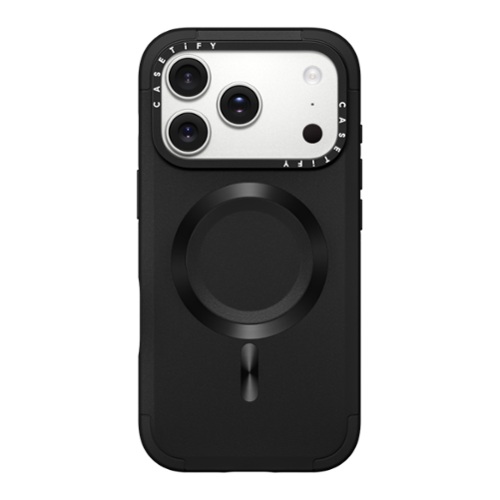
Don't let anything slow you down. Force Case by CASETiFY is built to handle everyday drops and bumps with a rugged new design that delivers 6.6 ft drop protection and 3x Military Garde toughness.
Customer Rating
5
Great Balance Between Thin and Protection
on November 22, 2025
Posted by: TravisJ
This is a great looking case by Casetify that also offers a good balance of protection while still feeling slim in the hand and pocket.
The case is a matt black and hard plastic on the back. There is a very thick rectangle protrusion around the camera cutout to keep the camera protected from drops. I believe this is also to help with the rigidity of the much larger camera bump on the iPhone 17 Pro Max. The edges of the case is a hard rubber that offers shock absorption. I was almost fooled into thinking the corners were plastic as it’s a very hard rubber with a smooth texture, but to get a 6.6ft drop rating, it makes sense to have something to absorb the kinetic energy of a drop.
The outside design carries into the inside, with the back being hard plastic but the sides and corners being the same rubber material. Buttons are protected too but each have slits cut out on either side to allow the case to flex for button presses. I’m not sure how I feel about this because it lets lint and dirt find it’s way into these over time.
There’s a bit of stippling on the plastic on the outside that adds a small amount of grippiness to the case. I think it could be a bit more aggressive as it’s more grippy than a completely matt case, but still fairly slick. I do like the brushed look of where the magsafe magnets are. I found the magnets to be acceptable with a reasonably good amount of grip. I also like how the ports and speakers on the bottom are individually cut out instead of being a long oval.
As far as case profile, no issues taking this in and out of my “phone pocket” that is on the side of my carpenter jeans. I’d call this a regular sized case. A great balance of protection and thinness. I wouldn’t be surprised if someone with tighter jeans may struggle with the sharp design around the camera bump, but no issues from me.
When the phone is in the case, the case hugs just around the bezel of the phone, adding protection for the screen. This is probably also my biggest gripe. I like a case that is easily removable so I can wipe down my phone and use it without a case. I’m probably a small minority of people that do this, but I found myself putting more pressure than what I was comfortable with pushing the phone out of the case. I don’t think it’s a flaw in the design, so I wouldn’t dock a star, but just something to be aware of. While I’m complaining, I’d love to see the “Casetify” around the camera cutout to just be black and not filled in white.
I’d say this is a solid case if you’re looking for a balance of size and protection. While I had a few gripes that were more personal preferences, I don’t think it takes away from the protection or usability the case offers.
I would recommend this to a friend!
Share this review:


0points
0of 0voted this as helpful.
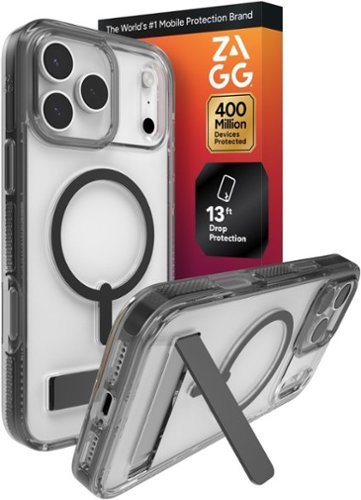
The ultra-slim Crystal Palace Lite Snap is the perfect case to showcase your phone. Crystal clear-as the name implies~and it keeps your phone pristine and protected. Anti-yellowing properties in the case help it maintain its transparent beauty. And its lightweight, stream-lined design won~t weigh you down.
Customer Rating
5
Protection, Utility, and Shows Off the Hardware
on November 8, 2025
Posted by: TravisJ
I love how clear cases are becoming more popular, showcasing the features of the phone, while still providing protection without feeling cheap or yellowing. Zagg has put together a protective case that does this, providing rigidity while working in magsafe and a kickstand.
It’s hard for me to describe what the case is made out of. It’s rigid but doesn’t seem fragile. It’s not quite plastic but not quite rubber or silicone. Someone who knows materials may be able to speak better to this. Zagg claims it’s scratch resistant, which I love because hard plastic cases which were the standard for clear cases were prone to getting scratches over time and not looking good. To be less scratch resistant, manufacturers tried a softer polymer type clear case, that usually yellowed over time. Zagg is saying they fixed that too. The long term usage will test out both of these claims, but with many other manufactures’ claiming never yellow technology, I’d say there’s something to the latter.
Zagg does have a claim that their newer line of cases is made with graphene. I spent a few minutes searching their website and youtube page to get more information. Most of what I found was just promotional CGI marketing. I’m genuinely curious how graphene is integrated and if there’s a measurable difference in how it protects the phone inside the case or if it’s just marketing.
Zagg does have a claim that their newer line of cases is made with graphene. I spent a few minutes searching their website and youtube page to get more information. Most of what I found was just promotional CGI marketing. I’m genuinely curious how graphene is integrated and if there’s a measurable difference in how it protects the phone inside the case or if it’s just marketing.
To get the 13ft drop protection claim, they had to make sure the case protects the phone, obviously. A few ways I noticed they did this was the snug fit of the phone inside the case along with support by creating a connecting piece of protection between the cameras and flash. While a lot of case makers are leaving the whole “camera shelf” open to fend for itself, Zagg took advantage of the blank space and reinforced it.
If you look on the inside of the case, around the edges, you’ll see a black rubberized inserts that add a layer of protection to the corners and edges. I would imagine these act as shock absorbers in the event of a drop to disperse the kinetic energy and prevent damage. Also, the power, volume buttons, and action button are all covered while the camera control button remains open, likely due to the capacitive nature of the button, requiring touch for input.
If you look on the inside of the case, around the edges, you’ll see a black rubberized inserts that add a layer of protection to the corners and edges. I would imagine these act as shock absorbers in the event of a drop to disperse the kinetic energy and prevent damage. Also, the power, volume buttons, and action button are all covered while the camera control button remains open, likely due to the capacitive nature of the button, requiring touch for input.
As for design, I wouldn’t say this is a thin case. It does add some dimension to the iPhone, but not so much that it can’t fit in the special side pocket of may carpenter jeans or hinder how I use it. This is a necessary tradeoff to get the layers of protection built into the case. There is some stippling on the side of the case that help with grip making it easy to pick up and hold. It is slightly aggressive so it can feel a bit prickly to the finger tips, but actually work great when using a natural grip to pick up and hold. You can see the magsafe ring on the back, indicating it will work with magsafe accessories, and it does. I will note, however, that I think the magsafe magnets could be a bit stronger.
One feature you can’t forget is the kickstand. While very simple, it’s such an underrated feature to have. At work, I like to keep it in portrait mode, using the kickstand, so I can see notifications as they come through. At home, it goes into landscape as I catch up on video creators I enjoy watching. It’s easy to grab with a fingernail and pull out, even with freshly clipped finger nails. I didn’t have this on my previous case and I found myself using this more than I thought I would.
The phone pushes out of the case from the top so if you want to give everything a wipe down, you can do so with ease. The case itself is a bit of a fingerprint magnet. They easily wipe away using your shirt or a microfiber cloth, but it doesn’t take long to come back. I do like to use my phone out of it’s case when I’m at home so hopefully this stands the test of time of cycling a phone in and out of it.
Zagg has been around making products for the iPhone for a long time and they’re nearly synonymous with screen protectors. I’m not surprised to see such a high quality case coming from them. They’re also very known for their warranty. Don’t sleep on registering your case and being protected.
The phone pushes out of the case from the top so if you want to give everything a wipe down, you can do so with ease. The case itself is a bit of a fingerprint magnet. They easily wipe away using your shirt or a microfiber cloth, but it doesn’t take long to come back. I do like to use my phone out of it’s case when I’m at home so hopefully this stands the test of time of cycling a phone in and out of it.
Zagg has been around making products for the iPhone for a long time and they’re nearly synonymous with screen protectors. I’m not surprised to see such a high quality case coming from them. They’re also very known for their warranty. Don’t sleep on registering your case and being protected.
I would recommend this to a friend!
Share this review:


0points
0of 0voted this as helpful.

Introducing the ROG Xbox Ally X, a groundbreaking device that brings the freedom of Windows, craftsmanship of ROG, and the power of Xbox into the palm of your hands. Built in partnership with Xbox, the ROG Xbox Ally X delivers a seamless experience across Xbox Game Pass, Steam, Epic Games, and more ~ all in one versatile system. At its core is the AMD Ryzen AI Z2 Extreme processor, delivering next-gen performance with AI-powered efficiency and responsiveness. With 24GB of ultra-fast LPDDR5X 8000 MHz RAM and 1TB of SSD storage, the ROG Xbox Ally X is engineered to tackle AAA titles. Its 80Wh battery powers extended play sessions, while the redesigned ergonomics and Xbox-inspired grips keep you comfortable through every mission. Dive deeper into your games with precise impulse triggers and enhanced haptic feedback, and enjoy smooth, vibrant visuals on a 7~ FHD 120Hz display with FreeSync Premium.
Customer Rating
5
First Handheld Very Impressed
on November 3, 2025
Posted by: TravisJ
The ROG Xbox Ally X is an impressive handheld gaming device. On the surface it’s another handheld to compete with the rest, but when you start looking at the details, teaming up with the Xbox team added some nuances that set it apart including the Xbox UI and a stripped down version of windows.
--==Performance==--
You can look at synthetic benchmarks if you want to compare numbers, but actual usage is impressive. After running updates, I spent some time getting familiar with the buttons and menus. I found navigating through the menus need more work to make it more intuitive. However, I will say, there’s a lot you can do within the Xbox interface as well as the fact it’s basically a handheld PC. The UI is snappy, but I did run into a few occasions where it would hang up and the controller wouldn't respond, then I had to use the touch screen.
I spent some time playing Battlefield 2042, downloaded Hollow Knight through Xbox gamepass, and fired up the Marvel’s Spider-Man Remastered to test out playing on the different platforms. Hallow Knight has been a ton of fun to play. The game loads quickly and I haven’t noticed any performance issues. Battlefield has been mostly great. It performed well and I didn’t have any issues with actual game play, but I do not think the game was designed for such a small screen. Spiderman was a lot of fun. It took me a little bit to remember all the buttons but again, performance was great and no issues swinging around the map.
It’s worth noting I played almost exclusively on battery so performance was not running at the highest wattage, but this is how I expect most people will use this. You can go into the menu and adjust settings to be more performative for smoother gameplay or lower wattage for battery saving.
I also used an HDMI to USB C cable to play on the TV, using a separate Xbox Controller I had on hand. I had to adjust some of the settings while playing Battlefield, but I was getting a consistent 30 FPS, which is bare minimum for playability these days, but considering this is coming from a handheld, I was happy with the results.
--==Software and Design==--
One thing they did right with the design was the Xbox feel to the controller grips. It’s very Xbox-esque and very natural feeling if you use an Xbox controller for steam or Xbox is your console of choice. The RGB on the thumbsticks is a nice touch and there’s enough stippling to the grip to feel nice in the hand without feeling grip fatigue. The screen isn’t anything special but gets plenty bright and the touch screen is responsive. The fingerprint reader built into the power button is a nice touch for easy login. Two USB C ports are nice to see with a dedicated volume button on top and an SD card reader for easily adding extra storage.
UI Design I think needs a bit more love. For me there’s just a lot that Xbox and ASUS allow you to do, which is great, but can be overwhelming and maybe confusing for some. The Armory Crate button is for most of your settings such as brightness, volume, performance settings, powering off or putting to sleep, changing resolution, and many other settings you can add to the quick access menu. You press the Xbox button and you actually just move over in the UI to the Home screen where you can quickly launch games or access your game and app library, including Steam, and access even more settings, some of which are the same as what’s found in the armory crate menu. You can also download and launch apps such as Steam or Edge Browser, which appear to act and function like the full PC apps.
Speaking of PC apps, the Xbox software does run on a stripped-down version of windows 11, which you can use just like you would use a PC. I think one of the better things that comes from this is the use of co-pilot, Microsoft’s AI. When you’re playing a game you can hold down the button just to the right of the screen at the top, looks like 3 books with one falling over, it will invoke co-pilot and you can ask questions to help your way through the game such as how to defeat an enemy.
--==Battery==--
Battery life is good, especially considering the performance. I can sit and play Hollow Knight for a few hours and still have plenty of battery left. I also launched Edge and loaded up youtube to watch videos. Spent an hour or so just watching videos and again, wasn't worried about plugging it in.
--==Other Thoughts==--
I’m glad that it came with a charger, so many things do not these days and I’m not really here for it. I would have liked to have seen an easier way to upgrade the internal storage, while I can appreciate an SD card, throwing in a 2TB or even a 4TB HDD would be a worthy upgrade. The speakers are fantastic. They sound great and really push out some volume. If you have a USB C to HDMI cable, you can easily connect to a TV. I had one laying around and I was able to test this out and it worked great. No notable input lag to be found. It also easily connects to an xbox controller if you want a full playing on TV experience.
I’d say one thing to note is there isn’t one, “update all” button to keep drivers and applications up-to-date. If Window’s updates, you’ll need to go there to grab those, if Armory crate has updates, grab them from there. I’m not sure if I had to, but I also made sure to use Steam to update my steam games, and I’m assuming you’ll use the Xbox app / home screen to update xbox games.
Finally, just the overall experience as someone who comes from PC gaming. I have tried cloud gaming on a spec’d out Mac, and wasn’t impressed. I’ve used Steam’s “cloud play” and didn’t like how some games weren’t compatible. A portable handheld is the way to play your favorite games on the go, especially when you have a desktop or just don’t have the room to pack around a laptop. I grabbed a carrying case I could throw the charger and my USB C to HDMI cable in for easy mobile gaming. You can use the device as a large controller or even throw an xbox controller in a go bag with you and you can practically play anywhere you want to go.
I gave a lot of grief on the software but honestly, you can get over this quickly if you’re willing to spend some time getting familiar with the menu’s, what button does what, and how to navigate best. For me it’s a mix between controller and touch screen inputs for the quickest input and navigation. You do get some lag from time to time, but I think this will get better over time as things are optimized.
It's easy for me to recommend the ROG Xbox Ally X. The performance and battery I think are easy wins but also the feel of the controller and the versatility of integrated Xbox app all running on a stripped down windows so there’s familiarity with what you can do with PC gaming, especially with something like game pass or a robust steam library. PC gaming on the go is getting pretty good.
I would recommend this to a friend!



Share this review:


+1point
1of 1voted this as helpful.
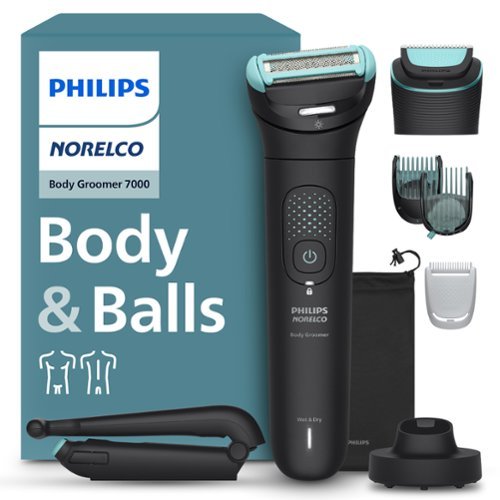
The Philips Norelco Body Groomer 7000 Series is designed for comfortable full body grooming, including intimate and hard-to-reach areas with a selection of combs and a foldable back attachment. Effortlessly switch between full body shaving and body hair trimming using our unique interchangeable dual-head system, without compromising on skin comfort. The dermatologist tested 2D flexing foil shaver head with Optilight functionality adapts to your body's contours and illuminates the target body area for a close, effective, and skin-friendly male grooming. Alternatively, the body trimmer head offers 10 length settings for a precise grooming experience. Our easy to use men's body trimmer & shaver features an ergonomic grip for more control, even in tough-to-reach areas and is 100% showerproof for convenient wet & dry use and easy cleaning. To clean the groomer, place the head and cutting element under running water. The Philips Norelco Men's Body Groomer 7000 Series is built to last, never needs to be oiled, and comes with a warranty of up to 5 years*. The high-power rechargeable hair trimmer battery allows for 120 minutes of cordless use, and you can use the appliance again after a 1-hour charge.
Customer Rating
5
Versatile to Use and Easy to Clean
on October 28, 2025
Posted by: TravisJ
This trimmer has several attachments and features that make it a versatile trimmer for the body and face. I found this useful in the most sensitive of areas as well as quickly getting a trim in on the beard.
My first use for this was actually to prepare for an upcoming procedure. The requirement is to be obviously clean but also clean cut, down to the skin. With that being said, my experience was overall positive. I have a trimmer that I’ve used before to get close to the skin, but not down to the skin, and it’s always a challenge. Skin too loose and you risk the skin getting “bit” by the oscillating teeth, getting the skin tight enough for a trimmer with one hand is its own challenge, depending on the area.
The shaver head has dual trimmer so you can move in both forward and backward directions and still trim hair. I found this useful for trimming my sensitive bits. This was also useful for getting my back and neck, which had different levels of hair growth. It was a bit more challenging to get around looser skin. Luckily you can easily go at it with different angles, the dual shave head lets you work with one hand to stretch the skin while using the trimmer with the other. Honestly, might not be much of a secret to some, but a cold shower helped with the loose skin issue, and since it’s made for wet and dry usage, I was comfortable going straight into using the trimmer after a cold wash. The finished work wasn’t perfect. The area in question is a hard area to get completely hair free and I think it just takes practice, understanding the hair growth direction, and patience. I have a few weeks before my actual appointment, so I’ll let it grow a bit so I don’t irritate the skin, but looking forward to using this instead of the recommended safety razor. Honestly it was probably best to use the trimmer in this area but I’ll save that for the next shave as I try out different things to get the results I’m most comfortable with.
The shaver head has dual trimmer so you can move in both forward and backward directions and still trim hair. I found this useful for trimming my sensitive bits. This was also useful for getting my back and neck, which had different levels of hair growth. It was a bit more challenging to get around looser skin. Luckily you can easily go at it with different angles, the dual shave head lets you work with one hand to stretch the skin while using the trimmer with the other. Honestly, might not be much of a secret to some, but a cold shower helped with the loose skin issue, and since it’s made for wet and dry usage, I was comfortable going straight into using the trimmer after a cold wash. The finished work wasn’t perfect. The area in question is a hard area to get completely hair free and I think it just takes practice, understanding the hair growth direction, and patience. I have a few weeks before my actual appointment, so I’ll let it grow a bit so I don’t irritate the skin, but looking forward to using this instead of the recommended safety razor. Honestly it was probably best to use the trimmer in this area but I’ll save that for the next shave as I try out different things to get the results I’m most comfortable with.
The trimmer head has a lot of versatility. There are three different guards with different length adjustments to control hair growth, all easy to change out as needed. I usually use a trimmer for my side burns going down to my beard, and keep my beard even using a #4 guard, while the sideburns are trimmed to a #2. These are two different heads in my case, and with just a push of the thumb, you can pop off the one you’re done with, and with a snap, put the next one on to touch up the next area. This is true for the shaver and trimmer heads. There’s a nice little eject button that it just pops off, and aligning the small cutout with the eject button, makes putting the next attachment back on easy.
Another attachment I was curious to use was the extension tool for getting the back. The trimmer is placed inside of the attachment. There’s a cutout for the power button so you know you have it the right way. Fold out the arm and use the grip to reach the areas of your back that you otherwise wouldn’t be able to reach. I was able to get a lot of my back, but this is again something I think that will get better with practice. It’s a bit heavy on the razer end and you’re trying to push up and down your own back. I was able to get a good portion of my back on my own, but my wife had to help me with the rest. I feel like with time and practice, I will be able to do this solo.
The final round up for accessories is a nice carrying pouch, a brush for cleaning and a base station for the power cable to plug into. I was disappointed to see that there was no wall adapter for the USB charge cable. I was even more disappointed to see that the cable was USB type A. As a consumer, I want USB type C on everything, even my trimmers.
Cleaning is quick and easy because everything detaches so easily and can be simply rinsed under water for most parts. You can use the included brush to clean off the guards and trimmer head. It is recommended not to use the brush on the shaving head. The rest can be rinsed under water. I avoided getting the main unit wet, but everything else seemed perfectly fine rinsing and letting it air dry.
I’d say if you’re looking to tackle body hair to try and be more well kept, looking for a low maintenance trimmer that can quickly get the job done with less hassle and easy cleaning, this is a great choice. It has very easy to swap attachments, it’s easy to use, and with the dual direction shaver and back attachment, Phillips is trying hard to make sure you can get all of the areas that are important for you to be neat and shaven.
I would recommend this to a friend!
Share this review:


+1point
1of 1voted this as helpful.
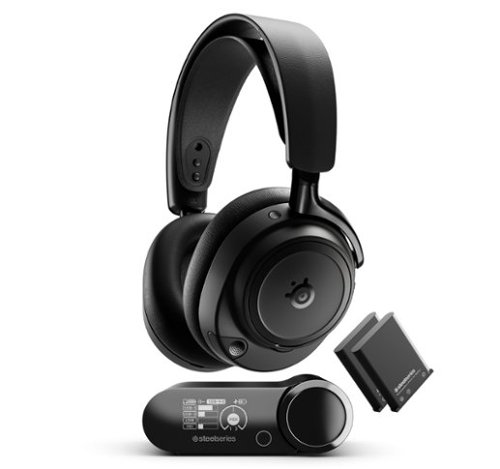
Meet the world~s first hi-res wireless certified gaming headset the SteelSeries Arctis Nova Elite. Outputting audiophile-quality 96kHz/24bit sound over 2.4GHz or Bluetooth, it's powered by 2-piece carbon fiber drivers. The new GameHub works with all systems, and can mix up to four sound sources simultaneously. Tune out external noise with best-in-class ANC and onboard AI noise rejection.
Customer Rating
5
Comfortable High Resolution Wireless Headset
on October 18, 2025
Posted by: TravisJ
This is probably if not the best wireless headphones I’ve used. That’s a bold claim but this is also the first High Res Wireless Audio certified headphones I’ve had the opportunity to use. That means higher clarity and definition in the sound output you’re getting in what you’re listening to.
These are very comfortable and well built. There’s a mix of plastic and metal where it counts. The metal frame helps with the rigidity and structure while the plush soft leather ear cuffs are soft and breathable and create a great seal. The buttons are tactile and the plastic has a soft premium feel. I love how the boom mic is seated inside of the housing of the left ear cuff so it can be easily stored out of the way and pulled out when ready to chat. It also has a LED that shows when it’s muted.
I’m not an audiophile so it’s a bit harder for me to describe the sound, but I thought playing Battlefield 2042 was a good medium for picking up a variety of sounds, how well I could hear footsteps and the direction in which gunfire was coming from. I was not let down. You can hear the explosions in the distance, the detailed sound of reloading your weapon and bullets whizzing by. I was able to go into the SteelSeries app and the Sonar function to select the preset for the game I was playing. There’s a very extensive list provided. The preset gives an enhanced sound profile specific to your game and highlights the sounds that might be important in the game your playing.
Aside from the highly customizable sound, you can also toggle noise canceling which adds an additional layer to immersion. The noise canceling, while not breaking any records, works very well and isolates the game from the surrounding sound. If you’re gaming and need to listen out for your surroundings, there’s an ambient sound option as well which I feel works really well.
To get noise canceling and ambient sound, you need microphones. There’s a boom mic that is easily pulled out from inside the housing, but if you want to take advantage of your ambient sound microphones used for noise canceling and ambient sound, those pick up voice too. You can also get a great bit of customization out of the microphone by using the SteelSeries app, selecting the profile that best compliments your voice.
Aside from the highly customizable sound, you can also toggle noise canceling which adds an additional layer to immersion. The noise canceling, while not breaking any records, works very well and isolates the game from the surrounding sound. If you’re gaming and need to listen out for your surroundings, there’s an ambient sound option as well which I feel works really well.
To get noise canceling and ambient sound, you need microphones. There’s a boom mic that is easily pulled out from inside the housing, but if you want to take advantage of your ambient sound microphones used for noise canceling and ambient sound, those pick up voice too. You can also get a great bit of customization out of the microphone by using the SteelSeries app, selecting the profile that best compliments your voice.
A few other things to note is connectivity. The wireless receiver has three different inputs as well as Bluetooth. You’re not going to get the studio quality sound from the Bluetooth connection, but if you’re like me and prefer to connect your phone for discord instead of using PC, it won’t matter too much. The base has several different display options as well as access to settings to adjust settings. You won’t get the full custom list of preset sounds, but you can change microphone gain, a few sound presets, as well as prioritizing Hi-res or range.
If I could caution on a few things. I was a bit challenged to get the USB 1 connection to pickup correctly on my PC. I’m not sure if this was a driver issue or PC issue, but ultimately, connecting the receiver using a USB-C to USB-C instead of the C to A that was provided did the trick. It also creates 4 different sound output options in control panel so knowing the one to use at first can be confusing. I think there could be some work done here to make it more intuitive on PC.
The receiver itself is lightweight and houses the spare battery for charging, but it’s not very laptop friendly. This isn’t a small dongle, but a receiver with a display, button, and multi use knob. If you’re going to use this headset on the go, be prepared to lug it around for the hi-res audio, or pair your Bluetooth to stay wireless. This is probably niche for most people, but worth calling out.
In summary, these sound really really really good and are very well made. Music comes through crisp and clear, while games get the special touch with custom presets, creating an immersive experience in whatever your playing.
The receiver itself is lightweight and houses the spare battery for charging, but it’s not very laptop friendly. This isn’t a small dongle, but a receiver with a display, button, and multi use knob. If you’re going to use this headset on the go, be prepared to lug it around for the hi-res audio, or pair your Bluetooth to stay wireless. This is probably niche for most people, but worth calling out.
In summary, these sound really really really good and are very well made. Music comes through crisp and clear, while games get the special touch with custom presets, creating an immersive experience in whatever your playing.
I would recommend this to a friend!
Share this review:


0points
0of 0voted this as helpful.
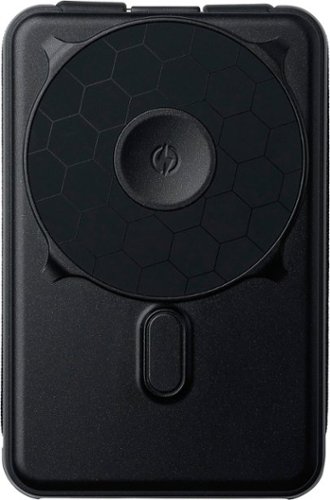
The Ridge Magnetic Power Bank bridges old and new, delivering 5-in-1 power solutions through integrated cables and magnetic attachment. No more tangled cords or compatibility issues. Just 10,000mAh of intelligent power that works with your latest MagSafe devices (like your iPhone and your Apple Watch) while maintaining backwards compatibility through built-in Lightning and USB-C connections. We've reimagined portable power through Ridge's lens of purposeful design. The result is a power bank that's as thoughtfully engineered as the devices it charges~because your everyday carry deserves better than basic.
Customer Rating

4
Versatile Power Bank, Very Strong Hold
on September 21, 2025
Posted by: TravisJ
Ridge has made a very solid power bank that has many features I think many will enjoy. Starting right off with the design, they’re very rugged looking. I wouldn’t be concerned throwing this in a pack with other items jostling around with it. Where the phone connects there’s a very soft rubber padding and it’s slightly raised from the rest of the pack. There’s a power button on bottom, along with an orange colored, USB C opening on the bottom for charging the battery, along with a very bright and easy to read capacity percentage readout, that includes percentages and a charging indicator. Embedded in the side and acting as part of the grip is a braided cable that has a really good feel and seems like it will be durable and lasting.
The standout features I think will attract most is how easy it is to pick up and start charging something and how strong the magsafe magnets are for my device, the iPhone 17 Pro Max. Holding the Ridge Power Bank with my phone connected, you have to shake it hard to get the phone to finally pop away. I’d say in a way, under normal use, you’re not going to get it to pop off unless it hits something and shears it away from the magnet. The kickstand puts the phone in a very good viewing angle for videos, whether you’re using it portrait or landscape. I did find it very rigid to open. I believe this was intentional so that it doesn’t accidently open or close, which is a feature in my opinion once you know you’re not going to break it.
When it comes to charging you have options. The two embedded cables charge up to 20 watts. The magsafe charging of course is compatible with magsafe devices, as well as charging your apple watch. This really has all your apple devices covered, whether you have an old pair of airpods that use lightning cable, or a newer iphone with USB type C, you can charge it.
I do have a few small complaints when it comes to charging. First, I wish the apple watch charger held on a bit better. I know most watch chargers don’t have a magnetic death grip, but just a light touch, and I find that my watch falls off. It’s better if you lay it flat on something as not to accidently knock it off the charger. My other gripe is you have to power it on when you want to charge Magsafe. Connecting with the cable starts the charging right away, but with magsafe, you have to attach your phone, then hit the power button to start charging. Finally, if you’re looking for the fastest charging magsafe or power bank, this isn’t it. While it isn’t bad by any means, it just doesn’t support the fastest possible speeds of the newer devices.
I like having Magsafe chargers I can keep charged and laying around so I don’t need to be tethered to the wall. I often throw them in my pocket or bag when I’m leaving the house so I can top off on the go. If versatility and staying attached is your biggest priority, I can say this is the strongest magsafe connection I have used, which includes very strong magsafe pop-sockets I’ve had on my phone.
I would recommend this to a friend!
Share this review:


0points
0of 0voted this as helpful.
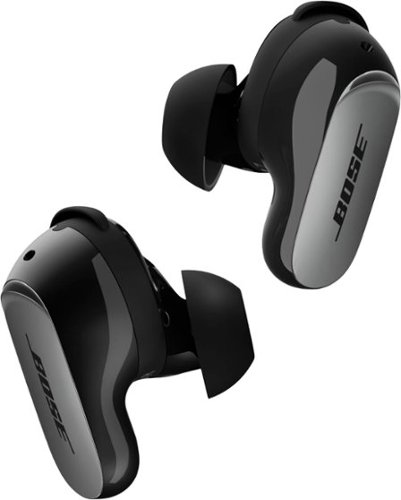
When music means everything, there~s QuietComfort Ultra Earbuds (2nd Gen). Because every listen deserves premium, personalized audio, the best Bose in-ear noise cancellation, and an entirely seamless earbud experience ~ so you can feel all the feels with each song you play.
Customer Rating
5
Awesome Bass, Sleek and Intuitive Design
on September 6, 2025
Posted by: TravisJ
I don’t think you can talk about top tier noise canceling earbuds without talking about Bose Quiet Comfort Ultra earbuds. Bose is a household name when you talk about speakers and for those who enjoy headphones. Noise canceling earbuds have been a competitive market for some time and I think Bose is a brand to consider.
I’ve been walking around with these for several days in my pocket as my every day carry earbuds. Whether it’s taking them out and jamming to music with active noise canceling when I need to focus for work or the aware mode when talking with my parents on the phone as I’m shopping for groceries, I have earbuds on me.
The case is small and fits nicely in the small pocket on the side of my jeans. The ear buds fit very snugly in the case and would likely take a hard jolt to get them to pop out. There’s actually a very specific way I have to grip them to get them out, which at first was frustrating, but now, I can easily remove them, and I can appreciate the snug fit. Aside from being USB type C for charging, the case itself can use wireless charging as well. Battery life was pretty good. I listened to music for hours without worrying about battery life.
The buds themselves fit very snugly in the ear and use both a silicone umbrella to hold itself in your ear, but there’s also a silicone piece that you can swap out that goes just in the outside of the ear to help hold it in place. I can’t wear any ear buds all day without some discomfort, but I can easily rock these for hours listening to music, podcasts, and just existing in the world with these wearables. Navigating play and pause, skipping songs, and adjusting volume is all done through the capacitive surface of the stem. It’s very responsive to a light touch without feeling like you have to push it into your ear and the controls are intuitive.
These sound fantastic. I’ll preface this with saying I’m not an audiophile, but I do appreciate great sounding earbuds. Bass is something that can be a bit difficult to come through well in earbuds just due to the size of the drivers, but I’m convinced companies have figured out how to move past limitations, Bose being no different. Bass sounds amazing, has depth and clarity, not muffled or distorted. Even listening to different surround sound demos, you can hear the details much like you would if you were sitting in a theatre. Active noise canceling just enhances that experience by isolating you from the outside world and removing noise and distraction for full immersion. Phone call audio is crystal clear as well, folks on the other end reported being able to hear me clearly.
The active noise canceling from these are great. When active, the surrounding sounds are muffled. In a room with the TV going with a sound bar and surround sound as well as people talking in the room, I hear almost nothing from the TV and the conversations are but muffled sound in the background, if I hear them at all. It’s only when you switch to “aware” mode that you realize how much sound it actually cancels out. The aware does a really good job of natural sound pass through. You kind of forget that you’re wearing earbuds, until you talk that is. I wish they were better at not making it sound like you have your fingers in your ears. They’re trying and it’s not quite that “talking in your head” bad, but I just wish it was better. I imagine improvements down the road can help because the noise canceling seems good enough they could feedback that natural sound. It’s by no means a deal breaker and I don’t find it nearly as annoying as some others I’ve tried that do much worse in this respect.
Bose has put together an intuitive and easy to use app. It has all of what you would expect. Customization of the touch controls, a very basic EQ, but also lots of control on how much noise canceling you can get, immersive audio which detects the position of your head compared to your device and gives you the illusion you’re walking around a room filled with your music. You can create your own custom level of noise canceling and set it as a mode. Multi point connection allows you to connect to two different devices and switch as needed. In the settings you can also check the ear fit using a fit test that plays a sound to test the seal, as well as instructions on how to swap out the ear tips or the fit bands that go around the buds.
There was a moment when I was using them that the noise canceling bugged out in one of the ear pieces and had a persistent static. I was able to put them back in the case to power cycle them then they’ve been fine since then. I’d love to have an EQ that has more range of adjustment. I tried a few different wireless chargers and you have to kind of kick it around on the pad to find when it’s lined up enough to charge. Most newer phones are moving to magnetic alignment with Qi 2 charging, it would just make it more convenient to have that in other wireless charging devices. None of these are by any means are deal breakers as the sound and quality far outweigh these suggested improvements.
The impressive bass and clarity of sound from these are easy to recommend. Sleek design and intuitive and easy to use controls and app make it an easy every day carry companion.
I would recommend this to a friend!
Share this review:


0points
0of 0voted this as helpful.
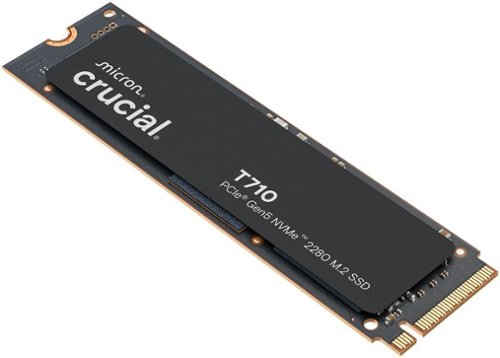
Make every microsecond count with the Crucial T710 Gen5 NVMe SSD. Built for serious gaming and professional creative applications, the T710 speeds up your experience with up to 14,900/13,800MB/s sequential and 2.2M/2.3M random reads/writes. The T710 is based on Micron G9 TLC NAND and features an optional integrated heatsink for unthrottled use. Its single-sided and low-power design makes it ideal for use on PCs and laptops.
Customer Rating
5
Super Fast SSD Memory for Gaming
on August 29, 2025
Posted by: TravisJ
It’s pretty wild how fast this SSD is. Just during the initial setup to get my games transferred to this new drive, I saw peaks of nearly 3 GB/s transfer speeds. Depending on the file size, it ranged between 0.8-2.5 GB/s, and to transfer 1.3TB of data, took just under 15 minutes.
One of the largest benefits you’ll see out of a super fast SSD such as this one is if you move large files around often such as a video or photo editor, or if you play games that have load times between matches or areas of the game. I was able to quickly copy a game file that was 126 GB in size in just a couple of minutes. I don’t really time loading screens in games I play, but I can tell you, I load into games very quickly. It’ll be night and day if you’re upgrading from an HDD, but SSDs are already very fast and while there will likely be a measurable difference between Gen4 and Gen5, my Gen4 SSD was already very fast in regards to gaming.
No SSD review goes without a crystal diskmark synthetic benchmark. Using a 2025 ASUS Strix Scar 16 with an Intel 275HX and NVIDIA 5080, I scored 11,896 MB/s Reads and 8,463 MB/s writes. This means in some scenarios, you could read nearly 12 GB/s. That’s crazy fast. 3Dmark also comes with a storage benchmark, so I ran it too. The T710 scored above average at 2,585 with the average coming in closer to 2,271. Do with that data what you will, but the screenshot shows bandwidth and average access times which may be closer to real world, but you can compare with other scores to see if the speed difference is worth it to you.
This SSD didn’t come with any type of heatsink or thermal padding. This makes it great for laptop installs or if you’re looking to put in an external NVME enclosure or if your motherboard comes with pre-installed heatsinks. There’s a limited 5 year warrant from Micron as well so you know they stand behind their product and it’s up there with other top SSD manufacturers.
One buying tip I would have is to make sure your device can support Gen5 PCIE for SSD. This is fairly new technology at the time of this review so you won’t get the full benefit without your motherboard supporting the interface. I have read that Gen5 PCIE is backwards compatible, but I was not able to test this. If true, it’d be useful if Crucial put it on the box as some folks may be looking to upgrade their motherboards at a later date and would want to know if this works now.
I would recommend this to a friend!




Share this review:


0points
0of 0voted this as helpful.
TravisJ's Review Comments
TravisJ has not submitted comments on any reviews.
TravisJ's Questions
TravisJ has not submitted any questions.
TravisJ's Answers
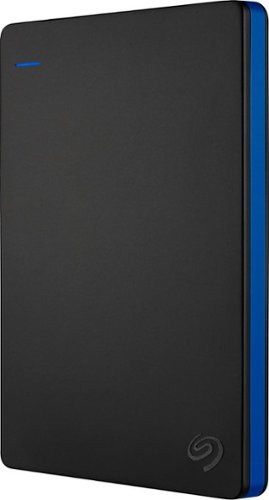
Store more than 50 PlayStation 4 game titles on this 2TB Seagate game drive. Its USB 3.0 port provides fast loading of full-size games so you can play smoothly, and its tough aluminum enclosure protects the drive from damage. This plug-and-play Seagate game drive is automatically recognized by any PS4, PS4 Slim or PS4 Pro console.
I've gotten quite tired of always uninstalling and reinstalling my games to make room and I was thinking about buying one of these. So, since all my games are hard copy, does that matter? For example, with this, will I be able to reinstall hard copy games
According to Sony’s website you can use from 250GB to 8TB in external storage to install games.
7 years, 6 months ago
by
TravisJ
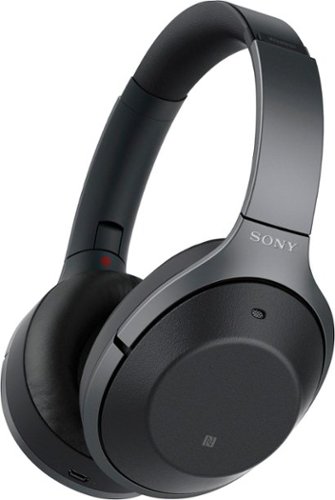
Listen to your playlist in peace with these Sony headphones. They have a 40mm dome driver to deliver the full depth of audio, and the noise cancelling feature minimizes outside disturbances for a better listening experience. These Sony headphones have a battery life of up to 30 hours for extended jam sessions.
Would you be able to use these headphones to workout at the gym? Is the clamping of the headphones to your ears tight enough so it doesn't slip out as i do certain lifts? Are replaceable ear pads available for this model that are more comfortable?
These will work fine at the gym. They come with 4 different sized wing tips and ear tips so that you can customize the fit to your ear. Since these are new, It's unlikely to have 3rd party ear tips or wings at the moment.
8 years, 7 months ago
by
TravisJ