


TravisJ's stats
- Review count179
- Helpfulness votes263
- First reviewNovember 6, 2016
- Last reviewJune 8, 2026
- Featured reviews0
- Average rating4.8
Reviews comments
- Review comment count0
- Helpfulness votes0
- First review commentNone
- Last review commentNone
- Featured review comments0
Questions
- Question count0
- Helpfulness votes0
- First questionNone
- Last questionNone
- Featured questions0
- Answer count2
- Helpfulness votes0
- First answerOctober 28, 2017
- Last answerNovember 20, 2018
- Featured answers0
- Best answers0

Experience the height of gaming innovation with the ROG Zephyrus G16. Featuring an all-new premium aluminum chassis with customizable lighting, this laptop merges style and durability. Its ultra-slim 0.59~ profile and lightweight 4.08lbs 16~ chassis redefines portability, but does not compromise on performance. Powered by Windows 11, the latest Intel Core Ultra 9 285H processor, and an NVIDIA GeForce RTX 5070 GPU, the Zephyrus G16 seamlessly aligns with your lifestyle, meeting all your gaming and creative demands. ROG Intelligent Cooling features liquid metal for reduced CPU temperatures and upgraded Arc Flow Fans for improved airflow to sustain peak performance on the Zephyrus G16 no matter the task. Immerse yourself in the OLED Nebula Display and enjoy rapid 0.2ms response times, vivid 2.5K resolution, and a smooth 240Hz refresh rate.
Customer Rating

5
All Around Great Gaming Machine
on July 4, 2025
Posted by: TravisJ
This is an all-around great laptop. Not just saying that as a lighthearted description for a normal laptop, I mean, most of everything about this laptop is GREAT.
First, I love the design. It’s a thin, aluminum chassis with a modern, almost gunmetal, design. The lid has a strip going diagonal, corner-to-corner that you can customize, but it is limited to just the one color. You can easily take this laptop into a meeting room or throw it on a coffee table at your local shop, and it creates just enough design noise to stand out but not enough to be distracting. The hinge is perfect with the right amount of resistance and the whole thing feels sturdy. It does have some heft to it, but I have no issues toting it around.
I/O is great. You have a thunderbolt four port which couples as a USB -C charging port for “normal” charging when not gaming. The left side also has a USB type A, headphone jack, HDMI and the charge port. For the right you get a second USB-C port (non-thunderbolt, sad face) and another USB type A. A full-size SD card reader is also on the right. I don’t think it would have been impossible to squeeze in a ethernet port, but it would have been one of those “expandable” ports, but honestly, the Wi-Fi 7 on this is so fast, you’re getting gigabit ethernet through the air, depending on if your router supports it.
I do not usually end up writing much about peripherals, but I have had a pretty great experience with nearly all the things. The camera is fairly decent in good lighting. I actually like the pictures it takes, and I can easily see this as a Teams conferencing laptop when the need calls for it. Low light does okay, it’s acceptable, but not nearly as good as using in a well lit room. I did not use any of the AI features for noise cancellation, so using it outside, I got some of the wind noise. But honestly, I thought the microphones picked up great, audio in my short video was very clear, and I can see anyone using this as a talking head vlog or just conference calling.
I would say this is one of the best sounding windows laptops I have used, ever. I understand that is a bold statement and it’s very subjective to the user, but I’m typically not impressed with laptop speakers because it seems like a choice not to have great sound with today’s technology. ASUS was like, “Alright, let’s do great sound.” You’re not going to get any groundbreaking bass or surround sound, but what you will get is clear, loud speakers, that have some depth and color. It’s not revolutionary, but to have a great sounding windows laptop, it’s so refreshing because you know it can be done if it’s engineered that way.
This is a thin mobile gaming laptop, it will be limited by thermal capability, but that doesn’t mean it isn’t a firecracker for it’s size. You’re getting the 285H which comes in just below a Ryzen 5900 desktop CPU on performance, but will turbo up to 5.4ghz using 45W of TDP maxing out at 115W. This CPU scores well in Speedometer 3.1 and 3Dmark. It’s not going to compete with the chunky desktop replacement laptops with beefy cooling, but I think for it’s size and portability, it falls in that sweet spot for a laptop you actually want to take with you.
When it comes to gaming, the 5070 is putting in some work, even on battery, in some games. I mostly gamed with New World Aeternum, Battlefield 2042, Stray and Tribes Ascend. Using Armory Crate software, I put the laptop into performance mode, and had no issues playing battle field or new world at native resolution. Most of the game settings are set at high, and although the fans are audibly putting in some work, you get a great gaming experience. I wanted to test what gaming was like on battery so I fired up each game listed. New World and Battle Field struggled on battery and I wouldn’t really recommend it. Lower demanding games such as tribes didn’t suffer too much. I’d say even a more casual game would be perfectly fine on battery, even Stray didn’t do too bad, but the full power experience is great. I’m letting Nvidia GeForce app take the wheel with optimizing game settings and everything on this smooth OLED screen just blows me away. In a game like New World Aeternum, where you have a wide open world with all kinds of colors, it’s easy to get immersed in the experience.
Battery life on windows is getting better. A beautiful screen such as the 3k OLED on this laptop, you would think would drain the battery after only a few hours, but I get plenty of time when doing productivity tasks or watching a video, say 4 or 5 hours. Gaming is a bit of a different story, looking at only maybe an hour at best on battery, but I tested more demanding games, you’re milage may vary. I wouldn’t be hesitant to leave the house with nothing but a charging brick.
The display is Amazing. Not sure how else to describe it other than the 3K OLED looks fantastic. OLED gives you those perfect black pixels providing amazing contrast that makes colors pop in videos. It’s a display that you’ll love to consume content or game on. I find that OLED just ends up being more immersive and keeps you focused on the content. The 240hz refresh rate keeps games silky smooth, even at lower resolutions, being a fluid experience makes up for it
Some random thoughts. I don’t mind typing on the keyboard. For me it isn’t anything special, but works well. I love the full RGB control and the RGB lighting is plenty bright, with customization options. The trackpad has a nice feel to it and it’s large, while I prefer a mouse, I don’t think anyone will mind it too much.
The area around the exhaust of the laptop gets very warm. I mainly game on a perforated cooling pad (powered off) just for the airflow and I could feel the exhaust blowing down onto my legs as I’m gaming. I’d say a more solid surface would solve this problem such as a table or book, but nevertheless, it does get warm just below the screen. Armory crate is still just “meh”. If they could streamline the UI and cut down on the design noise, I think it could be better. I just find it a bit busy.
I would have liked replaceable RAM. I know there are benefits to soldering ram to get thinner design and faster ram speeds, but I just like as many replaceable parts as possible. WiFi 7 is amazing. It’s fast, it has low latency. I game almost exclusively on WiFi and a big part of the experience is the fast speeds and low latency of WiFi 7, having dedicated 6ghz spectrum to work off of.
I’d say if I could summarize who this laptop is for, it’s for gamers, casual or more dedicated, who value the productivity side of things, while also enjoying a very sleek design and portability. You don’t need the most frames in a game to have fun, but you appreciate a beautiful display and smooth refresh rate.
I would recommend this to a friend!





Share this review:


+3points
3of 3voted this as helpful.
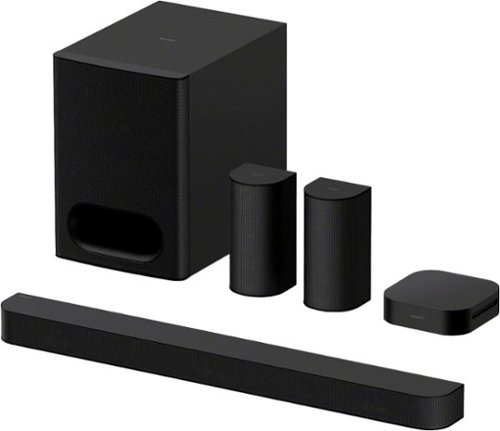
Turn up the energy with BRAVIA Theater System 6 all-in-one 5.1ch system. Featuring 10 total speakers, including a subwoofer and rear speakers, and with support for Dolby Atmos and DTS:X, movies will explode with powerful, immersive surround sound. Ready to entertain? Energize your next party with room-filling multi-stereo sound.
Customer Rating
5
Deep Bass and Clear Sound
on June 10, 2025
Posted by: TravisJ
While TV speakers are getting good, nothing really compares to what a surround sound system will do for your listening experience. Sony delivers a fantastic surround sound experience that is easy to setup and enhances your entertainment system.
Pros:
- Sound on this theatre system is clean and loud. Voices sound great through the center channel and dialog in movies and videos come in clear while still getting all the detail from the action sequences. You get all the details of sound in a chaotic action sequence while still getting clear dialog.
- The sub has very good bass. I enjoy turning it up for music, but I need to turn the level back down to 1 or 2 for movies just to balance it out with the sound.
- The Bravia app allows you to go in and adjust sound settings, volume, and sound profiles. Right on the main screen you can adjust the volume of the speakers as well as how much bass the subwoofer is putting out. The sound profiles allows you to quickly switch between different sound settings. On by default is sound field. If you go to the settings you can adjust how this performs, but from what I can tell it uses Upmixer of Dolby or DTS depending on what kind of content is detected. You have the option to switch to only Dolby or only DTS virtual.
Also within the app you can control how the device works with eARC, Bluetooth, system settings, and even powering off and on. It’s also worth noting you’ll need the app to finish the setup process, including testing the speakers, and setting up their location and distance from the listening area.
- Setup was simple and straight forward. While the rear speakers aren’t quite wireless, you get plenty of cable and they clip right into the receiver which does communicate wirelessly to the subwoofer. This gives quite a bit of flexibility regardless of being wired with the receiver being wireless.
- Setup was simple and straight forward. While the rear speakers aren’t quite wireless, you get plenty of cable and they clip right into the receiver which does communicate wirelessly to the subwoofer. This gives quite a bit of flexibility regardless of being wired with the receiver being wireless.
The subwoofer seems to be where the brains are seeing as how it’s where the HDMI and sound bar plug into. Once connected to the eARC plug on your TV, soundbar connected, and then the sub plugged in, you can fire up the app and follow the steps to get everything connected. Once through the setup process, the remote or app to control all things sound on the subwoofer, or if you’re just a one remote person, the tv remote would control the sound just as well, but you lose some of the customization provided with the app or remote.
Cons
- It really depends on your setup but if you have a wall mounted TV, running the HDMI cable from the subwoofer, ideally located on the floor, up to the TV, may require a longer cable and might not be necessarily the cleanest look unless you can hide the wires.
The same is true for the rear speakers. While you probably have a place in mind for the speakers, finding a place for the wireless receiver could be a problem, depending on how far apart your speakers are. There’s plenty of included speaker cable, so you’re likely to put the receiver where one of your speakers are, but now you have a cable to either hide or blend.
The same is true for the rear speakers. While you probably have a place in mind for the speakers, finding a place for the wireless receiver could be a problem, depending on how far apart your speakers are. There’s plenty of included speaker cable, so you’re likely to put the receiver where one of your speakers are, but now you have a cable to either hide or blend.
Final Thoughts
- I find that this is a great sounding surround system. While it has plenty of sound features and supports upmixing and dolby and DTS standards, you don’t get some of the more advance features that are out there such as room analysis to adjust sound and deeper integration with the TV speakers, or fully wireless connectivity (aside from power cables). If you’re looking for a plug and play surround sound system, with an easy setup process, and a great sound, you’ll be very happy with this theater system.
I would recommend this to a friend!
Share this review:


0points
0of 0voted this as helpful.

Use the new Surface Pro 12~, a Copilot+ PC, as a powerful tablet with an intuitive touchscreen, touch, voice, and Surface Slim Pen [3] to bring ideas to life, or attach the Surface Pro 12~ Keyboard for a full Windows laptop experience [3]. With built~in AI features, seamless integration across the Windows ecosystem, and an ultra~thin, lightweight design, Surface Pro gives you the freedom and versatility designed for creativity, efficiency and mobility to go beyond what you thought possible.
Customer Rating
5
Fast, Productive, Stylish and Smart
on June 7, 2025
Posted by: TravisJ
The surface pro is the perfect machine for productivity on the go. The keyboard and pen are excellent accessories for typing, navigating, and taking hand written notes. There’s great integration with office tools if hand writing is your preference.
Pros:
- The snapdragon x-plus that is at the center of performance makes for a snappy user experience. This ARM based processor is fast and power efficient. It’s design allows for a tablet style windows machine that is fanless while still having great performance. A fairly common benchmark, speedometer 3.1, netted a 30.3 score unplugged on performance mode, which I felt was impressive. I’ve been a fan of winodws on ARM with the Snapdragon processors. I think this is a good path forward for Microsoft and I’m here for it.
- The snapdragon x-plus that is at the center of performance makes for a snappy user experience. This ARM based processor is fast and power efficient. It’s design allows for a tablet style windows machine that is fanless while still having great performance. A fairly common benchmark, speedometer 3.1, netted a 30.3 score unplugged on performance mode, which I felt was impressive. I’ve been a fan of winodws on ARM with the Snapdragon processors. I think this is a good path forward for Microsoft and I’m here for it.
- The design is ultra portable. The keyboard and trackpad magnetically snap to the bottom of the surface pro, and holds strong, and when folded up, acts as a cover for the screen. There’s a spot for the pen on the back which also charges the pen, also attaching magnetically. I love the blue metallic design. The tablet itself feels rock solid. There’s a power button and volume rocker on the top with 2 USB type C ports on the side. There’s a hinge that folds out acting like a kickstand of sorts, but folds nearly 180 degrees for a wide range of use, making it exceptionally useful when using the pen to take notes or draw. I also really like the feel of the keyboard and trackpad. The keys have a smooth soft touch feel to them and the bottom has a soft felt like texture so you don’t feel like you’ll scratch the table when laying it down.
- Co-Pilot is something I’ve been sleeping on. If you’re like me and not quite sure how co-pilot can fit into your routine, there’s a few YouTube videos that I found useful. A few take aways was the ability to summarize videos and articles you’re looking up. For example, if you’re looking to buy a new set of pots and you’re watching review videos, you can have Co-Pilot to summarize the video, so you can quickly read the details. I’ve also used Copilot to find deals on the internet for items I’m shopping for which was very useful. I know after using on this device, I’m going to look for more ways to work this in to my routine.
- The pen and keyboard attachment is what brings this tablet full circle. While there is plenty of utility using the touch screen, I feel like windows is best used with mouse and keyboard input. The keyboard is easy to type on, is large enough that my fingers don’t feel cramped and the trackpad feels and works well enough and has good proportions in relation to the rest of the device. Being backlit is helpful for seeing the keys in a dim lit room. The pen writes well and I’ve used it to take some hand written notes and it does well with pressure sensitivity. I’m terrible at sketching or drawing, but I played around in paint and it was fun seeing how the different pressures change the draw lines.
- Battery Life has been great. I’ve been using it on max brightness and best performance all morning, mostly in office aps and browsing the internet, and I’m down to 65%.
- Windows Hello with Face Recognition. Every modern windows device that can have this should have this.
- The speakers are surprisingly loud. They sound good to be coming from a small device. I wouldn’t use this as my main music device, but I wouldn’t mind if it was what was handy.
Cons
- I don’t think windows is quite ready for the tablet form factor. While there was a lot of functionality with web browsing and navigating by touch, the icons could be a bit bigger in some of the menus. I had a difficult time navigating through menus and settings the way I normally would with a mouse and keyboard.
- I don’t think windows is quite ready for the tablet form factor. While there was a lot of functionality with web browsing and navigating by touch, the icons could be a bit bigger in some of the menus. I had a difficult time navigating through menus and settings the way I normally would with a mouse and keyboard.
- Screen brightness could be a bit brighter. In a dim room it does great, but outdoors there’s a bit to be desired. I noticed this in HDR content as well as it didn’t quite have the contrast you get with a brighter screen.
Other thoughts
- ARM on windows is making a comeback thanks to the snapdragon processor. While I haven’t ran into any compatibility issues or bugs, other applications could, so be aware of that.
-
The kickstand works well but Microsoft might consider making it slightly more rounded so it doesn’t feel as harsh on the lap or hand.
- ARM on windows is making a comeback thanks to the snapdragon processor. While I haven’t ran into any compatibility issues or bugs, other applications could, so be aware of that.
-
The kickstand works well but Microsoft might consider making it slightly more rounded so it doesn’t feel as harsh on the lap or hand.
- I felt the cameras and ports were ok. I did like how bright the front camera made me in a dim room, since this will likely be the one most will use for video calls.
I’ve been throwing this device in my backpack and taking it to work with me. It’s been great for catching up on news, checking personal emails, and updating my budget in excel. At home, I spend way too much time on YouTube. I found that if I’m in the middle of a video but need to attend to something in a different room, I will take this with me, where my other laptops, get closed and put away, for the video to be resumed later.
I think anyone looking for a premium design, ultra portability with great battery life, full size keyboard with a responsive touch screen, they’ll love the Surface Pro. If you travel or bounce conference room to conference room but still need a powerful laptop for work, this is easy to recommend.
I would recommend this to a friend!
Share this review:


0points
0of 0voted this as helpful.
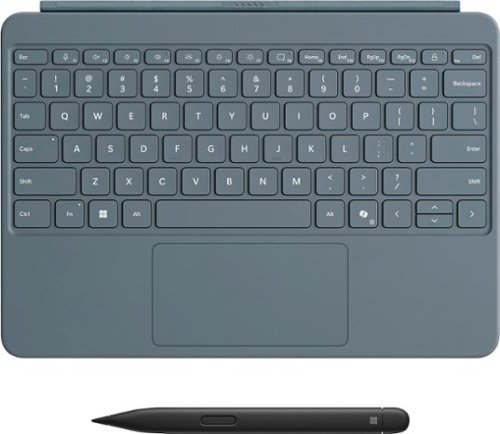
Level up your productivity in a click by easily attaching Surface Pro 12" Keyboard to Surface Pro 12" [1], transforming it into a powerful laptop. Designed by Microsoft, it features a stable and durable design, full size backlit keyboard, a dedicated Copilot key for instant AI access, and dynamic hinge that unlocks new postures. Perfect for your on-the-go lifestyle.
Customer Rating
5
Must Have Accessory for the Surface Pro
on June 7, 2025
Posted by: TravisJ
The pen and keyboard attachment is what brings the Surface Pro tablet full circle.
The keyboard has a very nice soft touch feel to it that does let my wrists get sweaty and it is pleasant to the touch. The keyboard doesn’t feel cramped and I found the typing experience to be good enough for this type of form factor. Someone with larger hands may feel a bit cramped.
The trackpad worked well and was responsive. Whether you’re a touch to click or like the physical press, both were very responsive. The feel of the trackpad is smooth and easy to use. Multi touch gestures for zooming and navigating is always nice to see and worked pleasantly.
A few other nice touches were the now what seems to be standard copilot key. If you get a lot of use out of copilot, it’s nice being able to quickly tap the key to start a search, summarize a task, or help you through your day. The keyboard is backlit so using it in a dim lit room makes finding the keys very easy. It also connect magnetically to the bottom of the Surface Pro. The magnets are very strong. You can pick up the tablet and they keyboard just dangles. I wouldn’t worry too much about getting up and walking around with it hanging off. You’d really have to bang it against something for it to fall off.
The slim pen designed for the surface pro, magnetically attaches to the back of the surface, which also conveniently charges the pen. I’m not one for taking hand written notes as much but I could easily see myself doing so with the slim pen. I fired up one note and doodled around with note taking and drawing. I like that the pen is force sensitive, you can double click the “eraser” to launch the note taking app of your preference (one note by default) and when your done, it doesn’t get lost by letting the magnets snap it to the back of the surface pro.
I would say for the pen the only recommendation I would have is the write to text is very sensitive to exactly as you write it. I think Microsoft can adjust the software to assume proper capitalization and spelling, and if that isn’t your preference, have the option to turn it off.
While the surface pro exists as a stand alone device, I don’t think windows is quite ready to live without the keyboard and trackpad. I highly recommend this as a companion to your surface pro.
I would recommend this to a friend!
Share this review:


0points
0of 0voted this as helpful.

Block out distractions or stay connected with WF-C710N earbuds. Dual mics boost noise Cancelling for crystal-clear, uninterrupted sound. Switch to Ambient Sound Mode and hear the world around you. These earbuds are lightweight, comfortable, and packed with premium audio, designed for everyday adventures.
Customer Rating
5
Amazing Sound, Noise Canceling, and Bass
on April 18, 2025
Posted by: TravisJ
Sony has been one of the top producers of noise canceling earphones and earbuds for several years now, pushing the envelope on what is possible. I’m very impressed with the noise canceling capabilities of these earbuds and the quality of sound is the best I’ve ever heard in earbuds.
Design
The pill box charging case that these come is small and light weight. Easily fits in a pocket or backpack zipper. It has a matt feel which provides a bit of grip, so it doesn’t feel like a bar of soap ready to slip from your hands any moment. The lid opens easily, and the earbuds are magnetically held in place.
The earbuds themselves fit very nicely in the ear, slightly sliding into the ear canal, which helps old it in place. The body of the earbuds fit nicely in the ear, comfortable to wear for hours. There are capacitive areas on each of the earbuds for controlling volume, play, pause, forward, back, hang up, answer and noise canceling. It’ll take some getting used to what all functions do what, while each earbud share some functions, they also have unique functions. For example, the left is for volume down, the right for volume up. The right controls pause and play while the left controls noise canceling mode (ambient or on).
I think the white looks good and looks good in the ear. It’s very obvious you’re wearing them, but they don’t stick out too far and have a very clean design language not needing buttons with the capacitive area. The capacitive area for me has been a learning curve as well. The area you interact with angles slightly down either due to the desing or the shape of my ear. Either way, it’s just a bit un-natural for me and has taken a bit to get used to.
The pill box charging case that these come is small and light weight. Easily fits in a pocket or backpack zipper. It has a matt feel which provides a bit of grip, so it doesn’t feel like a bar of soap ready to slip from your hands any moment. The lid opens easily, and the earbuds are magnetically held in place.
The earbuds themselves fit very nicely in the ear, slightly sliding into the ear canal, which helps old it in place. The body of the earbuds fit nicely in the ear, comfortable to wear for hours. There are capacitive areas on each of the earbuds for controlling volume, play, pause, forward, back, hang up, answer and noise canceling. It’ll take some getting used to what all functions do what, while each earbud share some functions, they also have unique functions. For example, the left is for volume down, the right for volume up. The right controls pause and play while the left controls noise canceling mode (ambient or on).
I think the white looks good and looks good in the ear. It’s very obvious you’re wearing them, but they don’t stick out too far and have a very clean design language not needing buttons with the capacitive area. The capacitive area for me has been a learning curve as well. The area you interact with angles slightly down either due to the desing or the shape of my ear. Either way, it’s just a bit un-natural for me and has taken a bit to get used to.
Sound
Sony makes great sounding products. They’ve been doing it a long time and have only gotten better over the years. I’m very surprised at how much bass they’ve managed to get into these. I’m sure there’s some sort of engineering trickery that’s making it work but I don’t care, they sound fantastic. On top of having a wide sound stage and great bass, they also have an app that allows you to create custom sound profiles using an equalizer. It is astonishing to me how many companies make sound products but don’t provide an EQ to allow for individuals to adjust to their preference. While Sony doesn’t provide a full EQ, they do give you 5 points of adjustment and a bass slider along with several presets.
Well, if you thought the focus was all about the sound, well they spent some time on the noise canceling too. The WH1000XM series, also from Sony, set the bar for the industry on noise canceling and it just took off from there. My first day using these, on at least 3 occasions, I had someone step into my office, completely unnoticed while I was working, and even spoke to me, and I never heard them. This is exactly what I want when I’m looking for 100% noise canceling. As I’m sitting outside, typing this review, listening to music, there’s a steady wind coming in from my left. The occasional gust might pick up some static but it’s easily drowning out the noise from the new house they’re building up the road, cars coming down the street. It’s not perfect however, as I could hear the church bells next to my neighborhood. My guess is they’re faint enough the microphones aren’t picking them up and I can still hear through the earbuds.
Sony makes great sounding products. They’ve been doing it a long time and have only gotten better over the years. I’m very surprised at how much bass they’ve managed to get into these. I’m sure there’s some sort of engineering trickery that’s making it work but I don’t care, they sound fantastic. On top of having a wide sound stage and great bass, they also have an app that allows you to create custom sound profiles using an equalizer. It is astonishing to me how many companies make sound products but don’t provide an EQ to allow for individuals to adjust to their preference. While Sony doesn’t provide a full EQ, they do give you 5 points of adjustment and a bass slider along with several presets.
Well, if you thought the focus was all about the sound, well they spent some time on the noise canceling too. The WH1000XM series, also from Sony, set the bar for the industry on noise canceling and it just took off from there. My first day using these, on at least 3 occasions, I had someone step into my office, completely unnoticed while I was working, and even spoke to me, and I never heard them. This is exactly what I want when I’m looking for 100% noise canceling. As I’m sitting outside, typing this review, listening to music, there’s a steady wind coming in from my left. The occasional gust might pick up some static but it’s easily drowning out the noise from the new house they’re building up the road, cars coming down the street. It’s not perfect however, as I could hear the church bells next to my neighborhood. My guess is they’re faint enough the microphones aren’t picking them up and I can still hear through the earbuds.
Sound Connect App
A lot of your settings and features will be done through the sound connect app. Along with controlling the headphones, you can adjust the active noise canceling. There is a slider that you can move to reach your preferred amount of noise canceling so if you still want to have some awareness but make it less distracting, you have the ability to find that balance for your environment. If you have an active day and have different preferences based on where you’re at or the amount of noise, there’s adaptive sound control. You can adjust for when you’re sitting, walking, running or in a vehicle on how much noise canceling you want. You can also register locations for noise canceling or adaptive sound. If you prefer noise canceling at home but ambient sound at the office, you can set locations and they will adjust accordingly.
Other features that are nice is sound quality versus sound connection prioritization. The ability to connect to multiple devices and switch based on which one is playing music or sound. It was a little clunky when both were playing at the same time but if I paused one and immediately played the other, it was seamless. You’re not locked into what the capacitive buttons do, those can be changed in the app as well.
A lot of your settings and features will be done through the sound connect app. Along with controlling the headphones, you can adjust the active noise canceling. There is a slider that you can move to reach your preferred amount of noise canceling so if you still want to have some awareness but make it less distracting, you have the ability to find that balance for your environment. If you have an active day and have different preferences based on where you’re at or the amount of noise, there’s adaptive sound control. You can adjust for when you’re sitting, walking, running or in a vehicle on how much noise canceling you want. You can also register locations for noise canceling or adaptive sound. If you prefer noise canceling at home but ambient sound at the office, you can set locations and they will adjust accordingly.
Other features that are nice is sound quality versus sound connection prioritization. The ability to connect to multiple devices and switch based on which one is playing music or sound. It was a little clunky when both were playing at the same time but if I paused one and immediately played the other, it was seamless. You’re not locked into what the capacitive buttons do, those can be changed in the app as well.
Other Thoughts
Some additional positives and negatives. You get a few different sized ear tips in the box along with a charge cable. Battery life has been great. I’ve been using on and off for a few days and I’ve only charged once. I don’t have a run time, but they advertise 30 hours of run time between the headphones and the case and I’m not doubting that. There’s a quick access feature that can launch your music app just by using a tapping gesture, but this appears to be limited to Spotify and amazon music, neither of which I use. The lid and hinge on the case doesn’t seem like it’ll be very durable as it’s all plastic design seems like a drop too hard, and you’ll be left with a crack. I hope I’m wrong here, but it remains to be seen. I also find if you have noise canceling set to still and ambient set to walking, the tone that’s played shifting between the two can be distracting when listening to music or talking on the phone. If there’s a way to turn it off, I haven’t found it yet or it isn’t obvious.
If I had one gripe, it’s they could improve how my voice sounds in my own head when I’m talking with someone with these in. While it does great at passing through natural sounds in the environment, I feel like I’m talking underwater and way too loudly when I’m talking with someone. If they could recreate how your voice sounds naturally talking without headphones in, these would be flawless. If I could take off a half star, I would, but I feel like everything else it does is so great, I can’t give it 4 stars for this alone.
Some additional positives and negatives. You get a few different sized ear tips in the box along with a charge cable. Battery life has been great. I’ve been using on and off for a few days and I’ve only charged once. I don’t have a run time, but they advertise 30 hours of run time between the headphones and the case and I’m not doubting that. There’s a quick access feature that can launch your music app just by using a tapping gesture, but this appears to be limited to Spotify and amazon music, neither of which I use. The lid and hinge on the case doesn’t seem like it’ll be very durable as it’s all plastic design seems like a drop too hard, and you’ll be left with a crack. I hope I’m wrong here, but it remains to be seen. I also find if you have noise canceling set to still and ambient set to walking, the tone that’s played shifting between the two can be distracting when listening to music or talking on the phone. If there’s a way to turn it off, I haven’t found it yet or it isn’t obvious.
If I had one gripe, it’s they could improve how my voice sounds in my own head when I’m talking with someone with these in. While it does great at passing through natural sounds in the environment, I feel like I’m talking underwater and way too loudly when I’m talking with someone. If they could recreate how your voice sounds naturally talking without headphones in, these would be flawless. If I could take off a half star, I would, but I feel like everything else it does is so great, I can’t give it 4 stars for this alone.
These are fantastic and easily recommended to anyone looking for noise canceling earbuds. Earbuds reviews are always subjective but for me these look great, feel great, sound fantastic. They’re easy to use and carry around. Easy to recommend.
I would recommend this to a friend!
Share this review:


+1point
1of 1voted this as helpful.
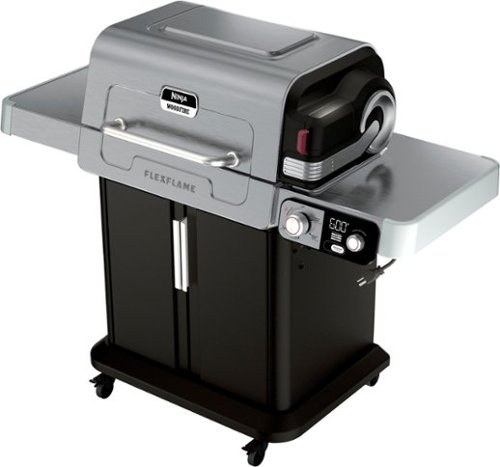
Meet the Ninja FlexFlame Outdoor Cooking System, the all-in-one revolutionary appliance that allows you to cook 5 unique ways with zero compromises - grill, smoke, roast, griddle, and make perfect pizzas all in one outdoor system. Plus - with CyclonicHeat-iQ rapid convection heat, propane flames, and authentic smoky flavors combine to give you faster cooking and more versatility.
Customer Rating
5
Versatile and Modern Gas Grill
on April 17, 2025
Posted by: TravisJ
The Ninja Flex flame is a mix between gas grill, convection oven, and smoker kind of all in one. You get all the great features of having a gas grill but you’re also introduced to the precision of a digital dial that adjusts your flame to the perfect setting for what you’re cooking, all of which is capable of infusing smoky flavor.
--Performance
I’m impressed. The convection fan that circulates the air evenly inside helps the grill get up to temperature very quickly and also provides a more even cooking while still delivering everything you love about a gas grill. For something like burgers, I would set the grill to the hottest setting of 600 degrees and allow the grates to get hot to get the best grill marks. Then I would bring temperature down to 400, allow even cooking of these 1/2 inch burgers which came out perfectly cooked and were delicious.
Next I wanted to give the smoker a try so we went with some pork ribs that I wanted to smoke at a lower temperature but also not take all afternoon to cook and eat. We did a dry rub and placed the ribs directly on the grate. Pellets were easy to load and only took a few minutes to begin smoking. I did notice mine caught fire, but I simply blew out the flames and the smoke was rolling. I’m not sure how often that happens as this is my first experience with smoke pellets, but it didn’t affect the smoke flavor.
I used a thermometer to monitor the temperature and basted with some bold and spicy barbecue sauce about 10 mintues before reaching temperature, getting a nice sticky glaze on the outside. The convection fan I believe maximizes the heat and smoke being generated and really infuses the smoke flavor while evenly cooking the meat on all sides.
--Features
The digital dial is useful to get the temperature setting you want and to know when your grill is ready for whatever your throwing at it. I was a bit apprehensive about having to plug in my grill, but honestly, the time I save with the convection fan, and likely the gas too, It’ll likely pay for the dedicated outdoor extension cable I purchased for it in the long run. What is also great is each setting utilizes a different set of burners, depending on the setting. While the higher temperature setting may use all three; front, middle, and rear burners, other settings may only require one.
As mentioned, the smoke box located on the side has a nice spring-loaded lid that you can pour pellets in. The pellet cage is removable so you can empty ashes. Another removable item is the drip tray, which you can buy disposable foil traps that will make clean-up much easier. You can always make a liner out of foil, but I always recommend a few layers in case you have holes.
You can also accessorize by visiting Ninja’s website where you can get an extended roasting rack, pizza stone, or a full size or half griddle that replaces the grates for flat top cooking of pancakes, smash burgers, or my favorite, a good potato hash.
It was also nice to see full swivel casters with front locking wheels. Not only does it make this grill easy to move in and out of my garage which is where I choose to store mine, it’s also nice knowing it won’t roll away with the wheels locked.
--Assembly
I’m incredibly impressed with assembly. Ninja has partnered with BILT, which is an app that provides 3D models of each step, reading the steps out loud, and easily replay, move forward, and back steps. Paired with the BILT app, was very clearly labeled parts, very well packed screws. The screws came in one of those screw strips, but instead of having one pouch with 30 of the same screw, each step had “pouch of screws” and you literally worked your way down the strip as you went through each step. It was one of the easiest and stress free assemblies I have ever done. Be sure to fully unpack the box, including the few boxes inside the lid, and underneath the cook box, but everything was there and precisely labeled.
While I’m sure this type of packaging comes at an additional cost to the consumer, in my opinion, it is well worth it. I think Ninja should advertise how easily this grill assembles. To be honest, the hardest part of assembly, was getting my wife to help me lift the main box onto the frame, and removing the stickers! Seriously, some of the stickers where kind of a pain when compared to assembly.
--Final Thoughts
I think it’s worth mentioning that Ninja offers a 10 year limited warranty. Which means they believe in the durability of this product. Everything seems very well made and high quality. I have a feeling while people may be apprehensive at first with the electric outlet, once they try it, hear about it, see it, they’ll be believers that this is the modern outdoor grill that makes delicious food.
I think it’s worth mentioning that Ninja offers a 10 year limited warranty. Which means they believe in the durability of this product. Everything seems very well made and high quality. I have a feeling while people may be apprehensive at first with the electric outlet, once they try it, hear about it, see it, they’ll be believers that this is the modern outdoor grill that makes delicious food.
I would recommend this to a friend!
Share this review:


+1point
1of 1voted this as helpful.

The GO Charge Wireless Bluetooth Mouse is small, comfortable in your hand, and dare we say~kind of cute? Your everything go-to, it goes with you from desk to caf~ to coworking space and beyond. We see you digital nomads. Three saved device connections means you can seamlessly switch connections as easily as you switch filters.
Customer Rating
5
Great Portable and Flexible Multi Device Mouse
on April 6, 2025
Posted by: TravisJ
I think JLAB has a good mouse here. I can’t argue with the flexibility of being able to connect a mouse to multiple devices. Most people have personal laptops, work laptops, and maybe even a tablet. Having the additional convenience of only needing to tote around one mouse makes life more portable.
The mouse itself is small but has good ergonomics. I can tell you it won’t be for everyone. My hands are a bit larger and while I don’t find it difficult to use, using it more as a travel mouse, my wife finds that it felt just right in her hands, which I presume will be for most people. There’s contouring on the sides which I find the fingers just comfortably fall into and the two side buttons are easily to reach and use. I find all the buttons have a nice click feel to them. They’re the perfect in between of being able to rest your fingers without clicking but easy to click.
Connectivity is intuitive and straight forward. You have a USB type A dongle that nestles in the bottom of the mouse. Every mouse with a dongle should do this so it’s nice to see JLAB has thought of this – you’d be surprised how often you don’t see this. You can also connect two different Bluetooth devices by simply using a single button on the bottom. Pressing it switches between the three different connection types and holding it while on Bluetooth will begin pairing. If you don’t want to use Bluetooth, you can plug in the included dongle and get a steady 2.4ghz connection as well if that’s your preference.
This works well with both PC and Mac. The DPI button on top will cycle through 3 different speeds from what I can tell. The one thing I wasn’t super impressed with was using it for gaming. There was a noticeable lag in the game I was using it with. If you’re not doing anything competitive where reaction time is a factor, I wouldn’t be too concerned about this, but if you’re trying to react faster than the other guy for the win, I wouldn’t rely too heavily on the dongle. Bluetooth I thought was a bit better in regards to latency to be honest but I doubt most people would buy this for gaming.
Even with it feeling a bit small in my hand and not suitable for gaming, this will be the mouse that travels with me. It charges USB C which means less charging cables and no batteries to fumble with, flexibility with multiple device connection, and the small footprint means it’ll throw easily in a go bag or laptop sleeve pocket.
I would recommend this to a friend!
Share this review:


0points
0of 0voted this as helpful.
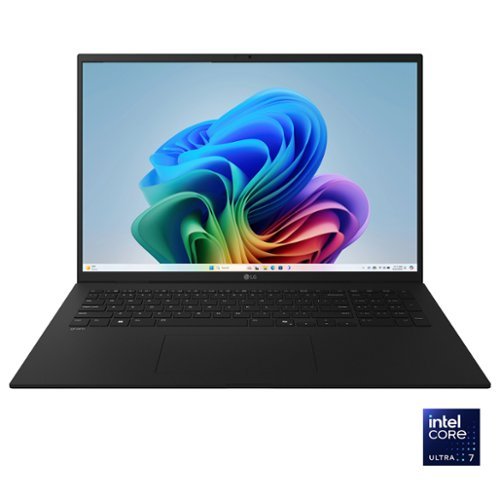
The Power of AI in an Ultra-Light Laptop. Achieve new levels of productivity with the LG gram, designed for those who demand both power and portability. Weighing just 3.2 lbs. and measuring a mere 0.7 inches thin, this ultra-light laptop is built for effortless mobility without compromise. The 17~ anti-glare touch display provides ample screen space for multitasking, delivering stunning visuals whether you're managing multiple projects or streaming your favorite content. At gram~s core, the Intel~ Evo Edition Intel Core Ultra 7 processor (Series 2) ensures seamless performance for AI-driven tasks and demanding workloads.
Customer Rating

4
Lightweight Touchscreen PC with Great Battery Life
on March 11, 2025
Posted by: TravisJ
When you think 17” laptop, you’re not typically thinking “lightweight and portable”, but the LG Gram re-defines 17” portability. While it is still a 17” laptop and that takes up a certain amount of space no matter how much you trim down the weight, when you throw this in a backpack, the weight feels more like a 14” laptop. Another part of the appeal is how little fatigue you get from having it sit in your lap for hours at a time.
--Performance
Now you might be thinking, what might you be doing with a thin and light laptop in your lap for hours at a time? Well, gaming actually, if you wanted to. Now when I ran 3Dmark, I wasn’t really impressed with the gaming score. But when you put it in practice, it holds up well to casual gaming. My two favorite games to put against any GPU, dedicated or integrated, is New World, which I consider to be a bit demanding, but typical of most modern games, then I also like Tribes 3 Rivals which is a fast pace first person shooter which has you zipping around the map, timing your shots perfectly. With New World you’re loading several game elements, players, and the world around you. I found this to be very playable on the lowest settings and locking in the frames per second at 30. There was times where I would experience some stutter, but nothing that would keep the game from being playable. Tribes on the other hand, played wonderfully. I didn’t have any issues speeding around the map. I would advise, however, that you will want to make sure no other apps are running as it can cause some frame drops when something is loading in the background.
Now you might be thinking, what might you be doing with a thin and light laptop in your lap for hours at a time? Well, gaming actually, if you wanted to. Now when I ran 3Dmark, I wasn’t really impressed with the gaming score. But when you put it in practice, it holds up well to casual gaming. My two favorite games to put against any GPU, dedicated or integrated, is New World, which I consider to be a bit demanding, but typical of most modern games, then I also like Tribes 3 Rivals which is a fast pace first person shooter which has you zipping around the map, timing your shots perfectly. With New World you’re loading several game elements, players, and the world around you. I found this to be very playable on the lowest settings and locking in the frames per second at 30. There was times where I would experience some stutter, but nothing that would keep the game from being playable. Tribes on the other hand, played wonderfully. I didn’t have any issues speeding around the map. I would advise, however, that you will want to make sure no other apps are running as it can cause some frame drops when something is loading in the background.
--Display & Design
I’ve touched on design, but there are a few more things to note here. I like that I have two USB Type C and are thunderbolt 4 standard. There are also two USB Type A ports for legacy devices. This isn’t LG’s fault, but I’d love to see USB type A as a thing of the past. There’s a full-size HDMI port for connecting to an external display as well as a headphone jack. You’ll need the headphone jack because the sound on this laptop is not good. I don’t really expect a great sound in a laptop since very few have done it well, and LG is no exception here. You do get a full-size keyboard with a number pad. I love laptops with a number pad as I spend a lot of time in excel files. The power button also doubles as a fingerprint reader.
I’ve touched on design, but there are a few more things to note here. I like that I have two USB Type C and are thunderbolt 4 standard. There are also two USB Type A ports for legacy devices. This isn’t LG’s fault, but I’d love to see USB type A as a thing of the past. There’s a full-size HDMI port for connecting to an external display as well as a headphone jack. You’ll need the headphone jack because the sound on this laptop is not good. I don’t really expect a great sound in a laptop since very few have done it well, and LG is no exception here. You do get a full-size keyboard with a number pad. I love laptops with a number pad as I spend a lot of time in excel files. The power button also doubles as a fingerprint reader.
The display is decent. It’s nothing special, a 2k touchscreen LCD coming in at 60htz. With only 300 nits brightness, you’re not getting HDR video content. I maybe wouldn’t consider this laptop if content consumption is your priority. The lid is also a little wobbly. This is especially noticeable when you’re using the touch screen. If you’re tapping different elements on the screen, the wobble is a little frustrating, but scrolling and moving around elements on the screen works great.
--Battery and AI
Battery life has been impressive as well. The laptop charges with an included wall dongle and usb C to usb C cable. I did a full charge when I got the laptop, and I prefer to opt in to features that may use more battery. This includes the screen on the brightest setting as well as keyboard backlight. I easily use for several hours and not even get down to 50 percent. No issues so far with sleep and standby, still plenty of battery life when I close the lid for hours and come back to it.
Battery life has been impressive as well. The laptop charges with an included wall dongle and usb C to usb C cable. I did a full charge when I got the laptop, and I prefer to opt in to features that may use more battery. This includes the screen on the brightest setting as well as keyboard backlight. I easily use for several hours and not even get down to 50 percent. No issues so far with sleep and standby, still plenty of battery life when I close the lid for hours and come back to it.
If you’re looking to get a copilot PC, you’ll find this laptop does that as well. Copilot is Microsoft’s AI assistant that can help you search the web, summarize notes, create excel formula’s and more. There’s a dedicated key that will pull up the copilot app and you can easily ask it questions. The AI is assisted by the intel core 7 processor with the NPU performing 47 TOPs and peak TOPs at 115. It sips power at only 17 watt base power, and boosts up to 37 watts.
--Other Thoughts
There’s a few other features worth mentioning. Keyboard and track pad are on par with most other laptops. I wasn’t a fan of the keyboard at first as it seemed a bit stiff, but I think as I got used to it, my typing improved. It comes with a built-in webcam as most do these days as video calls become more popular. It’s great to see Wi-Fi 7 on this although I have not been able to hit my peak, 1Gbps speeds, which I found to be a bit disappointing. I even went as far as adjusting my adapter settings to get the most out of the network card, but without much improvement. My assumption is it’s a power saving feature to not draw full power on the network card. LG also includes several apps of their own including adjusting system settings, downloading updates, troubleshooting and more. I also noticed McAfee trial installed and immediately uninstalled.
There’s a few other features worth mentioning. Keyboard and track pad are on par with most other laptops. I wasn’t a fan of the keyboard at first as it seemed a bit stiff, but I think as I got used to it, my typing improved. It comes with a built-in webcam as most do these days as video calls become more popular. It’s great to see Wi-Fi 7 on this although I have not been able to hit my peak, 1Gbps speeds, which I found to be a bit disappointing. I even went as far as adjusting my adapter settings to get the most out of the network card, but without much improvement. My assumption is it’s a power saving feature to not draw full power on the network card. LG also includes several apps of their own including adjusting system settings, downloading updates, troubleshooting and more. I also noticed McAfee trial installed and immediately uninstalled.
--Summary
Overall I think the benefit to this laptop for most will be the incredibly light weight for its size, excellent battery life, all packaged in a 17” form factor for those who want a full size keyboard and trackpad, as well as the extra screen real estate. I do think there’s a few things that could be better. The screen wobble is maybe the most annoying for me, as I see it from time to time with normal typing but it makes the touch screen less desirable to use. Also, the sound could maybe be tweaked. It does sound better when it’s on a flat surface but I think the appeal is how lightweight this computer is to use on your lap. It never felt hot and never got loud enough to be distracting, even when gaming. I would say this is a great fit for travel or if you constantly have to carry your laptop around.
Overall I think the benefit to this laptop for most will be the incredibly light weight for its size, excellent battery life, all packaged in a 17” form factor for those who want a full size keyboard and trackpad, as well as the extra screen real estate. I do think there’s a few things that could be better. The screen wobble is maybe the most annoying for me, as I see it from time to time with normal typing but it makes the touch screen less desirable to use. Also, the sound could maybe be tweaked. It does sound better when it’s on a flat surface but I think the appeal is how lightweight this computer is to use on your lap. It never felt hot and never got loud enough to be distracting, even when gaming. I would say this is a great fit for travel or if you constantly have to carry your laptop around.
I would recommend this to a friend!


Share this review:


+5points
5of 5voted this as helpful.
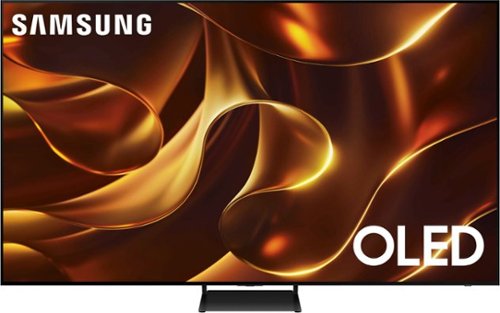
This premium TV features details and contrast, expert validated colors and a slim bezel. Its design brings you a modern look, wh ile clear motion and depth enhance the picture.
Customer Rating
5
Great OLED TV, Looks and Sounds Great!
on March 7, 2025
Posted by: TravisJ
This TV has great picture, sound, and features. OLED offers up a great display at 120hz where each individual pixel can turn off giving great contrast and HDR content.
HDR10+ looks great on this TV. You get the deep inky blacks from the pixels as they can individually turn off to give you true blacks giving you the high contrast. The panel is also Pantone validated, meaning it stands up to pantone’s high standard for color accuracy to real life. You can also use the AI features to set your preferred color, contrast, and tones. This process is neat as you select your preferred setting based on a set of photos and which one is more appealing to you. Once completed it will save your setting under whichever preset you selected, cinema, sports, or general.
This is a large TV so setup was a bit unique. The Styrofoam that is used to pad the TV in the box also serves as kind of a stand to hold the TV up and off the ground while you attach the two feet that will hold it in place. The directions will walk you through this process although I would have preferred some written guidance. The setup manual is very much a picture guide. My wife and I were capable of doing all the required steps and while heavy, we were able to lift it about waist high onto a chest that we’re using as an entertainment stand until I could get some help mounting it on the wall.
The Tizen OS is easy to navigate, works well, and is packed with features. Not only does it offer all of your typical apps such as Netflix, Hulu, YouTube, and more, it also includes several games and game streaming services. While there’s many to choose from, I was able to download Pac-Man and use the TV remote to burn up 15 minutes of nostalgic fun. You can connect several different types of controllers including Xbox, Nintendo Switch, and PlayStation among others. Supported streaming services appear to be GeForce NOW, XBox, Boosteroid TV. While I know GeForce Now is a paid service, it’s been a while since I’ve dabbled with Xbox. I think it’s neat to see the support of these services built in.
There’s a total of 4 HDMI with one of them being eARC. You can connect the TV to WiFi as well although I would have liked to have seen at least wifi 6 or 6e standard, it does support LAN connection which should provide a stable network connection. There’s optical audio as well so plenty of options for connectivity. If you also have a Samsung sound bar you’ll be able to take advantage of the Q-Symphony technology that syncs the TV speakers with the soundbar, creating a more robust sound profile.
If you’re looking for a great OLED TV, you won’t go wrong with this one. It’s packed with great display technology, AI features for picture and sound, the remote is even solar powered so you don’t have to worry about changing batteries.
I would recommend this to a friend!

Share this review:


0points
0of 0voted this as helpful.

Stay cool when things heat up with the Razer Laptop Cooling Pad ~ a smart stand that dynamically controls fan speeds based on your laptop~s temperature. Featuring an airtight pressure chamber, customizable fan curves, and a 3-port USB A hub for maximum connectivity, give your laptop the boost it needs for better performance.
Customer Rating
4
Great Design, Measurable Difference in Temps
on January 31, 2025
Posted by: TravisJ
I’ve been using a laptop with a 13980HX CPU and 4080 GPU for a while now. With an 18” screen, it’s a beast and it runs a bit toasty. I’ve been using a cooling pad almost ever since I’ve had it and I was eager to see what Razer had to offer.
***** Build Quality & Design *****
No surprises, Razer has some of the best build quality in their products. Hard black matt plastic for the chassis. Thick enough to be strong but thin enough to be light weight. There’s a permanently attached braided USB Type A cable (more on that later) and swappable foam base plates for different sized laptops. There’s a slide stop in the front that is adjustable so you can position your laptop for the perfect fit. On the back are three USB-Type A ports that you can use as an USB hub, plugging in a mouse and keyboard if you wish.
Part of the magic is the seal you get with the soft foam. It seems like it’s secured well to the swappable base plates, those are held on by magnets built into the chassis. When your laptop sits down on it, it creates a seal that focuses the airflow through the laptop, using intake vents on the bottom of your laptop, pushing airflow up and into the chassis. Most laptops are designed with 1-4 fans (depending on size) that are small but spin quickly to move air. This design uses a large fan that can move a lot of air to keep your laptop cool.
There’s also a removable dust filter on the bottom. The grid covering the fan simply twists off for cleaning. It looks like there are 5 phillips head screws that hold everything together, but when I tried to see if the fan was user replaceable, I couldn’t get it fully apart. I suspect there’s a screw under the rubber pad in the front, but I didn’t want to pull that off or break anything. If you hope to replace the fan with your own preferred brand, you may want to consider this isn’t possible, but I cannot confirm.
***** Setup and Use *****
I went with the larger base and didn’t find any issues with seal or thermals. Setup is easy, connect the USB type A cable to your PC, plug the power cable into the wall and cooling pad, and install the Razer Synapse software. I already had this running on my PC so it detected the device and updated the firmware. The software will let you control fan speed profiles, including a smart setting that adjusts based on the CPU temperature. You can select different RGB options as well for the light bar on the front of the cooling pad. If you choose not to use the software, you can still control power, fan speed, and RGB with dedicated buttons on the front right side, making quick changes effortless.
I went with the larger base and didn’t find any issues with seal or thermals. Setup is easy, connect the USB type A cable to your PC, plug the power cable into the wall and cooling pad, and install the Razer Synapse software. I already had this running on my PC so it detected the device and updated the firmware. The software will let you control fan speed profiles, including a smart setting that adjusts based on the CPU temperature. You can select different RGB options as well for the light bar on the front of the cooling pad. If you choose not to use the software, you can still control power, fan speed, and RGB with dedicated buttons on the front right side, making quick changes effortless.
***** Performance *****
Performance is probably what most people care about. Just using and playing games, I noticed after a few minutes that my hands were much cooler on the keyboard as it was pushing cool air up into the chassis of my laptop. So it was obvious it was doing something. As far as what it was doing, I ran 3DMark Time Spy to get a baseline. Baseline test was flat on the desk without any cooling pad. CPU temp baseline was at 97 degrees Celsius while the GPU came in at 87 degrees at peak. Using the smart graph settings I placed the laptop on the cooling pad and ended up with 94 degrees and 75 degrees respectively.
Performance is probably what most people care about. Just using and playing games, I noticed after a few minutes that my hands were much cooler on the keyboard as it was pushing cool air up into the chassis of my laptop. So it was obvious it was doing something. As far as what it was doing, I ran 3DMark Time Spy to get a baseline. Baseline test was flat on the desk without any cooling pad. CPU temp baseline was at 97 degrees Celsius while the GPU came in at 87 degrees at peak. Using the smart graph settings I placed the laptop on the cooling pad and ended up with 94 degrees and 75 degrees respectively.
While it wasn’t as big of a leap on the CPU I was impressed to see the improvements on the GPU. If you’re wondering how it scored on the benchmark? Well that was better too, likely meaning it was able to turbo boost longer before throttling out. I went from a score of 18,387 to 18,740. Not a huge increase across a synthetic benchmark, about 2%, but with continuous gaming, the ability to run cooler more often will have gains over time. There’s also the overall benefit of reducing the wear and tear that thermals have on laptops over time.
***** Needs Improvement *****
There are a few things, however, that I’m not impressed with, and I’ve encountered this with other Razer products. This is clearly designed for use on a desktop with little compromise for alternative use cases. For example, by hard lining the USB Type A cable to the device, if I want to simply use this to get the laptop off of a surface that restricts airflow, I now have to contend with a cable flopping around off the back of the cooler. The way I dealt with this is plug the USB cable into one of the hub ports to secure it and keep it from hanging.
The other shortfall is you cannot power the fan over USB alone, and the included power cable is about 5ft in length, meaning, I’m not able to use it on a bed, sofa, or coffee table, unless I’m close proximity to a wall outlet. I wouldn’t expect full fan speeds on USB power only but it would have been nice if the option was there and it would help justify the hard-lined USB-A cable.
***** Summary *****
If you’re looking for top cooling performance, I think this is probably one of the best purchases you can make. This is going to force cool air into the chassis and improve performance, accompanying software to customize how you want that to happen, and a sleek design to go along with it. The tradeoff will be portability and flexibility to use these features anywhere further than 5 foot from an outlet, and if the hard lined USB cable gets damaged, you may lose the ability to use the software to control the cooler alltogether.
I would recommend this to a friend!






Share this review:


+3points
4of 5voted this as helpful.
TravisJ's Review Comments
TravisJ has not submitted comments on any reviews.
TravisJ's Questions
TravisJ has not submitted any questions.
TravisJ's Answers
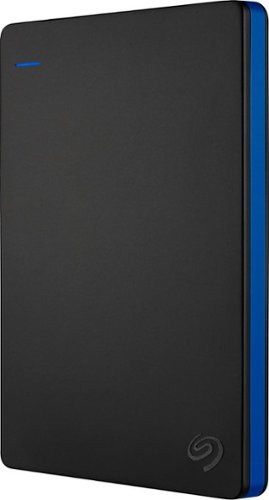
Store more than 50 PlayStation 4 game titles on this 2TB Seagate game drive. Its USB 3.0 port provides fast loading of full-size games so you can play smoothly, and its tough aluminum enclosure protects the drive from damage. This plug-and-play Seagate game drive is automatically recognized by any PS4, PS4 Slim or PS4 Pro console.
I've gotten quite tired of always uninstalling and reinstalling my games to make room and I was thinking about buying one of these. So, since all my games are hard copy, does that matter? For example, with this, will I be able to reinstall hard copy games
According to Sony’s website you can use from 250GB to 8TB in external storage to install games.
7 years, 6 months ago
by
TravisJ

Listen to your playlist in peace with these Sony headphones. They have a 40mm dome driver to deliver the full depth of audio, and the noise cancelling feature minimizes outside disturbances for a better listening experience. These Sony headphones have a battery life of up to 30 hours for extended jam sessions.
Would you be able to use these headphones to workout at the gym? Is the clamping of the headphones to your ears tight enough so it doesn't slip out as i do certain lifts? Are replaceable ear pads available for this model that are more comfortable?
These will work fine at the gym. They come with 4 different sized wing tips and ear tips so that you can customize the fit to your ear. Since these are new, It's unlikely to have 3rd party ear tips or wings at the moment.
8 years, 7 months ago
by
TravisJ