


TravisJ's stats
- Review count179
- Helpfulness votes263
- First reviewNovember 6, 2016
- Last reviewJune 8, 2026
- Featured reviews0
- Average rating4.8
Reviews comments
- Review comment count0
- Helpfulness votes0
- First review commentNone
- Last review commentNone
- Featured review comments0
Questions
- Question count0
- Helpfulness votes0
- First questionNone
- Last questionNone
- Featured questions0
- Answer count2
- Helpfulness votes0
- First answerOctober 28, 2017
- Last answerNovember 20, 2018
- Featured answers0
- Best answers0

With up to 3,000 PSI at 2.0 max GPM, the Greenworks GPW3000V pressure washer is the most powerful residential electric pressure washer available. With a powerful 14-amp TRUBRUSHLESS motor, axial cam pump, and hassle-free, push-button starts, you~ll get to work fast; just plug the 35-foot power cord into any typical exterior household outlet for quick starts with no priming, no choke, and no pull cord. This quiet-running, lightweight, and compact pressure washer is easy to store and features a rugged steel frame design. It includes a thermal relief valve that purges hot water from the pump to cool it down during constant use, and intelligent PCBA technology that automatically senses which nozzle is being used, adjusting motor speeds to provide maximum cleaning power with more pressure and water flow. Equipped with a 25-foot, non-marring, high-pressure hose, detergent hose that siphons soap, and on-board accessory storage for 15-, 25-, and 40-degree nozzles, as well as turbo and soap nozzle tips, this unit is versatile, portable, and powerful.
Customer Rating

5
Easy to use, very powerful
on December 27, 2024
Posted by: TravisJ
The quick of it, this is easy to setup and easy to use. After a half hour of assembly, you simply connect which nozzle you want to use, connect your water hose, turn it on, and plug in the power. Before turning on the pump, I held down the nozzle to get as much air out of the line as I could, then pressed the power button.
I spent some time just getting the surface dirt from my car. It’s very reminiscent of going to the DYI car washes with the spray nozzle and brush. Without squeezing the handle, you do not get any water flow and there isn’t any variation in water output (unless you change nozzles). Squeezing the handle turns it on and letting go turns it off. I was able to give my vehicles a good rinse with the larger angle at 40 degrees. It made quick work of surface dirt from the nearby construction work they’ve been doing by my house that has been kicking up dirt and dust. I still had some tougher spots and bugs, so I went for the heavier duty 25-degree nozzle. This one provided a bit more focused pressure, but I was careful not to get too close as to damage the paint on my vehicle. This nozzle was also a big more successful in removing the tougher debris off my car.
I’ve also had some mud on my driveway for several weeks that the rain has not been able to disperse. No problem for the pressure washer. I got a bit closer with it this time, but it easily took care of getting it out of the grooves of the concrete.
You get plenty of power cable and plenty of hose with the unit. I’m more limited by my spigot and water hose than I was the power cable. There’s also nothing fancy about the power cable. There is a GFIC circuit built into the power cable close to the plug, but it’s far enough down the line that I didn’t have a problem plugging it in. The wand and hose allow for plenty of freedom too. I had good coverage of the vehicle without having to reposition the pump. I had it parked at the front left wheel of the SUV and got about three quarters of the way around before I had to go around the other direction.
I was also surprised how light weight it was. I’m so used to lugging around the gas-powered pressure washers, I often dreaded the task knowing how heavy it was. The wheels allow for easy movement, and I hardly feel the weight, making it a much more enjoyable task. The added convenience of having a soap siphon will make cleaning the house siding and vehicles a time saver because you wont need to apply the soap by hand, it’ll just spray on and spray off.
Assembly instructions were easy to follow, everything was well packaged. A screwdriver and about 30 minutes of taking my time and reading everything to make sure I got it right, and I was ready to start using. I appreciated the quality and thoughtfulness of everything provided. There’s an easy storage hook for the spray wand cable as well as cable storage for the power cord. The front of the handle also houses the nozzles, and they included a small pin to clear any debris that may clog the nozzle which I just store in an unused nozzle.
You will have to evaluate if electric is the right choice for you. For home use, I do not see any downsides as I’m fully capable of reaching the end of my driveway with a longer hose (plenty of power cord!). The tradeoffs are well worth it, especially knowing I can extend the hose or extend the power cable as needed and I don’t feel like I’m losing anything special you would get with a gas-powered pressure washer. Highly recommend this if you’re looking for a pressure washer to clean your home, cars, driveway, or outdoor furniture.
I would recommend this to a friend!
Share this review:


0points
0of 0voted this as helpful.

LG UltraGear OLED introduces the World~s First VESA Certified Dual Mode gaming monitor.~ On the large 32" screen, Dual Mode allows PC gamers to experience graphics-driven games in detailed 4K/UHD at up to 240Hz or gamers can play super fast-paced games in Full HD at up to 480Hz with a quick press of a hotkey.~ The OLED screen is also certified VESA DisplayHDR True Black 400 which enables gamers to experience HDR in games as developers intended with stunning, rich black levels and bright, deep color contrast to produce the on-screen visuals gamers crave. The sleek, white, 32GS95UV will be the centerpiece of your battlestation with a gorgeous, virtually bezel-less design, that's height, tilt, swivel and pivot adjustable along with built-in speakers. With plenty of connectivity options it's easy to see how this UltraGear is essential gear for an amped up battlestation.
Customer Rating
5
Beautiful OLED with Options for Any Gamer
on November 13, 2024
Posted by: TravisJ
~~~~Display~~~~
LG makes beautiful displays, and they didn’t pull any punches with this one either. The ultra gear OLED has vibrant colors while having those deep blacks that OLED panels are known for. There’s several presets to go through including optimized settings for first person shooter or role playing games. You can also go in and make your own adjustments to customize your color preferred tone.
One of the things that makes this display unique is it’s ability to switch from 4K UHD at 240hz, which in itself is impressive, but if your more into competitive gameplay, you might find the 1080p at 480hz advantageous to your gameplay. It really is just a simple as hitting a button as well. Using the dedicated button on the bottom you can toggle between the two modes. A good use case for me is playing a game like New World Aeternum, where you have a game world diverse with color, floral and ethereal elements, and occasional competitive where the 240hz keeps everything very smooth. I then transition to battlefield 2042 where playing to the strengths of the 480hz at the lower, yet still high definition 1080p, can give a slight advantage. I’m not sure if I’m skilled enough for it to make a difference, but I need all the help I can get.
The cherry on top is LG also advertises it’s a 0.03ms response time. This, along with freesync and G-sync technology, you have the full gamer package no matter what you play.
LG makes beautiful displays, and they didn’t pull any punches with this one either. The ultra gear OLED has vibrant colors while having those deep blacks that OLED panels are known for. There’s several presets to go through including optimized settings for first person shooter or role playing games. You can also go in and make your own adjustments to customize your color preferred tone.
One of the things that makes this display unique is it’s ability to switch from 4K UHD at 240hz, which in itself is impressive, but if your more into competitive gameplay, you might find the 1080p at 480hz advantageous to your gameplay. It really is just a simple as hitting a button as well. Using the dedicated button on the bottom you can toggle between the two modes. A good use case for me is playing a game like New World Aeternum, where you have a game world diverse with color, floral and ethereal elements, and occasional competitive where the 240hz keeps everything very smooth. I then transition to battlefield 2042 where playing to the strengths of the 480hz at the lower, yet still high definition 1080p, can give a slight advantage. I’m not sure if I’m skilled enough for it to make a difference, but I need all the help I can get.
The cherry on top is LG also advertises it’s a 0.03ms response time. This, along with freesync and G-sync technology, you have the full gamer package no matter what you play.
~~~Design~~~~
The design is solid. There’s an adjustable base that snaps into place on the back. The base of the stand is sturdy and I have no concern of it being easily toppled. When it’s all setup, the monitor and base together is a bit heavy, but given the size, you wouldn’t want any accidental knock overs. You can also opt to mount it using a VESA mount.
I/O isn’t bad. You have two HDMI and one Display Port, a cable for each is included. You can also use the monitor as a USB hub with two USB 3 ports. The ports are located just off the back facing down. There’s a cover that covers the cables coming down for a cleaner look and they can be routed through the eye of the stand.
Not a big bullet point but I thought it was nice LG included the VESA screws with the monitor. There is also a LED accent on the back that you can adjust in the settings for a few different colors. It’s little details like this that makes me have respect for a brand.
The design is solid. There’s an adjustable base that snaps into place on the back. The base of the stand is sturdy and I have no concern of it being easily toppled. When it’s all setup, the monitor and base together is a bit heavy, but given the size, you wouldn’t want any accidental knock overs. You can also opt to mount it using a VESA mount.
I/O isn’t bad. You have two HDMI and one Display Port, a cable for each is included. You can also use the monitor as a USB hub with two USB 3 ports. The ports are located just off the back facing down. There’s a cover that covers the cables coming down for a cleaner look and they can be routed through the eye of the stand.
Not a big bullet point but I thought it was nice LG included the VESA screws with the monitor. There is also a LED accent on the back that you can adjust in the settings for a few different colors. It’s little details like this that makes me have respect for a brand.
~~~Menu and Features~~~
The menu can be accessed from the button on the back, just above the bottom of the monitor. It’s easy to get to but I noticed the way I have my cables routed, they’re getting in the way. I would have liked to see the control on the bottom or off to one side. From the menu you have your standard contrast, brightness, and mode control. You can also adjust preset picture settings as well as on screen information such as an FPS counter and different style crosshairs to be placed in the center. In the general section you’ll find several settings for maintaining your OLED panel to prevent burn in and pixel fatigue.
Something I’m seeing more manufacturers do is include software to control the display settings from the desktop. LG has done this as well although I’m not sure when I noticed the installer icon on my desktop. A link for the software on the box or on a sticker on the panel would have been enough for most. Aside from this, the software is intuitive and easy to use. It doesn’t offer as many settings as the on screen menu from the button will allow which I thought was a little strange since a mouse and app is a bit more intuitive. They have a bit of work to do here. There is also a screen split option not found in the built in menu on the app that basically serves as an app launcher but will place the app in specific zones on the screen. For me this would be useful to launch teams and outlook when I’m connected with my work PC or OBS and Discord when I’m gaming.
The menu can be accessed from the button on the back, just above the bottom of the monitor. It’s easy to get to but I noticed the way I have my cables routed, they’re getting in the way. I would have liked to see the control on the bottom or off to one side. From the menu you have your standard contrast, brightness, and mode control. You can also adjust preset picture settings as well as on screen information such as an FPS counter and different style crosshairs to be placed in the center. In the general section you’ll find several settings for maintaining your OLED panel to prevent burn in and pixel fatigue.
Something I’m seeing more manufacturers do is include software to control the display settings from the desktop. LG has done this as well although I’m not sure when I noticed the installer icon on my desktop. A link for the software on the box or on a sticker on the panel would have been enough for most. Aside from this, the software is intuitive and easy to use. It doesn’t offer as many settings as the on screen menu from the button will allow which I thought was a little strange since a mouse and app is a bit more intuitive. They have a bit of work to do here. There is also a screen split option not found in the built in menu on the app that basically serves as an app launcher but will place the app in specific zones on the screen. For me this would be useful to launch teams and outlook when I’m connected with my work PC or OBS and Discord when I’m gaming.
LG continues to make very impressive monitors and I can appreciate they continue to give consumers choice. Without much effort you can lean into the immersive world at 4k UHD resolution, still at an impressive 240hz or cut the limits away of technology by playing at 480hz at 1080p resolution for FPS game types.
I would recommend this to a friend!
Share this review:


0points
0of 0voted this as helpful.

The ultimate dinner flex, the bella PRO 4-qt. TriZone Touchscreen Air Fryer with Dual Flex Basket features a removable divider so you can cook two meals at once or simply opt for cooking one large meal. The spacious basket holds up to 3 lbs. of food and features EverGood Ceramic Nonstick Coating that~s made without PFAS, PFOA, PTFE, Lead, and Cadmium. Simple, one-touch custom cooking options include Air Fry, Roast, Broil, Bake, Reheat, and Dehydrate. Plus, the Sync function allows you to cook two different dishes at once and have them finish at the same time~eliminating the need to juggle cooking times or multiple pots and pans on your stove.
Customer Rating
5
Versatile and Streamlined for the Kitchen
on November 2, 2024
Posted by: TravisJ
First thing I noticed when pulling this out of the box is the small footprint it has on my counter top while featuring two separate cooking zones. While 4 quarts doesn’t seem like much, it’s just me and my wife, and this is perfect for our needs, especially when we’re both craving different foods.
It’s about 10” tall and roughly 11” deep including the handles on the front. This should fit under most cupboards and leave plenty of room in front of it for prep work. It’s also just over 13” wide or around 6” per zone. If all of these measurements are Greek to you, it’s a petite appliance and has room in the basket to easily heat up a meal if you’re using serving sizes.
There’s a lot of versatility with this kitchen tool. It’s a bit narrow to just call it an air fryer. Along with air frying, you can also bake, broil, dehydrate, reheat and roast. These presets will adjust default time and temperature to accomplish the intent for the setting. For example, air fry will default to 400 degrees farenheit for 15 minutes while bake will default to 350 degrees for 16 minutes. All of this is enhanced by the dual zone cooking feature allowing for two different cooking times and temperatures.
My wife and I have been cooking in the kitchen together for almost 20 years. We each have our own preferences for sides when it comes to dinner. While I prefer crinkle cut French fries, she prefers sweet potato fries. Each cook at different temperatures and times. The dual zone feature is perfect for this. With the separator installed, you can put the sweet potatoes on one side and the crinkle cuts on the other. If you press the option to sync the time, the side which cooks the longest will begin cooking. Once it counts down to the start time for the other zone, the other zone will start cooking so your food finishes at the same time. The manual does recommend you don’t select modes where temperatures and times have large gaps as some heat transfer is possible from one zone to the other.
If you have the need to cook a larger portion, the divider is easy to remove so you can utilize both zones. Simply select the preset you wish to use (do not select the dual zone button) and a single temperature and time option will appear on the screen. Dial in the recommended settings and hit start and you can make a large portion of a single item.
What’s great to note is that no pre-heat time is required. Your cook time is your cook time. It does recommend that you avoid abrasive cleaners or metal utensils to preserve the coating.
Clean up is super easy. Bella advertises their EverGood coating which is a nonstick coating that does not use PFAS, PFOA, PTFE, lead or cadmium. After my first use, I threw the trays and divider in the dish washer and hand washed the basket after sitting overnight. Using a soft sponge, everything wiped off easily without scrubbing using just soap and water. The second time I used it I opted to wash everything by hand. The grease just does not stick to it, it’s very simple and easy to clean. I knew it was going to be easy when food just slides around and dumps out with ease.
The only call out I would make for larger families is that you may have to cook in batches as the 4 quart basket is recommended for serving 4. If your kids have friends over or you’re hosting for the holidays, you may want to plan ahead. I actually love this as a feature because it keeps me from over eating or making too much and it heats so quickly an extra serving is usually just a few minutes away.
If you have one of the larger air fryers of the past, and you’re looking to clean up some countertop clutter, this is an easy recommend. It’s also a versatile cooking device, whether it’s to make a few sides at once, make a meal with a main course and a side, or you just need to heat up a lot of one thing.
I would recommend this to a friend!
Share this review:


+2points
2of 2voted this as helpful.

Enhance your home security with the smart, eco-friendly eufy SoloCam S220 2-Cam Kit plus HomeBase S380. Experience crisp, detailed views of family, deliveries, and activities around your home during the day and evening in stellar 2K clarity. Connect the cameras to HomeBase S380, a hub designed to seamlessly integrate with your other eufy security devices to create a unified security ecosystem for smarter, more reliable home protection. Minimize false notifications with built-in BionicMind facial recognition technology, a self-learning AI* that differentiates family and strangers with up to 99.9% accuracy over time. Customize detection zones, communicate through two-way audio, and stay updated with daily reports using the eufy app. Goodbye battery worries as the solar-powered cameras require just 3 hours of sunlight for a full day's charge.~ Both SoloCam~s feature a compact, wire-free design for flexible installation in any location such as your front yard and garage or backyard and a side door. The cameras are weatherproof IP67 rated to withstand heavy rain, snow, and dust. Save on subscription fees with eufy~s 16GB of local storage **, expandable up to 16TB on the HomeBase S380 (additional drive not included).
Customer Rating
5
Full Featured, Low Maintenance Security
on November 2, 2024
Posted by: TravisJ
These cameras are a great balance between low maintenance, low overhead, and usability. With a solar panel recharging and wireless connectivity, your setup and maintenance are low, and there’s flexibility in mounting with some caveats.
Setup and installation were easy. There are two screws and a bracket along with a placement sticker to help you with drilling holes. Since they rely on the sun for recharging the batteries, you want to be careful about mounting under an awning or gutters. If you’re drilling into masonry or vinyl, I would recommend getting some silicone sealant to use around the screws and bracket to keep up the weatherproofing. I did find there are options online from 3rd-party sellers to mount using vinyl hooks or gutter hooks, so those are options available if you’re not comfortable drilling into your home.
Once you decide where you want your cameras, go through the setup process for the base station and the cameras. There’s a quick start guide, and you can follow prompts from the app on getting everything going. I like how the app shows a QR code for you to point the camera at for quick pairing. Also, during this process, you’ll be prompted to set up the AI feature for setting up “familiar faces”. This is a feature that recognizes family members so you can reduce unwanted notifications and limit false positives.
Finally, you’ll likely be prompted to check for software updates on both the base unit and the camera. I recommend going ahead and doing this while also charging the cameras before first use and mounting them outside.
Once set up, you do everything from the app. You can click on the play button to go to the live feed. From there, you can record a video clip, take a screenshot, toggle night view, sound an alarm, or speak through the speaker. The camera resolution is great. I can easily make out license plates of the vehicles in my driveway. There is a sign in the yard across the street that becomes difficult to make out, but the view of my driveway is excellent, even in night mode. In night mode, you can still easily make out people from cars. I did notice there’s a bit of reflection off of my license plate, which makes it a bit hard to read at night, but this would happen with any IR camera, and if you have enough outdoor light, you can toggle off night vision.
You can also easily look at clips captured. The base station comes with 16GB of initial storage, but it is upgradable to 16TB. Clips can be accessed by clicking the events button on the app, and you can look at clips by day, and they’re labeled by timestamp. You can click the filter button and select additional filters such as event type, detection type, and by which device captured the footage you’re looking for. Once you view a clip, you have the option to download, share, mark as a favorite, or delete. There’s also a donate option which allows you to provide videos to Eufy to help train its AI algorithms. This is an opt-in feature you must agree to, but Eufy offers points for videos donated to the cause, and you can earn gifts with enough points.
There are a few things I’ve noticed that are great as well as some improvements to be made. The app itself is intuitive and easy to use. I like how quickly it is to navigate in the app and the speed in which the videos load for viewing. When viewing the live video in portrait, you have record, clip, speaker, and volume options and must click the menu to access the rest. When you change to landscape, you only have the Alarm, sound, and record options and no clear way to access the other buttons. Both have the hold to speak option, but I found that the speaker wasn’t quite as loud as I expected. My guess is if there’s a lot of ambient noise, you’ll have a hard time hearing anyone through the speakers.
Battery life hasn’t been much of a concern. I did an initial charge using a wall charger, then since they’ve been outside, I haven’t noticed any battery drain. I do wish I could see a percentage value like I could when I was charging them so I can see if I need to adjust for more sunlight or optimize recording.
All in all, these are great security cameras. Fast app with smart AI features for person recognition. The local storage is great if you’re avoiding costly monthly fees and expandable with cloud backup as an option for a monthly fee. I like the idea of not having to run wires if I decide to move them around and still keeping charged using the sun.
Setup and installation were easy. There are two screws and a bracket along with a placement sticker to help you with drilling holes. Since they rely on the sun for recharging the batteries, you want to be careful about mounting under an awning or gutters. If you’re drilling into masonry or vinyl, I would recommend getting some silicone sealant to use around the screws and bracket to keep up the weatherproofing. I did find there are options online from 3rd-party sellers to mount using vinyl hooks or gutter hooks, so those are options available if you’re not comfortable drilling into your home.
Once you decide where you want your cameras, go through the setup process for the base station and the cameras. There’s a quick start guide, and you can follow prompts from the app on getting everything going. I like how the app shows a QR code for you to point the camera at for quick pairing. Also, during this process, you’ll be prompted to set up the AI feature for setting up “familiar faces”. This is a feature that recognizes family members so you can reduce unwanted notifications and limit false positives.
Finally, you’ll likely be prompted to check for software updates on both the base unit and the camera. I recommend going ahead and doing this while also charging the cameras before first use and mounting them outside.
Once set up, you do everything from the app. You can click on the play button to go to the live feed. From there, you can record a video clip, take a screenshot, toggle night view, sound an alarm, or speak through the speaker. The camera resolution is great. I can easily make out license plates of the vehicles in my driveway. There is a sign in the yard across the street that becomes difficult to make out, but the view of my driveway is excellent, even in night mode. In night mode, you can still easily make out people from cars. I did notice there’s a bit of reflection off of my license plate, which makes it a bit hard to read at night, but this would happen with any IR camera, and if you have enough outdoor light, you can toggle off night vision.
You can also easily look at clips captured. The base station comes with 16GB of initial storage, but it is upgradable to 16TB. Clips can be accessed by clicking the events button on the app, and you can look at clips by day, and they’re labeled by timestamp. You can click the filter button and select additional filters such as event type, detection type, and by which device captured the footage you’re looking for. Once you view a clip, you have the option to download, share, mark as a favorite, or delete. There’s also a donate option which allows you to provide videos to Eufy to help train its AI algorithms. This is an opt-in feature you must agree to, but Eufy offers points for videos donated to the cause, and you can earn gifts with enough points.
There are a few things I’ve noticed that are great as well as some improvements to be made. The app itself is intuitive and easy to use. I like how quickly it is to navigate in the app and the speed in which the videos load for viewing. When viewing the live video in portrait, you have record, clip, speaker, and volume options and must click the menu to access the rest. When you change to landscape, you only have the Alarm, sound, and record options and no clear way to access the other buttons. Both have the hold to speak option, but I found that the speaker wasn’t quite as loud as I expected. My guess is if there’s a lot of ambient noise, you’ll have a hard time hearing anyone through the speakers.
Battery life hasn’t been much of a concern. I did an initial charge using a wall charger, then since they’ve been outside, I haven’t noticed any battery drain. I do wish I could see a percentage value like I could when I was charging them so I can see if I need to adjust for more sunlight or optimize recording.
All in all, these are great security cameras. Fast app with smart AI features for person recognition. The local storage is great if you’re avoiding costly monthly fees and expandable with cloud backup as an option for a monthly fee. I like the idea of not having to run wires if I decide to move them around and still keeping charged using the sun.
I would recommend this to a friend!


Share this review:


0points
0of 0voted this as helpful.
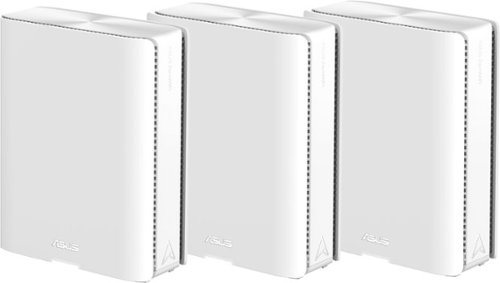
Award-winning meshes bring next-gen Wi-Fi 7 speeds of up to 30 Gbps, extendable coverage of up to 11000 sq. ft. (3pk) for your worry-free smart home.
Customer Rating
5
Super Fast and Loaded with Features
on November 2, 2024
Posted by: TravisJ
I’ve always been a fan of Asus routers. In my experience, they’ve been consistent with their GUI over the years and try to provide all the modern features and customizations you’d expect from a company that also does gaming PCs and hardware.
Most of the devices in my house use Wi-Fi 6e or something older, and I imagine this represents the majority of folks. With new cellphones coming with Wi-Fi 7 along with the most recently released laptops, I imagine over the next few years, most newer devices will also be Wi-Fi 7. With that said, my laptop does use the Wi-Fi 7 standard, and it’s fast!
<<Performance>>
With the caveat out of the way, I’ll jump straight into performance and operation. I’ve got two nodes downstairs and one upstairs. All devices get a very strong connection inside the home, and switching between nodes is seamless. You’ll see the Wi-Fi signal drop then go back up as it switches to a stronger connection without interruption. I tested this by walking around my house, doing speed tests, and watching the speed fluctuate as I switch nodes. My two nodes are connected wirelessly and using MLO for their connections, so most of my network is wireless.
My Wi-Fi 7 laptop holds a steady link speed of 3.8Gbps to the router. Considering most switches and routers connect at only 1Gbps, it’s wild to think my Wi-Fi is faster. My Wi-Fi 6e devices have a link speed of 1.8-2.1Gbps. As for actual internet speeds, I have a 1Gbps fiber connection. My modem supports 5Gbps Ethernet, and it’s connected to the 10Gbps uplink port on the router. It’s great to know if you have a 5Gbps internet speed, you’re not going to be limited by the ports on the router.
Having one node in the front of the house and one in the back, I get great coverage in my yard and garage. As expected, speeds do drop as you get further out, but I’m mostly concerned with streaming music when doing yard work, so no need for the full bandwidth.
<<Security>>
This Mesh system is loaded with features and protections. Starting off with AiProtection, the router turns on protections and off some features that create an environment for security risk. You can go into this menu and adjust as needed based on your usage. For most folks though, the default settings will provide a safer browsing experience.
You can also set family profiles to control certain levels of access to the web. You can assign devices to family members and control what types of sites that family member can access. With several different levels of protection and access.
If you pay for a VPN, you can integrate it into the router’s settings and use VPN Fusion, which is split tunneling or a VPN server to access your network remotely.
<<Connectivity>>
Each mesh node is equipped with a 10GB WAN and 10GB LAN Ethernet, which allows for high-speed wired backhaul or connection of a client that supports 10GB LAN. I love to see more and more routers with these high-speed connections. Not only does this make for super-fast wired backhaul, but also if you have a wired device nowhere near wired access, the router almost acts as a portable switch within your home.
There’s also a USB 3 port on each of the nodes, so if you can connect a portable drive, you can quickly access network storage. On the bottom of the unit, there’s a WPS button for quickly connecting devices. I found that this feature was turned off by default, though, for security. Along with these are all the built-in QoS, port forwarding, and IP reservation features. The number of features can be a bit overwhelming if you’re not tech-savvy, and you don’t have to use them all, as the original setup is enough, but I enjoy having the option, even though it may take me a moment to find what I’m looking for. I’d say the one caveat is the iPhone apps user interface is a bit different than the web UI. The layout and where to find things can be a bit challenging.
There were a few times during the first few days of use where I was having some issues with devices connecting to the internet. I ended up going into the settings and manually setting the DNS server to Google servers.
<<Final Thoughts>>
I love ASUS routers. I had the ASUS ROG Rapture years ago, and it always felt like the engineers were making the kind of routers that they would want to use. While I liked the design of the Rapture routers, the mesh routers blend in better with the modern home, shedding the gamer design. The menus can be a bit much, but I’d rather have the option buried in some menus than not having the option at all. I also like the UI for the web menu has been largely unchanged, so upgrading from one ASUS router to another years later remains largely unchanged.
Most of the devices in my house use Wi-Fi 6e or something older, and I imagine this represents the majority of folks. With new cellphones coming with Wi-Fi 7 along with the most recently released laptops, I imagine over the next few years, most newer devices will also be Wi-Fi 7. With that said, my laptop does use the Wi-Fi 7 standard, and it’s fast!
<<Performance>>
With the caveat out of the way, I’ll jump straight into performance and operation. I’ve got two nodes downstairs and one upstairs. All devices get a very strong connection inside the home, and switching between nodes is seamless. You’ll see the Wi-Fi signal drop then go back up as it switches to a stronger connection without interruption. I tested this by walking around my house, doing speed tests, and watching the speed fluctuate as I switch nodes. My two nodes are connected wirelessly and using MLO for their connections, so most of my network is wireless.
My Wi-Fi 7 laptop holds a steady link speed of 3.8Gbps to the router. Considering most switches and routers connect at only 1Gbps, it’s wild to think my Wi-Fi is faster. My Wi-Fi 6e devices have a link speed of 1.8-2.1Gbps. As for actual internet speeds, I have a 1Gbps fiber connection. My modem supports 5Gbps Ethernet, and it’s connected to the 10Gbps uplink port on the router. It’s great to know if you have a 5Gbps internet speed, you’re not going to be limited by the ports on the router.
Having one node in the front of the house and one in the back, I get great coverage in my yard and garage. As expected, speeds do drop as you get further out, but I’m mostly concerned with streaming music when doing yard work, so no need for the full bandwidth.
<<Security>>
This Mesh system is loaded with features and protections. Starting off with AiProtection, the router turns on protections and off some features that create an environment for security risk. You can go into this menu and adjust as needed based on your usage. For most folks though, the default settings will provide a safer browsing experience.
You can also set family profiles to control certain levels of access to the web. You can assign devices to family members and control what types of sites that family member can access. With several different levels of protection and access.
If you pay for a VPN, you can integrate it into the router’s settings and use VPN Fusion, which is split tunneling or a VPN server to access your network remotely.
<<Connectivity>>
Each mesh node is equipped with a 10GB WAN and 10GB LAN Ethernet, which allows for high-speed wired backhaul or connection of a client that supports 10GB LAN. I love to see more and more routers with these high-speed connections. Not only does this make for super-fast wired backhaul, but also if you have a wired device nowhere near wired access, the router almost acts as a portable switch within your home.
There’s also a USB 3 port on each of the nodes, so if you can connect a portable drive, you can quickly access network storage. On the bottom of the unit, there’s a WPS button for quickly connecting devices. I found that this feature was turned off by default, though, for security. Along with these are all the built-in QoS, port forwarding, and IP reservation features. The number of features can be a bit overwhelming if you’re not tech-savvy, and you don’t have to use them all, as the original setup is enough, but I enjoy having the option, even though it may take me a moment to find what I’m looking for. I’d say the one caveat is the iPhone apps user interface is a bit different than the web UI. The layout and where to find things can be a bit challenging.
There were a few times during the first few days of use where I was having some issues with devices connecting to the internet. I ended up going into the settings and manually setting the DNS server to Google servers.
<<Final Thoughts>>
I love ASUS routers. I had the ASUS ROG Rapture years ago, and it always felt like the engineers were making the kind of routers that they would want to use. While I liked the design of the Rapture routers, the mesh routers blend in better with the modern home, shedding the gamer design. The menus can be a bit much, but I’d rather have the option buried in some menus than not having the option at all. I also like the UI for the web menu has been largely unchanged, so upgrading from one ASUS router to another years later remains largely unchanged.
I would recommend this to a friend!




Share this review:


0points
0of 0voted this as helpful.
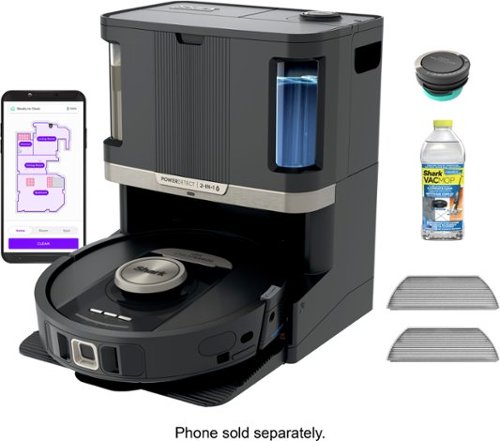
The PowerDetect NeverTouch Pro robot vacuum and mop system is designed to capture more, reach farther, and need you less (vs. Shark Matrix 2-in-1). Its five powerful cleaning technologies help to target hidden debris, stuck-on stains, edges and to optimize cleaning for every floor type, handling the toughest cleaning challenges. Whether vacuuming or mopping, the PowerDetect robot does the dirty work, so you don't have to. It deep-cleans and mops your floors, while the NeverTouch Pro base means you don~t have to worry about cleanup or maintenance for weeks at a time. After every cleaning run, the robot will return to the base to empty debris, refill the water tank, and wash and dry the mopping pad so it~s always ready for its next clean~ maintenance-free cleaning for up to a month. With NeverStuck Technology, the robot lifts itself over obstacles and across thresholds to avoid getting stuck. When mopping, it keeps the pad above carpets to prevent wet messes and deliver whole-home coverage. While the robot handles your cleaning chores for you, the bagless base with Anti-Allergen Complete Seal captures and traps 99.97% of dust and allergens (down to .3 microns, allergens refers to non-living matter).
Customer Rating
5
Robot Vacuum You Don’t Have to Think About
on October 12, 2024
Posted by: TravisJ
=-_Setup_-=
Setup was fairly easy, there’s a large cardboard cutout included in the box that will walk you through the setup process. The base just needs the ramp attached, attaching the side brush on the vacuum, and filling up the water reservoir. There’s also an air freshener that fits in top of the base to keep the dust bin odor down. Unless I totally missed it, I would have liked to have seen something that shows me what each of the buttons on the vacuum does. I’ve had to press each of them to figure out what they do. Also, a user manual or at least a downloadable user manual would be nice too just to have an offline reference for features, use and care, and troubleshooting.
First time use requires it to charge on the base until at least 70% battery which doesn’t take too long at all. The first run will do a mapping of your house which takes a bit depending on the size of your home. Once complete, you can review the map, label rooms, and set no-go spaces on the map.
First time use requires it to charge on the base until at least 70% battery which doesn’t take too long at all. The first run will do a mapping of your house which takes a bit depending on the size of your home. Once complete, you can review the map, label rooms, and set no-go spaces on the map.
=-_Cleaning_-=
Shark does cleaning a bit differently than some other vacuum and mop combos I’ve seen or used. First, the robot will do a vacuum run on the carpeted areas of your home. This is to get up any particulates that could be throughout the house that would affect it’s ability to mop. It does this without the mop attached to the robot. Then it’ll come back, grab the mop, and refill it’s tank if needed, to vacuum and mop the areas that are laminate or hard wood.
It does a great job of vacuuming. We have 4 cats and I barely notice any dander on the floor since we’ve had it. Since we’ve recently moved we’ve also had some more foot traffic than usual, but you wouldn’t be able to tell. I run it once daily, both mopping and vacuuming since most of our floors are laminate. It does great with mopping. The mopping pad oscillates as it moves along the floor and it puts down a good amount of cleaning solution too which I like.
When it’s done with a clean cycle, it’ll go back to the base and empty it’s bin. Occasionally the mop head will be cleaned. The vacuum will announce the task before it performs it and it takes several minutes to do so. I couldn’t get a good look at the cleaning process, but it cleans then dry’s the mop head so it’s ready for next use. This process is a bit loud, so I would advise against running a clean cycle while watching TV or at night to avoid the disturbance.
I’ve only had very minimum issues with navigation. If there’s a ledge or floor mat the robot is struggling to get over, it has the ability to raise it’s wheels to push over the obstacle. With this feature I’ve had no issues with kitchen floor mats which have been troublesome for other vacuums. You really do need to make sure the base has enough room for the robot to find and dock with the base. I had to reposition the base because the vacuum had trouble finding it. I pulled it away from the wall a few inches to give it some space next to the pantry that was next to it. It is good to note that like some other vacuums, the Shark’s navigation doesn’t rely on the room to be well lit, so no need to turn on all the lights to vacuum.
It does a great job of vacuuming. We have 4 cats and I barely notice any dander on the floor since we’ve had it. Since we’ve recently moved we’ve also had some more foot traffic than usual, but you wouldn’t be able to tell. I run it once daily, both mopping and vacuuming since most of our floors are laminate. It does great with mopping. The mopping pad oscillates as it moves along the floor and it puts down a good amount of cleaning solution too which I like.
When it’s done with a clean cycle, it’ll go back to the base and empty it’s bin. Occasionally the mop head will be cleaned. The vacuum will announce the task before it performs it and it takes several minutes to do so. I couldn’t get a good look at the cleaning process, but it cleans then dry’s the mop head so it’s ready for next use. This process is a bit loud, so I would advise against running a clean cycle while watching TV or at night to avoid the disturbance.
I’ve only had very minimum issues with navigation. If there’s a ledge or floor mat the robot is struggling to get over, it has the ability to raise it’s wheels to push over the obstacle. With this feature I’ve had no issues with kitchen floor mats which have been troublesome for other vacuums. You really do need to make sure the base has enough room for the robot to find and dock with the base. I had to reposition the base because the vacuum had trouble finding it. I pulled it away from the wall a few inches to give it some space next to the pantry that was next to it. It is good to note that like some other vacuums, the Shark’s navigation doesn’t rely on the room to be well lit, so no need to turn on all the lights to vacuum.
=-_Software_-=
There’s a lot you can do with the app too. Within the app you can create a map of your home, setup no-go zones, and spot clean. If you’ve moved around your furniture you can remap your home. Also you can clean on a schedule, mopping on some days, vacuuming on others, or both. The only limitation is you can currently only schedule one cleaning run per day, any additional runs will have to be triggered manually.
Also a few quick things within the app worth mentioning. There’s a notification center to notify if there’s any issues with the Shark. There’s a history where you can look at runtime, square footage cleaned, and where DirtDetect was activated. You can also adjust settings such as notification volume, language, and more.
Also a few quick things within the app worth mentioning. There’s a notification center to notify if there’s any issues with the Shark. There’s a history where you can look at runtime, square footage cleaned, and where DirtDetect was activated. You can also adjust settings such as notification volume, language, and more.
=-_Final Thoughts_-=
I’m very happy with the Shark Power Detect Pro. I think shark took notice of the robot vacuum industry and asked where they could be different and do better, and they did. I like how the dock has a mop pad cleaning system so you know you’re floors are getting cleaned with a clean pad as well as the “Never Stuck Technology” that lifts it over obstructions.
I would recommend this to a friend!
Share this review:


0points
0of 0voted this as helpful.

Rank up to Premier Cross-Platform Performance. The Turtle Beach Stealth 700 wireless multiplatform gaming headset for PC, PlayStation, Steam Deck and mobile is redesigned for a 3rd generation of premium gaming prowess. The all-new CrossPlay wireless system with dual USB transmitters and simultaneous Bluetooth connectivity deliver quick and easy connection to PC, gaming consoles & mobile devices. Huge, 60mm Eclipse Dual Drivers deliver 24-bit audio quality for unparalleled PC audio performance, and the Gen 3, flip-to-mute mic with high-bandwidth mic performance allows for exceptionally clear voice accuracy. Plus, using the Swarm II companion app, you can adjust your microphone & audio settings to your exact, customized preference. Dominate for hours in complete comfort with an 80-hour battery life, and memory foam ear cushions.
Customer Rating
5
Spoiled with Connectivity and Crazy Good Battery
on September 27, 2024
Posted by: TravisJ
Leave it to turtle beach to give me something I didn’t know I wanted. These headphones come with two dongles that you can plug into two different PC’s and switch between, and on top of that, you can simultaneously listen to Bluetooth.
Design
Starting with the design, these headphones have a lightweight plastic design that doesn’t feel cheap or fragile. Very thick cushions on the adjustable ear cuffs that are soft and comfortable for hours of wear. The ear cuffs connect at a single point on the headband. All the moving parts aren’t stiff or loose but move just how you’d want them to. The left side has a mode and power button along with a volume and sound monitor adjustment wheels and you charge from the left using USB type C, nice! The right side has two buttons as well, a Bluetooth multi-function button, a mode switcher, as well as a Bluetooth volume wheel button.
The cushions are removable and inside the ear cuffs there’s a fine mesh protecting the drivers from most debris. I consider my head a bit on the large side and the headphones adjusts out enough to easily compensate. There’s a boom style microphone that you can pull down for chats and push up to mute. There’s nothing flashy about these headphones. It’s mostly black with some silver highlights and turtle beach branding on the outside of each ear cuff. It’s subtle and I don’t mind that.
The cushions are removable and inside the ear cuffs there’s a fine mesh protecting the drivers from most debris. I consider my head a bit on the large side and the headphones adjusts out enough to easily compensate. There’s a boom style microphone that you can pull down for chats and push up to mute. There’s nothing flashy about these headphones. It’s mostly black with some silver highlights and turtle beach branding on the outside of each ear cuff. It’s subtle and I don’t mind that.
Features and Performance
One of the great things about this is the versatility of switching between different devices. First of all, there are two USB dongles that can be plugged into two different PC’s. There’s a button on the right ear cuff that will allow you to switch between each of these dongles. Along with that, you can also connect to a device with Bluetooth, such as a phone. The scenario I got the most use out of was either playing music through my phone while playing a casual game, or using my phone for discord while getting game SFX through the dongle connection. Yes sound from both connections come through. The call out here is that you cannot connect to both dongles at the same time, but you can quickly switch between them.
One of the neat things is the ability to control the volume from both sound streams. There are 3 total volume wheels. The right one controls Bluetooth, the top left one controls dongle volume (volume device you’re connected to) and the bottom left one controls the voice monitor levels. So without accessing the settings, you can control a lot of what the headphones do from the headset itself. Another example of this is a multi function Bluetooth button. This will allow you to access you’re phones voice assistant, pause, play and skip songs. There is also a mode button on the left ear cuff that will let you change the sound profile or it can be customized for other features using the turtle beach app or software.
The sound is great too. For listening to music, you’ll find that there’s plenty of bass and if that’s not for you, that’s okay too, there’s an EQ in the Swarm II app you can get to customize your preferred sound profile. There’s also custom modes to help you isolate game specific sounds such as footsteps to keep you on the competitive edge.
One of the neat things is the ability to control the volume from both sound streams. There are 3 total volume wheels. The right one controls Bluetooth, the top left one controls dongle volume (volume device you’re connected to) and the bottom left one controls the voice monitor levels. So without accessing the settings, you can control a lot of what the headphones do from the headset itself. Another example of this is a multi function Bluetooth button. This will allow you to access you’re phones voice assistant, pause, play and skip songs. There is also a mode button on the left ear cuff that will let you change the sound profile or it can be customized for other features using the turtle beach app or software.
The sound is great too. For listening to music, you’ll find that there’s plenty of bass and if that’s not for you, that’s okay too, there’s an EQ in the Swarm II app you can get to customize your preferred sound profile. There’s also custom modes to help you isolate game specific sounds such as footsteps to keep you on the competitive edge.
Battery and Comfort
I found the battery on this to be phenomenal. It advertises 80hrs on one charge. While I haven’t measured the battery life, I can tell you, I’ve spent 2 days using it as my main headset for work through the day and a few hours of gaming for the night for 2 days and there’s still battery life to spare. What some fail to see with such a high battery capacity is it’s somewhat future proofed against
You would think with great battery life comes a hefty battery that makes the headphones uncomfortable, but that’s not the case. As someone who wears glasses, headphones are hit and miss, but with the Stealth 700’s, I didn’t have any issues with wearing glasses and using them. There’s not a ton of side pressure. The ear cuffs are thick but not dense so the head grip that is there, isn’t noticeable. The shape of the ear cuffs play a big roll in the comfort, especially with glasses. The headband has some foam as well, but it’s not as padded as the ear cuffs. I’d like to have seen maybe a few more mm of foam on the headband, I do get a bit of fatigue on the top, but honestly a few minutes break is all I need, and I’m back at it for hours.
You would think with great battery life comes a hefty battery that makes the headphones uncomfortable, but that’s not the case. As someone who wears glasses, headphones are hit and miss, but with the Stealth 700’s, I didn’t have any issues with wearing glasses and using them. There’s not a ton of side pressure. The ear cuffs are thick but not dense so the head grip that is there, isn’t noticeable. The shape of the ear cuffs play a big roll in the comfort, especially with glasses. The headband has some foam as well, but it’s not as padded as the ear cuffs. I’d like to have seen maybe a few more mm of foam on the headband, I do get a bit of fatigue on the top, but honestly a few minutes break is all I need, and I’m back at it for hours.
Final Thoughts
These are great headphones. I can see someone who is getting into streaming or does a lot of gameplay while using their phone or discord for communication, finding these headphones essential. Also, if you’re switching your dongle between devices all the time, these headphones solve that problem magnificently.
I would recommend this to a friend!
Share this review:


0points
0of 0voted this as helpful.
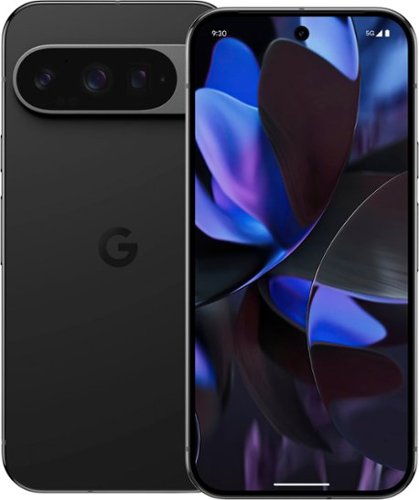
Meet Pixel 9 Pro with Gemini, now in two sizes. It has a sleek, stunning design, and it~s the most powerful Pixel yet. Take pro-level photos and videos with the triple camera system, and make expert edits. And it~s engineered by Google, so it gets the best of Google~s AI first.
Customer Rating
5
Great Design, Packed with Features and AI
on September 12, 2024
Posted by: TravisJ
This is my first Android phone in years. I’m glad that my switch was with the Pixel 9 Pro. It’s been a smooth experience, the hardware is great, and it’s just a small learning curve getting back into the android ecosystem.
*\-_DESIGN_-/*
The Pixel 9 Pro has a very clean design. The sides and edges are a glossy polished metal which is comfortable to hold and subtle with the obsidian color. The volume rocker and the power button are on the right and are easy to reach with your thumb. On the back is a camera “visor” which protrudes from the back of the phone. I don’t ever find it getting in my way when I go to use the phone but it does look a bit awkward as the “camera bump” looks weird on other phones.
Another well-functioning aspect of the design is the in-screen thumbprint sensor for unlocking the phone. There’s a visual on the screen so you know exactly where to place your thumb and it’s very fast to unlock. You can also unlock using your face but some people prefer the security of a thumbprint and having a sensor that works with the natural position of your hand on the phone is very convenient.
Another well-functioning aspect of the design is the in-screen thumbprint sensor for unlocking the phone. There’s a visual on the screen so you know exactly where to place your thumb and it’s very fast to unlock. You can also unlock using your face but some people prefer the security of a thumbprint and having a sensor that works with the natural position of your hand on the phone is very convenient.
*\-_CAMERA_-/*
The photos and videos on this phone are some of the best I’ve seen from a phone. The camera has the ability to record 8K at 30fps, 4k at 60fps and HRD, and FHD if you want to save space. I’ve been using the 8k which is nice for zooming in on details of a video and I’ve also used 4k HDR for some videos and those turn out really nice too.
The 50mp main back camera takes awesome photos too. I almost exclusively used the 50-megapixel high resolution setting. We went to the local zoo and I was able to use the zoom and still get very detailed photos of the animals. What’s great is you can even do a large amount of zoom, which you have to do sometimes in zoo when the animals are further out and still get very nicely detailed moments. Also I found portrait mode works really well at adding the bokeh effect, making for very artistic looking photos and blurring the background really well.
One of the other neat features is the “Add Me” feature. We tried it out but had a lot of people walking behind us at the Zoo for it to work correctly. This works better with a more static background. But if you want to get a photo with your whole party in the picture, this has been one of the more innovative ways to do it.
The 50mp main back camera takes awesome photos too. I almost exclusively used the 50-megapixel high resolution setting. We went to the local zoo and I was able to use the zoom and still get very detailed photos of the animals. What’s great is you can even do a large amount of zoom, which you have to do sometimes in zoo when the animals are further out and still get very nicely detailed moments. Also I found portrait mode works really well at adding the bokeh effect, making for very artistic looking photos and blurring the background really well.
One of the other neat features is the “Add Me” feature. We tried it out but had a lot of people walking behind us at the Zoo for it to work correctly. This works better with a more static background. But if you want to get a photo with your whole party in the picture, this has been one of the more innovative ways to do it.
*\-_DISPLAY_-/*
The display is a 3K, 3,000 nit peak OLED display. I love a bright display and with OLED, you know you’re getting a great picture. It’s bright enough to use outside and makes HDR photos look great. The front facing camera is a hole-punch style camera in the screen but it’s subtle enough you don’t really notice it. You also have a dynamic refresh rate, up to 120hz, so everything is buttery smooth when scrolling.
The display is a 3K, 3,000 nit peak OLED display. I love a bright display and with OLED, you know you’re getting a great picture. It’s bright enough to use outside and makes HDR photos look great. The front facing camera is a hole-punch style camera in the screen but it’s subtle enough you don’t really notice it. You also have a dynamic refresh rate, up to 120hz, so everything is buttery smooth when scrolling.
*\-_OTHER THOUGHTS_-/*
The Gemini smart assistant is clever in what it can do and how it responds. I’ve tested out several different inquiries and tasks and I’ve been happy with the responses. I asked it to identify the animal in a picture I took at the zoo and it was able to correctly identify the Wallaby I took a picture of along with the reasons it chose that animal. I also asked if another picture was an alligator or a crocodile and it also provided reasons for it’s choice. Another task was identifying the model of a ceiling fan. Although my fan was too generic for it to decipher, it was able to provide popular brands it “could be” which is useful if you’re looking to buy a similar style.
Android operating system can be both amazing and frustrating. The Pixel can switch between gesture-based navigation or the standard 3 button navigation. With the gesture navigation, I found myself accidently swiping too close to the edge and inadvertently navigating to a previous screen when I mean to only to scroll left or right. Less annoying is the seemingly unlimited amount of customization you have with apps and settings. One thing I found useful with transferring from my old device to the Pixel 9 Pro. I followed the steps during initial setup and just connected my phone using a cable. Apps, contacts, and other data transferred or downloaded automatically so I didn’t have to download each item one at a time.
Call quality in my experience did a great job at focusing in on the voice and drowning out background noise. I did my best to be loud and disruptive while talking with my wife who didn’t even know I was trying to make background noise. Your milage may vary on call quality depending on your carrier, but every call I made has been flawless.
Android operating system can be both amazing and frustrating. The Pixel can switch between gesture-based navigation or the standard 3 button navigation. With the gesture navigation, I found myself accidently swiping too close to the edge and inadvertently navigating to a previous screen when I mean to only to scroll left or right. Less annoying is the seemingly unlimited amount of customization you have with apps and settings. One thing I found useful with transferring from my old device to the Pixel 9 Pro. I followed the steps during initial setup and just connected my phone using a cable. Apps, contacts, and other data transferred or downloaded automatically so I didn’t have to download each item one at a time.
Call quality in my experience did a great job at focusing in on the voice and drowning out background noise. I did my best to be loud and disruptive while talking with my wife who didn’t even know I was trying to make background noise. Your milage may vary on call quality depending on your carrier, but every call I made has been flawless.
*\-_FINAL THOUGHTS_-/*
The hype is real. The design of the phone feels like a flagship device. It takes amazing photos and videos. Gemini is great for finding the answer to a question, not quite sure what something is in a photo, want to know where to buy something you saw out and about. The AI extends to the camera as well with the Add Me and other photo and video enhancements and features. One of the best android phones I’ve ever used.
I would recommend this to a friend!
Share this review:


0points
0of 0voted this as helpful.

Reversible Desk Mat with a detachable wireless charging panel that fast charges your smartphone and earbuds simultaneously. Features water-resistant vegan leather on one side and plush felt on the other side.
Customer Rating
5
Stylish and Functional Wireless Charging Mat
on September 4, 2024
Posted by: TravisJ
I’m not quite sure why we haven’t fully realized the wireless charging potential in our every day products, and places where it is, why has it taken so long? Journey has taken this idea and integrated it into an area where maybe we could use it the most. At our desk.
The Journey Alti wireless charging desk mat is a neat product that provides a very premium, reversible desk mat and adds an element of functionality to it by also including a wireless charging strip that magnetically attaches to the desk mat.
The design opens the door for preference. On one side you’re greeted with a soft felt, which I’ve been enjoying due to my longer work sessions. I notice my wrists aren’t getting clammy the way it does when they rest directly on the desk. The felt I feel helps wick away some of the moisture your skin gets from smothering against the desk. The other side offers its advantages as well. The premium vegan leather I think works better when I go from working to gaming. The leather surface has less friction than the felt and the mouse moves a bit smoother across because of it.
The two sides are only joined at one end, where the wireless charging attaches. Because of this, you can stash away a few sheets of paper to help with clutter. I keep a sheet of paper for scrap notes when I’m on calls that I then summarize in an email or notes app. When I’m done for the day, I can slide this in between the two fabrics to keep my desk looking tidy.
The design opens the door for preference. On one side you’re greeted with a soft felt, which I’ve been enjoying due to my longer work sessions. I notice my wrists aren’t getting clammy the way it does when they rest directly on the desk. The felt I feel helps wick away some of the moisture your skin gets from smothering against the desk. The other side offers its advantages as well. The premium vegan leather I think works better when I go from working to gaming. The leather surface has less friction than the felt and the mouse moves a bit smoother across because of it.
The two sides are only joined at one end, where the wireless charging attaches. Because of this, you can stash away a few sheets of paper to help with clutter. I keep a sheet of paper for scrap notes when I’m on calls that I then summarize in an email or notes app. When I’m done for the day, I can slide this in between the two fabrics to keep my desk looking tidy.
The wireless charging part of the matt feels like it’s made with the same premium vegan leather on top and a more rubberized material on the bottom to help keep it all in place. There’s a small, recessed area at the top which is clearly for your wireless charging AirPods case. Also, you’ll see the raised round part of the pad which is meant for devices using the Magsafe standard. I also expect devices that support Qi2 wireless charging might also benefit from this, but I did not have a device on hand to be able to test this. Either way, if your device supports Qi wireless charging, you shouldn’t have any issues using it with a non-magsafe device.
As far as connecting the device, you’re given a fairly basic usb-c to usb-c charging cable. No brick included, for sustainability purposes. The cable could have been a bit nicer considering you’re buying a desk mat with premium materials like felt and vegan leather. A braided cable would have matched the aesthetics here. Also, I’m not sure if there’s color matching, as I’m using the black desk pad and got a black cable, but I would also expect that from a high end mouse pad.
Using it is a pleasant experience. My phone and AirPods are detected immediately. You have a rather large detection area for the AirPods. This helps as the AirPod charging area isn’t magnetic, and you may inadvertently bump the AirPods, bump the desk, and if it moves a little, you won’t risk losing out on perfect alignment. As for charging my iPhone, the magnet is very grippy, and there is usually some lift of the mat if I pull straight up. It does disconnect before the full weight of the mat is held, but it’s easier if you just angle it off and that’s easy to do.
Charging speeds are about what you would expect with the iPhone or AirPods. It’s not the most efficient way to charge your phone but it’s very convenient. And if your phone is just going to sit on the desk anyways, it might as well be charging.
As far as connecting the device, you’re given a fairly basic usb-c to usb-c charging cable. No brick included, for sustainability purposes. The cable could have been a bit nicer considering you’re buying a desk mat with premium materials like felt and vegan leather. A braided cable would have matched the aesthetics here. Also, I’m not sure if there’s color matching, as I’m using the black desk pad and got a black cable, but I would also expect that from a high end mouse pad.
Using it is a pleasant experience. My phone and AirPods are detected immediately. You have a rather large detection area for the AirPods. This helps as the AirPod charging area isn’t magnetic, and you may inadvertently bump the AirPods, bump the desk, and if it moves a little, you won’t risk losing out on perfect alignment. As for charging my iPhone, the magnet is very grippy, and there is usually some lift of the mat if I pull straight up. It does disconnect before the full weight of the mat is held, but it’s easier if you just angle it off and that’s easy to do.
Charging speeds are about what you would expect with the iPhone or AirPods. It’s not the most efficient way to charge your phone but it’s very convenient. And if your phone is just going to sit on the desk anyways, it might as well be charging.
All together, this is a great desk mat. I like the idea of it being reversible. Even if it’s just to change things up a bit, it’s nice to have options. Everything feels premium and well made, aside from the charge cable, and looks like it will hold up to the test of time. Easy to recommend.
I would recommend this to a friend!



Share this review:


0points
0of 0voted this as helpful.

The new Zenbook S 16 harmoniously blends beauty and performance. Featuring an impossibly thin 0.43-inch chassis crafted from premium Ceraluminum material, the S 16 exudes elegance in its craftsmanship. Immerse your senses in its breathtaking 16-inch 3K OLED Lumina display and experience high-fidelity audio from its six powerful speakers. Optimized for productivity, the S 16 is powered by the latest AMD Ryzen processor with a dedicated AI NPU that speeds up local AI processes, while a quick-access Copilot AI Assistant key streamlines your workflow. Despite its compact form and powerful performance, the Zenbook S 16 offers incredible all-day endurance thanks to its 78Wh battery.
Customer Rating

4
Excellent Balance Between Size and Performance
on August 28, 2024
Posted by: TravisJ
Performance
When you see a thin and light, you usually don’t think performance. You’re going to be surprised with the Zenbook S 16. AMD has dropped their new Ryzen AI 9 365 processor in the laptop. If all of that means nothing to you, I’ll add the benchmarks down below. It’s not by any stretch a top of the line, but you’ll find it breezes through normal multitasking. Currently switching back and forward between office and an edge browser with over 30 tabs open with no lag or delay.
Gaming wasn’t bad. As long as you’re not trying to play high end games with top notch graphics, you’re probably fine. I played Tribes 3 Rivals on lowest settings and frames locked at 60 without any issues. I had a bit more trouble when trying to play New World, where frames barely made it to 30 FPS and that was without pulling mobs or fighting in wars where things can get really busy. If you’re a casual gamer playing lower demand games, you’re in great hands with this PC as it seems to do those well.
Wi-Fi performance is great! I have a Wi-Fi 7 router so I can take full advantage of the wireless features. I get very fast consistent Wi-Fi speeds and it negotiates at the router at 2.8 and no issues hitting internet speed tests that max out my connection at 1gb full duplex. For reference, this is faster than most ethernet connections on older routers.
When you see a thin and light, you usually don’t think performance. You’re going to be surprised with the Zenbook S 16. AMD has dropped their new Ryzen AI 9 365 processor in the laptop. If all of that means nothing to you, I’ll add the benchmarks down below. It’s not by any stretch a top of the line, but you’ll find it breezes through normal multitasking. Currently switching back and forward between office and an edge browser with over 30 tabs open with no lag or delay.
Gaming wasn’t bad. As long as you’re not trying to play high end games with top notch graphics, you’re probably fine. I played Tribes 3 Rivals on lowest settings and frames locked at 60 without any issues. I had a bit more trouble when trying to play New World, where frames barely made it to 30 FPS and that was without pulling mobs or fighting in wars where things can get really busy. If you’re a casual gamer playing lower demand games, you’re in great hands with this PC as it seems to do those well.
Wi-Fi performance is great! I have a Wi-Fi 7 router so I can take full advantage of the wireless features. I get very fast consistent Wi-Fi speeds and it negotiates at the router at 2.8 and no issues hitting internet speed tests that max out my connection at 1gb full duplex. For reference, this is faster than most ethernet connections on older routers.
Display
The display on this PC is beautiful. It measures in at 2880 x 1800 which they call 3K. It’s OLED so you know you’re getting the best display on a laptop and it also refreshes at 120hz so it’s buttery smooth to use. If you wanted to add a cherry on top, it’s also a touch screen. It’s great for watching videos or looking at photos. It is a bit glossy and at only 500 nits, it might not be the best for outdoor use, which for the most part, is not my use case.
The display on this PC is beautiful. It measures in at 2880 x 1800 which they call 3K. It’s OLED so you know you’re getting the best display on a laptop and it also refreshes at 120hz so it’s buttery smooth to use. If you wanted to add a cherry on top, it’s also a touch screen. It’s great for watching videos or looking at photos. It is a bit glossy and at only 500 nits, it might not be the best for outdoor use, which for the most part, is not my use case.
Keyboard, Mouse, Sound, and Camera
The keyboard is just fine. It isn’t satisfying or disappointing in one way or another. I do like that it’s spaced well, ASUS didn’t try to squeeze in a number pad or other keys that would force your fingers to be closer together. I do find myself typing just fine and about normal accuracy although the keys are a little spongy.
The mouse is a bit unique compared to other laptops I’ve used. It doesn’t “feel” any different but it does have extra touch features beyond the typical swipe up with 3 or pinch to zoom. If you swipe up or down on the leftmost part of the trackpad you can control the volume up or down, and if you do the same on the right, you can control brightness. You don’t lose mouse functionality in these areas as long as it’s not your starting point. I think it would be neat to be able to customize these settings to do other tasks like keyboard brightness but the settings seem to be fixed.
Laptop sound has gotten much better over the past few years. I’ve noticed ASUS has been putting focus here as well. They do well at getting loud without being distorted which is impressive in a thin and light. They’re down firing speakers coming out of the left and right sides of the chassis.
Finally, the camera. It’s not good. It’s grainy and I’m not sure if it’s over processing or just bad but it doesn’t come through good at all. What I do like is windows hello. The IR sensor will use depth sensing facial recognition to log you into windows. Also, new to me, is ASUS’ AI sensing camera. Not only will it allow you to add background blur, eye tracking and framing, but also detects when your present at your laptop and will wake the display for windows hello login when you sit back down at your desk. This is a neat little time saver as during a work day you may be up and down at your desk.
Design
ASUS has always set themselves apart by playing around with laptop design to be unique and appealing. Everything is very well made, almost no flex in the keyboard or surrounding area. The ventilation has a very unique machined design with tiny vent holes that gives it a unique aesthetic. The lid has a unique modern design, which actually looks very professional. The exposed aluminum lines have almost a silver luminance to it, subtly catching the eye.
The keyboard is just fine. It isn’t satisfying or disappointing in one way or another. I do like that it’s spaced well, ASUS didn’t try to squeeze in a number pad or other keys that would force your fingers to be closer together. I do find myself typing just fine and about normal accuracy although the keys are a little spongy.
The mouse is a bit unique compared to other laptops I’ve used. It doesn’t “feel” any different but it does have extra touch features beyond the typical swipe up with 3 or pinch to zoom. If you swipe up or down on the leftmost part of the trackpad you can control the volume up or down, and if you do the same on the right, you can control brightness. You don’t lose mouse functionality in these areas as long as it’s not your starting point. I think it would be neat to be able to customize these settings to do other tasks like keyboard brightness but the settings seem to be fixed.
Laptop sound has gotten much better over the past few years. I’ve noticed ASUS has been putting focus here as well. They do well at getting loud without being distorted which is impressive in a thin and light. They’re down firing speakers coming out of the left and right sides of the chassis.
Finally, the camera. It’s not good. It’s grainy and I’m not sure if it’s over processing or just bad but it doesn’t come through good at all. What I do like is windows hello. The IR sensor will use depth sensing facial recognition to log you into windows. Also, new to me, is ASUS’ AI sensing camera. Not only will it allow you to add background blur, eye tracking and framing, but also detects when your present at your laptop and will wake the display for windows hello login when you sit back down at your desk. This is a neat little time saver as during a work day you may be up and down at your desk.
Design
ASUS has always set themselves apart by playing around with laptop design to be unique and appealing. Everything is very well made, almost no flex in the keyboard or surrounding area. The ventilation has a very unique machined design with tiny vent holes that gives it a unique aesthetic. The lid has a unique modern design, which actually looks very professional. The exposed aluminum lines have almost a silver luminance to it, subtly catching the eye.
Battery Life
Battery life has been great. I’m on and off throughout the day, even while testing different features of the laptop, and only charge at night when I go to sleep. ASUS also boasts 60% battery in 49 minutes with fast charging. I didn’t measure this but I did notice even going from around 50% to 100% it was fast. I’m glad to see a larger focus is being placed on all day usage and less time tethered to the wall while still hammering out great performance. The one downside is you do get a bit of performance hit. While on battery I was getting nearly 200 points less on my multi-core score on Cinebench 2024, it would have been nice to see the same consistency when on battery as I got plugged in.
Battery life has been great. I’m on and off throughout the day, even while testing different features of the laptop, and only charge at night when I go to sleep. ASUS also boasts 60% battery in 49 minutes with fast charging. I didn’t measure this but I did notice even going from around 50% to 100% it was fast. I’m glad to see a larger focus is being placed on all day usage and less time tethered to the wall while still hammering out great performance. The one downside is you do get a bit of performance hit. While on battery I was getting nearly 200 points less on my multi-core score on Cinebench 2024, it would have been nice to see the same consistency when on battery as I got plugged in.
Final Thoughts
AMD has been shaking up the game for a few years now and they’re no different in their mobile chips. ASUS has been with them all the way integrating and using these high performance processors to push performance to the max. There’s a few call outs that make this PC just short of perfect. Palm rejection on the track pad needs to be better. Several times while typing up this review, I’ve had my cursor get lost in a paragraph and I ended up typing where I wasn’t supposed to. The other issue is the bottom gets pretty warm when pushing the processor. Not an issue for me as almost exclusively use on a desk or a cooling pad, but some may find it uncomfortable after longer sessions.
I really enjoy this laptop for the power package it is. It’s fast, sleek, lightweight, sounds good, has smart features, but there’s still some room for improvement with the trackpad palm detection, camera, and cooling.
AMD has been shaking up the game for a few years now and they’re no different in their mobile chips. ASUS has been with them all the way integrating and using these high performance processors to push performance to the max. There’s a few call outs that make this PC just short of perfect. Palm rejection on the track pad needs to be better. Several times while typing up this review, I’ve had my cursor get lost in a paragraph and I ended up typing where I wasn’t supposed to. The other issue is the bottom gets pretty warm when pushing the processor. Not an issue for me as almost exclusively use on a desk or a cooling pad, but some may find it uncomfortable after longer sessions.
I really enjoy this laptop for the power package it is. It’s fast, sleek, lightweight, sounds good, has smart features, but there’s still some room for improvement with the trackpad palm detection, camera, and cooling.
I would recommend this to a friend!


Share this review:


+7points
7of 7voted this as helpful.
TravisJ's Review Comments
TravisJ has not submitted comments on any reviews.
TravisJ's Questions
TravisJ has not submitted any questions.
TravisJ's Answers
Store more than 50 PlayStation 4 game titles on this 2TB Seagate game drive. Its USB 3.0 port provides fast loading of full-size games so you can play smoothly, and its tough aluminum enclosure protects the drive from damage. This plug-and-play Seagate game drive is automatically recognized by any PS4, PS4 Slim or PS4 Pro console.
I've gotten quite tired of always uninstalling and reinstalling my games to make room and I was thinking about buying one of these. So, since all my games are hard copy, does that matter? For example, with this, will I be able to reinstall hard copy games
According to Sony’s website you can use from 250GB to 8TB in external storage to install games.
7 years, 6 months ago
by
TravisJ

Listen to your playlist in peace with these Sony headphones. They have a 40mm dome driver to deliver the full depth of audio, and the noise cancelling feature minimizes outside disturbances for a better listening experience. These Sony headphones have a battery life of up to 30 hours for extended jam sessions.
Would you be able to use these headphones to workout at the gym? Is the clamping of the headphones to your ears tight enough so it doesn't slip out as i do certain lifts? Are replaceable ear pads available for this model that are more comfortable?
These will work fine at the gym. They come with 4 different sized wing tips and ear tips so that you can customize the fit to your ear. Since these are new, It's unlikely to have 3rd party ear tips or wings at the moment.
8 years, 7 months ago
by
TravisJ