
Share Kerey's profile


Kerey
Kerey's stats
- Review count1
- Helpfulness votes7
- First reviewNovember 17, 2010
- Last reviewNovember 17, 2010
- Featured reviews0
- Average rating4
- Review comment count1
- Helpfulness votes0
- First review commentOctober 8, 2010
- Last review commentOctober 8, 2010
- Featured review comments0
Questions
- Question count0
- Helpfulness votes0
- First questionNone
- Last questionNone
- Featured questions0
- Answer count72
- Helpfulness votes11
- First answerNovember 30, 2009
- Last answerNovember 17, 2010
- Featured answers0
- Best answers1
Kerey's Reviews
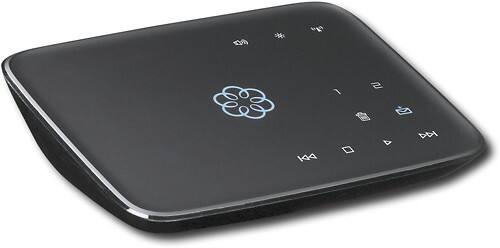
This hub works with your high-speed Internet and your home phones to deliver VoIP phone services and supports up to 4 Ooma Telo handsets. With easy setup, you can enjoy unlimited U.S. calling and low international rates.*

Posted by: Kerey
from AZ
I bought the OOMA over a month ago and just got my old phone ported. I have the device on the router and not in front of the router. This set up for me is preferred since if the OOMA goes out, the entire home network goes out. I have found no delays or problems using it this way.
The calls are clear and I have had just one network issue where the call had a slight delay-echo. This went away after a few seconds.
I also opted-in to the OOMA Premiere for a year which is an additional $120 (more or less) per year. That is the total cost to run the OOMA. I figured out that in 8 months I will have paid for the OOMA and then start saving about $40 a month on phone service.
I also went to cable network since DSL here is just plain lousy. It did feel good to get rid of our substandard phone company who really could care less about any issues you have. Not that cable is some queen of the highway.
Setup is easy and there were no real issues. There are a lot of tweaks you can do with Voicemail including linking it to Google Voice or just having the message sent to you via email. Or just letting your OOMA get it. You can also put your own answering machine on, but that makes calls NOT go to your voice mail.. at least that is what happened to me.
Check out the forums at OOMA and see what is going on. The customer service is MUCH better, too.
What's great about it: No expensive phone bill, free long distance to USA/Canada
What's not so great: Can be confusing to configure if you have limited tech knowledge.
I would recommend this to a friend!
Ease of Use

4
Features

5
Performance
4
Share this review:


+5points
7of 9voted this as helpful.
Kerey's Review Comments
This hub works with your high-speed Internet and your home phones to deliver VoIP phone services and supports up to 4 Ooma Telo handsets. With easy setup, you can enjoy unlimited U.S. calling and low international rates.*
Overall 5 out of 5
5 out of 5WORKS FOR ME!!
By SeattleZach
from Seattle, WA
This is a great little device. I had this plugged in to my DSL router in 5 minutes and started receiving calls about 10 minutes after opening the box. That is fast and easy. Honestly .. this reminds me on an Apple product ... simple - straighforward - easy.
For the folks who say, "Ir doesnt' work for me" you may wish to check your broadband connectivity. Just because you have DSL or Cable doesn't mean this will work for you.
With my non-scientifific research, I'm guessing you'll need AT LEAST 1.5 Mpbs downstream and 512 kpbs per second upstream to get a realible connection. I have 7Mmps downstream, so Im OK.
Works great .. I would recommend this to all my friends and family! Good bye phone bill!

Kerey
AZ
QOS is more important than raw speed
October 8, 2010
If you have good QOS at 1.5Mbps, this VOIP device works well. I did upgrade to 3 Mbps and didn't notice any difference. I can, however, download a movie much faster.
0points
0of 0voted this comment as helpful.
Kerey's Questions
Kerey has not submitted any questions.
Can we get just speakers for our Insignia Plasma 42" hd TV?
We bought it from Best Buy almost 3 years ago, and we still love it! We have all kinds of other equipment hooked up to it, and it would be nice to have surround sound as well.
Not know what model of TV you have:
If you TV has digital output, you can run that into an external 5.1 or 7.1 system. Here is the rub, the broadcast also has to be in 5.1 or 7.1 or whatever format. Most stations don't even broadcast locally in 5.1, yet. My suggestion is to listen to several models of home theater speaker systems. I have found you get what you pay for. I think Polk and Klipsh are good for the money.
If you TV has digital output, you can run that into an external 5.1 or 7.1 system. Here is the rub, the broadcast also has to be in 5.1 or 7.1 or whatever format. Most stations don't even broadcast locally in 5.1, yet. My suggestion is to listen to several models of home theater speaker systems. I have found you get what you pay for. I think Polk and Klipsh are good for the money.
16 years, 6 months ago
by
Kerey
AZ
whats the difference between 60 hz and 120hz
uh...60 Hz? Seriously, it is the rate the signal is passed to the TV. Here is the THEORY: All USA power is at 60hz and the TV picks that up at the power input and syncs to the signal coming from the TV station. If you double that sync rate, theoretically, you would get a nicer picture with less video noise. However, there is much concern that this is a marketing gimmick. You even see 240 Mhz TV sets now. I could not see a real difference between 60 and 120Hz. Some people can see it. I am not an expert TV viewer, so you can take that for what it's worth. I suggest you go see them side-by-side.
16 years, 6 months ago
by
Kerey
AZ