
Share internetuser's profile


internetuser
internetuser's stats
- Review count109
- Helpfulness votes149
- First reviewJune 30, 2015
- Last reviewMay 17, 2026
- Featured reviews0
- Average rating4.7
Reviews comments
- Review comment count0
- Helpfulness votes0
- First review commentNone
- Last review commentNone
- Featured review comments0
Questions
- Question count0
- Helpfulness votes0
- First questionNone
- Last questionNone
- Featured questions0
Answers
- Answer count0
- Helpfulness votes0
- First answerNone
- Last answerNone
- Featured answers0
- Best answers0
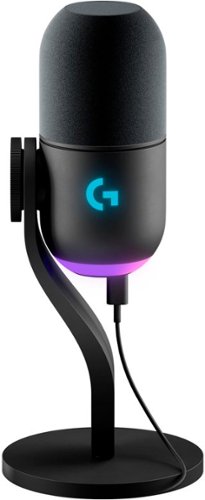
Yeti GX is a premium RGB gaming mic powered by LIGHTSYNC and designed specifically for game streamers. Combining a custom dynamic capsule with advanced software, this USB microphone rejects noise and key clicks, improves your sound and ensures consistent high-quality audio while you stream. Use LIGHTSYNC to control two separate RGB light zones on the mic and sync them with other G gear in G HUB, including mice and keyboards, for a fully immersive experience. Add fun vocal effects with Blue VO!CE software, and use Smart Audio Lock or set the gain manually with easy on-mic controls.

Posted by: internetuser
After receiving and testing the Logitech G Yeti Gx I have nothing but positive things to say.
The microphone that I had before was nothing spectacular and I decided to upgrade. It is a very easy setup and the look is very appealing. The microphone itself focuses just on your voice and avoids key clicking and background noise. I used the microphone in discord with a couple of my friends to test the mic out and the sound quality was great.
It comes with an adapter to attach to a microphone arm if you have one. You can change the gain either using Logitechs software or you can do it with the dial on the mic to your liking. I suggest keeping it close to 50% and if you start to peak on the microphone the dial will turn red.
The RGB capabilities make it so you can design the microphone how you want. Using the lightsync feature is very cool. You can control 2 seperatr RGB zones and sync them with another mouse and keyboard.
This is a perfect microphone for any gamers or streamers who want to take their setup to the next level without spending absurd amounts of money.
I would recommend this to a friend!
Share this review:


0points
0of 0voted this as helpful.
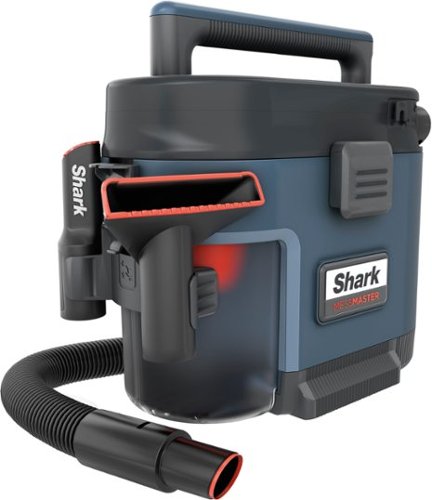
Meet the ultra-powerful, wet & dry MessMaster vacuum. Powered by No Loss of Suction Technology, it handles life~s un-vacuumable messes, from DIY disasters to kid chaos. When you~re done, MessMaster can rinse itself, cleaning the dust bin with just a cup of water. You even have the option to line the dust bin with a plastic bag to keep the mess contained for easy disposal.
Posted by: internetuser
If you are looking for one of those giant shop vacs on wheels that are cumbersome and hard to get in tight spaces then this is not for you. If you are looking for a great medium size portable shop vac with great suction then this Shark - MessMaster Portable Wet/Dry Vacuum is for you.
First of all, this Shark shop vac is very lightweight and so easy to assemble. Just attach the hose, clip on the attachments, and put an included small garbage bag into the collection bin and you are ready for some awesome cleaning. The Shark - MessMaster Portable Wet/Dry Vacuum comes with a squeegee attachment for liquid spills, a carpet tool for getting pet hair out of rugs and car floors, and a crevice tool for those hard to reach areas.
The coolest feature is being able to use a garbage bag in the collection bin. Just vacuum up your dry or wet spills and when full just throw away your collection bag. No mess, no fuss. If the hose or collection bin get messy, just run a cup or two of water through the hose and wash all the dirt away.
I also love how powerful the suction is. We have 2 large dogs who shed and using this Shark - MessMaster Portable Wet/Dry Vacuum to go along walls, carpet and stairs where dog hair builds up is way more easy then bringing out our big canister vacuum and having to empty it every few minutes because of the cannister filling up. The included extensions and crevice tools make it easy to get to hard to reach places.
This is a great medium size shop vac that packs up pretty easy. The only problem is the extension wands don't attach to the unit in any way so you have to keep track of them so you don't lose them.
I would recommend this to a friend!
Share this review:


0points
0of 0voted this as helpful.
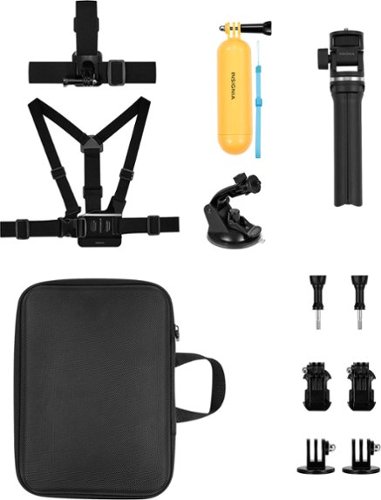
Whether you manage a travel vlog or enjoy sharing important moments with friends and family, amp up your video~s production quality with the NS-GPK23 12-Piece GoPro Accessory Kit for Most GoPro Cameras. This 12-piece kit includes everything you need to go completely hands-free, including head and chest straps, a floating aid, an extendable tripod and more. All accessories are waterproof, letting you film both above and below the waves. A suction cup mount attaches your GoPro to the windshield of your car, helping you nail those dramatic highway or off-roading shots. Finally, at the end of the day, you can pack your GoPro into the semihard carrying case and rest assured knowing that your camera is well protected.
Posted by: internetuser
I have been wanting to get a floaty stick for my GoPro so my kids can take it out on the tube while I tow them with the boat. When I saw you get all the accessories for almost the price of one floaty stick, I decided to get this Insignia kit.
You get a head and chest strap to use while hiking or biking. They fit securely and are actually very comfortable to wear. For the chest strap just slip in the included quick release buckle and attach your go pro to it with the also included thumb screws. I guess you could use the head strap while snorkeling to get hands free video of underwater scenes. I can't wait to try that. The uses could be endless for these 2 straps.
The tripod is great also. It can be used on a tabletop and extends from 8" to 2 1/2'. It will be perfect to set up Christmas morning to catch all the action or a kids party to video the cake cutting. You could place this anywhere to record events that don't have a lot of movement as it doesn't have a swivel to follow the action.
The suction cup mount is amazing. That thing sticks to any surface. I put it on my windshield and dash on both car and boat and it held in place perfectly. I also attached it to my wood work bench to record DIY projects.
Of course I tried the floating handle that worked as advertised. I first put it in shallow water to see what happens. The handle floats on the water line and flips the go pro into the water. I decided it was safe enough to try while tubing. Luckily with the safety cable attached there was no disastrous loss of my go pro and some amazing footage recorded. Make sure to use the water proof housing for your go pro while using the floaty handle.
This whole accessory kit is well worth the money.
I would recommend this to a friend!



Share this review:


0points
0of 0voted this as helpful.
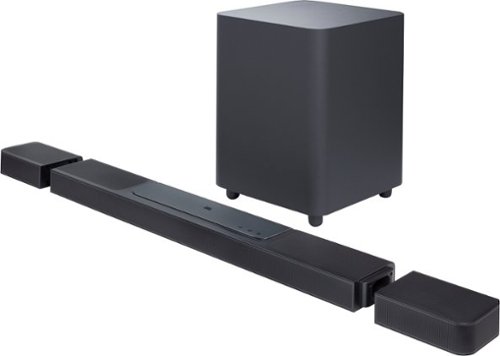
The ultimate 3D surround experience that will blow you away. You~ve never heard anything like the JBL BAR 1300X~in your living room or anywhere else. More than just a great soundbar, it~s a full sound system. It features MultiBeam and six up-firing drivers~four in the bar and two in the detachable battery-powered surround speakers~that deliver massive Dolby Atmos and DTS:X 3D surround sound, centering you in your music, movies, and games. 1170W of total output power and thrilling bass from a 12~ subwoofer is more than enough to make the room shake. Though, you~ll never miss a word with due to our PureVoice technology, which makes sure the dialogue is clear even when other sounds are at their loudest. When you want to enjoy your favorite tunes choose streaming via either AirPlay, Alexa Multiroom Music (MRM), or Chromecast built-in that give you over 300 music streaming options. But that~s not all. Your choices are as unlimited as you are because you can also pair the soundbar to your Bluetooth device. You can even take one of the detachable speakers (or both for powerful stereo sound) out to your kitchen or patio and enjoy listening to your favorite music or podcast there.
Posted by: internetuser
Needing an upgrade from my old Sony soundbar, I decided to give this JBL - BAR 1300X a try. When the box arrives you will think you were just delivered a new chair for your living room. The box is enormous but that's because the Subwoofer is like a giant ottoman. The bar itself is very long if you add the detachable rear speakers. It's about as wide as my 65" TV. Setup is very easy especially if you download the JBL One app. This will help you connect to your WIFI, download any updates, and calibrate the surround rear speakers for best sound.
Hooking up the JBL - BAR 1300X to your TV is also very simple. Hopefully you have a TV that supports eArc. Just connect your HDMI cable from eArc on the soundbar to the eArc on your TV. Now you will be able to immerse yourself in Dolby Atmos surround sound. Of course you must detach the rear speakers from the "docking station" on the bar to get this sound. There are 3 other HDMI ports to connect your gaming systems or video players and get great 4K video quality.
All the speakers working together produce an exceptional watching experience. The wireless Sub as stated before is a huge square plain box with a plug. Looking at it you might wonder where the bass is coming from. Well, flip that bad boy over and you will find a 12" woofer that packs a lot of punch and makes explosions, crashes and booming music rumble in your chest. The 11.1.4 means there are 11 channels coming from from front and rear, 1 low frequency sub and 4 upward facing speakers to get that sound that something is coming from or hovering over you. It's like a great symphony working together to produce wonderful sounds. The placement of the wireless rears is very important on many levels. First off, make sure to look just above the charging port on the back of each rear speaker and look for a "R" or "L" (right/left) and place them accordingly. Also be sure to give them plenty of space in between so the sound is not crashing into each other. The biggest thing about location is you might want to place them near an outlet because if you are like me you will forget to dock them to the soundbar for charging. With a plug near, you can connect (not supplied) USB-C charging cords and blocks to the rears to never have to remember to charge on the bar. Remember to use the included end covers to hide the docking area or the bar looks kind of funky. Another great function of the removeable portable rear speakers is that they can connect to Bluetooth and moved around your house or to the backyard as portable stereo speakers.
The remote is somewhat basic and has a replica on the app with all the same functions. Also in the app you will find a 3 band equalizer to adjust bass, mid and treble. You will also be able to adjust the rear sound level so when you start a movie and want that full surround sound blasting at you, it can be cranked up to full volume. Wireless playback is another cool feature where you can send music straight over WIFI to the soundbar without have to go through the Bluetooth on your phone.
If you are looking for a mid to high priced soundbar with wireless surround that produces incredible sound, this is for you. I love it and would recommend it.
I would recommend this to a friend!


Share this review:


0points
0of 0voted this as helpful.
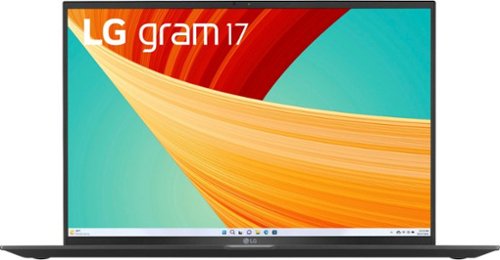
LG - gram 17 Laptop - Intel Evo Platform 13th Gen Intel Core i7 with 16GB RAM - 1TB NVMe SSD - Black
LG gram Z90R series laptop is an ultra-lightweight powerhouse of productivity that gives you what you need to get it all done~wherever your hustle takes you. The 17~, anti-glare IPS display delivers vivid color and resolution that makes what you see on screen come to life. On the inside, LG gram runs Windows 11 Home, while the Intel Evo 13th Gen Intel Core Processor and integrated Intel Iris Xe Graphics deliver the performance to accomplish daily demands from crunching numbers, to editing a masterpiece, or streaming your favorite content with nimble responsiveness and power.
Posted by: internetuser
This is the first update to my old laptop in about 4 years. When unboxing I actually thought they may have forgotten to put the LG - gram 17” Laptop in the box. Weighing in at about 2.5 lbs, it's more then half the weight of my old laptop. The rest of the unboxing is just removing the ultra lightweight power cord and fast charging block. LG also makes charging very simple. No carrying around a 6 foot cable with a huge power block in the middle.
A quick look around the outside before opening and you will find 1 HDMI port, 2 USB-C ( one will be needed for charging) and 2 USB-A ports. There's also a SD Card slot and a headphone jack. The case looks great brand new. It's shiny and reflective but after several uses, fingerprints start to become the design on the top. It will need to be wiped down after every use. When opening the case you see where the light weight of the LG - gram 17” Laptop comes from. I almost feel like I need to open it gingerly because it you push/pull to hard you actually feel a little bending in the lid. I hope this was put through tests by LG because I could see this being a problem in the future.
Opening it up you notice the brilliant colors and sharpness of the 17" non-reflective screen. The Keyboard and number pad are full size and backlit for low light typing. The track pad is good size but leaves plenty of room on the sides to rest your hands while typing. The matte finish on the keyboard is much nicer then the finish on the outside of the laptop. Getting to work is easy with the face recognition or fingerprint reader.
The processor performance is what you would expect from Intel's core13th Gen I7. From watching videos, to office work and zoom meetings and everyday web surfing, the LG - gram 17” Laptop performs amazing. The Intel Iris Xe Graphics is sufficient for some video and photo editing and light game playing. The 16Gb of DDR5 ensures fast data transfers and the 1TB of storage is plenty for all your docs, pics and media.
I absolutely love this LG - gram 17” Laptop and now take it everywhere unlike my old laptop that was cumbersome and heavy to drag from work, to home, vacations, etc. I hope the construction stands the test of time so I don't have to update for another 4 years.
I would recommend this to a friend!

Share this review:


+1point
1of 1voted this as helpful.
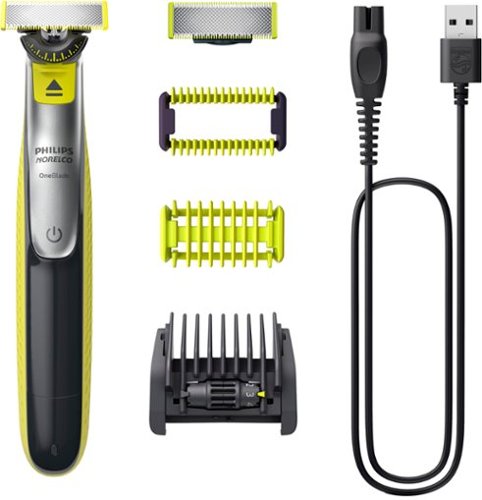
Philips Norelco OneBlade 360 Face + Body trims, edges and shaves any length of hair, even on body. OneBlade 360 Face + Body includes one blade for your face, and another blade with a click-on skin guard for your body. The unique OneBlade shaving technology integrates a fast moving cutter (12000x per minute) with a dual protection system to give you an efficient comfortable shave on longer hairs. OneBlade does not shave too close, so your skin stays comfortable. Click on the 5-in-1 stubble comb for face or use the additional blade with click-on skin guard and 3mm body comb for a fast and even trim on your body and below-the-belt. The Lithuim Ion battery delivers up to 60 minutes of run time after a 4 hour charge. Forget about using multiple tools. OneBlade Face + Body does it all. Completely waterproof so you can even use in the shower- with or without foam. Pack includes: 1 handle, 1 360 blade for face, 1 blade for body, 1 5-in-1 stubble comb for face, 1 skin guard for body, 1 body comb, 1 USB-A charging cord (adapter not included), 1 protective cap.
Posted by: internetuser
When unboxing you will find the electric shaver, 360 pivoting blade, 5 length trimming comb and a body comb and skin guard comb. There is also a cord for charging the Philips Norelco One Blade System. I would suggest charging the unit right out of the box while you read the instructions and figure out all the accessories. In about 1 hour you will be able to use you shaver. An extra blade and blade cover are also included.
For a close shave of your face just attach the pivoting 360 blade, turn the power on and lay the flat surface of the blade against your face and start shaving. You can move the blade in either direction and the pivoting blade glides easily over the contours of your face. If you have a beard or sideburns where you need clean lines, just use the edge of you blade steadily until you have nice straight lines. There is a sensitive skin guard included if you normally get skin burn from shaving. Just attach the guard and the razor doesn't come completely come in contact with your skin but still gives you a nice close shave.
Attach the adjustable length comb to get the trim length you want on your beard and mustache. Start with the longest setting and move down until you get your desired length. You also get a body comb to do those real sensitive area's of your body where you can't afford to make a mistake. (ouch!!) This gives you a nice clean uniformed shave without the danger of just using a straight razor.
I highly recommend this Philips Norelco OneBlade
I would recommend this to a friend!
Share this review:


0points
0of 0voted this as helpful.
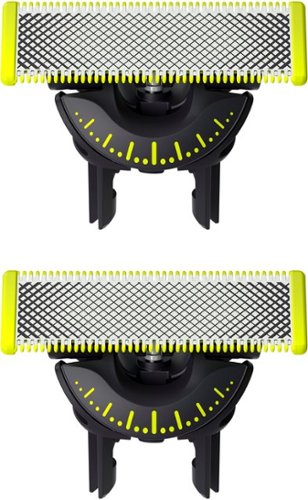
The innovative 360 Blade can flex in all directions to adjust to the curves of your face. The design enables constant skin contact and control. Easily trim and shave hard-to-reach areas ~ with fewer strokes and greater comfort. Fits with all OneBlade products.
Posted by: internetuser
These OneBlade 360 replacement blades work great and give almost as close a shave as razors and shaving cream. The pivoting 360 blades make it easy to shave all the contours of your face easily and cleanly. Just pop them into any of your One Blade shavers and listen to it click into place then you are ready for a great shave.
You can also use the edge of these blades to create clean straight lines in your beard, goatee or side burns. Depending on the model of your shaver these blades will fit into all the attachments the are available from Philips Norelco. From the sensitive skin guard to the body comb and 14 length adjustable comb these blades will fit perfectly and give your whole body a remarkable shave.
The best part is these blades will last you up to 4 months per blade so you will save money on buying replacement blades for standard razors. These work great with the Philips Norelco One Blade 360 Pro shavers.
The best part is these blades will last you up to 4 months per blade so you will save money on buying replacement blades for standard razors. These work great with the Philips Norelco One Blade 360 Pro shavers.
I would recommend this to a friend!
Share this review:


0points
0of 0voted this as helpful.
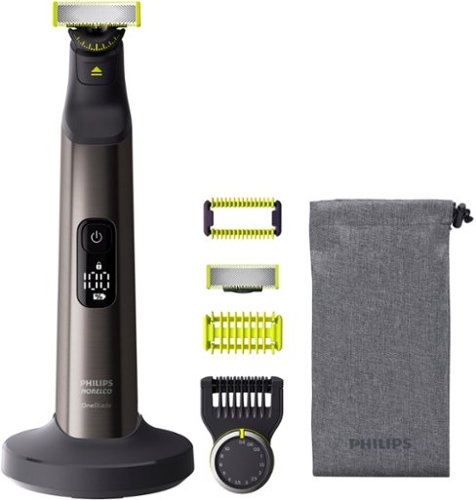
Trim, edge and shave any length of hair. Designed to cut hair, not skin. Philips Norelco OneBlade 360 Pro Face & Body is a revolutionary hybrid styler that can trim, shave and create clean lines and edges, on any length of hair- on your Face or Body. Forget about using multiple steps and tools. OneBlade does it all. Philips Norelco OneBlade has a revolutionary blade technology designed for facial styling and body grooming. Its dual protection system ~ a glide coating combined with rounded tips ~ makes shaving easier and comfortable. Its shaving technology features a fast-moving cutter (200x per second) so it's efficient - even on longer hairs. The innovative 360 Blade can flex in all directions to adjust to the curves of your face. Trim your beard to an even length with the included adjustable precision comb. Dial up one of the 14 lock-in length settings to get everything from a 5 o'clock shadow, to a tight trim, to a longer beard style. Use the additional body blade with click-on skin guard and 3mm body comb for a fast and even trim on your body and below-the-belt. OneBlade is water resistant, so it is easy to clean: just rinse it under the tap. You can shave wet or dry, with or without foam. The blades are designed for lasting performance. For optimal performance, you will only need to replace each blade every 4 months (For best shaving experience. Based on 2 full shaves per week. Actual results may vary.). An eject icon will appear on the blade when it's time to consider changing the blade for the best shaving experience. Rechargeable Li-Ion battery delivers 120 minutes of constant styling power after a 1 hour charge.
Posted by: internetuser
At first glance the Philips Norelco One Blade 360 Pro looked very confusing with all the attachments that come with it. But after reading through the long but informative directions I was shaving, trimming and edging like a pro.
First of all the shaving experience. Just attach the 360 blade into the unit and you are ready to shave even the scruffiest of faces. The big plus in this mode is that you can shave your face in both directions because of a blade on each end. Just hold it flat to your face and let the 360 motion easily and smoothly glide against your skin. You get almost as close a shave as you do using a razon and shaving cream.
Now put on the beard attachment and you can get a barber shop quality trim. The adjustable comb lets you trim your beard from lengths of 0.4 to 10mm. The lengths are very accurate. I get my sideburns shaved at the barber to 4mm and when I set the adjustable comb to 4mm on the shaver it was exactly the same length as the barber.
For those with sensitive skin there is a skin guard attachment that keeps the blade from giving you a razor burn like shave. The guard keeps the razor from making direct contact to you skin so you can still get a close shave without the irritation.
The Philips Norelco One Blade 360 Pro will also let you make clean edges on you beard or sideburns. If you just use the regular blade that is also included you can place the sides of the blade on you face to make perfectly straight lines. You can use both sides of the blade so you don't have to contort you hands a wrists to work on both sides of your face.
Charging the unit was very fast upon first opening. I plugged it in while I read through the instructions. It took about an hour for both charging and reading the instructions. The instructions say that battery life will last up to 120 minutes between charges. Charging is done with an included wall plug. But the cool thing is they include a stand which the cord can be attached to so charging is a breeze. just put your Philips Norelco One Blade 360 Pro on the stand and it starts charging. I'm not sure if it's bad to keep the stand plugged in and the unit always on it but it's nice to have a fully charged shaver at every use.
Philips Norelco One Blade 360 Pro also comes with a blade guard and cool little carry case to keep all your attachments in. Also you get an extra blade which is nice because each blade is suppose to last up to 4 months. This is a great Do-It-All shaver.
I would recommend this to a friend!
Share this review:


0points
0of 0voted this as helpful.
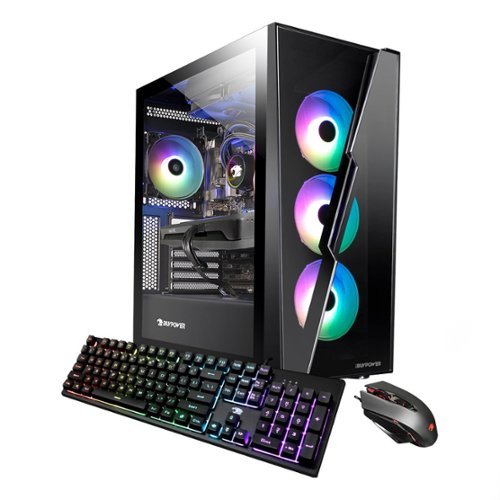
Upgrade your current gaming rig with this iBUYPOWER Desktop. It~s 16GB of RAM and Intel i7-12700 processor lets you run multiple programs at once, and its Intel Arc A750 graphics card renders fast-paced action smoothly without screen tearing. This iBUYPOWER desktop also has a 1TB HDD + 500GB solid state drive for a faster start up and data acesss.
Posted by: internetuser
The first thing I would say is that iBUYPOWER really takes care in packaging their computers for shipment. Styrofoam to keep the unit tight in the box and a foam like substance in the case to make sure no components get bounced around. After unboxing you see just how handsome this machine is. With it's 3 RGB fans in the front and a glass side panel you can see everything going on inside the case. The colors of the fans and included mouse and keyboard can be customized to a rotating color scheme or can be made 1 solid color. When the keyboard is set to flashing alternate colors it is kinda mesmerizing.
setup was easy except for the fact that there were 7 updates that needed to be installed right from startup. Most were successful but the update for the ARC Control kept sending me error codes when I would start up the computer. I took several days to correct the issue but going to the Intel website lead to a fix for the problem.
As far as my initial gaming experience on the SlateHako2120i Gaming Desktop I was thoroughly happy with it's performance. The i7 12700 combined with the Intel Arc A750 works great for gaming. I was a little skeptical at first because Intel has not been known for making great GPU’s but the Intel Arc A750 really surprised me. This GPU compares really well against the rtx 3060 which is an all around great GPU. I tested this by playing multiple games and even with high graphics you still get upwards of 100 fps. On low graphic setting you could easily get upwards of 200 fps.
The SlateHako2120i also comes with a fairly large amount of storage with the 1tb hard drive and the 500gb SSD. The SlateHako2120i Gaming Desktop has all around great pc parts and if you ever feel the need to upgrade, it would be fairly easy. It also comes with windows 11 installed which has a new look over windows 10 but very easy to navigate.
I would recommend this pc to anyone who wants solid all around gaming pc for a great price.
I would recommend this to a friend!



Share this review:


+4points
4of 4voted this as helpful.
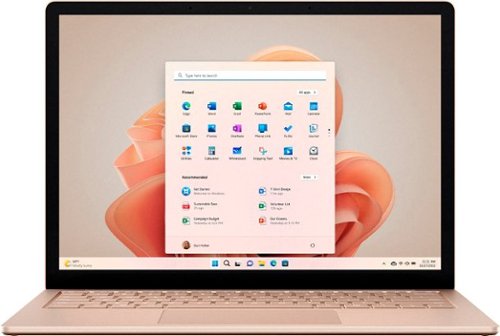
Multitasking speed powered by 12th Gen Intel Core, with Windows 11 and a vibrant PixelSense touchscreen. Sleek and beautiful, in choice of size ~ 13.5~ or 15~ ~ and colors from bold to subtle, including new Sage.~ Plus battery life~ for real life to do your thing your way all day. Surface Laptop 5 gives you the perfect balance to do it all on your terms and make an impact.
Posted by: internetuser
The first thing I notices while unboxing the Microsoft - Surface Laptop 5 is the feel of the case. No cheap plastic covering this laptop, it's a solid aluminum case which felt a little heavy but very sturdy. The laptop when closed is les then a 1/2 inch which makes it very portable. Put it in a backpack and carry from school to work and back home easily.
Unboxing and setup is very simple. Mine had over 50% battery life at setup so I proceeded to set up my laptop. I have a Microsoft account so I just had to sign in, connect to my WIFI and I was ready to use it. Never having used a surface product before I noticed that there were not many ports. On the left side there is a USB 3.1 port, a Thunderbolt port ( which can be used to connect to a monitor, charge the laptop or data transferring), and a 3.5mm headphone jack. The surprise for me came on the other side. There is a Surface Connect port. It's a long thin port that the included charger fits into. But I have come to find out that this port can open a world of opportunities for external hook ups. If you buy a separate Surface docking station you can basically turn your Microsoft - Surface Laptop 5 into a desktop. you can hook up monitors, keyboards and a mouse. That comes at an extra cost though.
The performance of the Microsoft - Surface Laptop 5 is pretty amazing. Startup takes just a couple seconds and the screen is unlocked by password, fingerprint or facial recognition. The Intel Core i5 processor is very fast for light gaming and web browsing. Switching between tabs and and open apps is lightning quick. The touch screen is a plus while using for work and school and switching between windows. The picture on the 13.5" is very vibrant and colors come out bright and clean. A sensor in the Microsoft - Surface Laptop 5 will adjust the brightness and colors on the screen depending on the ambient lighting.
If using this laptop for work you will be happy to know it has a built in web cam and 2 microphones as well as built in speakers. If you're looking for premium sound and web cam you should probably hook up external ones but for everyday sound and video the built in speakers, web cam and mic's work well.
The battery life boasts an 18 life unplugged. I have never gone that long but did watch a couple football games, some streaming while going back and forth browsing the web and still had about 50% battery life so I am sure if not putting it under a full load you can come close to that 18 hours. I also personally don't do any video editing or play graphically intensive games so I couldn't really push the Microsoft - Surface Laptop 5's processor to its limits, but for everyday web browsing, Microsoft Office apps, and watching videos this Microsoft - Surface Laptop 5 was perfect for me.
I would recommend this to a friend!
Share this review:


0points
0of 0voted this as helpful.
internetuser's Review Comments
internetuser has not submitted comments on any reviews.
internetuser's Questions
internetuser has not submitted any questions.
internetuser's Answers
internetuser has not submitted any answers.