
Share internetuser's profile


internetuser
internetuser's stats
- Review count109
- Helpfulness votes149
- First reviewJune 30, 2015
- Last reviewMay 17, 2026
- Featured reviews0
- Average rating4.7
Reviews comments
- Review comment count0
- Helpfulness votes0
- First review commentNone
- Last review commentNone
- Featured review comments0
Questions
- Question count0
- Helpfulness votes0
- First questionNone
- Last questionNone
- Featured questions0
Answers
- Answer count0
- Helpfulness votes0
- First answerNone
- Last answerNone
- Featured answers0
- Best answers0
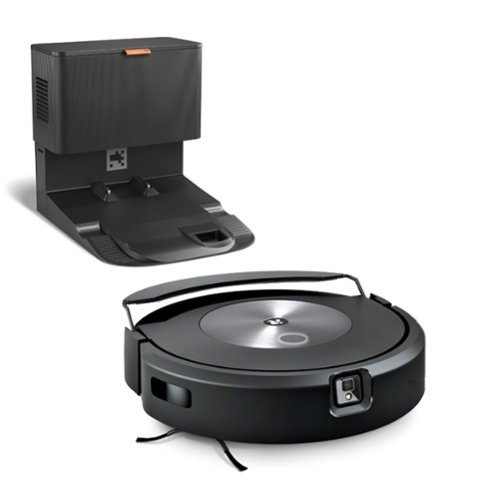
The premium vacuum and mop solution like no other. It~s the only 2-in-1 with D.R.I. (Dry Rug Intelligence) means the Roomba Combo j7+ uses carpet detection and the Auto Retract Mopping System that lifts itself to the top of the robot, completely away from carpet preventing wet messes entirely. On hard floors, it vacuums and mops at the same time. The 4-Stage Cleaning system combines our Edge-Sweeping Brush, Dual Multi-Surface Rubber Brushes, Power-Lifting Suction and first-of-its-kind mopping with added pressure for a thorough clean. It's all designed to keep your carpet and hard floors cleaner while avoiding obstacles at the same time~so you can live your life.

Posted by: internetuser
I'll start by saying we have two 100 pound labs who shed a lot and in no way can this Roomba Combo j7 keep up with their hair on carpets but it is great for keeping hair off and mopping hardwood floors. We have a 10'x7' area rug where our pups like to lay so I thought I would try the Roomba Combo j7 on it. Well half way through the the rug I got a red light and command to empty the bin. I in no way expected the Roomba to take on such a big task but thought I would try. Regular cleaning with a regular vacuum will still be needed several times a week on our rugs.
Now for the good news. The Roomba works awesome on hardwood floors. Setup was super easy for the Roomba Combo j7. I plugged in the base, attached the mop pad and charged the Roomba until completely charged. We have a large area downstairs so I didn't want it to run out of juice on it's first mapping run. I also added the included package of floor cleaner to the removable dustbin and added water to fill . Now the mopping function was ready to go.
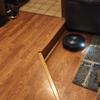
On first use your Roomba Combo j7 will map out your floorplan so it knows where to go in future uses. I choose to have it give the floors a vacuum as it mapped out the bottom floor. You can also just give it a mapping run to save battery life. The first run took just under an hour and I was amazed at the map it created. I had lifted chairs and anything on the floor out of the way so it could reach everywhere on the floor. The next day I ran it one more time and it completed a perfect map of house. It shows where carpet or area rugs are and even showed where the floor moldings are that separate our rooms. By the way, the Roomba had no problem climbing over 1/2 inch transition molding between rooms or climbing up on area rugs that sit high above the hardwood floors. We also have a sunken living room so after the main level was done and since the Roomba is smart enough not to go over the edge, I placed the unit on the lower level and it continued to create a map for that area too.
On the first try of vacuuming and mopping our floors came out amazing. It sucked up any loose pet hair and dirt and the mop flipped down from it's resting place and trailed the Roomba mopping the floor with just the right amount of cleaning solution. I touched the floor after the Roomba made a mop run and the floor was barely moist but was sparkling clean. When the Roomba sensed it was about to go onto an area rug the mop flipped back up into position and just the vacuuming feature took over on the rug. It is so SMART!!! You can also change preferences on each job like just run the vacuum with no mop, how much cleaning solution to use, and how many passes you want the Roomba Combo j7 to take while running in each room. By the way this is all controlled by using the the IRobot app which is very user friendly. You can program the vacuum to do only certain rooms on certain days. The rooms can be separated and named on the map so you can use the app or voice commands on Alexa or Google Assistant to start, pause or end cleaning jobs.
The sound level while the Roomba Combo j7 is doing it's thing is a little less then that of a normal vacuum. I thought it would be quieter. So if you're watching TV during the vacuuming you may need to turn it up a bit but if you are working from home and need silence make sure to not run the Roomba during that time. It is that loud to where it could be annoying to talk over.
The best part, unless there is some malfunction, is that after completing the job the Roomba Combo j7 goes to it's home base, empties the dust collection bag and goes to sleep to recharge it's batteries on it's own. You just need to change the collection bag when it get's full.
This is an awesome vacuum/ mop combo to keep your floors clean daily without having to do any of the work.
I would recommend this to a friend!

Share this review:


0points
0of 0voted this as helpful.
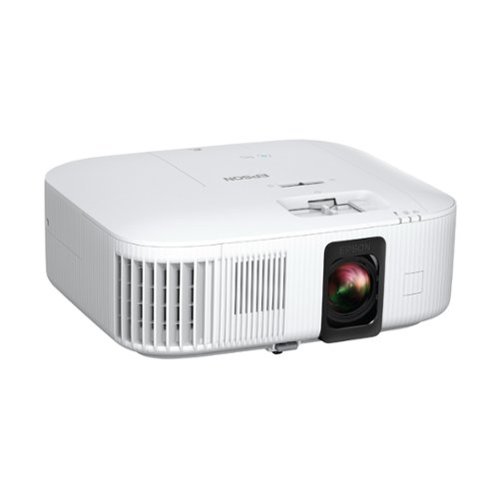
Enjoy an immersive, big screen home theater experience with the Home Cinema 2350 Smart Streaming Projector. Featuring Epson~s innovative 4K PRO-UHD1 technology and phenomenal HDR102 brilliance~the Home Cinema 2350 delivers a truly epic 4K experience.. True 3-chip 3LCD technology offers outstanding brightness and color accuracy without disturbing the overall contrast, ensuring deep blacks and remarkably vivid colors. And with Android TV3 included, the Home Cinema 2350 Smart Streaming Projector also makes it easy to stream your favorite Twitch and YouTube channels~or watch the latest movies and TV shows on Netflix, Amazon Prime Video, Hulu, Disney+, HBO Max and more4. Allowing for multiple audio options, the Home Cinema 2350 features an integrated 10 W bass-reflex speaker, plus Bluetooth wireless audio device support5 for connecting soundbars or headphones. And, with a sleek, compact design and vertical lens shift, you can place the projector nearly anywhere~including tables and bookshelves~for flexible setup and easy viewing.
Posted by: internetuser
The Epson - Home Cinema 2350 is all you will need for all of your streaming, fun gaming, satellite or cable viewing or Blue Ray disc watching. This 4K UHD smart gaming projector will definitely replace my HD television when it dies.
The unboxing and setup is pretty straightforward. Plug it in, pair your remotes and connect to your WIFI. Now you are ready to watch your favorite streaming services that are already loaded on to the Android TV home page. I also went into the app store and downloaded some of my favorite apps like NFL Sunday Ticket, and NBA Courtside. There are hundreds of other apps to download.
Now you are ready to plug all your devices into the Epson - Home Cinema 2350 except that there is only 1 HDMI port available. If you are mounting this projector in your entertainment room you will need a 4K HDMI switch that will allow you to connect multiple units at 1 time. If your preference is to move the projector from room to room or outside for movie night then the single HDMI port is just fine.
The picture from the Epson - Home Cinema 2350 in a dark room is movie theater like. the colors are vibrant and lifelike, the black is very deep and rich not washed out or dull and the whole picture is very bright and clear. Watching 4K shows and movies from Netflix is a great experience. Even in a dimly lit or bright from outside light room the picture still shows up pretty well.
As far as gaming the Epson - Home Cinema 2350 is great to use for some family night gaming. It does boast a 120 FPS and under 20MS lag time but when put to the test by the true gamers in the family, my kids, they found playing games like Call of Duty and other FPS games were better at 1080p then in 4K and they lag time to be just ok. Their main complaint is that the picture is just to big to play competitive FPS games because they actually had to move their heads to see the whole screen causing them to be a fraction of a second to late to hit targets or hide from incoming shots. They prefer to play these games on a smaller screen to get a faster reaction time. BUT, family game nights playing Mario Kart, and Mario Party were a blast playing on an 90 inch screen from the Epson - Home Cinema 2350.
The sound from the projector itself is just ok. It sounded a little tinny like it was coming out of a metal box. But no-one will use the speaker from the unit. At the very least you can pair a portable Bluetooth speaker and put in above or below the screen for a better sound. And at best you can connect to a sound bar in your media room for surround sound results.
I can't wait to do away with my smart TV and mount this in my entertainment room with a retractable screen for hours of streaming, sports watching and gaming. I highly recommend the Epson - Home Cinema 2350 4K PRO-UHD Smart Gaming Projector with Android TV.
I would recommend this to a friend!





Share this review:


+6points
6of 6voted this as helpful.

Sonos Roam SL allows the user to enjoy hours of music, radio, audiobooks, and more from all your favorite services thanks to the long-lasting rechargeable battery. Listen at home with WiFi and easily control the sound with the Sonos app, and stream with Bluetooth everywhere else. Add more Sonos speakers around your home for multiroom listening. Everything works together over WiFi.
Posted by: internetuser
This is my first Sonos speaker but I can see how 1 or 2 more linked together through WIFI will ensure great wireless sound everywhere in the house. Better yet link it with a Sonos sound bar and get a surround type rear speaker.
The unpacking of this speaker is straight forward. The packaging comes with the speaker, a USB to USB-C cord for charging. A wireless charger is also available and fits the Sonos - Roam SL perfectly so you can leave the unit on the charger and have endless battery life.
All you need to do is download the Sonos app and setup is a breeze. Just allow the app to discover and setup your Sonos - Roam SL. Enter your WIFI password and you are ready to go.
Using the app if fine. You can add all downloaded music from your phone as well as music services and play it through the app. There are some EQ settings you can play with on the app as well. Adjust the Bass and Treble and turn on loudness for full sound coming out of the speaker. When you take the Sonos - Roam SL on the go it also has Bluetooth capability to connect to your phone to play media. Just hold down the power button to put in discovery mode and look on your Bluetooth list to find Sonos Roam and hit connect. You now have portable sound to take on the go.
Now for the sound. The sound output from the little speaker compares to that of larger not so portable speakers. I have a suitcase size "portable" speaker and except for the bass boost it has, this Sonos - Roam SL puts out as good a sound if not better. The lows hit hard without distortion and vocals and instrumentals are very clear. This would be perfect for camping or taking to the beach.
The function buttons on the Sonos - Roam SL are very simple. If sitting upright the top has a play/pause button, volume control and forward and back capability with a few presses of the play button.
The Sonos - Roam SL is a great little portable speaker that has opportunity for expansion.
I would recommend this to a friend!
Share this review:


0points
0of 0voted this as helpful.
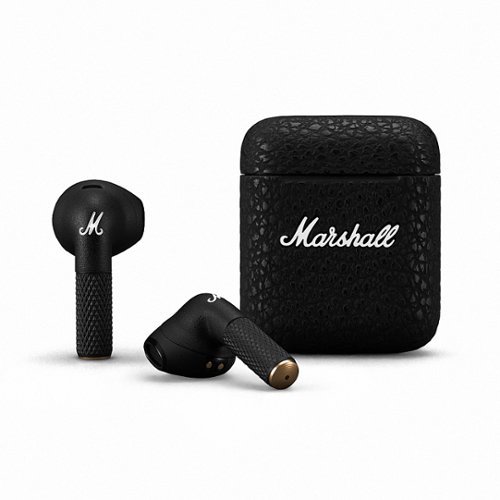
Minor III brings you Marshall signature sound without any extra clutter. These headphones do all the heavy lifting for you, so you can just grab your music and go. Enjoy the absolute freedom of listening without wires. Minor III comes with Bluetooth 5.2, ensuring that each earbud has a strong connection to your device.
Posted by: internetuser
The first thing you notice about these earbuds is the iconic Marshall lettering and textured case. It looks sharp and the textured outside feels great while holding them, not slippery like it wall fall out of your hand. When puling out your earbus you will notice it takes a little force because the magnet inside hold the buds securely in place while in the case. Even if your case were to open in transit, the earbuds will not fall out. The earbuds themselves look like a black version of Airpods which makes them unique. They have the same textured feel on the stems for a very stylish look. They fit in my ears perfectly. Even during light workout they stay seated in my ear. I'm sure if I were to do very vigorous exercise, 1 or both could slip out but I don't get that feeling from just normal walking, working or exercise.
Setup was easy. I just powered them on and they connected to my Bluetooth automatically. The sound that comes from these earbuds is amazing. If you have ever owned Marshall speakers you know the quality and sound will be top notch.
Charging is very simple. A USB-C cable is including and these Marshall Minor III also have the option for wireless charging. My first use was on a flight and with a couplie hours at the airport, 3 hour flight and listening time before bed the battery life never drained. There is no power meter on the case but under Minor III in my Bluetooth it said I still had 40% so I'm sure you could never completely drain these airbuds in 1 day even with constant use.
The touch commands are very simple on the Minor III. tap once to
play /pause, twice to skip to next song and 3x to go back to last song. There is no volume control on the earbud itself but if you pull one bud out of your ear the music will pause and you can have a conversation without music playing in your ears.
play /pause, twice to skip to next song and 3x to go back to last song. There is no volume control on the earbud itself but if you pull one bud out of your ear the music will pause and you can have a conversation without music playing in your ears.
With the great style, amazing sound and ease of use these are definitely a keeper.
I would recommend this to a friend!
Share this review:


0points
0of 0voted this as helpful.
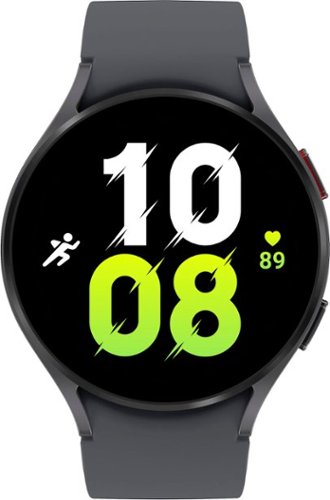
Stay on track, on time, and in style with Galaxy Watch5~. Ready to get a better understanding of your wellness? Galaxy Watch5 features body composition analysis~, improved sensors that get an accurate read on your heart rate~ and Advanced Sleep Coaching~ that helps you get your zzzs . Whether you~re getting your steps in, jogging at lunchtime or crushing yoga class on the weekend, strut your fashion sense with Watch bands and faces that match your awesome outfit. Stay powered up on the go throughout even your busiest day with an improved battery that gives you time to do it all. Worry less and do more and with a Sapphire Crystal Glass that~s more durable than before and a water resistant design that can take a splash~ or two. Go ahead, unleash the best you with Galaxy Watch5.
Posted by: internetuser
I haven't worn a watch since cell phones came out because really all they did was tell time and I had the time right on my phone. But after trying out this Samsung - Galaxy Watch5 and all of it's features, I am back in the watch game.
First of all this watch is an extension of your phone. I have a Samsung S22 which made setup a breeze. I just turned on the watch and it connected with my phone automatically and walked me through the setup process.
With the watch I can do all the things that I can do on my phone. Place and receive calls, Text, listen to music, open apps, and use navigation. It's like having your phone right on your wrist. Just swipe right for notifications, left for health apps, down for settings and up for apps. Very simple.
As I said, setup is easy and when I put the phone on my wrist I noticed that it was a bit heavy but not overly weighted. It feels very comfortable on my wrist and the strap is rubbery so it doesn't pinch like some bands. The glass is made of sapphire crystal so I feel safe wearing the watch at work and not worry about scratches. The face is large enough to read texts and notifications easily and the home screen is customizable. You can choose from dozens of faces from analog to digital clocks and from animals to flowers to dashboards with lots of info on them.
The feature that sold me on the watch is the built in health and wellness apps. Just swipe right to see your steps and active time for the day. You can even program your own exercises into the watch to track those activities. Also you can get biometric readings like heart rate, blood pressure, EKG and stress levels from sensors on the back of the watch. The most important to me is the tracking of your sleep. It will tell you how long you slept, and what type of sleep you got. Light sleep, deep sleep REM are some of the stages of sleep it tracks for you. Also if you enable snore tracking on your phone it will tell you how often you snore at night.
The battery life has not been an issue for me. The Galaxy Watch5 last me all day and night. I keep it on while I sleep to get my sleep report. It comes with a wireless charger which will top up your battery to 100% in less then an hour. I just lay my watch on my Samsung S22 and enable wireless power sharing to get a quick charge while getting ready in the morning. I would say if you had a full charge and used the watch until completely empty you would get a full day and half out of it.
The Galaxy Watch5 is very comfortable to wear 24-7and with the ability to do pretty much everything your phone does I don't ever see taking it off unless a quick charge is needed.
I would recommend this to a friend!
Share this review:


0points
0of 0voted this as helpful.
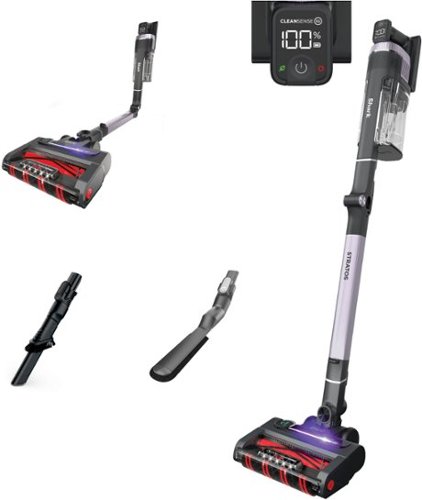
The Shark Stratos Cordless vacuum is the ultra-powerful, ultra-intelligent answer to whole-home cordless deep cleaning. Clean Sense IQ uses infrared sensors to detect dirt you can~t see and automatically boosts power for up to 50% better* dirt pickup (vs. Shark Stratos Cordless in ECO Mode). Stratos offers ultra-powerful cordless suction for up to 60 minutes runtime (In ECO mode, measured at the hand vacuum). Clean above the floor and in every crevice with the 2 included accessories: Duster Crevice Tool and Anti-Allergen Brush. Shark's MultiFLEX technology lets you bend the wand to reach under furniture or fold over for easy storage. Experience powerful hair pickup with the DuoClean PowerFins HairPro system- two brushrolls that dig deep into carpets, directly engages hard floors, and picks up dirt, debris, and hair in every pass. It features an LED display with real-time readouts to monitor battery, select suction levels, and engage Clean Sense IQ. Anti-Allergen Complete Seal with HEPA Filtration captures and traps over 99.9% of dust, allergens, and odor, keeping them out of the air you breathe. (*From floor to dust cup, third party tested on human/pet hair). Plus, Shark's new Odor Neutralizer Technology guards against bad odors inside your vacuum, for a fresh-smelling home. (*From floor to dust cup, third party tested on human/pet hair).
Posted by: internetuser
With 2 very fluffy dogs we tend to go through vacuums rather quickly. We prefer these light weight stick vacuums like this Shark - Stratos Cordless with Clean Sense IQ. It is very light weight to carry from downstairs to upstairs. The only drawback is the dust cup on these light weight vacuums fill up quickly, especially when you have pets.
The setup is very easy as with any stick vacuum. Attach the wand to the roller body at the bottom and the dust cup and motor assembly on the top. One difference with this Shark - Stratos Cordless Vacuum is that it has an Odor Neutralizing Cartridge which adds a fresh scent to the air and carpet as you vacuum up the dust, dirt and hair. I really like the fresh scent and will buy more cartridges as needed.
The motor of the Shark Sratos is by far the best of any vacuum we have owned. There is 3 settings, Eco, clean sense IQ, and Boost. The clean sense did well. It added power to the suction when it sensed a dirty area but if you really want to get deep down dirt out put it in boost mode (or as I say, "Beast" mode) and really feel that suction. I ran it on Boost mode at 100% battery life and was down to 25% after vacuuming our living room, family room, and bedrooms. There wasn't a strand of dog hair left anywhere and the 2 rollers stayed hair free unlike previously owned stick vacuums that end up with a huge hairball after each use. As I said though the dust cup is small so I had to empty it 4 times while vacuuming those rooms.
I tried the Stratos out on our hardwood floors also and it did very well. Usually a vacuum will shoot particles of debris around the floor when you try to vacuum hardwood but not this vacuum. It adjusts the roller speed automatically to gently pick up particles on hardwood and not shoot them out the back.
Besides the beast mode suction the position you can fold it into for storage is the best part. Just press a button on the stick and you can fold the dust cup and motor part of the vacuum forward so it sits balanced and with a very tiny footprint. You could store this easily in a closet, under a table or even out in the open because it gets so small you would barely recognize it's a vacuum.
We love this Shark - Stratos Cordless with Clean Sense IQ and hope to get many years of hard work out of it.
I would recommend this to a friend!
Share this review:


+1point
1of 1voted this as helpful.
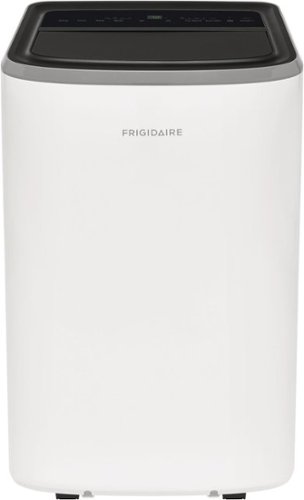
The Frigidaire 10,000 BTU 3-in-1 Portable Air Conditioner keeps your home cool and comfortable when and where you need it. Enjoy more cooling flexibility with two different fan speeds plus dehumidifying Dry Mode to keep your room cool and comfortable while also removing excess moisture from the air.

Posted by: internetuser
This Frigidaire - 3-in-1 Portable Room Air Conditioner does an amazing job of cooling down our master bedroom at night. We live in the central California valley where temperatures reach over 100 during the day and only down to mid 70's at night.
Our central A/C runs all day so we give it a break at night and now use this (portable) A/C at night.
Our central A/C runs all day so we give it a break at night and now use this (portable) A/C at night.
Unboxing and setup is somewhat simple. The included instructions are a little confusing but thanks to a YouTube video on this product we had it up and running in less then a half hour. The vent shield that covers the window is not made for all windows. You may need to use the foam weather stripping to seal up unexpected gaps. The vent hose feels a little cheap so over time connecting and disconnecting I'm sure I will need to buy a new one.
The 4 stars are definitely for the cooling power this unit has. We set the Frigidaire - 3-in-1 Portable Room Air Conditioner to 74 degrees and our room stays cool all night. It's no louder then when we crank our ceiling fan to high speed so sleeping is no problem. It's just like having a little white noise in the background.
The reason it is not 5 stars is the "portable" in the name of the unit. First off we only use it upstairs so it took me and my son to carry it up the stairs because of how heavy it is. I was hoping it was portable enough so that my son could use it in his bedroom during the day. But with the weight of the unit, wheels that don't roll well on carpet, and having to uninstall the window vent cover and reinstall it in his window it's almost not worth moving it at all.
One plus is that it comes with a remote. In the middle of the night if the room gets to cool I can raise the temp up from bed without having to get up. It does have a sleep mode but that gradually raises the temp as the night goes on so that setting isn't for us.
Overall the Frigidaire - 3-in-1 Portable Room Air Conditioner is a great cooling unit just not so portable.
I would recommend this to a friend!
Share this review:


+2points
2of 2voted this as helpful.
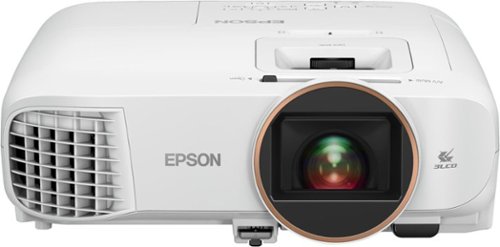
Android TV built-in projector for seamless access to content Powered by Google, watch all your favorite streaming channels including Netflix, Hulu, HBO NOW, YouTube and more. Sit back, relax and watch movies with this Epson video projector. It offers 2.700 lumens of color & white brightness to ensure vibrant, accurate colors, and its HD resolution delivers crisp image quality at 1080p. This Epson video projector lets you also connect a Blu-ray player or gaming console via an HDMI input for smooth streaming of your favorite media.
Posted by: internetuser
from Placerville
I have owned a couple projectors before to take camping or have a movie night in the backyard during summer. It was ok with it's 800x600 resolution and sound that only came out of the projector. But this Epson Home Cinema 2250 is like having a 10 foot Android TV in a little box.
The setup is super easy. If you have an Android phone just pair your phone to the projector and follow the prompts to connect your projector to your WIFI. Then put in the batteries and connect the remote to the projector. Very simple and you are ready to watch.
The projector comes with many apps downloaded already but you can add apps from your phone during setup too. On top of the popular apps like Netflix, YouTube and Prime, I was able to add my favorite apps like The Sunday Ticket, MLB TV and NBA League pass apps so I could watch all my sports on this awesome projector.
The connections on the back are very simple (once you find them). Pull off the cover that looks like a speaker cover and you will find 1 HDMI port and an audio out port which you will not need if you have a Bluetooth speaker. Yes you can connect a speaker close to where you are projecting to get the sound like it is coming out of the picture like on a TV. No more hearing the sound coming from behind you while you are watching a movie or show in front of you.
The picture from the projector is great. Even in a sunlit room ( see pic), just tweaking the brightness, contrast and color will produce an awesome picture.
When not using the apps on the projector I just hook up my DIRECTV box to the HDMI port and can watch whatever I want wherever I want. I haven't mounted the projector in 1 spot because I like to move it around. During summer out by the pool, camping by the lake or relaxing in my living room. Just get a 100" screen, a Bluetooth speaker and you've got entertainment anywhere you want.
The setup is super easy. If you have an Android phone just pair your phone to the projector and follow the prompts to connect your projector to your WIFI. Then put in the batteries and connect the remote to the projector. Very simple and you are ready to watch.
The projector comes with many apps downloaded already but you can add apps from your phone during setup too. On top of the popular apps like Netflix, YouTube and Prime, I was able to add my favorite apps like The Sunday Ticket, MLB TV and NBA League pass apps so I could watch all my sports on this awesome projector.
The connections on the back are very simple (once you find them). Pull off the cover that looks like a speaker cover and you will find 1 HDMI port and an audio out port which you will not need if you have a Bluetooth speaker. Yes you can connect a speaker close to where you are projecting to get the sound like it is coming out of the picture like on a TV. No more hearing the sound coming from behind you while you are watching a movie or show in front of you.
The picture from the projector is great. Even in a sunlit room ( see pic), just tweaking the brightness, contrast and color will produce an awesome picture.
When not using the apps on the projector I just hook up my DIRECTV box to the HDMI port and can watch whatever I want wherever I want. I haven't mounted the projector in 1 spot because I like to move it around. During summer out by the pool, camping by the lake or relaxing in my living room. Just get a 100" screen, a Bluetooth speaker and you've got entertainment anywhere you want.
Mobile Submission: False
I would recommend this to a friend!


Share this review:


0points
0of 0voted this as helpful.
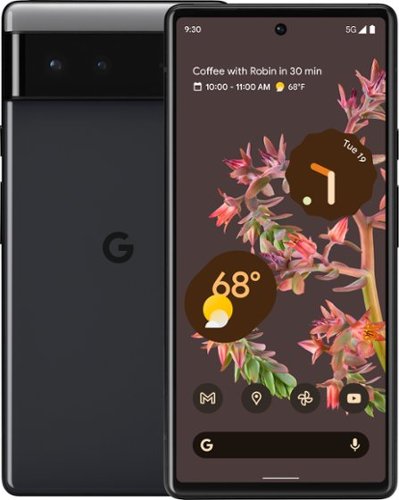
Meet Pixel 6. It~s completely reimagined, inside and out. Powered by Tensor, Google~s first-ever processor, it~s fast, smart, and secure. The all-day battery adapts to you.* The Pixel Camera captures a moment just how you experienced it. And the Personal Safety app and the new Titan M2TM chip help protect you, your stuff, and your privacy.**
Posted by: internetuser
from Placerville
Coming from a 3 year old Stylo 5 this is a great improvement in camera, storage, security and processor.
First, the design. When unboxing I noticed it was quite a bit heavier than my old phone but smaller in size even though the screen is bigger. That's because the screen is the size of the phone, there is no edge around the screen taking up space. The sides of the phone are really smooth, almost to smooth. Before I got a case for it I felt as though it could easily slip right out of my hand. With the case though it adds a little more bulk and grip to make it feel secure in my hand.
Next, performance. The Google Tensor processor works great. The ease of switching between apps is so easy. Just swipe up and hold to find all your apps that are open. Swipe left or right and you and can scroll super fast to find the app you want. Pages load incredibly fast too. Move your favorite apps to the home screen and with one tap your apps loads in about 1 second. Very quick!!
Setting up your home screen and unlocking features is a breeze too. Swipe up to find all your apps, long press an app and move it right to your home screen. If you want to group your apps just drop like apps on top of each other and it will create a folder. Pixel 6 comes preloaded with many wallpaper and screen saver colors and patterns or you can upload your own photos as a backdrop to your home screen,(see pics). There are several ways you can set up your Pixel to unlock. First a pin is needed but then you can add a finger(s)print to unlock, or smart lock. In smart lock you can set your phone to stay unlocked when it's on you or in a safe place like work or home. The finger print reader is on the front screen so it's a little different if you are used to a reader on the back. But I suggest programming both thumbs into the reader because when holding the phone in your palm your thumbs will be right where the reader is.
Now Photos. When I first saw the camera bar on the back I didn't like it. It sticks out so far you would think the phone would wobble when lying flat, but it doesn't. It sits pretty flat unless you push on the top of the phone then the bottom raises up a bit. But after some use I actually like the raised camera bar. My index finger rests against it to feel even more secure when holding the phone.
The 50mp camera is awesome though. Maybe because I am coming from a 13mp camera but I never thought I could take pictures and video like this. (see pics) I have tried all the options on the camera and most work great. You can get an awesome 360 degree panorama shot or use Photo Sphere which takes several pictures and stitches them to together to make 1 beautiful panoramic picture. The Night Sight mode adds a lot of light to a dark scene. It actually almost adds to much light making dark pictures almost look like daylight. The one mode I can't get to really work is the motion mode. Supposedly you can take pictures of moving things and kind of get a blur or tracer effect. I tried it on my dog running with no effect. Maybe you need to try it on cars moving fast or birds flying by. That's something I need to experiment a little more with.
Video quality comes out great. There is also fun modes to use in video capturing like slow motion and time lapse. Google Lens is another mode that's fun to play around with. Just take a picture of something and Google Lens will search the Google database and tell you what the object is. Try it on trees, birds or insects to find exactly what they are and called.
The absolute coolest thing about the photo options is Magic Eraser. Someone photo bombs a picture your taking, just go to Magic Eraser and take the bomber right out of your picture. (see pics)
The 50mp camera is awesome though. Maybe because I am coming from a 13mp camera but I never thought I could take pictures and video like this. (see pics) I have tried all the options on the camera and most work great. You can get an awesome 360 degree panorama shot or use Photo Sphere which takes several pictures and stitches them to together to make 1 beautiful panoramic picture. The Night Sight mode adds a lot of light to a dark scene. It actually almost adds to much light making dark pictures almost look like daylight. The one mode I can't get to really work is the motion mode. Supposedly you can take pictures of moving things and kind of get a blur or tracer effect. I tried it on my dog running with no effect. Maybe you need to try it on cars moving fast or birds flying by. That's something I need to experiment a little more with.
Video quality comes out great. There is also fun modes to use in video capturing like slow motion and time lapse. Google Lens is another mode that's fun to play around with. Just take a picture of something and Google Lens will search the Google database and tell you what the object is. Try it on trees, birds or insects to find exactly what they are and called.
The absolute coolest thing about the photo options is Magic Eraser. Someone photo bombs a picture your taking, just go to Magic Eraser and take the bomber right out of your picture. (see pics)
Battery life so far has been so-so. I do delivery gig work and have my companies app and google maps constantly working and the battery drains pretty fast. After 3 hours of work I am usually down to 50% and need to keep it plugged in to not lose any more life while finishing my shift. The Pixel is said to have an adaptive battery to learn your app usage and save power by limiting power to apps you're not using. So far, after a week, I haven't noticed battery power usage slowing down but I will keep trying. Also when I have my car charger plugged in the phone gets very warm. Not to hot to touch but you can definitely feel the warmth when charging.
Overall the Pixel 6 is a great improvement if you have an older phone. The Pixel tips on the settings page will walk you through all the neat features of the phone. If you are coming from a higher end Android phone this may be just a lateral move for you.
Mobile Submission: False
I would recommend this to a friend!


Share this review:


0points
1of 2voted this as helpful.

The Mason Luxe digital photo frame pairs simple design elements with meticulous craftsmanship for a striking sculptural effect. Its Ultra HD 9.7~ display presents your memories with vibrant colors and brilliant clarity. Simply download the free app, pair your frame and start adding your photos. With unlimited storage, you can easily upload 10,000+ images, never having to choose between your favorites. Invite your friends and the entire family to share their photos too! It~s never been easier to stay connected to loved ones and enjoy all the amazing photos stuck on your phone. Changing the orientation of the frame from portrait to landscape is as easy as turning it on its side; our smart technology rotates the photo for you. Use the integrated touch bar to scroll through your images or customize the playback settings using the Aura app.
Posted by: internetuser
from Placerville
I thought this would be a great gift for my wife but I didn't realize how great. When I received it I saw that I could load pictures to the Aura - Mason Luxe 9.7'' LCD Wi-Fi Digital Photo Frame without even opening the box. I just peeled back a small corner portion of the box to unveil a QR code. That took me to the setup where I could load pictures to the frame without even opening the box. my wife was so surprised that the frame came preloaded with pics of our family.
The frame itself looks good sitting on her desk with it's dark grey finish and mitered edges. The pictures really pop with the 9.7" LCD screen that can be set up in portrait or landscape mode.
The thing to me that makes it soooo cool is that you can invite friends and family to add photos no matter where they are. Our boys live in different states but with an invitation to their phone they downloaded the app, set up an account and could add photos whenever they want. That's amazing!!!
I thought this was going to be a frame where I had to connect it to my computer and drag pictures over but being able to add photos wirelessly is great. I have my photos stored in google photos so all I had to do was allow the app to use Google photos and I had access to 1000's of pictures to load. Just check each photo you want to add and then hit submit. I don't think there 's a limit as to how many you can add at once. I added over 200 pics in just a minute or two. Super cool.
This makes an amazing gift for parents, friends, and spouses.
Mobile Submission: False
I would recommend this to a friend!
Share this review:


0points
0of 0voted this as helpful.
internetuser's Review Comments
internetuser has not submitted comments on any reviews.
internetuser's Questions
internetuser has not submitted any questions.
internetuser's Answers
internetuser has not submitted any answers.