
Share 91preludesi's profile


91preludesi
91preludesi's stats
- Review count102
- Helpfulness votes161
- First reviewApril 13, 2008
- Last reviewJune 1, 2026
- Featured reviews0
- Average rating4.4
Reviews comments
- Review comment count0
- Helpfulness votes0
- First review commentNone
- Last review commentNone
- Featured review comments0
Questions
- Question count0
- Helpfulness votes0
- First questionNone
- Last questionNone
- Featured questions0
- Answer count10
- Helpfulness votes26
- First answerAugust 18, 2019
- Last answerMay 17, 2021
- Featured answers0
- Best answers2
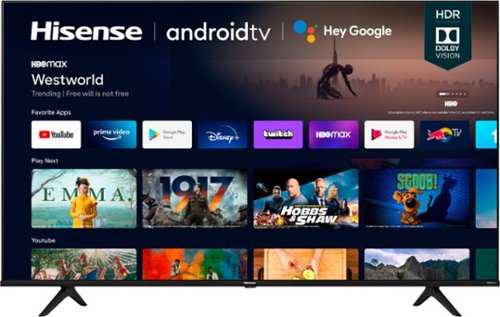
The A6G series. Proving that good things come in big packages too. Take your pick from 75~, 70~, 65~, 60~, 55~, 50~ and 43~ screens. For 4K UHD picture quality, in the perfect size for your space. With Android TV, you can discover 700,000+ movies and shows in one place. Ask Google to control your TV with your voice. And cast your photos, videos, and music from devices to your TV easily with Chromecast built-in~. Add to that Dolby Vision HDR and Auto Low Latency Game Mode. Or as we call it, a great looking TV.

Posted by: 91preludesi
from Newnan, GA
I got this TV to upgrade from our Hisense 50" TV. After having a 65" TV for years and downsizing to a 50" I was always left wanting a 65" TV again. The Hisense 65" A6G is a great budget TV. 4K, HDR, 4 HDMI ports, 2 USB ports, there's a lot to like about this TV.
I'll start at the beginning. I opened the top of the box and took out the top protectors (styrofoam, etc.). In the box, on the front side of the TV was a thick piece of corrugated cardboard to protect the screen. When I looked down at it I saw a nail stuck in it with the head sticking out less than an inch from the screen. (See pictures) My heart dropped. I knew that being shipped on a semi that it more than likely had gotten jostled around and hit the screen and broke it. After fully removing the TV from the box the screen didn't look damaged. Luckily it didn't touch the screen.
I used two of the pieces of packaging to lay the TV on so that I had room to put the legs on. I have a TV stand that is made for up to 65" TVs, so I put the legs on in the outermost position. If you have a smaller TV stand there is another inner location where you can place the legs. It's not the thinnest TV out there, but it is definitely thin enough. Initial setup was quick and easy. Set your preferences, add it to your wifi, and if you want, connect it to your smart device (Alexa, Google Home, etc.). The picture quality is great. The colors are vibrant and crisp. The outer bezel is small and not very noticeable.
I have a Firestick and Playstation connected through the HDMI ports. One improvement this TV has over our 50" Hisense TV is the input switching. On the 50", I would turn the Playstation on and it would automatically switch inputs. However, when I turned the Playstation off it wouldn't automatically switch back to the Firestick. The 65" A6G does. If I'm on the Firestick and turn on the Playstation it quickly switches inputs to it. Then, when I turn the Playstation off it quickly switches back to the Firestick input. Because of this, I don't have to use the remote that came with the TV at all. As far as the remote, it has all of the buttons you could need. With the built-in voice assistant, you never really need to use any other buttons. You just hold the assistant button and say whatever you want to do. There are 6 "branded" buttons on the bottom. (Netflix, Prime Video, YouTube, Disney+, Tubi, and Peacock. I personally don't like this on remotes. To me, it's useless when you have the voice assistant and all it does is make the remote about 2" longer than it needs to be. With Chromecast built-in, you can quickly cast from your phone to the TV.
The only real downside to this TV to me is the 60Hz refresh rate. It seems like today 120Hz should be the minimum, but at this price point, it's not surprising. That's the only reason I rated it 4/5 stars. I've always wanted one of the big-name brand TVs, but they cost thousands more than this TV and for that kind of money, they're just not worth it to me. Overall, if you want a great budget-level TV, then I would definitely recommend the Hisense 65" A6G.
Mobile Submission: False
I would recommend this to a friend!


Share this review:


+16points
16of 16voted this as helpful.
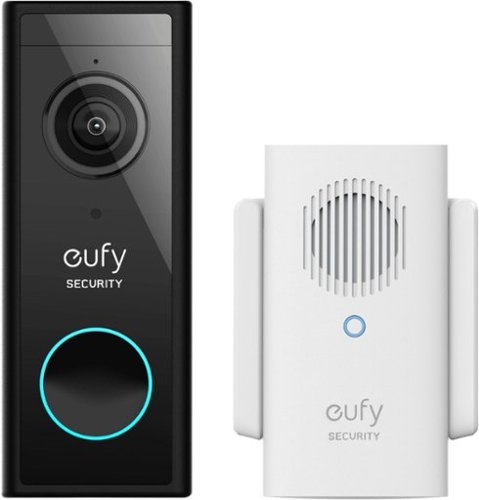
eufy Smart Wi-Fi 2k Video Doorbell with Chime is a battery powered (or wired- you choose) video doorbell that is the perfect protection for your home. With no monthly fee, enjoy 2K resolution so that you can see who is at your door, clearly. Talk to them via the 2-way mic, and be alerted when a human is at the door instead of the neighborhood dog. IP65 Weatherproof Ensures the Video Doorbell camera continues to operate in extreme temperatures from minus 4~F to 122~ F (minus 20~C to 50~C). Installation is easy. No need to mess around with complicated wiring, self-installation in minutes. Wireless Video Doorbell camera will also work with old chimes.
Posted by: 91preludesi
from Newnan, GA
I got this video doorbell to replace the original button doorbell. We had been looking to get a video doorbell for a while. My holdup had always been monthly subscription fees with other brands to be able to see your recordings. I don't want another monthly bill. Fortunately, the eufy video doorbell doesn't charge any monthly subscription fees.
The setup was quick. Altogether (without the hiccup, that I'll explain in a minute) installation was about 15 minutes. I hardwired it to the existing wiring from the original doorbell. You'll need to remove the existing doorbell, remove the wires from it and install the backing plate for the eufy video doorbell. It comes with wire extenders, screws, wall anchors, and wire nuts. I had to end up using the wire extenders due to how short the existing wires were. The instructions make it clear how to do all of this. Attach the two wires to the back of the doorbell and then it snaps into the bracket. Now, about that hiccup. After I installed the new eufy video doorbell and chime (it simply plugs into an electrical outlet which is a great feature!), I installed the app. What I didn't realize is that you will need to scan the QR code on the back of the doorbell. This meant using the metal pin in the bottom of the bracket to separate it and then scan the QR code. In fairness, this was 100% my fault as the instructions tell you to download the app and follow the instructions that it gives you, then the quick start guide tells you the installation instructions. It also comes with an angled bracket to offset it 15 degrees if you need to as well as a charging cable if you don't hardwire it. (They estimate 6 months between charges, but I can't speak to that as mine is hardwired and I haven't had it that long). If you do hardwire it, your old chime will still function. There is a button in the app to disable it and only use the eufy chime if you decide not to remove it.
The 2k resolution is enough to be able to see everything clearly. The app has a lot of features and is easy to use. You can set activity zones, sensitivity levels and choose from several chime options. It has three preset voice responses, "Excuse me, can I help you?", "Please leave it at the door", and "We will be right there". You can also record your own response that can be up to 10 seconds. I was at work yesterday (about 40 miles from home) and the motion alarm went off. Within seconds I got the alert. My wife had opened the door to clean the storm door. I used the opportunity to test the voice responses. She heard them clearly and I then talked to her through the doorbell. I was able to hear her perfectly like we were sitting next to each other talking. I set the activity zone too far out initially, and even with the sensitivity set to 1 (out of 5), it was still sending motion alerts to my phone every time I made a pass with the lawnmower. (The picture is the mower about 40' from the camera and it was still alerting). Some people live very close to a road, so make sure you set your activity zone properly to avoid a ton of false alarms. I have since set the activity zone to the walkway and not including the grass to avoid this. I also have a picture of what the doorbell sees at night.
Although it does work with Alexa, in my experience it is very slow. Whereas the app is immediate for viewing the video doorbell, when I ask Alexa to show me the doorbell, it takes an average of 16 seconds for the video to come up on the Echo Show. Also, while it is pulling it up, the Show is making constant thumping sounds through the speaker. Once the video pops up, the thumping stops and you get the audio from the doorbell.
Overall, with the image/voice quality, ability to get alerts and communicate through the app, and no monthly subscription fees, I would say it's great. One feature I would like to see is that the actual doorbell button was permanently lit up. As it is now, since we don't leave the porch light on, you would never be able to see the doorbell, much less where the button is. If they add that feature it would easily be 5 stars for me.
Mobile Submission: False
I would recommend this to a friend!


Share this review:


+2points
2of 2voted this as helpful.
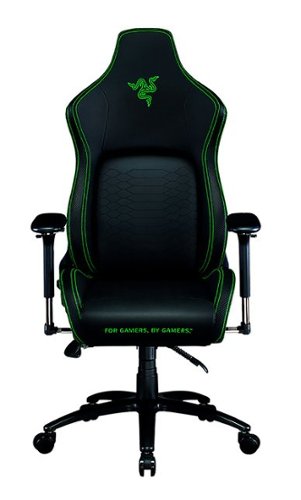
Keep the competition in your kill zone, as you enter your comfort zone with the Razer Iskur~an ergonomic gaming chair designed for posture-perfect hardcore gaming. Fitted with an adjustable, ergonomic lumbar support system, we~ve got your back when it comes to keeping you in prime gaming form.
Posted by: 91preludesi
from Newnan, GA
I've always wanted a gaming chair, but just never pulled the trigger and gotten one. I have always just sat on the couch and played. However, my couch is about 16' from my TV, which doesn't make for the best gaming experience. Now with this chair, I can sit closer to the TV and set it up to what works best for me. (I use my regular TV and PS4 for gaming instead of an actual gaming setup like a desk and gaming monitor).
Setup. Setup was easy and the instructions come on a poster board the size of the box. You could tack it to the wall for reference if you wanted to. It is packaged very well to prevent shipping damage. I had the chair assembled in about 20 minutes by myself. It would be a little easier if you had a helper. It comes with a T-handle Allen wrench which is nice. The first thing you notice (as someone who has never seen a gaming chair in person) is that it is huge. It also weighs a little over 66 pounds. It just barely fits through an interior doorway when assembled. Keep that in mind. You probably want to assemble it in the room that you will be using it in.
Adjustability. The Razer Iskur chair has more adjustments than I can count. It took me a little while to get everything adjusted to exactly the way that I wanted it, but once I did it was amazing. There are the standard adjustments like height (I'm 6' tall and at the tallest height my feet barely touch the ground), and recline, but there are many more. There is a side handle to lock the recline amount. It has a lever for recline lock. You can lean it as far back as you want and keep it there. The lumbar support comes out about halfway across the seat bottom and you can adjust it to anywhere in between fully in (no extra support) to all the way out. There is a tension adjustment knob under the middle of the seat. If you like to lean back with less resistance, then you can loosen that knob and the chair will lean back more freely. The armrests have four adjustments of their own. 1. The standard height adjustment. 2. The armrests can be moved forward or backward. 3. The armrests can move in or out (closer or further from you). 4. The armrests can be positioned straight, pointing in or pointing out.
Comfort. My first use was for about two hours. I didn't have any fatigue or need to keep moving around as I did on the couch. I've started sitting in it while watching TV as well, just because it is so comfortable. The pillow for the headrest is extremely soft and comfortable memory foam. My wife sat in it and said that the bottom was too stiff, but I think it's just right. It's firm enough to support you, but soft enough to keep you comfortable. I also love the colors. Razer's lime green really pops on the black. Overall, I highly recommend this chair for serious gamers. If you play for multiple hours every week, then this chair will help you step up your game in absolute comfort.
Mobile Submission: False
I would recommend this to a friend!


Share this review:


0points
0of 0voted this as helpful.

The Shark Navigator Lift-Away ADV Upright Vacuum features a lighter and easier-to-detach Lift-Away pod for go-anywhere cleaning. Anti-Allergen Complete Seal locks in 99.99% of dust and allergens, keeping them out of the air that you breathe (based on ASTM F1977 of particles .3 microns or larger). Also equipped with an easy-empty dustup and Swivel Steering to easily maneuver around obstacles.
Posted by: 91preludesi
from Newnan, GA
This is a great vacuum. After getting the Shark Navigator Lift-Away I don't think I'll ever use another vacuum again. Our previous vacuum was the Dyson Cyclone V10 Animal. Recently, it won't hold a charge long enough to vacuum the house (5 rooms with carpet). Before using the Shark I vacuumed the living room with the Dyson. Then I went over it again with the Shark. The canister was full by the time I was done. It was amazing how much more it picked up.
Another benefit is this vacuum is really quiet. You can hold a conversation with someone while you're vacuuming. The Dyson was incredibly loud. After I was finished vacuuming the carpet felt renewed. Our carpet is 20 years old and lays flat from all of the years of traffic. After I was done, you could tell that it felt "fluffier". I think it would be even better with newer carpet. We have two cats and a dog and it easily picked up their fur. It comes with a crevice tool, upholstery tool, and dusting brush. The tools work great and there is plenty of suction. The filters work great at reducing dust.
One thing that took some getting used to was the fact that there is no button to push to release and lean the handle back. You just put your foot on the bottom and pull the handle back. There is a detent that holds it up, so it feels different than the release that older vacuums have always had. Another great thing about this vacuum is the steering. They call it swivel steering. You just twist your wrist left or right and it turns that way. It glides and gives you the feeling that it is on a ball. It works great on carpet and hard floors. When you switch it to hard floor mode, the roller brush slows down to prevent things from being pushed away from the vacuum. Emptying the canister is as easy as pushing a button. The filters are easy to get to and clean.
Overall, I can't find anything about this vacuum that I don't like or would improve. I always thought that I wanted a cordless vacuum...until I got one. Doing the back-to-back comparison with the Dyson showed me just what I have been missing this whole time.
Mobile Submission: False
I would recommend this to a friend!
Share this review:


0points
0of 0voted this as helpful.

Grab a fistful of metal for man-sized grooming. Define and refine ear and nose hair with the precision of MetalCraft from ConairMan. This powerful, professional, all-in-one ear/nose trimmer has a patent-pending Advanced 360~ Rotary Cutting System. It~s a metallic must-have for any guy who wants to get a grip on his grooming. Equipped with a diamond-shaped 3-bevel blade, the trimmer quickly and easily removes annoying nose and ear hairs with no pulling, nicks, or cuts. This battery-operated grooming essential (AA battery not included) gets the job done right~without a cord to hold him back. Featuring a smooth metal handle for complete comfort and control, this rugged gear is built to last, with a washable head for easy cleaning, and can be his go-to for confident, high-performance grooming, now and years from now. Preferred by professional Instagram influencer and Man Maintenance Missionary Kevin Creekman, the MetalCraft High-Performance Nose/Ear Trimmer lets a man refine his facial canvas with the skill and power of a pro. The guesswork is gone. No pulls, nicks, or cuts. The ultra-precise 3-bevel blade is just the right size and shape to remove hard-to-reach hairs, painlessly cutting as close to his skin as possible for perfect results every time. And he'll appreciate the firm, comfortable grip he gets on the metal handle as he takes control of his trimming. Professional-grade power and performance. It~s more than maintenance, it~s MetalCraft.
Posted by: 91preludesi
from Newnan, GA
This is my first ear and nose hair trimmer. Needing one is a side effect of getting old I guess. It takes one AA battery. You turn it on by twisting the bottom battery cap. It cut through ear and nose hair quickly and easily. After trying it for the first time, I wasn't sure that it was doing anything. I was expecting at least a little pulling, but there wasn't any. A bonus is that the head pops off and can be washed out. If you're looking for an ear and nose hair trimmer, you won't be disappointed with this one. The one thing I don't like is that it looks like a long tube of lipstick, but there's not much that can be done about that. It pretty much has to be that shape in order to function.
Mobile Submission: False
I would recommend this to a friend!
Share this review:


0points
0of 0voted this as helpful.
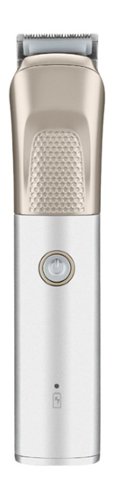
Grab a fistful of metal for man-sized grooming. Define and refine stubble, 'stache, sideburns and beard with the precision of MetalCraft from ConairMan. This powerful, professional all-in-one trimmer has self-sharpening, etched stainless steel blades. It~s a metallic must-have for any guy who wants to get a grip on his grooming. The easy-to-use attachments~Ear/Nose Trimmer, 3 Jawline Combs, Shaving Foil, Stubble Comb, and 5-Position Adjustable Comb~help put professional-grade trimming right in the palm of his hand. Equipped with a high-torque DC motor, this pro-grade power tool also gives him all the rechargeable, lithium-ion energy he needs to get the job done~without a cord to hold him back. Featuring a smooth metal handle for complete comfort and control, this rugged gear can be his go-to for confident high-performance grooming, now and years from now. Preferred by professional Instagram influencer and Man Maintenance Missionary Kevin Creekman, the MetalCraft High-Performance All-in-One Metal Trimmer lets a man refine his facial canvas with the skill and power of a pro. The guesswork is gone. He just chooses the attachment that lines up with the look he~s looking for. Whether he wants to retain that stubble for the rugged look, beat back the 'burns or frame-up a full-beard, this multipurpose trimmer makes daily grooming quick and easy. Professional-grade power and performance. It~s more than maintenance, it~s MetalCraft.
Posted by: 91preludesi
from Newnan, GA
This is a great trimmer. It is rechargeable so you don't have to worry about a cord getting in the way. It is quiet and easy to maneuver. The attachments are great. It comes with 3 combs for the jawline, a 5-position comb for trimming the bulk of your beard, stubble comb, ear and nose hair trimmer, and shaving foil.
I trimmed my beard closer to my face using the longest position on the 5-position comb. It is the perfect length for a more professional look. I constantly change my beard from long to short, and this trimmer makes it a breeze. I removed the comb to get a tight, clean neckline and used the foil trimmer to trim my upper cheeks and neck. The trimmer cut through my rough beard hair with ease. It just glided through. Everything else that I have ever used I would have to go very slow and make multiple passes to get it to cut properly. With the Conair, I could cut through it quickly. I have to say that the shaving foil was amazing. It left me feeling like I had shaved with a regular razor. It was that smooth. You couldn't feel any stubble. I also used the trimmer with no comb to straighten my mustache. The good thing about this trimmer is that it doesn't "bite". I previously used a Philips Norelco trimmer and you couldn't push the blades straight in as the gaps between the teeth were big enough that it would grab the skin and cut you. The Conair doesn't have that issue. You can turn the blades straight into your face to get a nice tight line and without fear of being cut. Changing the heads is a snap. You simply push up on them and they pop off. You just snap in the next head that you want to use. This is the best trimmer that I have ever used. I highly recommend it!
Mobile Submission: False
I would recommend this to a friend!
Share this review:


0points
0of 0voted this as helpful.
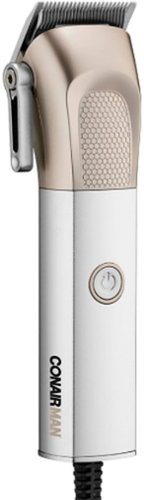
For professional-style cuts at home, use the ConairMAN~ MetalCraft~ High-Performance Clipper. Designed with a sleek metal handle and Japanese stainless-steel blades for precise cuts, this must-have men~s grooming tool gets the job done right. Powered by a high-torque, professional DC motor and equipped with a 6-foot cord that gives you room to maneuver, it includes 8 guide comb attachments that let you customize your cut. Respect the ritual with pro-barber performance and at-home convenience.
Posted by: 91preludesi
from Newnan, GA
I have been cutting my own hair for years. I just shave it down with the shortest guide. I had been using a Wahl that I have had for a few years. That makes me appreciate the Conair metal series even more. The Wahl, being plastic, was very loud. The one I used also had a pop-out trimmer. Because of this, it always rattled while it was on and was extremely annoying. The Conair, being metal gives it a little more weight, which I like, as well as making it much quieter. Another feature that I like is the button to turn it on. It is very "clicky" and feels solid. The Wahl has an on/off lever on the side to turn it on. Since I always wrapped the cord around it when I was finished, that would sometimes move the on/off lever and cause it to be on when I plugged it in. That can't happen with the Conair. It's a small detail, but it makes a difference to me.
I used the shortest guide (#1) on the Conair, and it leaves my hair a little longer than the Wahl did. Next time I'm going to cut my hair without the guard, but keep the blades extended all the way. I believe that would be about equal to the Wahl's shortest guide. I will say that I was able to cut my hair in about half the time using the Conair. It comes with 8 guide combs for different hair lengths, small scissors, a blade guard, a brush, oil and a pouch.
I will say that I would prefer if it had a hard case for storage instead of a thin bag. I also noticed that after one use, some of the color was coming off of the gold part at the back where your fingers are when you are cutting. It seems like the finish should last for more than one use. At the end of the day, that doesn't affect performance and isn't a big deal to me, but I figured I would mention it. Overall, this is a definite improvement over my previous clippers.
Mobile Submission: False
I would recommend this to a friend!
Share this review:


0points
0of 0voted this as helpful.

Quality is available on your countertops, thanks to an array of GE food processor options, crafted to suit your family's lifestyle. All GE Appliances food processors come with an extra large chopping jar that holds up to 12 cups of food and allows you to prepare enough for the whole family. The ergonomic handle will help you hold, carry, and pour from the jar easily without worrying about losing your grip, while the available Large Feed Tube can accommodate whole or large ingredients, eliminating the need for pre-cutting or additional prepping. Plus you'll enjoy the peace of mind that comes from buying from a brand you trust.
Posted by: 91preludesi
from Newnan, GA
We've owned our previous food processor for 17 years. It was a wedding gift, and now that there are two adults and two teenagers, it was far too small. This 12-cup (about 10-cups usable) food processor is big enough to make everything at once. With our previous one, we had to do everything in batches.
My first use was chopping onions. I cut them into quarters and put them in. I used the pulse function (which is low speed) to get them to the size I wanted. It was quick, and not nearly as loud as our old one. It also comes with two discs. One for fine and one for medium shredding and slicing. I shredded some cheese and sliced some vegetables with it and it worked great. It definitely speeds up the prepping process from hand cutting everything. The feed tube is large and allows you to put bigger foods through it. It also has a smaller feed tube inside it so you can add smaller ingredients like herbs easily.
I like that it has a simple knob for the pulse/low/high settings. Others with 5 or 6 buttons for varying speeds just seems like too much. The handle is a good size. I have larger hands and the handle fits well. It's hefty enough to be able to lift the processing jar when it's full of food. The suction cup feet have the right amount of grip, but let go easily when you need to move it. My previous one felt like it was nailed down. You would have to pull on it incredibly hard to get it to release, and then when it did you almost threw it across the room.
The stainless steel finish looks great and it has cord storage inside of it, which is nice. It seems like every other small appliance I have doesn't have this and the cord just gets thrown behind it in the cabinet. Although it's not huge, it is about 16" tall, so take that into account. You will probably have to remove the top if you store it in a cabinet. Not a big deal, but it does take up twice as much space that way.
Overall, it's been a great addition to the kitchen and something that I will use often.
Mobile Submission: False
I would recommend this to a friend!
Share this review:


0points
0of 0voted this as helpful.
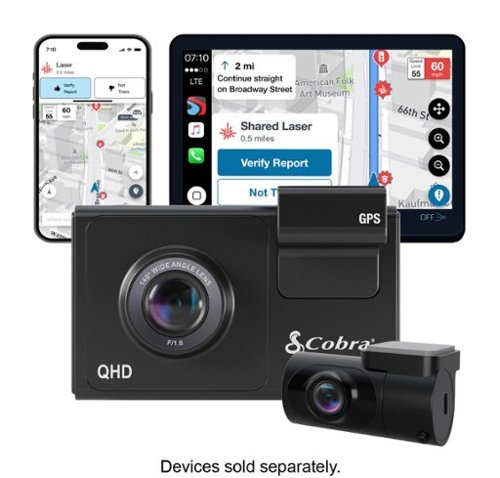
SC 200D - The dash cam that can see the future. We designed the Cobra SC 200D smart dash cam to offer state-of-the-art protection against anything the road throws at you. With QHD 1600P front-view resolution and rear FHD 1080P, built-in Wi-Fi and GPS, heads-up navigation, and voice commands, you can capture everything that happens in or around your vehicle on the road or in the lot. Learn how a SC 200D dash cam can be your extra pair of eyes on the road, protecting the ones you love against life's blindspots.
Customer Rating

3
Nice dashcam with rearview camera, but some flaws.
on December 17, 2020
Posted by: 91preludesi
from Newnan, GA
First, I'll say that I will no longer drive without a dashcam. A couple of years ago I bought a cheap $20 online, and while it did work, don't waste your $20. It eventually melted in the summer heat.
I decided to give this dashcam a try as it comes with a rear camera as well. Most other manufacturers have rear cameras, but they are an add on and cost extra. In full disclosure, the first one that I got seemed to be defective. It wouldn't connect to my phone with the "Drive Smarter" app. It turned on and would flash "Format memory card" on the screen for a brief moment and then that would disappear and I couldn't do anything else. I contacted customer support, told them about the issues. They had me remove the Bluetooth pairing from my phone, delete and reinstall the app and try again. Nothing worked. It was returned for a replacement. Once I received the replacement, I tested it before I took the time to install it and it worked fine.
Installation is straightforward. The camera mounts with tape, not suction cups so I would advise getting the camera running before you install it to ensure that where you place it has a good viewing angle. With the curve of the windshield, you may find out that it is pointing too far in one direction. I would recommend placing the front camera behind the rearview mirror and the rear camera centered at the top of the back windshield. As far as the rear camera, the cord for it is definitely long enough! It connects to the front camera and I tucked the wire into the headliner, ran it back at the top and I had to run the wire back and forth across the rear headliner 3-1/2 times so that I didn't have access hanging down. I drive a Genesis Coupe, so it is a shorter car, but this wire could easily reach the back of a Suburban.
The video quality is great. I locked in several recordings at different times of day/night and they all looked great. However, there is a quirk that drives me crazy. I occasionally glance at the screen and I've noticed that when a car is coming towards me, the screen will freeze them for a split second. It's almost like it's stuttering. I checked and this does not show up on the recordings. It's not a dealbreaker, but it is aggravating. It has a mode that will let you know if you are getting too close to the car in front of you, or if someone is too close in the rear. It makes a noise and shows a symbol on the screen. I found this annoying as it kept going off as I was slowing down for a red light so I turned it off. It has the option to time/date stamp the video as well as put the GPS coordinates and your speed if you want. You can turn these on/off individually. It also has parking mode, which will save a recording if your vehicle is hit while parked.
Another issue that I noticed is that it sometimes wants to go into parking mode, even when you're driving. I haven't figured out what is causing this. I drive 38 miles to work and it is dark in the mornings with not much traffic. It's a long drive on one highway. I set the cruise control to 75 mph and I assume that since the camera is just seeing my headlights and what appears (to it) to be the same patch of asphalt on the screen that the car is parked. It pops up a message saying it is going into parking mode with a countdown. You can stop it by hitting a button. I also noticed that as soon as I came upon a car it canceled going into parking mode.
As far as the app, Drive Smarter, I haven't gotten any use out of it, so I can't really say too much about it. My phone initially connected to the camera and then without moving the app said that the camera was out of range. I removed the Bluetooth pairing and paired it again, deleted and reinstalled the app and nothing seems to work, so honestly, I just gave up and deleted the app. It would be nice to see the video immediately if you needed to, versus having to get home, remove the SD card and download it. One last thing is that the original (defective) one that I got had two spare adhesive pads so that you could move the cameras to a different vehicle, the replacement dashcam only had one spare adhesive pad.
Overall, while it is nice to have both front and rear cameras at this price point, there are several flaws. Because of this, I gave it three stars. It's just average. It might fit your needs and you may not have any of these issues, but I believe there are better options out there.
Mobile Submission: False
No, I would not recommend this to a friend.
Share this review:


0points
0of 0voted this as helpful.

Make your photos look amazing with Adobe Photoshop Elements 2021. The Adobe Sensei AI technology features a new face-tilt function, and its Guided Edits provide a new perfect-landscape feature. Adobe Photoshop Elements 2021 lets you easily edit photos, make clips, and create memes to share on your favorite social websites.
Customer Rating

5
Easy to use, turns your photos into works of art.
on December 12, 2020
Posted by: 91preludesi
from Newnan, GA
Although I enjoy taking photos, I've never really gotten into editing them. I've dabbled with older versions of Photoshop but never got too far with it. It was so intensive and I never had a computer that could run it smoothly, so I always gave up. Photoshop Elements is perfect for someone just starting out and yet it has tons of features for pros as well.
The guided edits are great. To try one out, I made a Christmas card with a couple of pictures of my family. It was as easy as selecting the two pictures that I wanted to use and typing in what I wanted it to say. You can also add designs like a wreath if you want. I've been playing a lot with some older pictures that I have. One was a picture from a few years ago of my wife and me at the beach. We were both wearing sunglasses and you could see the reflection of my daughter taking the picture in them. I was able to blend the reflection out and it looks seamless. I also removed a couple of people who were in the water behind us. I was also able to replace the entire sky that was light blue with two small clouds with a great sunset shot (preloaded in Elements) that had a lot of oranges and pinks. It completely changed the feel of the shot. PS Elements makes it quick and easy to make your picture exactly what you wanted it to be. Removing objects is as simple as selecting them and removing them.
Although I'm no expert on photo editing, Elements 2021 is great for all skill levels. You can quickly and easily turn your photos from good to great. It's designed for all skill levels and helps to walk beginners through the process. I'm looking forward to going back through and editing more old photos as well as new ones. It seems like every time I start it up I find something new that it can do.
Mobile Submission: False
I would recommend this to a friend!
Share this review:


0points
0of 0voted this as helpful.
91preludesi's Review Comments
91preludesi has not submitted comments on any reviews.
91preludesi's Questions
91preludesi has not submitted any questions.
91preludesi's Answers
Keep the competition in your kill zone, as you enter your comfort zone with the Razer Iskur~an ergonomic gaming chair designed for posture-perfect hardcore gaming. Fitted with an adjustable, ergonomic lumbar support system, we~ve got your back when it comes to keeping you in prime gaming form.
Is this the all-black edition Iskur chair? I asked support and they said it was, but right before ordering, I decided to double-check the model number. When comparing to another site, it seems this is the Black/Green Edition. Which is it?
It is black with lime green accents.

5 years ago
by
91preludesi
SC 200D - The dash cam that can see the future. We designed the Cobra SC 200D smart dash cam to offer state-of-the-art protection against anything the road throws at you. With QHD 1600P front-view resolution and rear FHD 1080P, built-in Wi-Fi and GPS, heads-up navigation, and voice commands, you can capture everything that happens in or around your vehicle on the road or in the lot. Learn how a SC 200D dash cam can be your extra pair of eyes on the road, protecting the ones you love against life's blindspots.
#1) do you have to purchase mounts separately or is the mounting system included? #2) what do you mean by park mode? #3) does this camera system record a rear-end accident or is it just cabin recording?
1) The mounts are included. 2) Parking mode is when the camera will come on and start recording automatically, even when the vehicle is off. This way, if you're in a store and someone bumps into your vehicle it will record the incident. 3) You could choose to mount the rear camera in the front for cabin recording, but there is so much cable length that it is meant to go in the rear windshield to record a rear-end accident. The camera screen overlays the rear camera onto the front camera, however, in the recordings, they will be two separate files.
5 years, 5 months ago
by
91preludesi
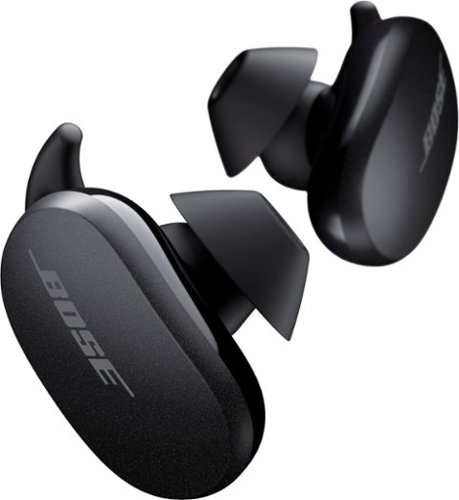
Better sound begins with better silence. That~s why Bose QuietComfort Earbuds are engineered with the world-class noise cancelling and high-fidelity audio. Microphones inside and outside the earphones sense noise and react instantaneously to cancel the signal. Get rid of disruptions so you can turn up the music on your wireless earbuds and amplify whatever you~re most passionate about ~ from hiking or circuit training to coding or baking. And when you need to be more aware of your surroundings, minimize noise cancelling with a quick double tap, so you can walk down a busy street or listen for your boarding announcement. StayHear Max tips provide extra comfort and stability for an even better experience. Rule the Quiet with Bose QuietComfort Earbuds and get an exhilarating experience that~s tough to find in any other Bluetooth earbuds. The Bose QuietComfort Noise Cancelling Earbuds are available in Triple Black, Soapstone and limited-edition Sandstone or Stone Blue.
does the charge case support qi wireless charging?
Yes, it does.
5 years, 8 months ago
by
91preludesi
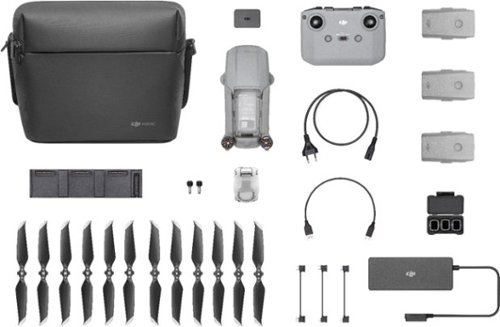
Shoot pro-quality aerial footage with this DJI Mavic Air 2 drone. The three-axis gimbal stabilizes the 48.0MP camera for stunning photos and clear videos, while the 3500 mAh battery delivers dependable power for every flight. This DJI Mavic Air 2 drone features FocusTrack technology for advanced obstacle avoidance and target tracking.
When using the new DJI Mavic 2 Air Do you need an adapter to use a galaxy s9plus with a case on it
I have the Galaxy S8+ with the Otterbox defender case and I have to remove it to fly. The phone/case fit in the controller fine, but the connector is too short to reach through the case and get to the charging port.
6 years, 1 month ago
by
91preludesi
Shoot pro-quality aerial footage with this DJI Mavic Air 2 drone. The three-axis gimbal stabilizes the 48.0MP camera for stunning photos and clear videos, while the 3500 mAh battery delivers dependable power for every flight. This DJI Mavic Air 2 drone features FocusTrack technology for advanced obstacle avoidance and target tracking.
How many batteries come with the bundle
Three batteries come in the fly more combo.
6 years, 1 month ago
by
91preludesi
Shoot pro-quality aerial footage with this DJI Mavic Air 2 drone. The three-axis gimbal stabilizes the 48.0MP camera for stunning photos and clear videos, while the 3500 mAh battery delivers dependable power for every flight. This DJI Mavic Air 2 drone features FocusTrack technology for advanced obstacle avoidance and target tracking.
Does this come with ads-b I heard the Europe version has it stripped out. But I see no mention of it here either
I am in the US and it has ADS-B.
6 years, 1 month ago
by
91preludesi
Shoot pro-quality aerial footage with this DJI Mavic Air 2 drone. The three-axis gimbal stabilizes the 48.0MP camera for stunning photos and clear videos, while the 3500 mAh battery delivers dependable power for every flight. This DJI Mavic Air 2 drone features FocusTrack technology for advanced obstacle avoidance and target tracking.
DJI offers a crash and damage replacement warranty for 79.00 - the only warranty I see here is GS for 2yr 350.00 Is the DJI warranty not available if bought through BB?
I received an offer through the DJI Fly app after connecting my drone to purchase their warranty.
6 years, 1 month ago
by
91preludesi
Shoot pro-quality aerial footage with this DJI Mavic Air 2 drone. The three-axis gimbal stabilizes the 48.0MP camera for stunning photos and clear videos, while the 3500 mAh battery delivers dependable power for every flight. This DJI Mavic Air 2 drone features FocusTrack technology for advanced obstacle avoidance and target tracking.
I have the Samsung s9+, and have heard and read about compatibility issues with Android phones. Has this been resolved so the app works with Android phones now. They seem to have a 5 star drone and a 2 star +- app. Thx
I have the Samsung Galaxy S8+ and have no issues at all. The app works perfectly for me. I have had zero issues.
6 years, 1 month ago
by
91preludesi
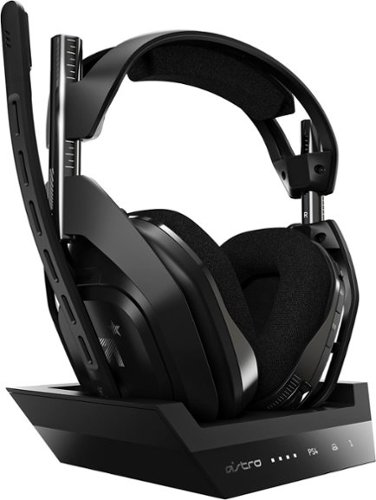
Experience legendary performance and sound of ASTRO Audio V2, with the convenience and freedom that comes without wires. The A50 Wireless + Base Station for PS5 /PS4 / PC delivers top-of-the-line acoustics, ergonomics, comfort and durability that gamers demand. The all-new Base Station provides clear, low-latency voice communication, while making headset pairing and charging simple. The ASTRO Command Center software allows gamers and streamers to tune every input and output parameter of the A50 precisely for their specific setup. Experience absolute audio immersion with the A50 Wireless + Base Station.
How does this headset connect to a ps4 slim? Does it still require the optical cords? Is there anything extra needed to be purchased to make this compatable for a ps4 slim?
I was told that you can connect the optical cable to the TV since the slim doesn't have an optical cable port. However, I've been using mine without the optical cable at all and they work perfectly.
6 years, 9 months ago
by
91preludesi
Experience legendary performance and sound of ASTRO Audio V2, with the convenience and freedom that comes without wires. The A50 Wireless + Base Station for PS5 /PS4 / PC delivers top-of-the-line acoustics, ergonomics, comfort and durability that gamers demand. The all-new Base Station provides clear, low-latency voice communication, while making headset pairing and charging simple. The ASTRO Command Center software allows gamers and streamers to tune every input and output parameter of the A50 precisely for their specific setup. Experience absolute audio immersion with the A50 Wireless + Base Station.
Is this a light headset? If not, will it cause any head pain or anything? Im using this for long term use.
These are fairly light. I just used them for 4 hours with no fatigue. They're not hot on the ears either. My Turtle Beach Elite Pro 2s would get very hot on my ears.
6 years, 9 months ago
by
91preludesi