


enem156's stats
- Review count177
- Helpfulness votes342
- First reviewJune 7, 2013
- Last reviewJune 10, 2026
- Featured reviews0
- Average rating4.5
- Review comment count1
- Helpfulness votes1
- First review commentFebruary 25, 2016
- Last review commentFebruary 25, 2016
- Featured review comments0
Questions
- Question count0
- Helpfulness votes0
- First questionNone
- Last questionNone
- Featured questions0
- Answer count2
- Helpfulness votes3
- First answerMarch 24, 2018
- Last answerJuly 15, 2020
- Featured answers0
- Best answers0
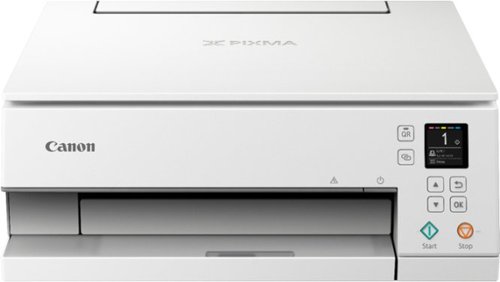
Upgrade your home office to handle on-demand printing jobs with this Canon PIXMA all-in-one wireless inkjet printer. The built-in LED bar and 1.44-inch OLED display let you view and navigate the printing status easily, while the auto expandable output tray makes printing from across the room possible. This Canon PIXMA all-in-one wireless inkjet printer features a five-color individual ink system for replacing ink tanks more efficiently.Prints up to 15 ISO ipm* in black, up to 10 ipm* in color
Customer Rating

5
Great little printer with really nice features
on November 13, 2019
Posted by: enem156
from Chicago, Il
I really like this printer. This is a really cool printer for not a lot of money. The smaller size means you have more options for where you can put it. A lot of printers these days are on the larger side. The TS6320 is able to cram some really good functionality into a reasonably sized package.
The controls for the printer itself are laid out really well. It has an illuminated power button and next to it, has an illuminated strip that shows you the print status with lighting effects. It includes a multi line display that while small, has very good resolution and is easy to read. It walks you through the setup process right from the screen and is intuitive enough that I didn’t need to open up the quick start manual. I actually set it up on my smartphone first, which was pretty easy. When I went over to my laptop, all I had to do was add a new printer. It found the TS6320 right away and I printed to it immediately. No elaborate setup needed. It also has a good amount of mechanical buttons that include things like direction arrows, back, start, stop and a button that will display a QR code that lets you scan it with your phone to be taken to more information about the printer and the setup steps.
You can print directly to from your mobile device by using either the WiFi connection or Bluetooth connection. Printing is very quiet and surprisingly fast. Multiple ink cartridges means you only need to buy the color you ran out of instead of a tri-color cartridge. I found the build quality to be on par with other printers in this same category. Actually, I would say even better. If I had to say anything negative, it would be that it has a rather small paper load tray. But it does give you a rear (vertical) paper tray that you can also fill with paper. One of the nicest features of this printer is that it does have duplex printing. Canon is really good about providing this arguably necessary feature on every one of their printers I’ve ever used. A lot of name brand printers still seem to think of this feature as an option, but when you consider printing manuals, school papers, documents, etc., not to mention paper conservation, it just becomes an obvious feature to include in all printers.
This printer also has a scanner/copier function. These features also work really well and are very intuitive to use. I found the overall quality of the documents I printed to be sharp and clear. The scans and photos I’ve printed have been of really good quality as well. Because of it’s size, this would be a really good printer for a college student in a dorm but it works so well right out of the box with just a few setup steps that it would also be a good choice for anyone’s home printer. But because of the small paper tray you might want to think twice about using it for a small business printer. The low price makes this printer a really good choice as a good quality all around home printer.
Mobile Submission: False
I would recommend this to a friend!
Share this review:


+1point
1of 1voted this as helpful.
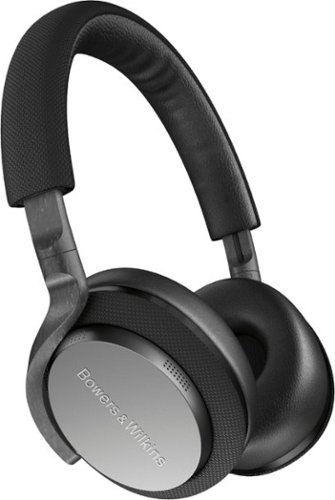
Enjoy up to 25 hours of nonstop audio playback with these Bowers & Wilkins PX5 on-ear headphones. The custom 35.6mm drivers offer more natural sound reproduction, while adaptive noise cancelling automatically adjusts to your environment for the best possible listening experience. These compact Bowers & Wilkins PX5 on-ear headphones feature carbon fiber composite arms to withstand everyday wear and tear.
Customer Rating

4
Sound great but lack comfort
on October 27, 2019
Posted by: enem156
from Chicago, Il
I've never owned any Bowers and Wilkins speakers, but I wanted to try these headphones out. To begin with, they just look cool. They have a very sleek look. I like the way the ear cup hinge is a minimalist design with interesting swiveling arms. The materials they used give the phones a very upscale appearance (as you might expect from a company used to making high end speakers). They sit relatively comfortably on your head and are adequately padded. Ear cups have a good amount of foam padding and are very soft to the touch. They are comfortable enough and I'm able to wear them for an hour or so without my ears hurting. The cups have a good amount of tension on them, this helps them to stay in place without slipping off your head, but after a time, I found myself fidgeting with them to try and find a more comfortable position. This is probably caused by the narrow headband which is not as padded as the ear cups and I never felt like I had them in the right spot.
Connecting them to my S10+ was no problem at all, although I found that the free app makes this process a little easier, I was able to connect them without using the app. The app itself is very basic and doesn't offer any equalization features, which was a bit disappointing. As far as the controls are concerned, I really loved the way they are laid out. On the right ear you have a Bluetooth button, transport control and volume controls, the charging port and 3.5mm audio in jack. All are very easy to find with your finger tips. The left ear has just one button to cycle through the noise canceling levels. They come with three levels of noise canceling and also an “auto” position which will set the level for you. Cycling through all the different levels, I never really heard any difference between them. Overall they were very quiet and that's maybe due to the ear cup padding, and I rarely hear any external sounds when I'm wearing them but I really couldn't hear any difference in the noise canceling levels.
I do like the fact that they pause playback if you lift one of the ear cups off your ear. Some people have complained that it takes a second (literally) for the music to pause and then another second to resume, but honestly, if it was any less than that you would run the risk of them pausing the music every time you adjusted the fit. I really liked this feature and I found it to work extremely well. It's a welcome feature on a set of headphones that is as quiet as these are. The sound quality is on the upper side of good. I would have liked just a tad more bass, but they do sound really good. I won't say great because there are better sounding ones out there, but they are certainly good, and I will not hesitate to use them over any of my other headphones. I also noted that the sound pressure levels are a bit on the weak side. If you're looking for a set of phones that are clear and have a nice clean sound without over coloring, then you should give these a try.
There are people out there that claim to be audiophiles and because of that, they think you should listen to them but, what it comes down to is this. These are consumer grade headphones and not intended for professional studio work. Can you find better headphones out there? Of course. But these offer a lot of good features. They are built very well, and don't seem fragile at all. The sound quality is very good and for almost everyone out there, will sound great. The noise canceling feature does work well even though I didn't really notice a difference in the various levels. And the pause feature when you lift an ear cup is really cool and very welcome. Very few of us wear headphones for hours a day, but if you do, I don't recommend these. However, they are just fine for an hour or two at a time before they start becoming uncomfortable. The soft pouch they come with is nice but could have been better received if it was a hard shell.
Mobile Submission: False
I would recommend this to a friend!
Share this review:


0points
0of 0voted this as helpful.

Philips Premium Twin Turbostar Digital Airfryer with Fat Removal Technology, The Original Airfryer, Fry Healthy with 90% Less Fat, Black HD9741/96
Customer Rating
5
Very easy to operation, cooks food perfectly
on October 20, 2019
Posted by: enem156
from Chicago, Il
This is our first air fryer, so I'll try to focus on the operation and results and not on air fryers in general. This particular air fryer seems to be a good size, but as it doesn't list it's size in quarts (it lists it in lbs. of food), it's hard to compare it to other fryers on the market. I will say that everything we've cooked so far has turned out really well. We've done a pork tenderloin, fries and cheese sticks. The fries and sticks were perfect, very crispy on the outside and tender on the inside. The tenderloin turned out perfect as well. Very juicy and flavorful.
The controls are extremely intuitive. Press the temperature button and turn the dial to set the degrees, press the timer button and turn the dial to set the time. Push the dial in to start cooking. If you want to pause cooking and pull out the drawer to check on the cooking progress, simply push in the dial to pause, pull out the drawer to flip things over or take a peek, close the drawer and push the dial again to keep on cooking from where it left off. There's also preset cooking modes you can use for cooking things like veggies, poultry, pork, etc.. Very intuitive. The digital display is a really good color, and very easy to read.
Cleanup is very easy. Everything comes apart nicely and cleans up without any scrubbing. All the removable parts are dishwasher safe, although we've just given them a swish with a soapy sponge and and a rinse. The outside of the fryer does not get hot and you can move it if you need to without getting burned. The cooking vent is on the back side, so it doesn't blow out where you might put your hands.
The instruction manual is on the small side, and not very easy to read but that's pretty typical of any new device you but these days. There's also a recipe booklet included that can help you get started. We actually just looked up cooking time for various foods online. There's lots of web sites devoted to air fryer cooking. All in all, this fryer was a big hit for us. It cooked the food perfectly, the operation was very easy and the cleanup couldn't be easier. Can't say enough about it, great job Phillips!
Mobile Submission: False
I would recommend this to a friend!
Share this review:


+1point
1of 1voted this as helpful.
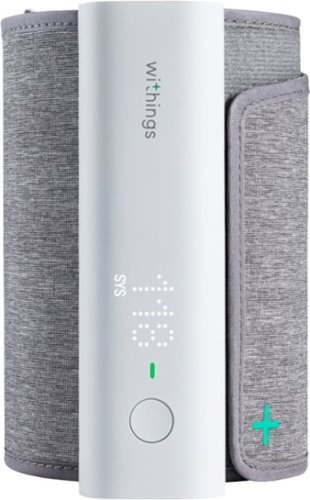
With BPM Connect, taking your blood pressure at home has never been so convenient. The device provides medically accurate blood pressure and heart rate measurements with immediate color-coded feedback on the device. BPM Connect synchronizes seamlessly via Wi-Fi and Bluetooth to the free Health Mate app, where you can see all your data history and share it with your doctor.
Customer Rating
5
The best BPM monitor we've used
on October 13, 2019
Posted by: enem156
from Chicago, Il
This is an awesome device. It has so much to offer and comes in an easy to carry and travel with package. It measures your pulse rate and BP. It's easy to read the results right on the device and also lets you track your blood pressure history with the companion Health Mate app. The BPM Connect can sync to the app over WiFi and Bluetooth. And you can share your reports and history with your doctor. The cloth cuff is very comfortable to wear and easy to put on. Honestly, they hit it out of the park with this design. Although I've not had it long enough to put this to the test, Withings claims this guys battery will stay charged for six months, and comes with a USB cable so you can charge it from your computer. Best of all it's been FDA cleared and is medically accurate. My wife and I have both used it and found the results to be what we expected. We needed to replace our older blood pressure monitor and the BPM Connect turned out to be a great choice. I can't recommend it enough.
Mobile Submission: False
I would recommend this to a friend!
Share this review:


+4points
4of 4voted this as helpful.
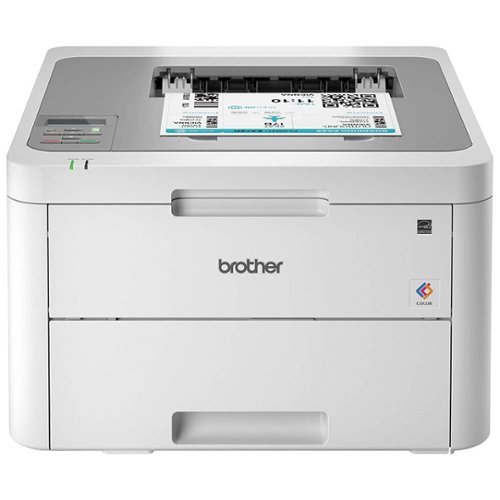
The reliable Brother HL-L3210CW compact digital color printer is a great choice for the busy home or small office. Quick print speeds of up to 19 pages per minute~ plus manual feed slot accommodates varied printing needs and can handle a variety of paper types and sizes including card stock, envelopes and more. Connect with versatile options including built-in wireless or USB interfaces and print wirelessly from mobile devices. The 250-sheet capacity adjustable paper tray helps improve efficiency with fewer refills and handles letter or legal sized paper. Brother Genuine high-yield replacement toner cartridges help lower printing costs. Comes with a 1-year limited warranty and free online, call or live chat support for the life of your product. Prints up to 19 ppm~ in black and up to 19 ppm~ in color.
Customer Rating

3
Good quality but lacking features
on September 30, 2019
Posted by: enem156
from Chicago, Il
At first glance this printer looks like a great deal... and it is. The problem is, it sacrifices some really nice features in order to do that. With that said, it does have some good qualities. To start with, it is wireless which is a good thing, and something literally everyone expects these days. Now a lot of printers offer a slew of different ways to connect to them aside from WiFi. Your only option with this printer is connect it to a computer with a USB cable. There is no Bluetooth and no hard wired network connection. So be sure you look at what this printer offers if you need a specific connection type.
It is quite basic for a laser printer. It has only a set of buttons and a one line small display for interaction (no touchscreen here). I do however like the fact that it is pretty straight forward. Not a lot of misleading display text, etc.. It has two LED's on the front edge, one for data, for when the printer is receiving data and one for error. It's actually nice to see some feedback for this purpose for a change. I'm tired of asking myself on every other printer, did it get what I sent it? WiFi was relatively easy to set up although it did take several tries for it to finally find my network and walk me through setting it up. It will also print from a mobile device if you're so inclined.
It has a nice big paper tray which is always a plus, until you realize that you're going to go through a lot of that paper quite fast because it has no automatic two sided printing. There is a manual two sided mode, but... enough said. Without the auto two sided mode, this printer is not good for any business environment or even a house with kids and school papers, or even just anyone wanting to print out a hard copy of a users manual.
The print quality is crisp and clear, as you would expect from a laser printer. And the printer is very quiet and fast. And if that's all you're interested in, this would be a great printer for you. I just really think that a printer of this variety excels in busy homes and small offices, which is how Brother is marketing this printer, but without the auto two sided printing, it's just a no go for me.
Bottom line: If you want a laser printer for the quality and speed, this would be a good choice if that's all you needed. The price is certainly right, and when you consider that replacing the four toner cartridges will cost almost twice what you paid for the printer in the first place, it's not a bad deal (depending on how long they last). But if you need more of the basic features that everyone expects these days on a printer, you might want to consider something else.
Mobile Submission: False
I would recommend this to a friend!
Share this review:


0points
1of 2voted this as helpful.
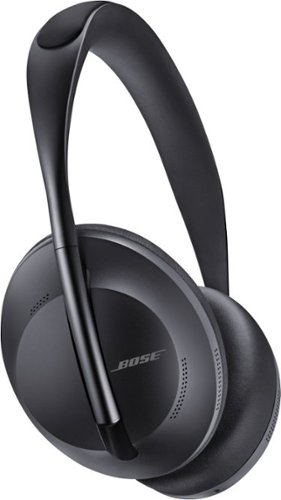
Bose Noise Cancelling Headphones 700 deliver everything you expect from Bluetooth headphones ~ and some things you never imagined possible. It~s no surprise PC Magazine called them ~The best active noise cancellation you can buy.~ Eleven levels of noise cancellation feature a range of options to choose from. You can totally eliminate distractions or minimize noise cancelling to hear everything around you. Or choose from nine other levels in between. Active noise cancelling technology in Bose Headphones 700 monitors the sounds around you and instantly cancels out unwanted noise to let your music shine through. At the same time, the acoustic space inside the earcups is maximized to give your music depth and detail. With these noise cancelling headphones, it~s not just your music that~s clear, so are your calls. The unrivaled microphone system uses a series of microphones to adapt in real time to noisy and windy environments so voices sound crystal clear on calls. Voice commands are also captured with unprecedented accuracy. The stunning new design of Bose Headphones 700 features a streamlined stainless-steel headband and a lightweight, comfortable fit that~s perfect for all-day listening. With these wireless headphones you get up to 20 hours of battery life and time-based power information per charge. Bose Headphones 700. The wireless headphones everyone is talking about.
Customer Rating
5
Modern design and great sound
on July 25, 2019
Posted by: enem156
from Chicago, Il
Bose has been around for a lot of years and there's good reason for that. They build things well and have great sound. What else does any speaker manufacturer need. I've owned lots of ear buds, head phones and speakers over the years, Bose among them. I love listening to all types of speakers.
The 700's make a really good first impression. They come in a nice zippered and moulded case. It's about time manufacturers realized that people use and take their headphones everywhere these days, and a good case has always been missing. This one works well and is still pretty flat with a small foot print.
Pairing was very easy. Lets face it, it should be easy to pair things, everything you buy wants to pair to your phone. It does want you to download their app to complete the full process though. I'm not generally a fan of this type of add on app. I don't think anyone should have to have the app if they don't want to mess around with it.
They are nice and light and very comfortable. There's not a huge number of buttons on the outside and really, all you need to do is turn them on. Controlling them is great. I love the fact that you use touch technology to control them. Tapping the outside of the ear cup will play or pause, swipe up or down for volume, and swipe forward or backward to go to next or previous tracks. Very innovative, and yes, it works well.
Out of the box these phones were about 2/3 charged and showed me I had about 6 1/2 hours of play time left on them. That's after listening to them for about an hour already. Battery life is good, at least for me it has been.
The sound quality is clear. Not harsh, no brain crippling, screeching highs or muddy dull bass. Everything just sounds correct. A nice smooth balance of everything. Those that have used Bose speakers before know what I'm talking about. So, if you're already a Bose fan, I don't think you'll be disappointed. Noise cancelling works quite well and there's about 10 different levels of it to choose from. So if you like to wear them in public, you'll have no problem finding the sweet spot for just the right amount of noise cancelling, no matter what type of environment you're in.
I honestly can't find anything to complain about with these headphones. They offer a really cool modern design with touch controls. They're light and comfortable to wear. The sound is really good without being overbearing at the low or high end. The noise cancelling technology works well and lets you adjust just how much you need for your environment. People might complain about the price, but for headphones like these, you should really expect to pay more. These are high quality, well built phones from a company that consistantly delivers great sounding products. Well done!
Mobile Submission: False
I would recommend this to a friend!
Share this review:


0points
0of 0voted this as helpful.
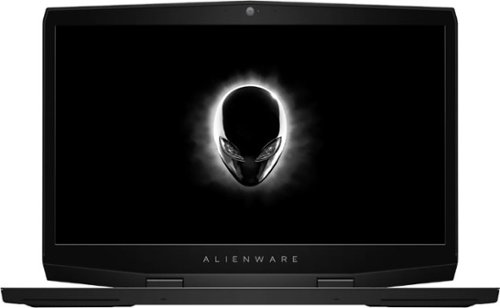
Get the tools to achieve victory with this 17.3-inch Dell Alienware gaming laptop. Featuring an NVIDIA GeForce RTX 2070 graphics card with Max-Q design, this laptop smoothly handles visually intensive titles at high settings. This Dell Alienware gaming laptop delivers vivid colors and makes games look sharp and detailed with its 17.3-inch Full HD display.
Customer Rating
5
Fast machine for professional graphics software
on March 20, 2019
Posted by: enem156
from Chicago, Il
This is the fastest laptop I have ever used. The specs are out the roof, Intel Corei7, 16GB Memory, 512GB SSD and 1TB of hybrid hard drive. The graphics could have had more of a “wow” factor for the price, but this machine flies.
It's technically a “gaming” machine (god I hate that phrase), and if you like to play a lot of intense graphics games I can't comment on it's abilities or shortcomings. I have played Diablo 3 on it at the highest speeds and graphics settings and it had no trouble at all looking and sounding superb. For anyone else who actually wants to use this machine for real work, it's fantastic. The Core i7 works great at allowing you to open several programs at once and keep them open while surfing and checking email at the same time. A 4k display might have been nice but the screen and HD resolution are adequate. I use this machine for graphic development and simulation and it performs flawlessly. I'm able to go from one program to another without the slightest delay. It's nice to not have to wait for a machine to catch up with me for a change.
The overall build is really nice looking and solid. Medium gray outside with a black keyboard area and screen bezel. The keyboard is back lit and you can change the color of the back lighting (and even the front and back alien heads). It would have been nice if the touch pad also lit up, it tends to blend into keyboard deck just a little too much without it. The touch pad feels good and solid and the buttons have a audible click to them. The keys are responsive and feel good although not stellar. Sound is very good and has really nice depth to it. It sounds good at all the volume levels I tried. Jacks are adequate for pretty much anything you want to plug into it and include a thunderbolt port, an HDMI port and three USB 3.0 ports. Plus it has the options we've all come to expect on any new machine like wireless AC connectivity and a built in web cam. The look of the entire machine is really cool and it has a well designed, and professional feel. Really a pleasure to use.
Mobile Submission: False
I would recommend this to a friend!
Share this review:


+3points
3of 3voted this as helpful.
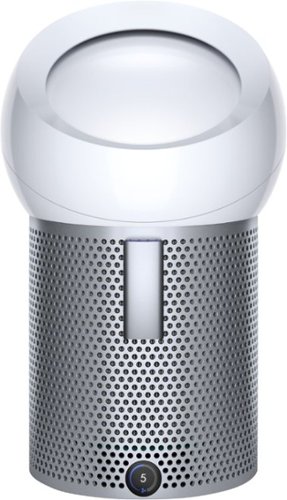
The Dyson Pure Cool Me Air Purifier - Dyson's first personal purifying fan. Delivers a focused stream of purified air to cool you with Core Flow technology. Includes a fully-sealed HEPA filter and activated carbon filter to capture 99.97% of allergens and pollutants, including pollen, bacteria and pet dander.
Customer Rating
4
Good basic air purifier
on March 16, 2019
Posted by: enem156
from Chicago, Il
The Pure Cool Me personal air purifier is for those who want or need air purification in a specific area or small room. It's not a whole house or large room purifier. Ideally, it should be positioned close to where you need it and preferably on a raised surface like a desk or table.
It comes with some really nice features. For starters, it has a replaceable HEPA filter inside the base. This is great for filtering out allergens and small particles. The build quality is as you would expect from Dyson, top notch. It feels well put together, no parts are loose or mis-aligned. There's a power push button right above the power entry connection on the back. After powering it up, you can use the included remote control to turn it on and off. The remote is magnetic and has a nice dedicated spot to store it right on the front of the purifier. There's also a nice display on the lower front, that displays the fan speed level typically and a graphic for the condition of the filter. The air flow direction out the top is adjustable, and you can force the air to point anywhere from upward to downward by just sliding the rounded white “lens” up or down.
The remote control will allow you to control all the features available. The power button, as expected, will turn the unit on or off. There's a fan speed button to allow you to increase or decrease fan speed. A button to turn on the oscillation function, and a timer button that cycles through several choices for time limits that the purifier is on. Using this will allow you to save the filter life if you really don't need to keep it powered on all the time. It also has an information button that will show the state of the filter on the front panel display.
The fan is quiet yet strong. You have ten speed settings to choose from. I found that anything above “6” will really kick out the air. This purifier works good in a bedroom, and is quiet enough to run while you're asleep. Air purifiers in general are difficult to measure the effectiveness of without some type of air analyzer (which I obviously don't have), but it does suck a fair amount of air through the HEPA filter and you can feel the breeze across the room if you have it on a higher setting. All in all it's a nice purifier. What's missing from it however is WiFi. There isn't any way to control it aside from the remote. If it had an app, like other Dyson purifiers, you could set on and off times, and monitor the condition of the filter among other things. It's not a deal breaker, but it would have been nice if they had included it. But, the purifier functions really well, has good solid basic features and is quiet. Great for personal use.
Mobile Submission: False
I would recommend this to a friend!
Share this review:


+3points
3of 3voted this as helpful.
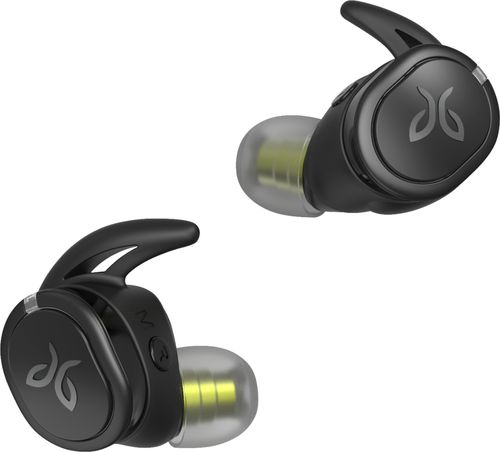
Stay motivated throughout workouts and outdoor excursions when you listen to music on these Jaybird RUN XT wireless earbuds. The interchangeable tips and fins let you find the perfect fit, while the waterproof, sweat-proof design stands up to outdoor use. These Jaybird RUN XT wireless earbuds feature a fast-charge battery, which delivers an hour of playback with just five minutes of charging.
Customer Rating
4
Great sound when the fit is right.
on February 6, 2019
Posted by: enem156
from Chicago, Il
I've owned about three other pair of Jaybird ear buds over the years and the sound quality is always where they shine. Rich bass, clear mids and highs, and plenty of volume. I'll say this with the caveat that also with Jaybirds, if you don't take the time to get the fit perfect, you won't get the above mentioned great sound.
The Run XT Sport's are no exception to this statement. These have a great set of features. They're relatively small, they last 4 hours on a charge, they come with a charging case that's good for 3 charges before it needs a recharge. They offer a free app that allows you to change the tone of the buds with a parametric EQ, and they also have saved EQ settings you can try out and use in the app itself. You can even save as many different EQ settings as you want. The nice thing about this is that these settings are saved right on the buds themselves, so you don't have to worry about changing devices and losing all your settings.
There are pros and cons about these buds, and whether you're already a fan of totally wireless buds or this is your first pair, it may help you to read through them.
The Pros:
First and foremost, the sound quality. I've never had an issue with the sound of any Jaybird ear buds. They give you deep rich bass without getting muddy, the mids are clean and clear and voices sound natural, and the highs are bright without being tinny.
First and foremost, the sound quality. I've never had an issue with the sound of any Jaybird ear buds. They give you deep rich bass without getting muddy, the mids are clean and clear and voices sound natural, and the highs are bright without being tinny.
Second is the charging case. If you've used this style of ear bud before you know that it's important to have a secure place to store them when you're not using them, and an easy way to charge them back up. The case performs both of these features nicely, but I did notice that when you open the case, the lid can only open to a vertical position and doesn't go all the way back. This makes the case very back heavy when it's open and it will not stand up easily, which makes you fumble around a bit to get the buds into or out of it.
Third, they can accept calls. Like most other buds, this has become a pretty standard feature. The Bluetooth setup and connect was simple and straight forward, and walked me through the steps.
Forth, the free app. It works great and offers a lot in terms of personalizing the sound. It offers you a way to save your own settings for different styles of music and it comes with pre-loaded EQ settings for you to try out and use. You can even try out other people's play lists for work outs. It's a good app, well thought out and very useful. You don't need to use it, but it's there if you want it.
The Cons:
I've mentioned that with these buds, fit is everything. That's no small understatement. If you don't get the fit right, you will flat out not like them. The sound will be thin and they will probably hurt. These particular buds I found trickier than their other versions to get a good fit. I found that I often had them "close" to being in the right position, but they hurt or pinched a bit. It will take you some time to figure out the right position and correct set of tips and fins to use, but even after that, I never thought they were very comfortable, although I never ever felt like they were going to fall out. They're light enough to stay in place very nicely (as all the other Jaybird buds do).
I've mentioned that with these buds, fit is everything. That's no small understatement. If you don't get the fit right, you will flat out not like them. The sound will be thin and they will probably hurt. These particular buds I found trickier than their other versions to get a good fit. I found that I often had them "close" to being in the right position, but they hurt or pinched a bit. It will take you some time to figure out the right position and correct set of tips and fins to use, but even after that, I never thought they were very comfortable, although I never ever felt like they were going to fall out. They're light enough to stay in place very nicely (as all the other Jaybird buds do).
This leads in nicely to my second con. In order to start, stop, pause, skip tracks, answer a call, etc., you press inward on the button at the end. Essentially, you're pressing the buds into your ears even further, and with the fit being as finicky as it is, that only makes you monkey around with them even more, after you use either button. I appreciate that the button is easy to find and large enough to actually use (unlike so many of the microscopic buttons found on other brands of buds), but you may find that you tend to avoid using them because of this.
In the end, I'll say I "like" these buds, but I don't "love" them. The sound is great once the fit is right. And it could just be the shape of my ears that hampered my comfort. They are definitely worth a try especially if you're looking for a pair that stay put when you run or work out. I've loved all my other Jaybird buds, so I may just need to get used to these.
Mobile Submission: False
I would recommend this to a friend!
Share this review:


-1point
1of 3voted this as helpful.
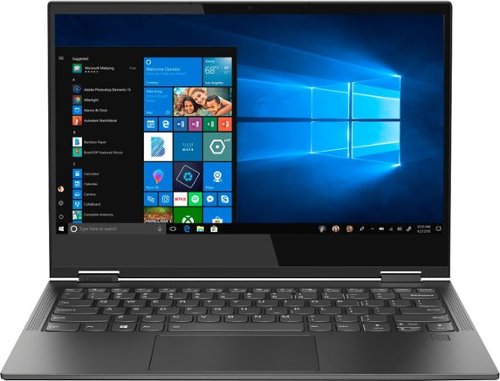
Lenovo Yoga C630 WOS Convertible 2-in-1 Laptop: Stay productive all day with this Lenovo Yoga laptop. The QualComm Snapdragon 850 processor and 8GB of RAM provide smooth operation of programs and apps, and the battery lasts up to 22 hours between charges. This Lenovo Yoga laptop has a 13.3-inch FHD display for clearly viewing photos and videos.
Customer Rating

2
Great hardware, not so nice processor
on December 16, 2018
Posted by: enem156
from Chicago, Il
I've always loved Lenovo machines because of their build quality and great hardware, but aside from that, I was completely disappointed with this machine.
The Good:
There's no denying that Lenovo builds a great machine. The build quality is always top notch. This machine certainly lives up to this reputation. The entire machine is very well designed and assembled. It sports a beautiful HD display with a high gloss finish that's an absolute pleasure to look at. The touch screen works flawlessly and is highly responsive.
There's no denying that Lenovo builds a great machine. The build quality is always top notch. This machine certainly lives up to this reputation. The entire machine is very well designed and assembled. It sports a beautiful HD display with a high gloss finish that's an absolute pleasure to look at. The touch screen works flawlessly and is highly responsive.
The keyboard is very tight with no loose qualities on any keys. The key shape is very unique and feels very smooth. On top of that, it's extremely quiet. Keystrokes have no noticeable annoying click and unless you're pounding away on it, the keys do not make much noise. I really enjoyed typing on it. The touch pad is large and smooth. I never had to re-swipe at any time and it always worked as expected the first time. The touch pad keys give a distinct click to let you know you've engaged the button correctly. The whole touch pad felt solid and was also a pleasure to use.
Ports are fairly limited, with a headphone/microphone jack and two USB-C ports. These are a welcome addition on any laptop, and the added bonus of both of these ports is that you can actually charge the Lenovo with either one of them. So, if it's more convenient to plug the charger into the left port, go right ahead. Likewise the right port.
The overall machine is extremely thin and light. It has a very nice deep gray, slightly textured finish that looks really cool and classy. It's a beautiful machine. Even though I handled it quite a bit, the finish seems to repel fingerprints.
To round out the hardware, there's a 128GB solid state drive that means this machine is lightning fast at boot up and during program use. Add to that 8GB of DDR4 RAM, Bluetooth, built in web cam, adequate speakers, dual band wireless, fingerprint reader and a nano SIM card expansion slot.
The Bad:
The bad centers around the Snapdragon processor running Windows 10. In this device, for better or worse (you decide), it comes out of the box running Windows 10 S. If you're not familiar with this nomenclature, it's a version of Windows 10 that only allows you to run Microsoft certified apps on it. Now at first glance, that doesn't sound too terrible but as you start to download the apps and programs you like to use normally, you may find that this is really not for you (as I did). Windows 10 S will by default, only allow you to install apps that are available in the Windows app store. There is apparently a work around or opt out, but even that has very short limitations. I decided to op out of the 10 S environment with the convenient Microsoft app that allows you to do this. With this selection made (and just to be clear, there's no going back to 10 S once you opt out of it), I was able to install Google Chrome, which I couldn't load before making this change.
The bad centers around the Snapdragon processor running Windows 10. In this device, for better or worse (you decide), it comes out of the box running Windows 10 S. If you're not familiar with this nomenclature, it's a version of Windows 10 that only allows you to run Microsoft certified apps on it. Now at first glance, that doesn't sound too terrible but as you start to download the apps and programs you like to use normally, you may find that this is really not for you (as I did). Windows 10 S will by default, only allow you to install apps that are available in the Windows app store. There is apparently a work around or opt out, but even that has very short limitations. I decided to op out of the 10 S environment with the convenient Microsoft app that allows you to do this. With this selection made (and just to be clear, there's no going back to 10 S once you opt out of it), I was able to install Google Chrome, which I couldn't load before making this change.
Even though I decided to opt out of 10 S, there were still programs that it wouldn't allow me to load. If you're fine with Microsoft as your network security package, this is probably not a big deal. I however have a subscription to Bitdefender. If you're of a similar mind, say good bye to your beloved security program, you won't be able to load it. After over an hour of trying, I resorted to trying to load the free version of Avast. Negative here as well. The funny thing is, Avast is available (seemingly) in the Microsoft app store. But even after successfully loading this version, it told me in order to get all the benefits of Avast free version, I needed to download and install it, which of course Windows 10 wouldn't let me do.
If this type of thing doesn't really matter to you anyway, then the Windows 10 S route is probably a good thing for you and you won't be disappointed by the hardware. But if you're like me and want to take control of your security yourself, and take that out of Microsoft's hands, then you might want to look elsewhere for a more open machine/OS. I really wanted to like this Lenovo and fully expected to give it a great review before I got it in my hands, but after spending hours on it trying to load the most basic software (like a non Edge web browser), I realized that the experience I was having on it would always at some point be a drawback. If I want to load an application on my machine, I should be able to do that regardless if Microsoft likes it or not.
Mobile Submission: False
No, I would not recommend this to a friend.
Share this review:


+4points
4of 4voted this as helpful.
enem156's Review Comments
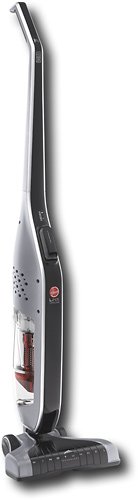
Retire your dustpan and broom and transform your everyday floor cleaning! This sleek, versatile stick vacuum is always ready to deliver upright performance with Fade Free Lithium-Ion battery power. The only stick vacuum with Hoover WindTunnel~ technology and cyclonic filtration even when moving from hard floors to low pile carpet.
Overall 1 out of 5
1 out of 5Not enough suction
By BHIHIFI
I bought this after reading a positive review in a leading consumer magazine. It comes with an impressive number of accessories but the suction is weak. It would not even vacuum up bits of grass on my doormat. I returned it and bought the portable Dyson instead. Night and day difference.

enem156
Chicago, Il
Wrong vacuum review?
February 25, 2016
I'm not sure that you're reviewing the vacuum you think you are. This vacuum really doesn't have any accessories...
+1point
1of 1voted this comment as helpful.
enem156's Questions
enem156 has not submitted any questions.
enem156's Answers
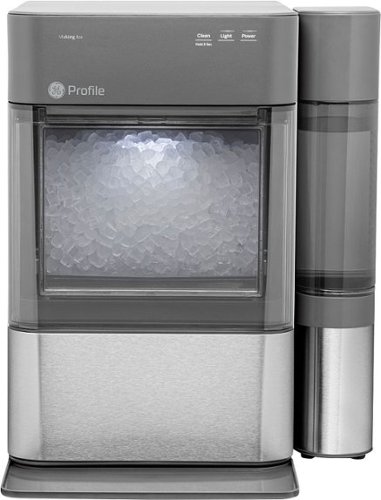
Nugget Ice. Pellet ice. Drive-in ice. Whatever you call it, you know it's "the good ice." Now that chewable ice is available from the convenience of your countertop with the Opal 2.0 Ice Maker. It is capable of producing up to 38 lbs. of ice in 24 hours and stores up to 3 lbs. of ice at one time. The Opal 2.0 Ice Maker has WiFi connection capability and comes with the side tank attachment for 3x more ice production.
Does it need to be connect to waterline
No, it's a completely stand alone unit. It uses a water container on the side that you can remove and refill, much like a coffee maker.
5 years, 10 months ago
by
enem156
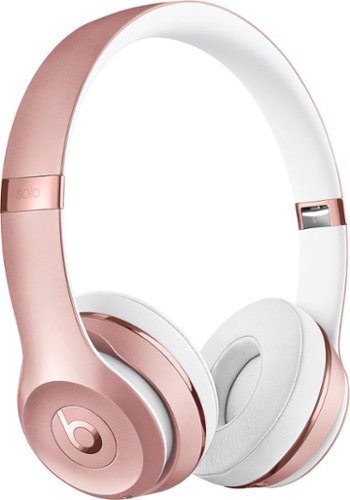
With up to 40 hours of battery life, Beats Solo3 Wireless is your perfect everyday headphone. With Fast Fuel, a 5-minute charge gives you 3 hours of playback. Enjoy award-winning Beats sound with Class 1 Bluetooth~ wireless listening freedom. The on-ear, cushioned ear cups are adjustable so you can customize your fit for all-day comfort.
Can you answer phone calls with them
Yes, you can. Provided you're connected with your phone via Bluetooth.
8 years, 2 months ago
by
enem156