Samsung
Samsung's Stats
Reviews
- Review Count0
- Helpfulness Votes0
- First ReviewNone
- Last ReviewNone
- Featured Reviews0
- Average Rating0
Reviews Comments
- Review Comment Count0
- Helpfulness Votes0
- First Review CommentNone
- Last Review CommentNone
- Featured Review Comments0
Questions
- Question Count0
- Helpfulness Votes0
- First QuestionNone
- Last QuestionNone
- Featured Questions0
- Answer Count74543
- Helpfulness Votes37,989
- First AnswerApril 24, 2013
- Last AnswerSeptember 28, 2026
- Featured Answers0
- Best Answers3951
Samsung's Reviews
Samsung has not submitted any reviews.
Samsung's Questions
Samsung has not submitted any questions.
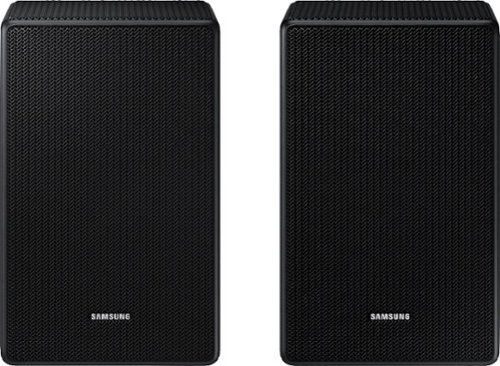
I need more speakers for the sound bar hw-r60m

Hi Jrhodes,
The HW-R60M Soundbar is not compatible with the SWA-9500S Wireless Rear Speakers.
You will need to purchase the SWA-8500S Wireless Rear Speaker Kit.
~Samsung Solutions
The HW-R60M Soundbar is not compatible with the SWA-9500S Wireless Rear Speakers.
You will need to purchase the SWA-8500S Wireless Rear Speaker Kit.
~Samsung Solutions
3 years, 8 months ago
by
Posted by:
Samsung
Is this compatible with my Samsung - 3.1-Channel Soundbar System with 7" Wireless Subwoofer -
Hello Briandrea,
The SWA-9500S Wireless Rear Speakers are compatible with the: HW-Q800B, HW-Q700B, HW-S800B/S801B, HW-Q900A, HW-Q800A, HW-Q700A Soundbars only.
Please contact Samsung Customer Support for additional assistance regarding your specific model soundbar.
Call us at 1-800-SAMSUNG (ask for Soundbars), available 8 AM – 12 AM EST, 7 days a week.
LiveChat with an agent by clicking the ‘Support’ link on the Samsung website.
~Samsung Solutions
The SWA-9500S Wireless Rear Speakers are compatible with the: HW-Q800B, HW-Q700B, HW-S800B/S801B, HW-Q900A, HW-Q800A, HW-Q700A Soundbars only.
Please contact Samsung Customer Support for additional assistance regarding your specific model soundbar.
Call us at 1-800-SAMSUNG (ask for Soundbars), available 8 AM – 12 AM EST, 7 days a week.
LiveChat with an agent by clicking the ‘Support’ link on the Samsung website.
~Samsung Solutions
3 years, 8 months ago
by
Posted by:
Samsung
SWA 9500 S samsung-2-0-2-channel-wireless-rear-speaker-kit-with-dolby-atmos-dtsx-black es compatible con la barra de sonido Samsung Q HW Q 600 B GRACIAS
Hello MARCELO,
The SWA-9500S Wireless Rear Speakers are not compatible with the HW-Q600B Soundbar.
You will need to purchase the SWA-9200S Wireless Rear Speaker Kit.
~Samsung Solutions
The SWA-9500S Wireless Rear Speakers are not compatible with the HW-Q600B Soundbar.
You will need to purchase the SWA-9200S Wireless Rear Speaker Kit.
~Samsung Solutions
3 years, 8 months ago
by
Posted by:
Samsung
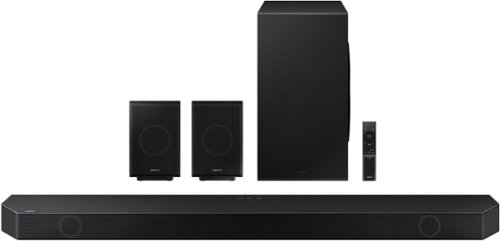
Samsung - HW-Q990B 11.1.4ch Soundbar with Wireless Dolby Atmos / DTS:X and Rear Speakers - Black
Keep your setup sleek and elegant without the clutter of wires. Enjoy enveloping sound with 11 channels, 1 subwoofer and 4 up-firing channels. Perfectly synchronized audio uses every speaker in compatible Samsung TV and soundbars. Get room filling sound designed specifically for your space.
Do the rear speakers in the Q990B come with a stand?
Hello Miranda,
The HW-Q990B Soundbar does not come with stands for the rear speakers.
~Samsung Solutions
The HW-Q990B Soundbar does not come with stands for the rear speakers.
~Samsung Solutions
3 years, 8 months ago
by
Posted by:
Samsung
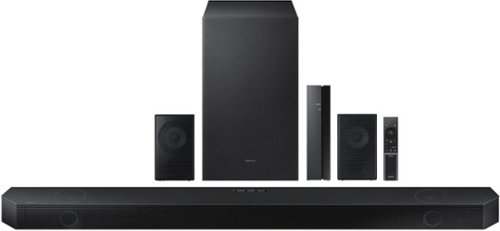
Samsung - HW-Q750B 5.1.2ch Soundbar with Wireless Dolby Atmos / DTS:X - Black
Take your audio to a higher level with the Q750B with Dolby Atmos sound without requiring HDMI cables. Enjoy a cinematic experience with 5 channels, 1 subwoofer and 2 up firing channels. With Q Symphony, the soundbar sound synchronizes with your compatible Samsung TV. Plus, control your soundbar hands free using Alexa voice controls.
Are the rear speakers wireless?
Hello Frankie,
The rear speakers of the HW-Q750B Soundbar will connect using provided speaker cables to a central transmitter. This is then wireless to the Soundbar so you do not have any cables running around the room.
~Samsung Solutions
The rear speakers of the HW-Q750B Soundbar will connect using provided speaker cables to a central transmitter. This is then wireless to the Soundbar so you do not have any cables running around the room.
~Samsung Solutions
3 years, 8 months ago
by
Posted by:
Samsung

Samsung - HW-Q930B/ZA 9.1.4ch Soundbar with Wireless Dolby Atmos / DTS:X and Rear Speakers - Black
Enjoy an unparalleled audio experience with the Q930B, thanks to wireless Dolby Atmos. Sound floods your ears from every corn er of the room with 9 channels, 1 subwoofer and 4 up firing channels to make you feel like you~re right there at the big game, concert or action scene. With Q Symphony, the soundbar sound synchronizes with all of the internal speakers in your compatible Samsung TV to enrich the audio even further. Plus, the included up firing rear speakers project sound above and around you.
What size, as in 8 inch 10inch or 12 inch, is the subwoofer?
Hi there,
The HW-Q930B Soundbar comes with an 8" Wireless Subwoofer.
~Samsung Solutions
The HW-Q930B Soundbar comes with an 8" Wireless Subwoofer.
~Samsung Solutions
3 years, 8 months ago
by
Posted by:
Samsung
Samsung - HW-Q990B 11.1.4ch Soundbar with Wireless Dolby Atmos / DTS:X and Rear Speakers - Black
Keep your setup sleek and elegant without the clutter of wires. Enjoy enveloping sound with 11 channels, 1 subwoofer and 4 up-firing channels. Perfectly synchronized audio uses every speaker in compatible Samsung TV and soundbars. Get room filling sound designed specifically for your space.
Why is Q990b not able to connect to the new apple tv 4k via bluetooth?
Hello Jazzabana,
The HW-Q990B Soundbar will be able to connect to a smart device via Bluetooth, or an iOS device using AirPlay. For your Apple 4K TV device you will need to connect to a 4K TV using an HDMI cable, and then connect the HW-Q990B Soundbar to the TV itself using the TV ARC/eARC port using a HDMI cable.
~Samsung Solutions
The HW-Q990B Soundbar will be able to connect to a smart device via Bluetooth, or an iOS device using AirPlay. For your Apple 4K TV device you will need to connect to a 4K TV using an HDMI cable, and then connect the HW-Q990B Soundbar to the TV itself using the TV ARC/eARC port using a HDMI cable.
~Samsung Solutions
3 years, 8 months ago
by
Posted by:
Samsung
Samsung - HW-Q750B 5.1.2ch Soundbar with Wireless Dolby Atmos / DTS:X - Black
Take your audio to a higher level with the Q750B with Dolby Atmos sound without requiring HDMI cables. Enjoy a cinematic experience with 5 channels, 1 subwoofer and 2 up firing channels. With Q Symphony, the soundbar sound synchronizes with your compatible Samsung TV. Plus, control your soundbar hands free using Alexa voice controls.
are the rear speakers wireless and bluetooth
Hello jpf219,
The rear speakers of the HW-Q750B Soundbar will connect using provided speaker cables to a central transmitter. This is then wireless to the Soundbar so you do not have any cables running around the room.
~Samsung Solutions
The rear speakers of the HW-Q750B Soundbar will connect using provided speaker cables to a central transmitter. This is then wireless to the Soundbar so you do not have any cables running around the room.
~Samsung Solutions
3 years, 8 months ago
by
Posted by:
Samsung

Samsung - HW-S60B 5.0ch All in One Soundbar with Wireless Dolby Atmos - Black
Enjoy room filling sound in an all in one design. Hear Dolby Atmos sound from above and around without requiring HDMI cables. Perfectly synchronized TV and soundbar sound brings a new level of immersion. Don't miss a word, thanks to a built in center speaker. Plus, play your favorite songs with Alexa built in.
Does this soundbar have 4k passthrough?
Hello Larryb,
The HW-S60B Soundbar does not 4K Pass Through.
~Samsung Solutions
The HW-S60B Soundbar does not 4K Pass Through.
~Samsung Solutions
3 years, 8 months ago
by
Posted by:
Samsung
Samsung - HW-S60B 5.0ch All in One Soundbar with Wireless Dolby Atmos - Black
Enjoy room filling sound in an all in one design. Hear Dolby Atmos sound from above and around without requiring HDMI cables. Perfectly synchronized TV and soundbar sound brings a new level of immersion. Don't miss a word, thanks to a built in center speaker. Plus, play your favorite songs with Alexa built in.
Does this have to have an optical cable to work with a Samsung TV?
Hello Deb,
The HW-S60B Soundbar features a Digital Optical Cable that will work with any TV that also has this input.
~Samsung Solutions
The HW-S60B Soundbar features a Digital Optical Cable that will work with any TV that also has this input.
~Samsung Solutions
3 years, 8 months ago
by
Posted by:
Samsung